

TikTok User Search Scraper
Pricing
from $2.50 / 1,000 profiles
TikTok User Search Scraper
Extract data about users based on TikTok user search. You'll get full user profiles, including name, nickname, signature, number of followers, number of videos, bio link, and author’s ID.
Pricing
from $2.50 / 1,000 profiles
Rating
4.6
(13)
Developer

Clockworks
Maintained by ApifyActor stats
38
Bookmarked
4.4K
Total users
301
Monthly active users
a day ago
Last modified
Categories
Share
What is TikTok User Search Scraper?
TikTok User Search Scraper is an easy-to-use scraping tool that helps you with scraping TikTok users you search for with a search query. Using this tool, you will be able to scrape:
- user’s name,
- nickname,
- signature,
- number of followers,
- number of videos,
- bio link,
- author’s ID,
- and much more.
How to scrape TikTok with TikTok User Search Scraper?
TikTok User Search Scraper is designed to be user-friendly, offering a smooth start for those who have never extracted data from TikTok before. Here’s how you can use this web scraper:
- Create a free Apify account using your email.
- Open TikTok User Search Scraper.
- Type in your search query.
- Click the “Start” button and wait for the data to be extracted.
- Download your data in JSON, XML, CSV, Excel, or HTML.
If you want more guidance on how to use TikTok User Search Scraper, this video tutorial shows you how to do it in just a few minutes.
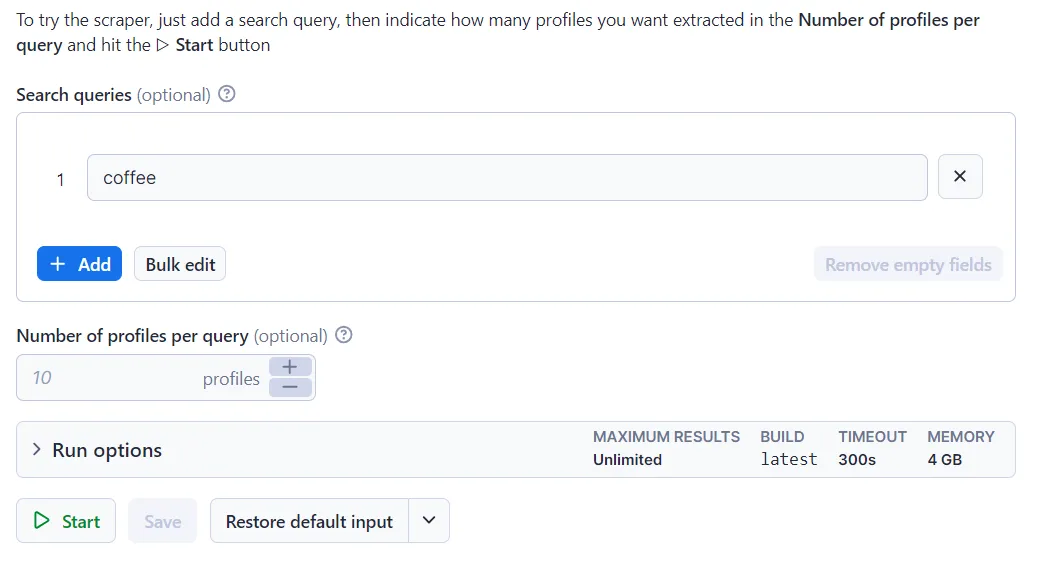
🔼Input sample
The input for TikTok User Search Scraper should be one or multiple TikTok search queries. See the example below:
🔽Output sample
The scraped TikTok user search data will be shown as a dataset which you can find in the Output tab:
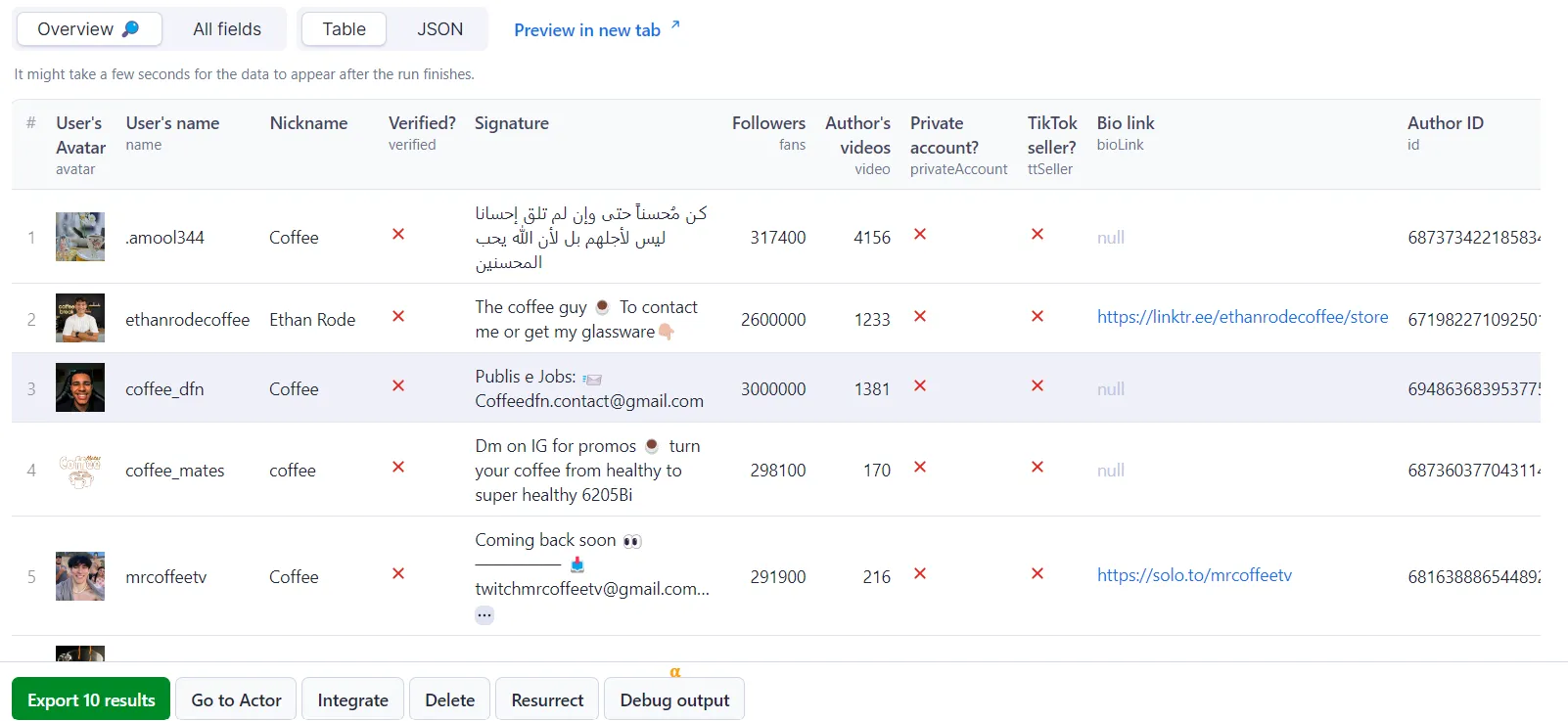
You can preview all the fields and choose in which format to download the data you’ve extracted: JSON, CSV, Excel, HTML table, or XML. Here below is the same dataset in JSON:
How can I use the data extracted from TikTok User Search?
The data extracted from TikTok User Search Scraper can be used for a variety of purposes, including:
🦠 Analyze trends, viral campaigns, and content of specific creators
📚 Prepare for or analyze a TikTok marketing campaign
✨ Conduct sentiment analysis and find authentic product reviews
👩🔬 Obtain data for research and social listening experiments
🥸 Identify unverified content and inaccurate information with high public value
Integrate TikTok User Search Scraper and automate your workflow
Last but not least, TikTok User Search Scraper can be connected with almost any cloud service or web app thanks to integrations on the Apify platform.
These include:
Alternatively, you can use webhooks to carry out an action whenever an event occurs, e.g. get a notification whenever TikTok Scraper successfully finishes a run.
Scrape any TikTok data you need with dedicated scrapers
You can use the dedicated scrapers below if you want to scrape specific TikTok data. Each of them is built particularly for the relevant TikTok data scraping case, be it hashtags, search results, profiles, or all data at once. Feel free to browse them:
Not your cup of tea? Build your own scraper.
TikTok User Search doesn’t exactly do what you need?
You can always build your own! Use one of scraper templates in Python, JavaScript, and TypeScript to get started. Take a look at a guide on how to scrape TikTok using Python.
Alternatively, you can write it from scratch using our open-source library Crawlee. You can keep the scraper to yourself or make it public by adding it to Apify Store and start making money on it.
Or let us know if you need a custom scraping solution.
Your feedback
We’re always working on improving the performance of our Actors. So if you’ve got any technical feedback for TikTok User Search Scraper or simply found a bug, please create an issue on the Actor’s Issues tab in Apify Console.
❓FAQ
How much does it cost to use TikTok User Search Scraper?
TikTok User Search Scraper uses the Pay-per-result pricing model, so your costs can be easily calculated: it will cost you $5 to scrape 1,000 results, so $0.005 per item. Apify provides you with $5 free usage credits every month on the Apify Free plan, so you can get 1,000 results from TikTok User Search Scraper for free.
But if you need to extract data regularly, you should get an Apify subscription. We recommend our $29/month Starter plan — that one could get you over 5,800 results from TikTok User Search Scraper every month.
How can I use TikTok User Search scraper with the Apify API?
The Apify API gives you programmatic access to the Apify platform. The API is organized around RESTful HTTP endpoints that enable you to manage, schedule, and run Apify actors. The API also lets you access any datasets, monitor actor performance, fetch results, create and update versions, and more.
To access the API using Node.js, use the apify-client NPM package. To access the API using Python, use the apify-client PyPI package.
Check out the Apify API reference docs for full details or click on the TikTok User Search Scraper API tab for code examples.
Is it legal to scrape TikTok with TikTok User Search Scraper?
Our TikTok scrapers, TikTok User Search Scraper included, are ethical and do not extract any private user data, such as email addresses, gender, or location. They can only extract what the user has chosen to share publicly. However, you should be aware that your results might contain personal data.
Personal data is protected by GDPR in the European Union and other laws and regulations around the world. You should not scrape personal data unless you have a legitimate reason to do so. If you’re unsure whether your reason is legitimate, consult your lawyers. You can also read our blog post on the legality of web scraping and ethical scraping.
Error items
When the scraper cannot retrieve data for a given input — for example a profile is private or a post has been deleted — it pushes an error item to the dataset instead of silently skipping it. Normal output items are never affected; you can tell them apart by the presence of an errorCode field.
Error item structure
Error codes reference
errorCode | Meaning |
|---|---|
NOT_FOUND | Profile or hashtag does not exist |
POST_NOT_FOUND_OR_PRIVATE | Post URL is gone or private |
POST_SENSITIVE | Post is flagged as sensitive content |
NO_TRENDING_FOR_HASHTAG | No ads found for this hashtag |
MUSIC_NOT_FOUND | No videos found for the music tag |
SEARCH_QUERY_NOT_FOUND | No videos found for the search query |
SEARCH_QUERY_PROFILE_NOT_FOUND | No profiles found for the search query |
FILTER_NO_PASS | Videos exist but none match the active date/popularity filters |
PROFILE_EMPTY | Profile has no videos (or is behind a login wall) |
PROFILE_REPOSTS_EMPTY | Profile has no reposts (or is behind a login wall) |
PROFILE_FOLLOWING_EMPTY | Profile is not following anyone |
PROFILE_FOLLOWERS_EMPTY | Profile has no followers |
PROFILE_PRIVATE | Profile is private |
GOOGLE_RUN_NO_RESULTS | Google-assisted run returned no results |
TRENDING_EMPTY | Trending page returned no results |
INVALID_INPUT | Actor failed due to bad configuration (run is also terminated) |
INVALID_URLS | One or more start URLs were malformed |


![TikTok User Search Scraper - Find Creators [NO LOGIN] ✅ avatar](https://images.apifyusercontent.com/xQN1VJN2CrdTx_ww-l8Mdp0h4WEd5eETlcN_nftk4Wc/rs:fill:76:76/cb:1/aHR0cHM6Ly9hcGlmeS1pbWFnZS11cGxvYWRzLXByb2QuczMudXMtZWFzdC0xLmFtYXpvbmF3cy5jb20vc0NDU2R3bm1LTUoxUTJzVG4tYWN0b3ItR3BOSzFGUEtBakpmYjFFVGctam5mZjh4UUMzNC1jYW52YS10aWstdG9rLWxvZ28tTUFHek5nb0lIancucG5n.webp)


