

Fragrantica Reviews Scraper
Pricing
from $0.10 / 1,000 results
Fragrantica Reviews Scraper
[💰 $0.10.0 / 1K] - Scrape member reviews from Fragrantica (fragrantica.com) perfume pages: review text, author, date, the reviewer's own ratings and votes, plus the perfume name, brand, year, gender and rating. Use perfume, designer or note pages. Export JSON, CSV or Excel.
Pricing
from $0.10 / 1,000 results
Rating
0.0
(0)
Developer

ActorFlow
Maintained by CommunityActor stats
0
Bookmarked
2
Total users
1
Monthly active users
11 hours ago
Last modified
Categories
Security
Limited permissionsShare
Fragrantica Reviews Scraper - Perfume Reviews, Ratings & Reviewer Votes
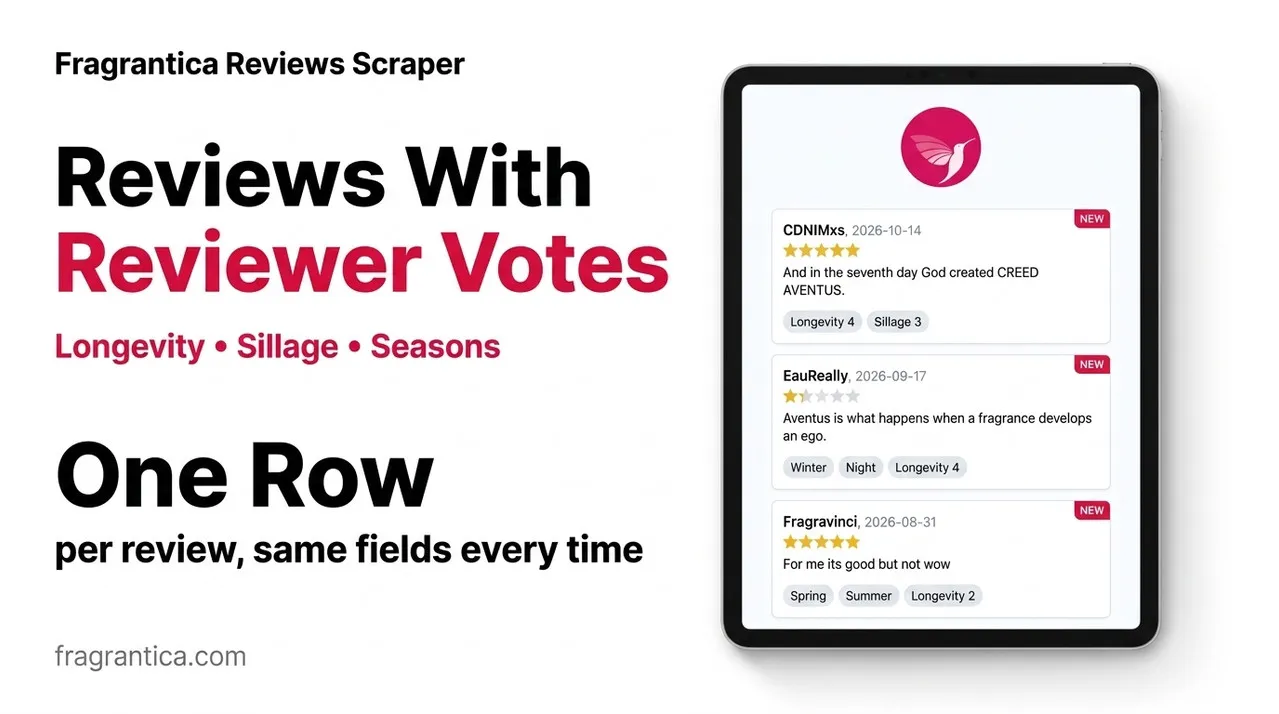
Scrape perfume reviews from Fragrantica (fragrantica.com): review text, author, date, the reviewer's own ratings and votes, together with the perfume name, brand, launch year, gender and community rating. Paste a perfume, designer or note page URL, or type a brand name, press Start, and export the reviews as JSON, CSV or Excel - or call the scraper as an API.
Target website: fragrantica.com
✨ Features of this Fragrantica reviews scraper
- Review extraction - one record per review with the text, author, author profile link, date and a category (recent, popular positive or popular negative).
- Reviewer votes - the reviewer's own rating and votes for longevity, sillage, seasons, day or night, gender and whether they have, had or want the perfume.
- Perfume context on every row - perfume name, brand, launch year, gender, rating, rating votes and review count, so the data works without a second lookup.
- Perfume, designer and note pages - paste one perfume, or a brand or note page to collect the reviews of the perfumes listed there.
- Brand names as input - type
Chaneland the scraper opens that brand's page for you. - Cache for scheduled runs - set a cache project name and every run returns only reviews you have not saved before.
- Filtering - gender and launch year for the perfumes found on designer and note pages.
- 20 language editions - brand names are looked up in the edition you choose, and perfume pages from any edition work as start URLs.
- Proxy support - an optional proxy configuration if you want to choose your own proxies.
- No browser required - plain HTTP requests keep runs fast and cheap.
🚀 How to scrape Fragrantica reviews in 5 steps
- Sign up for a free Apify account - includes $5 monthly credit.
- Open the actor page and click Try for free.
- Fill in the Input fields (a Fragrantica URL or a brand name is required).
- Click Start and wait for the run to complete.
- Download results from the Output tab in JSON, CSV, or Excel format.
You can also run this actor via the Apify API or integrate it directly into your workflows using Zapier, Make, or n8n.
💰 Pricing for the Fragrantica reviews scraper
This actor uses pay-per-result billing based on the compute units a run consumes.
- New Apify accounts include $5 of free monthly credit.
- The scraper uses plain HTTP requests instead of a headless browser, so it costs significantly less to run than browser-based scrapers.
- Proxies are disabled by default; leaving them off keeps runs cheapest.
- Reviews skipped by the cache are not charged.
🖼️ Fragrantica reviews scraper input screenshot
The input form starts with the Fragrantica URLs, the cache name and the two limits, then the optional brand and filter fields. The proxy settings are last.
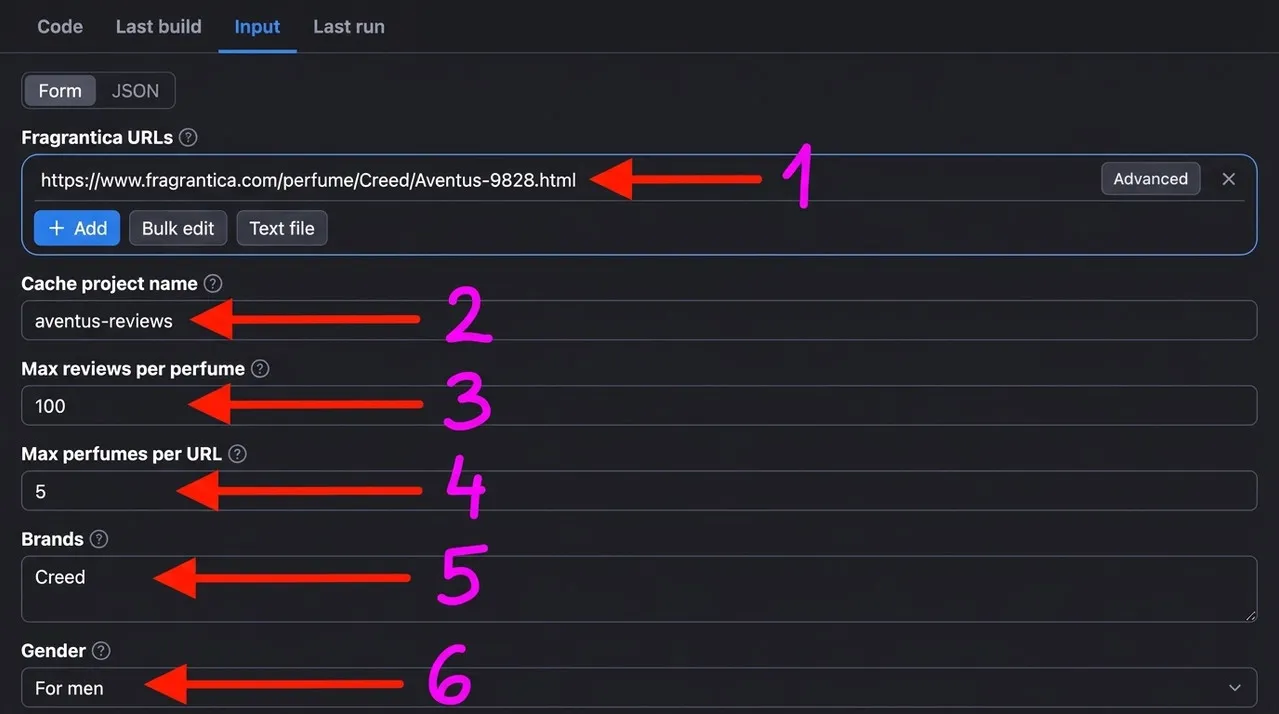
- Fragrantica URLs - perfume, designer or note pages to scrape reviews from (here the Creed Aventus page)
- Cache project name - reuse the same name on every scheduled run to get only new reviews
- Max reviews per perfume - limit for each perfume (here 100; 0 means every review on the page)
- Max perfumes per URL - how many perfumes to open from a designer, note or brand page
- Brands - brand names to scrape, for example
Creed - Gender - filter for women, men or both (here men)
The launch year filters and the language edition follow below these fields, and the proxy configuration comes last.
🔧 Fragrantica reviews scraper input configuration
| Field | Type | Required | Default | Description |
|---|---|---|---|---|
Fragrantica URLs (startUrls) | array | — | https://www.fragrantica.com/perfume/Dior/Sauvage-31861.html | Perfume pages, or designer and note pages. A perfume page returns the reviews of that perfume; a designer or note page returns the reviews of the perfumes listed on it. |
Cache project name (cacheProjectName) | string | — | — | Use the same name on each scheduled run to get only new reviews. Reviews already saved under that name are skipped and not charged. Each record gets changeType: "new". |
Max reviews per perfume (maxReviewsPerPerfume) | integer | — | 20 | Maximum reviews saved for each perfume. 0 means every review on the page. |
Max perfumes per URL (maxPerfumes) | integer | — | 5 | Maximum perfumes opened for each designer page, note page or brand. Perfume pages you paste are always scraped. |
Brands (brands) | array | — | — | Brand names spelled as on Fragrantica, for example Chanel. |
Gender (gender) | string | — | any | any, female, male or unisex. |
Launched from / until (yearFrom, yearTo) | integer | — | — | Only perfumes launched in or after / in or before this year. |
Language edition (language) | string | — | en | Fragrantica edition used for the brand names. |
Proxy configuration (proxyConfiguration) | object | — | no proxy | Optional. Choose your own proxies if you want to. |
Supported URL types:
- Perfume page:
https://www.fragrantica.com/perfume/Dior/Sauvage-31861.html - Designer (brand) page:
https://www.fragrantica.com/designers/Chanel.html - Note page:
https://www.fragrantica.com/notes/Lavender-1.html
Gender and launch year filters apply to the perfumes found on designer and note pages. Perfume pages you paste are always scraped.
📦 Fragrantica reviews scraper output data
The output is a dataset of JSON records with one review per record and the same fields on every record; a value the site does not show is null. Fields: reviewId, url, perfumeId, perfumeName, perfumeUrl, brand, year, gender, ratingValue, ratingCount, reviewsCount, authorName, authorUrl, datePublished, reviewCategory, reviewText, reviewerVotes, changeType and scrapedAt. The dataset has 2 views:
- Reviews - a table with perfume, brand, author, date, category, review text and the reviewer's votes.
- Perfume info - the perfume behind each review: year, gender, rating, rating votes and review count.
Output at a glance:
| Perfume | Brand | Author | Date | Category | Review |
|---|---|---|---|---|---|
| Black Orchid | Tom Ford | virginislandwawa | 2026-04-02 | recent | so good |
| Aventus | Creed | nahdi82 | 2026-04-20 | recent | The King |
| Libre L'Absolu Platine | Yves Saint Laurent | ytrewqq | 2026-02-10 | recent | listerine |
| Goddess Intense | Burberry | saramariah | 2026-05-18 | recent | LOVE THIS! |
| Libre L'Absolu Platine | Yves Saint Laurent | 104403 | 2025-08-17 | recent | Too strong. |
Sample output (raw JSON):
🔁 Scrape only new Fragrantica reviews with the cache
Set the same Cache project name on every scheduled run. Reviews already saved under that name are skipped: they are not charged and do not count towards Max reviews per perfume, so each run returns the newest reviews you have not seen yet. Every saved record gets changeType: "new"; with the cache off the field is null. Each name keeps its own separate cache. Add the actor to an Apify Schedule to follow new reviews of a perfume, a brand or a note automatically.
🐍 How to scrape Fragrantica reviews with Python, JavaScript or the API
Run the actor programmatically with the official Apify clients. Replace <YOUR_API_TOKEN> with the token from your Apify Console.
Python (pip install apify-client):
JavaScript (npm install apify-client):
cURL - start a run and wait for the dataset:
💡 What you can use Fragrantica review data for
- Sentiment analysis of what members say about a perfume, a brand or a note.
- Tracking how opinions on a new release change over time with scheduled, cached runs.
- Longevity and sillage research from the reviewers' own votes.
- Brand and competitor monitoring for perfume retailers and niche houses.
- Training data for recommendation engines and fragrance chatbots.
Perfume brands, retailers, content creators, data analysts and fragrance app developers use review data in the beauty, fashion and e-commerce industries.
⚠️ Limitations of the Fragrantica reviews scraper
- Reviews per perfume - A perfume page shows up to about 210 reviews: the most recent plus the most popular positive and negative ones. Older reviews are not on the page.
- Language editions - Reviews are specific to each language edition, so a non-English edition shows its own reviews.
- Rounded review counts - For popular perfumes the site shows the number of reviews rounded (for example 4.3K), and
reviewsCountfollows it. - Keyword search and perfumer pages - Search result pages and perfumer pages cannot be scraped. Use a perfume page, a brand name, a designer page or a note page instead.
- Overall vote charts - The overall longevity, sillage and season charts of a perfume are not part of the output; each review carries its author's own votes.
❓ Fragrantica reviews scraper FAQ
Can I scrape Fragrantica reviews legally?
The actor only collects data that is already publicly visible on Fragrantica - no login, paywall or private content is accessed. Scraping publicly available data is generally considered lawful (see the hiQ Labs v. LinkedIn ruling), but you are responsible for complying with Fragrantica's Terms of Service and applicable laws such as GDPR/CCPA, especially because reviews contain reviewer usernames.
What data does the Fragrantica reviews scraper return?
Each record is one review with its text, author, date, category and the reviewer's own votes, plus the perfume name, brand, launch year, gender, rating, rating votes and review count. Every record has the same fields; missing values are null.
How many reviews can I scrape from one perfume?
A perfume page exposes up to about 210 reviews. Max reviews per perfume limits how many are saved for each perfume, and 0 saves every review on the page. For designer and note pages, Max perfumes per URL limits how many perfumes are opened.
Do I need a proxy to scrape fragrantica.com?
No. The proxy configuration is off by default and the scraper runs without any proxy setup. If you prefer, choose your own proxies in the proxy field.
How do I scrape Fragrantica reviews with Python?
Use the Python example above: call the actor with the Apify client and iterate over the dataset items. Each item is one review.
Can I run this Fragrantica reviews scraper on a schedule?
Yes. Use Apify Schedules to run the actor daily or weekly. Set a Cache project name and each run returns only reviews you have not saved before; reviews already in the cache are skipped and not charged.
What output formats are supported?
JSON, CSV, Excel, XML and RSS, either from the Output tab or through the Apify API.
Why are some reviewer votes empty or zero?
Reviewers only fill in the votes they want to give. A vote of 0 means the reviewer did not vote on it, and reviewerVotes is null when the page does not show any votes for that review.
🔗 Relevant actors for Fragrantica review data
| Scraper | Description |
|---|---|
| 🌸 Fragrantica Perfume Scraper | Scrapes perfumes from Fragrantica: notes, accords, perfumers and ratings. |
| 🍷 Vivino Wine Reviews Scraper | Scrapes user reviews and tasting notes from Vivino. |
| 🛍️ Shopify App Reviews Scraper | Scrapes merchant reviews of any Shopify App Store app, one row per review. |
| 📱 Google Play Store Reviews Scraper | Scrapes user reviews from Google Play Store apps. |
| 💬 YouTube Comments Scraper + Sentiment Analysis | Scrape comments and replies from YouTube videos with sentiment. |
🔗 Other actors you may find useful
| Scraper | Description |
|---|---|
| 🧴 Incidecoder Scraper | Scrapes skincare product pages with full ingredient lists. |
| 🛒 AliExpress Products Scraper | Scrape AliExpress products, prices, variants, store and shipping data. |
| 🏷️ Mercari Japan Scraper | Scrapes Mercari Japan listings: prices in JPY, sold status and condition. |
| 🎒 Carousell Products Scraper | Scrape Carousell.sg product listings with prices and seller ratings. |
| 🍾 Total Wine Scraper | Scrape Total Wine & More wine, liquor and beer prices, ratings and reviews. |
💬 Support & contact
If you encounter any issues or have questions, please open an issue.
You can also find more of our actors on the Actor Flow page.


