

LinkedIn Jobs Scraper with Cache
Pricing
from $0.70 / 1,000 results
LinkedIn Jobs Scraper with Cache
Scrape LinkedIn (linkedin.com) job postings without login: title, company, location, posted date, salary, applicants, seniority, employment type, industries and full description. Search by keyword, location and filters or by URL. Export JSON, CSV or Excel.
Pricing
from $0.70 / 1,000 results
Rating
0.0
(0)
Developer

ActorFlow
Maintained by CommunityActor stats
0
Bookmarked
2
Total users
1
Monthly active users
11 hours ago
Last modified
Categories
Security
Limited permissionsShare
LinkedIn Jobs Scraper
Scrape job postings from LinkedIn (linkedin.com) without login: title, company, location, posted date, salary, applicants, seniority, employment type, industries and the full job description. Search by keyword, location and filters or paste a LinkedIn jobs URL, then export as JSON, CSV or Excel or call it as an API. A built-in cache returns only the new jobs on every run, so scheduled runs never pay twice for the same job.
Target website: linkedin.com/jobs
✨ Features of this LinkedIn jobs scraper
- Job extraction — title, company with its LinkedIn page and logo, location, posted date, salary (when the job shows one) and the number of applicants.
- Full job details — description as text and HTML, seniority level, employment type, job function and industries.
- Search by keyword and location — type job titles and a place, or paste a LinkedIn jobs search URL with its filters.
- Filters — date posted, job type, experience level and workplace type (on-site, remote, hybrid).
- Beyond the 1,000 jobs limit — LinkedIn shows about 1,000 jobs per search; when you ask for more the actor splits the search by job type, experience level, workplace type and posting date and removes duplicates.
- Cache for new jobs only — use the same cache project name on every scheduled run to skip jobs you already scraped and pay only for new ones.
- Single job URLs — scrape one job page directly.
- Proxy support — uses Apify residential proxies by default because LinkedIn blocks many IPs.
- No browser required — plain requests keep runs fast and cheap.
🚀 How to scrape LinkedIn jobs in 5 steps
- Sign up for a free Apify account — includes $5 monthly credit.
- Open the actor page and click Try for free.
- Fill in the Input fields (a LinkedIn jobs URL, or keywords and a location).
- Click Start and wait for the run to complete.
- Download results from the Output tab in JSON, CSV, or Excel format.
You can also run this actor via the Apify API or integrate it directly into your workflows using Zapier, Make, or n8n.
💰 Pricing for the LinkedIn jobs scraper
This actor uses pay-per-result billing based on the compute units a run consumes.
- New Apify accounts include $5 of free monthly credit.
- The actor uses plain HTTP requests instead of a browser, so it costs significantly less to run than browser-based scrapers.
- Turning off Scrape job details makes runs faster and cheaper: you then get the search result fields only.
🔧 LinkedIn jobs scraper input configuration
The input form starts with the LinkedIn URLs, the keywords, the job limit and the cache name. The location, job details switch and filters are grouped as optional settings, and the proxy settings are last.
| Field | Type | Required | Default | Description |
|---|---|---|---|---|
LinkedIn job URLs (startUrls) | array | — | a software engineer search in the United States | A LinkedIn jobs search page with its filters, or a single job page. |
Search keywords (queries) | array | — | — | Job titles or keywords, one search each. Uses the location and filters below. |
Max jobs per search or URL (maxItems) | integer | — | 5 | Maximum jobs saved for each start URL or keyword. |
Cache project name (cacheProjectName) | string | — | — | Reuse the same name on every run to get only new jobs. Jobs saved in earlier runs under this name are skipped and do not count towards the limit. |
Location (location) | string | — | — | Where to search for the keywords, for example Berlin, Germany. |
Scrape job details (scrapeDetails) | boolean | — | true | Open each job page for the description, criteria, applicants and salary. |
Date posted (datePosted) | string | — | any time | past24h, pastWeek or pastMonth. |
Job type (jobTypes) | array | — | all | fullTime, partTime, contract, temporary, internship, volunteer or other. |
Experience level (experienceLevels) | array | — | all | internship, entry, associate, midSenior, director or executive. |
Workplace type (workplaceTypes) | array | — | all | onSite, remote or hybrid. |
Proxy configuration (proxyConfiguration) | object | — | Apify residential proxy | Residential proxies get the fewest blocked requests; you can switch to datacenter proxies to cut cost. |
Supported URL types:
- A search page:
https://www.linkedin.com/jobs/search/?keywords=nurse&location=Texas(the filters in the address are used) - A job page:
https://www.linkedin.com/jobs/view/4483550346
🖼️ LinkedIn jobs scraper input screenshot
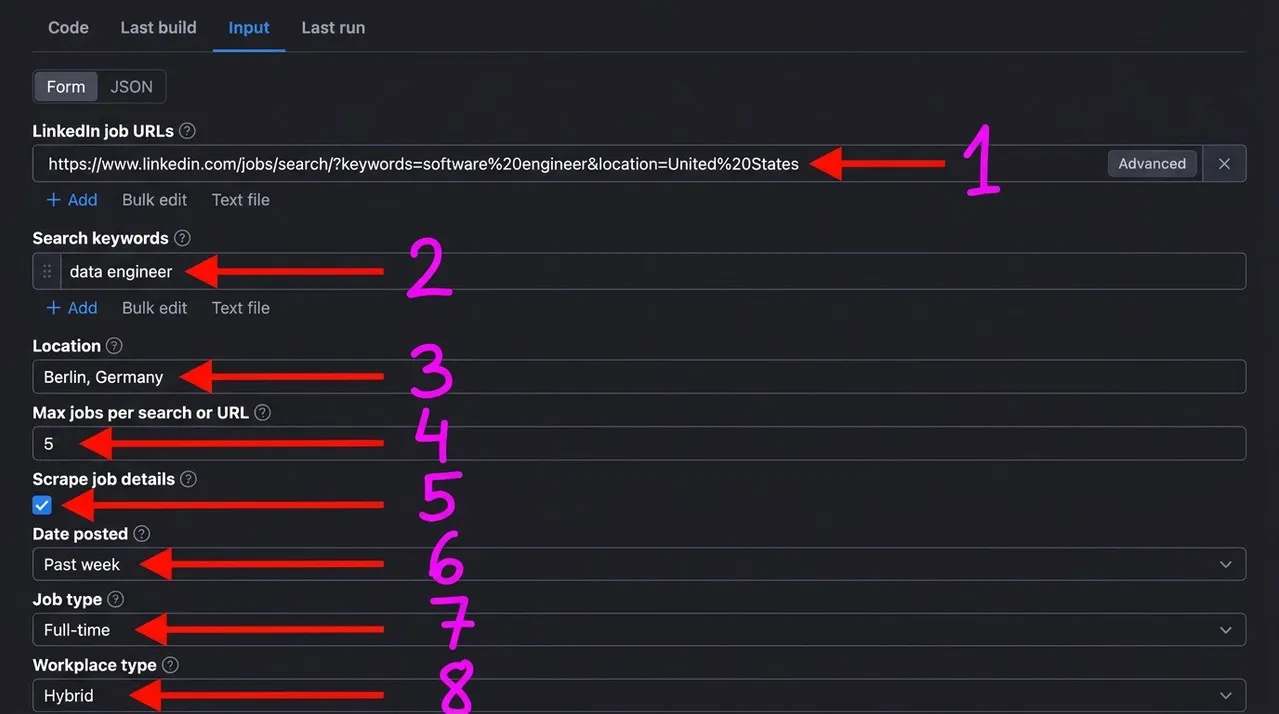
Numbered labels in the screenshot:
- LinkedIn job URLs — LinkedIn job search pages or single job pages to scrape.
- Search keywords — job titles or keywords to search, one search each.
- Location — the place to search in.
- Max jobs per search or URL — how many jobs to save for each URL or keyword.
- Scrape job details — open each job page to add the full description, seniority, employment type, job function, industries, applicants and salary.
- Date posted — only jobs posted within the chosen period.
- Job type — filter by full-time, part-time, contract and more.
- Workplace type — filter by on-site, remote or hybrid.
📦 LinkedIn jobs scraper output data
Every job is one flat record with the keys id, url, title, companyName, companyUrl, companyLogo, location, postedAt, postedText, salary, applicantsText, seniorityLevel, employmentType, jobFunction, industries, descriptionText, descriptionHtml, applyUrl, source, scrapedAt. Every record has all keys; a value the page does not carry is null, for example salary when the job shows none. Without Scrape job details the description, criteria and applicants are null. The dataset has 1 view:
- Jobs — a compact table of title, company, location, posted date, employment type, seniority, salary, applicants and the job link.
Output at a glance:
| Title | Company | Location | Posted | Type | Seniority | Salary |
|---|---|---|---|---|---|---|
| Software Engineer II (Java/AWS) | JPMorganChase | New York, NY | 2026-10-29 | Full-time | Not Applicable | $123,500.00/yr - $150,000.00/yr |
| (Senior) Data Engineer (m/f/x) | Scalable Capital | Berlin, Berlin, Germany | 2026-10-26 | Full-time | Mid-Senior level | — |
| Junior Data Engineer | reeeliance | Berlin, Germany | 2026-10-29 | Full-time | Entry level | — |
| Software Engineer III - Golang | JPMorganChase | Chicago, IL | 2026-10-24 | Full-time | Not Applicable | $114,000.00/yr - $155,000.00/yr |
| Data Engineer (m/w/d) | Meridian Personal | Berlin, Germany | 2026-10-26 | Full-time | Associate | — |
Sample output (raw JSON):
🔁 Save money: scrape only new LinkedIn jobs with the cache
Scheduled runs usually meet the same jobs again and again, and without a cache you pay for them every time. This actor has a built-in cache that skips previously scraped jobs, so you pay only for new jobs across multiple runs.
- Set Cache project name to any name, for example
data-engineer-berlin. - Keep the same name on every run, for example from an Apify Schedule.
- Each run returns only jobs that were not saved before.
Jobs already saved under the same name are skipped before their job page is opened, and they do not count towards Max jobs per search or URL, so each run goes deeper into the results instead of repeating the same jobs. Different names keep separate caches.
🐍 How to scrape LinkedIn jobs with Python, JavaScript or the API
Run the actor programmatically with the official Apify clients. Replace <YOUR_API_TOKEN> with the token from your Apify Console.
Python (pip install apify-client):
JavaScript (npm install apify-client):
cURL — start a run and wait for the dataset:
💡 What you can use LinkedIn jobs data for
- Tracking hiring demand for roles, skills and locations over time.
- Salary benchmarking from the jobs that publish a pay range.
- Lead generation: finding companies that are hiring and who they hire.
- Building job boards and alerts for a niche, city or industry.
- Labour market research on seniority, employment type and remote work.
The data is typically used by recruiters, staffing agencies, HR analysts, job boards, sales teams and market researchers.
⚠️ Limitations of the LinkedIn jobs scraper
- About 1,000 jobs per search — LinkedIn shows no more per search; the actor splits larger requests by filters, which needs more requests and proxy traffic.
- Public data only — everything behind a LinkedIn login (applicant profiles, recruiter details, saved jobs) is out of reach.
- Salary and apply link — salary is only filled when the job shows a pay range, and the external apply link is not always available.
- Blocked IPs — LinkedIn blocks many IPs, so the actor retries on new ones; very large runs may need residential proxies.
❓ LinkedIn jobs scraper FAQ
Can I scrape LinkedIn legally?
The actor only collects job postings that are already publicly visible on LinkedIn, with no login, paywall or private content. Scraping publicly available data is generally considered lawful (see hiQ Labs v. LinkedIn), but LinkedIn's Terms of Service restrict automated access, so you are responsible for complying with them and with applicable laws such as GDPR and CCPA.
What data does the LinkedIn jobs scraper return?
Each job has its title, company with page and logo, location, posted date, salary when shown and the applicants text. With Scrape job details on you also get the description as text and HTML, seniority level, employment type, job function and industries.
How many jobs can I scrape from one LinkedIn search?
Max jobs per search or URL limits the saved jobs for each start URL or keyword. LinkedIn shows about 1,000 jobs per search; above that the actor splits the search by job type, experience level, workplace type and posting date to reach more.
Is this the cheapest LinkedIn jobs scraper actor?
Possibly yes. It uses plain HTTP requests instead of a browser, and its built-in cache skips jobs you already scraped, so across multiple runs you pay only for new jobs. Set a Cache project name and keep it the same on every run to get this saving.
Do I need a proxy to scrape linkedin.com?
Yes, a proxy is needed: LinkedIn blocked requests from a single home or office IP after a few pages. The input defaults to Apify residential proxies, which get the fewest blocked requests. You can switch to datacenter proxies in the proxy settings to lower the cost, but more requests may be blocked.
How do I scrape LinkedIn jobs with Python?
Use the Python example above: it starts the actor with your input and iterates over the dataset items.
Can I run this LinkedIn jobs scraper on a schedule?
Yes. Create an Apify Schedule for the actor and set a Cache project name, so every run returns only the jobs it has not saved before. You can also set Date posted to past 24 hours to narrow the search.
What output formats are supported?
JSON, CSV, Excel, XML and RSS, either from the Output tab or through the Apify API.
Why is the salary empty for most LinkedIn jobs?
LinkedIn only shows a pay range for jobs where the employer or the local law provides one, so most jobs return null for salary.
🔗 Relevant actors for job data
| Scraper | Description |
|---|---|
| 💼 Dice Jobs Scraper | Tech job listings from Dice by keyword or URL. |
| 🇩🇪 XING Jobs Scraper | Job listings from XING Jobs in Germany: title, company, location and more. |
| ☕ HiringCafe Jobs Scraper | Job listings from HiringCafe by keyword or URL. |
| 📧 Decision Maker Email Finder | Find decision makers, founders and executives at any company website. |
🔗 Other actors you may find useful
| Scraper | Description |
|---|---|
| 🥾 AllTrails Scraper — Hiking, Biking & Running Trails | Hiking, biking and running trails by park, city or state. |
| 📌 Pinterest Pins, Boards & Profiles Scraper | Pins, videos, boards and profiles from Pinterest searches and URLs. |
| 🔮 Kalshi Markets Scraper | Prediction market prices, implied probability and volume from Kalshi. |
| 🍷 Vivino Wine Scraper | Wine data from Vivino: name, winery, vintage and ratings. |
| 🛍️ Shopify App Store Scraper | Apps from the Shopify App Store: name, rating, reviews and pricing. |
💬 Support & contact
If you encounter any issues or have questions, please open an issue.
You can also find more of our actors on the Actor Flow page.


