

Facebook Reviews Scraper
Pricing
$1.20 / 1,000 review results
Facebook Reviews Scraper
Scrape public Facebook Page reviews and recommendations: recommends / doesn't recommend, review text, reviewer, date, tags, photos, reactions, comments, business replies, Page recommend % and review count. Date, keyword and positive/negative filters, only-new monitoring. No login or cookies.
Pricing
$1.20 / 1,000 review results
Rating
0.0
(0)
Developer

Delowar Munna
Maintained by CommunityActor stats
0
Bookmarked
2
Total users
1
Monthly active users
14 days ago
Last modified
Categories
Features
Share
Facebook Reviews Scraper — Page Recommendations, Review Text, Replies, Tags, Photos & Reactions

Get every public review on a Facebook Page as a clean row. Give it Page URLs, handles or IDs — or just a business name — and get back each review's recommends / doesn't recommend verdict, text, reviewer, exact date, tags, photos, reactions, comments and the business owner's replies, plus the Page's own recommend % and review count. Export to JSON, CSV or Excel, or call it from the API.
- ⭐ Correct Facebook semantics — Facebook Page reviews are recommendations, not star ratings. You get the real verdict, never an invented 1–5 score
- 💬 Business replies detected — replies the Page itself wrote under a review are pulled out into
businessReplies - 📈 Page recommend % and review count — kept separate from what your sample says
- 🗓️ Date, keyword and positive/negative filters — with early stopping on dates, because reviews arrive newest first
- 🔔 Only-new monitoring — schedule it daily and get just the reviews posted since the last run
- 🔓 No Facebook login, cookies or token — nothing to hand over, nothing to get banned
- 💸 Pay only for reviews delivered — lookups, pagination, comments, filtered-out reviews and empty Pages are never charged
Are Facebook Page reviews star ratings?
No. Facebook replaced 1–5 star Page ratings with recommendations. Each reviewer answers one question — do you recommend this Page? — and may add text, tags and photos. So every row has:
recommendationStatus | Meaning |
|---|---|
RECOMMENDS | The reviewer recommends the Page (Facebook shows "X recommends Y") |
DOES_NOT_RECOMMEND | The reviewer doesn't recommend it ("X doesn't recommend Y") |
UNKNOWN | Facebook's verdict could not be read with certainty — reported as unknown, never guessed |
This Actor never fabricates a star score for a review. recommendationStatusRaw keeps Facebook's own wording.
What is pageRecommendPercent?
It is the number Facebook shows at the top of the Page's reviews tab — e.g. "92% recommend (2,656 reviews)" gives pageRecommendPercent: 92 and pageReviewsCount: 2656. It is Facebook's figure across all reviews it counts. The share of "recommends" in your scraped rows can differ (you may have scraped only recent or only negative reviews), so the two are reported separately — see Page summaries.
Quick start
Paste a Page and run:
That returns the Page's 100 newest reviews. Measured on Apify: 100 reviews in 32–66 seconds, with the first review in your dataset after about 2 seconds.
More examples
Only negative reviews from the last 3 months
Reviews that mention service, delivery or price — with comments
A brand and two branches, with comments (the run behind the sample output below — 45 reviews)
Several Pages for a reputation report
Find the Page by business name
Daily monitor — only new reviews
Input
| Field | What it does | Default |
|---|---|---|
pageTargets | Page URLs, /reviews URLs, handles, profile.php?id= URLs or numeric Page IDs (up to 100) | Porto's Bakery |
searchQueries | Business names to look up with Facebook's Page search (up to 20) | — |
maxPagesPerQuery | How many top Page matches to scrape per name | 1 |
maxReviewsPerPage | Reviews to return per Page, newest first. 0 = all Facebook shows (up to 10,000) | 100 |
maxReviewsTotal | Cap across the whole run. 0 = no cap | 0 |
recommendationType | ALL, RECOMMENDS (positive) or DOES_NOT_RECOMMEND (negative) | ALL |
dateFrom / dateTo | YYYY-MM-DD, ISO timestamp, or relative (7 days ago, 3 months) | — |
keywords | Keep reviews whose text or tags contain any of these | — |
onlyWithText / onlyWithPhotos | Skip reviews without text / without photos | off |
includeComments | Add comments to each row | off |
maxCommentsPerReview / maxRepliesPerComment | Comment / reply depth when comments are on | 20 / 0 |
includePageMetadata | Page handle, picture, verified badge and followers in each row's page object | on |
onlyNewReviews / monitorKey / emitBaselineReviews | Monitoring — see below | off |
maxReviewsScannedPerPage | How far to read into a Page looking for reviews that pass your filters. 0 = automatic | 0 |
maxConcurrency | Pages read in parallel | 3 |
proxyConfiguration | Apify Datacenter by default. Residential is refused — see Proxy policy | Datacenter |
Which Page formats are accepted?
All of these point at the same Page, and if you give more than one of them the Page is scraped once (and charged once):
Can I search Pages by business name?
Yes — put names in searchQueries. The Actor runs Facebook's own Page search and scrapes the top match (or the top maxPagesPerQuery). Chains often have one Page per branch ("Porto's Bakery (Downey, CA)"), so every row from a searched Page says which name found it and how well it matched:
HIGH = the Page name is the name you searched; MEDIUM = one contains the other (or the Page is verified); LOW = Facebook ranked it, but the name does not obviously match — check it. The run log names every Page each search resolved to. If you know the Page, a URL is always more reliable than a name.
Can I filter positive / negative reviews, by date, or by keyword?
Yes. Facebook has no review filter for logged-out visitors, so filters are applied to each review as it is read — and filtered-out reviews are never charged.
- Date — reviews arrive newest first (measured: 82 reviews in a row, no date out of order), so with
dateFromthe Actor stops reading a Page at the first older review. Recent-review runs are fast. - Positive / negative —
recommendationType. A Page that is 92% positive has few negative reviews, so to find 50 negatives the Actor may need to read ~600. With any filter on, it reads up to 10×maxReviewsPerPage(at least 300) per Page before stopping; raisemaxReviewsScannedPerPageto dig deeper. - Keywords — case- and accent-insensitive match on the review text and its tags;
"deliver"also matches "delivery". Each row listsmatchedKeywords.
Why might I get fewer reviews than I asked for?
- The Page has fewer public reviews, or Facebook shows a logged-out visitor fewer than its displayed count.
- Your filters removed them (see
RUN_SUMMARY.filters). dateFromstopped the Page at the first older review — that is the date window working.- The run hit
maxReviewsTotalor your spending limit.
Each Page's coverage block says which.
Output
One row = one review. Every row has every column; a value Facebook did not serve is null, never a made-up 0.
| Field | Description |
|---|---|
reviewId | Facebook's ID for the review post — stable across runs |
recommendationId | Facebook's recommendation ID, when the review carries one (reviews with tags or photos) |
reviewUrl | Link to the review |
recommendationStatus, recommendationStatusRaw | The verdict (see above) and Facebook's wording |
text | The review text, as written — Unicode, emoji and line breaks kept |
createdAt, createdTimestamp, timestampQuality | Exact posting time (EXACT on every review measured) |
tags, tagsText | The tags the reviewer picked, e.g. "Friendly staff", exact labels |
reviewer {id, name, url, profilePictureUrl} | Public reviewer details; reviewerName / reviewerUrl flat copies for CSV |
reactionCount, reactions [{type, count}] | Total reactions and the breakdown (LIKE, LOVE, HAHA, …) |
commentCount, shareCount | Facebook's counts |
hasBusinessReply, businessReplyCount, businessReplies | Replies written by the Page itself (see below) |
firstBusinessReplyAt, latestBusinessReplyAt | Timestamps of the Page's replies |
comments | With includeComments: [{id, text, createdAt, url, author, isBusinessReply, reactionCount, replyCount, media, replies}] |
media, photoUrls, photoCount, photoUrlsText | Review photos — photoUrls are direct image files |
matchedKeywords | Which of your keywords the review matched |
pageId, pageName, pageUrl, pageRecommendPercent, pageReviewsCount | The Page, flat for CSV |
page | The Page object (with includePageMetadata: handle, reviews URL, picture, verified, followers) |
search | For Pages found by name: the search and its confidence |
isNewReview, firstSeenAt | Monitor mode |
inputTarget, inputIndex, scrapedAt | Which input produced the row, and when |
Sample record
A real review from an Apify run, from the Glendale branch, which was found by business-name search. The reviewer's identity is replaced and long URLs are trimmed:
followersCount is parsed from Facebook's rounded "4.8K followers", so it is approximate. followersText keeps the original.
Output views
The dataset has four tabs. Each tab is a different set of columns over the same rows. The examples below are real rows from the run above; reviewer names are replaced.
Reviews
Verdict, text, reviewer, date, tags, counts, business-reply flag and the Page's recommend %.
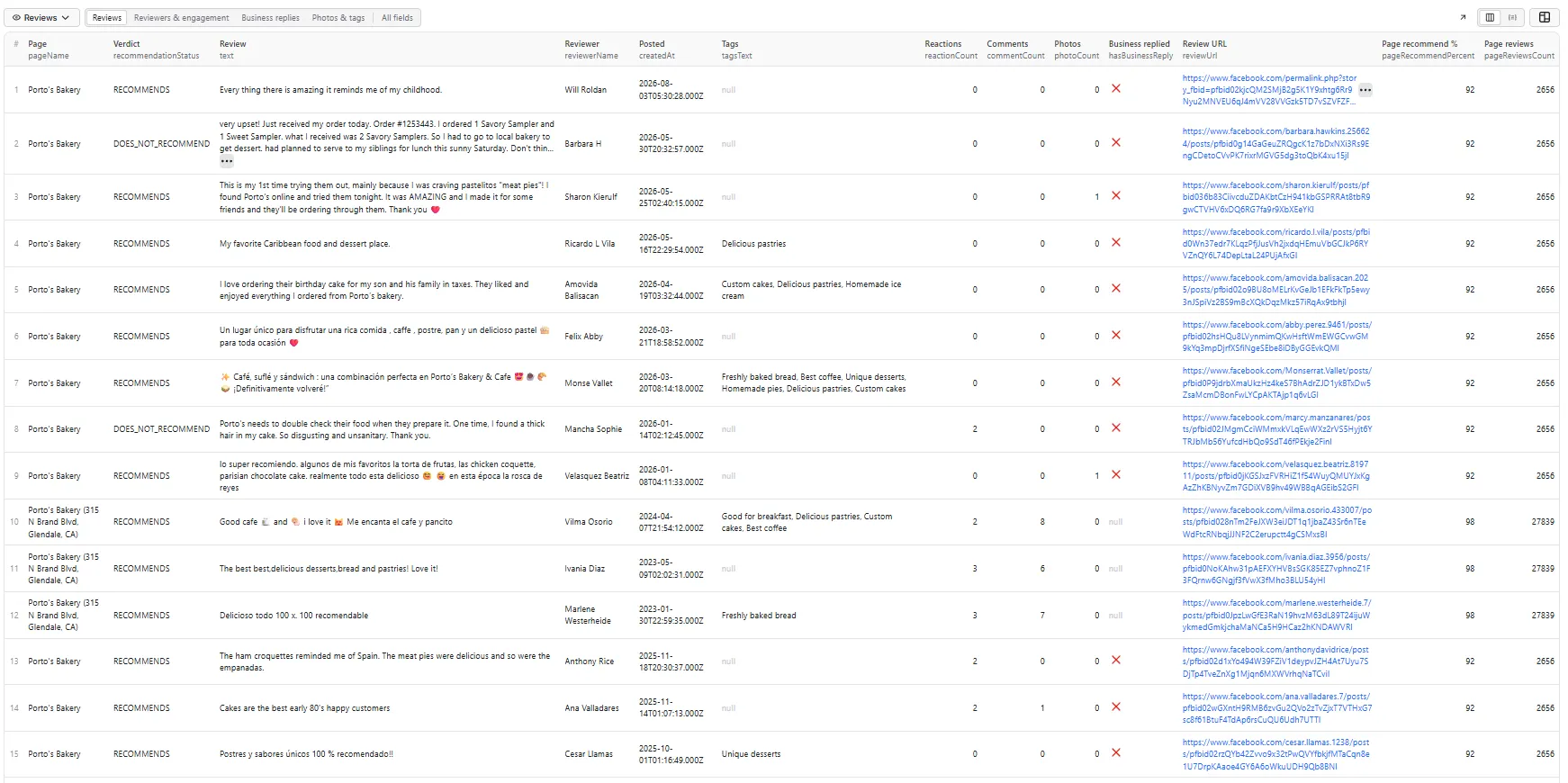
Reviewers & engagement
Reviewer links, reactions by type, comments, shares and matched keywords.
reviewerUrl is null here because Facebook doesn't show every reviewer's profile link to
logged-out visitors.
Business replies
The Page's own replies under each review.
None of the 45 reviews in this run had a reply that a logged-out visitor can see. This review has
8 comments, and Facebook didn't show all of them, so hasBusinessReply is null (unknown) rather
than false. A review with a reply is shown in
Can I get business-owner replies?.
Photos & tags
Review photos (direct image links) and the tags reviewers chose.
Can I get business-owner replies?
Yes — this is the column most review tools miss. When the Page itself comments under a review, the reply goes into businessReplies (text, time, link) and hasBusinessReply becomes true. Detection is by the commenter's Page ID matching the reviewed Page, not by name.
It runs on every review, with or without includeComments, using the comments Facebook shows alongside the review — no extra cost. Example from Porto's Bakery:
⚠️ hasBusinessReply is three-state. true = the Page replied. false = the review has no comments, or every comment was read. null = unknown: Facebook hides some comments from logged-out visitors (measured: 2 of 6 shown on one review), so a reply may exist that nobody logged out can see. We report unknown rather than a misleading false.
Can I scrape review comments?
Yes, with includeComments: true. Each row gets a comments array (author, text, time, reactions, reply count, and isBusinessReply), with replies nested when maxRepliesPerComment is above 0. Comments can be incomplete: Facebook shows a logged-out visitor only some of the comments on a review, and the rest cannot be read without logging in — which this Actor never does. commentCount is Facebook's own total; commentsFetched is how many were actually read.
Are reviewer names and profile URLs included?
The reviewer's public name, ID and profile picture are included on every review. A profile URL is included when Facebook serves one to a logged-out visitor (about 4 in 10 reviewers measured); otherwise reviewer.url is null. Nothing about reviewers is inferred beyond what is publicly shown — no emails, phone numbers or other private details.
Are tags, photos and reactions included?
Yes. tags keeps Facebook's exact labels ("Delicious pastries", "Friendly staff"). photoUrls are the image files; media also has each photo's Facebook page link. reactions breaks reactions down by type.
Facebook image URLs expire (they are signed and time-limited, usually lasting days to weeks). Download photos you need to keep.
Can I monitor only new reviews?
Yes. Turn on onlyNewReviews and give a monitorKey (any name, e.g. "client-reviews"), then schedule the Actor — daily works well.
- First run — baseline. The Actor records the Page's newest reviews and returns nothing (status
BASELINE_CREATED), so existing reviews are not treated as "new". Turn onemitBaselineReviewsif you want them returned too. - Later runs. The Actor reads newest first and stops at the first review it has already seen. Only reviews posted since the last run are returned, marked
isNewReview: truewithfirstSeenAt. A Page with nothing new costs one page load.
Monitor state is saved per monitorKey and Page in your account's facebook-reviews-monitor key-value store. It is only advanced after a Page finished cleanly — a run that fails or is stopped mid-Page does not move the boundary, so nothing is skipped. Reviews that disappear are never reported as deleted. Changing filters keeps the known reviews, so old reviews do not suddenly count as new.
How is pagination handled?
The Actor loads the Page's public reviews tab and then asks Facebook for the next reviews the same way the reviews tab does when you scroll — newest first, 3 at a time (Facebook's own page size). Each Page is read in order; several Pages run in parallel. Every loop is bounded: a review limit, a scan limit, a request budget, and detection of repeated or empty pages.
What do FULL / PARTIAL coverage mean?
Each Page gets a summary in the key-value store record PAGE_SUMMARIES (also linked from the run's output tab):
coverage.status | Meaning |
|---|---|
FULL | Facebook ended the review list and at least its displayed review count was read |
LIMITED | Your own settings ended it — review limit, date window, or the monitor boundary |
PARTIAL | Ended early — an error, or Facebook served fewer reviews logged out than its displayed count |
NO_REVIEWS | The Page has a reviews tab with no reviews |
We never claim FULL without that evidence.
Page statuses and retries
Every Page ends with a status in RUN_SUMMARY.pages: SUCCESS, BASELINE_CREATED, NO_REVIEWS, PAGE_NOT_FOUND, PAGE_NO_REVIEWS_TAB (the Page exists but has no public reviews tab), PAGE_REQUIRES_LOGIN_OR_UNAVAILABLE, DUPLICATE_PAGE (same Page as an earlier input), PAGE_SEARCH_NO_MATCH, PARTIAL_REVIEWS, PAGINATION_FAILED, RATE_LIMITED, BLOCKED, PROVIDER_ERROR. One failed Page never fails the run. Pages that failed for a temporary reason are saved as a ready-to-run input in the key-value store record RETRY_INPUT.
RUN_SUMMARY also totals reviews scanned and returned, recommends vs doesn't recommend, how many each filter removed, reviews with photos / comments / business replies, and request counts.
Does it need a Facebook login or cookies?
No. The Actor reads what Facebook shows any logged-out visitor on a Page's public reviews tab. It never asks for a login, cookies, session or access token. If a Page shows reviews only to logged-in users, that Page is reported as PAGE_REQUIRES_LOGIN_OR_UNAVAILABLE — the Actor will not ask for your credentials.
💸 How is pricing calculated?
Pay per review delivered — one review-result event for each review row in your dataset. Nothing else is charged:
- Page lookups, pagination, retries and Page search — free
- Comments and replies (
includeComments) — no extra charge; they are part of the review row - Reviews removed by your filters — free
- Duplicate Pages or reviews — free (each review is charged once)
- Pages that are not found, have no reviews tab or no reviews — free
- A monitor baseline that returns nothing — free
There is no start fee: a run that finds nothing costs nothing. Your per-run spending limit is respected — when it is reached the run stops with everything you paid for. See the Pricing tab for the current rate; this README deliberately doesn't quote figures, since prices can change.
Can I use it through the API or MCP?
Yes. Any Apify Actor can be run from the Apify API, the JavaScript / Python clients, Make, Zapier, n8n, or from AI agents via the Apify MCP server. Example:
For a monitor, create a Schedule in Apify Console with the monitor input and add a webhook or integration to receive new reviews.
🚦 Proxy policy
Use Apify Datacenter proxy (the default) or no proxy for normal runs — both are supported for reading public Facebook Page reviews at this Actor's conservative concurrency.
Apify Residential proxy is not supported. If apifyProxyGroups includes RESIDENTIAL, the run uses Apify Datacenter proxy instead and logs a warning; it doesn't fail. Reason: in pay-per-event actors, residential bandwidth is billed to the developer, not the run user, so a single bandwidth-heavy run could exceed the per-result event revenue.
If you genuinely need residential routing, supply your own residential provider via the proxy editor's Custom proxy URLs field — that traffic goes through your provider, not Apify, and is unaffected:
Limitations
- Public reviews only, as a logged-out visitor sees them. Availability varies by Page; some Pages have reviews turned off.
- No per-review star rating — Facebook does not have one any more. Old star ratings are not reconstructed.
- Comments can be incomplete — Facebook hides some comments from logged-out visitors;
hasBusinessReplyisnullwhen it cannot be sure. - Reviewer profile URLs are missing for some reviewers (Facebook does not serve them logged out).
- Facebook image URLs expire.
- Page contact details (phone, email, website, address) are not on the reviews tab and are not included — use the Facebook Pages & Business Leads Scraper for those.
- Review edits and deletions are not tracked — monitor mode reports new reviews only.
- Facebook changes its site often. The Actor reads Facebook's own definitions at run time and adapts to routine changes, but a larger change can interrupt it until it is updated.
Privacy and responsible use
This is an unofficial tool, not affiliated with or endorsed by Meta or Facebook, and it is not Facebook Insights. It collects only data that Facebook shows publicly to any visitor without logging in, and only reviewer information that is publicly visible. Reviews contain personal data (reviewer names and photos): make sure your use complies with the GDPR, CCPA and other laws that apply to you, and with Facebook's terms. Do not use the data to contact, profile or harass reviewers.
Need something else?
Related Coregent Actors: Facebook Pages & Business Leads Scraper (Page contact details), Facebook Comments Scraper (comments under any post), Facebook Search Scraper (find Pages, posts and more by keyword). Missing a field? Open an issue on the Actor's Issues tab.


