

Instagram Growth Tracker
Pricing
from $2.50 / 1,000 profile snapshots
Instagram Growth Tracker
Track public Instagram accounts over time. Monitor follower gains, following changes, posting activity, engagement trends, growth velocity, 7/30/90-day comparisons, milestones and alerts from stored historical snapshots. Built for scheduled runs.
Pricing
from $2.50 / 1,000 profile snapshots
Rating
0.0
(0)
Developer

Delowar Munna
Maintained by CommunityActor stats
0
Bookmarked
2
Total users
1
Monthly active users
a day ago
Last modified
Categories
Share
Track public Instagram accounts over time. Monitor follower gains, following changes, posting activity, engagement trends, growth velocity, milestones and historical snapshots. Ideal for creator monitoring, competitor research, agencies and influencer analytics.
What this actor does
Instagram Growth Tracker observes a list of public Instagram profiles on every run, stores each observation, and compares it with the account's own history. One row = one profile × the current observation, with:
- 📈 Deltas: followers, following and posts gained or lost since the previous observation, plus growth percentage
- ⏱️ Velocity: followers per day / week / 30 days, normalized for uneven run intervals
- 🗓️ Period comparisons: 24 hours, 7, 30 and 90 days, each against a real stored baseline
- 🧭 Trend:
SURGING,GROWING,STABLE,DECLINING,SHARP_DECLINEand acceleration (ACCELERATING/STEADY/DECELERATING) - 🏁 Milestones:
CROSSED_1K…CROSSED_1M - 🔔 Signals and alerts: follower surges and drops, posting and engagement changes, profile changes, plus
alertTriggered/alertReasonsready for webhooks, Zapier, Make, n8n, Slack or email - 💬 Engagement (optional): average and median likes, comments and views over recent posts, engagement rate, and its change over time
- 📝 Posting activity: latest post, posts in the last 7 / 30 days, posts per week and month
- 🪪 Profile changes: bio, name, category, link, verification and account type, with old and new values
- 🔁 Username changes: tracked through the stable Instagram user ID, so a rename doesn't break history
How is this different from a profile scraper?
A profile scraper answers "how many followers does this account have now?". This actor answers "how is this account changing over time?". It keeps persistent history in your Apify account and turns repeated observations into growth analytics. For one-off profile data, use Instagram Profile Scraper instead.
How it works
- Normalize. Usernames,
@handlesand profile URLs are reduced to one username. Duplicates are removed. Post or Reel URLs get a freeINVALID_INPUTrow, because this actor tracks accounts. - Observe. The current public profile is fetched: followers, following, posts, user ID and metadata. With engagement on, recent posts are analyzed too.
- Look up history. The stored state for that profile is loaded under your
trackerKey, keyed on the Instagram user ID. - Compare. Deltas, growth %, velocity, period baselines, trend, acceleration, milestones, profile changes, signals and alerts are calculated.
- Persist. The observation is saved as an immutable snapshot, after validation, so a failed fetch can never overwrite good history.
- Output. One row per profile in the run's dataset, plus a
RUN_SUMMARYrecord.
Scheduling (recommended)
Growth only exists between two observations, so run the same input on a schedule: create a Task with your profile list and attach an Apify Schedule.
| Cadence | Good for |
|---|---|
| Daily (recommended) | Most monitoring, agency reporting, competitor watch |
| Every 12 hours | Fast-moving creators, campaign weeks |
| Weekly | Large watchlists, long-term benchmarking |
Hourly runs are rarely useful: follower counts move slowly, and Instagram rounds or caches them. Uneven intervals are fine. Velocity is always divided by the real elapsed time, so a missed day doesn't distort followersPerDay.
First run: the baseline
The first observation of a profile creates its baseline. Growth can't exist yet, so the row says so honestly:
The actor never reports zero growth when there is nothing to compare with. History starts at the first observation. No history from before your first run is available or estimated.
Formulas
| Field | Formula |
|---|---|
followersDelta | current followers − previous followers (same for following and posts) |
followersGrowthPct | (current − previous) ÷ previous × 100; null when previous is 0 or unknown |
followersPerDay | followersDelta ÷ elapsed days; null under one hour of elapsed time |
followersPerWeek / followersPer30Days | followersPerDay × 7 / × 30 |
engagementRate | (avg likes + avg comments) ÷ followers, over the analyzed posts |
engagementGrowthPct | change in engagement rate vs the previous observation, in % |
7 / 30 / 90-day comparisons
Each period in growthPeriods (previous, day1, day7, day30, day90) is compared with the stored snapshot closest to that age, and only if that snapshot falls inside a tolerance window:
| Period | Baseline must be within |
|---|---|
| 24 hours | ±6 hours |
| 7 days | ±24 hours |
| 30 days | ±3 days |
| 90 days | ±7 days |
No suitable snapshot means null, not a guess. A 30-day comparison appears about 30 days after you start tracking. Each period reports baselineAt, elapsedHours, followersDelta, followersGrowthPct, followersPerDay, followingDelta, postsDelta and engagementRateDelta.
Growth classifications
Trend uses follower growth normalized to one week, measured against a ~7-day baseline (±2 days), or else the previous observation if it is at least 12 hours old:
| Trend | Weekly follower growth |
|---|---|
SURGING | ≥ 3% (and at least 20 followers/week) |
GROWING | ≥ 0.1% |
STABLE | between −0.1% and 0.1% |
DECLINING | ≤ −0.1% |
SHARP_DECLINE | ≤ −2% (and at least 20 followers/week) |
INSUFFICIENT_HISTORY | no usable baseline yet |
Acceleration compares follower velocity over the last 7 days with the 7 days before (or the last 24h with the 24h before, or the last two intervals between runs). ACCELERATING and DECELERATING need a change of at least 20% (minimum 1 follower/day).
Signals (trend.signals): FOLLOWER_SURGE, FOLLOWER_DROP, ACCELERATING_GROWTH, DECELERATING_GROWTH, POSTING_INCREASE, POSTING_DECREASE, ENGAGEMENT_INCREASE, ENGAGEMENT_DECREASE, FOLLOWERS_GROWING_ENGAGEMENT_FALLING, NEW_MILESTONE, PROFILE_CHANGED, USERNAME_CHANGED, POSTS_REMOVED_OR_ARCHIVED.
A negative postsDelta means posts were removed or archived. The actor can't tell which, so it doesn't claim deletions.
Alerts and webhooks
Every row has alertTriggered (boolean) and alertReasons (list). Set any of:
growthAlertThresholdPct, e.g.5→FOLLOWERS_GROWTH_PCT>=5growthAlertThresholdAbsolute, e.g.10000→FOLLOWERS_DELTA>=10000dropAlertThresholdPct, e.g.3or-3→FOLLOWERS_GROWTH_PCT<=-3
A SHARP_DECLINE trend and every new milestone (MILESTONE_CROSSED_100K) always trigger an alert.
To act on alerts, add an Apify webhook on Run succeeded that calls Zapier / Make / n8n / Slack. In the receiving step, read the run's dataset and keep rows with alertTriggered: true:
Historical storage
History lives in your own Apify account, in two named storages that persist between runs:
| Storage | Holds |
|---|---|
Key-value store instagram-growth-state | Latest state per profile: identity, profile metadata, and the snapshots used as baselines, thinned to one per day after 3 days and kept for maxHistoryDays |
Dataset instagram-growth-history | Every saved observation, one immutable row each, append-only. Export it for charts or BI tools |
Each run's own dataset holds that run's growth rows. Deleting the named storages resets tracking.
trackerKey isolation
trackerKey namespaces the history. Track the same account for two clients (agency-client-a, agency-client-b) and the two histories never mix. Changing a task's trackerKey starts a fresh history for it. Default: default.
Repeated and overlapping runs
A run within minSnapshotIntervalMinutes (default 30) of the last saved observation still returns a row, compared with the snapshot before it (or with that recent observation itself, when there is nothing older), but adds no history entry (historySkipReason: "MIN_SNAPSHOT_INTERVAL"). If two scheduled runs overlap, every save re-checks the stored version first. A run that lost the race recomputes against the fresh state, so the delta chain stays correct.
Private profiles, unavailable profiles and failures
- Private profiles: public counters are tracked as normal (
status: PROFILE_PRIVATE). Recent-post engagement and posting metrics are not available. The actor never bypasses privacy. - Not found:
PROFILE_NOT_FOUND. If the username was tracked before, the status isUSERNAME_CHANGED_UNKNOWNinstead: the account was renamed, deleted or deactivated. - Temporary failures (
RATE_LIMITED,BLOCKED,TEMPORARY_FETCH_ERROR,PROVIDER_ERROR) are retried on a fresh session with backoff. If they persist, the profile gets a free error row and its stored history is left untouched. The row shows the last known observation inprevious, never zeros. Retryable failures are saved to theRETRY_INPUTrecord for an easy re-run. - Missing counters: a profile returned without its follower or following count gets
PARTIAL_PROFILE. It isn't saved and isn't charged. - Posts count: some data sources don't report an account's total post count. That observation then has
postsCount: nullandpostsDelta: null, never zero, while followers, following and posting cadence from recent posts are still tracked. - One failing profile never fails the run.
Username changes
Identity is the Instagram user ID, not the username. If an account renames itself and you track it under its new username, history continues and the row reports usernameChanged: true and previousUsername. If you keep tracking the old username, it stops resolving and gets USERNAME_CHANGED_UNKNOWN.
Engagement availability
Engagement is calculated from up to postsForEngagement recent public posts (default 12). Pinned posts are excluded because they are often months old, so an account with 3 pinned posts typically has 9 of its latest 12 analyzed. postsAnalyzed always shows the real number. Hidden like counts are skipped, never counted as zero, and views count only for videos and Reels. If recent posts can't be fetched, the counters are still tracked and the row says POSTS_UNAVAILABLE. Posting counts for a 7- or 30-day window are null when the analyzed posts don't reach back that far, rather than an undercount.
Login and cookies
None. You don't provide a login, password, cookies, session ID or Meta token. The actor reads only public information.
Input
| Field | Type | Default | Description |
|---|---|---|---|
profiles | string[] | — | Usernames, @handles or profile URLs (max 1,000 per run) |
mode | enum | TRACK | TRACK: compare with previous + selected periods. COMPARE: all periods. SNAPSHOT: record only |
trackerKey | string | default | History namespace |
comparisonPeriods | enum[] | PREVIOUS, 7_DAYS, 30_DAYS | Also 24_HOURS, 90_DAYS |
includeEngagementMetrics | bool | true | Recent-post engagement (recent-posts add-on) |
postsForEngagement | int | 12 | Recent posts analyzed (1–48); billed per block of 12 |
includePostingMetrics | bool | true | Posting cadence (recent-posts add-on) |
includeProfileMetadata | bool | true | Name, bio, category, link, picture |
saveHistory | bool | true | Off = read-only comparison, nothing saved |
maxHistoryDays | int | 365 | Baseline retention in the state store |
minSnapshotIntervalMinutes | int | 30 | Repeat-run protection |
growthAlertThresholdPct | number | — | Alert on growth ≥ this % |
growthAlertThresholdAbsolute | int | — | Alert on gain ≥ this many followers |
dropAlertThresholdPct | number | — | Alert on a drop ≥ this % |
proxyConfiguration | object | Apify Proxy on | See Proxy policy |
maxConcurrency | int | 10 | Profiles fetched in parallel |
maxRetries | int | 3 | Retries per profile on temporary errors |
debugMode | bool | false | Verbose logging |
An empty profiles list runs the example profile natgeo.
Example 1: Minimal
Example 2: Daily competitor tracker (schedule it)
Example 3: Lightweight profile-only tracking
Output
Tabs: Growth, Period comparisons, Trends, signals & alerts, Engagement & posting, Profile, Status & errors. Every row, snapshot or error, has the same keys. Unavailable values are null, never zero.
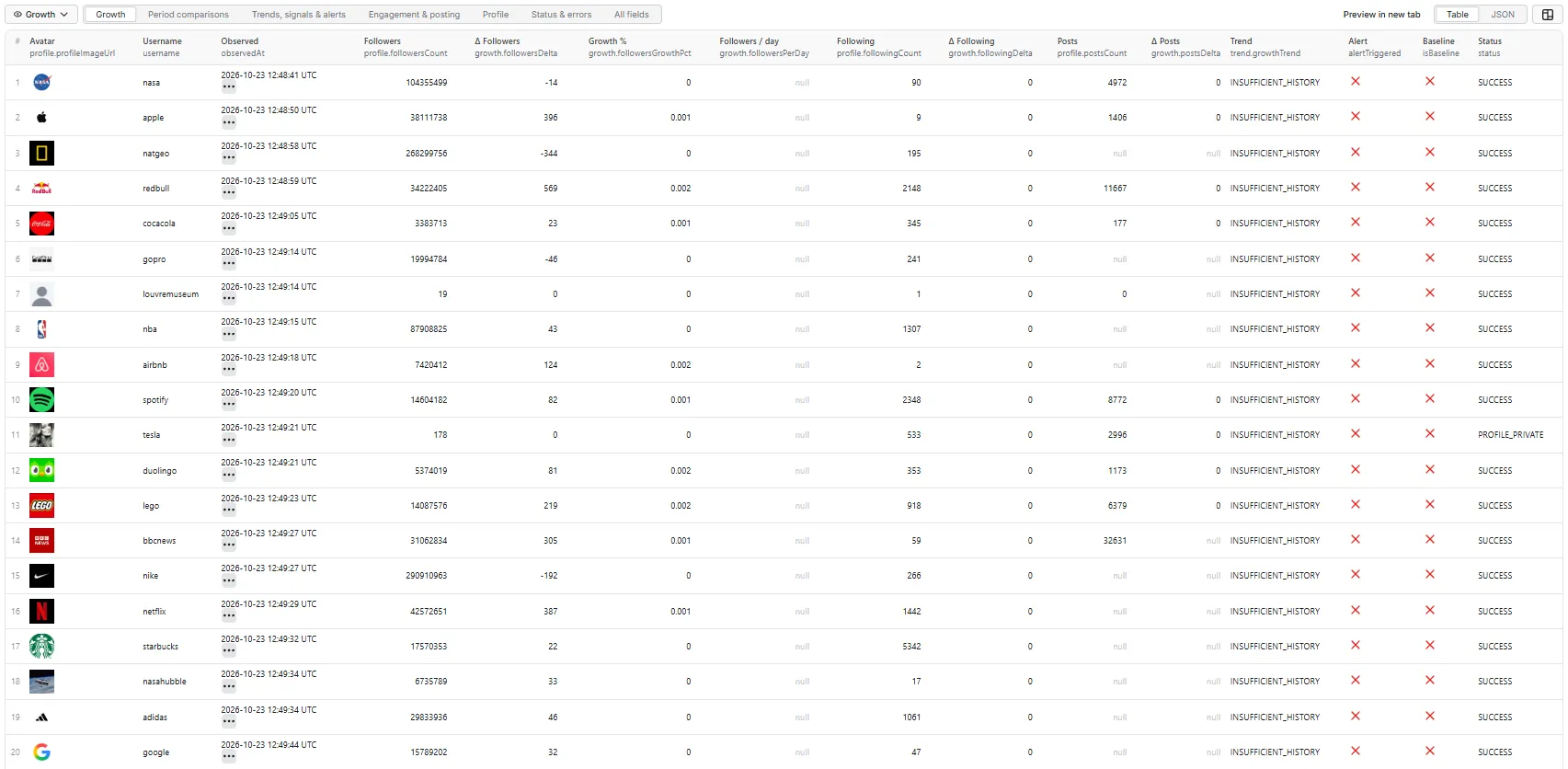
The records below come from a real run with this input: 20 brand and media accounts, the second observation of each, 35 minutes after the first. Over that short gap the deltas are real, but velocity (followersPerDay, under one hour), the trend (needs a previous observation at least 12 hours old) and the 24h/7d/30d periods are still null. They fill in as the schedule builds history. Profile picture URLs are shortened with ….
Full record: a compared profile
postsInLast7Days is null here because Red Bull posts about 15 times a week, so its 9 analyzed posts cover less than 7 days.
Growth tab
Period comparisons tab
On the second observation only previous has a baseline. day1, day7, day30 and day90 stay null until a stored snapshot of roughly that age exists.
Trends, signals & alerts tab
The trend needs a previous observation at least 12 hours old, so this short-gap run has none yet. The long-history example further down shows the filled version.
Engagement & posting tab
Coca-Cola posts about 1.4 times a week, so its 12 analyzed posts reach back past 30 days and both window counts are filled.
Profile tab
Status & errors tab: a private profile
The tesla handle is a small private account (not the company's), so it shows the private-profile row: counters are tracked and charged as a snapshot, with no engagement.
After a few months of daily runs
A compared row then looks like this (illustrative values, trimmed):
Status values
| Status | Meaning | Charged |
|---|---|---|
SUCCESS | Observation compared with history | ✅ |
BASELINE_CREATED | First observation saved | ✅ |
PROFILE_PRIVATE | Private account: counters tracked, no engagement | ✅ |
POSTS_UNAVAILABLE | Counters tracked; recent posts couldn't be fetched | ✅ |
STATE_WRITE_ERROR | Observation returned but couldn't be saved | free |
PROFILE_NOT_FOUND / USERNAME_CHANGED_UNKNOWN / PROFILE_UNAVAILABLE | Account missing, renamed or unavailable | free |
PARTIAL_PROFILE | Counters missing; nothing saved | free |
RATE_LIMITED / BLOCKED / TEMPORARY_FETCH_ERROR / PROVIDER_ERROR | Fetch failed after retries; history untouched | free |
STATE_READ_ERROR | Stored history couldn't be read | free |
INVALID_INPUT | Not a profile username/URL | free |
Run summary
The RUN_SUMMARY record has: profiles requested and succeeded, baselines created, profiles compared, growing, stable and declining counts, follower surges, milestones, alerts, profile and username changes, failed and private profiles, history rows written, state conflicts, duration and fetch latency.
Scale and performance
Up to 1,000 profiles per run. Profile-only tracking (engagement and posting metrics off) is the fastest: one profile lookup each. Engagement adds up to one feed page per 12 posts analyzed (often none for 12 or fewer, when Instagram includes the latest posts with the profile). For very large watchlists, split them into several tasks with their own trackerKey, or schedule them at different times.
Pricing
Pay per event:
- Profile snapshot: per profile successfully observed (see the ✅ statuses above).
- Recent-posts add-on: per block of up to 12 recent posts analyzed for engagement and posting metrics. 12 posts is one block and 24 is two. It's charged only when
includeEngagementMetricsorincludePostingMetricsis on and posts were actually analyzed. It's never charged for private profiles or when posts couldn't be fetched. Turn both off for cheaper, counters-only tracking.
Not charged: invalid inputs, duplicates, missing, unavailable or failed profiles, and rows whose history couldn't be saved. There is no start fee. Rates can differ by Apify plan, so see the Pricing tab for the current rates on yours. This README deliberately doesn't quote figures.
The actor respects the spending limit you set for a run. Before each profile it checks that the limit still covers a snapshot plus the planned add-on blocks. When the limit covers only the snapshot, recent posts are skipped, with a note on the row. When it covers nothing more, the run stops cleanly.
🚦 Proxy policy
Use Apify Datacenter proxy (the default) or no proxy for normal runs. Both work for Instagram profile lookups at this actor's conservative concurrency.
Apify Residential proxy is not supported. The actor fails at startup if apifyProxyGroups includes RESIDENTIAL. In pay-per-event actors, residential bandwidth is billed per GB to the developer, not the run user, so a single bandwidth-heavy run could cost more than the per-result revenue.
If you need residential routing, supply your own residential provider in the proxy editor's Custom proxy URLs field. That traffic goes through your provider, not Apify, and is unaffected:
API and MCP
Call it like any Apify actor: through the Apify API, an Apify client library (JavaScript, Python), or Apify's MCP server so AI agents can use it as a tool. See the API tab for ready-made snippets. A typical integration runs a saved Task on a schedule, then reads the run's dataset (or the instagram-growth-history dataset for full time series) from a webhook.
Interpretation and limitations
- Unofficial. This is not Instagram or Meta analytics.
- Discrete observations. Metrics are what Instagram showed publicly at each run. Growth between runs is a difference, not an exact time of acquisition.
- History begins at your first observation.
- Instagram rounds and caches some counters, so very small changes on very large accounts can lag.
- Deleted or archived posts change the total post count.
- Engagement depends on public post metrics, which Instagram may hide.
- Trends, signals and milestones are Coregent-derived analytics.
- Not provided: follower demographics, organic vs paid follower growth, reach, impressions, story metrics, or any history before tracking started.
Related actors
- Instagram Profile Scraper: one-off profile metadata and public business contact
- Instagram Posts Scraper: posts, carousels and Reels with full engagement
- Instagram Creator Leads Scraper: find creators by niche
Legal and privacy
This is an unofficial tool. It is not affiliated with, endorsed by or sponsored by Instagram or Meta. It processes only publicly accessible information and never accesses private content. Profile data can be personal data. You are responsible for having a lawful basis for collecting, storing and processing it (for example under GDPR or CCPA), including the history this actor keeps in your account, and for complying with Instagram's terms in your use of the data.
Local development
History is stored locally under actor/storage/ in the same named stores, so repeated local runs produce real deltas.


