

LinkedIn Posts Search Scraper
Pricing
from $1.00 / 1,000 post results
LinkedIn Posts Search Scraper
Search public LinkedIn posts by keyword, phrase or hashtag. Get full text, author, publish time, reactions, comments, media, hashtags, mentions, reposts and search position - with the search source on every row. No LinkedIn login or cookies.
Pricing
from $1.00 / 1,000 post results
Rating
0.0
(0)
Developer

Delowar Munna
Maintained by CommunityActor stats
0
Bookmarked
6
Total users
5
Monthly active users
14 days ago
Last modified
Categories
Share
Search public LinkedIn posts by keyword, "exact phrase" or #hashtag, and export each matching post as clean structured data. Every row includes the full text, the author (person or company page), the exact publish time, reactions and comments, media, hashtags, @-mentions, article cards and repost / quote-post context. It also records which query found the post, its position in the results, and where the result came from.
No LinkedIn login, no cookies, no browser extension. You never share a LinkedIn account with this Actor.
What you can do with it
- Market intelligence: see who is talking about "AI agents", "zero trust" or "customer data platform", and what they say.
- Brand and competitor monitoring: find public posts that mention your brand, product or competitors.
- Buyer-intent discovery: search phrases like
"looking for a CRM"or"any recommendations". - Hiring signals:
"we are hiring" data engineers. - Creator and executive discovery: find the people and company pages publishing on a topic, then enrich them with a profile scraper.
- Monitoring: schedule the same search daily or weekly with a
PAST_24_HOURS/PAST_WEEKdate window.
The workflow it enables:
Quick answers
| Question | Answer |
|---|---|
| What can I search? | Plain keywords (AI agents), exact phrases in double quotes ("looking for CRM"), and hashtags (#cybersecurity). Up to 100 queries per run. |
| Do I need a LinkedIn login or cookies? | No. The Actor only reads public posts that anyone can open without signing in. |
| Is this LinkedIn's own search? | No, and the Actor says so on every row. LinkedIn's post search only works for signed-in users. This Actor finds public LinkedIn posts through a public web search index, then opens each post's public LinkedIn page and reads it there. Every row carries searchSource: "WEB_INDEX". |
What does searchSource mean? | Where the result was discovered. WEB_INDEX = a public web search index of LinkedIn post pages. The post data itself (text, author, counts, media) always comes from the post's own public LinkedIn page. |
| How many results per query? | Up to maxResultsPerQuery (1–1,000). Broad topics easily reach hundreds. Niche topics have fewer public posts, and the run stops when the index has no more. coverageStatus tells you which of the two happened. |
| Relevance or recency? | RELEVANCE puts the search index's own top results first, then goes deeper through newest-first date slices. RECENCY returns the newest posts first, working through date slices from newest to oldest. Neither is LinkedIn's in-app ranking. |
| Can I search hashtags? | Yes: #cybersecurity. hashtags is returned without the #. |
| Can I filter by date? | Yes: past 24 hours / week / month / year, or a custom range. Every post's exact publish time is checked, so posts outside the window are dropped and not charged. |
| Can I filter by author or company? | Yes. authors (profile URLs or slugs) and authorCompanies (company pages) keep only posts written by them. mentionedOrganizations keeps posts that @-mention or name an organization. |
| Are company posts included? | Yes. author.type is PERSON or COMPANY. |
| Media and article cards? | Yes: images, native and embedded videos (with duration where shown), documents / carousels (title, page count, cover), and link / article cards (URL, title, publisher). |
| Reposts and quote posts? | Yes. They are never flattened into the reposter's own post: isQuotePost / isRepost are set, quoteText holds the reposter's comment, and originalPost holds the original author, text and media. |
| Why do results differ from what I see when I'm signed in to LinkedIn? | Signed-in search is personalised (your network, language, history) and includes posts that are not public. This Actor sees only public posts that a search index has picked up, so coverage varies by query. |
| How does pricing work? | You pay per post delivered. See Pricing. |
| Can I schedule it? | Yes. Use Apify Schedules with a date window that matches the schedule (e.g. daily + PAST_24_HOURS). |
| API / MCP? | Yes. Run it from the Apify API, any Apify client, integrations (Make, Zapier, n8n) or as a tool for AI agents through Apify's MCP server. |
Input examples
Minimal
Several queries, newest first, last month
Buyer intent, text and image posts only
Posts by specific people
Author filters keep only posts written by the listed profiles. Put the author's name in the query too, so the search finds their posts in the first place.
Posts by company pages
Posts that mention organizations
Custom date range
Input fields
| Field | Default | Notes |
|---|---|---|
queries | ["AI agents"] | Keywords, "exact phrases", #hashtags. Identical queries are merged. |
maxResultsPerQuery | 100 | 1–1,000 posts saved per query. |
sortBy | RELEVANCE | RELEVANCE or RECENCY. |
datePosted | ANY_TIME | ANY_TIME, PAST_24_HOURS, PAST_WEEK, PAST_MONTH, PAST_YEAR, CUSTOM. |
postedAfter / postedBefore | empty | YYYY-MM-DD (UTC), used with CUSTOM. |
authors | [] | Profile URLs or slugs. Posts written by these people. |
authorCompanies | [] | Company page URLs, slugs or exact page names. Posts published by these pages. |
mentionedOrganizations | [] | Posts that @-mention or name one of these (up to 10). Also added to the search. |
contentTypes | [] (all) | TEXT (text-only), IMAGE, VIDEO, ARTICLE, DOCUMENT, REPOST, QUOTE_POST. |
includeMedia | true | Media objects per post. |
includeTopComments | false | Up to 3 top comments shown publicly on the post. A preview, not full threads. |
includeRawData | false | Raw structured data + search hit under raw. |
deduplicateAcrossQueries | false | Return each post once per run instead of once per query. |
proxyConfiguration | Apify Proxy | See Proxy policy. |
How filters combine: query AND date AND authors AND author companies AND mentioned organizations AND content types. Inside one filter, the values are OR'ed: "contentTypes": ["IMAGE", "VIDEO"] means image or video.
authors and authorCompanies filter the posts found for your queries; they do not search for everything a person has posted. To collect one person's full post history, use a LinkedIn profile posts scraper instead.
Output
One row per matching post, in the Posts tab of the dataset. Export it as JSON, CSV, Excel or HTML.
Posts: table view
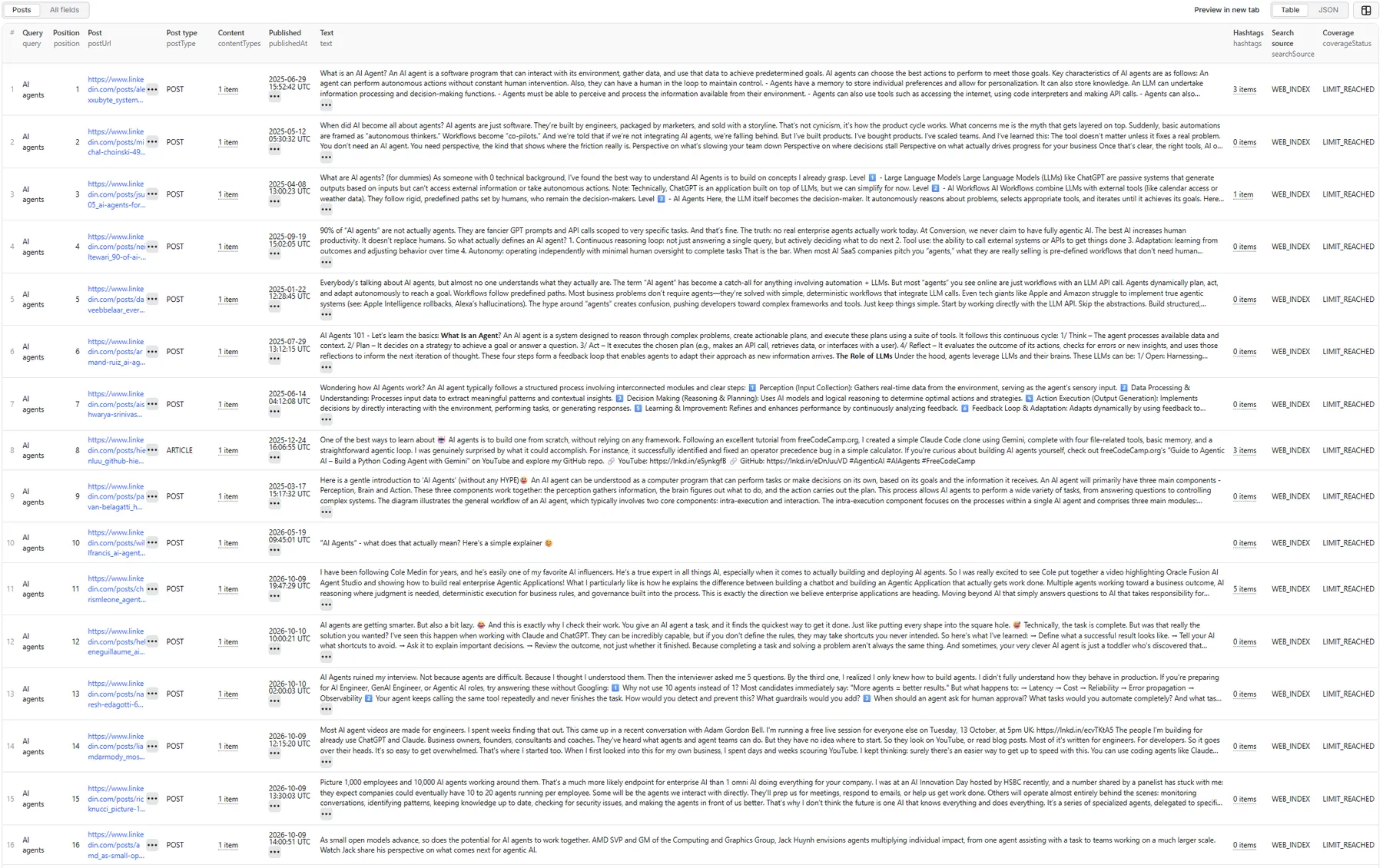
Posts: sample record (JSON)
A real row from a default run (query AI agents). This one is a company-page video post:
Field notes
position: the post's place in the results for that query, in discovery order. Positions 1–10 are the search index's own ranking. Posts dropped by a filter or unavailable keep their number, so a filtered run can have gaps (1, 2, 5, …). Results are never re-ranked locally.coverageStatus:LIMIT_REACHED(yourmaxResultsPerQuerywas filled),INDEX_LIMITED(the public index had no more matching posts),NO_RESULTS, orPROVIDER_LIMITED(the search stopped early: a provider error, the per-query search budget, or filters that kept almost nothing; the run summary'sstopReasonsays which). Queries over 200 posts save results in batches as they go; rows from an early batch havecoverageStatus: null, and the query's final coverage is in the run summary (queries[]).postType:POST,REPOST,QUOTE_POST, orARTICLE(a post sharing a link / article card). Image, video and document are listed incontentTypesandmediarather than as post types.author.headline: LinkedIn does not show a person's headline on public post pages, so it is usuallynull. Useauthor.profileUrlwith a profile scraper to get it.engagement.repostsCount: alwaysnull. LinkedIn does not show repost counts to signed-out visitors, and the Actor never estimates missing numbers.publishedAt: the exact publish time from the post page. If a page omits it, the time is taken from the post ID, which encodes the creation time.
Web-index coverage, explained
Each query is searched in a public web index of LinkedIn post pages. Results arrive at most 10 per request, so the Actor goes deeper by slicing time into date windows (newest first) and searching each one. That gives depth to hundreds of posts on broad topics. It also means:
- coverage depends on which public posts the index has picked up. A very new post may not be indexed yet.
RECENCYis newest-first by date window. Within a window, posts are sorted by their exact creation time, but an index can date a page slightly differently from LinkedIn, so the order across windows is close to chronological, not guaranteed.- you never get posts that are only visible to signed-in users.
Run summary
Each run saves a RUN_SUMMARY record in the default key-value store. It includes queries run, succeeded and failed; posts saved; duplicates skipped; posts filtered out (and by which filter); posts that were not public; per-query status (SUCCESS, NO_RESULTS, PARTIAL_RESULT, RATE_LIMITED, BLOCKED, PROVIDER_ERROR) with coverage; and the search source used. Failed queries are also saved as RETRY_INPUT, a ready-to-use input for a re-run. One failed query never fails the whole run.
Pricing
This Actor uses pay-per-event pricing. You pay only for posts delivered to your dataset:
- Post result: charged once per unique post saved for a query.
You are not charged for search requests, retries, pagination, duplicates, posts removed by your filters, posts that turn out not to be public, failed queries, or the run summary. A run that finds nothing costs nothing in results.
The same post found by two different queries is saved, and charged, once per query, because each row keeps its own query and position. Turn on deduplicateAcrossQueries to get and pay for each post only once per run.
Current prices are on the Pricing tab of this Actor's page, and the per-post price can differ by Apify plan. This README deliberately doesn't quote figures, so it never shows an outdated price. Your Apify per-run spending limit is respected: the Actor stops searching once it has found as many posts as your limit can pay for, and saves them.
🚦 Proxy policy
Post pages are fetched from LinkedIn's public site. Use Apify Datacenter proxy (the default) or no proxy for normal runs. Both work for public LinkedIn post pages at this Actor's conservative concurrency.
Apify Residential proxy is not supported. The Actor fails at startup if apifyProxyGroups includes RESIDENTIAL. Reason: in pay-per-event Actors, residential bandwidth is billed to the developer, not the run user, so a single bandwidth-heavy run could exceed the per-result revenue.
If you genuinely need residential routing, supply your own residential provider via the proxy editor's Custom proxy URLs field. That traffic goes through your provider, not Apify, and is unaffected:
Limitations
- Public posts only. Posts limited to connections, groups or signed-in users are never returned.
- Index-based discovery. Coverage depends on what the public web index has picked up, and varies by query. The Actor never claims a complete result set; it reports
INDEX_LIMITEDwhen the index runs out. - Filters narrow, they don't widen the search.
authors,authorCompanies,contentTypesandmentionedOrganizationsare checked on each post the search finds. If a filter keeps fewer than about one post per search request after the first few requests, the query stops early withPROVIDER_LIMITED(stopReason: filter-yield-too-low) rather than paging through posts that won't match. Rare combinations can return few or no posts; widen the query or loosen the filter. - No author title or industry filters. Public post pages do not show a person's headline or industry, so these cannot be verified reliably and are not offered.
- Repost counts are not public (
repostsCountisnull). - Top comments are a preview (up to 3 that LinkedIn shows publicly), not full threads.
- Results can differ from LinkedIn's signed-in, personalised search.
Works well with
- LinkedIn Profile Scraper: pass
author.profileUrlto get headlines, experience and more. - LinkedIn Profile Posts Scraper: once you know the person, collect everything they post.
- LinkedIn Company Employees Scraper and Work Email Finder: go from the companies you discovered to the people behind them.
Compliance and privacy
This Actor is an unofficial tool and is not affiliated with, endorsed by or sponsored by LinkedIn. It processes publicly available professional content only and does not log in, collect credentials or bypass any privacy setting. Public posts can contain personal data. You are responsible for processing results lawfully (for example under GDPR / CCPA) and in line with LinkedIn's terms and your own use case.


