

Keyword Ideas Generator: Long-Tail Keywords — Keyfern
Pricing
Pay per event
Keyword Ideas Generator: Long-Tail Keywords — Keyfern
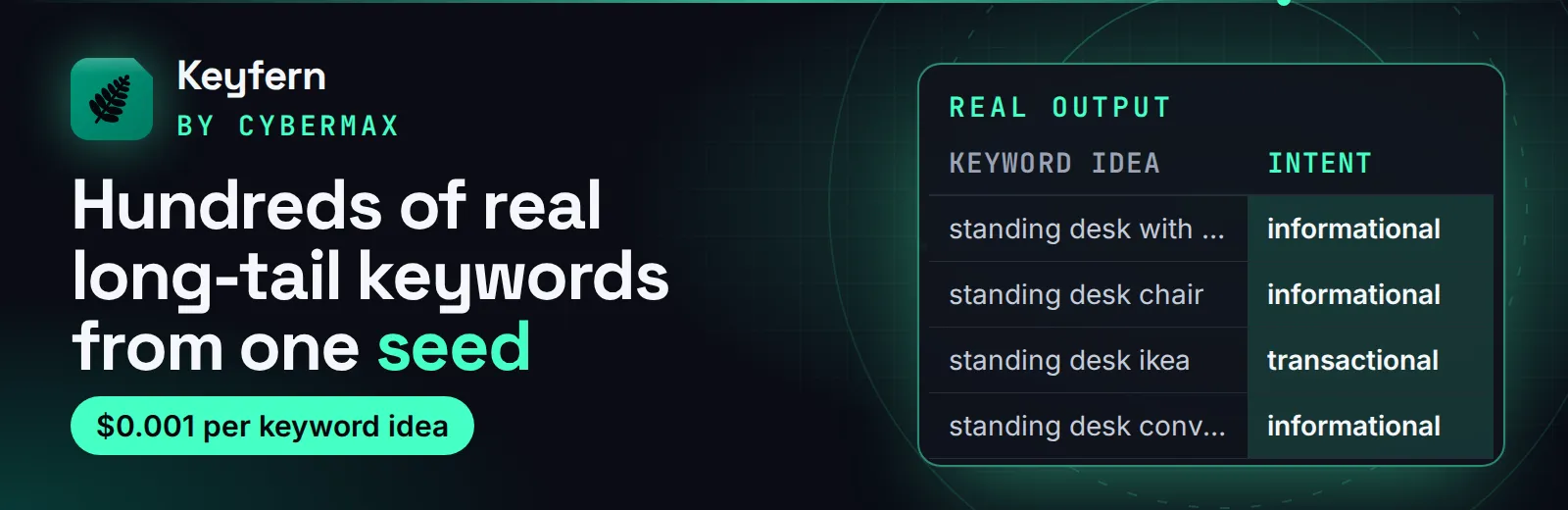
Hundreds of real long-tail keywords from one seed. Keyword research and Google autocomplete scraper: keyword suggestions from Google, YouTube, Bing, Amazon and DuckDuckGo, with search intent, clusters, signal score, Google Trends verdicts and new-keyword alerts. $0.001 per keyword idea.

Keyfern — keyword ideas & autocomplete scraper for Google, YouTube, Bing and Amazon
Website: cybermaxtools.com/store/keyfern-keyword-ideas · plans, related tools and bundles
Hundreds of real long-tail keywords from one seed
Give it seed keywords; get the phrases people actually type into Google, YouTube, Bing, Amazon and DuckDuckGo, deduped and tagged with intent, cluster and a signal score, for $0.001 per keyword idea.
▶ Try it now with a prefilled input · $0.001 per keyword idea (1,000 ideas = $1); optional Google Trends verdict $0.003 per keyword · Apify's free plan includes $5 of credit a month, enough for up to about 5,000 keyword ideas
Built for: SEO and content writers · YouTube creators · Amazon and e-commerce sellers · PPC marketers and AI content agents
Real output (real run on Apify, 23 Sep 2026: seed "standing desk", Google + YouTube + Bing + Amazon, US):
| Keyword idea | Intent | Cluster | Engines | Score | Google Trends |
|---|---|---|---|---|---|
| standing desk with drawers | informational | drawers | 4 | 100 | rising +111% |
| standing desk chair | informational | chair | 4 | 100 | rising +74% |
| standing desk ikea | transactional | ikea | 4 | 100 | stable +13.5% |
| standing desk converter | informational | converter | 3 | 90 | – |
| standing desk and walking pad | informational | walking | 4 | 90 | – |
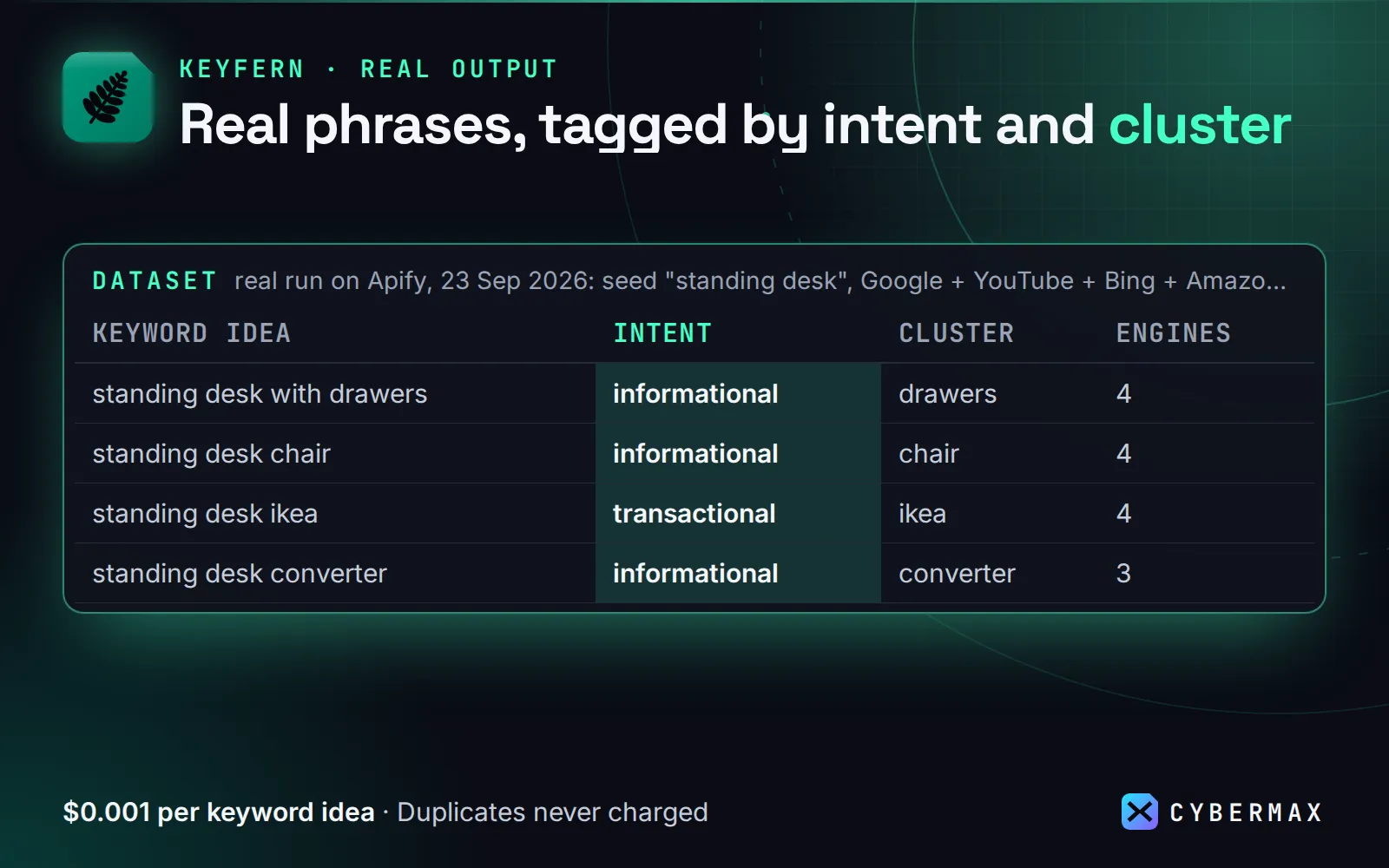
The engines column counts how many engines suggested the idea; the 0–100 signal score rewards ideas suggested by several engines and near the top. Trend verdicts (rising, falling, spiking, stable) are optional and only for the top ideas you choose.
First try: the prefilled input (seed standing desk, best 8 ideas, no trend check) runs in about 15 seconds
and costs about $0.008.
Why Keyfern
- Five autocomplete engines in one run. Most autocomplete scrapers read Google only. Keyfern asks Google Search, YouTube, Bing, Amazon and DuckDuckGo (pick any mix) and merges the answers. A phrase suggested by several engines is a stronger idea, and the score shows it.
- The whole long tail, not ten suggestions. Each seed is expanded A–Z (
standing desk a…standing desk z), with question words (how,what,why,can,is,does, …) and with prepositions and comparisons (for,with,without,near,vs, …). One seed on 3 engines = 147 lookups in a few seconds. In our test,standing deskon all five engines gave 1,041 unique ideas. - Sorted and labelled, ready to use. Each idea is tagged
question,commercial,transactional,local,comparisonorinformational, grouped into a cluster (converter,treadmill,ikea…), and ranked. A per-seedSUMMARYlists the top clusters, the top questions (FAQ and blog topics) and the intent mix. - Trend direction, not invented search volume. Autocomplete doesn't reveal search volume, and Keyfern doesn't make one up. Instead it can check the top N ideas on Google Trends (the same engine as our Swellmeter Actor) and tell you whether interest is growing.
- New-keyword alerts.
monitor: truereturns only ideas you haven't received before for your seeds, plus ideas whose trend verdict flipped, so a weekly scheduled run costs only for what's new.
Real example (live run, 2026-09-23, seed standing desk, Google + YouTube + Bing + Amazon, US):
196 of 196 autocomplete calls answered in about 6 seconds. Top ideas: standing desk chair · standing desk ikea · standing desk with drawers · standing desk with storage · standing desk with wheels. Biggest clusters: walking, treadmill, gaming, keyboard. Google Trends: "standing desk chair" rising (+74% last quarter of the year vs the first), "standing desk ikea" stable.
What you get (one record per keyword idea)
| Field | Meaning |
|---|---|
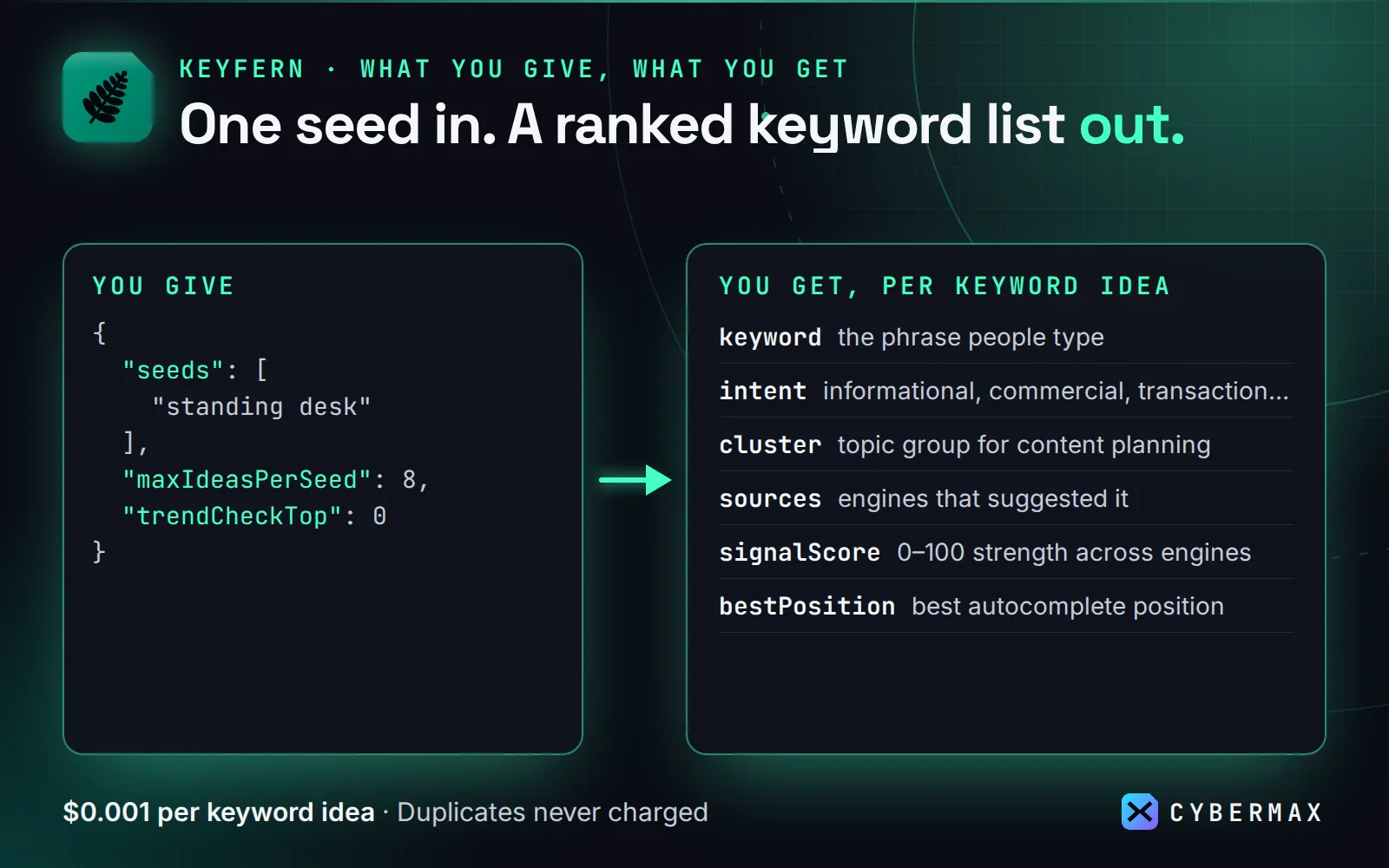
keyword | The suggested search phrase (lowercased, deduped) |
seed | The seed it came from |
signalScore | 0–100 relative ranking signal: how many engines suggest it, how high, how often, and whether it shows up for the bare seed. Not search volume. |
intent | question, commercial, transactional, local, comparison or informational (inferred from the wording) |
cluster, modifier | The main word the idea adds to the seed, and all the words it adds |
sources, sourceCount | Engines that suggested it |
bestPosition, hits | Best rank in any suggestion list (1 = top), and how many lookups returned it |
suggestedOnSeedQuery | true if the engine suggests it for the bare seed (the strongest ideas) |
foundVia | How it was found: seed, alphabet:c, question:how, preposition:vs… |
trend | Only for the top N ideas: { status, direction, trendChangePct, recentChangePct, peakDate, exploreUrl } |
language, country, fetchedAt | Run settings and time |
change, changedFields, previousTrendDirection | Monitor mode only: new or changed (trend verdict flipped) |
The key-value store record SUMMARY has, per seed: idea count, intent mix, top 15 clusters, top 20 ideas,
top 15 questions, and per-engine success counts.
Input
| Option | Default | |
|---|---|---|
seeds | Up to 50 seed keywords | |
sources | google, youtube, bing | Any of google, youtube, bing, amazon, duckduckgo |
language, country | en, US | Language and country of the suggestions (also picks the Amazon marketplace and the Trends region) |
expandAlphabet, expandQuestions, expandPrepositions | all on | Which expansions to run |
mustContainSeed | true | Drop suggestions that don't contain the seed's words |
maxIdeasPerSeed | 300 | Best N ideas kept per seed, which also caps the cost (300 ideas = $0.30) |
minSignalScore | 0 | Keep only ideas at or above this score |
intents | all | Keep only some intents, e.g. ["question"] for FAQ research |
trendCheckTop | 5 | Google Trends verdict for the N best ideas per seed (0 = off, max 25) |
trendTimeRange | today 12-m | Trends window: past 30 days, 90 days, 12 months or 5 years |
monitor | false | Only ideas not returned by an earlier monitor run, plus trend-verdict changes (see below) |
monitorKey | Optional name for the monitor's saved state, to keep several seed sets apart |
Monitor mode: only new keyword ideas since the last run
Turn on monitor for scheduled runs. Keyfern remembers, per seed, language and country, every idea it already
returned and outputs only:
- ideas it has never returned for that seed:
"change": "new"; - ideas whose Google Trends verdict changed (both runs had a verdict):
"change": "changed","changedFields": ["trend.direction"]and"previousTrendDirection".
Shape of a monitor record (other fields as in the normal output below):
Unchanged ideas are left out and not charged. The first monitor run returns everything ("change": "new").
Ideas that drop out of autocomplete for a while aren't reported again when they come back. maxIdeasPerSeed
applies before the comparison, so "new" means "new in your top N". The SUMMARY record gets new/changed/unchanged
counts. State lives in your named key-value store keyword-ideas-monitor (one record per monitorKey, or derived
from the seeds, sources, language and country); delete the record to start over.
Ready-made inputs (first try in one click)
No account yet? See real results first on the free demo page: keyword ideas for 20 popular topics.
Paste one into the JSON tab of the input form (or send it to the API) and press Start. Each is sized so the first run is quick and cheap; you pay only for results (Apify's compute is included in the price).
| Preset | What you get | Cost |
|---|---|---|
| 8 long-tail ideas for one seed | 8 ideas with intent, cluster, engines and signal score | $0.008 |
| Questions people ask | 8 question-style searches (how/why/can…) | $0.008 |
| Amazon buyer searches + 1 trend verdict | 5 product searches + a rising/falling verdict for the top one | $0.008 |
8 long-tail ideas for one seed
Questions people ask
Amazon buyer searches + 1 trend verdict
Same thing from a script (returns the results directly):
Output (trimmed, real record)
Why it pays for itself
- By hand: typing a seed plus each letter a–z into one search box and copying the suggestions takes about 15 seconds per letter (estimate), so one seed on 3 engines ≈ 20 minutes before deduping; here 300 deduped, tagged ideas cost $0.30.
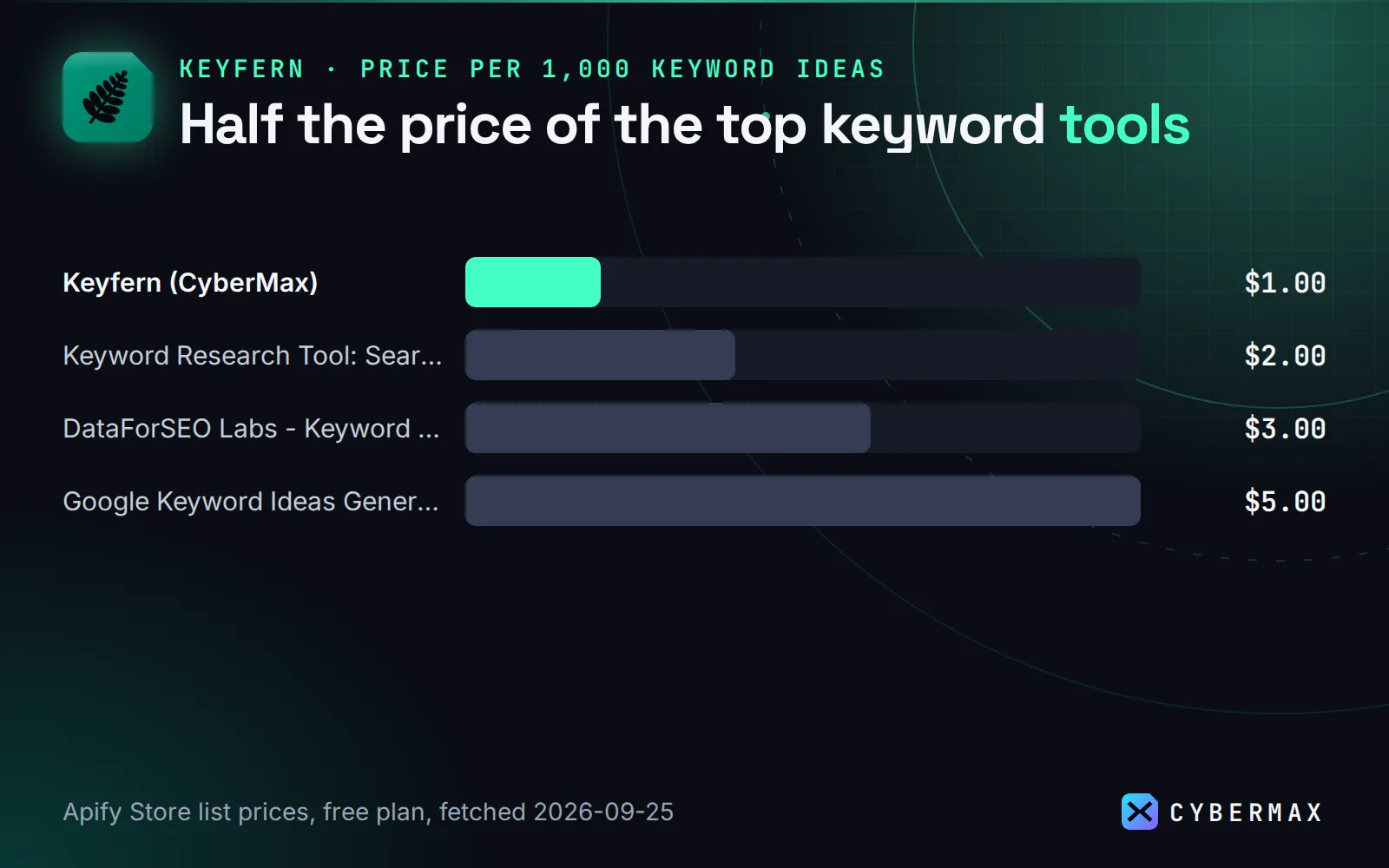
- Google-only rival memo23/google-suggest-scraper (74 users) charges $0.0005 per suggestion plus $0.005 per run (Apify Store pricing, checked 25 Sep 2026). Keyfern costs more per row ($0.001) but merges five engines into one deduped list and adds intent, cluster, signal score and optional trend verdicts.
- Top "keyword research" Store result s-r/google-keywords (496 users) charges $0.003 per keyword with volume and CPC (Apify Store pricing, checked 25 Sep 2026); Keyfern is $0.001 per idea when you need real phrasing and many ideas rather than volume numbers.
- Monitor mode returns and charges only ideas you haven't received before, so a weekly new-keyword alert costs cents.
▶ Run it on your own list: the example input is already filled in, so the first run takes one click.
Pricing
| Event | Price | Charged when |
|---|---|---|
keyword-idea | $0.001 | One unique idea is returned (capped by maxIdeasPerSeed) |
trend-checked | $0.003 | One idea gets a Google Trends verdict. No-data and failed checks are free |
Typical costs: one seed with 300 ideas and 5 trend verdicts = $0.315. 100 question ideas only
(intents: ["question"], maxIdeasPerSeed: 100, trendCheckTop: 0) = $0.10. Set a maximum charge per run
in Apify and Keyfern stops cleanly when it's reached.
When NOT to use Keyfern
- You need search volume, CPC or keyword difficulty numbers. Autocomplete doesn't expose them; use a paid-data SEO tool. Keyfern gives you real phrasing and trend direction, never estimated volumes.
- You need the full Trends picture for a few keywords (timeline, regions, related queries): use Swellmeter — Google Trends.
- Very long seeds (6+ words) get few suggestions; use 1–3 word topics.
FAQ
Why not a Google-only autocomplete scraper? It is cheaper per row and fine if Google is all you need. Keyfern asks up to five engines, so you also see YouTube and Amazon phrasing, and a phrase suggested by several engines scores higher.
Why not a keyword tool with search volume? Autocomplete can't reveal search volume and Keyfern never invents it. Use a volume tool to size your shortlist; use Keyfern to find the long-tail phrases and questions first, cheaply.
Why not type the seed into Google myself? You see about ten suggestions per query. Keyfern runs the A–Z, question and preposition expansions across engines in seconds and hands back one sorted, deduped list.
Can I call it from Python, JavaScript or plain HTTP? Yes. POST your input JSON to https://api.apify.com/v2/acts/cybermax~keyword-ideas/run-sync-get-dataset-items?token=YOUR_APIFY_TOKEN and the results come back in the response, or use the apify-client package for Python or JavaScript. Recipes for Make, Zapier, n8n and Google Sheets are in Integrations.
Is it legal to use? Keyfern collects public autocomplete suggestions, the same ones anyone sees while typing a search. No login and no personal data. This is general information, not legal advice.
Is this a Google Keyword Planner alternative? For ideas and phrasing, yes: it expands a topic into the long-tail searches people actually type on Google, YouTube, Bing and Amazon, with a Google Trends verdict on the best ones. It doesn't estimate search volume or CPC (see "When NOT to use Keyfern").
How many keyword ideas do I get per seed? Up to 2,000 (maxIdeasPerSeed, default 300), ranked by how many engines suggest a phrase and how high. Up to 50 seeds per run.
Can I get only question keywords for FAQ or blog posts? Yes: "intents": ["question"]. The question expansion ("how/what/why … + seed") is on by default.
Which languages and countries? Any two-letter language and country (en/US, de/DE, fr/FR, ja/JP…). The country also picks the Amazon marketplace and the Google Trends region.
How much does it cost compared with Semrush or Ahrefs scrapers? $0.001 per idea. The most-used keyword Actors on the Store charge $0.002–$0.012 per keyword result (Apify Store, 24 Sep 2026), and Keyfern needs no SEO-suite account.
Can an AI agent use it? Yes, through Apify's MCP server (https://mcp.apify.com/?tools=cybermax/keyword-ideas), and it's in the official MCP Registry.
Notes
Keyfern reads the public autocomplete endpoints that each engine's own search box uses: no login, no API key, no personal data. Suggestions change over time and by country and language. Calls go out directly and fall back to Apify Proxy when an engine throttles.
Run it on a schedule
Weekly new-keyword report: Apify Console → Schedules → Create new → cron 0 8 * * 1 (8:00 every Monday,
or 0 8 * * * daily) → Add Actor → cybermax/keyword-ideas with your input (or a saved task) including
"monitor": true. Or with the API:
With monitor mode a scheduled run only pays for new ideas and changed trend verdicts. To get notified, add a webhook, Slack or email notification on Run succeeded in the Actor's Integrations tab.
Integrations
Make: Apify app → "Run an Actor" (cybermax/keyword-ideas, input JSON, "Run synchronously" on) → "Get dataset
items" → Google Sheets "Add a row" / Airtable.
Zapier: Apify app → "Run Actor" action (or "Finished Actor Run" trigger for your schedule) → "Find dataset items" → Google Sheets / Notion / Slack.
n8n: Apify node ("Run actor and get dataset"), or an HTTP Request node:
Google Sheets: Apify's Google Sheets integration (Actor → Integrations), or paste into a cell to pull the last run as CSV:
Python (pip install apify-client):
JavaScript (npm i apify-client):
AI agents (MCP): Keyfern is a tool in any MCP client via Apify's hosted MCP server,
https://mcp.apify.com/?tools=cybermax/keyword-ideas (header Authorization: Bearer <your Apify token>). The
records are compact and flat, so an agent can pick blog topics, FAQ questions, product keywords or video titles
directly. Claude Desktop / Cursor config:
Example prompt: "Find 50 question keywords about cold brew that are rising on Google Trends."
Free datasets from the same pipeline
Open data on Hugging Face, built by the same code as this Actor. Download it free; run the Actor when you need your own list, fresh data or alerts.
- Keyfern: what people search about superintelligence: a worked example of this Actor's output on one topic.
Start now
▶ Try Keyfern with a prefilled input · $0.001 per keyword idea (1,000 ideas = $1); optional Google Trends verdict $0.003 per keyword. Questions or a missing field? Open an issue on the Store page and it gets answered the same day.
Also from CyberMax
- Swellmeter — Google Trends: the full Trends picture (timeline, related and rising queries, regions, trending now) for your best ideas.
- Linkheft — Domain authority: how strong the sites ranking for your keywords are.
- Capturewren — Website screenshots: screenshot and text of the pages ranking for your keywords.
- DomainDNA — Tech stack & domain intel: what the competing sites are built with.
- Gripeline — App reviews: the words real users use in App Store and Google Play complaints.
- Frontpeek — Hacker News scraper: the HN front page, keyword search and alerts when a domain is posted.
- Sitemoss — sitemap URL extractor: every page URL of a site from its sitemaps, with new-page alerts.
All tools: Insidewell · HireHeat · HireHeat Jobs · Hollerdex · Printwren · Logolark
Changelog
- 2026-09-23: Monitor mode (
monitor,monitorKey: only keyword ideas not seen before for your seeds, plus trend-verdict changes), schedule & integration recipes.
Found Keyfern useful? A quick rating on its Store page helps others find it.
Made by CyberMax.


