
Bulk QR & Barcode Generator - PNG, SVG, Label PDFs
Pricing
$0.50 / 1,000 code generated (png and/or svg saved)s
Bulk QR & Barcode Generator - PNG, SVG, Label PDFs
Bulk QR codes and barcodes: QR (colours; logo in PNG only), Micro QR, EAN-13, EAN-8, UPC-A, UPC-E, ISBN, Code 128, GS1-128, Code 39, Code 93, ITF-14, Codabar as PNG and SVG, plus label PDFs and a ZIP. Check digits validated. $0.0005 per code.
Pricing
$0.50 / 1,000 code generated (png and/or svg saved)s
Rating
0.0
(0)
Developer

DigiVibeTech
Maintained by CommunityActor stats
0
Bookmarked
2
Total users
1
Monthly active users
2 days ago
Last modified
Categories
Features
Share
Bulk QR & Barcode Generator — bulk QR codes and barcodes: QR (colours; logo in PNG only), Micro QR, EAN-13, EAN-8, UPC-A, UPC-E, ISBN, Code 128, GS1-128, Code 39, Code 93, ITF-14, Codabar as PNG and SVG, plus label PDFs and a ZIP.
Try it free: press Start — the prefilled input runs a small real job (up to 20 × code generated, about $0.010 in events). Apify's free plan includes monthly platform credit, so a first test costs you nothing. You can also set a maximum cost per run.
- What you get:
value,formatName,encoded,pngUrl,svgUrl,fileName - Who it's for: retailers, warehouses, event organisers and marketers
- Price: $0.0005 per code generated
- Data source: Generates codes from the data you enter; nothing is fetched from third-party sites.
What is Bulk QR & Barcode Generator?
Turn a list of values or CSV rows into QR codes and barcodes in bulk: PNG and/or SVG files for each valid value (up to maxCodes, default 10,000), a printable label sheet PDF and one ZIP with the run's files. Made for shops, warehouses, events, schools and anyone printing product, stock, asset or ticket labels.
Inspect the bounded file sample without starting a paid run. Pay per event: $0.0005 per generated code.
✅ Why this one
- QR, Micro QR and 11 barcode types (EAN-13, EAN-8, UPC-A, UPC-E, ISBN, Code 128, GS1-128, Code 39, Code 93, ITF-14, Codabar) in one run, with PNG and SVG per code.
- Check digits are added or verified: a wrong EAN/UPC check digit is reported with the right one and not charged.
- $0.0005 per code with no start fee.
- The bounded sample covers all 13 supported code types plus automatic selection: 28 PNG/SVG files and all 14 PDF labels were independently decoded on 7 November 2026.
Formats
- QR code (L/M/Q/H error correction, full Unicode text, optional logo in the centre of PNG files, colours) and Micro QR
- EAN-13, EAN-8, UPC-A, UPC-E, ISBN-13, ITF-14: give the number without its check digit and it is added; a wrong check digit is reported with the right one
- Code 128, GS1-128 (application identifiers such as
(01)...), Code 39, Code 93, Codabar - Automatic: valid EAN/UPC/ITF numbers become barcodes, links and text become QR codes. A row can set its own
format.
⬇️ What data you get
- One result per code:
value,format,encoded(with check digit),pngUrl,svgUrl,fileNameand your other CSV columns underfields. - PNG (sharp whole-pixel modules, any width up to 4000 px, transparent background option) and SVG (vector, for print).
- Label sheet PDF (free): Avery L7160, L7159, L7163, L7173, L7651, L7656 (A4), 5160, 5163, 5167, 22806 (Letter) or a custom layout; text lines from your columns, copies per row, skip used labels, outlines for a test print. Bars and modules are vector shapes.
- CODES.zip (free) with the PNG/SVG files of each code generated in the run, plus the label PDF when one is made.
- Prefix and suffix to turn product numbers into links, and file names from a column.
🎯 Use cases
- Print EAN-13 / UPC barcode labels for a product range
- Create hundreds of QR codes with your colours for flyers or tickets
- Generate ITF-14 / GS1-128 codes for cartons
▶️ How to use
- Open the actor; the input is prefilled with a small real example.
- Replace it with your own input and set
maxCodesto control the cost. - Press Start. Results appear in the Output tab (Overview view).
- Download JSON, CSV or Excel, call the results via API, or schedule the actor.
⚙️ Input
| Field | Default | Meaning |
|---|---|---|
items or csv | (required) | Values, or CSV rows with a header |
valueField | value | Column to encode (CSV) |
format | auto | Code type |
outputFormats | png, svg | Files per code |
size | 400 | PNG width in pixels |
errorCorrection | M | QR level (always H with a logo) |
logoUrl, foreground, background, transparentBackground | QR style; the logo is added to PNG output only; SVG and label PDF are without the logo | |
labelTemplate | none | Label PDF layout |
labelTextFields, copiesField, skipLabels, labelBorder | Label options | |
maxCodes | 10000 | Most codes per run |
Example input
An Apify cloud run of build 1.0.3 with exactly this input on 10 November 2026 (run fO76GvYvBlHJ3aRky) generated the QR code and the EAN-13 barcode as PNG and SVG, 2 labels on one L7160 page and a 5-file CODES.zip, and was charged as 2 code-generated events. Both PNG files and both labels in the PDF decode back to their input values. That proof run used build 1.0.3. Build 1.0.4 changed only README text and one input-field title. Build 1.0.5 changed the logo handling, which this input does not use: with a logo, QR codes always use level H, a logo that cannot be downloaded or used stops the run before any code is made, and each QR code with the logo is decoded before it is saved.
⬆️ Output
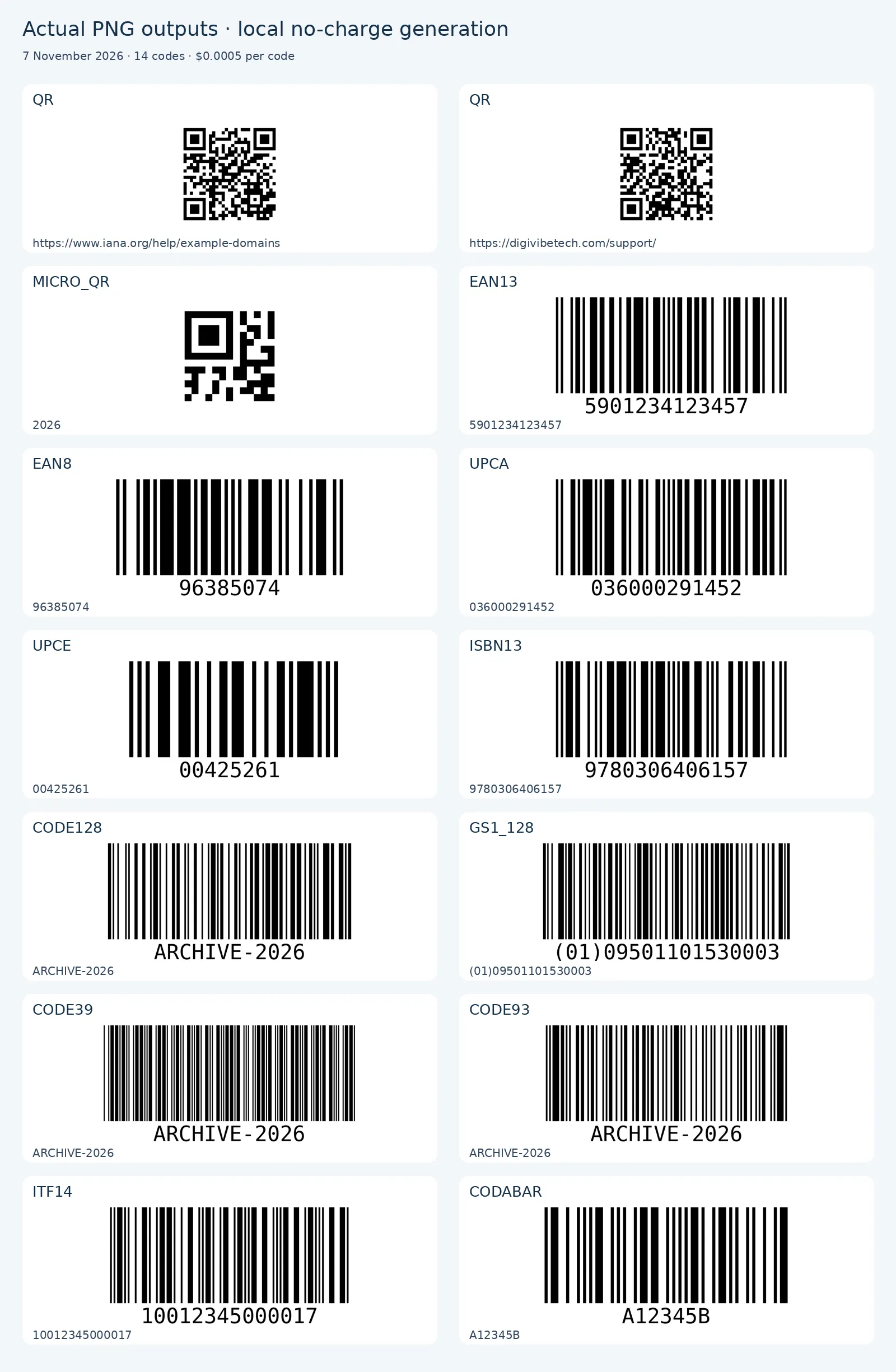
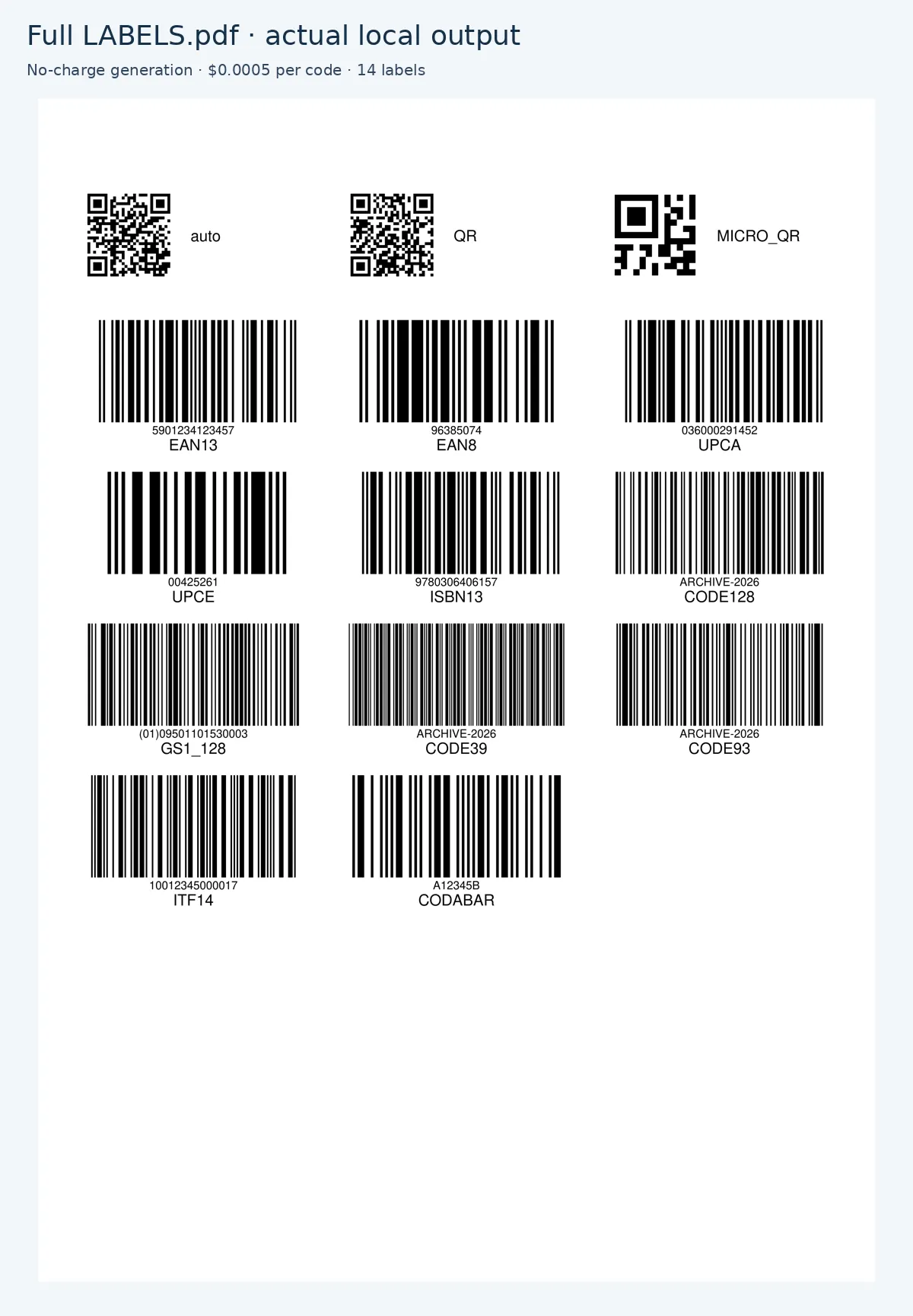
Open the sample gallery, download the complete ZIP, or open the full label PDF. The JSON and CSV use relative file paths in the same folder, not Apify storage URLs. These are actual generated files from a local no-charge run of this actor's source on 7 November 2026. No Apify cloud run or cloud billing is implied. The sample contains 14 codes; at $0.0005 per code, a paid run with the same 14 codes costs $0.007. Numeric values are symbology examples, not claims of allocated retail identifiers or real stock records.
Output views
Example record (real run b6dU1A4PuS1DOgsx9, 2026-11-11)
💵 Pricing and cost estimate
| Event | Price |
|---|---|
| Code generated (PNG and/or SVG saved) | $0.0005 |
The label PDF, the ZIP and invalid values are free, and there is no start fee. With a logo, a QR code that the decoder check cannot read back is not saved and not charged; if the logo cannot be downloaded, is not a PNG, JPEG, GIF or WebP image, or is larger than 2 MB, the run stops before making any code and nothing is charged. 1,000 generated codes cost $0.50. Set a maximum cost per run and the actor stops before going over it; values it did not generate are not charged.
Cost estimate
| Code generateds | Cost |
|---|---|
| 100 | $0.050 |
| 1,000 | $0.50 |
| 10,000 | $5.00 |
You pay only for these events: no subscription.
🔌 Integrations and API
Run it from n8n, Make, Zapier, Clay or any tool that can call an HTTP endpoint, connect a webhook to get notified when a run finishes, or let AI agents call it through the Apify MCP server (mcp.apify.com).
Run it and get the results in one call:
Python (pip install apify-client):
Use it with Make, Zapier or a webhook
Send rows from a sheet or shop export as csv, then read CODES.zip or LABELS.pdf from the key-value store (links are in SUMMARY as zipUrl and labelsUrl).
⚠️ Limits
- PDF417, Data Matrix and Aztec are not included.
- Label text uses a standard font (Latin letters, numbers and common symbols such as €); QR codes themselves hold any Unicode text up to the QR capacity limit (2,331 bytes of plain ASCII text at the default M level, a little less for non-ASCII text and less at Q or H); longer values are reported and not charged.
- Files stay in the run's key-value store for its retention period; download the ZIP to keep them.
- Code 128 accepts printable ASCII characters only.
🛡️ Data source, privacy and legality
Generates codes from the data you enter; nothing is fetched from third-party sites.
Responsible use
Without a logo URL, no website is crawled. Your values are encoded inside the run; avoid personal, confidential or payment data. Only an optional logo URL is downloaded, once per run (max 2 MB, private addresses refused). When run on Apify, inputs, files, results, logs and event accounting are processed on Apify. An optional logo request also reaches the chosen host.
Data processing
- What it requests: nothing, unless you set
logoUrl. Codes are encoded inside the run from the values you submit. With a logo URL, the actor downloads that one image once per run (at most 2 MB; PNG, JPEG, GIF or WebP) with the User-AgentBulkQRBarcode/1.0 (Apify Actor; logo requested by the run's user; +https://apify.com), so that host sees the request. Logo URLs with login credentials or pointing to private or local network addresses are refused. - What it stores: PNG and/or SVG files per code in the run's default key-value store, plus LABELS.pdf and CODES.zip when requested. One dataset row per code:
value,format,formatName,encoded,fileName, thepngUrl/svgUrlfile links,modulesfor 2D codes and your other CSV columns underfields. The key-value records SUMMARY and OUTPUT hold counts and thelabelsUrl/zipUrllinks; ERRORS lists invalid or skipped values (up to 200 characters of each value). - Personal data: the files reproduce the values you encode and the dataset keeps your extra CSV columns. Do not encode personal, confidential or payment data. The file links give access to the files, so share them only where you mean to.
- Where it runs and how long data is kept: on Apify, which processes the input, run metadata, logs, dataset, key-value store and pay-per-event accounting. The actor sets no deletion period of its own, so retention follows your Apify plan and settings (Apify storage and retention). Download the ZIP to keep the files.
- Billing: one
code-generatedevent at $0.0005 per code, charged after its files and row are saved. Invalid values, QR codes with a logo that fail the decoder check, the label PDF and the ZIP are not charged; a logo that cannot be used stops the run before any charge. See pay-per-event. No seven-day free actor-run window or separate product key applies. - Questions and privacy requests: DigiVibeTech support. The DigiVibeTech website privacy policy covers the website and support; this section covers what the actor itself processes.
❓ FAQ
How much does Bulk QR & Barcode Generator cost?
$0.0005 per code generated. See the cost estimate table above. There is no monthly fee.
Can I try it for free?
Yes. Press Start with the prefilled input: it runs a small real job (up to 20 × code generated, about $0.010 in events). Apify's free plan includes monthly platform credit, which covers a first test.
Is it legal to use Bulk QR & Barcode Generator?
Generates codes from the data you enter; nothing is fetched from third-party sites. Use the results lawfully (terms of the source, GDPR where it applies). This is not legal advice.
Can I use it through the API or an MCP server?
Yes. Every run is available through the Apify API and the official client libraries, and AI agents can call the actor through the Apify MCP server. See Integrations and API above.
Something does not work. Where do I get help?
Open an issue on the Issues tab or use digivibetech.com/support. Include the run ID so we can reproduce it.
📝 Changelog
20 Nov 2026 — listing refresh
- README, listing text and input form restructured to the DigiVibeTech Apify quality standard v1. No feature or price change.
1.0 — builds 1.0.1 to 1.0.5
- First build 2026-10-26, latest build 2026-11-10 (5 successful builds).
🧩 More DigiVibeTech actors
- Bulk Image Converter & Compressor - WebP, AVIF, JPEG, PNG
- Universal Shop Catalog & Price Monitor
- Broken Link & Image Checker - Sitemap or Crawl
- PDF OCR to Markdown - Scanned PDF & Image to Text for RAG
Maintained by DigiVibeTech. Questions or bugs: use the Issues tab or digivibetech.com/support; we reply within 2–5 business days.


