

Universal Shop Catalog & Price Monitor
Pricing
$0.97 / 1,000 product (or change record) delivereds
Universal Shop Catalog & Price Monitor
Product catalogs, prices, stock, GTIN and variants from WooCommerce, Magento, Shopware and PrestaShop shops, with automatic platform detection and sitemap discovery. Change mode, MAP alerts, Google Merchant XML and Meta catalog CSV feeds. $0.00097 per product.
Pricing
$0.97 / 1,000 product (or change record) delivereds
Rating
0.0
(0)
Developer

DigiVibeTech
Maintained by CommunityActor stats
0
Bookmarked
1
Total users
1
Monthly active users
4 days ago
Last modified
Categories
Security
Limited permissionsShare
Universal Shop Catalog & Price Monitor - WooCommerce, Magento, Shopware, PrestaShop
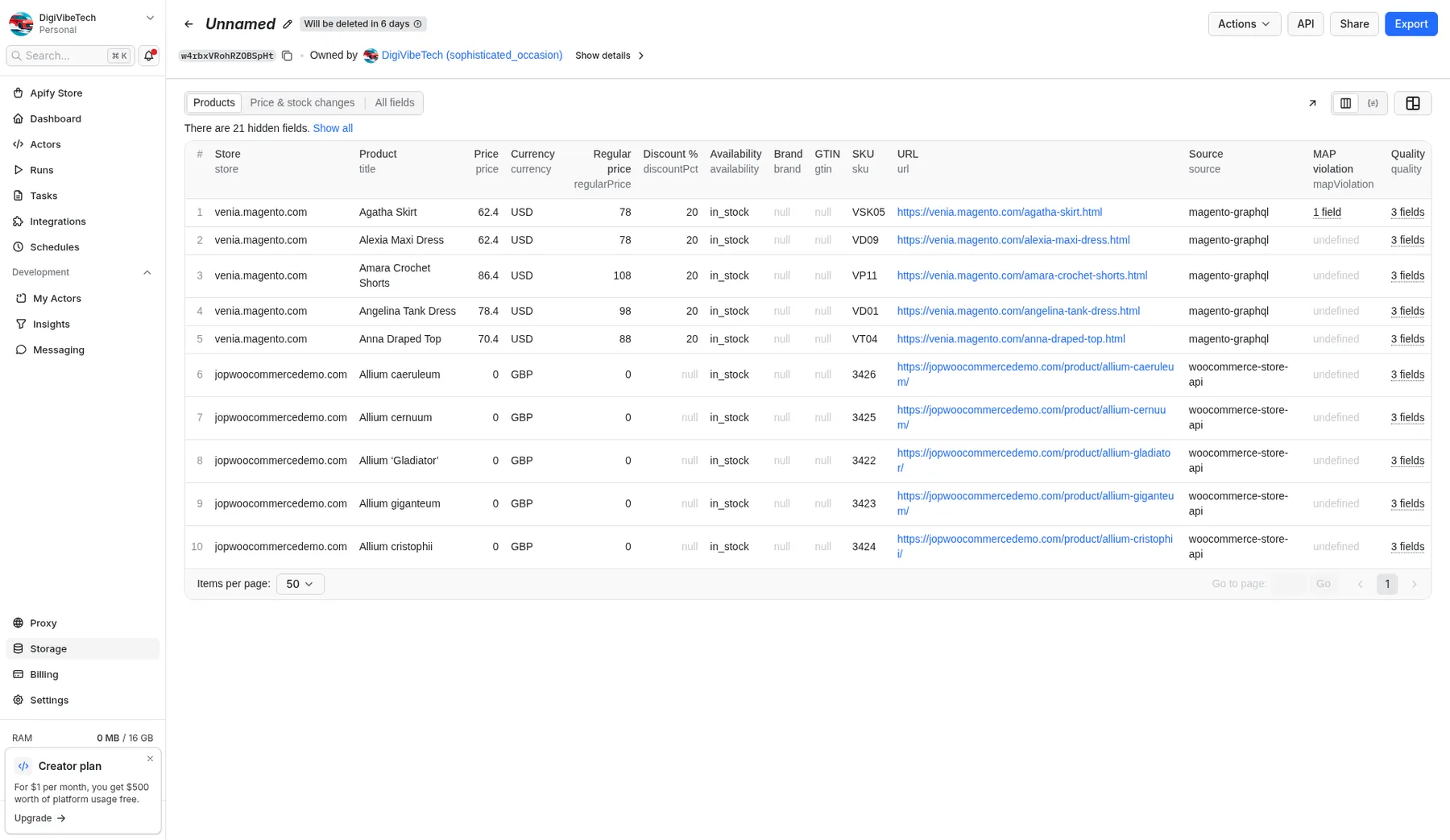
Paste shop homepages and get the whole product catalog (price, currency, stock, GTIN, brand, variants) in one consistent format, whatever the shop runs on. The platform is detected for you, product pages are found through the shop's sitemap, and you can track price and stock changes, flag MAP violations and export Google Merchant and Meta catalog feeds.
$0.00097 per product or change record delivered, no start fee. MAP alerts and feed files are free extras; shops that are skipped (robots.txt, unsupported platform, errors) are never charged.
Why this one
- One input for four platforms: put a shop homepage under
shops. WooCommerce, Magento, Shopware and PrestaShop are detected automatically and read through the best public source: the WooCommerce Store API, Magento's public catalog GraphQL, the Shopware Store API (with your key) or the sitemap plus schema.org product data. Most rivals cover a single platform. - Seller tools built in: change mode that returns only price and stock moves (same $0.00097 per change record), plus MAP alerts and ready-to-upload Google Merchant Center XML and Meta catalog CSV feeds as free extras.
- Fair pricing: $0.00097 per product or change record with no start fee; the most-used WooCommerce-only rival charges $0.001 per product plus $0.001 per start (checked 28 Oct 2026).
- Polite and safe by design: robots.txt checked on every URL (fail-closed), about 1 request per second per site, no proxies, no logins, no personal data.
Screenshots
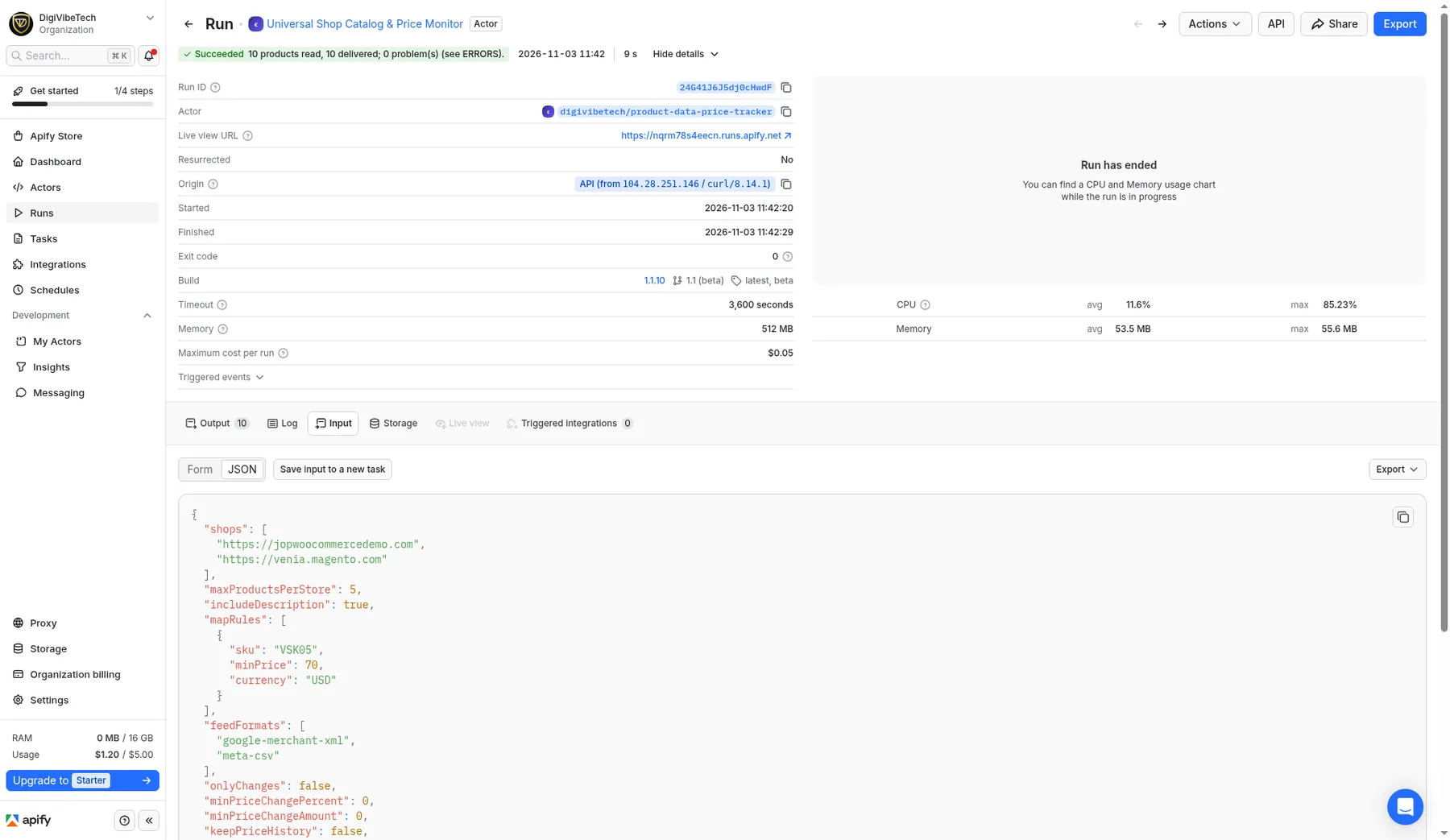
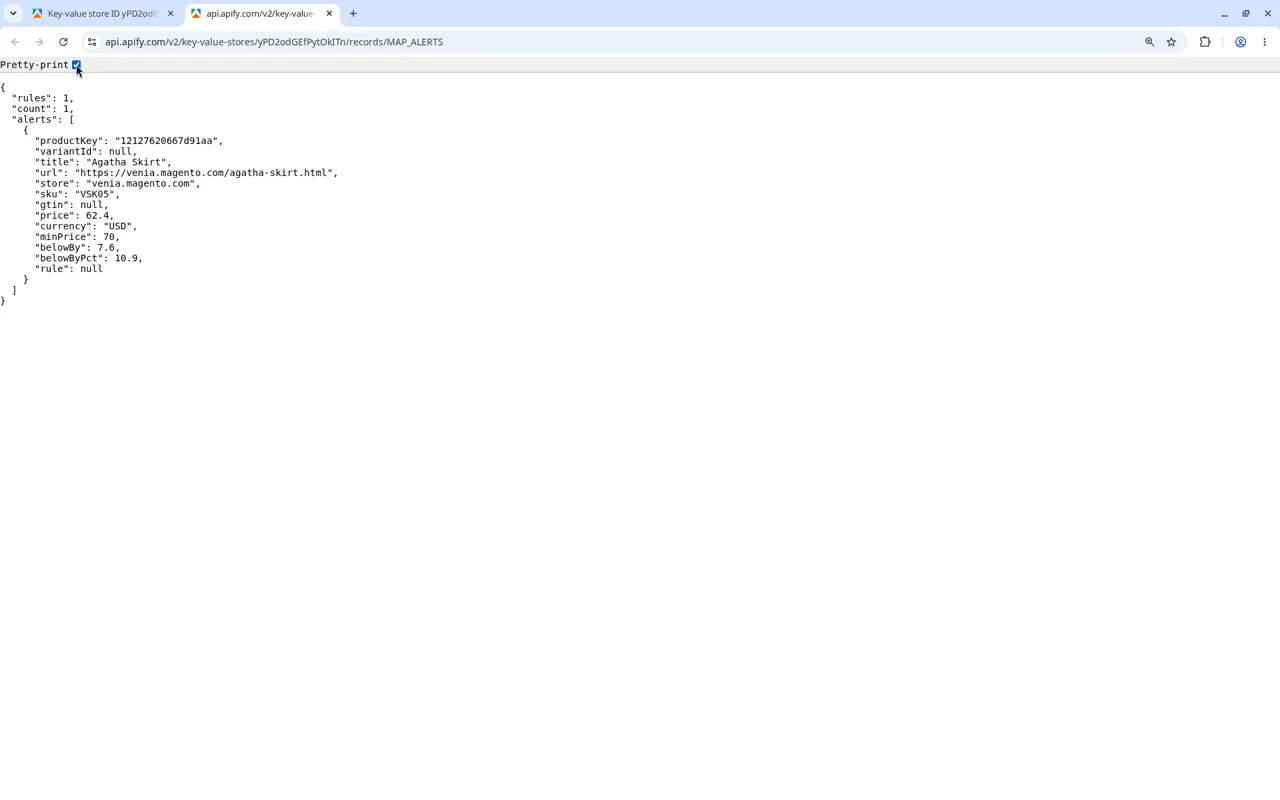
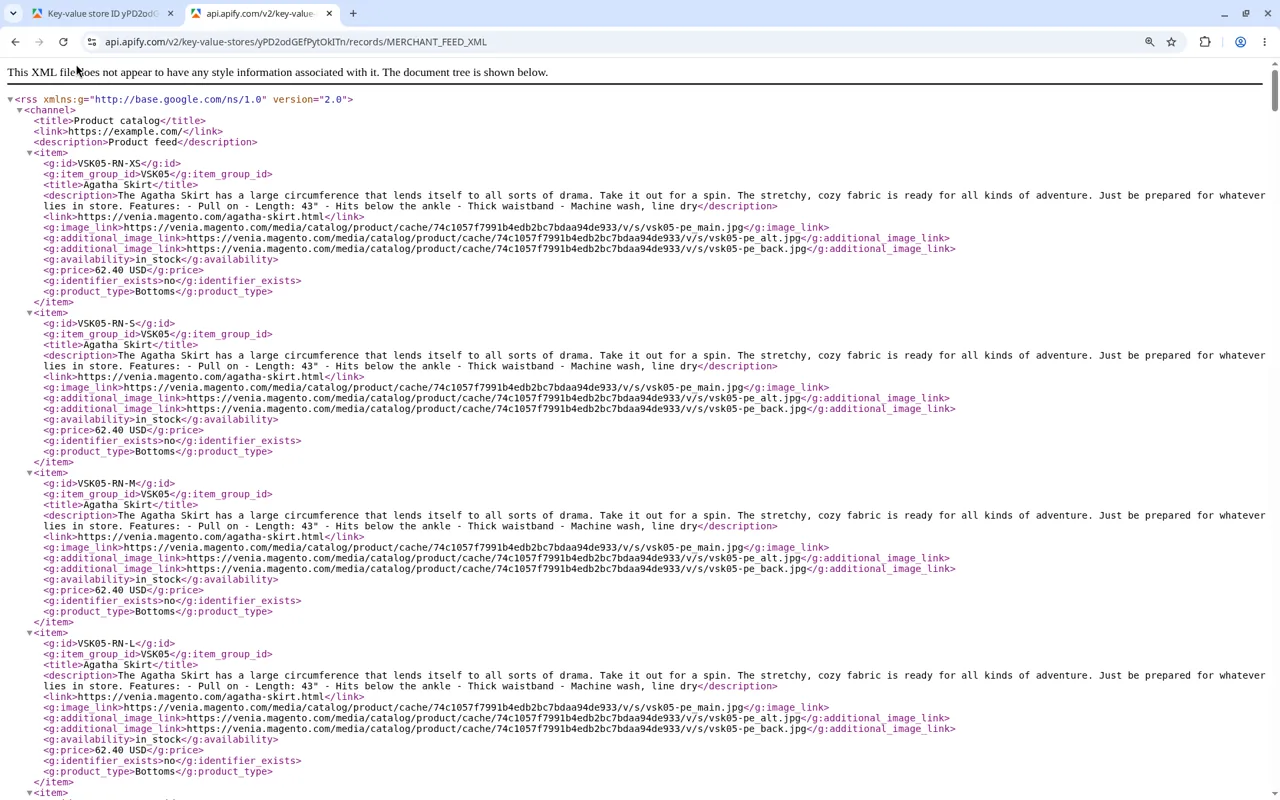
From a real run on 3 Nov 2026 against two public demo shops (a WooCommerce and a Magento store whose robots.txt allows it), 5 products each.
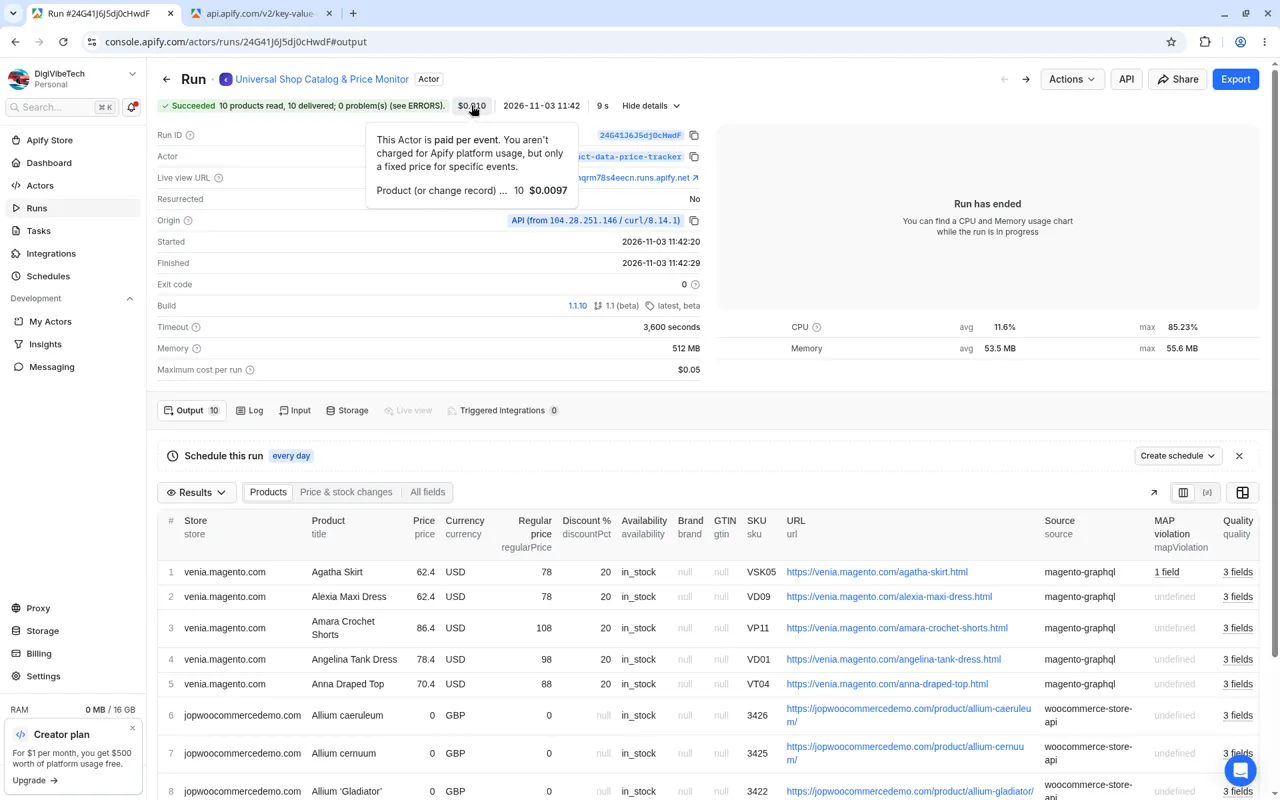
Quick start: example input, output and cost
Read whole shop catalogs from WooCommerce, Magento, Shopware and PrestaShop, track prices and stock, flag MAP violations, price-drop and restock alerts. robots.txt respected.
Example input
Cost example: 500 products x $0.00097 = $0.49; a daily full check of 200 products = $5.82/month (in change mode you pay only for changes).
Example output (real run, 2026-10-30 UTC)
From a real run of this actor on two public WooCommerce stores (the WooCommerce marketplace, input https://woo.com, which serves woocommerce.com; and yithemes.com), 3 products each. Three records max, long fields shortened:
Full sample from the same run (≤50 rows): JSON · CSV
Try it: run with {"stores":["https://woo.com","https://yithemes.com"],"maxProductsPerStore":3}. That is 6 products × $0.00097 (product event) = $0.0058 (about $0.01). Apify's free plan includes $5 of prepaid usage every month, so this run fits in it many times over.
Five ways in, one output
| Input | How it is read | Good for |
|---|---|---|
stores: WooCommerce shops | The WooCommerce Store API, the public API the storefront itself uses: 100 products per request | Whole catalogs, fast and exact (prices in minor units, sale prices, stock) |
storeApis: Magento / Shopware (opt-in) | Magento 2 GraphQL (anonymous catalog) or Shopware 6 Store API (your sales-channel key) | Your own Magento/Shopware shop, or a store you have permission for |
productUrls: product pages of any shop | schema.org Product data the shop publishes for search engines: JSON-LD first, then microdata, then OpenGraph product tags | Competitor or supplier pages on Shopify, Magento, Shopware, PrestaShop, custom shops |
discoverFromSitemap (opt-in) on stores | Robots-allowed sitemaps (incl. nested indexes); URLs matching productUrlPattern are fetched as product pages | Auto-finding product URLs when you only have the shop homepage |
productFeeds: open product feed URLs | Google Merchant RSS 2.0 (g: namespace), Atom, or CSV/TSV (gzip OK); robots-checked | Shops that publish a comparison-shopping feed; whole catalog in one request |
What you get (one item per product)
source (woocommerce-store-api / magento-graphql / shopware-store-api / json-ld / microdata / opengraph / google-merchant-feed), store, productId, productKey, url, title, brand, sku, gtin, mpn, categories, price, priceMinor, currency, regularPrice, onSale, discountPct, priceMin, priceMax, availability, inStock, stockQuantity, condition, imageUrl, images, rating, variantsCount, variants[], attributes, unitPrice, shippingDetails, returnPolicy, priceValidUntil, priceEur / priceMinEur / priceMaxEur / regularPriceEur + fxDate, fxRate, fxStatus, fxNote (optional, convertToEur), descriptionText (optional), quality, priceCheck, matchGroup (optional, matchAcrossStores), changeType, changes, fetchedAt, schemaVersion
Normalisation:
- Prices:
"1.299,00","1,299.00","€ 9"and12.5all become numbers, pluspriceMinor(cents; whole units for JPY and other zero-decimal currencies). - Currency: ISO 4217 codes; symbols such as €, £, zł and CHF are mapped. Ambiguous symbols such as
$andkrare flagged inquality.warnings. - Availability:
in_stock,out_of_stock,preorder,backorder,limited,discontinuedorunknown, plusinStocktrue/false. - Variants: from schema.org
ProductGroup/hasVariant, multiple offers, or WooCommerce variations. Attributes are included; turn onmaxVariationsPerProductto get each variation's price. - Discounts: sale prices from WooCommerce or schema.org
StrikethroughPricegiveregularPrice,discountPctandonSale. - GTIN: the check digit is validated. Images become absolute URLs.
Data-quality block (quality): score 0-100, a missing field list, warnings (invalid GTIN, ambiguous currency, thousands separator guessed...), and filledFrom when a gap was filled from OpenGraph tags. Use minQualityScore to skip and not pay for weak records.
Merchant fields (new in 1.1): when the page publishes them in JSON-LD Offers, you also get unitPrice (from UnitPriceSpecification), shippingDetails (rate, destination, handling/transit times), returnPolicy (category, days, method, fees, country) and priceValidUntil. Variant attributes come from variesBy / additionalProperty and WooCommerce term slugs.
Price cross-check (priceCheck, new in 1.1): on single-product pages the JSON-LD price is compared with the microdata and OpenGraph prices on the same page. status is match, mismatch or unverified; mismatches add a quality warning and set likelyCentsError when the two differ by exactly x100 (a common feed bug). Useful for auditing your own shop's structured data.
Universal shop mode
Put shop homepages under shops (up to 500). For each shop the actor reads the public homepage once, detects the platform and picks the source:
| Detected platform | How it is read |
|---|---|
| WooCommerce | WooCommerce Store API (public, 100 products per request) |
| Magento 2 / Adobe Commerce | Public catalog GraphQL; falls back to sitemap + schema.org pages |
| Shopware 6 | Store API only when you supply shopwareAccessKey (your sales-channel key); otherwise sitemap + schema.org pages. Keys are never taken from page source. |
| PrestaShop | Sitemap + schema.org product pages |
| Other / custom | WooCommerce Store API is tried, then sitemap + schema.org pages |
| Shopify | Not covered: the shop is listed in ERRORS, free |
The detected platform per shop is saved in the free PLATFORMS record. Sitemap pages that are not products (categories, CMS pages) are counted as nonProductPages and not charged. The older stores, storeApis, productUrls and productFeeds inputs still work exactly as before.
MAP alerts
Give mapRules, a list of minimum advertised prices matched by gtin, sku, mpn or url, with an optional currency:
Every product or priced variant below its floor gets a mapViolation field (minPrice, belowBy, belowByPct) and is listed in the free MAP_ALERTS record. Rules with another currency than the product are skipped, never converted. In change mode, unchanged products are still checked, so a violation is not missed just because the price did not move. Free.
Feed files: Google Merchant XML and Meta catalog CSV
Set feedFormats to any of google-merchant-xml, meta-csv, google-merchant-tsv (and turn on includeDescription). The run writes MERCHANT_FEED_XML (RSS 2.0 with the g: namespace), META_CATALOG_CSV (Facebook / Instagram catalog columns, in stock wording) and/or MERCHANT_FEED (TSV), plus MERCHANT_FEED_ISSUES with every product left out and why. Nothing is guessed. Use feeds only for catalogs you are allowed to advertise, usually your own shop. Free.
Monitor mode (price & stock tracking)
Set monitorName (e.g. competitors-daily) and schedule the actor.
- The first run returns everything as
new. - Later runs return only
price-drop,price-increase,back-in-stock,out-of-stock,changed,newandremoved, withchangesholding the old and new values and the % change. - Removed products are reported only after a complete catalog read, or when a product page answers 404/410.
- Change thresholds:
minPriceChangePercent(e.g.2) and/orminPriceChangeAmount(e.g.0.50, in the product's currency) ignore small price moves, so you are not charged for noise. If both are set, a move must pass both. The baseline stays at the last reported price, so a slow drift (1 % a day) is reported once it adds up. Stock changes are always reported; when a stock change comes with a small price move,changes.price.belowThresholdistrue. The same thresholds apply toregularPrice. Defaults (0) report every change, exactly as before. Ignored moves are counted in SUMMARYbelowThreshold. - Price history: set
keepPriceHistorytotrueand every returned change is also appended as one compact row (price, old price, % change, stock, time, run ID) to a named datasetproduct-tracker-<monitorName>-historyin your account. Run the monitor on a schedule and you get a full price history for charts or spreadsheets. History rows are free; the dataset counts toward your own Apify storage. Off by default. - ALERTS record: every monitor run writes an
ALERTSrecord to the run's key-value store with back-in-stock products and price drops of at leastalertMinDropPercent% (0 = every drop). Point a webhook, Make, n8n or Zapier step at it to get only the changes worth acting on. Free.
Sitemap discovery
Set discoverFromSitemap to true and put the shop homepage (or a sitemap URL) under stores. The actor:
- Reads
Sitemap:lines from robots.txt (or falls back to/sitemap.xml//sitemap_index.xml). - Walks nested sitemap indexes, robots-checked on every file.
- Keeps URLs matching
productUrlPattern(default regexproduct|/p/|/products/) on the same host, up tomaxSitemapUrls(default 500). - Fetches those pages for schema.org Product data like
productUrls.
Billing: sitemap downloads are free. You pay only for products (or change records) delivered, same as always. Off by default so existing runs are unchanged.
Magento GraphQL & Shopware Store API
Put entries under storeApis (opt-in; existing stores WooCommerce path is unchanged):
- Magento 2 / Adobe Commerce GraphQL: anonymous
POST /graphqlcatalog query (no login, no customer/cart mutations). Page size capped at 100. ConfigurableProduct variants included. - Shopware 6 Store API:
GET /store-api/context+POST /store-api/product. Requires your sales-channelsw-access-key(Admin > Sales Channels > API access) or a key the vendor publishes for a public demo. Prefer the top-levelshopwareAccessKeysecret field (per-entry key also works); it is never taken from page source or JavaScript. - robots.txt: fail-closed for
/graphql,/store-api/contextand/store-api/product(POST with no query string, soDisallow: /*?does not block them). - Auto:
platformApi: "auto"(default) probes Magento GraphQL; ifshopwareAccessKeyis set it uses Shopware first. - Monitor mode:
productKeyis stable (store + platform product id). - Billing: API pages are free. You pay only for products (or change records) delivered, same $0.00097, no start fee.
- Compliance: use only on stores you own or have permission for (or clear vendor demos). Identifying User-Agent with publisher contact details, ≤1 req/s/host, no proxies, no logins, no anti-bot bypass, no personal data.
Open product feeds (Google Merchant)
Put public feed URLs under productFeeds (RSS 2.0 with the Google g: namespace, Atom, or CSV/TSV with Google Merchant column names: id, title, description, link, image_link, price, sale_price, availability, brand, gtin, mpn, condition, item_group_id). Gzip is fine. The actor:
- Checks robots.txt for every feed URL (404 = allow; 401/403/network fail = disallow), same fail-closed rule as pages.
- Parses items into the same normalised product records (
sale_pricebecomespricewithregularPrice; availabilityin_stock/out_of_stock/preorder/backorder;item_group_idgroups variants). - Caps at
maxFeedItems(default 1000) per feed. - Works with monitor mode (
productKeyis stable across runs).
Billing: feed downloads are free. You pay only for products (or change records) delivered. Descriptions redact e-mails and phone numbers. XML is parsed with defusedxml (XXE/DTD blocked).
EUR prices with ECB reference rates (optional)
Set convertToEur to true to add priceEur, priceMinEur, priceMaxEur and regularPriceEur to every product, converted with the latest European Central Bank euro foreign exchange reference rates (about 30 currencies, published each working day around 16:00 CET). One free fetch per run, no extra charge. Each converted item carries fxDate, fxRate (units of the shop currency per 1 EUR), fxStatus and fxNote. Currencies without an ECB rate get fxStatus: "no-ecb-rate"; nothing is guessed. If the ECB file can't be reached, products are still delivered without EUR fields and the problem is listed in ERRORS.
Source: European Central Bank. The EUR fields are computed by this actor (price divided by the reference rate, rounded to 2 decimals). The reference rates are published for information only, are not meant for transactions, and are available free of charge at ecb.europa.eu.
Compare the same product across stores (optional)
Set matchAcrossStores to true when you read several shops in one run (any mix of stores, storeApis, productUrls, sitemap discovery and productFeeds). After all products are read, the actor groups offers of the same item from different stores and writes a free MATCHES record to the run's key-value store.
- Strong identifiers only: a valid GTIN (GTIN-8/12/13/14 normalised to GTIN-14 with the check digit verified, so a UPC-12 and an EAN-13 of the same item match), or, for products without a valid GTIN, the exact brand + MPN (case and spaces ignored; placeholders such as
N/Aare ignored). Titles are never compared, so there are no fuzzy false matches. GTINs with a wrong check digit are not matched. - A group needs at least 2 different stores (same-shop duplicates do not count).
- Each product gets
matchGroup(e.g.gtin:00036000291452ormpn:bosch|gsr 18v-55, stable across runs) ornullwhen no other store sells it. MATCHES:{groupCount, matchedProducts, productsConsidered, productsWithIdentifier, note, groups: [{matchGroup, matchedBy, gtin, brand, mpn, title, storeCount, offerCount, currencies, priceComparable, priceBasis, lowestPrice, highestPrice, priceSpreadPct, cheapest, cheapestInStock, offers[]}]}, sorted by the biggest price spread first.- Prices are compared honestly: in EUR when
convertToEurgave every offer an ECB EUR price, otherwise only when all offers share one currency. Mixed currencies without EUR conversion are listed but not compared (priceComparable: falsewith a note). - Works in monitor mode too: change records carry
matchGroup, andMATCHEScovers the current offers of the whole monitor (changed and unchanged). - Billing unchanged: matching and
MATCHESare free; you pay only for products (or change records) delivered.MATCHESlists only products you were charged for (now or as an earlier monitor baseline), so the maximum cost per run is respected. With matching on, products are saved at the end of the run (after all shops are read) instead of shop by shop. Off by default: output is exactly as before.
Own-shop price position (optional)
Add your own shop's host to ownStoreHosts (for example ["myshop.example"]; a full URL works too, www. and paths are ignored, a port is kept) together with matchAcrossStores: true, and read your shop plus the competitors you are allowed to monitor in the same run. The actor then writes a free PRICE_POSITION record: for every matched product your shop sells, where you are the cheapest or the most expensive, and by how much.
- One row per match group in which your shop has an offer:
matchGroup, matchedBy, gtin, brand, mpn, title, position, priceComparable, priceBasis, currencies, ownPrice, own, ownOfferCount, ownInStock, competitorStoreCount, competitorOfferCount, pricedCompetitorStoreCount, rank, tiedCompetitors, cheapestCompetitor, cheapestInStockCompetitor, highestCompetitor, deltaToCheapestAmount, deltaToCheapestPct, deltaToHighestAmount, deltaToHighestPct, competitors[](plusnotewhen prices cannot be compared). positionis one ofcheapest,tied-cheapest,mid,most-expensive,only-offer(no competitor price) orno-comparable-price(your offer has no price, or mixed currencies withoutconvertToEur).deltaToCheapestAmount= your price minus the cheapest competitor's price, so a negative value is how far below the next competitor you are.rank1 = cheapest store.- Top level:
ownStoreHosts, ownProducts, ownProductsMatched, ownProductsUnmatched, rowCount, positions(count per position),fxDate, note, rows(sorted with the most over-priced products first) andschemaVersion. Plain JSON with stable field names, so a webhook on run success can fetchPRICE_POSITIONfrom the run's key-value store and act on it. - Same matching and price rules as
MATCHES(GTIN or brand + MPN only; EUR whenconvertToEurgave every offer an ECB EUR price, otherwise only within one currency). Several own hosts (e.g. your.nland.comshop) count as one seller; your lowest own offer is used. - Needs
matchAcrossStores: true(otherwise the run stops with a free input error). If no delivered product comes from your host(s), a warning is added to ERRORS. Works in monitor mode (the report covers the monitor's current offers). - Free; billing unchanged. Only products you were charged for are used, so the maximum cost per run is respected. SUMMARY gains
pricePositionRows,ownCheapest(cheapest + tied-cheapest) andownMostExpensivewhen on. Off by default: output is exactly as before.
Export a Google Merchant Center feed for your own shop (optional)
Set merchantFeedExport to true (and includeDescription to true, because Google requires a description) to turn the products of a run into a ready-to-upload Google Merchant Center product feed. Meant for your own shop: read it with stores, storeApis, productUrls, sitemap discovery or productFeeds, then upload or schedule-fetch the file in Merchant Center.
- MERCHANT_FEED (key-value store, tab-separated text): Google attribute names
id, item_group_id, title, description, link, image_link, additional_image_link, availability, price, sale_price, brand, gtin, mpn, identifier_exists, condition, product_type, color, size. Prices are written as49.90 EUR; a discount becomesprice= regular price plussale_price. Variants become one row each withitem_group_id,colorandsize. - MERCHANT_FEED_ISSUES (key-value store, JSON): every product or variant Google would reject (missing description, image, link, price or a mappable availability, duplicate id, unknown variant price), with the reason, plus warnings (GTIN with a wrong check digit left out, no GTIN and no brand + MPN so
identifier_exists=no, titles over 150 characters). Rejected rows are not put in the feed. - Nothing is guessed: no invented descriptions, GTINs, conditions or variant prices.
- Free; billing unchanged. The feed covers only products you were charged for in this run (or, in monitor mode, the whole current catalogue of the monitor), so the maximum cost per run is respected. Off by default: output is exactly as before. SUMMARY gains
merchantFeedRows/merchantFeedRejectedwhen on.
Limits
- Only shops that publish product data openly (WooCommerce/Magento/Shopware public APIs, schema.org markup, open feeds). Amazon, eBay and other marketplaces are not supported.
- Prices are what the shop shows to an anonymous visitor; customer-group or logged-in prices are not visible.
Responsible use (public product data only)
- Only public product data from shops that allow automated access. robots.txt is checked for every URL (RFC 9309, fail-closed). Disallowed stores and pages are skipped and listed in ERRORS, free of charge.
- About 1 request per second per site, with an honest User-Agent (
ProductFeed/2.0; digivibetech.com/support). No proxies, no cookies, no logins. HTTP 401/403/429 blocks are reported and never bypassed. - No personal data: reviews, review authors and Person nodes are dropped (only the aggregate rating is kept). Descriptions are optional, with e-mails and phone numbers redacted.
- Check each shop's terms of use before monitoring it; using the data is your responsibility. Google Shopping, Amazon and other sites that forbid automated access are not supported.
Pricing
| Event | Price |
|---|---|
| Product (or change record) delivered | $0.00097 |
| MAP alerts, feed files, platform detection, sitemaps | Free |
| Skipped shops (robots.txt, Shopify, errors) | Free |
Example: a daily monitor of 2,000 products where 3% change each day costs about $0.06 per day.
Output
- Dataset: one item per product or change, with an "overview" table view.
- ERRORS (key-value store): every input that failed, with the reason (not charged).
- SUMMARY (key-value store): counts of stores, pages, feeds / feedItems, products seen, delivered, unchanged, below-threshold (monitor mode), history rows, alerts, sitemaps / sitemapUrls (discovery), matchGroups / matchedProducts (with
matchAcrossStores), pricePositionRows / ownCheapest / ownMostExpensive (withownStoreHosts), filtered and billed. - MATCHES (key-value store, only with
matchAcrossStores): cross-store match groups with lowest/highest price, cheapest store and price spread (free). - PRICE_POSITION (key-value store, only with
ownStoreHosts): your own shop's price position per matched product: cheapest / most expensive and by how much (free). - PLATFORMS (key-value store, with
shops): detected platform per shop (free). - MAP_ALERTS (key-value store, with
mapRules): products below your minimum advertised price (free). - MERCHANT_FEED_XML / META_CATALOG_CSV (key-value store, with
feedFormats): Google Merchant XML and Meta catalog CSV (free). - MERCHANT_FEED / MERCHANT_FEED_ISSUES (key-value store, only with
merchantFeedExport): Google Merchant Center TSV feed and the list of rejected products with reasons (free). - ALERTS (key-value store, monitor mode):
{monitorName, alertMinDropPercent, count, alerts: [{alert: "price-drop" | "back-in-stock", productKey, title, url, store, oldPrice, price, pctChange, currency, availability}]}.
Roadmap
Requests are welcome via Issues.
Covered by tests (unit + end-to-end with a mock store).
Maintained by DigiVibeTech. Questions or bugs: use the Issues tab or digivibetech.com/support; we reply within 2–5 business days.


