
PDF Text Extractor: Text, Pages & Metadata from PDF (OCR)
Pricing
from $2.40 / 1,000 documents
PDF Text Extractor: Text, Pages & Metadata from PDF (OCR)
Extract the text of any PDF (native or scanned with OCR), Word, PowerPoint, Excel or web page: full text, text per page, page count, title, author and dates as JSON, CSV or Excel. Bulk URLs or uploads, no API key. Pay per document.
Pricing
from $2.40 / 1,000 documents
Rating
0.0
(0)
Developer

Fernando Guiraud
Maintained by CommunityActor stats
0
Bookmarked
1
Total users
1
Monthly active users
a day ago
Last modified
Categories
Share
What does PDF Text Extractor do?
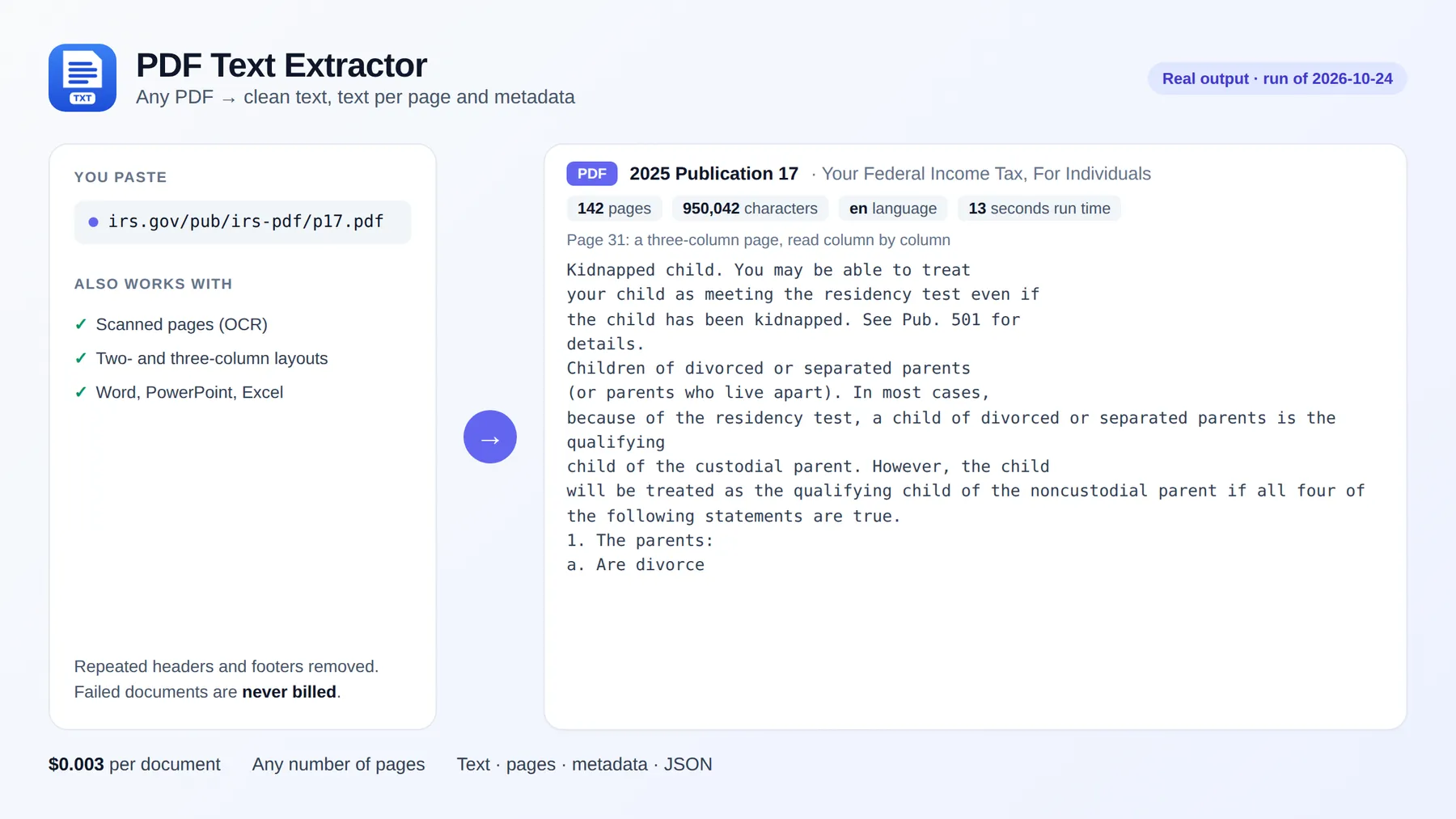
PDF Text Extractor gets the text out of any PDF and gives it back as clean JSON, CSV or Excel: the full text, the text of each page, the page count and the document's title, author, language and dates. It reads native and scanned PDFs (OCR for pages without a text layer) and also Word (DOCX), PowerPoint (PPTX), Excel, web pages and images.
Paste PDF URLs (Google Drive, Dropbox and OneDrive share links work) or upload files, and get one row per document. No API key, no browser, and you pay only per document processed, however many pages it has.
It runs on the Apify platform, so you also get an API, scheduling, integrations (Google Sheets, Make, Zapier, n8n) and access for AI agents through the Apify MCP server.
Why use it?
- 📄 Bulk PDF to text: contracts, reports, invoices, research papers, government forms, thousands at a time.
- 🔎 Text per page: search, cite or split documents by page.
- 🖨️ Scanned PDFs: pages without text are read with OCR (7 languages), and only those pages are billed as OCR.
- 🏷️ Metadata included: title, author, subject, creator, creation and modification dates, page count and detected language.
- 🧹 Clean text: repeated headers and footers removed, two- and three-column layouts read column by column (not mixed line by line), and words split by a hyphen at the end of a line joined again.
- ⚡ Fast on long documents: the 142-page IRS Publication 17 is processed in about 13 seconds of run time.
- 🤖 For AI and RAG: switch on
markdownorchunksto get LLM-ready Markdown or pieces with page numbers.
How to extract text from a PDF
- Click Try for free.
- Paste one or more PDF (or DOCX/PPTX/XLSX/HTML) URLs, or upload files.
- Click Start.
- Read the Documents view, or download the dataset as JSON, CSV or Excel.
Input
| Field | Description | Default |
|---|---|---|
sources | Document URLs (PDF, DOCX, PPTX, XLSX, HTML, images; share links work) | sources or base64Files |
base64Files | Files sent inline (for APIs and AI agents) | - |
outputs | text, pages, markdown, tables, chunks | text, pages |
ocr | auto (only pages without text), always or never | auto |
pageRange | e.g. 1-5, 8 | all pages |
pdfPassword | Password of encrypted PDFs | - |
followDocumentLinks | Also extract the documents linked on a web page | false |
Output
One row per document. Real result for the IRS Form W-9 (October 2026; text and pages shortened):
You can download the dataset in various formats such as JSON, HTML, CSV, or Excel.
Data fields
| Field | Description |
|---|---|
text | The whole document as plain text |
pages[].page / pages[].text / pages[].ocr | Text of each page, and whether it was read with OCR |
pageCount, characters | Size of the document |
title, author, language | From the document metadata (language is detected from the text) |
metadata | Subject, creator, producer, creation and modification dates |
ocrPages | Pages read with OCR (billed as OCR pages) |
status, warnings | ok or error, and anything worth knowing (for example, no text found) |
How much does it cost to extract text from PDFs?
| Event | Price |
|---|---|
| Run start (per GB of memory) | $0.001 |
| Document processed (any number of pages) | $0.003 |
| OCR page (only scanned pages without text) | $0.01 |
1,000 native PDFs cost about $3, whatever their length. Failed documents are free. Set Max cost per run and the Actor stops cleanly at that limit.
Use it with AI agents (MCP)
Add https://mcp.apify.com?tools=fguiraud/pdf-text-extractor to Claude, Cursor or any MCP client and ask: "Read this contract and list the termination clauses: https://example.com/contract.pdf".
Smallest useful input for an agent: {"sources": [{"url": "https://www.irs.gov/pub/irs-pdf/fw9.pdf"}]}.
Agent-friendly input: common field names such as url, urls, startUrls, query or keywords are accepted, and an empty input runs a small sample from the input form (with a note in the results) instead of failing.
Related tools
- PDF to Markdown Extractor & Document Parser: LLM-ready Markdown, RAG chunks and AI field extraction (invoices, forms), same engine.
- PDF Table Extractor: every table to Excel, CSV and JSON.
FAQ and limitations
- Scanned PDFs: OCR is automatic for pages without text;
ocr: "never"turns it off,"always"forces it. - Encrypted PDFs: enter the password in PDF password.
- Very large documents: results over 9 MB drop the per-page text first and keep the full text, with a warning.
- Found a problem or need a feature? Open an issue on the Issues tab. Replies within 48 hours.
- Did it save you time? A short review on the Reviews tab helps other people find this Actor.


