
PDF to Markdown Extractor & Document Parser: Tables, JSON, OCR
Pricing
from $2.40 / 1,000 documents
PDF to Markdown Extractor & Document Parser: Tables, JSON, OCR
Extract text and tables from PDF, Word, Excel, PowerPoint, HTML and scanned images. Returns LLM-ready Markdown, tables as JSON/CSV, RAG chunks and metadata. OCR for scanned PDFs, optional AI field extraction (invoices, forms). No API key; pay per document.
Pricing
from $2.40 / 1,000 documents
Rating
0.0
(0)
Developer

Fernando Guiraud
Maintained by CommunityActor stats
0
Bookmarked
2
Total users
1
Monthly active users
11 days ago
Last modified
Categories
Share
What does PDF to Markdown Extractor & Document Parser do?
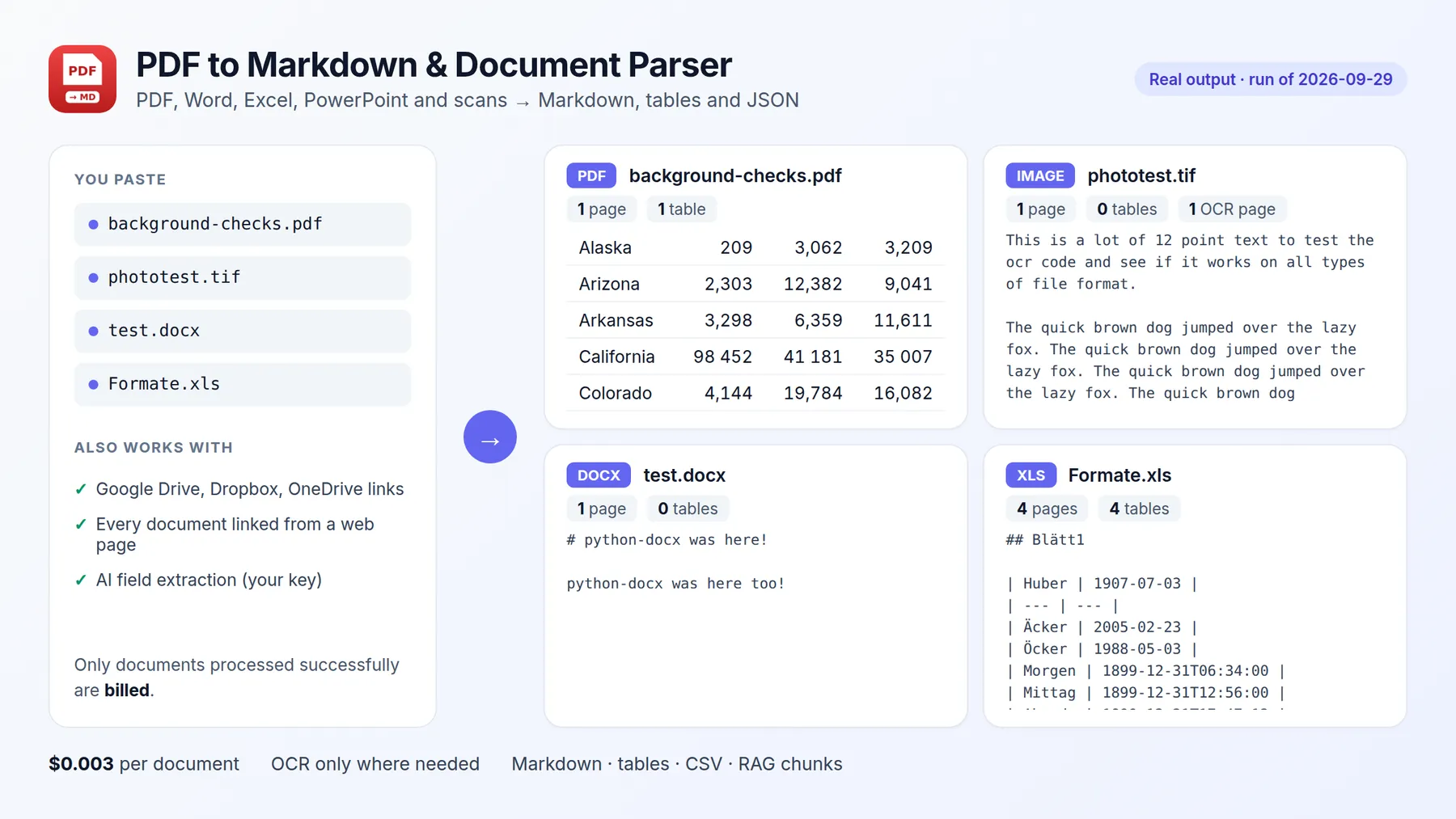
Document to Markdown, Tables & JSON converts PDF, Word (DOCX), Excel (XLSX), PowerPoint (PPTX), HTML pages, legacy Excel (XLS), CSV, TXT and images into clean, LLM-ready Markdown, structured tables (JSON + CSV), plain text, metadata and RAG chunks. Scanned PDFs and images are read with OCR in 7 languages.
Use it as a PDF extractor, PDF table extractor (PDF to Excel/CSV/JSON), document parser for RAG, DOCX/PPTX to Markdown converter or OCR API, all in one Actor.
Give it a list of document URLs and get one structured JSON record per document. No API key and no setup. You pay only for documents that are processed successfully.
It runs on the Apify platform, so you also get an API, scheduling, integrations (Make, Zapier, n8n, LangChain, LlamaIndex), webhooks, monitoring, and access for AI agents through the Apify MCP server.
Why use it?
- 🤖 RAG and AI agents: turn documents into Markdown with preserved headings, lists and tables, pre-split into chunks with page numbers.
- 📊 Table extraction: every table in a PDF, Word, PowerPoint or Excel file comes back as
header+rows+ ready-to-usecsv, in its original position in the Markdown. This includes academic-paper tables drawn with horizontal rules only (LaTeX booktabs), which most PDF tools return as jumbled text. Tables that continue over several pages (with the header repeated on each page) are merged into one table. - 🧾 Scanned documents: OCR runs only on pages that need it (auto mode), so native PDFs stay fast and cheap.
- 📰 Clean reading order: two-column layouts (papers, journals, forms) are read column by column, and running headers, footers and page numbers are removed, so RAG chunks are not polluted.
- 🧠 AI field extraction (optional): ask for specific fields (invoice number, total, dates, parties, line items…) and get them as clean JSON matching your schema, powered by Claude with your own Anthropic API key.
- 🔗 Paste any link: Google Drive, Google Docs/Sheets/Slides, Dropbox, OneDrive/SharePoint and GitHub share links are converted to downloads automatically.
- 🕸️ Whole document libraries: point it at a web page (reports, filings, publications) and enable
followDocumentLinksto convert every PDF/Office file linked from it. - ✍️ Faithful Markdown: bullet and numbered lists and bold sub-headings in PDFs; bold, italic, links and nested lists in Word; chart data from PowerPoint as tables; OCR text re-flowed into real paragraphs.
- 🗂️ One tool, many formats: the file type is detected from the content, not the URL, so links without extensions work.
- 🛡️ Predictable cost: failed downloads and unsupported files are never billed, and the run stops cleanly when your spending limit is reached.
How to convert a PDF to Markdown and tables
- Click Try for free.
- Paste one or more document URLs into Document URLs.
- Choose what to return: Markdown, tables, text, per-page content and/or RAG chunks.
- Click Start and download the results as JSON, CSV, Excel or HTML, or fetch them via API.
Input
| Field | Description | Default |
|---|---|---|
sources | Document URLs (PDF, DOCX, XLSX, XLS, PPTX, HTML, CSV, TXT, PNG, JPG, TIFF, BMP, GIF, WEBP) | — |
base64Files | Files without a URL: [{"fileName": "a.pdf", "content": "<base64>"}] (ideal for AI agents) | — |
outputs | Any of markdown, tables, text, pages, chunks | markdown, tables |
followDocumentLinks / maxLinkedDocuments | Convert the documents linked from a web page instead of the page itself | false / 20 |
saveFiles | Also save each document as a downloadable .md file, each table as a .csv file and all tables as an Excel workbook (.xlsx, one sheet per table); links in files | false |
pdfPassword | Password for encrypted PDFs (stored as a secret) | — |
maxCharactersPerDocument | Truncate text for AI agents with small context windows (0 = no limit) | 0 |
removeHeadersFooters | Drop lines repeated at the top/bottom of most pages | true |
tableDetection | lines (ruled tables, precise) or text (also borderless tables, experimental) | lines |
ocr | auto (only scanned pages), always, never | auto |
ocrLanguages | eng, spa, deu, fra, por, ita, nld | eng |
pageRange | e.g. 1-5, 8 (PDF pages, slides or Excel sheets) | all |
chunkSize / chunkOverlap | RAG chunk size and overlap in characters | 1000 / 100 |
maxPages, maxFileSizeMb, maxConcurrency | Safety limits | 500, 50, 2 |
Example input:
Output
One record per document. You can download the dataset in various formats such as JSON, HTML, CSV, or Excel.
Failed documents return "status": "error" with an error message and are not billed.
Data fields
| Field | Description |
|---|---|
markdown | Whole document as Markdown: headings, paragraphs, lists, tables in reading order |
tables | Each table as header, rows, csv, with its page/slide/sheet number (pageEnd for tables merged across pages) |
text | Plain text |
pages | Markdown per PDF page, slide or sheet, with an ocr flag |
chunks | RAG chunks that respect paragraph boundaries, with pageStart/pageEnd and an approximate tokens count |
metadata | Title, author, subject, creation/modification dates, page count, sheet names, detected language (ISO code) |
stats | Pages processed, OCR pages, tables found, characters |
warnings | Anything worth knowing (skipped pages, scanned pages with OCR disabled…) |
How much does it cost to convert documents?
Pay-per-event pricing, with no monthly fee:
| Event | Price |
|---|---|
| Run start (per GB of memory, default 2 GB) | $0.001 |
| Document processed successfully | $0.003 (about $3 per 1,000 documents) |
| Page read with OCR (scanned pages and images only) | $0.01 |
AI extraction (only with extractionFields/extractionSchema; Claude usage is billed to your own key) | $0.005 |
A run converting 100 native PDFs costs $0.002 + 100 × $0.003 = $0.302. A 5-page scanned PDF costs $0.002 + $0.003 + 5 × $0.01 = $0.055. Put many documents in one run to spread the start fee. Set Max cost per run in the run options, and the Actor stops cleanly when the limit is reached.
Extract invoice, contract or form fields with AI
Add extractionFields (or a full extractionSchema) and your Anthropic API key. Each document then gets an extracted object with exactly those fields; missing values are null.
- Works on every supported format, including scanned PDFs (OCR runs first).
- Claude usage is billed by Anthropic to your key; this Actor adds one small AI extraction event per successful extraction.
- Use
extractionSchemafor nested data such as line items ("type": "array"of objects).
AI agents can pay per use
AI agents can find this Actor through the Apify MCP server and pay per document on their own with x402 (USDC) or Skyfire, without an Apify account. See Apify's agentic payments guide.
Agent-friendly input: common field names such as url, urls, startUrls, query or keywords are accepted, and an empty input runs a small sample from the input form (with a note in the results) instead of failing.
Use it with AI agents (MCP): Claude, ChatGPT, Cursor
This Actor works as a tool for AI agents through the Apify MCP server. Add it to Claude Desktop, Claude Code, Cursor, VS Code or any MCP client with this server URL:
Then just ask in plain language, for example:
- "Convert this PDF to Markdown and give me its tables: https://example.com/annual-report.pdf"
- "Read these three invoices and return the invoice number, date and total of each"
- "Find all PDF reports linked on this page and summarise them"
Smallest useful input for an agent:
maxCharactersPerDocumentkeeps long documents inside the model's context window.base64Fileslets an agent send a file it already has, without a public URL.
Agents pay per result like everyone else (Apify also supports agentic payments), so there is no subscription to set up.
Tips
- Leave OCR on auto: it runs only on pages without a text layer.
- Use
pageRangeto process only the pages you need from large reports. - Large batches are safe: downloads that fail with a temporary error (5xx, 429, network) are retried, and if the platform restarts or migrates the run, documents already processed are skipped, so they are never charged twice.
- For RAG, select
chunksand tunechunkSizeto your embedding model (e.g. 800–1500 characters). - Tables with grid lines and tables with only horizontal rules (typical in scientific papers) are detected automatically. For tables with no lines at all, try
tableDetection: text: it finds more tables, but may split columns imperfectly.
Related tools
- Only need the tables? PDF Table Extractor returns every table as an Excel workbook (one sheet per table), CSV and JSON.
- Only need the plain text? PDF Text Extractor returns the full text, the text of each page and the document metadata.
FAQ and limitations
- Which files are not supported? Legacy Word and PowerPoint files (
.doc,.ppt): save them as DOCX or PPTX first. Legacy Excel.xlsand password-protected PDFs (withpdfPassword) are supported. - Private Google Drive files? The file must be shared as "Anyone with the link"; otherwise it is reported as not accessible and is not billed.
- Web pages: static HTML is converted to Markdown with navigation, footers and cookie banners removed. JavaScript is not executed, so pages that render their content in the browser may come back mostly empty.
- Layouts: one- and two-column pages are supported. Three or more columns, and text inside figures, may come out in an imperfect order. Rotated text (for example margin stamps) is skipped.
- Can I process local files? Yes: send them in
base64Files(up to ~9 MB of input per run), or upload them anywhere reachable by URL and usesources. - Privacy: documents are processed in memory during the run and are not stored anywhere except in your own run's dataset.
Found a bug or need a new format? Open an issue in the Issues tab. Feedback is welcome.
- Did it save you time? A short review on the Reviews tab helps other people find this Actor.


