

Video to Text: TikTok, Instagram Reels & MP4 Transcriber
Pricing
from $4.80 / 1,000 audio minutes
Video to Text: TikTok, Instagram Reels & MP4 Transcriber
Convert video to text: transcribe TikTok videos, Instagram Reels, X and Facebook videos and MP4, MOV, WEBM files (or Google Drive / Dropbox links) to a full transcript, timestamps and SRT/VTT subtitles in 99 languages, or translate to English. Open-source Whisper, no API key, pay per minute.
Pricing
from $4.80 / 1,000 audio minutes
Rating
0.0
(0)
Developer

Fernando Guiraud
Maintained by CommunityActor stats
0
Bookmarked
7
Total users
6
Monthly active users
2 days ago
Last modified
Categories
Share
What does Video to Text Transcriber do?
Video to Text Transcriber converts video to text: it transcribes TikTok videos, Instagram Reels, X (Twitter) and Facebook videos and MP4, MOV, WEBM, MKV, AVI files into a full transcript, timestamped segments, Markdown with timestamps and readable SRT/VTT subtitles (42 characters per line, 2 lines, ready to upload), in 99 languages, and can translate the speech to English. Paste a TikTok, Instagram, X or Facebook link, a direct link to a file, or a Google Drive, Dropbox or OneDrive share link; audio files work too.
It runs open-source Whisper on Apify, so there is no OpenAI key and no subscription. You pay per minute of video, and failed files or videos without speech are never billed.
It runs on the Apify platform, so you also get an API, scheduling, integrations (Make, Zapier, n8n, Google Drive, Notion) and access for AI agents through the Apify MCP server.
Independent tool, not affiliated with or endorsed by the platforms it reads. TikTok, Instagram, X and Facebook are trademarks of their respective owners; they are named only to describe the public data this Actor collects. It only accesses publicly available content.
Why use it?
- 📱 TikTok and Instagram Reels: the spoken words of any public video, with its title, author, date, views and likes. Study hooks and scripts of viral videos, or repurpose your own.
- 🎓 Courses, webinars and lectures: searchable text and notes from every recording.
- 🎥 Content repurposing: turn videos into blog posts, newsletters, show notes and social posts.
- 🧑💼 Meetings and interviews: transcripts of Zoom, Teams or Meet recordings, with an optional AI summary, chapters and action items (Claude, with your own Anthropic key).
- 🔎 Research and compliance: make video archives searchable.
- 🤖 RAG and AI assistants: timestamped text chunks ready for a vector database.
How to convert video to text
- Click Try for free.
- Paste links to TikTok videos, Instagram Reels or video files (or Google Drive / Dropbox share links).
- Choose the spoken language (or
auto) and what to return: text, SRT subtitles, Markdown with timestamps… - Click Start. With the default model, transcription runs several times faster than real time.
- Download the transcript as JSON, CSV or Excel, or the
.txt/.srtfiles from the links in the results.
Input
| Field | Description | Default |
|---|---|---|
sources | TikTok / Instagram links, video (or audio) URLs and share links | required (or profiles / base64Files) |
profiles | TikTok accounts (@username or profile link) or Instagram profile links: transcribe their newest videos | - |
maxVideosPerProfile | Newest videos per account (Instagram: up to 12) | 10 |
onlyNewVideos | Skip TikTok videos transcribed by earlier runs | on |
language | Spoken language code, or auto | auto |
task | transcribe or translate (to English) | transcribe |
model | base (recommended), small (most accurate) or tiny | base |
outputs | text, markdown, segments, srt, vtt, chunks | text, srt |
subtitleMaxChars | Characters per subtitle line (0 = raw Whisper segments) | 42 |
vocabulary | Names and jargon to spell correctly | - |
speakerLabels | Label who said each sentence (Speaker 1, Speaker 2...), +$0.003/min | off |
numSpeakers | How many people speak, if you know it (0 = detect) | 0 |
aiInsights + anthropicApiKey | AI summary, chapters and action items | off |
maxDurationMinutes | Transcribe (and bill) at most N minutes per file | 240 |
Output
One record per video. You can download the dataset in various formats such as JSON, HTML, CSV, or Excel.
Every record also has hook: what is said in the first 3 seconds of the video, the opening line creators study to see why a video keeps people watching.
Who said what: speaker labels
Turn on speakerLabels and every sentence gets its speaker (Speaker 1, Speaker 2...), for interviews, podcasts, meetings and panels. The text, segments, SRT/VTT subtitles, Markdown and RAG chunks all show who speaks; the result also says how many speakers were found (speakers). It adds $0.003 per minute.
Real result on a podcast interview (SRT output: the host's question, then the guest's answer):
SRT and VTT mark the speaker on each subtitle ([Speaker 2] ... and the standard WebVTT voice tag <v Speaker 2>), and a subtitle never mixes two voices.
- Speakers are detected automatically. If you know how many people talk, set
numSpeakersfor more exact labels. - Works best when each person talks for a while. Someone who only says a word or two in the whole file can be counted as the closest other voice. Overlapping speech goes to the main voice.
- Speaker labels are names in order of appearance, not real names: Speaker 1 is whoever talks first.
- Voice fingerprints: NVIDIA NeMo TitaNet small (CC-BY-4.0), run on Apify; no audio leaves the run.
TikTok, Instagram, X and Facebook video to text
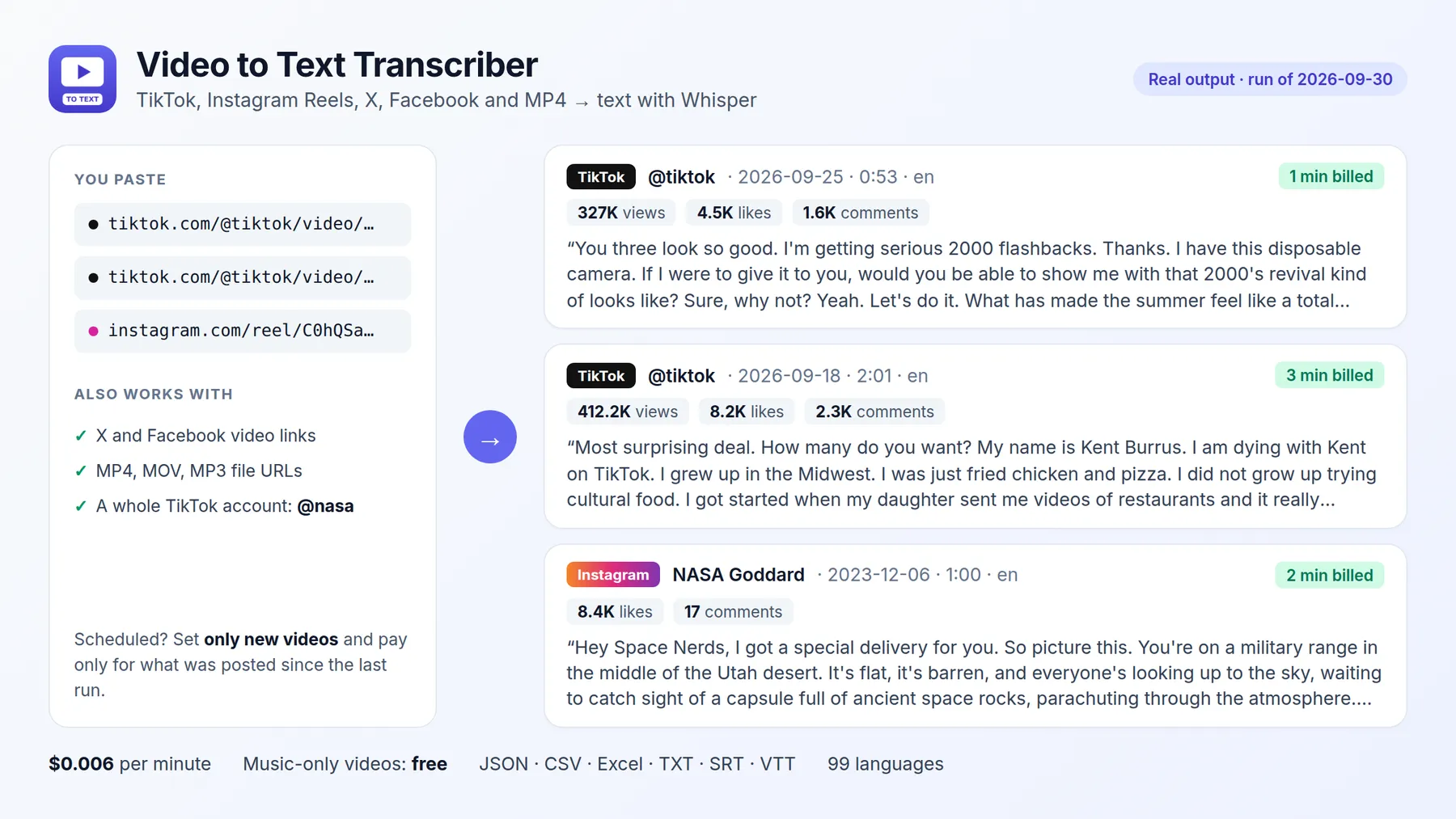
Paste the link of a public TikTok video, Instagram Reel / video post, X (Twitter) post with a video or Facebook video / Reel. The Actor downloads only the audio track, transcribes it with Whisper and adds the video details:
Transcribe a whole TikTok or Instagram account
Put accounts in TikTok or Instagram accounts (profiles) instead of pasting links one by one. The Actor lists the newest videos of each account and transcribes them, one row per video with its date, views and likes:
Schedule it weekly: with onlyNewVideos (on by default) videos transcribed in earlier runs are skipped, so you only pay for new ones. Videos with only music are marked as having no speech and are not billed. Instagram accounts work with their profile link (https://www.instagram.com/username/): the newest Reels, up to the 12 that Instagram shows without a login.
A typical 15 to 60-second video costs $0.006 (one minute). Private videos, videos that need a login and videos that cannot be downloaded are not billed; the result explains why. YouTube is not supported here: use YouTube Transcript Scraper.
How much does video transcription cost?
| Event | Price |
|---|---|
| Run start (per GB of memory, default 4 GB) | $0.0005 |
| Minute of video, base or tiny model | $0.006 ($0.36 per hour) |
| Minute of video, small model | $0.012 ($0.72 per hour) |
Speaker labels per minute (optional, speakerLabels) | $0.003 |
| AI insights per video (optional; Claude usage billed to your own key) | $0.01 |
A 1-hour webinar costs about $0.36 with the base model. Failed files and videos without speech are free.
How accurate is it? Whisper tiny vs base vs small
We measured the three models ourselves, with the same code this Actor runs:
| Model | Word error rate (lower is better) | Speed on Apify (default 4 GB) | Price per minute |
|---|---|---|---|
tiny | 11.3% | about 20–30× faster than real time | $0.006 |
base (default) | 8.2% | about 11× faster than real time | $0.006 |
small | 5.4% | about 4× faster than real time | $0.012 |
Word error rate was measured on 73 clean English recordings from the LibriSpeech test set (8.6 minutes of audio). Speed was measured on a 2.6-minute speech recording in Apify runs (tiny: scheduled test runs). Accents, background noise and other languages give higher error rates, so choose small for those. A 60-minute video takes about 5–6 minutes with base and about 15 minutes with small.
Use it with AI agents (MCP)
Add https://mcp.apify.com?tools=fguiraud/video-to-text-transcriber to Claude, Cursor or any MCP client and ask: "Transcribe this webinar and give me the key takeaways: https://…/webinar.mp4".
Agent-friendly input: common field names such as url, urls, startUrls, query or keywords are accepted, and an empty input runs a small sample from the input form (with a note in the results) instead of failing.
Related tools
- Need subtitles with proper line lengths for publishing? SRT Subtitle Generator.
- YouTube videos? YouTube Transcript Scraper returns existing captions in seconds.
- Podcasts by name or RSS feed: Podcast Transcript Scraper.
- Many short Reels or TikToks: Instagram Reels Transcript Scraper and TikTok Transcript Scraper, priced per video.
FAQ and limitations
- Which links work? TikTok, Instagram, X (Twitter), Facebook, direct file links and cloud-drive share links. Other video platforms (YouTube, Vimeo) are not downloaded; use the YouTube tool above for YouTube.
- Who is speaking? Speaker labels are not included yet.
- Long files: up to 240 minutes per file by default; set
maxDurationMinutesto cap cost. - Found a problem or need a feature? Open an issue on the Issues tab. Replies within 48 hours. If the Actor saved you time, a quick review helps others find it.
- Did it save you time? A short review on the Reviews tab helps other people find this Actor.


