

Instagram Profile Scraper | Followers, Bio & Links
Pricing
from $1.96 / 1,000 profiles
Instagram Profile Scraper | Followers, Bio & Links
Get public Instagram profile details: exact follower and following counts, bio with mentions and hashtags, bio links, website, category, account type, verified and private flags, HD avatar, optional latest posts with likes and comments. Usernames, URLs or ids; no login.
Pricing
from $1.96 / 1,000 profiles
Rating
0.0
(0)
Developer

Flowo
Maintained by CommunityActor stats
0
Bookmarked
2
Total users
1
Monthly active users
5 days ago
Last modified
Categories
Features
Share
Get public Instagram profile details as one flat row per profile: exact follower and following counts, bio text with its mentions and hashtags, bio links with their titles, the main website, category and account type (personal, business or creator). Each row also carries the verified, private and memorialized flags, the HD profile picture, highlights, active story, reels and Threads badge, and, when you set latestPosts (0–50, default 0), that many latest posts with likes, comments and date plus average likes and comments. No login, cookies or Instagram account needed.
What does Instagram Profile Scraper do?
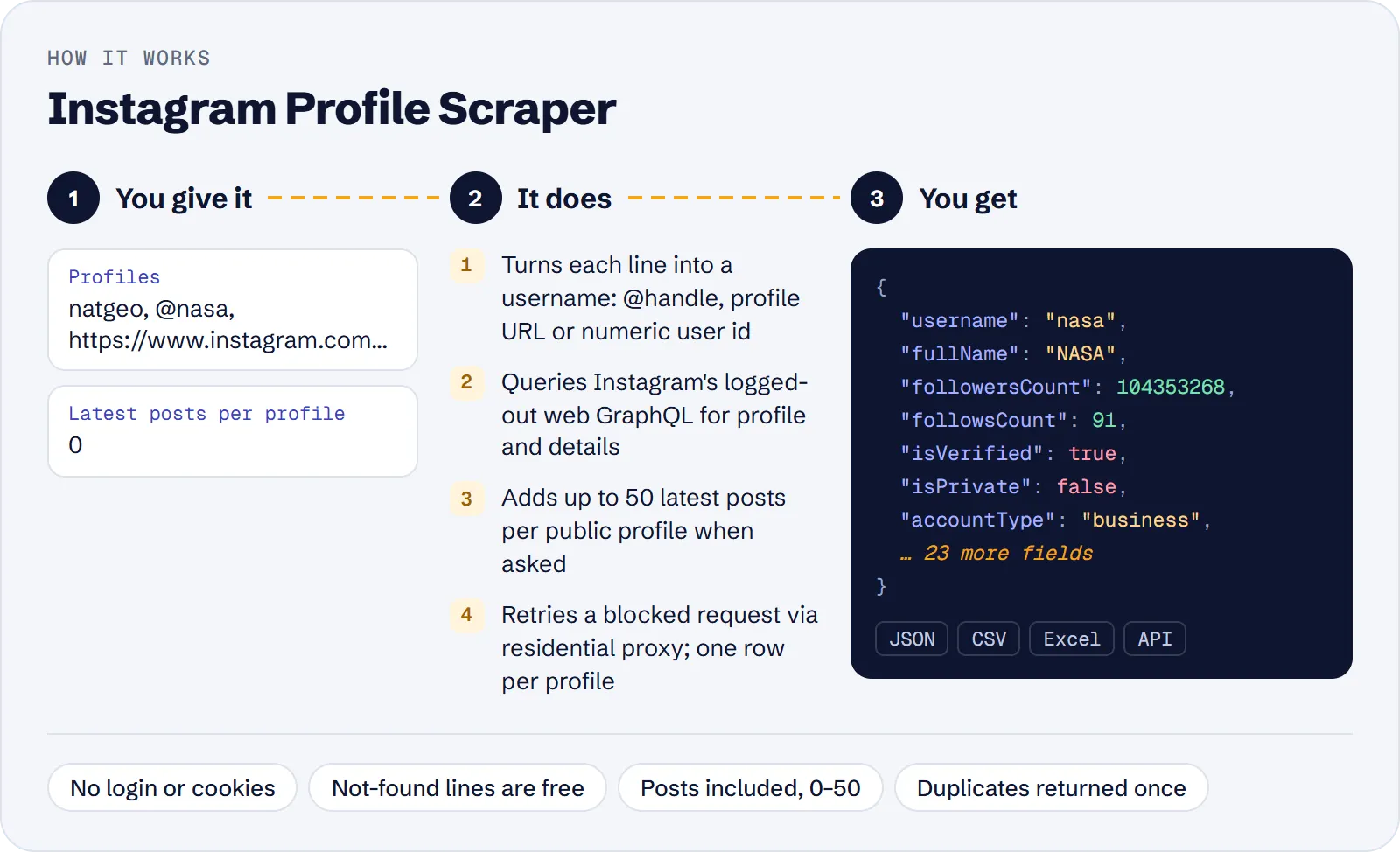
You paste a list of Instagram profiles — usernames (natgeo), handles (@nasa), profile URLs (https://www.instagram.com/zara/) or numeric user ids (787132) — and get one row per existing profile. Every row keeps your input line in query, so you can join the results back to your source list. It is built for influencer-marketing teams vetting creators, sales teams enriching lists of brand accounts with websites and categories, analysts tracking follower counts on a schedule, and AI agents that need the profile of one account in a single call.
How to scrape Instagram profiles
- Open the actor in Apify Console and go to the Input tab.
- Paste your profiles into Profiles, one per line: usernames, @handles, profile URLs or numeric user ids, in any mix.
- Optionally set Latest posts per profile (0–50) to add recent posts with likes and comments, and Max profiles to cap the run.
- Click Start and wait for the run to finish.
- Open the Output tab: the Overview view shows avatar, followers, account type, category and website; the Engagement view shows latest post date, average likes and comments, story and reels flags. Export as JSON, CSV, Excel or via the API.
How much does it cost to scrape Instagram profiles?
Price per event by Apify plan:
| Event | Free | Bronze | Silver | Gold and above |
|---|---|---|---|---|
| Profile | $2.30 per 1,000 | $2.185 per 1,000 | $2.07 per 1,000 | $1.955 per 1,000 |
| Run start | $0.00005 | $0.00005 | $0.00005 | $0.00005 |
A test run with the API example input below returned 3 rows in 17 s.
The actor uses pay-per-event pricing. One paid Profile event is one Instagram profile saved to the dataset, public or private. The latest posts are included in that price, whether you ask for 0 or 50. There is also a small Run start fee of $0.00005 per run (charged per GB of memory).
Not charged: usernames that do not exist or are not visible without login, invalid lines, non-profile URLs (posts, reels, stories), duplicates and profiles that could not be fetched. Each skipped line gets a warning in the log that names it and the reason.
| Scenario | Events | Cost on the Free plan |
|---|---|---|
| Check 3 creators | 3 profiles + 1 start | about $0.007 |
| Enrich 100 brand handles with websites and categories | 100 profiles + 1 start | about $0.23 |
| 1,000 profiles with 12 latest posts each | 1,000 profiles + 1 start | about $2.30 |
| Track 200 profiles daily for 30 days | 6,000 profiles + 30 starts | about $13.80 |
Input
| Field | Type | Description |
|---|---|---|
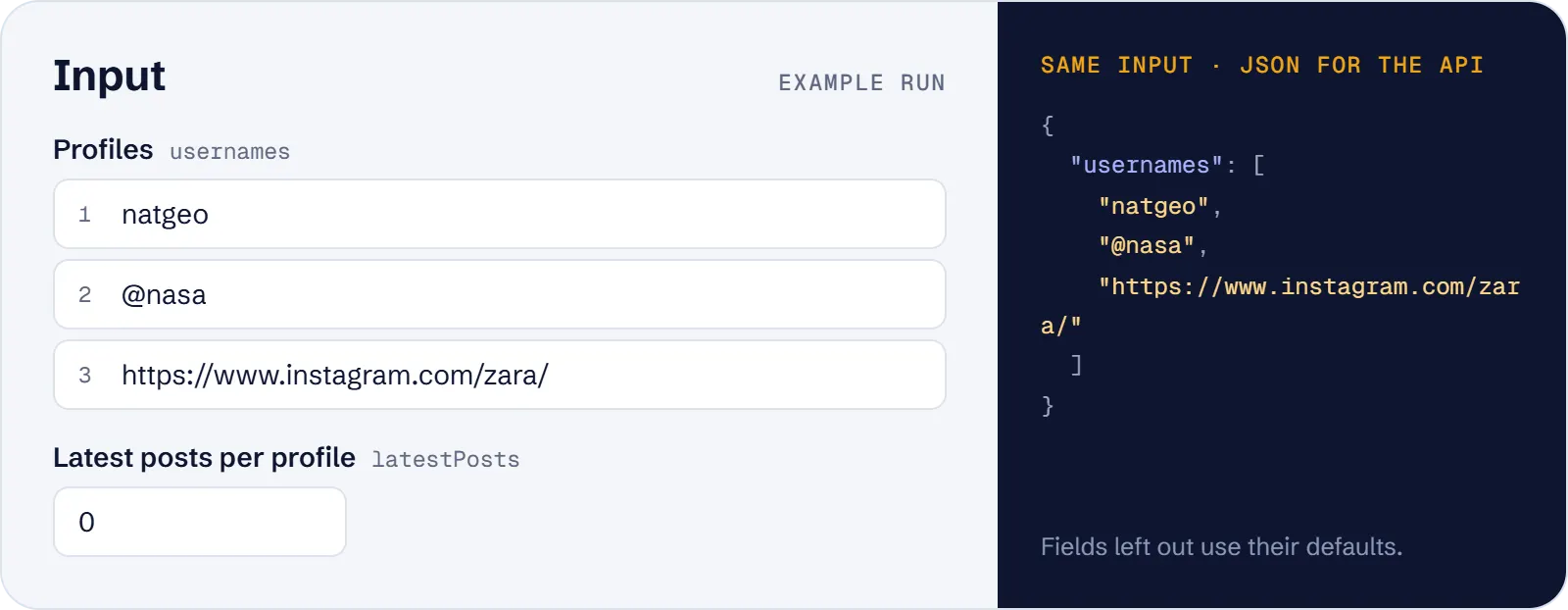
usernames | array of strings, required | One profile per line: a username (natgeo), a handle (@natgeo), a profile URL (https://www.instagram.com/natgeo/, also m.instagram.com, with a query such as ?hl=en or a subpath such as /reels/ or /tagged/) or a numeric user id (787132). Case does not matter. Post, reel, story and explore URLs are not profiles and are skipped with a warning. Duplicates are returned once. |
latestPosts | integer 0–50, default 0 | How many of the latest posts to add to each public profile, with likes, comments, date and caption, plus average likes and comments. 0 = profile details only. Private profiles never get posts. |
maxItems | integer ≥ 1, optional | Stop after this many profiles are saved. Empty = the whole list. |
proxyConfiguration | object, default { "useApifyProxy": true } | The default Apify datacenter proxy works; a blocked request is retried automatically through a residential proxy. |
Example input:
What data can you extract from Instagram profiles?
| Field | What it is |
|---|---|
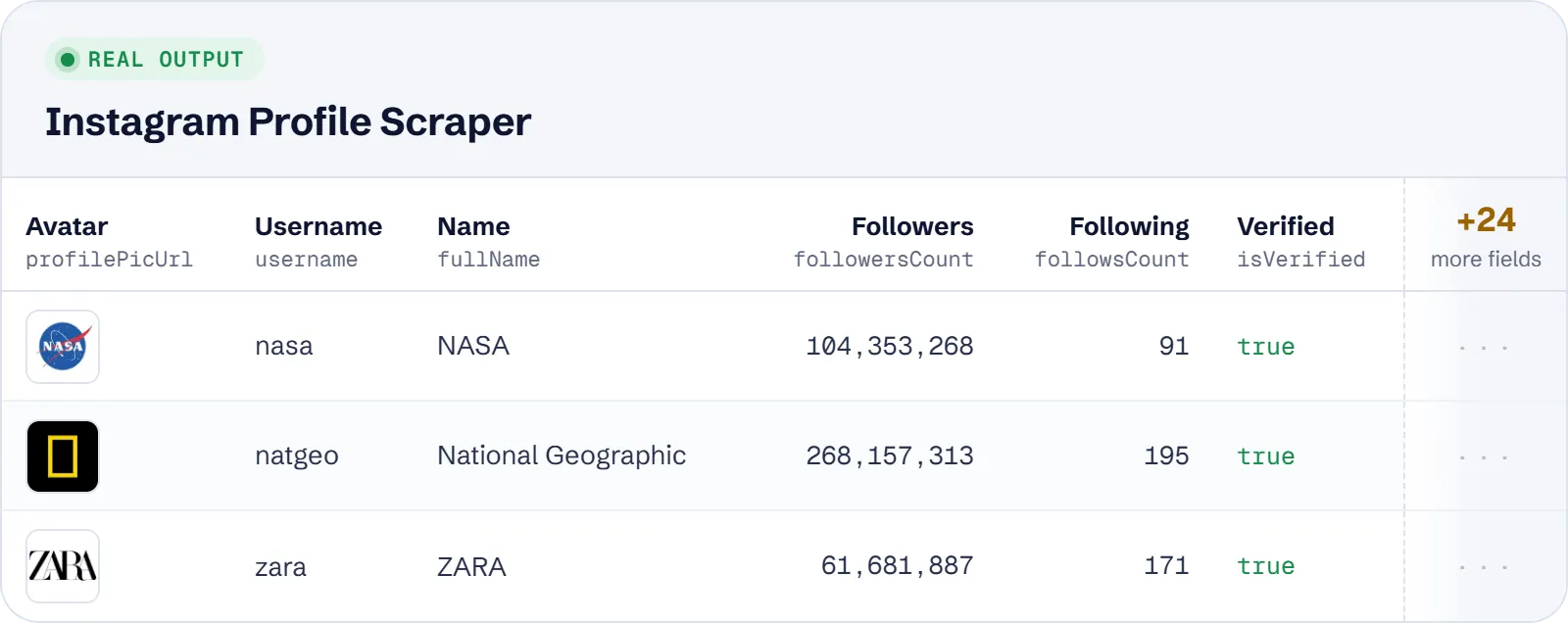
url, query, id, username | Profile page, your input line as entered, numeric user id, lowercase username |
fullName, biography | Display name and bio text (null when empty) |
followersCount, followsCount | Exact follower and following counts |
isVerified, isPrivate, isMemorialized | Verified badge, private account, memorialized account |
accountType, category | personal, business or creator; category shown on the profile (e.g. Clothing (Brand), Restaurant) |
externalUrl, bioLinks | Main website; all bio links as { url, title } |
bioMentions, bioHashtags, pronouns | Usernames and hashtags in the bio (without @ and #), pronouns shown on the profile |
profilePicUrl, profilePicUrlHd | Profile picture in 150 px and in the largest size |
highlightsCount, hasActiveStory, hasClips | Story highlights (first page, up to about 10), story live now, has reels |
threadsUsername, fbid | Threads badge username, linked Meta account id |
latestPosts | When requested: { id, shortCode, url, type (image, video, carousel), caption, likesCount, commentsCount, publishedAt, imageUrl } |
latestPostAt, avgLikesCount, avgCommentsCount | Newest fetched post date, average likes and comments over the fetched posts |
scrapedAt | When the profile was extracted |
A real row (run with latestPosts: 0, picture links shortened):
Use cases
- Creator vetting: check followers, following, bio, category, account type, verified flag and website of a shortlist of influencers before outreach.
- Engagement snapshot: set
latestPoststo 12 and compare average likes and comments and the date of the latest post across creators. - Lead-list enrichment: paste hundreds of brand handles from a CRM in mixed forms (
@Brand, URLs, duplicates) and get the website, bio links, category and account type for each, joined back byquery. - Follower tracking: schedule a daily run on a fixed list to record exact follower and following counts over time; with
latestPosts0 each profile needs only 2 requests. - Id resolution: turn numeric user ids from another export into current usernames and full profile rows.
Limitations
- No post count, contact details or related profiles. Instagram does not show the exact number of posts, business email, phone, address, related profiles, join date or country to logged-out visitors, so the actor does not return them.
- Some accounts are hidden without login. A few existing accounts (for example
justinbieber) are not visible to logged-out visitors; they are reported as "not found or not visible without login" and not charged. - Private profiles return all profile fields, but no posts:
latestPosts,latestPostAtand the averages are null. - Fields can be empty:
categoryis often null (Instagram sends none for many brands, e.g. natgeo and nasa), as arefullName,biography,externalUrlandthreadsUsernamewhen the profile has none.hasActiveStorycan be null, often for private profiles.likesCountof a post is null when the owner hides likes; such posts are left out ofavgLikesCount. highlightsCountcounts only the first page of highlights (up to about 10), so a value around 10 is a lower bound.- Picture links are signed by Instagram's CDN and expire after a few days — download them if you need to keep them.
- Counts move constantly on big accounts; two runs minutes apart can differ.
- The actor reads Instagram's logged-out web endpoint. If Instagram changes it, the run fails with a clear error instead of returning wrong data.
Tips and troubleshooting
- Mixed lists are fine: usernames, @handles, profile URLs (with
?hl=en,/reels/or/tagged/) and numeric ids can sit in one list. A line made only of digits is tried as a username first, then as a user id. - 0 rows? Check the log: every skipped line is named with the reason (not found or hidden without login, not a profile URL, invalid characters, duplicate). If every line is invalid, the run fails with an input error naming
usernames. - Fewer rows than lines is normal when the list has duplicates (
natgeo,@NatGeoand its URL are one profile, one charge) or accounts that do not exist. - Keep
latestPostsat 0 when you only need counts and bio: it saves one request per profile. Posts are included in the price either way. - Use
maxItemsto test on a few profiles before a long list; later lines are not requested. - Proxy: the default Apify datacenter proxy is enough; blocked requests switch to a residential proxy automatically. You can also choose a residential proxy yourself.
API, MCP and integrations
Run the actor from your code with the same JSON input as in Console. Your API token is in Console → Settings → API & Integrations.
Python (pip install apify-client):
Node.js (npm install apify-client):
HTTP — one request runs the actor and returns the results (runs up to 5 minutes; longer ones: run asynchronously):
AI agents (MCP). Add the actor as a tool of the Apify MCP server. Claude Code:
Claude Desktop, Cursor or VS Code: {"mcpServers": {"apify": {"url": "https://mcp.apify.com?tools=genial_candlestand/instagram-profile-details-scraper"}}}. Then ask, for example:
- "Get followers, bio, website and account type of the Instagram profiles natgeo, nasa and zara"
- "Compare average likes and comments over the last 12 posts of @nasa and @taylorswift on Instagram"
- "Find the current Instagram username and follower count for user id 787132"
Integrations. Run it on a schedule with Apify Schedules and send the results to Google Sheets, Slack, Zapier, Make, n8n or your webhook — see Apify integrations.
FAQ
Do I need an Instagram account or cookies?
No. The actor reads only what Instagram shows to logged-out visitors. No login, cookies or session are used.
Can I scrape private Instagram profiles?
You get the public part of a private profile: counts, bio, links, category, account type and flags, with isPrivate: true. Posts of private profiles are not visible, so latestPosts is null.
Can I get the number of posts, email or phone?
No. Instagram does not show an exact post count or business contact details to logged-out visitors.
Am I charged for usernames that do not exist?
No. Not-found and hidden accounts, invalid lines, non-profile URLs, duplicates and failed lookups are free. You pay only for profiles saved to the dataset.
How is it different from other Instagram profile actors?
It costs $2.30 per 1,000 profiles on the Free plan, against $2.60–$2.70 for the most used profile scrapers, with latest posts included. Rows are flat, with avgLikesCount, avgCommentsCount and latestPostAt as plain columns, the nested latestPosts only when you ask for it, accountType as personal, business or creator, bio links with titles, and extra fields such as threadsUsername, hasActiveStory, isMemorialized and pronouns. It does not return a post count.
Is it legal to scrape Instagram profiles?
The actor collects only public data that Instagram shows to any logged-out visitor, and no personal data beyond that. You are responsible for how you use it: check Instagram's terms and the data-protection laws that apply to you (such as GDPR) before storing or processing data about people.
Also useful
- YouTube Channel Scraper — vet the same creators on YouTube: subscribers, views, videos, country and links
- Pinterest Search Scraper — find pins and their authors by keyword, with followers, boards and outbound links
- YouTube Comments Scraper — read audience comments and replies on a creator's videos and Shorts
- Reddit Scraper — track what people say about a brand or creator in Reddit posts and comments
- Google Search Scraper — find brand websites and social profiles through Google results by keyword


