

XING Jobs Scraper | Job Listings by Keyword & City
Pricing
from $0.60 / 1,000 job listings
XING Jobs Scraper | Job Listings by Keyword & City
Get XING job listings for Germany, Austria and Switzerland: job title, company, city, salary range with estimate flag, employment type, career level, remote options, full description and apply link. Many keywords × cities per run, server-side filters, no login.
Pricing
from $0.60 / 1,000 job listings
Rating
0.0
(0)
Developer

Flowo
Maintained by CommunityActor stats
0
Bookmarked
2
Total users
1
Monthly active users
7 days ago
Last modified
Categories
Features
Share
XING Jobs Scraper — job listings by keyword and city

Get XING (xing.com) job listings for Germany, Austria and Switzerland as flat rows: job title, company name, city and country, employment type, career level, remote options, salary range with a flag for XING's own estimate, publish and expiry dates, the full job description and the apply link. One run covers many keywords × many cities, plus search URLs copied from xing.com. No login or cookies needed.
What does XING Jobs Scraper do?
You give it job keywords (e.g. python, Pflegefachkraft) and city names (e.g. Berlin, Wien, Zürich). It searches XING for every keyword in every city and returns one row per job posting, with duplicates across searches removed. XING's own filters for employment type, career level, remote work and posting date run on the server, so jobs that don't match are never fetched or charged. It is built for recruiters, staffing agencies, salary analysts, lead-generation teams and AI agents that need DACH job data as structured JSON, CSV or Excel.
How to scrape XING jobs
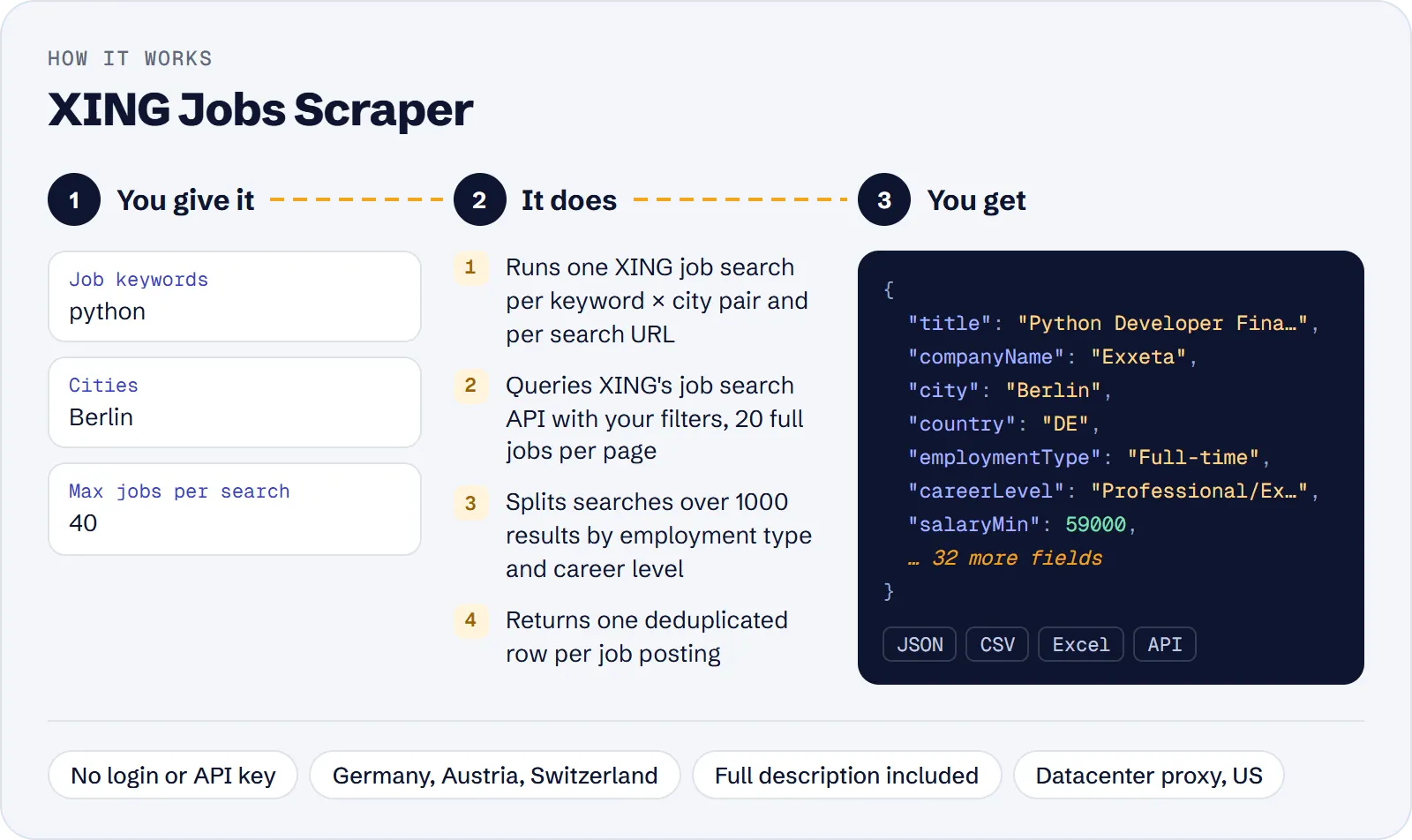
- Open the actor in Apify Console.
- Enter one or more Keywords (one per line) and one or more Cities. You can leave one of the two lists empty, but not both (unless you add XING search URLs).
- Optionally set Employment type, Career level, Remote work or Posted within.
- Set Max jobs per search (default 100). Each keyword × city pair is one search.
- Click Start, then download the results as JSON, CSV, Excel or HTML, or read them through the API.
How much does it cost to scrape XING?
Price per event by Apify plan:
| Event | Free | Bronze | Silver | Gold and above |
|---|---|---|---|---|
| Job listing | $0.85 per 1,000 | $0.765 per 1,000 | $0.68 per 1,000 | $0.595 per 1,000 |
| Actor start | $0.00005 | $0.00005 | $0.00005 | $0.00005 |
A test run with the API example input below returned 40 rows in 7 s.
You pay per job saved to the dataset (the job event) plus a small start fee per run (apify-actor-start). Not charged: the same job found again by another search, jobs dropped by a country filter, and jobs XING hid from the IP (geo-fenced). A search with no results costs nothing beyond the start fee.
| Scenario | Jobs (events) | Cost on the Free plan |
|---|---|---|
| 1 keyword × 1 city, default 100 jobs | 100 | ≈ $0.085 |
| 2 keywords × 2 cities, 100 jobs each | 400 | ≈ $0.34 |
| 1 search with 1,000 jobs | 1,000 | ≈ $0.85 |
| Large export of one keyword with splitting | 3,000 | ≈ $2.55 |
Costs are computed from $0.00085 per job plus the $0.00005 start fee; higher Apify plans get the discounted per-job prices shown above.
Input
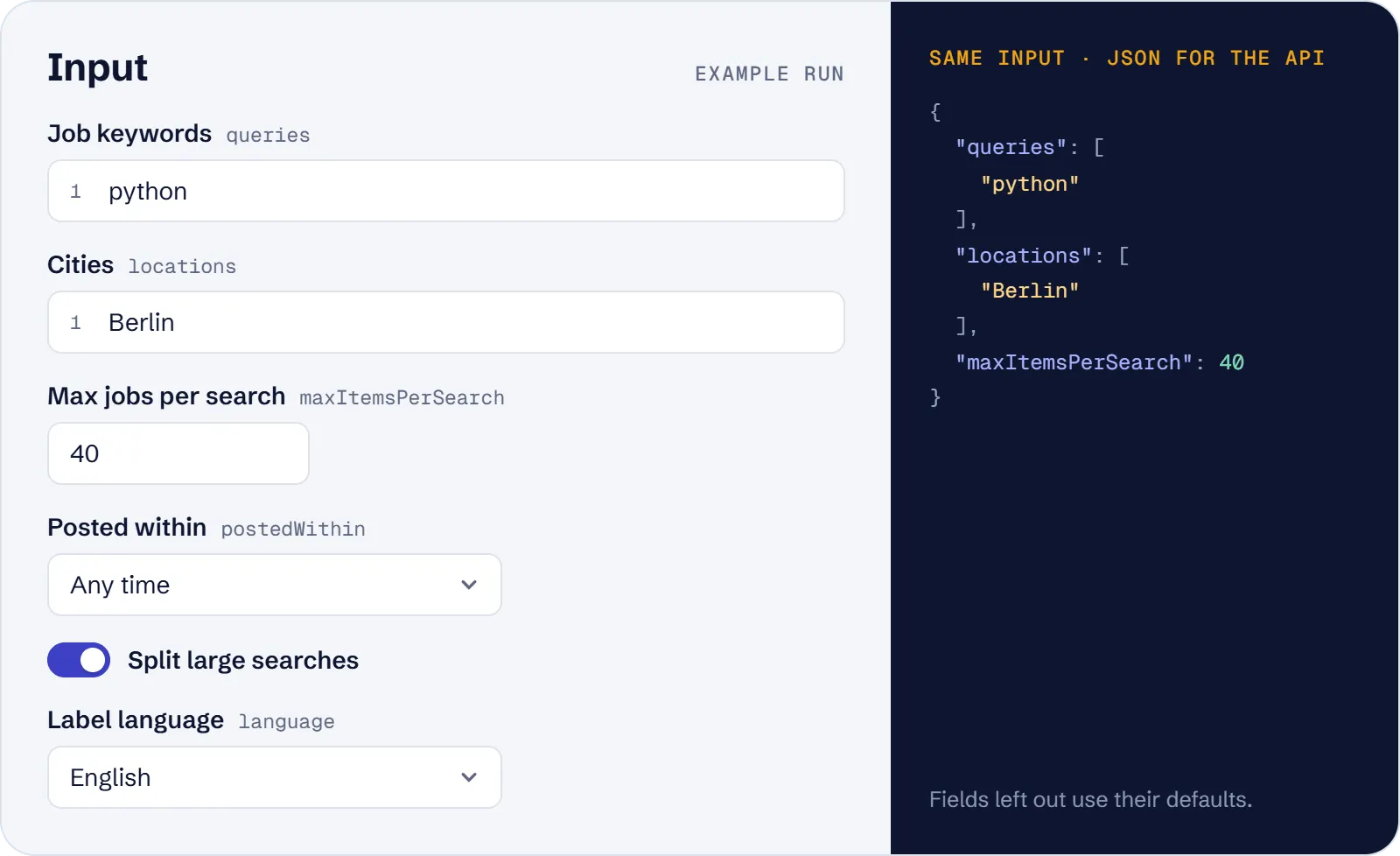
| Field | What it does |
|---|---|
queries | Job keywords, one per line. Each keyword is searched in every city. Empty = all jobs in the cities. |
locations | City names in DE/AT/CH (Berlin, München or Munich, Wien, Zürich). Country names (Deutschland, Österreich, Schweiz) become a country filter. Postcodes and regions are not supported by XING. |
startUrls | XING job-search URLs copied from the browser, including filters such as discipline or industry. |
maxItemsPerSearch | Max jobs per search, 1–10,000 (default 100). |
maxItems | Optional cap for the whole run. |
employmentType | FULL_TIME, PART_TIME, INTERN, CONTRACTOR, TEMPORARY, SEASONAL, VOLUNTARY (several = any of them). |
careerLevel | STUDENT, ENTRY_LEVEL, PROFESSIONAL, MANAGER, DIRECTOR, EXECUTIVE. |
remoteOption | FULL_REMOTE, PARTLY_REMOTE (hybrid), NON_REMOTE (on-site). |
postedWithin | any (default), day, week, month. |
radius | Widen each city by 0–200 km. |
splitLargeSearches | On by default: gets past XING's 1,000-results-per-search cap by splitting the search. |
language | Language of category labels: en (default) or de. Job texts stay as posted. |
proxyConfiguration | Default: Apify datacenter proxy, US. |
Example input — nursing jobs in two cities posted in the last 7 days:
What data can you extract from XING?
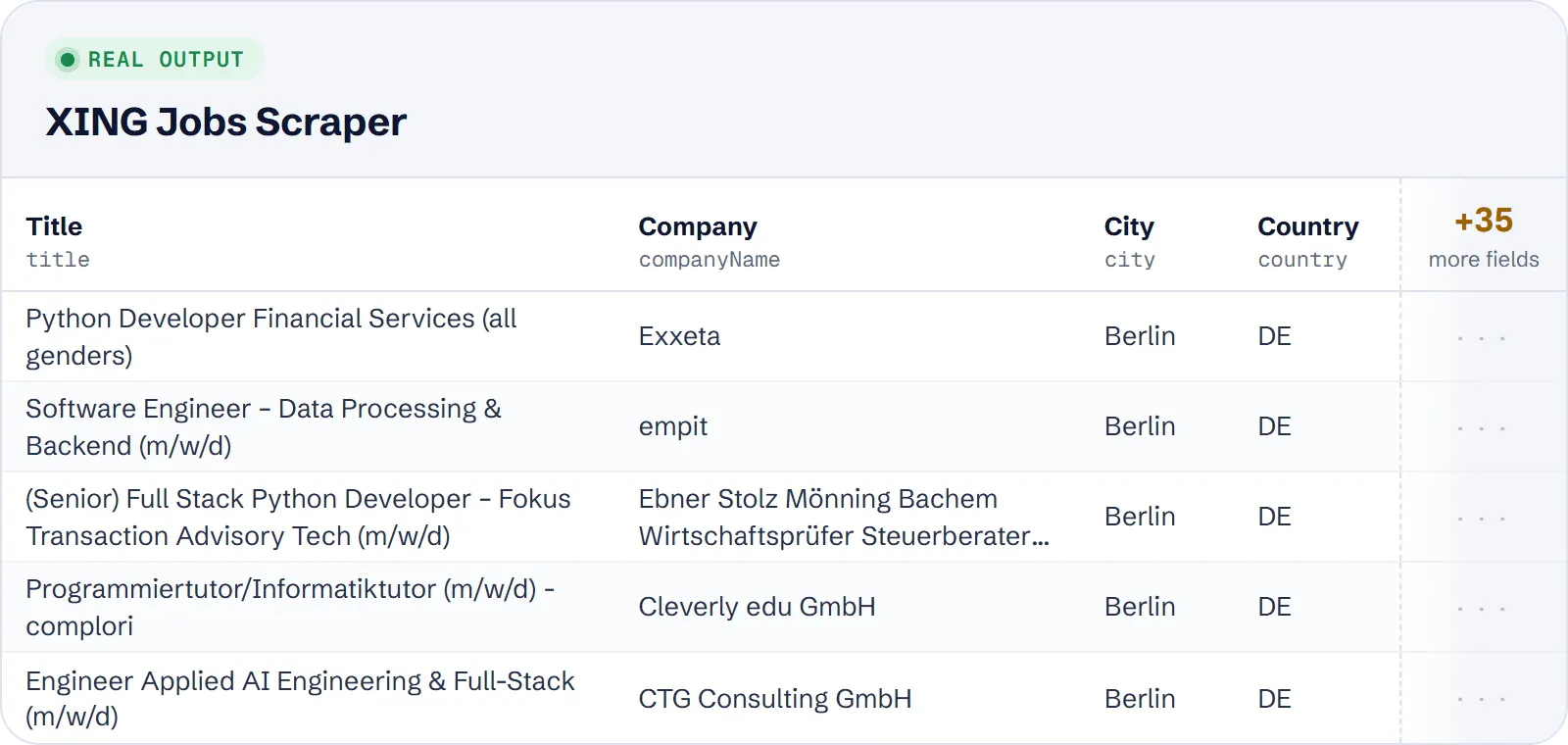
| Field | Meaning |
|---|---|
id, url, title | XING job id, job page and job title |
companyName, companyUrl, companyLogoUrl, companySize, companyIndustry | Employer and its XING company page |
location, street, zipCode, city, region, country | Job address; country is a two-letter code (DE, AT, CH) |
employmentType, careerLevel, discipline, industry | Category labels in English or German |
remoteOptions | Any of FULL_REMOTE, PARTLY_REMOTE, NON_REMOTE |
salaryMin, salaryMax, salaryMedian, currency | Salary as published, or XING's estimate (salaryMedian only for estimates) |
salaryIsEstimate | true = XING's estimate, false = published by the employer, empty = no salary |
publishedAt, updatedAt, activeUntil | Go-live, last refresh and expiry dates |
isPaid, isTopJob | Paid (premium) posting and highlighted top job |
applicationType, applyUrl | external (apply on the employer's site via applyUrl) or xing |
language, tags, jobCode, description | Posting language, XING keywords, employer's reference code, full plain-text description |
query, searchLocation, position | The search that found the job and its rank in the results |
A real row (description shortened):
Use cases
- Recruiting and staffing: watch new nursing, IT or sales jobs in several cities each week with
postedWithin: "week". - Salary research: compare
salaryMin/salaryMax/salaryMedianfor one role across München, Wien and Zürich, and separate employer-published salaries from XING estimates withsalaryIsEstimate. - Lead generation: find companies that are hiring, with company size, industry and XING company page.
- Remote job boards: collect fully-remote jobs across XING with
remoteOption: ["FULL_REMOTE"]. - Labour-market analysis: export up to thousands of jobs for one keyword with automatic splitting past the 1,000 cap.
Limitations
- XING returns at most 1,000 jobs per search. Above that, the actor splits the search by employment type and then career level; a very broad search can still run out of slices before your limit.
- XING uses semantic search: a rare or misspelled keyword returns loosely related jobs instead of none.
- Only city names work as locations. Postcodes are ignored (searched without a location, with a warning); regions such as
Bayernmay match only a few jobs; cities outside XING's markets (e.g. Paris) return 0 jobs. - Fully-remote jobs are not tied to a city: with
FULL_REMOTE, XING returns them from all locations. - Many fields are optional on XING: salary appears on roughly three in four jobs, street address on about a third,
applyUrlonly for jobs that apply on the employer's site. - Salary amounts are as published (yearly or monthly); XING's salary filter is not supported.
- Job pages and company pages are not accepted as start URLs — only
xing.com/jobs/searchURLs.
Tips and troubleshooting
- Keep the default proxy (Apify datacenter, US). From some other IPs XING hides about 45 % of jobs ("geo-fenced"); the actor retries such pages on a new IP and warns in the log if jobs stay hidden.
- Want more than 1,000 jobs per search? Set
maxItemsPerSearchabove 1000 and leavesplitLargeSearcheson. - Only new jobs: schedule the run daily with
postedWithin: "day". - Country-wide search: put
Deutschland,ÖsterreichorSchweizin Cities — the actor keeps only that country's jobs (at most 1,000 per search before filtering). - 0 results? Check the log: each empty search is named (e.g. a foreign city or a filter combination with no jobs). Empty runs are not charged per job.
radiusworks only together with a city; without one it is ignored with a warning.
API, MCP and integrations
Run the actor from your code with the same JSON input as in Console. Your API token is in Console → Settings → API & Integrations.
Python (pip install apify-client):
Node.js (npm install apify-client):
HTTP — one request runs the actor and returns the results (runs up to 5 minutes; longer ones: run asynchronously):
AI agents (MCP). Add the actor as a tool of the Apify MCP server. Claude Code:
Claude Desktop, Cursor or VS Code: {"mcpServers": {"apify": {"url": "https://mcp.apify.com?tools=genial_candlestand/xing-jobs-scraper"}}}. Then ask, for example:
- "Find python jobs in Berlin on XING posted in the last 7 days with salary ranges"
- "Compare Data Scientist salaries on XING in München, Wien and Zürich for full-time professional roles"
- "List fully remote Python Developer jobs on XING with company names and apply links"
Integrations. Run it on a schedule with Apify Schedules and send the results to Google Sheets, Slack, Zapier, Make, n8n or your webhook — see Apify integrations.
FAQ
Do I need a XING account or API key?
No. The actor uses XING's public job search, as seen by a logged-out visitor.
Can I use a search I built on xing.com?
Yes. Paste the search URL into XING search URLs. Keyword, location, radius, posting date and filters such as employment type, career level, remote, discipline, industry and company are taken from the URL.
Does it include the full job description?
Yes, every row has the full description as plain text, at no extra charge.
How is it different from other XING job scrapers?
It runs many keywords × many cities in one run, applies employment type, career level and remote filters on XING's side, splits searches past the 1,000-result cap, flags salary estimates with salaryIsEstimate and salaryMedian, and costs $0.85 per 1,000 jobs, against $1.00 per 1,000 plus a start fee for the most used XING jobs actor.
Is it legal to scrape XING?
The actor collects only job postings that XING shows publicly to any visitor, without login. Job postings are business information published by employers. You are responsible for how you use the data, including compliance with GDPR and XING's terms; ask a lawyer if unsure.
Also useful
- Google Jobs Scraper — search the same roles across job boards via Google Jobs: salaries, descriptions and all apply links
- Google Trends Scraper — check how search interest in a job title or skill changes over time and by region
- Google News Scraper — follow news about the companies that are hiring on XING
- Yelp Business Scraper — enrich hiring leads with business phone, website, address and ratings


