
Zillow Scraper | Real Estate Listings, Rentals & Sold Homes
Pricing
from $1.62 / 1,000 listings
Zillow Scraper | Real Estate Listings, Rentals & Sold Homes
Get Zillow listings with price, address, coordinates, beds, baths, sqft, home type, Zestimate, days on Zillow, sold date, broker and photos. Search US cities, ZIPs, counties or states with filters, or paste search URLs. Rental buildings with rent range. Past the 820 cap, no login.
Pricing
from $1.62 / 1,000 listings
Rating
0.0
(0)
Developer

Flowo
Maintained by CommunityActor stats
0
Bookmarked
2
Total users
1
Monthly active users
7 days ago
Last modified
Categories
Features
Share
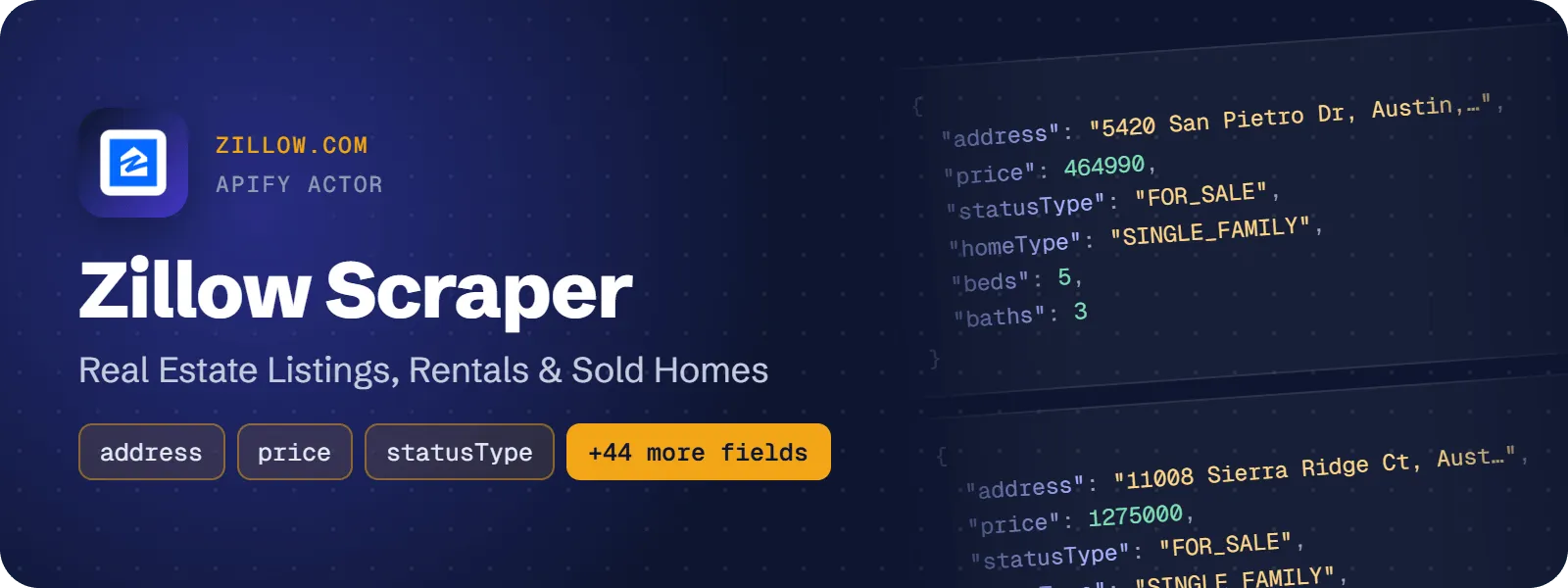
Get Zillow listings for sale, for rent or recently sold as flat rows: price, full address with ZIP code and coordinates, beds, baths, living area, home type, Zestimate and Rent Zestimate, days on Zillow, sold date, last price change, broker and photos. Type a US city, ZIP code, county, neighborhood, borough or state and set filters, or paste a Zillow search URL. Rental buildings come with their rent range, available units, the from-price of each unit type and the leasing phone.
What does Zillow Search Scraper do?
It runs Zillow searches for you and returns one row per listing. You give locations (for example Austin, TX, 10001 or Travis County, TX) plus filters such as listing type, price, bedrooms, bathrooms, living area, year built, home types and listing age, or you paste search URLs from your browser. Zillow shows at most 820 results per search; when a search has more and you ask for more, the actor splits it into price bands and merges them without duplicates. It is built for real-estate investors pulling sold comps, agents watching new listings in their ZIP codes, and data teams feeding spreadsheets or databases.
How to scrape Zillow listings
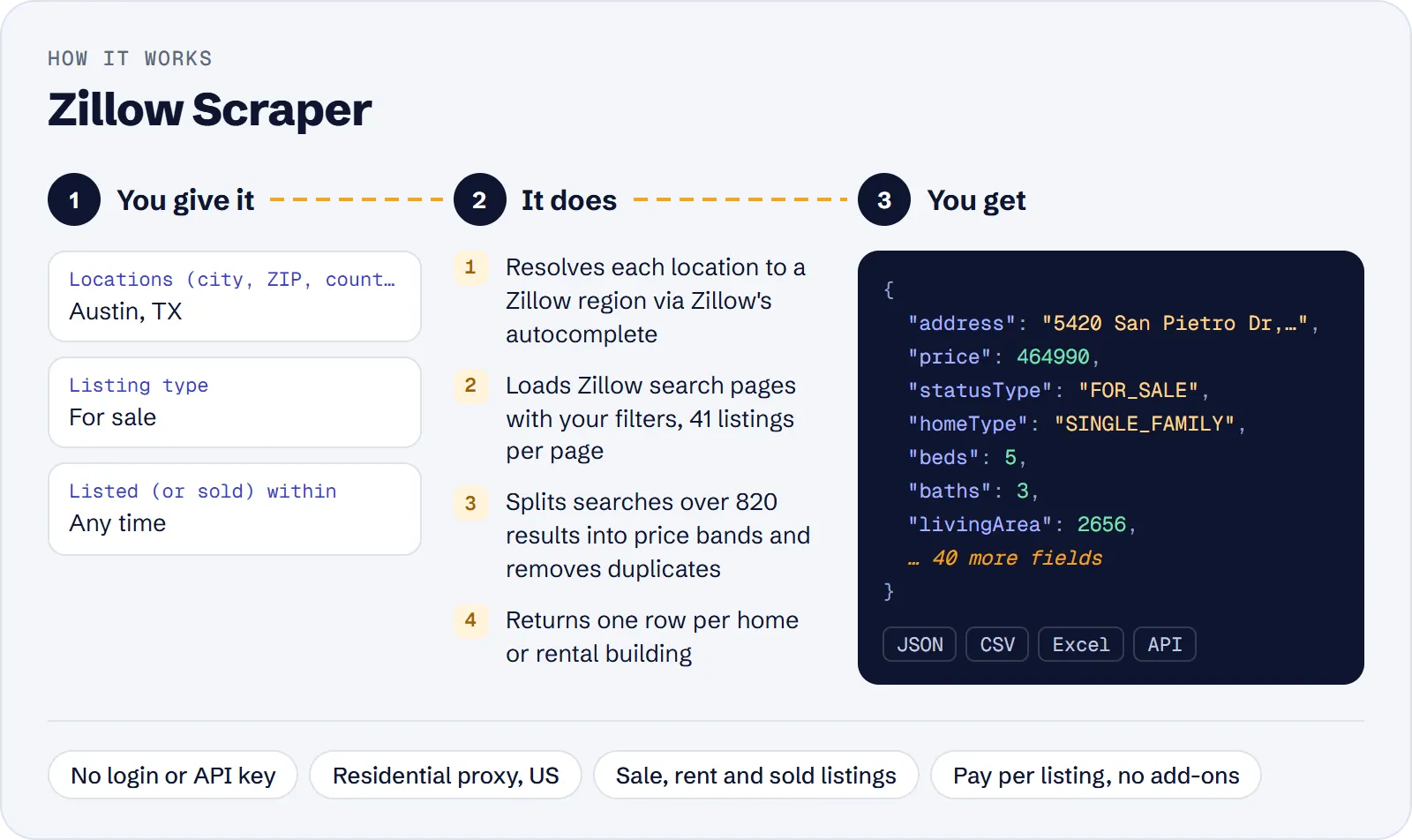
- Open the actor in Apify Console.
- In Locations, enter one place per line: a city with its state, a ZIP code, a county, a neighborhood, a borough or a state. Or paste Zillow search URLs into Start URLs.
- Choose Listing type: For sale, For rent or Recently sold.
- Set the filters you need: price, bedrooms, bathrooms, living area, year built, home types, "Listed (or sold) within" and sort order.
- Set Max results for the run and, if you search several places, Max results per search.
- Click Start. Download the rows as JSON, CSV or Excel, or open the Overview and Rentals views in the dataset.
How much does it cost to scrape Zillow?
Price per event by Apify plan:
| Event | Free | Bronze | Silver | Gold and above |
|---|---|---|---|---|
| Listing | $1.90 per 1,000 | $1.805 per 1,000 | $1.71 per 1,000 | $1.615 per 1,000 |
| Actor start | $0.00005 | $0.00005 | $0.00005 | $0.00005 |
A test run with the API example input below returned 100 rows in 15 s.
You pay one listing event per row in the dataset: one home, or one rental building with all its units. There are no add-on events. Duplicates (the same listing found by two locations or two price bands), locations that Zillow does not find and failed pages are not charged. Each run also has the standard Apify start event of $0.00005 per GB of memory (the actor runs with 256 MB).
| Scenario | Listing events | Cost on the Free plan |
|---|---|---|
| Quick look: 100 homes for sale in Austin, TX | 100 | about $0.19 |
| Rental market of two cities, 300 rows each | 600 | about $1.14 |
| Sold comps: 1,000 sold homes | 1,000 | about $1.90 |
| A whole county past the 820 cap: 3,000 rows | 3,000 | about $5.70 |
The start fee adds less than $0.0001 to each scenario. Use Max results to cap what a run can cost.
Input
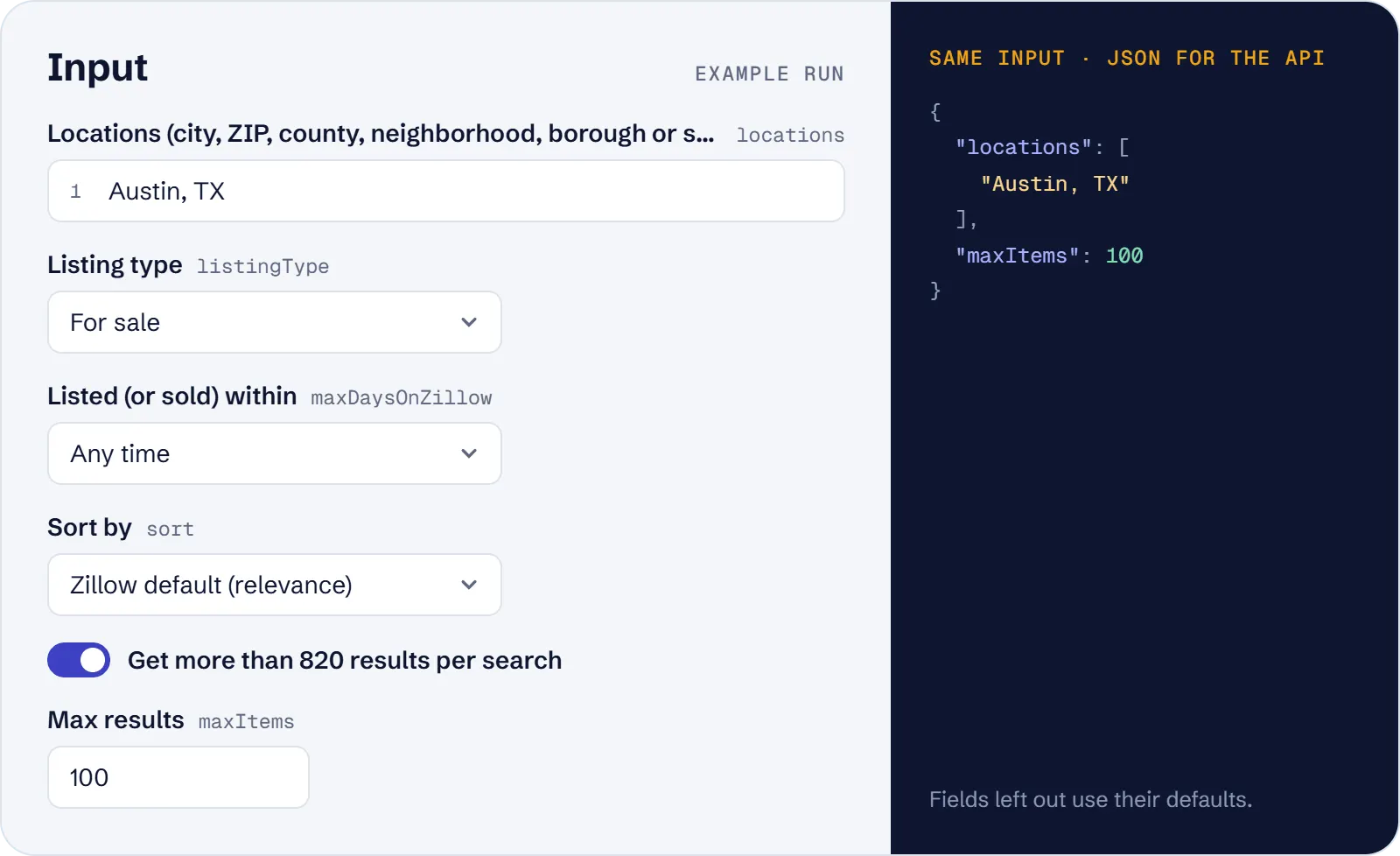
All fields are optional, but you must give Locations or Start URLs (or both); an empty input stops with an input error before any request.
| Field | What it does |
|---|---|
locations | Places to search, one per line: city (Austin, TX), ZIP code (10001), county (Travis County, TX), neighborhood (Capitol Hill, Seattle, WA), borough (Brooklyn, NY) or state (Texas). Add the state for best matching. Street addresses are not supported. Each location is one search. |
startUrls | Zillow search result URLs, e.g. https://www.zillow.com/austin-tx/, https://www.zillow.com/homes/for_sale/Boise,-ID_rb/ or a map search with ?searchQueryState=…. The URL keeps its own listing type and filters; the form filters are not applied to it. Property pages (/homedetails/…) and building pages are rejected. |
listingType | forSale (default), forRent or sold. Applies to locations only. |
minPrice, maxPrice | Price in USD. For sale and sold: the list or sold price. For rent: the monthly rent. Min must not be greater than max. |
minBeds, minBaths | At least this many bedrooms / bathrooms (0–20; halves allowed for baths). 0 = any. |
minLivingArea, maxLivingArea | Interior living area in sqft. Min must not be greater than max. |
minYearBuilt, maxYearBuilt | Year built, 1700–2100. Min must not be later than max. |
homeTypes | Any of houses, townhomes, condos, multiFamily, apartments, lots, manufactured; empty = all. apartments is for rent only; lots and manufactured are for sale and sold only. A type that does not fit the listing type is dropped with a warning; if it is the only type chosen, the run stops with an input error. |
maxDaysOnZillow | Listed (for sold: sold) within any (default), 1, 7, 14, 30, 90 days or 6m, 12m, 24m, 36m months. 1 is not available for sold listings. |
sort | relevance (default), newest, priceLowToHigh, priceHighToLow, bedrooms, bathrooms, livingArea. Price sorting works for sale and sold only; for rent the actor uses Zillow's default order and logs a warning. When a search is split into price bands, the order holds within each band. |
splitLargeSearches | On by default. Splits a search with more than 820 results into price bands when you ask for more than 820 rows. Off = at most 820 rows per search. |
maxItemsPerSearch | Stop each location or start URL after this many rows. Empty = no per-search limit. |
maxItems | Stop the whole run after this many rows (default 500). |
proxyConfiguration | Default: Apify residential proxy, US. Zillow blocks most datacenter IPs. |
Example input:
What data can you extract from Zillow?
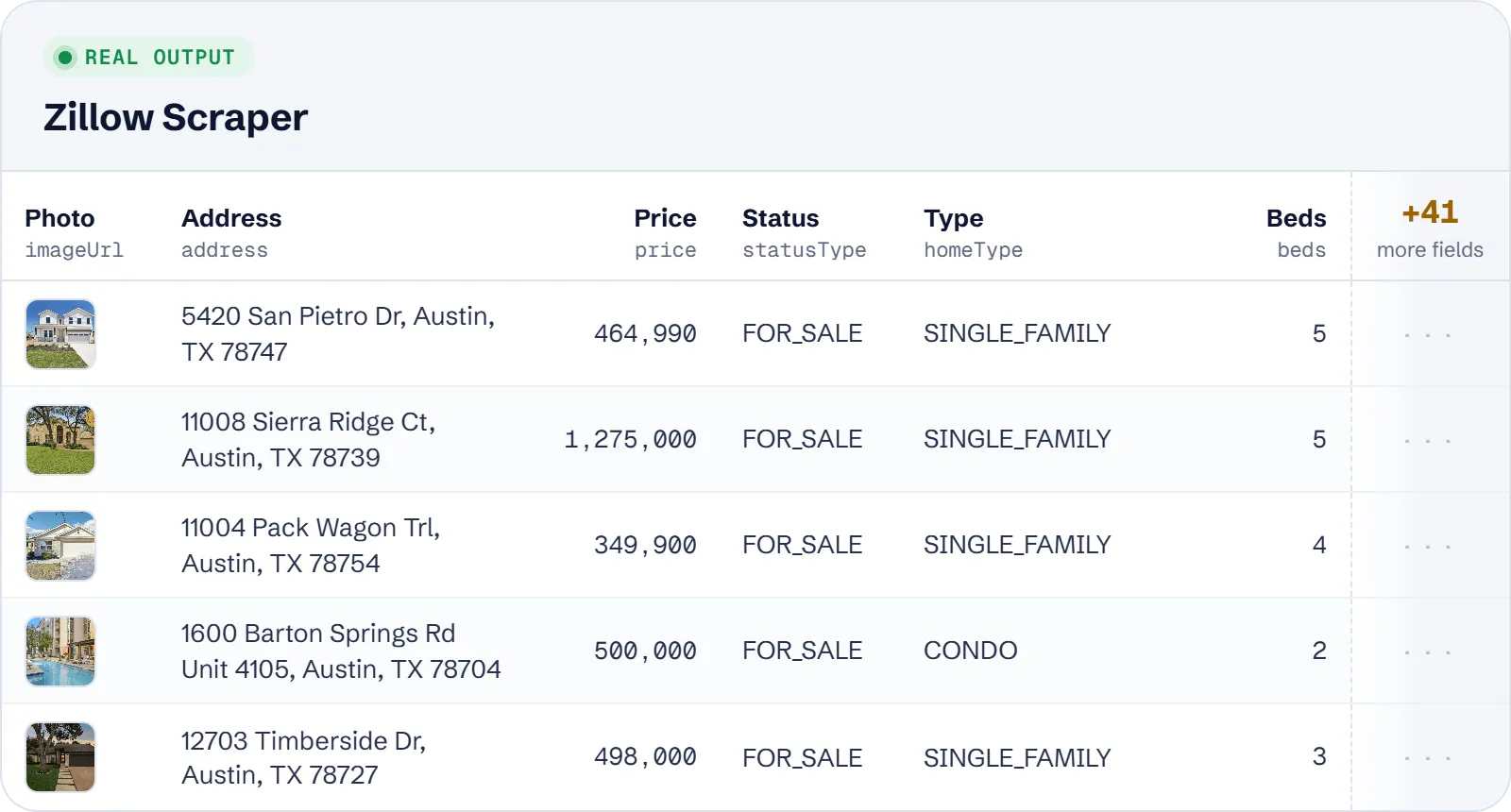
Each row is one listing with 47 fields. Fields that Zillow does not show for a listing are null.
| Field | Meaning |
|---|---|
url, id, zpid | Listing or building page; row id (the zpid of a home, or lat--lng for a rental building); Zillow property id (null for rental buildings) |
statusType, statusText | FOR_SALE, FOR_RENT or SOLD, and Zillow's status label |
homeType | e.g. SINGLE_FAMILY, CONDO, TOWNHOUSE, MULTI_FAMILY, APARTMENT, LOT, MANUFACTURED; null for rental buildings |
price, priceText, currency | Price in USD (list price, sold price or monthly rent; for a building, its lowest rent), the price as shown, the currency code |
address, street, city, state, zipcode | One-line address and its parts |
latitude, longitude | Coordinates |
beds, baths, livingArea | Bedrooms, bathrooms, living area in sqft |
lotAreaValue, lotAreaUnit | Lot size and its unit (sqft or acres) |
zestimate, rentZestimate, taxAssessedValue | Zillow home value estimate, monthly rent estimate, tax-assessed value (USD) |
daysOnZillow, soldAt | Days since listed (-1 for some new-construction plans); sale date of sold homes |
priceChange, priceChangedAt | Last price change in USD (negative = price cut) and its date |
brokerName, phone | Listing brokerage; contact phone of a rental card |
isBuilding, buildingName, availableUnits, minRent, maxRent, unitPrices | Rental buildings: name, available units, rent range, from-price per unit type (e.g. Studio: $2,263+) |
imageUrl, photos, photoCount | Main photo, card photo URLs and their count |
has3DModel, hasVideo, flexFieldText, newConstructionType | 3D tour, video, card highlight (e.g. Showcase), new-construction kind |
position, query, totalResults, scrapedAt | Rank within its search, the location or URL that found it, Zillow's result count for the search, extraction time |
Real example row (photos shortened):
A rental building row looks like this (shortened): "isBuilding": true, "buildingName": "One Six Six", "price": 2198, "minRent": 2198, "maxRent": 4682, "availableUnits": 23, "unitPrices": ["Studio: $2,263+", "1 bd: $2,698+", "2 bd: $4,194+"], "phone": "773-840-0882", "zpid": null, "beds": null.
Use cases
- Sold comps: pull recently sold condos in
10001orMiami, FLfrom the last 6 months with sold price and sold date. - New-listing watch: run daily for your ZIP codes with sort
newestand "Listed within 1 day" to catch new homes for sale. - Rental market research: compare rents of 2-bedroom units in
Chicago, ILandBrooklyn, NY, including apartment buildings with rent ranges and available units. - Market snapshots: export a whole county (for example
Travis County, TX) past the 820-result cap for price, Zestimate, days on market and price cuts. - Data pipelines and AI agents: feed flat, documented rows into spreadsheets, BI tools or an agent that answers "3-bed homes under $600k in Austin".
Limitations
- The rows come from Zillow search results. Descriptions, agent names and phones of sale listings, price history, tax history and schools are not included (they are on the property page only).
- Zillow shows at most 820 listings per search. Above that, the actor needs price-band splitting; listings without a price may be missed in split searches.
- Many fields depend on the listing:
zestimateis filled for only part of the homes for sale (it is much more common on sold homes),brokerNameis missing in some states, andsoldAtis set only for sold homes. Sold prices can be empty in non-disclosure states such as Texas. - Rental buildings have no
zpid,homeType,bedsorbaths; useunitPrices,minRentandmaxRentinstead. - Locations must be areas Zillow knows (city, ZIP, county, neighborhood, borough, state). Street addresses are not supported.
- US listings only, prices in USD.
Tips and troubleshooting
- 0 rows? Check the log:
Location not found on Zillowmeans the text did not match an area; add the state (Springfield, IL). If Zillow answers with a different region than requested, that search is skipped with a warning so you never get rows from the wrong place. - Fewer rows than expected? Make sure Get more than 820 results per search is on and Max results is high enough. With splitting off, each search stops at 820.
- Several locations in one run: set Max results per search so one big city does not use up the whole Max results.
- Start URLs keep their own filters: set the filters on Zillow in your browser before copying the URL. The form filters apply to locations only.
- Rentals sorted by price: Zillow does not sort rentals by price, so the actor uses the default order and warns you. Sort the dataset afterwards instead.
- Blocked pages: keep the default US residential proxy; Zillow blocks most datacenter IPs.
API, MCP and integrations
Run the actor from your code with the same JSON input as in Console. Your API token is in Console → Settings → API & Integrations.
Python (pip install apify-client):
Node.js (npm install apify-client):
HTTP — one request runs the actor and returns the results (runs up to 5 minutes; longer ones: run asynchronously):
AI agents (MCP). Add the actor as a tool of the Apify MCP server. Claude Code:
Claude Desktop, Cursor or VS Code: {"mcpServers": {"apify": {"url": "https://mcp.apify.com?tools=genial_candlestand/zillow-search-scraper"}}}. Then ask, for example:
- "Find 3-bed homes for sale under $600k in Austin, TX, newest first"
- "Get condos sold in the last 6 months in ZIP 10001 with sold price and sold date"
- "List 2-bedroom rentals between $2000 and $3000 in Chicago, IL with rent and phone"
Integrations. Run it on a schedule with Apify Schedules and send the results to Google Sheets, Slack, Zapier, Make, n8n or your webhook — see Apify integrations.
FAQ
Is it legal to scrape Zillow?
The actor reads public search pages that Zillow shows to any visitor without login. It does not log in or solve captchas. Zillow's Terms of Use restrict automated access, so you are responsible for how you use the data and for complying with the laws and terms that apply to you. The rows contain listing data and brokerage names as Zillow shows them publicly.
Can I search without building a Zillow URL first?
Yes. Type locations and set the filters in the form. Search URLs from your browser are also accepted, and both can be combined in one run.
How do I get more than 820 results?
Leave Get more than 820 results per search on and set Max results above 820. The actor splits the search into price bands and removes duplicates, so each listing is returned and charged once.
Does it scrape rentals and apartment buildings?
Yes. With listing type For rent, single rentals come as normal rows, and apartment buildings come as one row each with minRent, maxRent, availableUnits, unitPrices and phone; price holds the building's lowest rent.
How is it different from other Zillow actors?
It accepts locations plus filters as well as search URLs, returns 47 flat camelCase fields per row including rental building rent ranges and unit prices, splits large searches past 820 results also for start URLs, and charges one event per listing ($1.90 per 1,000 on the Free plan, against $2.30 per 1,000 for the most used Zillow search actor) with no add-on events.
Can I get property details like price history and schools?
Not with this actor. Use the Zillow Property Details Scraper below with the url or zpid values from this actor's output.
Also useful
- Zillow Property Details Scraper — get price history, tax history, schools and listing agent for the homes you found
- Airbnb Scraper — compare short-term rental prices per night in the same cities you track on Zillow
- Google Maps Scraper — list nearby places, phones and ratings around a neighborhood you are evaluating
- Booking.com Hotel Search Scraper — check hotel and vacation-rental prices for a market by dates


