

Bilibili Scraper - Videos, Comments, Danmaku & Subtitles
Pricing
from $3.80 / 1,000 result rows
Bilibili Scraper - Videos, Comments, Danmaku & Subtitles
Bilibili scraper for videos, search, UP master profiles, comments, danmaku (弹幕) and subtitles. Clean English fields, ISO dates, full stats with coins and shares. Monitor new uploads. No login or cookies.
Pricing
from $3.80 / 1,000 result rows
Rating
0.0
(0)
Developer

Group Oject
Maintained by CommunityActor stats
0
Bookmarked
2
Total users
1
Monthly active users
16 hours ago
Last modified
Categories
Share
Bilibili Scraper
Bilibili Scraper pulls videos, search results, UP master (UP主) profiles, comments, danmaku (弹幕 bullet comments) and subtitles from Bilibili (哔哩哔哩, B站) as clean JSON. Every row has the same English field names, ISO 8601 dates, numeric counts and full URLs, so it drops straight into a spreadsheet, a database or an AI pipeline. No Bilibili account, cookies or login needed.
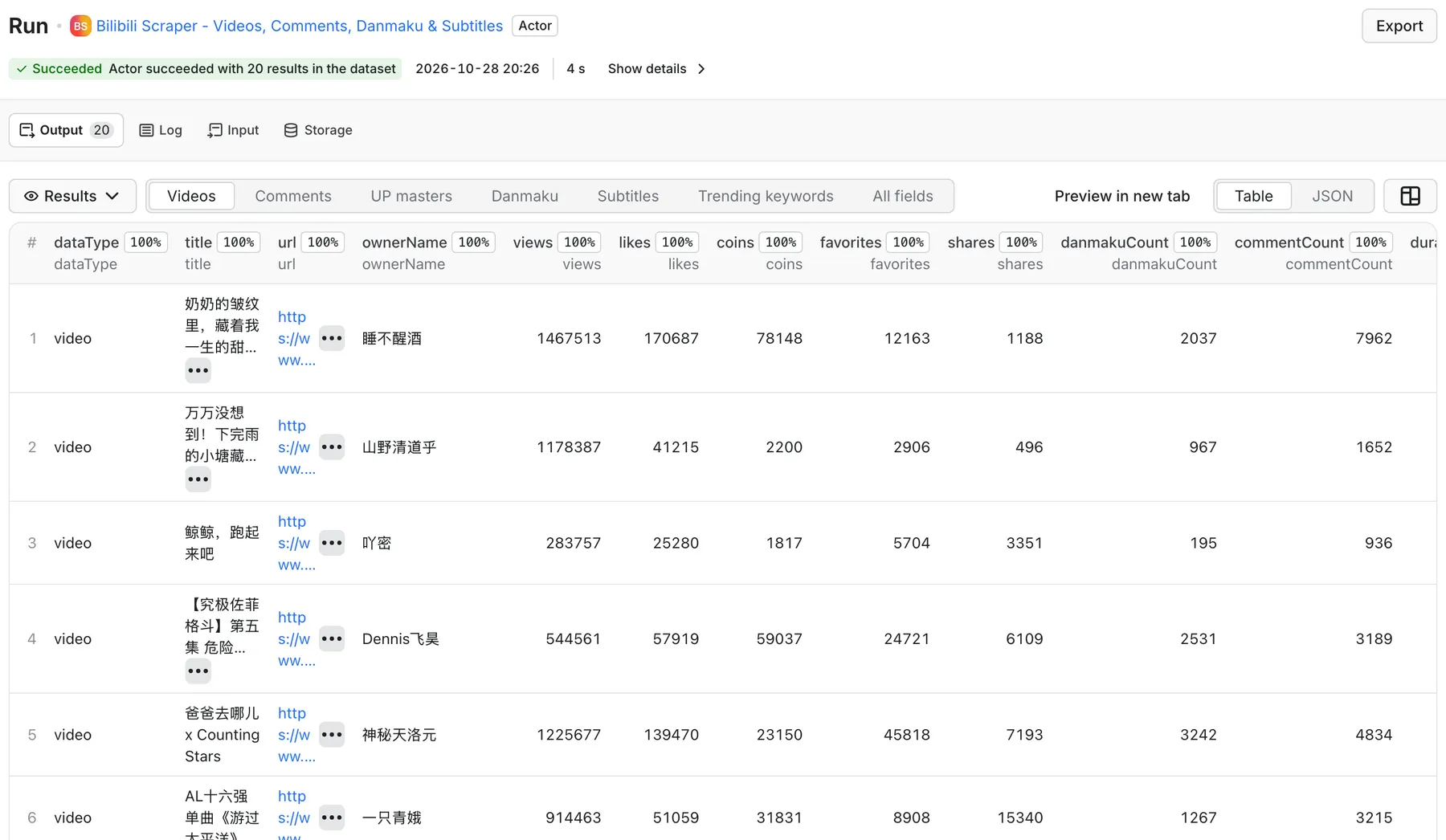
Real output from a default run of Bilibili Scraper in Apify Console.
What can it do?
- Search Bilibili videos by keyword: sort by relevance, views, newest, danmaku or favorites; filter by length and publish date. Up to 1,000 videos per keyword (Bilibili's own limit).
- Get full video details from a link or id: BV ids, av ids, desktop/mobile URLs,
?p=parts and b23.tv short links. You get views, likes, coins, favorites, shares, danmaku and comment counts, tags, partition (分区), part count and the uploader's follower count. - Scrape UP master profiles and uploads: followers, following, total likes, video count, level, verification (认证), VIP label, live room, plus every uploaded video, newest or most viewed first.
- Scrape comments and replies: hot or newest first, pinned comments flagged, reply threads with the parent and root comment ids, likes, author level and IP region.
- Scrape danmaku (弹幕): text, position in the video in seconds, display mode, colour and send time. Get one row per video (cheaper) or one row per bullet comment.
- Get subtitles and transcripts (字幕): creator or AI-generated (
ai-zh) subtitle tracks as timed segments plus the full text. Videos without subtitles cost nothing. - Track what is hot: Bilibili's popular (热门) feed and the trending search (热搜) keyword list.
- Monitor new uploads: "Only new videos" remembers what earlier runs delivered, so a scheduled run returns (and charges for) new videos only.
What data do you get?
Every row has a dataType field: video, comment, user, danmaku, subtitle or trendingKeyword. The dataset has a tab for each type.
| Field | Type | Example |
|---|---|---|
bvid, aid, cid | string | BV1chxT6xEyo, 117512402370778, 43092804680 |
url | string | https://www.bilibili.com/video/BV1chxT6xEyo |
title, description | string | original Chinese text |
durationSeconds | number | 263 |
publishedAt | ISO 8601 | 2026-10-27T10:34:07.000Z |
ownerMid, ownerName, ownerUrl, ownerFollowers | string / number | UP master id, name, space URL, followers |
views, likes, coins, favorites, shares, danmakuCount, commentCount | number | full engagement stats |
tags | string[] | ["攻略", "单机游戏"] |
coverUrl | string | https cover image |
categoryId, categoryName | number / string | Bilibili partition, e.g. 单机游戏 |
parts, isOriginal, publishLocation | number / boolean / string | 分P count, 自制 vs 转载, region |
detailLevel | string | full (video's own record) or listing (search / list page) |
source, searchQuery, position | string / number | where the row came from and its rank |
Comment rows add commentId, text, likes, replyCount, isReply, rootCommentId, parentCommentId, authorMid, authorName, authorLevel, location, isPinned, likedByUploader, pictures. User rows add followers, following, totalLikes, videoCount, level, isVerified, verificationTitle, vipLabel, liveRoomUrl, isLive. Danmaku rows add text, timeSeconds, timeFormatted, mode, color, sentAt (or an items array per video). Subtitle rows add language, isAiGenerated, segments[{start, end, text}] and fullText.
Search results and creator lists don't include coins and shares, so those fields are null there and never a made-up 0. Turn on Fetch full video details to fill them in.
How much does it cost?
You pay per result (Pay-Per-Event). Nothing is charged for errors, duplicates, skipped "already seen" videos or videos without subtitles.
| Event | Price |
|---|---|
| Actor start | $0.003 per run |
| Result row (any video, comment, reply, user, danmaku or trending row) | $5.00 per 1,000 |
| + Video detail (videos mode, or "Fetch full video details") | +$4.00 per 1,000 videos |
| + UP master profile | +$4.00 per 1,000 profiles |
| + Danmaku, one row per video | +$7.00 per 1,000 videos |
| + Subtitle / transcript found | +$22.00 per 1,000 transcripts |
On paid Apify plans the per-row price drops automatically (Bronze and above get volume discounts); the Pricing tab shows your exact rate.
Examples:
- 500 search results for two keywords: $0.003 + 500 × $0.005 = $2.50.
- One video deep-dive (details, 100 comments with 300 replies, the danmaku pool and the transcript): $0.003 + $0.009 + 400 × $0.005 + $0.012 + $0.027 = $2.05.
- Daily monitor of one keyword that finds about 30 new videos a day: about $0.15 a day.
Set a maximum charge per run in the run options; the Actor stops cleanly when it gets there and keeps everything it collected.
How to use it
- Open the Actor and pick What to scrape (the default, Popular videos, finishes in a few seconds).
- Fill the field for that mode: keywords, video links, or UP master UIDs / space URLs.
- Set Max results per input, plus any filters and extras (comments, danmaku, subtitles).
- Click Start. Download the results as JSON, CSV, Excel or HTML, or read them through the API.
- For monitoring, turn on Only new videos, give the monitor a state key, and add a schedule.
Input example
Output example
Use with the API
cURL (run and get the items in one call):
Python:
JavaScript:
Use with AI agents (MCP)
Add the Actor to Claude, Cursor or any MCP client through the Apify MCP server:
https://mcp.apify.com?tools=groupoject/bilibili-scraper
Example prompt: "Use the Bilibili Scraper to get the transcript and top 50 comments of BV1g1C6Y2Ef3, then summarise what viewers liked."
Integrations
Send results to Google Sheets, Make, Zapier, n8n, Slack or your own webhook when a run finishes. Pair "Only new videos" with an Apify schedule to get a daily feed of new uploads for a keyword or a creator.
FAQ
Is it legal to scrape Bilibili?
The Actor reads only public data that any visitor can see without logging in: videos, public profiles, comments, danmaku and subtitles. It doesn't access accounts or private content. Personal data in comments (user names, regions) can still fall under laws such as GDPR or China's PIPL, so use it for legitimate purposes and check with your lawyer if you're unsure.
Do I need a Bilibili account, cookies or proxies?
No. Everything works without login or cookies, and you don't need to configure proxies.
How many results can I get?
Bilibili returns at most 1,000 videos per search keyword; use several keywords or date ranges for more. Creator uploads go back up to 2,500 videos per UP master. Comments and replies page until the thread ends or your limit. Danmaku come from the pool Bilibili serves, usually the latest 1,000–8,000 depending on video length.
Why are coins or shares empty for some videos?
Search results and creator lists don't carry coins and shares. Turn on Fetch full video details, or use videos or popular mode, to get them.
Why did a video give no subtitles?
Many Bilibili videos have no subtitle track (music, gameplay without talking, older uploads). Those videos are listed in the ERRORS record with NO_SUBTITLES and are not charged.
How fast is it?
About 1–3 seconds per page of 20–50 results. A 1,000-video search takes well under a minute. Subtitle lookups are slower (5–15 seconds each), so the Actor runs several in parallel.
How do I monitor new videos every day?
Pick search or user mode, set sort order to Newest, turn on Only new videos, choose a state key, and create a schedule. Each run returns only videos that earlier runs haven't delivered.
Why did my run stop early?
It stops cleanly when it reaches your maximum charge, gets close to the run timeout, or keeps paying for data lookups that return nothing (for example, a long list of videos that all lack subtitles). The SUMMARY record explains which one happened, and every row collected up to that point is kept.
Related actors
- YouTube Scraper API: search results, playlists and video details from YouTube.
- YouTube Comments Scraper: comments and replies for YouTube videos and Shorts.
- YouTube Transcript Scraper: captions and transcripts with timestamps.
- YouTube Channel Monitor: new-video alerts for channels.
- Reddit Scraper: posts, comments and search from Reddit.
- Google Trends Scraper: interest over time and rising queries.


