

Booking.com Reviews Scraper 💰$1/1K — Guest Reviews & Replies
Pricing
from $0.70 / 1,000 reviews
Booking.com Reviews Scraper 💰$1/1K — Guest Reviews & Replies
Booking.com reviews scraper: score, title, liked and disliked text, stay date, guest country, traveller type, room, nights, hotel reply and photos, plus the hotel's overall and category scores on every row. Sort by date or score, filter by traveller type and language. $1 per 1,000 reviews, no login.
Pricing
from $0.70 / 1,000 reviews
Rating
5.0
(1)
Developer

Matvey
Maintained by CommunityActor stats
0
Bookmarked
30
Total users
8
Monthly active users
4 days ago
Last modified
Categories
Security
Limited permissionsShare
Booking.com Reviews Scraper extracts guest reviews from Booking.com, one row per review, for any hotel, apartment or villa you can open on the site — with the property's overall score and category scores on every row. Paste the property URLs, choose the order and the filters, press Start — and get score, title, what the guest liked and disliked, stay date, country, traveller type, room, nights, the hotel's reply and photos. $1 per 1,000 reviews, no fee per run, no fee per hotel, error rows free.
Tested head-to-head — 26 September 2026
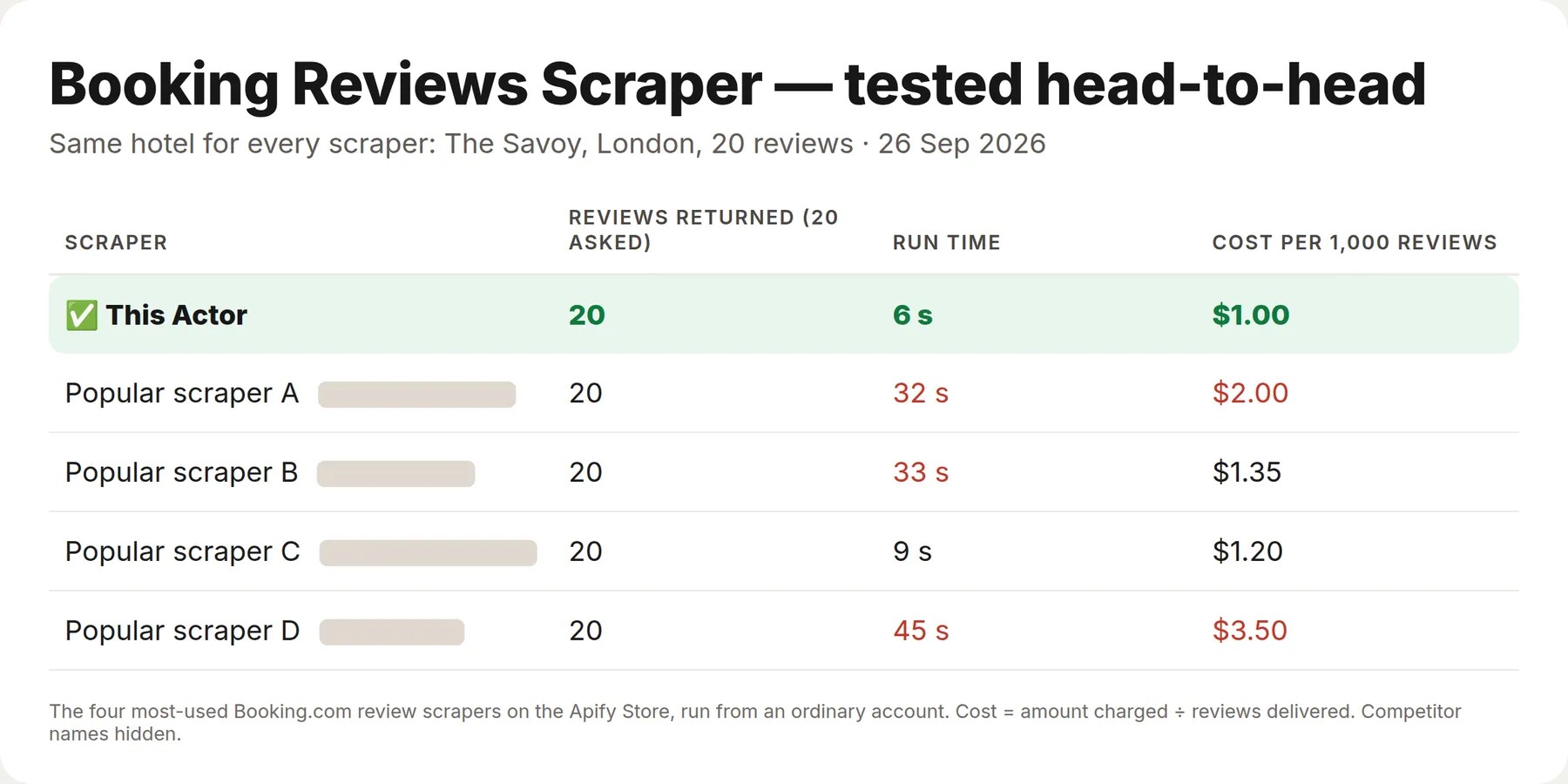
Same hotel (The Savoy, London), 20 reviews, through the four most-used Booking.com review Actors on the Apify Store, from an ordinary account.
| This Actor | The four others | |
|---|---|---|
| Reviews returned (20 asked) | 20 | 20 each |
| Price per 1,000 reviews | $1.00 | $1.20–$3.50 |
| Run time | 6 s | 9–45 s |
What is Booking.com Reviews Scraper?
Booking.com Reviews Scraper reads the review list that Booking.com shows on a property page — the same cards, in the same order, with the same filters — and turns it into a flat table you can download as JSON, CSV or Excel or pull through the API. It talks to the site's own data endpoint, so there is no browser, no login and nothing to configure. Give it one hotel or a list of five hundred; each property is billed only for the reviews it returns.
Booking.com is the largest review pool in travel: many properties carry thousands of verified stays. This Actor is for the people who need those reviews in bulk — reputation teams, revenue managers benchmarking competitors, researchers, and anyone feeding an LLM with what real guests wrote.
What data can Booking.com Reviews Scraper extract?
| Field | What it holds |
|---|---|
hotelId, hotelName, hotelUrl | The property the review belongs to |
hotelScore, hotelReviewCount | The property's overall Booking.com score and its total number of reviews, on every row |
hotelRatingScores | The property's category scores — staff, facilities, cleanliness, comfort, value for money, location, free Wi-Fi — each with the city's average band next to it |
reviewId, reviewUrl | Stable id and a link that opens the review on Booking.com |
score | Guest score on Booking.com's 10-point scale |
title | Review headline |
positive, negative | The two text boxes Booking.com asks for: what was good, what was not |
language | Language the review was written in |
reviewedAt | Date the review was posted |
guestName, guestCountry, guestCountryName, guestAvatar | Reviewer as shown on the page (first name or "Anonymous"), country and profile picture |
guestType | Family, couple, solo traveller, group of friends, business traveller |
roomName, roomId | Room type the guest booked |
nights, checkin, checkout, stayStatus | Length and dates of the stay, when Booking.com exposes them |
helpfulVotes, isApproved, isAnonymous | Page metadata |
hotelReply | The property's public answer, if any |
photos | Full-size URLs of photos attached to the review |
scrapedAt | When the row was taken |
Every row also carries type: "review". If a hotel cannot be read — wrong URL, property removed, bot check — you get one type: "error" row for it that says what happened and what to do; error rows cost nothing.
How much does it cost to scrape Booking.com reviews?
One event, one price: $0.001 per review on the free plan, falling to $0.0006 on the highest plans. There is no fee per run, no fee per hotel, no fee per page and no proxy charge — Booking.com is read over plain HTTP through Apify's datacenter proxies, which are included.
| Plan | Price per review | Reviews per $1 |
|---|---|---|
| Free | $0.001 | 1,000 |
| Bronze | $0.0009 | 1,111 |
| Silver | $0.0008 | 1,250 |
| Gold | $0.0007 | 1,428 |
| Platinum, Diamond | $0.0006 | 1,666 |
The $5 of free monthly credit on Apify's free plan buys about 5,000 reviews. A property with 2,000 reviews costs $2 to export in full.
Bulk export: what 50,000 reviews actually cost
This Actor is built for volume — put hundreds of hotel URLs into one run, or call it from the API on a schedule. Because there is no fee per run and no fee per hotel, the bill is the number of reviews you keep and nothing else.
| Job | This Actor | Most-used Actor in this category |
|---|---|---|
| 50,000 reviews across 100 runs | $50 | $100 |
Checked on the Apify Store on 23 September 2026 against the Actor with the most monthly users for "booking reviews"; its per-run fee is counted in, as ours would be if we charged one. Some Actors here ask less per row — this table compares against the one buyers actually use most.
How to scrape Booking.com reviews
- Open the property on Booking.com and copy the address from the browser, e.g.
https://www.booking.com/hotel/id/the-magani-amp-spa.html. Dates and other parameters in the URL do no harm. - Paste one or more URLs into Booking.com hotel URLs or ids. Numeric hotel ids work too.
- Set Reviews per hotel (25 is one page; 5,000 is the ceiling per hotel per run) and the order — newest first for monitoring, lowest scores first for complaints.
- Optionally narrow by reviewer type or language.
- Press Start. Download the table, or read it through the API.
⬇️ Input
The newest 25 reviews of two Bali hotels (the form's default — runs in under a minute)
Every complaint: lowest scores first, families only, in English
Full history of a competitor set
⬆️ Output
Export as JSON, CSV, Excel, XML or RSS from the Dataset tab, or fetch the same rows with one API call.
🔁 Get only new reviews — schedule it
A one-off export is useful once; a feed is useful every day. Fill Only new rows — memory name (for example my-reviews-watch) and the Actor remembers every review row it has delivered under that name. Every later run with the same name writes — and charges — only rows you have not received before; rows delivered earlier are skipped for free.
- Run once with the memory name to load the history.
- Open the run → Actions → Schedule (or Schedules) and set daily or hourly.
- Read the new rows from the run's dataset, or connect a webhook, n8n, Make or Zapier to the run.
Each memory name is separate, so one schedule per hotel list, keyword set or market never mixes with another. To start over, use a new name.
Use cases for Booking.com review data
Reputation management
Pull the newest reviews of your own properties every morning, route the ones under 7 to the front desk, and answer them before they age.
Competitor benchmarking
Export the last 12 months of reviews of your competitive set, tag them by topic (breakfast, noise, Wi-Fi, staff) and see where you win and where you lose.
Revenue management
Review scores move ADR. Track score and review volume of a market weekly and correlate with the rates you scrape elsewhere.
Market research and investment
Thousands of verified stays per property, with traveller type and country, for any city — the ground truth behind hotel-market reports.
AI, RAG and sentiment analysis
Clean text, split into liked and disliked, with a numeric score attached — training and evaluation data for sentiment models and hotel assistants without any cleaning.
Integrations and Booking.com reviews API
Run the Actor from your own code with the Apify API or the Python and JavaScript clients, from n8n, Make and Zapier through the Apify nodes, straight into Google Sheets, or on a schedule with a webhook when the run finishes. The dataset endpoint returns JSON, CSV or Excel:
Use it from Claude, Cursor or any MCP agent
Every Apify Actor is available as a tool through the Apify MCP server. Add the server, and an agent can ask for "the newest 50 reviews of this hotel" and get the rows back.
🤖 For AI Agents & LLM Apps
- One row type, flat fields, no nesting except
photos. positiveandnegativeare already separated — no need to split the sentiment yourself.scoreis numeric,reviewedAtis ISO date,guestCountryis ISO-3166 alpha-2.- Error rows carry
type: "error"with a human-readableerrorstring and cost nothing.
Troubleshooting
- A hotel returns an error row "Could not resolve hotel" — the URL is not a property page. It must contain
/hotel/<country>/<name>.html; search-result and city pages are not accepted here. bot-checkerror rows — Booking.com asked the datacenter IP to prove it is a browser. Switch Proxy configuration to Residential and run again.- Fewer reviews than the hotel shows — filters by reviewer type and language reduce the pool; also Booking.com hides reviews without text from the list.
❓ FAQ
Is it legal to scrape Booking.com reviews?
The Actor reads only what any visitor sees on a public property page, without logging in, and reviewer names are shown exactly as Booking.com publishes them (first name or "Anonymous"). How you store and use the data is subject to the laws of your country and Booking.com's terms; consult a lawyer for commercial projects involving personal data.
Does Booking.com have a public reviews API?
Not for the public. Booking.com's partner API is for accommodation providers and affiliates and does not expose guest reviews for arbitrary properties. This Actor is the practical alternative.
How many reviews can I get per hotel?
Up to 5,000 per hotel per run, in the order you choose. For a property with more, run it twice with different orders (newest and oldest) or filter by language.
Do I need proxies?
No. Apify datacenter proxies are used by default and included in the price. Residential proxies are only a fallback if you see bot-check rows.
Can I run it on a schedule?
Yes — create a Task with your hotel list, schedule it daily, and only newly posted reviews will be new rows in your dataset; deduplicate by reviewId.
What happens on an error?
You get an error row that explains the problem in plain words. Error rows are never billed.
Your feedback
If a field is missing or a hotel does not parse, open an issue on the Actor page with the URL — it is usually fixed within a day. If the Actor saved you time, a review on the Store helps other buyers find it.
You might also like
| Actor | What it does |
|---|---|
| Booking.com Hotels Scraper | Search results with prices, full room and rate lists, facilities and price calendars from Booking.com |
| Agoda Reviews Scraper | Hotel reviews from Agoda, including the Booking.com reviews shown on Agoda |
| Airbnb Reviews Scraper | Guest reviews of Airbnb listings with rating, text, date and host reply |
| Google Hotels Scraper | Hotel prices across booking sites from Google Hotels |
| Trip.com Scraper | Hotels with prices, details and guest reviews from Trip.com |


