

Trip.com Scraper — Hotel Prices, Rates & Availability
Pricing
from $2.10 / 1,000 hotel with prices
Trip.com Scraper — Hotel Prices, Rates & Availability
Scrape Trip.com hotels with live room rates for your own check-in and check-out dates: nightly and total price, availability, star level, guest rating with sub-scores, review count, district, address and coordinates. Hotel price data across Asia and beyond.
Pricing
from $2.10 / 1,000 hotel with prices
Rating
5.0
(2)
Developer

Matvey
Maintained by CommunityActor stats
0
Bookmarked
57
Total users
25
Monthly active users
15 hours ago
Last modified
Categories
Share
Trip.com Scraper extracts public Trip.com hotel data with live prices for your own check-in and check-out dates: hotel name, nightly and total price, star level, guest rating with its sub-scores for cleanliness, location, service and amenities, review counts, district, coordinates, full address and the guest reviews published on the hotel page. No login, no API key, no partner account. Export to JSON, CSV or Excel, run it via API, schedule it, or plug it into n8n, Make, Zapier, Google Sheets or an AI agent through MCP.
What is Trip.com Scraper?
Trip.com is one of the largest online travel agencies in the world and the main booking channel for Asia. It has no public hotel API for the general web, and its pages render in the browser, so most scrapers either miss prices or run an expensive headless browser for every hotel.
This Actor reads the data Trip.com already ships inside its own pages. That means a run is fast and cheap, and — unlike list-only tools — the rows carry the price for the exact dates you asked for, both per night and as a total including taxes and fees.
| Mode | What you get | Input |
|---|---|---|
| 🏨 Hotels in a city | Hotel cards with price for your dates, total stay price, star level, rating and sub-scores, review count, district, coordinates, room type offered, image | city ID and dates |
| 📋 Hotel details | Property description, full amenities list by category, photo gallery, highlights, check-in/check-out times, full address with postcode and country, star level, rating, review count and price range | hotel URLs |
| ⭐ Guest reviews | Reviews published on the hotel page: text, author, date | any hotel or city input |
Every row records checkIn, checkOut, currency and hotelId, so daily runs stack into a price history.
What data can Trip.com Scraper extract?
🏨 Hotel cards
| Field | Example |
|---|---|
name | Hotel Tjampuhan Spa |
price / totalPrice / currency | 89 / 192 / USD |
priceNote | Total price: US$192 · 1 room × 2 nights incl. taxes & fees |
rating / ratingText / reviewCount | 9.3 / Great / 216 |
subScores | [{"name":"Cleanliness","score":9},{"name":"Location","score":9.6}] |
star / category | 4 / Resort |
roomName / adults / children | Two Double Room / 2 / 0 |
bedType / bedDetails / roomQuantity | 1 double bed or 2 single beds / ["1 double bed (4.92 ft wide)"] / 1 |
district / location | Ubud / `Ubud Centre |
positionHighlights / zoneNames | ["Ubud Centre","Near Monkey Forest"] / ["Ubud"] |
featuredReview / reviewTags | Staff were lovely and the pool is huge. / ["Delicious breakfast","Great swimming pool"] |
ratingScale | 10 — the denominator of rating, so scores from several sites can sit in one table |
highlightTags | ["Floating breakfast","Ideal location"] — the hotel's selling lines, without opening its page |
advantageTags / promotionTags / discountTags / encourageTags | ["Free Cancellation"] / ["Surprise Savings"] / ["61% off"] / ["Only 4 left at this price"] |
originalPrice / originalPriceText | 82 / US$82 — the struck-through price next to the offer |
provinceId / countryId / cityNameEn | 11445 / 108 / Bali |
masterHotelId / hotelType / roomType / payType | Trip.com's own identifiers and codes, as they come in |
latitude / longitude | -8.506 / 115.259 |
checkIn / checkOut | 20261015 / 20261017 |
hotelId / url / imageUrl / images | identifier, link, main photo, gallery |
📋 Hotel details
description (the property write-up, several paragraphs) and descriptionSections (the same text split by topic: location, dining, rooms, services), amenities (flat list) and amenityGroups (by category, each item carrying its own note such as Free or Additional charge and details like opening hours), images and imageGroups (the gallery, grouped the way Trip.com groups it — pool, restaurant, rooms), highlights (the short "why this place" lines with the sentence behind each), checkInTime and checkOutTime, plus address (full street address), addressRegion, postalCode, country, star, rating, ratingBest, reviewCount, priceRange (the hotel's own "From US$70" line) and the canonical url.
All of it comes from the same page fetch as the address — no extra request and no extra charge per field.
⭐ Guest reviews
text, author, reviewTime as printed, reviewDate as ISO 8601, score on Trip.com's
1-10 scale, plus hotelId, hotelName and hotelUrl.
Four filters narrow them: Minimum review score, Maximum review score, Reviews posted from and Reviews posted until. Set the maximum score to 6 and you get the complaints on every hotel in a city; set the date window to the last three months and you get how a property is doing now rather than how it did in 2023. Filtered-out reviews are never charged for.
How much does it cost to scrape Trip.com?
The Actor uses Apify's pay-per-event pricing, so you pay for results and nothing per page. Error rows are never charged.
| Event | Price | Per 1,000 |
|---|---|---|
| Hotel with price | $0.003 | $3 |
| Hotel detail | $0.005 | $5 |
| Guest review | $0.002 | $2 |
No browser is involved, so platform usage is a fraction of a cent per run. The Apify Free plan ($5 monthly credit) covers roughly 1,600 priced hotels or 2,500 reviews a month. Bronze, Silver and Gold Store tiers get a discount on top.
Bulk export: what 50,000 hotel records actually cost
This Actor is built for bulk jobs — put hundreds of inputs into one run, or call it from the API on a schedule. There is no fee per run, no fee per page and no proxy charge: you pay for the rows you keep, and error rows are free. That is what decides the bill once you pull a whole market rather than a single property.
50,000 priced hotel records cost $150 here (50,000 × $0.003), whether you pull them in one run or a hundred — nothing is added per run. Prices are per row; the Store's other Trip.com hotel Actors range from about $1 to $50 per 1,000 rows (checked 24 September 2026).
How to scrape Trip.com
- Open Trip.com Scraper on Apify and click Try for free.
- Open your city on Trip.com and copy the number from the address bar: in
trip.com/hotels/list?city=**723**the city ID is723(Bali). Paste it into Trip.com city ID. - Set Check-in and Check-out. Without dates you still get hotels and ratings, but no prices.
- Set Max hotels, tick Collect guest reviews if you want them, then click Start.
- Alternatively paste Trip.com URLs: a hotel list URL you copied from the site, or single hotel URLs.
- Open the Output tab and download JSON, CSV, Excel or XML, or read the dataset through the API.
⬇️ Input
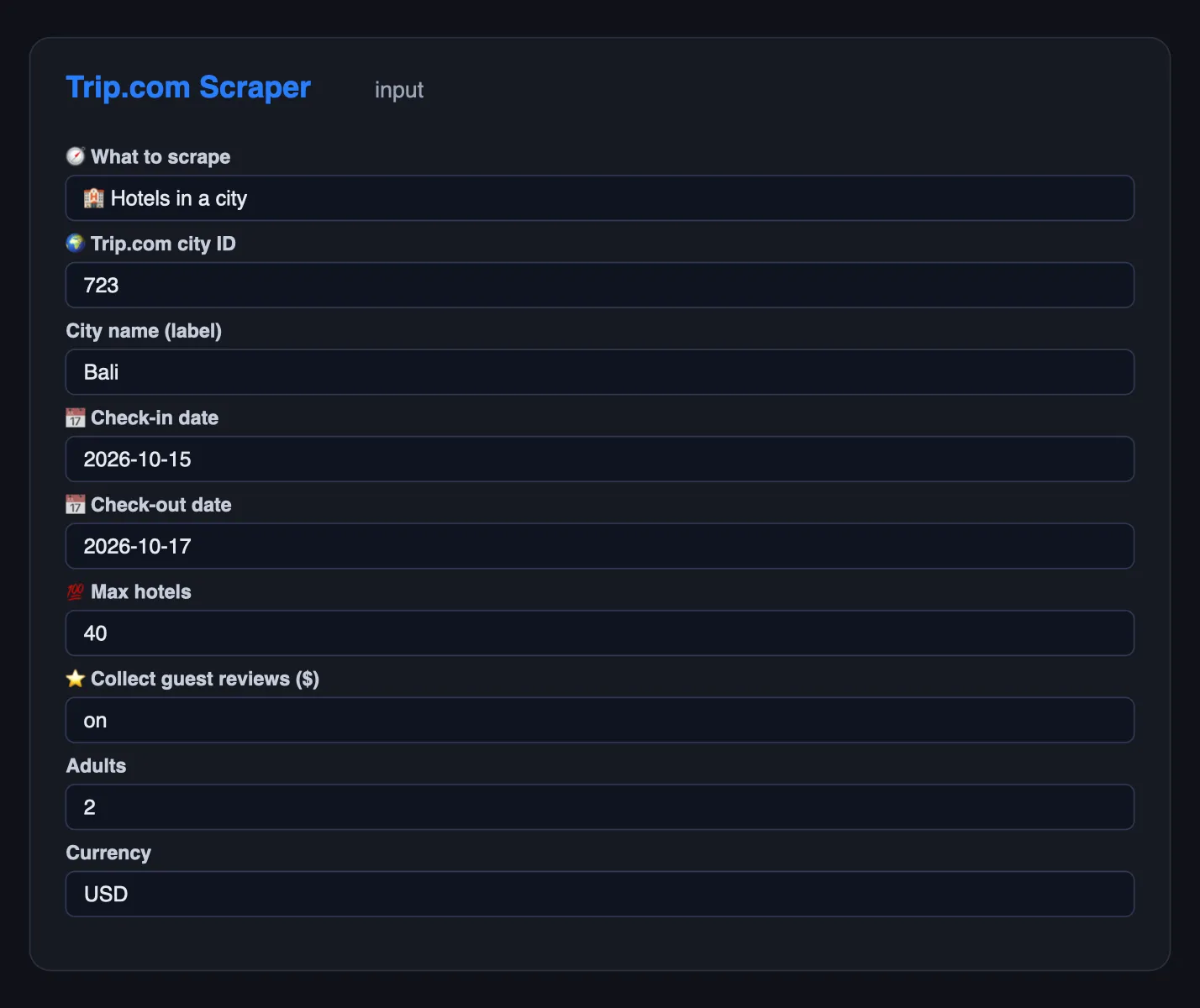
Hotels in Bali for a two-night stay, with reviews:
Specific hotels by URL, with full addresses:
A hotel list URL copied straight from the browser:
Prices in another currency for a family room:
⬆️ Output
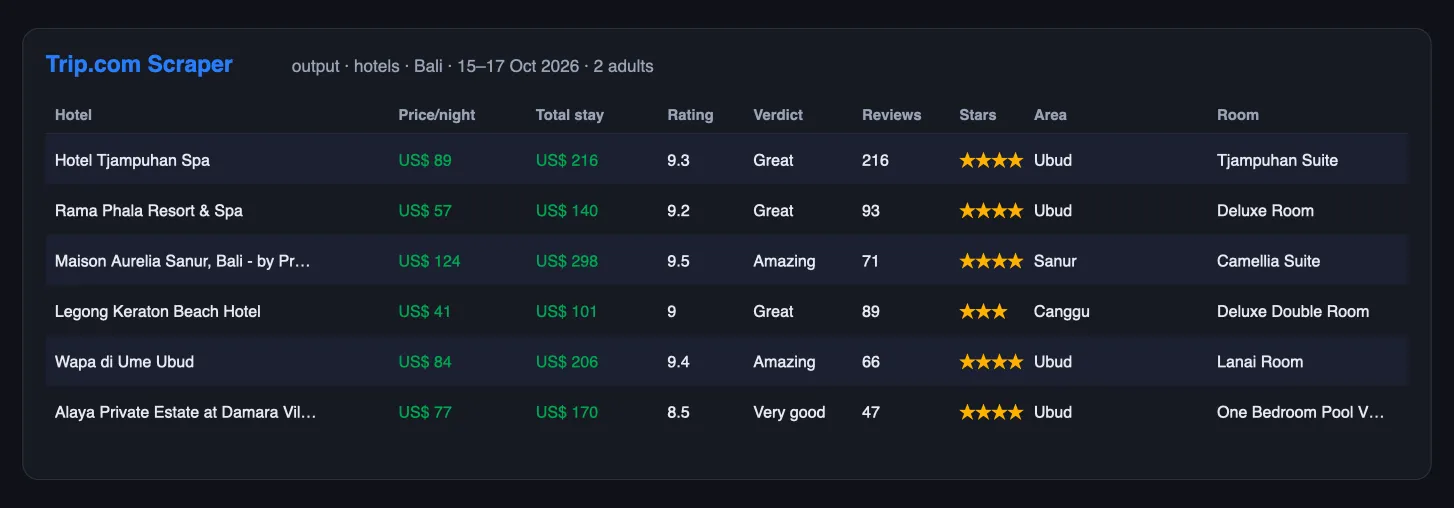
One hotel with a live price:
One hotel detail:
Rows carry a type (hotel, hotel_detail, review, error), so one dataset can be split in a spreadsheet or in code. Pages that fail after the retries become error rows with the URL and the reason.
🔁 Get only new hotels — schedule it
A one-off export is useful once; a feed is useful every day. Fill Only new rows — memory name (for example my-hotels-watch) and the Actor remembers every hotel row it has delivered under that name. Every later run with the same name writes — and charges — only rows you have not received before; rows delivered earlier are skipped for free.
- Run once with the memory name to load the history.
- Open the run → Actions → Schedule (or Schedules) and set daily or hourly.
- Read the new rows from the run's dataset, or connect a webhook, n8n, Make or Zapier to the run.
Each memory name is separate, so one schedule per hotel list, keyword set or market never mixes with another. To start over, use a new name.
Use cases for Trip.com data
Rate shopping and price monitoring
Run the same city and dates every morning and watch price and totalPrice move. Hotels, revenue managers and OTAs use exactly this to see where they sit against the market.
Competitive set benchmarking
Pull your competitors by hotel URL and compare price, rating and the sub-scores for cleanliness, service, location and amenities side by side.
Destination research
One run returns a whole city with stars, districts and coordinates, which is enough to map supply, plot hotels on a map or size a market before entering it.
Review mining
Collect the reviews published on hotel pages and run sentiment analysis, or feed them to an LLM to find what guests praise and complain about.
Travel content and affiliate sites
Ratings, sub-scores, price ranges and photos are enough to build a comparison page or keep a "best hotels in …" list fresh automatically.
AI agents and RAG
Flat rows with literal names and a minimal input make the Actor easy to call from an agent through the Apify MCP server.
Integrations
- API — start a run and read the dataset with any HTTP client:
- JavaScript —
npm i apify-client, thenclient.actor('lergassy/tripcom-scraper').call(input). - n8n, Make, Zapier, Google Sheets, Airtable, Slack, webhooks — through the standard Apify integrations.
- MCP — add the Apify MCP server to Claude, ChatGPT or Cursor and let the agent call
lergassy/tripcom-scraperwith a city and dates.
Errors and troubleshooting
| What you see | What it means | Fix |
|---|---|---|
| No prices in the rows | Check-in and check-out were not set | Add both dates; Trip.com only prices a real stay |
| Fewer hotels than Max hotels | Trip.com shows no more hotels for these dates and guests (the status message says how many were found), or it kept refusing list pages | The Actor already walks sort orders, star levels and price bands; try other dates, or switch the proxy to residential if the status message mentions refusals |
error rows | The page failed after the retries | Re-run those URLs; the Actor rotates proxy sessions automatically |
| No reviews for a hotel | That hotel has no reviews rendered on its page | Check reviewCount on the hotel card first |
| Wrong city in the results | cityName alone does not identify a city | Always pass the numeric city ID from the Trip.com URL |
Run health
When a run ends with many error rows, the Actor sends its developer the counts (rows delivered, error types, run ID) so the cause gets fixed fast; your input and results are never sent.
🤖 For AI Agents & LLM Apps
Compact reference for agents calling this Actor through the Apify MCP server or the Apify API (lergassy/tripcom-scraper).
Purpose: returns Trip.com hotel availability and prices for a city and a date range, with guest scores, stars, room type and coordinates, plus optional property details and guest reviews. Use it to answer "what do hotels in Bali cost that week", "which four-star properties are under $100" and "how do guests rate this hotel".
Minimal input:
Output: one row per hotel — type, hotelId, name, nameEn, category,
star, rating, ratingText, reviewCount, subScores, price, priceText,
currency, totalPrice, priceNote, originalPrice, originalPriceText,
roomName, roomType, roomQuantity, bedType, bedDetails, payType,
district, zoneNames, location, positionHighlights,
cityNameResolved, cityNameEn, cityId, provinceId, countryId,
ratingScale, featuredReview, reviewTags, highlightTags, advantageTags,
promotionTags, discountTags, encourageTags, dealTags, freeCancellation,
masterHotelId, hotelType, starType,
latitude, longitude, distance, isAd, status, imageUrl, adults,
children, checkIn, checkOut, url, city, position, scrapedAt. Detail
rows add description, descriptionSections, amenities, amenityGroups,
amenityCount, images, imageGroups, imageCount, highlights,
checkInTime, checkOutTime, address, postalCode, country and
priceRange; review rows carry
score, text, author and reviewTime; unreadable pages arrive as
type: "error".
Behaviors an agent should know:
- Trip.com has no search by city name.
cityNameworks only for the thirty destinations Trip.com links from its own pages (Bali, Bangkok, Tokyo, Singapore, Hong Kong, London, Paris, New York and so on) — the Actor maps those to ids and logs which id it used. For anywhere else, pass the numericcityId: open the city on trip.com and copy the number from/hotels/bali-hotels-list-723/. An unrecognised name is reported in the log rather than silently returning nothing. Hotel and hotel-list URLs also work as input. - Prices only exist for a date range. Without
checkInandcheckOutthe Actor cannot quote a nightly rate, andpricewill be empty. Always pass both. priceis per night for the given occupancy;totalPricecovers the whole stay.priceNotesays whether taxes are excluded — quote it when reporting a price.currencyis chosen by input and defaults to USD. The number is converted by Trip.com, not by the Actor.maxHotelscaps a run. Trip.com renders only one screen of hotels per list view, so the Actor slices the city by sort order, star level and price band and merges the slices without duplicates until it reachesmaxHotels. If Trip.com shows fewer hotels for your search, the run's status message says how many it found.maxPagesis no longer used.includeHotelDetailsandincludeReviewseach add a fetch per hotel.isAdmarks sponsored results; drop them before ranking by price or score.- Availability moves fast: a row is a snapshot at
scrapedAt, not a bookable quote.
Hotel rates by date, not just a list of hotels
Prices depend on when you stay, which is why a list of hotels without dates is close to useless. Every row here carries the check-in and check-out you asked for, the nightly rate and the total including taxes and fees, so hotel price data can be compared honestly across properties and cities.
Hotel availability and room rates on a schedule
Run the same city daily and the rows stack into a rate history: what a room costs as the date approaches, when a property sells out, how a district moves in season. That is the hotel booking data hotels and analysts pay for, built from public pages.
❓ FAQ
Is it legal to scrape Trip.com?
The Actor reads only pages any visitor can open without logging in, and it collects no personal data beyond the guest names Trip.com publishes next to reviews. You are responsible for using the data in line with local law and Trip.com's terms; consult a lawyer for your case.
Do I need a Trip.com API key or an affiliate account?
No. The Actor never authenticates.
Does it use a browser?
No. Everything is plain HTTP, which keeps runs fast and cheap.
Where do I find the city ID?
Open the city on Trip.com. The address bar shows trip.com/hotels/list?city=723&cityName=Bali, so the ID is 723. You can also paste that whole URL into Trip.com URLs instead.
Can I track prices over time?
Yes. Schedule the run daily with the same city and dates. Each row carries checkIn, checkOut and scrapedAt, so the dataset becomes a price history.
How many hotels can one city return?
Trip.com shows one screen of hotels per view and loads the rest through a signed request the Actor does not touch. To widen coverage it walks several sort orders, which typically yields a few dozen distinct hotels per city and date pair.
Does it return room-level prices for every room type?
The card carries the cheapest bookable room for your dates, with its name and the total for the stay. Full room lists sit behind the same signed request.
Can I use it with the Apify API, MCP or n8n?
Yes, see Integrations. The input is plain JSON.
Your feedback
Need another field, another Trip.com page type, or flights and trains? Open an issue in the Issues tab or leave a review — user requests decide what ships next.
You might also like
| Actor | What it does |
|---|---|
| Airbnb Scraper | Airbnb listings for any place and dates: nightly price, rating, beds, amenities, host |
| Agoda Reviews Scraper | Hotel reviews from Agoda and Booking.com |
| Google Flights Scraper | Flight prices, airlines and price insights |
| Shopee Scraper | Products and prices across 11 Shopee marketplaces |
| Lazada Scraper | Products, prices and reviews across six Lazada marketplaces |
| Email Verifier & Phone Number Validator | Checks e-mails and phone numbers in bulk: deliverability, throwaway and role flags, numbering plan, US state and time zone |
Also known as
People look for this Actor as a Trip.com scraper, a hotel price scraper, a hotel rates API, hotel availability data, hotel booking data, an Asia hotel prices source, and a Ctrip scraper.


