

Google Hotels Scraper 💰$3/1K — Hotel Prices, OTA Rates & Taxes
Pricing
from $2.10 / 1,000 hotels
Google Hotels Scraper 💰$3/1K — Hotel Prices, OTA Rates & Taxes
Google Hotels scraper and API: hotel prices for your dates — nightly rate, stay total, taxes and fees — with rating, reviews, stars, amenities, address, phone, photos and Maps link, plus Booking.com, Agoda, Expedia and official-site rates. $3 per 1,000 hotels. Export or run via API.
Pricing
from $2.10 / 1,000 hotels
Rating
5.0
(3)
Developer

Matvey
Maintained by CommunityActor stats
0
Bookmarked
49
Total users
23
Monthly active users
4 days ago
Last modified
Categories
Security
Limited permissionsShare
Google Hotels Scraper is a Google Hotels API alternative for hotel prices on any dates: it extracts hotels from Google Hotels for any place — the nightly price, the stay total and the total with taxes and fees, the guest rating and review count, star class, property type, amenities, coordinates, photos, check-in and check-out times, the Google Hotels page and the booking link. Turn on OTA rates and each hotel also gets the price on every booking site Google lists — Agoda, Expedia, Trip.com, Priceline, Hotels.com, the hotel's own website and more — for your dates, with deep links, plus its full address and phone and the guest reviews Google aggregates. Google shows 20 hotels and stops; this Actor walks Google's own sort orders, star classes and price bands and de-duplicates by hotel, so one search for a city returns well over a hundred properties instead of twenty. Pure HTTP, no browser, no login, no API key — a search of 150 hotels takes about 17 seconds, and 15 hotels with OTA rates for all 15 about 20 seconds ($0.165 on the free plan).
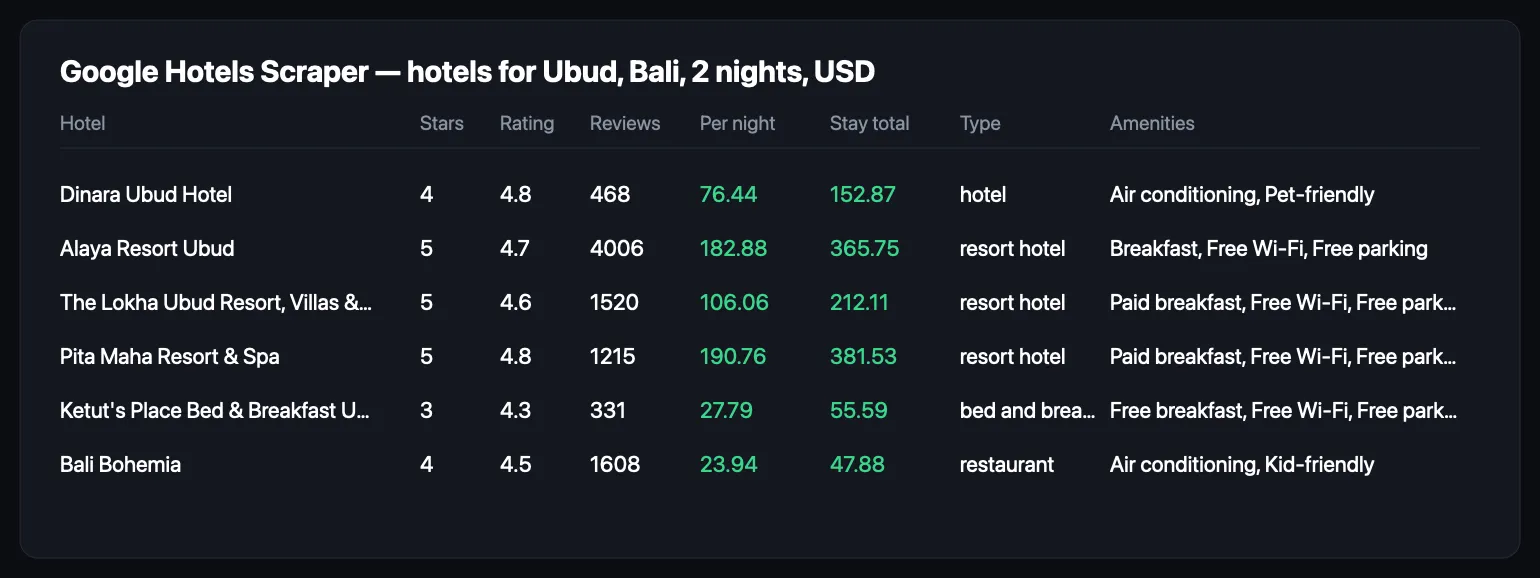
Paste a city, pick dates, click Start, and download JSON, CSV or Excel — or pull the rows through the Apify API into Google Sheets, n8n, Make, Zapier, a database or an AI agent.
What is Google Hotels Scraper?
Google Hotels is the price comparison inside Google Travel: for a place and a stay it lists the properties, the cheapest rate it found across Booking.com, Expedia, Agoda, Hotels.com, Trip.com, the hotel's own site and dozens of smaller sellers, the aggregate guest rating, and the amenities. There is no official Google Hotels API. This Actor is the Google Hotels API alternative: it reads the same JSON endpoint the Google Hotels page itself calls — for the hotel list and, with OTA rates on, for each hotel's prices panel — and turns them into flat rows you can sort, filter and join.
It answers the questions a revenue manager, an OTA analyst or a travel-data team actually asks:
- What does every hotel in Lisbon cost for the first weekend of October, and how does that compare with last month?
- Which 4- and 5-star properties in Ubud are rated 4.5 or better, and what is the cheapest nightly rate among them?
- Which booking sites sell a given hotel, at what total, and where is the official site's price against Booking.com?
- What do guests praise and complain about — service, location, dining, cleanliness — and how many say so?
Three modes, one row shape:
| Mode | You give | You get |
|---|---|---|
| Search | places, check-in, check-out, guests | hotels with price for that stay, rating, reviews, class, amenities, location, photos, booking link |
| Search + OTA rates (add-on, on in the form) | the same, with OTA rates on | everything above plus every booking site's price for your dates with a deep link, the number of booking sites, the official-site price, address and phone, review scores per source, guest reviews |
| Hotel pages | Google Hotels URLs or entity ids | one row per hotel with offers, reviews and full details — no search |
What data can Google Hotels Scraper extract?
Every hotel row carries these fields. Nothing is invented: a field Google did not show for a property is empty rather than guessed.
| Field | Example | Notes |
|---|---|---|
name | Alaya Resort Ubud | |
hotelClass, hotelClassLabel | 5, "5-star hotel" | empty for unrated properties |
propertyType | resort hotel | hotel, villa, bed and breakfast, hostel, apartment, guest house … |
rating, reviewCount | 4.7, 4006 | Google's aggregate, 5-point scale |
pricePerNight, pricePerNightDisplay | 340.29, "$340" | the cheapest rate Google found for the searched stay, averaged per night, as Google displays it — before taxes (fees are already in); the all-in figure is totalWithTaxes |
totalPrice, totalPriceDisplay | 680.59, "$681" | the whole stay, exactly as Google prints it — equal to priceBeforeTaxes + fees, with taxes left outside; checked on 755 rows, 755 of 755 (21 Oct 2026) |
priceBeforeTaxes, taxesAndFees | 562.45, 118.13 | when Google itemises them (whole stay) |
taxes, fees, totalWithTaxes | 118.13, 0, 680.58 | the same itemisation split out, and the all-in stay total. totalWithTaxes − totalPrice = taxes in all 755 rows measured; across Ubud, Barcelona, Bangkok, Singapore, Tokyo, Paris and Lisbon that gap ran from 9.1% to 17.6% of the all-in total by city median |
currency | USD | any code Google supports |
checkIn, checkOut, nights, adults | 2026-10-10, 2026-10-12, 2, 2 | what the price was quoted for |
description | Polished rooms in a chic getaway offering a spa… | Google's one-line summary |
address, phone, website | Jl. Hanoman, Ubud…, +62 361 972200, alayahotels.com | on every hotel row; when Google's search answer leaves address and phone out, they are completed from the hotel's own record at no extra charge (vacation rentals have none) |
country, latitude, longitude | ID, -8.5188, 115.2635 | |
checkInTime, checkOutTime | 3:00 PM, 12:00 PM | |
amenities, amenityIds | ["Free Wi-Fi", "Outdoor pool", "Spa"], [29, 22, 26] | names for the ids Google uses; the OTA-rates add-on merges in the hotel record's grouped amenity ids |
ratingHistogram | {stars5: 3272, stars4: 518, …} | review counts per star |
reviewTopics | Service 705 mentions, 667 positive, 28 negative | what guests write about |
nearbyPlaces | Sacred Monkey Forest Sanctuary, 7 min | landmarks, transport, airport with travel time |
thumbnail, photos | image URLs | |
entityId, placeId, googleMapsUrl, hotelUrl, bookingUrl | ChgI…, 0x2dd2…, google.com/maps?cid=…, google.com/travel/hotels/entity/…, google.com/travel/clk/… | the booking link goes to the cheapest seller for the searched stay |
location, searchRank | Ubud, Bali, 1 | the place you searched and the row's position |
offers[] | Agoda $236, Trip.com $237, official site $405 … | OTA-rates add-on: seller, stay total, per night, dates quoted (your dates), deep link, official-site flag; rooms[] (room name, per-night price) for the sellers Google features |
vendorCount, officialSiteTotal, offersForSearchedDates | 19, 405, true | how many booking sites list a price, the hotel's own website total, and whether the offers are for your dates |
cheapestOfferSeller, cheapestOfferTotal, cheapestOfferPerNight | Agoda, 236, 118 | the lowest of the offers |
reviewSources[] | Tripadvisor 4.8 (1,490), Trip.com 4.7 (104) | rating and count per source Google aggregates |
reviews[] | source, author, date, rating, text, link | the review snippets Google attaches to the hotel — usually one per source, 1–3 per hotel |
Beyond Google's 20 results
Google Hotels returns 20 properties per request, and its "next page" is the same request with a different filter — there is no offset to walk. Other scrapers stop at those 20, or page blindly and return the same hotels again.
This Actor reads the way Google itself lets you explore: it asks for the same place sorted by relevance, by lowest price, by highest rating and by most reviewed, then per star class, then under a few price caps, and keeps every hotel once. Measured on Ubud, Bali on 14 September 2026: 197 distinct hotels from 15 requests, against 20 from the first request. Set Hotels per place to what you need; the walk stops when the count is reached or when four facets in a row bring nothing new, so a small town does not burn requests looking for hotels it does not have.
The price on each row is still Google's own cheapest rate for your dates — the facet walk only changes which hotels come back, never what Google says they cost.
How much does it cost to scrape Google Hotels?
The Actor is priced per hotel row, with an add-on per hotel priced on every booking site (OTA rates). There is no start fee, and rows that failed or came back empty are never charged.
| Event | Price | What it buys |
|---|---|---|
| Hotel | $3.00 per 1,000 | one hotel with price, rating, class, amenities, location, photos, booking link |
| OTA rates (add-on, event "Hotel page read") | $8.00 per 1,000 | that hotel's price on every booking site for your dates, with deep links, booking-site count, official-site total, address, phone, review sources, guest reviews |
Two hundred hotels for a city cost $0.60. OTA rates for the fifty you shortlist add $0.40. The form has OTA rates on for the first 20 hotels; an API call without includeOffers gets hotel rows only. There is no residential proxy and no browser to pay for: the Actor's own platform usage is a fraction of a cent per run. Bronze, Silver and Gold plans get 10 %, 20 % and 30 % off.
The free plan includes $5 of usage every month — about 1,600 hotel rows, or a full city every day of the month.
Bulk export: what 50,000 hotel records actually cost
This Actor is built for bulk jobs — put hundreds of inputs into one run, or call it from the API on a schedule. There is no fee per run, no fee per page and no proxy charge: you pay for the rows you keep, and error rows are free. That is what decides the bill once you pull a whole market rather than a single property.
| Job | This Actor | Most-used Actor in this category |
|---|---|---|
| 50,000 hotel records across 100 runs | $150 | $249.50 |
Checked on the Apify Store on 21 September 2026 against the Actor with the most monthly users in this category; its per-run fee is counted in, as ours would be if we charged one. Some Actors here ask less per row — this table compares against the one buyers actually use most.
Switching from another Google Hotels Actor
Measured on 5 October 2026 from Apify's own public Store data. The comparison is with the most-used Google Hotels Actor on the Store; it is not named here on purpose — the numbers are public and checkable, the name adds nothing.
| The most-used Google Hotels Actor | This Actor | |
|---|---|---|
| Price per 1,000 hotels, free plan | $4.99 | $3.00 |
| Price per 1,000 hotels, Gold plan | $2.99 | $2.10 |
| Start fee | none | none |
| Runs in the last 30 days that ended SUCCEEDED | 32% of 49,296 | 97% of 63 |
Read that last row honestly in both directions: their 32% is a large sample and includes runs that failed because of the caller's own input, and our 97% is 63 runs — a sample, not a promise. On the same day we ran both on the same request (Lisbon, 10–12 November 2026, 2 adults, 5 hotels). Both returned 5 hotels with prices. Ours took 5 seconds and cost $0.015; the other took 8 seconds and cost $0.025.
Input mapping
| Common field elsewhere | This Actor | Note |
|---|---|---|
searchQuery, locations | locations | one place per line |
checkInDate / checkOutDate | checkIn / checkOut | YYYY-MM-DD; leave empty and we search 30 days ahead |
adults | adults | |
maxItems, maxResults | maxHotelsPerLocation | ours goes past Google's 20-per-page limit |
currency | currency | |
languageCode | language | |
countryCode | market | |
includeBookingSources, includeOtaRates | includeOffers | billed as a separate "hotel page read" event |
Output mapping
| Common field elsewhere | This Actor |
|---|---|
hotelName, name | name |
price, priceValue | pricePerNight / pricePerNightDisplay |
totalRate | totalPrice |
rating | rating |
reviewCount | reviewCount |
hotelClass ("5-star hotel"), starRating (5) | hotelClassLabel / hotelClass |
latitude / longitude | latitude / longitude |
placeId | placeId |
googleMapsUrl | googleMapsUrl |
hotelDescription | description |
imageUrl | thumbnail (and photos for the rest) |
googleHotelsUrl | hotelUrl |
checkInDate / checkOutDate | checkIn / checkOut |
bookingSources[], vendors[] | offers[] (with includeOffers on) |
vendorCount | vendorCount |
leadPrice, leadPriceTotal | cheapestOfferPerNight, cheapestOfferTotal (and pricePerNight / totalPrice from search) |
One caveat worth a minute of your time: other Actors differ on whether their numeric price field means per night or the whole stay. Ours is explicit — pricePerNight and totalPrice are separate columns. Check one row against the hotel's page before you rewire a pipeline on the assumption.
How to scrape Google Hotels
- Open the Actor and type the place the way you would in Google Hotels: a city, a district, a landmark. One per line for several.
- Set check-in and check-out. Leave them empty for a two-night stay 30 days out — the Actor never searches a date that has passed, even from a saved task.
- Pick the currency and how many hotels per place you want. Twenty is one Google page; a hundred or more is what Google would never show you at once.
- Optionally filter — star class, minimum rating, maximum price per night, pool — and keep OTA rates on to get every booking site's price for your dates and the guest reviews.
- Click Start. Results appear in the dataset as the run goes; export them as JSON, CSV or Excel, or read them through the API.
⬇️ Input
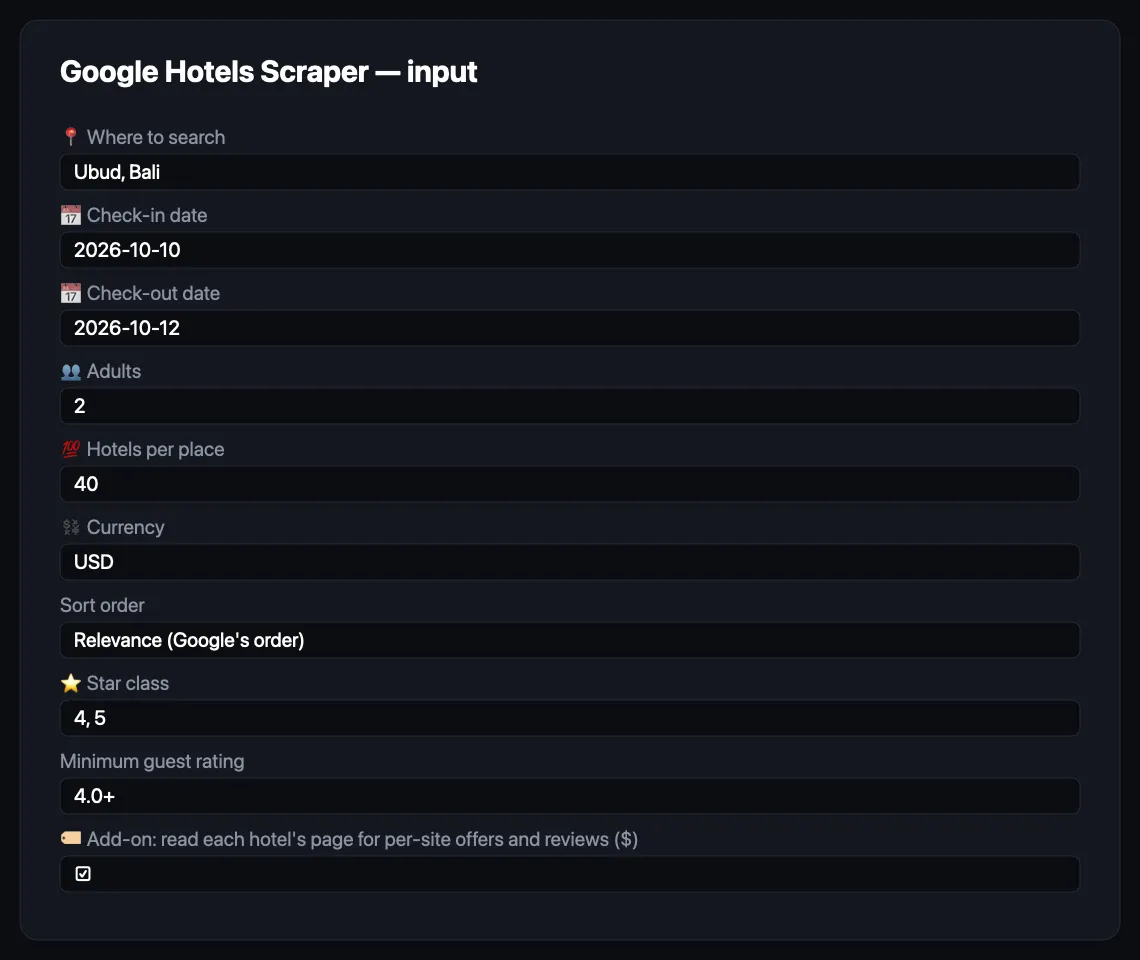
Hotels for a city and dates
Shortlist with filters
Filters are sent to Google where it supports them and checked again on every row, so a 3-star property cannot slip into a 4–5-star shortlist through a ranking quirk.
OTA rates: every booking site's price, plus reviews
Hotel pages by URL
Entity ids come from an earlier run's entityId column, so a daily price monitor for a fixed set of hotels needs no search at all.
Every input field
| Field | Default | Meaning |
|---|---|---|
locations | ["Ubud, Bali"] | places to search, one per line |
checkIn, checkOut | 30 days out, 2 nights | YYYY-MM-DD |
adults | 2 | guests in one room, 1–8 |
maxHotelsPerLocation | 40 | how deep to go per place, up to 500 |
currency | USD | any ISO code |
sortBy | relevance | relevance, lowest_price, highest_rating, most_reviewed — the first facet read and the searchRank order |
hotelClass | any | keep only these star classes |
minRating | any | 3.5, 4 or 4.5 |
maxPricePerNight | none | in the output currency |
poolOnly | false | only hotels with a pool |
includeOffers | false (on in the form) | OTA rates: every booking site's price for your dates, booking-site count, official-site total, address, phone, review sources ($) |
maxOfferLookups | 20 | how many hotels per run get OTA rates |
includeReviews | false | include guest review snippets (needs includeOffers or hotelUrls) |
maxReviews | 10 | per hotel |
hotelUrls | — | Google Hotels URLs or entity ids to read directly |
language, market | en, us | language of labels; country Google prices for |
proxyConfiguration | Apify datacenter | residential only if a run reports consent pages |
⬆️ Output
One row per hotel. Error rows carry type: "error" and an explanation, and are never charged.
With OTA rates on
OTA rates are quoted for your check-in, check-out, guests and currency — the same answer the Google Hotels prices panel shows when you open a hotel from a search (offersForSearchedDates: true). Prices are Google's displayed figures, rounded to the whole currency unit, before taxes like the headline price. The rooms list appears only for the few sellers Google features with room names; its per-night figures can sit on another rate plan than the seller's headline price, so they are reported next to it. If Google's dated answer fails for a hotel, the Actor falls back to the hotel page, whose prices are for Google's default stay — the row then says so (offersForSearchedDates: false, with offersCheckIn / offersCheckOut).
The dataset has three table views: Hotels, Booking sites (OTA rates) (one line per seller) and Guest reviews (one line per review).
Use cases for Google Hotels data
Rate shopping and revenue management
Run the same city every morning and diff pricePerNight per entityId: who dropped, who raised, where you sit against the compset for the next weekend. The facet walk means the compset is the whole market, not the twenty hotels Google felt like showing.
OTA and metasearch analysis
With OTA rates on, offers tells you which sellers list a property and at what total for your dates. Count how often the official site is the cheapest, which OTAs undercut whom, and where a hotel is missing from a channel entirely.
Market research and site selection
Class, price band, rating and amenity mix for every property in a district, with coordinates for a map. Compare Shibuya with Shinjuku, or Ubud with Seminyak, in one run.
Guest-experience research
reviewTopics gives you what guests talk about and how it splits positive against negative, for every hotel in a city, without reading a review. reviews gives you the text when you do want to read.
Travel products and AI agents
Flat rows with a stable entityId, a booking link and a per-night price are what a trip planner, a price-alert bot or an agent answering "find me a 4-star under $150 near the station" needs. The Actor runs from the Apify API and through the Apify MCP server.
Integrations
- API: start a run with
POST https://api.apify.com/v2/acts/lergassy~google-hotels-scraper/runs?token=…and read…/datasets/{id}/items?format=csv. - Clients:
apify-clientfor Python and JavaScript wrap the same calls. - Google Sheets, n8n, Make, Zapier: use the Apify integration; the flat row shape needs no transformation.
- Webhooks: fire on run finish to pull the dataset into your own system.
- MCP: the Actor is callable as a tool through the Apify MCP server, so an AI agent can search hotels and read prices in a conversation.
- Schedules: a daily task with a fixed
hotelUrlslist is a price monitor for your own properties and competitors.
🤖 For AI agents and LLM apps
Inputs that matter: locations (list of place strings), checkIn and checkOut (YYYY-MM-DD), maxHotelsPerLocation (integer), currency (ISO code), optional hotelClass (list of "1"–"5"), minRating ("3.5" | "4" | "4.5"), maxPricePerNight (number), includeOffers (boolean, OTA rates; one extra paid lookup per hotel, default false), hotelUrls (list of Google Hotels URLs or entity ids).
Output: one JSON object per hotel with name, hotelClass, rating, reviewCount, pricePerNight, totalPrice, currency, checkIn, checkOut, amenities, latitude, longitude, address, hotelUrl, bookingUrl, entityId; with includeOffers, also offers[] (seller, totalPrice, pricePerNight, checkIn, checkOut, bookingUrl, isOfficialSite), vendorCount, cheapestOfferSeller, officialSiteTotal, reviewSources[] and reviews[]. Rows with type: "error" explain what to change. Sort or filter on the numeric fields directly; use entityId to refer to the same hotel across runs.
Limits, honestly
- Search returns what Google shows for the place. Google decides which properties belong to "Ubud, Bali"; the facet walk enlarges that set but cannot add a hotel Google does not list there.
totalPriceis Google's headline, not the all-in. It equalspriceBeforeTaxes+fees; thetaxesslot is outside it on every row measured. UsetotalWithTaxesfor the number a guest pays. Two properties can swap places when you re-sort on the all-in figure — in 9 of 14 Ubud runs the cheapest hotel changed identity.- OTA rates need one extra lookup per hotel, which is why they are an add-on: Google's search answer carries only the cheapest price, not the per-site list. They are for your dates; only the hotel-page fallback quotes Google's default stay, and the row says so.
- Vacation rentals (no
placeId) usually list one or two sellers and have no address or phone on Google. - Amenities from search are the ids Google tags the property with, named where the table in this Actor knows them and returned raw otherwise.
- Children and rooms are not yet inputs — prices are for the given number of adults in one room.
- Rate limits. Google answers these requests from datacenter IPs today; each request retries on a new IP, and a run that meets a consent page says so in the log. Residential proxies are a switch away if that changes.
❓ FAQ
Is there a Google Hotels API?
Not a public one. This Actor reads the same endpoint the Google Hotels page uses, which is why the fields match what you see on the page — including the itemised taxes and the review topics.
How many hotels can I get for one city?
As many as Google lists for it, up to the cap you set. The facet walk measured 197 distinct hotels for Ubud from 15 requests; a big city yields several hundred. Set maxHotelsPerLocation to what you need.
Are the prices for my dates?
Yes for pricePerNight and totalPrice — those are Google's cheapest rate across booking sites for the check-in and check-out you gave. They are the figures Google prints, which means taxes are not in them; totalWithTaxes is. The per-seller offers (OTA rates add-on) are for the same dates; offersForSearchedDates confirms it on each row.
Does it include taxes?
Not in totalPrice, and this is worth a minute of your time. Google's headline price is priceBeforeTaxes + fees; the taxes slot sits outside it. That held in 755 of 755 rows measured on 21 October 2026 across eight destinations and three currencies, with no exception. The all-in figure is on the same row as totalWithTaxes, and totalWithTaxes − totalPrice equals taxes exactly.
totalPrice stays the headline on purpose: it matches what the Google Hotels page shows you, so you can check any row against the page in ten seconds. Sum totalWithTaxes when you need the number a guest actually pays. By city median the difference was 9.1% (Bangkok) to 17.6% (Barcelona) of the all-in total, and single rows reached 30.4%.
One edge worth knowing: Google's displayed total is rounded to the whole currency unit while the itemisation is not, so on very cheap stays totalPrice can land a few cents above totalWithTaxes — $17 against $16.66 on a two-night Ubud homestay. Trust the itemisation when the two disagree by less than a unit.
Can I get reviews?
Yes — turn on includeReviews with the OTA-rates add-on or with hotelUrls. You get the review snippets Google attaches to the hotel (source, author, date, rating, text, link) — usually one per source, 1–3 per hotel in our Ubud test of 22 October 2026 — plus the rating and review count per source in reviewSources. For full review histories use a reviews scraper for the source site.
Can I use it with the Apify API or an MCP server?
Both. Start runs and read datasets through the REST API or the Python and JavaScript clients, and call the Actor as a tool from any MCP-capable agent through the Apify MCP server.
Can I integrate it with other apps?
Through the Apify integrations for Google Sheets, n8n, Make and Zapier, or through webhooks on run finish.
Why does a default run search 30 days out?
Because a saved task or a scheduled monitor must never search a date that has already passed and come back empty. Give explicit dates and they are used; give a past date and the row says the date was adjusted.
Is it legal to scrape Google Hotels?
The Actor reads public pages and public data — prices, ratings, amenities — with no login and no personal data beyond reviewer display names Google already publishes. How you use the data is subject to your local law and Google's terms; consult a lawyer for your case.
One row per hotel?
Yes. Offers and reviews are arrays on the hotel's row; the dataset views unwind them into one line per seller or per review when you want a flat table.
Your feedback
If a field is missing, a place returns fewer hotels than Google shows, or a price does not match the page, open an issue on the Actor with the input you used — it is answered quickly and fixed in the next build. A short review after your first run helps other people find a scraper that works.
You might also like
| Actor | What it does |
|---|---|
| Google Flights Scraper | fares, price calendar and booking options by route and dates |
| Hotel Price Scraper | just the hotel prices: nightly rate and total with taxes for a city and dates, filtered by stars, rating and price |
| Booking.com Scraper | Booking.com search with rooms, rates and reviews |
| Booking.com Reviews Scraper | Booking.com guest reviews with hotel replies, $1 per 1,000 |
| Agoda Reviews Scraper | guest reviews and ratings from Agoda |
| Trip.com Scraper | Trip.com hotel prices and availability |
| Airbnb Scraper | vacation rental prices and availability |
Also known as
Google Hotels API, Google Hotel Search scraper, Google Travel hotels scraper, hotel price scraper, hotel rate shopping tool, hotel price comparison API, scrape hotel prices from Google, Google hotel reviews scraper, hotel metasearch data.


