

LinkedIn Post Comments Scraper — No Cookies, No Login
Pricing
from $2.00 / 1,000 comments
LinkedIn Post Comments Scraper — No Cookies, No Login
Who commented on a LinkedIn post, with no login and no cookies. One row per person with name, headline and profile link, optional company, title and industry, plus each post's reaction, comment and repost counts.
Pricing
from $2.00 / 1,000 comments
Rating
0.0
(0)
Developer

Muhamed Didovic
Maintained by CommunityActor stats
0
Bookmarked
2
Total users
1
Monthly active users
2 days ago
Last modified
Categories
Share
Paste LinkedIn post links and get everyone who commented, merged into one row per person. Someone who commented on four of your posts is one lead with four comments. Each post also gets LinkedIn's own reaction, comment and repost counts.
No login, no cookies, no LinkedIn account needed.
| You provide | You get |
|---|---|
| Post URLs | Commenters: name, headline, profile link, comment text, time, comment link |
enrichProfiles on | Current company, location, followers, job title and company industry per person |
| Every run, free | Each post's counts: reactions, comments, reposts, top reaction types, author, text and publish time |
Why Use This Scraper?
- No cookies and no login. Your LinkedIn account is never involved, so there is nothing to export and nothing to put at risk.
- One row per person across all your posts. Comment count, number of posts commented on, and every comment with its post.
- Enrichment from public data. Company, location, title and industry, looked up per person.
- Post counts for free. Reactions, comments and reposts as LinkedIn shows them, for every post, even posts left uncollected by a limit.
- Any post link form.
activityandugcPostlinks, from company pages or personal profiles. The same post pasted twice is collected once. - Cost caps that hold. Per-post and per-run limits stop the requests, not only the rows.
Overview
This actor is for people who publish on LinkedIn and want to know who responds: marketing teams measuring a company page, sales teams building lead lists from engaged audiences, agencies reporting on client content, and researchers studying who joins the conversation.
The default output is one row per person, with who they are and every comment the run found from them. A second mode returns one row per comment.
Only comments are collected as people. LinkedIn shows the lists of who reacted and who reposted to logged-in members only, so this actor reports those as counts per post, not as names.
Supported Inputs
| Link form | Example |
|---|---|
| Post link with activity id | https://www.linkedin.com/posts/acme_big-news-activity-7267273010393358336-AbCd |
| Feed update link | https://www.linkedin.com/feed/update/urn:li:activity:7267273010393358336/ |
| ugcPost link | https://www.linkedin.com/feed/update/urn:li:ugcPost:7267273010393358336/ |
| Bare URN or activity id | urn:li:activity:7267273010393358336 |
Use Copy link to post from the post's ··· menu.
Not supported: profile links, company page links, search result pages and LinkedIn articles (/pulse/). The actor takes posts, not accounts. To get a company's post links first, use a posts scraper such as LinkedIn Posts Scraper.
Use Cases
| Who | What they do with the rows |
|---|---|
| B2B marketing | See which companies and job titles comment on each post |
| Sales / SDR teams | Build outreach lists from people who already engaged |
| Agencies | Report on who responds to client content, not only counts |
| Recruiters | Find people who comment on hiring and employer-brand posts |
| Competitor research | See who comments on a competitor's company page |
| Community managers | Spot repeat commenters across a quarter of posts |
How It Works
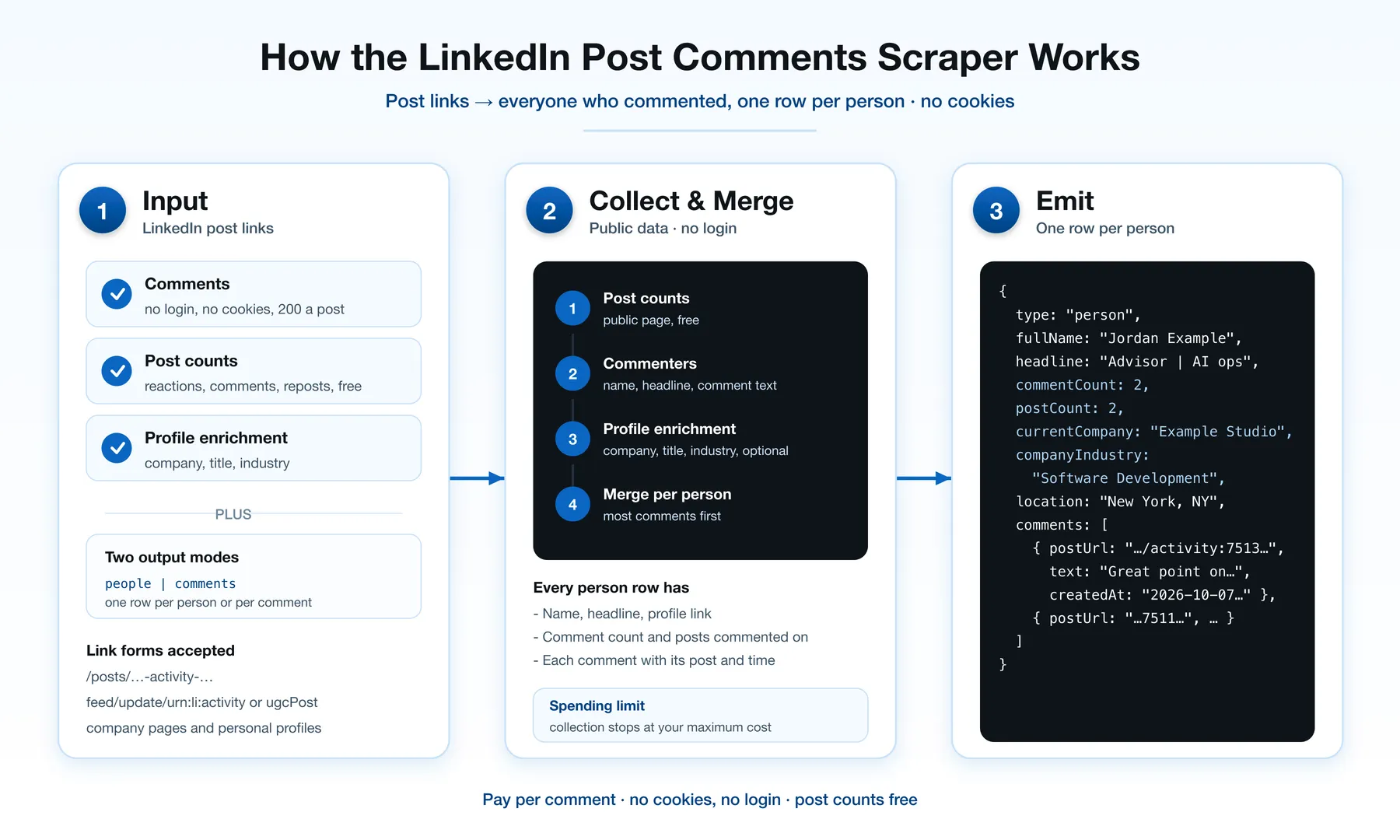
- Each link is reduced to its post id.
- The post's public page is read once for its counts, author and text. Two links to the same post are recognised here and collected once.
- Comments are read from public data, up to 200 per post.
- Comments are merged into one row per person, most comments first.
- With
enrichProfiles, each person's public profile and their company's page are looked up, eight at a time.
Input Configuration
| Field | Type | Notes |
|---|---|---|
postUrls | string[] | Required. LinkedIn post links, URNs or activity ids. |
includeComments | boolean | Default true. Switch off to get only each post's counts, which are free. |
enrichProfiles | boolean | Default false. Adds company, location, title and industry fields. Billed per person enriched. Applies to one-row-per-person output. |
outputMode | people | comments | Default people. comments returns one row per comment. |
maxCommentsPerPost | integer | Stop a post after this many comments. Empty means all (up to 200). |
maxItems | integer | Stop the run after this many comments. Empty means no cap. |
Example input
Commenters on two posts:
Commenters with company, title and industry, capped at 500 comments:
One row per comment, for sentiment work:
Post counts only, free:
Output Overview
In the default mode each row is a person (type: "person"). Identity fields come first, then the comment count and the number of posts they commented on, then the enrichment fields (null unless enrichProfiles is on), then comments, the list of their comments with the post each one belongs to.
A company page that comments gets a row too, with isCompany: true and no first or last name.
In per-comment mode each row is one comment (type: "comment") with the person's fields alongside it and postPublishedAt for the post.
A POSTS record in the key-value store has one entry per post: LinkedIn's own reactionCount, commentCount and repostCount, the topReactionTypes shown on the post, author, text and publishedAt, next to how many comments the run collected. It is read from the public post page and is not billed. Every post gets its counts, including posts left uncollected because a limit was reached. repostCount is null when LinkedIn shows no repost count on the page.
A SUMMARY record holds run totals.
Output Samples
One person row from a live run on a company post, with enrichProfiles on. Identity fields are replaced with placeholders; the shape and the other values are as returned.
One POSTS entry from a live run capped at 3 comments (maxItems: 3):
currentTitle is null in the person row because the headline is a tagline and does not read "Title at Company". See the FAQ.
Key Output Fields
Who
fullName, firstName, lastName, headline, profileUrl, publicIdentifier, isCompany
What they wrote
commentCount, postCount, comments[] (postUrl, text, url, createdAt)
Enrichment, person (with enrichProfiles)
enriched, currentCompany, currentTitle, location, followerCount, connectionCount
Enrichment, company (with enrichProfiles, when the company page is matched)
companyUrl, companyIndustry, companyEmployeeCount, companyHeadquarters, companyWebsite
Per post (POSTS record)
reactionCount, commentCount, repostCount, topReactionTypes, author, text, publishedAt, commentsCollected
FAQ
Do I need a LinkedIn account or cookie? No. Everything comes from public data. Nothing asks for or uses your LinkedIn session.
Can I get the people who reacted or reposted? Not from this actor. LinkedIn shows those lists to logged-in members only, and this actor does not log in. You get the reaction and repost counts per post instead.
Why does a post return at most 200 comments? That is the ceiling of the comment source. Posts with more comments return the 200 most relevant.
Why is currentTitle empty for some people?
Public profiles carry a headline, not a separate job title. The actor fills currentTitle only when the headline reads "Title at Company" and that company matches the person's current company. A tagline such as "Helping founders scale" is left out rather than passed off as a title. headline is always returned.
Why is companyIndustry empty for some people?
The profile gives the company's name, and the industry lives on the company's page. The actor finds that page from the name and accepts it only when the page's own name agrees. Companies with unusual page addresses are not matched, so expect partial coverage on the company fields.
Is a person with no enrichment data billed?
No. If the profile lookup returns nothing usable, the person is left with enriched: false and no enrichment event is charged.
What are the post counts, and do they cost anything?
Every run reads each post's public page once and saves LinkedIn's own reaction, comment and repost counts in the POSTS record. They are not billed. Switch comments off to get only these.
How fast is it? Comments take a few seconds per post. Enrichment is the slow part: each lookup takes 10–20 seconds and eight run in parallel, so 100 people take a few minutes.
Can it scrape a whole company page? It takes post links. Collect the page's post links first with a posts scraper, then paste them here.
Does it return emails or phone numbers? No.
Pricing
Pay per event, no subscription.
| Event | Price |
|---|---|
| Run start | $0.005 |
| Each comment collected | $0.002 |
| Each person enriched (optional) | $0.003 |
| Post counts | free |
1,000 comments cost $2.00. Enriching 400 distinct people adds $1.20. Set maxItems or the run's maximum cost to cap spend; the actor stops making requests when either is reached.
The free plan collects up to 50 comments and enriches up to 10 people per run.
Support
Found a bug or need a field that isn't here? Open a ticket on the Issues tab.
Additional Services
Need the results pushed to a CRM or a sheet, or a scheduled run across a company page's new posts? Get in touch through the Apify Console.
Explore More Scrapers
LinkedIn in this family: Posts, Profiles, Company profiles, Company employees, People search, Email finder. Full list at apify.com/memo23.
🤖 For AI Agents & LLM Apps
Compact reference for agents calling this actor via the Apify MCP server or the Apify API (actor: memo23/linkedin-post-comments-scraper).
Purpose: people who commented on given LinkedIn posts, merged per person, with optional company and title enrichment, plus each post's reaction, comment and repost counts. No login or cookie.
Minimal input:
With enrichment:
Output: rows with type = person (default) or comment. Person rows: fullName, headline, profileUrl, commentCount, postCount, comments[], and when enriched currentCompany, currentTitle, location, companyIndustry. Per-post counts are in the POSTS key-value record.
Behaviors an agent should know:
- Input is post links only. Profile and company links are rejected.
- Names of people who reacted or reposted are not available; only counts.
- Always set
maxItems. Comments cap at 200 per post. currentTitleand thecompany*fields can be null on enriched rows;headlineis always present.- Enrichment adds 10–20 seconds per person (eight in parallel). Keep
maxItemssmall for interactive use. - Billing: $0.005 start + $0.002 per comment + $0.003 per enriched person. Post counts are free.
⚠️ Disclaimer
This Actor is an independent tool and is not affiliated with, endorsed by, or sponsored by LinkedIn Corporation, Microsoft Corporation, or any of their subsidiaries. All trademarks mentioned are the property of their respective owners.
All data is read from publicly available sources without logging in to LinkedIn. Users are responsible for ensuring their use complies with LinkedIn's terms of service, applicable data-protection law (including GDPR and CCPA), and any contractual obligations of their own organization.
SEO Keywords
linkedin post comments scraper, linkedin comments scraper, linkedin commenters scraper, export linkedin post comments, linkedin comment export, linkedin post comments no cookies, linkedin scraper no login, linkedin post engagement, linkedin post analytics, linkedin post reactions count, linkedin comments api, linkedin company page engagement, linkedin lead generation, linkedin engagement leads, linkedin audience research, linkedin social listening, b2b lead scraper, linkedin content marketing analytics, linkedin competitor research, who commented on my linkedin post


![LinkedIn Posts Scraper [$0.99💰 No Cookies] Profile + Companies avatar](https://images.apifyusercontent.com/4iiKhOPe-AsUb7uu0cpKFhamAGoapxumogkJ42V01qQ/rs:fill:76:76/cb:1/aHR0cHM6Ly9hcGlmeS1pbWFnZS11cGxvYWRzLXByb2QuczMudXMtZWFzdC0xLmFtYXpvbmF3cy5jb20vbmduOHZSRVNUa3NleVdFNnAtYWN0b3Itc0lCSWFpOWZMU2xjUGFmdm4tdUJOMlFocXF0Yy1saW5rZWRpbi53ZWJw.webp)


