

LinkedIn Email Finder - Verified Work Emails from Profile URLs
Pricing
$30.00 / 1,000 confirmed work emails
LinkedIn Email Finder - Verified Work Emails from Profile URLs
Paste LinkedIn profile URLs, get each person's work email confirmed by their company's mail server. Reads the public profile (no login, no cookies), finds the employer's domain and checks the likely addresses over SMTP with catch-all detection. $0.03 per confirmed email, other rows free.
Pricing
$30.00 / 1,000 confirmed work emails
Rating
0.0
(0)
Developer

Muhamed Didovic
Maintained by CommunityActor stats
0
Bookmarked
27
Total users
20
Monthly active users
2 days ago
Last modified
Categories
Share
Paste LinkedIn profile URLs. Get back each person's work email, confirmed by their own company's mail server.
You pay $0.03 for each confirmed email and nothing else - no fee per profile, no fee for catch-all guesses, no fee for profiles where no address could be confirmed. No LinkedIn login, no cookies, no API keys.
Why Use This Scraper?
- You pay only for confirmed emails. One event, $0.03, charged only when the company's mail server accepted that exact mailbox on a domain that is not catch-all. Every other row is free.
- Real mailbox check, not a pattern guess. The likely addresses (first.last@, flast@, first@ ...) are asked of the company's mail server one by one, with a random-address test that catches catch-all domains.
- The company's own pattern first. The company website is scanned for published addresses, so when the company writes
j.doe@orjdoe@, that pattern is tried before the generic ones. - No LinkedIn account at risk. Profiles are read the way a logged-out visitor sees them. You never hand over cookies or a session.
- A row for every profile, with the reason. Each profile gets a status (
confirmed,catch-all,unverified,not-found,no-company...) and asendDecision(send / review / skip), so you know what to do with the ones that did not confirm. - Track record. The same lookup engine runs inside memo23/email-finder: 642 of 661 public runs succeeded over the last 30 days (97.1%).
Price and reliability against the best-known alternative
| This actor | pequod-labs/linkedin-profile-verified-email | |
|---|---|---|
| Per confirmed / verified email | $0.03 | $0.028 + $0.004 for the profile = $0.032 |
| Profile read, no email found | free | $0.004 |
| Catch-all best guess | free | free |
| Public runs succeeded, last 30 days | 97.1% (642 of 661, same engine in memo23/email-finder) | 95.4% (719 of 754) |
Figures read from the Apify Store on 2026-10-01.
How often it finds an email
Measured on 10 October 2026 over 45 US profiles found by searching LinkedIn for B2B titles (VP of Sales, Marketing Manager, Head of Engineering, Account Executive, HR Manager):
| Result | Profiles | Share | You pay |
|---|---|---|---|
| Confirmed work email | 11 | 24% | $0.03 each |
| Best guess on a catch-all domain | 13 | 29% | free |
| Best guess, server gave no clear answer | 4 | 9% | free |
| Server refused every likely address | 4 | 9% | free |
| No employer, or no domain for it | 13 | 29% | free |
Your list will score differently. Lists that carry the company domain on each line (..., acme.com) skip the employer lookup, which is where almost a third of this sample stopped. Senior titles at mid-size companies confirm most often; Google, Amazon and other very large employers usually run catch-all mail servers.
Overview
This actor is for sales, recruiting and growth teams who already have a list of people on LinkedIn - from Sales Navigator, a search export, a CRM, an event attendee list - and need an email they can actually send to.
For each profile URL it returns one dataset row: the person's name and headline, their current employer and its domain, the work email, and the mail server's verdict on that email. The output is flat, so it exports straight to CSV, Excel, Google Sheets or a CRM import.
An email is marked confirmed only when the company's mail server said the mailbox exists and the domain does not accept every address. That is the email you are billed for.
Supported Inputs
URL types
| Input | Example | Supported |
|---|---|---|
| Public profile URL | https://www.linkedin.com/in/satyanadella/ | Yes |
| Country subdomain | https://uk.linkedin.com/in/jane-doe-4b2a1c9 | Yes (normalized to www) |
| URL with tracking parameters | https://www.linkedin.com/in/jane-doe?trk=public_profile | Yes (cleaned) |
| Profile URL plus a company domain | https://www.linkedin.com/in/jane-doe/, acme.com | Yes - the domain is used for that person |
Copy-pasteable input
Bulk paste
Paste a whole column into Bulk paste - one profile per line. A line can carry the person's company domain after a comma or a tab, which skips the employer lookup for that person:
Both fields can be used together. Duplicates across them are removed, and a duplicate that brings a domain the first mention lacked keeps the domain.
Unsupported inputs
- Company pages (
linkedin.com/company/...), job posts, posts, groups and search result URLs - only/in/profiles. - Sales Navigator lead URLs (
linkedin.com/sales/lead/...) - open the lead and copy its public/in/URL. - Names without a profile URL - use memo23/email-finder (name + company domain) instead.
- Personal emails (Gmail, Outlook.com and the like). This actor finds work emails at the person's current employer.
Use Cases
| Who | What they use it for |
|---|---|
| Sales teams and SDRs | Turn a Sales Navigator or LinkedIn search export into a sequence-ready list with confirmed work emails |
| Recruiters | Reach a candidate at work after finding them on LinkedIn, without InMail credits |
| Agencies and lead-gen shops | Enrich client prospect lists in bulk and bill only for what confirmed |
| Founders and growth teams | Email the people who engaged with a post, attended an event, or follow a competitor |
| RevOps and data teams | Fill missing emails in CRM contacts that already carry a LinkedIn URL |
How It Works
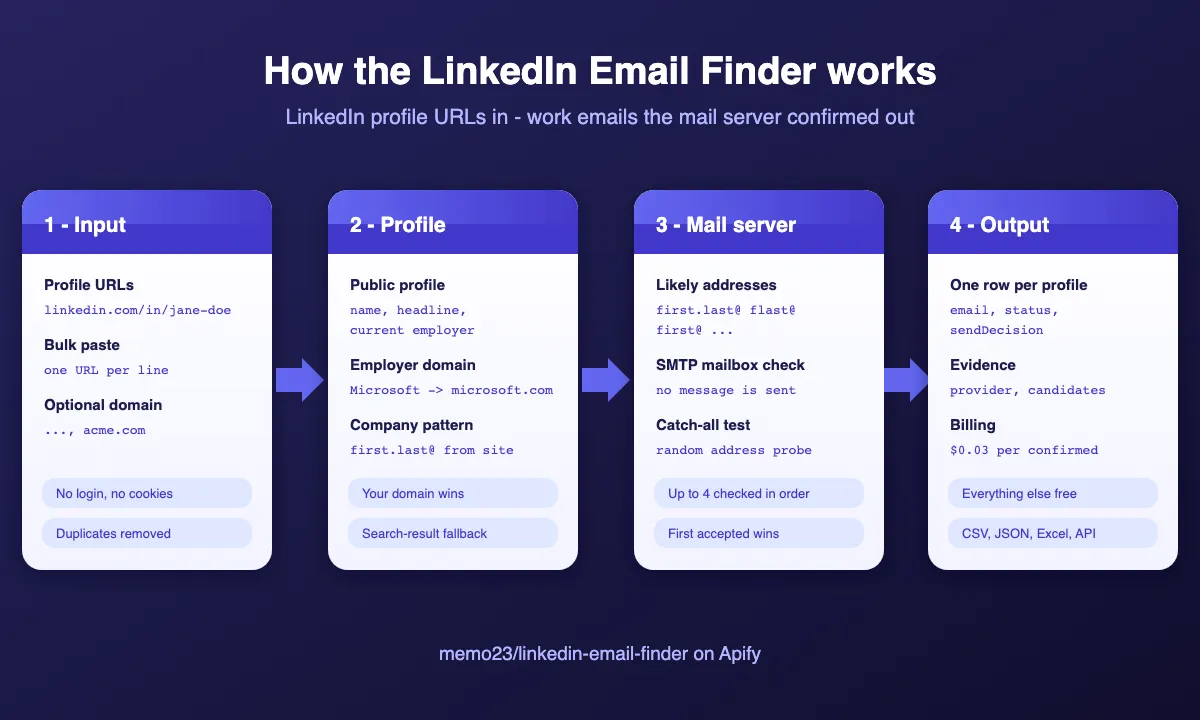
- Read the profile. Each URL is opened as a logged-out visitor to read the name, headline and current employer. When LinkedIn hides a profile from every logged-out visitor, or the page names no employer, the profile is read through a second public source, and the search engine's listing for that exact profile is the last resort.
- Find the employer's domain. The company name is matched to its website (a company-name match, so a namesake domain is not accepted). A domain you supply on the line or in Company domain skips this step.
- Learn the company's address pattern. The company website is scanned for published addresses. A direct match, or the pattern they show (first.last, f.last ...), moves to the front of the queue.
- Ask the mail server. Up to four likely addresses are checked with the company's mail server in order, plus a random address to detect catch-all domains. The first address the server accepts on a non-catch-all domain is confirmed.
- Bill and save. A confirmed email is billed once at $0.03 and saved with its evidence. Every other outcome is saved free, with its status.
Input Configuration
Input fields
| Field | Type | Default | Description |
|---|---|---|---|
linkedinUrls | array of strings | - | Public linkedin.com/in/... profile URLs. An entry may carry a domain after a comma: https://www.linkedin.com/in/jane-doe/, acme.com. |
linkedinUrlsText | string (textarea) | - | Bulk paste, one profile per line, optional domain after a comma or tab. |
companyDomain | string | - | Domain used for every profile that has no domain on its own line, instead of the employer read from LinkedIn. |
smtpCheck | boolean | true | Confirm each email with the company's mail server. Off: unconfirmed best guesses only, nothing billed. |
onlyConfirmed | boolean | false | Keep only confirmed emails in the dataset. Off: every profile gets a row (free unless confirmed). |
maxItems | integer | 1000 | Most profiles processed per run, after duplicates are removed. Free Apify plans: 25 per run. |
maxConcurrency | integer | 5 | Profiles processed in parallel (1-20). |
Common scenarios
A list of profiles, every row back for review:
Everyone works at one company - set the domain once:
Import-ready output - only the billed, confirmed rows:
Spending cap. Set Maximum cost per run in the run options. The actor stops starting new profiles once the cap cannot pay for another confirmed email, and never returns a confirmed email it could not bill.
Output Overview
One row per input profile (or per confirmed profile with onlyConfirmed). Each row has three groups of fields:
- The person -
fullName,title(the LinkedIn headline),companyName,linkedinUrl, your originalinputline and its positioninputIndex. - The email -
email,status,sendDecision,billed,confidence,pattern,mailboxConfirmed. - The evidence -
companyDomainand where it came from, the mail provider, the mail server's answer, and the ranked candidate addresses with the server's answer for each.
Rows are written as profiles finish, so their order can differ from your list. Sort by inputIndex to restore it.
The dataset has three views in the console: Emails (the import columns), Verification details and Profile lookup.
Output Samples
Real rows from a platform run on 2026-10-01 (build 0.0.1, two of the five profiles confirmed and billed), trimmed. Email local parts are masked in this README; the dataset carries the full address.
Confirmed, company pattern first.last (billed)
Confirmed after the server refused first.last (billed)
confidence is medium here because a first-name-only mailbox at a large company could belong to someone else with that first name. The mailbox is real; the attribution is less certain than for first.last.
Catch-all domain (free)
Profile LinkedIn hides from logged-out visitors (free)
Key Output Fields
Person
| Field | Description |
|---|---|
inputIndex | Position of the profile in your de-duplicated input (1-based) |
input | Your original entry or line |
linkedinUrl | Normalized profile URL |
fullName | Name as shown on LinkedIn (or from the URL when the page is hidden) |
title | LinkedIn headline or current job title |
companyName | Current employer as shown on LinkedIn |
nameSource / profileSource | profile, lookup (the second public source), search-result or url-slug |
| Field | Description |
|---|---|
email | Confirmed address, or the best unconfirmed guess (catch-all / unverified), or null |
status | confirmed, catch-all, unverified, not-found, no-mail-server, no-company, no-name, charge-limit |
sendDecision | send (confirmed), review (catch-all or unverified), skip (everything else) |
billed | True only for the confirmed row that was charged |
mailboxConfirmed | The mail server accepted this mailbox and the domain is not catch-all |
confidence | high (confirmed with first and last name), medium, low |
pattern | Address pattern of email: first.last, flast, first ... |
Evidence
| Field | Description |
|---|---|
companyDomain | Domain the addresses were built on |
domainSource | profile (matched from the employer), input-line, input (Company domain field) |
smtpStatus | Mail server's overall answer: confirmed, rejected, catch-all, unknown, skipped |
emailSource | site-match (published on the company site), site-pattern (company style learned from the site), pattern |
emailProvider | Mail host read from DNS: google-workspace, microsoft-365, proofpoint, mimecast ... |
mxValid | The domain accepts email |
candidates[] | Up to six ranked addresses { email, pattern, score, smtp } with the server's answer for each one checked |
checkedAt | ISO timestamp |
FAQ
What exactly am I billed for?
Only person-email-confirmed, $0.03, once per profile whose work email the company's mail server confirmed on a domain that is not catch-all. The billed field shows it on every row. Profiles without a confirmed email cost nothing, whatever the reason.
Why do some rows say catch-all?
Some companies' mail servers accept mail for any address, so no checker can tell a real mailbox from a made-up one there. You get the most likely address for free, marked catch-all and sendDecision: review.
Is an email sent to the person?
No. The check stops before any message is sent: the server is asked whether it would accept mail for the address, and the conversation ends there.
Do I need a LinkedIn account or cookies?
No. Profiles are read as a logged-out visitor sees them. No session, cookie or account of yours is used, so nothing on your LinkedIn account is at risk.
What if LinkedIn shows the wrong company, or none?
Add the right domain after the URL on that line (..., acme.com), or set Company domain for the whole list. A domain you give always wins over the one read from LinkedIn.
Why did a profile return no-name?
A few members hide their public profile from every logged-out visitor, and neither the second public source nor the search engine had it either. When the URL itself spells a name (jane-doe-4b2a1c9), the actor still uses that; a one-word URL (rauchg) leaves nothing to build an address from.
Does it find personal emails or phone numbers?
No. Only work emails at the person's current employer. For phones and company inboxes, see memo23/email-finder.
How fast is it?
Most profiles take 5-10 seconds, nearly all of it the mail server check; slow servers such as Microsoft 365 can take 20-30 seconds. With the default concurrency of 5, a list of 1,000 profiles takes roughly 20-40 minutes.
Can I cap what a run costs?
Yes. Set Maximum cost per run. The actor stops starting new profiles when the cap cannot pay for another confirmed email, and a confirmed email it cannot bill is withheld (status: charge-limit), never given away and never overcharged.
Is there a free trial?
Free Apify plan users can process up to 25 profiles per run, billed the same way from their monthly platform credit.
Support
- Found a bug or need a new field? Open a ticket on the Issues tab of this actor - it's the fastest way to reach me and I actively maintain this actor.
- Email: muhamed.didovic@gmail.com
- Website: muhamed-didovic.github.io
Additional Services
Need something beyond the standard output? I build and maintain custom actors and data pipelines:
- Email lookups wired into your CRM or outreach tool on a schedule
- Custom fields, filters or export formats for your workflow
- Private or dedicated actors for high-volume or compliance-sensitive use
Reach out via the Issues tab or email and describe what you need.
Explore More Scrapers
- LinkedIn People Search - find profiles by company, title and industry, no login; feed the URLs into this actor
- LinkedIn Company Employees Scraper - list the people at a company
- Decision Maker Finder - company in, C-suite contacts with confirmed emails out
- B2B Email Finder & Verifier - emails by company domain, company name, or person name plus domain
- Email Verifier & Validator - bulk SMTP and catch-all check for addresses you already have
Full list at apify.com/memo23.
🤖 For AI Agents & LLM Apps
Compact reference for AI agents calling this actor via the Apify MCP server or the Apify API (actor: memo23/linkedin-email-finder).
Purpose: LinkedIn /in/ profile URL -> the person's work email, confirmed by the company's mail server over SMTP with catch-all detection. No LinkedIn login.
Minimal input:
Output: one row per profile - inputIndex, input, linkedinUrl, fullName, title, companyName, companyDomain, domainSource, email, status, sendDecision, billed, mailboxConfirmed, confidence, pattern, smtpStatus, emailSource, emailProvider, mxValid, candidates[] {email, pattern, score, smtp}, checkedAt.
Behaviors an agent should know:
- Use only rows with
status: "confirmed"(equivalentlysendDecision: "send") as deliverable;catch-allandunverifiedrows carry an unconfirmed guess. - Billing:
person-email-confirmed$0.03 per confirmed row, nothing else.billedis true on exactly those rows. onlyConfirmed: truedrops every non-billed row from the dataset.- A domain after the URL (
"https://www.linkedin.com/in/x/, acme.com") orcompanyDomainoverrides the employer read from LinkedIn. - Rows arrive out of input order; sort by
inputIndex. smtpCheck: falsereturns pattern guesses only and bills nothing.- Free Apify plans: 25 profiles per run.
⚠️ Disclaimer
This Actor is an independent tool and is not affiliated with, endorsed by, or sponsored by LinkedIn Corporation or Microsoft Corporation, or any of their subsidiaries. All trademarks mentioned are the property of their respective owners.
The actor accesses only publicly available LinkedIn profile pages - no authenticated endpoints, paid features, or content behind the linkedin.com login wall - and checks addresses with mail servers without sending any message. Users are responsible for ensuring their use complies with LinkedIn's Terms of Service, applicable data-protection and anti-spam law (GDPR, CCPA, CAN-SPAM, etc.), and any contractual obligations of their own organization.
SEO Keywords
linkedin email finder, linkedin profile email finder, find email from linkedin profile, linkedin to email, linkedin email extractor, linkedin email scraper, Apify linkedin email, work email finder, verified email finder, SMTP email verification, catch-all email detection, b2b email finder, bulk linkedin email lookup, sales navigator email finder, prospect email list, recruiter email finder, cold outreach emails, lead enrichment, CRM email enrichment, Hunter alternative, Apollo alternative, Lusha alternative, RocketReach alternative


