
GitHub Repo to RAG Chunks & LLM Context
Pricing
from $2.10 / 1,000 processed repositories
GitHub Repo to RAG Chunks & LLM Context
Turn any public or private GitHub repo into token-counted, line-cited RAG chunks and one LLM-ready context file. One archive download, no API quota, secrets masked, license and commit included. Not affiliated with GitHub.
Pricing
from $2.10 / 1,000 processed repositories
Rating
0.0
(0)
Developer

Muhammet Mustafa Dincer
Maintained by CommunityActor stats
0
Bookmarked
2
Total users
1
Monthly active users
3 days ago
Last modified
Categories
Security
Limited permissionsShare
What is GitHub Repo to RAG Chunks & LLM Context?
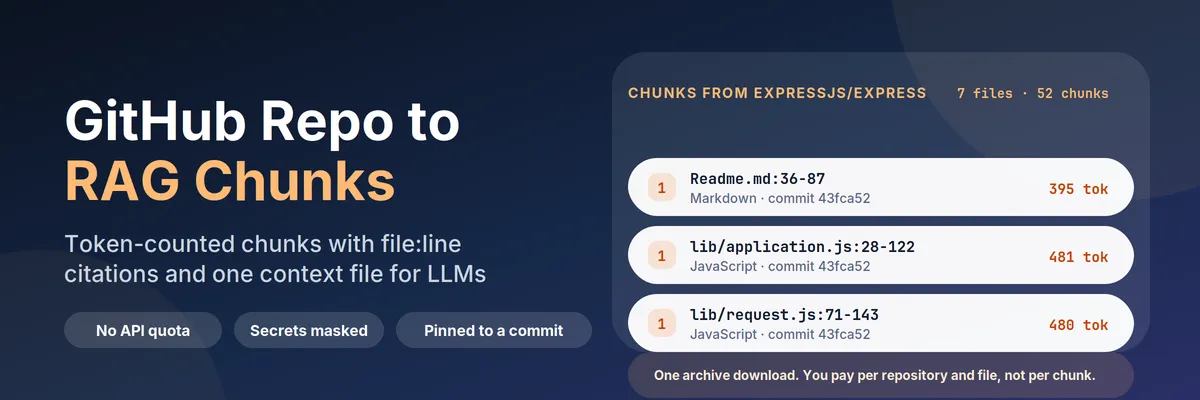
GitHub Repo to RAG Chunks & LLM Context turns a GitHub repository into data an LLM pipeline can use. Give it one repository, a hundred, or the ID of another Actor's dataset, and you get back:
- one row per repository (
recordType: "repository") with the exact commit, detected license, language breakdown, file and token counts, what was skipped and why, a folder tree and, when GitHub answers, stars, topics and description; - one row per chunk (
recordType: "chunk") with the chunk text, its token count, the file path and line range it came from (lib/router/index.js:120-188) and a GitHub link pinned to the commit, so a generated answer can cite the exact lines instead of "somewhere in the repo"; - optionally one row per file with the whole text, and one Markdown context file per repository (folder tree plus files in reading order, README first, cut at a token budget you choose) that you can paste straight into an LLM chat.
It needs no browser, no GitHub account for public repositories and no cloning. It downloads one archive per repository over plain HTTP and reads it in JavaScript.
Quick answer: when should you (or an AI agent) pick this Actor?
Pick this Actor when you are building a retrieval pipeline over code and docs and you need chunks, not a text dump: a "chat with this library" assistant, a code-search index, a docs Q&A bot, an onboarding agent for a codebase, or a nightly job that re-indexes a list of repositories. It is also the right tool when your repository links already sit in an Apify dataset (from a GitHub search or trending Actor) and you want them chunked without copying links by hand.
Pick something else when you want GitHub data rather than file content: issues, pull requests, contributors, star history, release notes or user profiles. This Actor reads the files of a repository at one commit and does not return the issue tracker, the git history or any person's data. For that, use a GitHub data scraper.
Defaults that work: send {"repositories": ["https://github.com/expressjs/express"]} and you get one repository row plus 595 chunks at 512 tokens each (213 files, 191,908 tokens) in about four seconds. For a vector store send {"repositories": [...], "mode": "chunks", "chunkSize": 512, "chunkOverlap": 64} and the dataset is exactly what you feed to embeddings. To read only the docs, add "paths": ["docs", "README.md"].
At a glance
| Does | Downloads a repository archive and returns token-counted chunks with file path, line range and a commit-pinned link, a repository row (commit, license, counts, skipped files) and a Markdown context file |
| Input | repositories (or datasetId to read links from another dataset). Optional: mode, ref, paths, includePatterns, excludePatterns, chunkSize, chunkOverlap, redactSecrets, includeMetadata, buildContextFile, contextTokenBudget, maxRepositories, maxFilesPerRepository, maxFileKb, maxArchiveMb, maxChunksPerRepository, githubToken |
| Output | recordType: "repository", "chunk" and (optional) "file" rows in one dataset, plus CONTEXT-owner-repo.md and RUN_SUMMARY in the key-value store |
| Needs | A public github.com repository. A GitHub token only for private repositories and for reliable metadata |
| Speed | Measured on the platform: 7 files in 3 s, 213 files in 4 s, 500 files and 3,373 chunks of a very large repository in 10 s |
| Pricing | Pay per event: $0.003 per repository with readable files, $0.0001 per file read, $0.0005 per run on the Free plan. Chunks are free. Failed, missing, oversized and empty repositories are free |
| Does not | Return issues, pull requests, history or people; read submodules or Git LFS files; run code; clone over SSH; access anything but github.com |
Key terms used in this README
- Repository row: a dataset row with
recordType: "repository". One per repository reference, always written, even when the repository failed. The failure reason is in the row. - Chunk row: a dataset row with
recordType: "chunk". A run of whole lines from one file, up tochunkSizetokens, withpath,lineStart,lineEnd, a ready-madecitationand asourceUrl. - Commit SHA: the exact commit the archive was built from, read from the archive itself. Chunk links are pinned to it, so they keep pointing at the same text after the branch moves.
- Token count: the number of tokens the text becomes in cl100k_base, the tokenizer used by OpenAI's embedding and chat models. It is counted, not estimated from characters.
- Overlap: how many tokens (in whole lines) from the end of one chunk are repeated at the start of the next, so a function that straddles a boundary is still retrievable.
- Context file: one Markdown file per repository in the key-value store: directory tree, then each file under its path in reading order (README, license, docs, source, tests), cut when the token budget is reached.
- Secret masking: replacing private keys and well-known token formats with
[REDACTED:type]before anything is written.
What can you use it for?
RAG and vector stores over code and docs
mode: "chunks" is a ready-made embedding input: one row per chunk, inside your token budget, with repository, commitSha, path and language as metadata. Store lineStart and lineEnd next to the vector and an answer can cite src/server.ts:44-97.
"Chat with this library" agents
Point an agent at this Actor through MCP, give it a repository link and it receives citable chunks and a context file instead of an HTML page. The rows are flat and identical in shape, so the agent can filter and quote without knowing anything about Git.
Dropping a whole codebase into a long-context model
buildContextFile writes one Markdown file with the directory tree and the files in priority order. contextTokenBudget (default 100,000) stops it at the size your model accepts, and contextFileTokens on the repository row tells you the exact count.
Re-indexing on a schedule
Pass ref as a tag or commit for reproducible results, or leave it empty to follow the default branch. commitSha on every row tells your pipeline whether anything changed since the last run.
Chaining after a GitHub search
Feed the dataset ID of a GitHub search, topic or trending Actor into datasetId. The Actor finds the repository link in each row (repositoryUrl, url, html_url, fullName and similar fields) and returns chunks for every repository.
Licence and size triage
The repository row carries the detected license (and whether it came from the LICENSE text or the GitHub API), tokenCount, languages and skippedFiles, which is enough to decide whether a repository is worth indexing before you embed it.
How does it work?
- The repository list is built from
repositoriesand, if you set one, from the links found indatasetId. Each entry is parsed (https://github.com/owner/repo,owner/repo,owner/repo@v1.2.0,/tree/<branch>/<folder>links) and duplicates are removed. Entries that are not agithub.comrepository get a row withfailureReason: "invalid_reference"and cost nothing. - For each repository one archive is downloaded from
codeload.github.com, the host Git tooling and package managers use for snapshots. This needs no GitHub API call, so the 60 requests an hour that GitHub gives anonymous API users do not apply. With a token, the archive comes from the official REST API instead. - The archive is streamed to disk with a size cap, and the commit SHA is read from it. Files are decompressed one at a time.
- Files are chosen: lockfiles, build output, vendored and cache folders, binaries, minified or generated files, empty files and anything over
maxFileKbare skipped, and every skip is counted by reason on the repository row. Yourpaths,includePatternsandexcludePatternsnarrow it further. - Files are read in priority order (README, license, docs, source, tests), so a file limit cuts tests before it cuts the README. Secrets are masked, text is normalised, and each file is split into chunks of whole lines. Chunks break before a heading or a top-level declaration when they can, then at a blank line, and mid-block only when a block is larger than the budget.
- Rows are written. The repository row is charged once and each file read is charged once; chunks are free. A missing repository, a refusal from GitHub, an oversized archive and a repository with nothing readable write a row and cost nothing.
If GitHub answers 403 or 429 the Actor stops and says so. It does not retry around a refusal.
How to turn a GitHub repository into RAG chunks (step by step)
- Open the Actor and paste one or more GitHub repositories, one per line, for example
https://github.com/expressjs/express. - Leave What to return on Chunks (RAG), or choose Whole files or Chunks and whole files.
- Set Chunk size to 512 for general retrieval. Use 256 for narrow lookups and 1024 or more to keep whole functions together.
- Optionally narrow the run with Folders or files (for example
docs) or include and exclude patterns (for example*.py,**/*.test.js). - Click Start. In the Output tab open Repositories to see the commit, license and counts, or Chunks for the embedding input. The Markdown context file is in the key-value store under
CONTEXT-owner-repo.md. - Download the dataset as JSON, JSONL, CSV or Excel, or read it from the API.
recordTypetells the row kinds apart.
Input
| Field | Type | Default | What it does |
|---|---|---|---|
repositories | list of text | expressjs/express | https://github.com/owner/repo, owner/repo, owner/repo@ref, or a /tree/<ref>/<folder> link. Up to 100 per run |
datasetId | text | empty | Read repository links from an existing Apify dataset. Looks for repositoryUrl, url, html_url, fullName and similar fields |
mode | choice | chunks | chunks writes the repository row and chunk rows; files writes whole files; both writes everything |
ref | text | default branch | Branch, tag or commit. A ref inside the repository link wins |
paths | list of text | empty | Only these folders or files, from the repository root |
includePatterns | list of text | empty | Glob patterns a file must match, for example *.py or src/**/*.ts |
excludePatterns | list of text | empty | Glob patterns to leave out. Exclude always wins |
chunkSize | number | 512 | Token budget per chunk (64 to 4096), counted in cl100k_base |
chunkOverlap | number | 64 | Tokens repeated from the previous chunk, at most half of chunkSize |
redactSecrets | yes/no | yes | Replace private keys and well-known token formats with [REDACTED:type] |
includeMetadata | yes/no | yes | Add description, stars, forks, topics and last push from the GitHub API. May be skipped when GitHub's anonymous limit is reached; the files are still complete |
buildContextFile | yes/no | yes | Save CONTEXT-owner-repo.md per repository to the key-value store |
contextTokenBudget | number | 100000 | Token budget of the context file |
maxRepositories | number | 100 | Upper bound on repositories processed in one run. Extra repositories are left out and counted in RUN_SUMMARY |
maxFilesPerRepository | number | 500 | Stop after this many files, in priority order |
maxFileKb | number | 256 | Skip files larger than this |
maxArchiveMb | number | 100 | Refuse repositories whose archive is larger than this |
maxChunksPerRepository | number | 5000 | Safety cap on chunk rows for one repository |
githubToken | secret | empty | Needed only for private repositories and reliable metadata. Stored encrypted, never written to the dataset or the log |
Output
Every run writes one dataset. Filter on recordType.
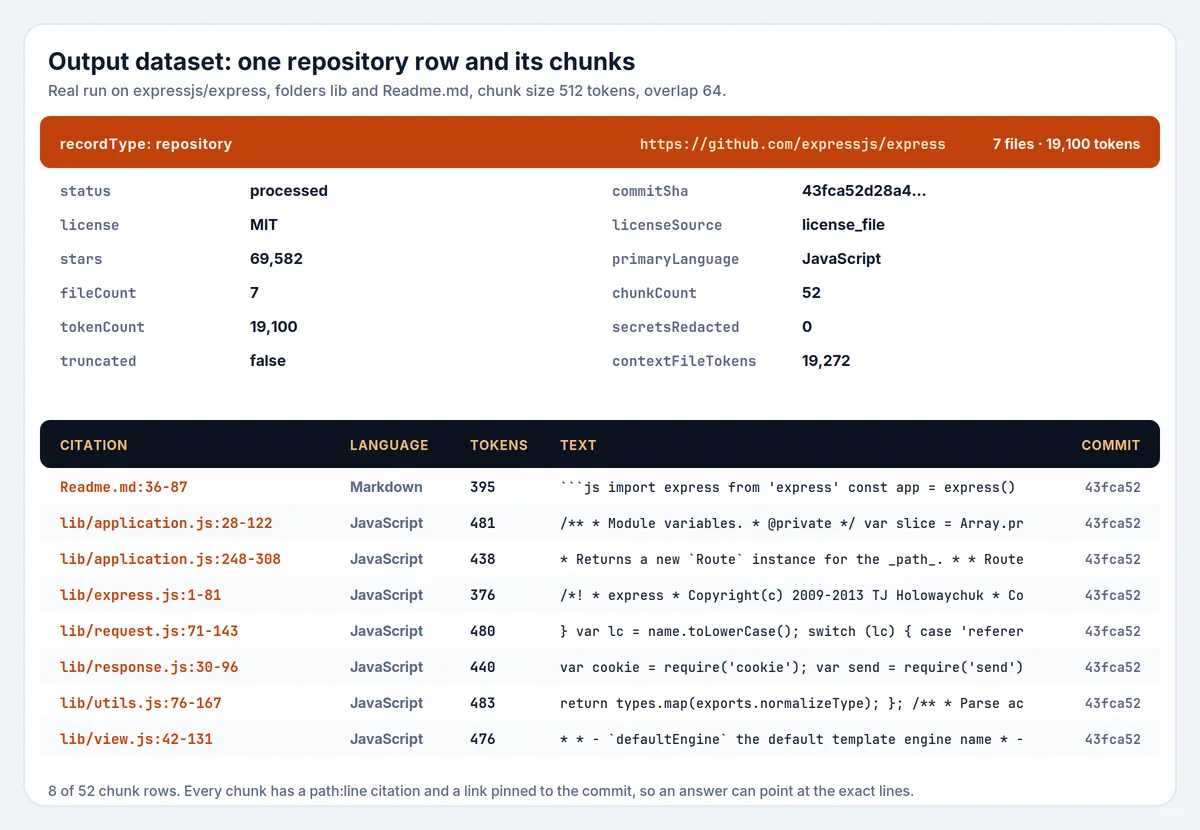
Repository row. Real output for expressjs/express limited to the lib folder and Readme.md (folder tree shortened):
Chunk row. From the same run (text shortened):
Field reference
| Field | Row | Meaning |
|---|---|---|
status | repository | processed (charged), empty (downloaded, nothing readable, free) or failed (free) |
failureReason | repository | invalid_reference, not_found, token_rejected, blocked, too_large, network_error, http_error, corrupt_archive, unavailable_for_legal_reasons, no_readable_files |
commitSha | all | Commit the archive was built from; links are pinned to it |
license, licenseSource | repository | SPDX id from the LICENSE text (license_file) or the GitHub API (github_api). A keyword heuristic, not legal advice |
fileCount, archiveFileCount | repository | Files read and charged, and all files in the archive |
skippedFiles | repository | Counts by reason: excluded_directory, lockfile, minified_or_generated, binary, too_large, empty, not_utf8_text, not_selected, file_limit |
truncated, truncatedReason | repository | A limit stopped the repository early: file_limit, chunk_limit, text_size_limit or budget |
secretsRedacted, secretTypes | repository, file | How many secret-looking values were masked, and which kinds |
metadataStatus | repository | ok, unavailable (GitHub API refused; files are still complete) or disabled |
path, language | chunk, file | File path and language from the file name |
lineStart, lineEnd, citation | chunk | 1-based line range and a path:start-end string to show next to an answer |
sourceUrl | chunk, file | GitHub link to the exact lines at the exact commit |
tokenCount | all | cl100k_base tokens in the text of that row |
headings | chunk | For Markdown-like files, the headings the chunk sits under or contains |
isPartial | chunk | True when a single line was longer than the chunk size and had to be cut mid-line |
How much does it cost?
The Actor uses pay-per-event pricing. On the Free plan:
| Event | Price | When it is charged |
|---|---|---|
| Actor Start | $0.0005 | Once per run (per GB of memory) |
| Processed repository | $0.003 | Per repository that had at least one readable file |
| Processed file | $0.0001 | Per file read, masked and chunked |
Chunks, whole-file rows, the context file and metadata are free, and so is a repository that fails, is missing, is too large or has nothing readable. Paid plans get lower prices per event.
Measured examples, charged at Free-plan prices (platform runs on 2026-11-04):
| Run | Files | Chunks | Tokens | Run time | You pay |
|---|---|---|---|---|---|
expressjs/express, folders lib and Readme.md (the prefill) | 7 | 52 | 19,100 | 3 s | $0.0042 |
expressjs/express, whole repository | 213 | 595 | 191,908 | 4 s | $0.0248 |
pallets/click, whole repository | 169 | 964 | 323,134 | 6 s | $0.0204 |
facebook/react, first 500 files by priority, chunks and whole files | 500 | 3,373 | 1,175,868 | 10 s | $0.0535 |
To cap spending, lower maxFilesPerRepository or maxRepositories, narrow the run with paths, or set a maximum cost per run in the Apify run options: the Actor stops cleanly when the limit is reached and says so in the repository row (truncatedReason: "budget").
How does it compare with other GitHub-to-LLM Actors?
Checked on the Apify Store on 2026-11-04. These Actors solve a related problem and some of them are the better choice for a simpler job.
| This Actor | Gitingest-style converters (for example automation-lab/github-repository-to-llm-context-gitingest) | get_anything/github-repo-scraper | README-only extractors | |
|---|---|---|---|---|
| One context file for an LLM | Yes, with a token budget | Yes, this is their main output | File rows | README only |
| Token count | Exact cl100k_base, per row | Not provided by some; estimates by others | Approximate | No |
| Embedding-ready chunks with line ranges | Yes | No | No | No |
| Commit pinned in every row and link | Yes | No | No | No |
| Needs GitHub API calls | No (one archive download). A token is optional | Varies | Yes, one request per file, 60 requests an hour without a token | Varies |
| Secret masking | Yes, on by default | Not documented | Not documented | No |
| Issues, pull requests, stars history | No | No | Some metadata | No |
| Price (Free plan) | $0.003 per repository + $0.0001 per file | Starts at about $0.0001 per run | About $0.0001 per file | Varies |
In short: if you need one text file to paste into a chat and nothing else, a Gitingest-style converter is simpler and cheaper. If you need chunks you can embed, cite and re-index, with exact token counts and a commit you can trust, this Actor is built for that.
Is it legal to extract a GitHub repository?
This Actor reads public repository files that you name. It is not a crawler.
- It downloads the archive from
codeload.github.com(or the official REST API when you give a token), not fromgithub.comweb paths that GitHub'srobots.txtdisallows for archives. It does not log in, does not collect user profiles, commit authors or e-mail addresses, and does not follow links. - A repository's content belongs to its authors under the license in the repository. The
licensefield tells you what the maintainers declared; it does not grant you any right. Check the license before you redistribute code, train a model on it or ship it in a product. Many licenses require attribution; some forbid commercial use. - Respect GitHub's Terms of Service and Acceptable Use Policies. You are responsible for what you do with the data.
- If GitHub refuses a download (HTTP 403 or 429) the Actor stops and reports
blocked. It does not rotate IPs or try to get around the limit.
Not affiliated with, endorsed by or sponsored by GitHub, Inc. GitHub is a trademark of GitHub, Inc.
Can it mask secrets?
By default the Actor replaces private keys and well-known token formats (AWS access keys, GitHub tokens, Slack tokens, Google API keys, Stripe live keys, OpenAI keys, npm tokens, Twilio keys) with [REDACTED:type] before any text is written. The repository row says how many values were masked and of which kind. This is a pattern check, not a scanner: a secret in a format that is not listed is left alone, so do not rely on it to publish a private repository. Turn it off with redactSecrets: false if you need the raw text.
Using the API
MCP (AI agents)
Apify MCP server (ChatGPT, Claude, Cursor and other MCP clients). Connect https://mcp.apify.com, then:
search-actorswith a query such asGitHub repository to RAG chunks.fetch-actor-detailsformmdincer/github-repo-rag-extractorto read the input schema.call-actorwith the input below.get-dataset-itemswith the returned dataset ID andrecordType: "chunk"as your filter.
To give an MCP client this Actor as its own tool (no search step), connect https://mcp.apify.com?tools=mmdincer/github-repo-rag-extractor.
JavaScript
Python
curl
The context file of a run is a key-value store record: https://api.apify.com/v2/key-value-stores/<defaultKeyValueStoreId>/records/CONTEXT-expressjs-express.md.
FAQ
Do I need a GitHub account or token?
Not for public repositories. A token (a personal access token with read access to contents) is needed for private repositories and makes the optional metadata reliable. Without a token, GitHub limits anonymous API use to 60 requests an hour per IP, which a shared platform can exhaust; the Actor still downloads and chunks every file, and the repository row says metadataStatus: "unavailable".
Why not just git clone and run a tokenizer myself?
You can, and for one repository on your laptop that is the cheapest route. This Actor is for the cases where you cannot or do not want to: n8n, Make or agent workflows, many repositories on a schedule, a consistent output shape across repositories, PDFs and other sources, and no Git or tokenizer installation.
How accurate is the token count?
It is counted with the cl100k_base tokenizer, which OpenAI's embedding and chat models use, not estimated from characters. Other model families tokenize differently, so use the count as a budget guide for them.
Which files are skipped?
Lockfiles, build and dependency folders (node_modules, dist, build, vendor, target and similar), binaries and images, minified and generated files (*.min.js, *.map, protobuf output), empty files, files that are not UTF-8 text and files over maxFileKb. The repository row counts every skip by reason, so nothing disappears silently.
Does it include Git history, submodules or LFS files?
No. The archive holds the files of one commit. Submodule content is not included and Git LFS files appear as their small pointer text.
How do I read a single branch, tag or commit?
Use owner/repo@v1.2.0, a /tree/<branch>/<folder> link or the ref field. Branch names that contain slashes work. A commit SHA gives reproducible output.
Why did a repository come back not_found?
GitHub answers 404 for repositories that do not exist and for private ones you cannot see. Check the spelling, or add a githubToken that can read it. A wrong tag name also gives 404.
What if the repository is huge?
The archive is refused before anything is read when it exceeds maxArchiveMb (default 100 MB), and the row says too_large. Narrowing with paths does not shrink the download, so raise the limit deliberately. Within the archive, maxFilesPerRepository, maxFileKb and maxChunksPerRepository keep a run predictable, and truncated tells you when one of them applied.
Is the output deterministic?
For the same commit, ref and settings, yes: files are read in a fixed order and chunk boundaries do not depend on timing.
Where can I report a problem or request a feature?
Use the Issues tab of the Actor in Apify Console. Include the input, the run ID and the repository row.


