
Bulk Image Downloader to ZIP with SHA-256 Manifest
Pricing
from $1.40 / 1,000 downloaded files
Bulk Image Downloader to ZIP with SHA-256 Manifest
Bulk image downloader and file downloader. Image and file URLs become ZIP parts with a SHA-256 manifest, the real file type from the bytes and per-URL status. HTML error pages are rejected and failed downloads are free. Not affiliated with Google, Dropbox, Shopify or YouTube.
Pricing
from $1.40 / 1,000 downloaded files
Rating
0.0
(0)
Developer

Muhammet Mustafa Dincer
Maintained by CommunityActor stats
0
Bookmarked
1
Total users
1
Monthly active users
3 days ago
Last modified
Categories
Security
Limited permissionsShare
What is Bulk Image Downloader to ZIP with SHA-256 Manifest?
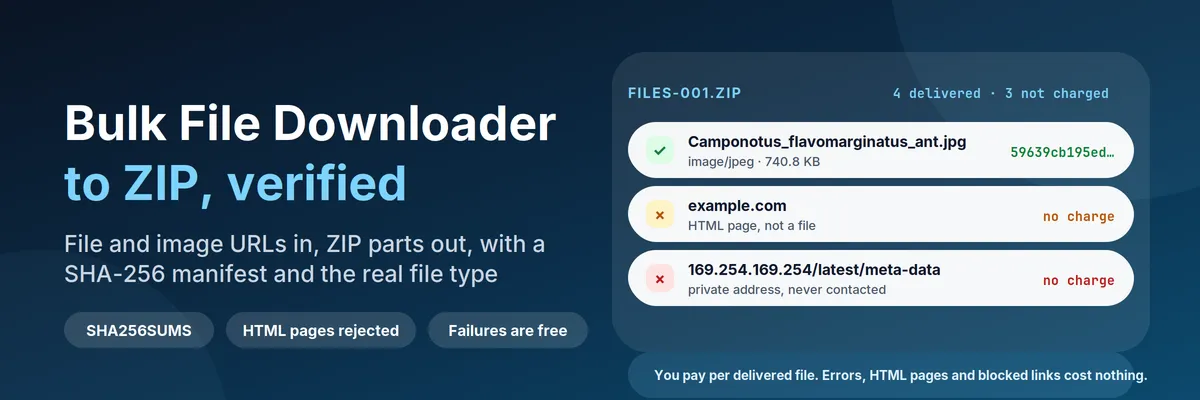
Bulk Image Downloader to ZIP with SHA-256 Manifest is a bulk image downloader and a file downloader. It takes image and file URLs (up to 10,000 per run) and hands them back as ZIP parts you can unpack in one step. Every file is checked while it downloads: the Actor reads the real file type from the bytes, computes the SHA-256, measures image size, and refuses a web page that pretends to be a file. You get:
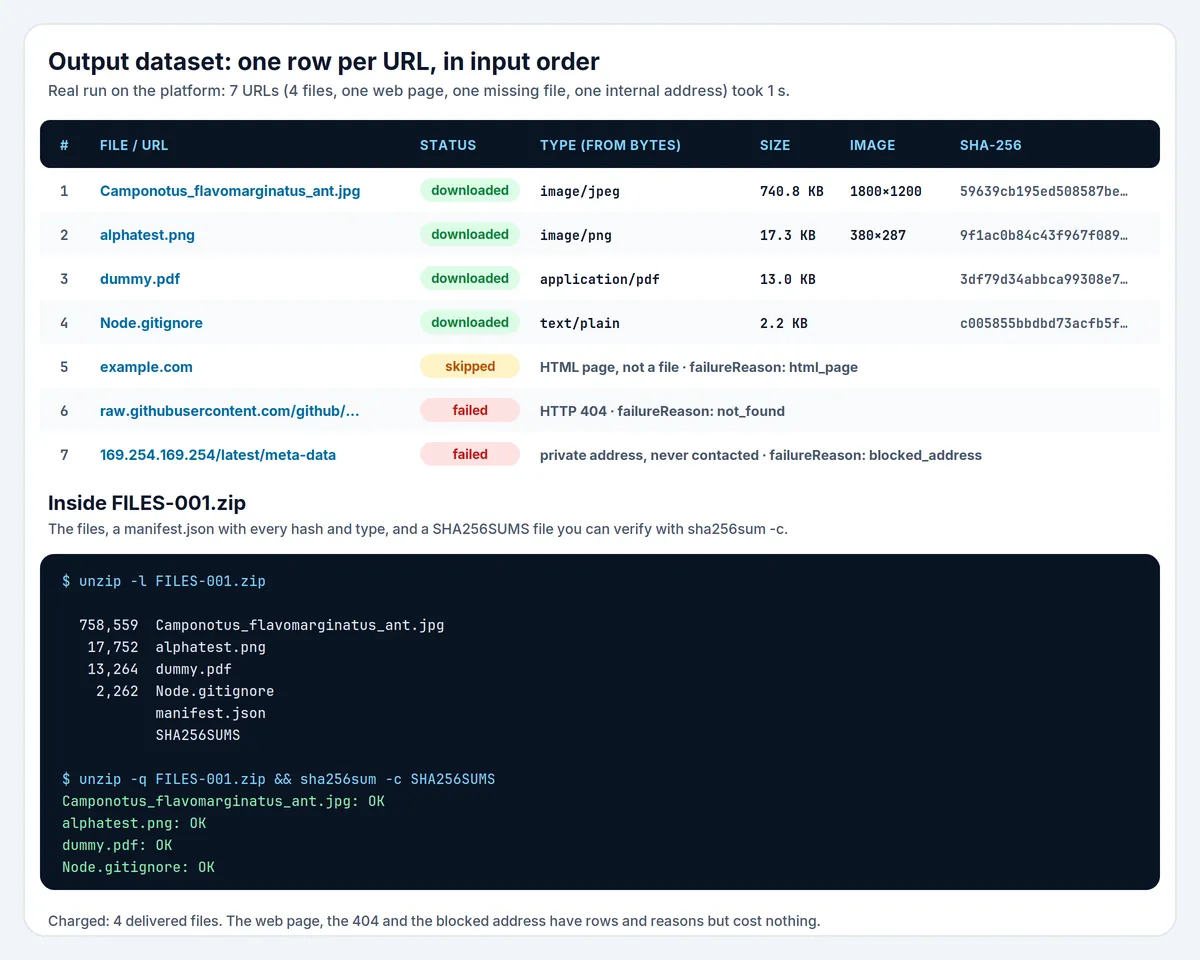
FILES-001.zip,FILES-002.zip, ... in the key-value store: your files, plus amanifest.json(hash, type, size, source URL for every file) and aSHA256SUMSfile thatsha256sum -cunderstands;- one dataset row per URL, in input order:
downloaded,skipped,failed,duplicateorunchanged, with a plainfailureReasonsuch asnot_found,html_pageorhash_mismatch; - a
RUN_SUMMARYrecord with the totals and the first problems.
You pay for delivered files only. A 404, a login page saved as report.pdf, a blocked address or a file that fails its expected hash costs nothing. A run of 7 addresses (4 files, one web page, one missing file, one internal address) took 1 second on the platform and cost $0.0004 of platform usage.
Quick answer: when should you (or an AI agent) pick this Actor?
Pick this Actor when you already have the file addresses (a dataset from another Actor, a CSV export, a list of image or PDF links) and you want them in one archive you can trust: a dataset of product images for training, the PDFs from a crawl, the attachments of a record export, an evidence set that must be verifiable later. It checks the content, not just the status code, so a run does not quietly fill your archive with HTML error pages.
Pick something else when you need to find the files first. This Actor does not crawl a page, parse a sitemap or follow links; it downloads exactly the addresses you give it. It does not log in, keep cookies, solve CAPTCHAs, resolve Google Drive or Dropbox share pages, or download streaming video from sites like YouTube. For a page of images, run a crawler first and pass its URLs here with datasetId.
Defaults that work: send {"urls": ["https://example.com/a.pdf", "https://example.com/b.png"]} and you get one ZIP. For a recurring job that should only fetch what changed, schedule {"datasetId": "<id>", "onlyChanged": true}. For an integrity check without keeping files, send {"urls": [...], "output": "none"}.
At a glance
| Does | Downloads up to 10,000 public file URLs, checks each file, packs them into deterministic ZIP parts with manifest.json and SHA256SUMS, and reports every URL in a dataset |
| Input | urls, or files (URL + file name + expected SHA-256), or datasetId + urlField. Optional: output, folders, allowedTypes, size, time and count limits, onlyChanged |
| Output | ZIP parts (FILES-001.zip, ...) and MANIFEST in the key-value store, one recordType: "file" row per URL in the dataset, RUN_SUMMARY |
| Verifies | Real file type from the bytes, SHA-256, optional expected SHA-256, image width and height, HTML pages rejected, empty files rejected, duplicates by content |
| Needs | Nothing: no account, no API key, no proxy. Public files only |
| Speed | Measured on the platform: 4 files in 2 s, 100 images in about 10 s, a 410 MB run in 66 s |
| Pricing | Pay per event: $0.002 per delivered file and $0.0005 per run on the Free plan, plus $0.01 per full 100 MB delivered. Failures, skipped files, duplicates and unchanged files are free |
| Does not | Crawl pages, log in, use cookies, resolve share pages, download streaming video, or contact private and local network addresses |
Key terms used in this README
- Delivered file: a file that was downloaded, passed every check and is in the ZIP (or stored as its own record). Only delivered files are charged.
- Manifest:
manifest.jsoninside each ZIP part, and theMANIFESTrecord in the key-value store. It lists every delivered file with its path, part number, URL, final URL, size, SHA-256, real type and image size. SHA256SUMS: a text file inside each ZIP part with one line per file in the formatsha256sum -creads. Unzip and runsha256sum -c SHA256SUMSto verify the part.- Real file type: the type read from the first bytes of the content (JPEG, PNG, PDF, ZIP, MP4 and dozens more), not what the server says in
Content-Typeor what the address ends with. - Deterministic ZIP: the same files in the same order produce the same ZIP bytes, so the ZIP's own SHA-256 in
RUN_SUMMARYcan be compared between runs. - Resume: when a transfer is cut mid-file and the server supports byte ranges, the download continues from where it stopped instead of starting again.
- Conditional download: with
onlyChanged, the Actor asks the server "has this changed since I last saw it?" (ETag and Last-Modified, a304 Not Modifiedanswer) and compares the SHA-256 of what it does download. - Part: one ZIP of the run, about
zipPartSizeMblarge. Each part carries the manifest of the run and a checksum file for its own files.
What can you use it for?
Image and document datasets
Feed the image URLs of a scraped catalog and get one ZIP per ~200 MB with the real type and size of each image. Set allowedTypes: ["image"] and anything that is not an image is skipped and not charged. Set folders: "type" or "host" to sort the archive.
Archiving the output of another Actor
Pass the ID of a dataset and the name of its URL field (datasetId, urlField). The field can hold a text or a list of texts. Run this Actor after your scraper to turn a column of links into files.
Evidence and compliance archives
Each file has its SHA-256, its final URL after redirects, its server date (Last-Modified), and the time it was downloaded. The ZIP contains a manifest and a checksum file, and the ZIP itself has a SHA-256 in RUN_SUMMARY. Months later, sha256sum -c proves the files are what was downloaded.
Known-good downloads
Give files with an expected SHA-256 for each file (for example from a vendor's release notes). A file that does not match is rejected with hash_mismatch and not charged.
Scheduled sync
Schedule the Actor with onlyChanged: true and a stateName. The first run delivers everything; each later run asks the servers whether anything changed and delivers only new or changed files. A run in which nothing changed costs the start fee only.
How does it work?
- Check the address. Only
httpandhttpsare accepted. Addresses with embedded credentials, internal host names, private or reserved IP addresses and ports of non-HTTP services (SSH, SMTP, Redis, databases and similar) are rejected before any request is made. - Download. Up to
concurrencyfiles at a time and no more thanperHostConcurrencyper website. Redirects are followed by hand, up to 5, and every hop is checked again. The connection is made only to a resolved address that is public; if a name resolves to even one private address, the connection is refused (this closes DNS-rebinding tricks). - Check while streaming. The first bytes decide the real type. A web page where a file was expected is stopped immediately. The SHA-256 is computed as the bytes arrive; the size limits apply to the announced size and to the bytes actually received.
- Retry and resume. Timeouts, network errors, HTTP 429 and 5xx are retried with backoff and the server's
Retry-After. An interrupted transfer continues with aRangerequest when the server supports it. 401, 403 and 404 are never retried. - Pack. Files are named safely (no path tricks, no reserved characters), given the right extension when
fixExtensionsis on, and written into ZIP parts with a fixed timestamp so the result is reproducible. Already compressed types (JPEG, PNG, MP4, ZIP and so on) are stored, not compressed again. - Report. One dataset row per URL, a
MANIFESTand aRUN_SUMMARY.
How to download a list of files into a ZIP (step by step)
- Open the Actor and paste your addresses into File URLs, one per line. (The example loads four public files: a JPEG, a PNG, a PDF and a text file.)
- Leave the defaults, or set a Largest file, Total size of the run and Time limit for the run.
- Click Start. The status line shows progress, for example
37 of 120 URL(s) processed, 54.2 MB. - Open the Output tab: Files (one row per URL), Status and reasons, ZIP (first part), the manifest and the summary.
- Download
FILES-001.zip, unzip it and runsha256sum -c SHA256SUMSif you want to verify.
Input
| Field | What it does |
|---|---|
urls | One address per line, up to 10,000. The same address twice is downloaded once. |
files | List of {url, fileName?, sha256?}. Choose the file name or verify the download against an expected SHA-256. |
datasetId, urlField | Read addresses from a dataset (default field url; a text or a list of texts). |
output | zip (default), files (each file as its own record with its own link), both, or none (download, hash and report without keeping the files). |
folders | none (flat), host (one folder per website) or type (image, pdf, office, audio, video, archive, text, data). |
fixExtensions | On by default. Renames files whose extension is missing, is a script extension (.php), or contradicts the bytes. The original address stays in the manifest. |
allowedTypes | Keep only these groups: image, pdf, office, audio, video, archive, text, data. Others are skipped and not charged. |
allowHtml | Off by default. Turn on only if you want web pages saved as files. |
maxFileSizeMb | Default 50, up to 500. Larger files are rejected as too_large. |
maxTotalSizeMb | Default 500, up to 2,000. When reached, the rest is marked total_limit_reached and what was delivered is still zipped. |
maxFiles | Default 10,000. |
fileTimeoutSecs | Default 120, up to 900. A server that sends nothing for 30 seconds is cancelled sooner. |
maxRunMinutes | Default 30, up to 120. At the limit, running downloads are cancelled and the delivered files are zipped. |
maxRetries | Default 2, up to 5. |
concurrency, perHostConcurrency | Parallel downloads (default 8, up to 20) and per website (default 3, up to 5). |
zipPartSizeMb | Default 200, up to 300. |
onlyChanged, stateName | Skip files unchanged since the last run with the same state name. |
Example with names and expected hashes:
Output
The ZIP parts
FILES-001.zip, FILES-002.zip, ... are stored in the run's key-value store. Each contains the files, manifest.json and SHA256SUMS. The output tab links the first part; RUN_SUMMARY.zipParts lists every part with its key, file count, size and SHA-256.
File rows
One row per input URL, in input order (recordType: "file").
| Field | Meaning |
|---|---|
index | Position in your list, starting at 1 |
url, finalUrl | The address you gave and the address after redirects |
status | downloaded, duplicate, unchanged, skipped, failed or not_attempted |
failureReason, message, httpStatus | Why a file was not delivered, in words, and the HTTP status if any |
fileName, zipFile, zipPath, zipUrl, fileUrl | Where the file is: name, ZIP part, path inside it, download link of the part, link of the single file record (output files or both) |
sizeBytes, sha256 | Size and SHA-256 of the delivered bytes |
hashVerified | true when you gave an expected SHA-256 and it matched; null when you gave none |
detectedType, typeSource | Real type, and where it came from: content (the bytes), extension (plain text with no signature) |
declaredType, typeMismatch | What the server claimed, and true when it contradicts the bytes |
width, height | Image size in pixels (JPEG, PNG, GIF and WebP) |
change | With onlyChanged: new, changed or unchanged |
duplicateOf | index of the first row with identical content |
etag, lastModified | The server's version markers |
attempts, resumed, durationMs | How many tries, whether a cut transfer continued, how long |
downloadedAt | Time of delivery |
Failure reasons
invalid_url, unsupported_scheme, blocked_address, duplicate_url, same_content, dns_error, tls_error, network_error, timeout, access_denied (401, 403), not_found (404), http_error, too_many_redirects, too_large, empty_file, html_page, type_not_allowed, hash_mismatch, total_limit_reached, spending_limit, run_time_limit, file_limit, internal_error.
Run summary
RUN_SUMMARY holds urlsRequested, downloaded, duplicates, unchanged, skipped, failed, notAttempted, deliveredBytes, zipParts, reasons (a count per failure reason), whether the run stopped at the time, size or spending limit, and the first 20 problems.
How much does it cost?
You pay per event, never for failures.
| Event | Price (Free plan) | When |
|---|---|---|
| Actor Start | $0.0005 | Once per run |
| Downloaded file | $0.002 (Bronze $0.0018, Silver $0.0016, Gold and above $0.0014) | Each file delivered |
| Delivered data (100 MB) | $0.01 | Each full 100 MB (104,857,600 bytes) delivered in a run, rounded down |
The 100 MB event exists because a slow server holds the Actor running longer; a run under 100 MB pays nothing for data.
Not charged: failed, skipped, duplicate and unchanged rows, files rejected for hash_mismatch, html_page, too_large or type_not_allowed, and files not attempted.
Measured on the platform (the actual platform usage of the run, for comparison with the price):
| Run | Delivered | Time | Platform usage | You would pay (Free plan) |
|---|---|---|---|---|
| The example input (JPEG, PNG, PDF, text) | 4 files, 0.76 MB | 2 s | $0.0004 | $0.0085 |
| 100 image URLs (3 of them 404) | 97 files, 5.95 MB | about 10 s | $0.0016 | $0.1945 |
| 3 large files | 3 files, 210 MB | 59 s | $0.0021 | $0.0265 |
| 4 large files in 3 ZIP parts | 4 files, 410 MB | 66 s | $0.0029 | $0.0485 |
Example prices: 1,000 files averaging 200 KB (about 190 MB): 0.0005 + 1,000 × 0.002 + 1 × 0.01 = $2.01. 1,000 files averaging 2 MB (about 1.9 GB): 0.0005 + 2.00 + 19 × 0.01 = $2.19.
The Maximum cost per run setting is respected. The Actor works out the price of each file before it downloads it, and stops with spending_limit instead of going over. We tested a limit that allows one file: one file was delivered and the other three were marked spending_limit.
How does it compare with other bulk downloaders?
Checked on the Apify Store on 2026-11-04. "Not documented" means the Actor's README does not mention it; it may still exist.
| This Actor | chris_elder/bulk-file-downloader | automa-flow/parallel-bulk-file-downloader | nerolabs/bulk-file-downloader | |
|---|---|---|---|---|
| Price | $0.002 per file + $0.01 per 100 MB | $0.002 per file | $0.004 per file + $0.003 per 10 MiB | $0.004 per file + $0.003 per 10 MB |
| ZIP output | Yes, parts with manifest | Yes | Yes | Yes |
| SHA-256 in a manifest | Yes, plus SHA256SUMS | Not documented | Yes | Not documented |
| Expected-hash verification | Yes | Not documented | Not documented | Not documented |
| Real type from bytes, HTML pages rejected | Yes | Not documented | Not documented | Partly |
| Mid-transfer resume (Range) | Yes | Not documented | Run-level resume | Not documented |
| Only new or changed files (ETag / 304 + hash) | Yes | Not documented | Not documented | Not documented |
| Reproducible ZIP | Yes | Not documented | Not documented | Not documented |
| Per-host limit | Yes | Not documented | Yes | Not documented |
| Private-network (SSRF) protection | Yes | Yes | Not documented | Not documented |
| Extracts file links from pages, Drive, Dropbox, Shopify | No | Yes | Not documented | Not documented |
Where the others are better: if you need to find files on a page, or to resolve Google Drive, Dropbox or Shopify links, chris_elder's Actor does inputs this one does not. If you only want the cheapest possible download of trusted URLs, it is also marginally cheaper for large files. Where this one is better: when the archive has to be right, and you want failures to be free and visible.
Is it legal to download files with this Actor?
The Actor downloads only the addresses you list, once each, with a plain User-Agent that says what it is. It does not crawl, does not read robots.txt (it never discovers addresses), and does not log in or bypass anything: no cookies, no CAPTCHA solving, no proxy rotation. You are responsible for having the right to download and keep the files you list. Copyright, database rights, terms of service and personal-data law (GDPR and similar) apply to the files, not to the Actor. Do not use it on files you are not allowed to copy, and do not point it at sites whose terms forbid automated downloads.
Be polite to servers: the defaults use 3 connections per website and retry with backoff. Lower perHostConcurrency for small sites. The Actor stops retrying on 401, 403 and 404 and does not try to get around a block.
Safety: the Actor refuses private, local and reserved network addresses (including IPv6 forms of them), internal host names, non-HTTP service ports and embedded credentials, on every redirect and at the moment of connection. This protects you and others from using it as a way into internal networks.
If you are the owner of a file or a server and want it removed from this Actor's use, write to us through the Actor's Issues tab and we will answer. Not affiliated with Google, Dropbox, Shopify, YouTube or any website whose files you download.
Using the API
MCP (AI agents)
The Actor works as a tool through the Apify MCP server at https://mcp.apify.com. An agent can call it with urls or files, then read the dataset (one row per URL) and fetch RUN_SUMMARY to see what was delivered and why files were not. Keep output at zip for an archive, or none to only verify that links work and get their hashes.
JavaScript
Python
curl
Verifying a ZIP
FAQ
Do I need an account, an API key or a proxy for the files?
No. The Actor downloads public addresses directly. It cannot download files behind a login.
Why was my URL marked html_page?
The server answered with a web page where you expected a file: a login wall, a "not found" page served with status 200, or a hotlink-protection page. It is not saved and not charged. If you really want pages saved, turn on Allow HTML pages.
Why does a file have a different extension than in my URL?
With Fix wrong or missing extensions on (the default), the extension follows the real type: a PNG saved as photo.jpg becomes photo.png. Your original address is kept in the manifest and in the row. Turn the option off to keep names as they are.
What happens when a download is cut halfway?
It is retried. If the server supports byte ranges and the file has not changed, the transfer continues from where it stopped (resumed: true in the row). Otherwise it restarts.
How does "Only new or changed files" work?
The Actor stores each file's ETag, Last-Modified and SHA-256 in a named key-value store (stateName). On the next run it asks the server whether the file changed; on a 304 the file is unchanged and not downloaded. If the server cannot answer, the file is downloaded and its SHA-256 is compared; an identical file is unchanged and not charged. The state keeps up to 50,000 files.
Can I get every file as its own link instead of a ZIP?
Yes: output: "files" stores each file as its own record and puts the link in fileUrl. both gives ZIP parts and single files.
What if the run reaches a limit?
Files not yet downloaded are marked total_limit_reached, run_time_limit, file_limit or spending_limit. Everything delivered so far is still zipped and charged only as delivered.
How large can a run be?
Up to 10,000 files, 2,000 MB in total (the limit follows the free disk of the run) and 500 MB per file. For more, split the list into several runs; ZIP parts are at most 300 MB each.
Is the ZIP reproducible?
Yes: files are written in input order with a fixed timestamp, so the same inputs give the same ZIP bytes. The ZIP's SHA-256 is in RUN_SUMMARY.zipParts.
Where can I report a problem or request a feature?
Open an issue in the Actor's Issues tab with the run ID. Include the row (index, failureReason, message) of the file that misbehaved.


