
Image to Text & Scanned PDF OCR to RAG Chunks
Pricing
from $2.80 / 1,000 ocr pages
Image to Text & Scanned PDF OCR to RAG Chunks
Image to text OCR for photos and scanned PDFs: text, Markdown and token-counted chunks with page numbers and a confidence score. Tesseract, 37 languages, no API key. Blank pages and failed files are free. Not affiliated with any OCR vendor.
Pricing
from $2.80 / 1,000 ocr pages
Rating
0.0
(0)
Developer
Muhammet Mustafa Dincer
Maintained by CommunityActor stats
0
Bookmarked
2
Total users
1
Monthly active users
2 days ago
Last modified
Categories
Security
Limited permissionsShare
What is Image to Text & Scanned PDF OCR to RAG Chunks?
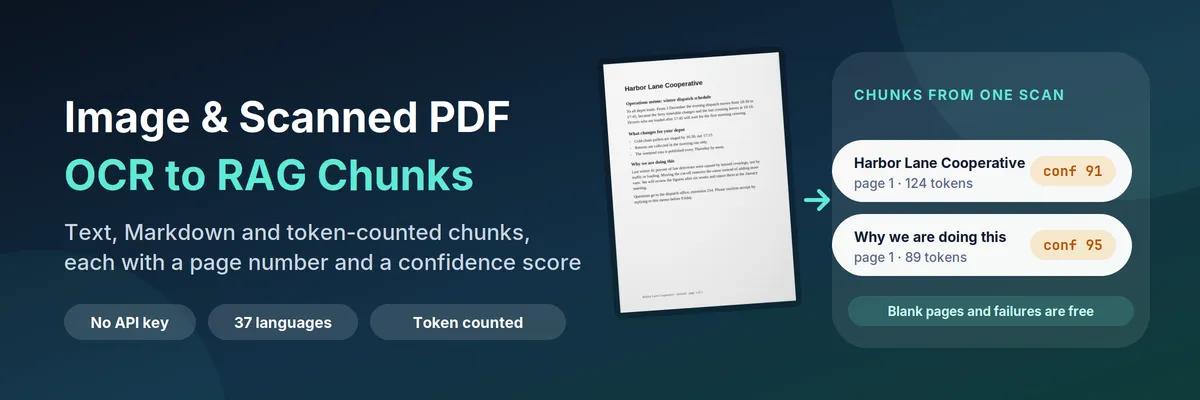
Image to Text & Scanned PDF OCR to RAG Chunks reads text from an image or a scanned PDF. Give it links to photos, screenshots, scans or scanned PDFs and you get back:
- one row per file (
recordType: "document") with the recognised text, LLM-ready Markdown with headings and lists, page counts, word count, token count and an overall confidence score; - one row per chunk (
recordType: "chunk") with the chunk text, its token count, the page numbers it came from and its own confidence score, so your pipeline can cite a page and skip a chunk that was read badly.
It runs the open-source Tesseract OCR engine inside the Actor. There is no API key, no OCR account and no third-party service: the file is downloaded over plain HTTP and recognised on the machine that runs the Actor.
Quick answer: when should you (or an AI agent) pick this Actor?
Pick this Actor when the text you need is trapped in an image: a scanned contract, a photographed receipt, a screenshot of a table, a fax, an old manual, a folder of invoices exported as JPEG, or a PDF that is only pictures of pages. It is also the right tool when the next step is retrieval (RAG): the chunk rows are already inside a token budget, tagged with page numbers, and carry a confidence score you can filter on.
Pick something else when your PDF has a real text layer (one made from Word or LaTeX): it is cheaper and exact to read the text layer directly, for example with PDF to Markdown & RAG Chunks Extractor. Pick something else for handwriting, for pages that must keep a complex table structure, or when you need a cloud vision model's understanding of a picture rather than the characters in it.
Defaults that work: send {"urls": ["https://example.com/scan.jpg"]} and you get a document row and chunks of about 512 tokens, in a couple of seconds per page. For a vector store, send {"urls": [...], "mode": "chunks", "chunkSize": 512, "chunkOverlap": 64} and the dataset is exactly what you feed to embeddings. For German scans add "languages": ["deu"]; for a mix, "languages": ["eng", "deu"].
At a glance
| Does | Downloads images and PDFs, straightens and cleans each page, runs OCR, and returns text, Markdown, quality numbers and token-counted chunks with page ranges |
| Input | urls (or datasetId to read links from another dataset). Optional: languages, mode, chunkSize, chunkOverlap, lowConfidenceBelow, startPage, maxPagesPerFile, pdfDpi, enhance, autoRotate, includeMarkdown, includePages, maxFiles, maxFileSizeMb, maxChunksPerFile, requestsPerSecond |
| Output | recordType: "document" rows with text, markdown, confidence, quality, tokenCount, page counts, status; recordType: "chunk" rows with text, tokenCount, pageStart, pageEnd, headings, confidence, lowConfidence |
| File types | JPEG, PNG, WebP, GIF, BMP, TIFF (also multi-page) and PDF |
| Languages | 37, up to 4 per run: English, German, French, Spanish, Italian, Portuguese, Dutch, Turkish, Russian, Ukrainian, Polish, Czech, Swedish, Norwegian, Danish, Finnish, Romanian, Hungarian, Bulgarian, Croatian, Serbian, Slovak, Catalan, Estonian, Latvian, Lithuanian, Hebrew, Arabic, Hindi, Bengali, Indonesian, Vietnamese, Thai, Japanese, Korean, Chinese (Simplified and Traditional) |
| Needs | No login, no API key, no browser, no proxy. Only a public http(s) link that returns the file itself |
| Speed | Measured: a photographed memo in 1.2 s, a two-page scanned PDF in 2 s; 12 dense A4 pages in 46 to 67 s on 2 GB |
| Pricing | Pay per event: $0.004 per OCR page and $0.0005 per GB of memory at start on the Free plan (cheaper on paid plans). Blank pages, failed downloads and unreadable files are free |
| Does not | Read handwriting reliably, reconstruct tables as Markdown tables, open password-protected PDFs, or follow a link that shows a viewer page instead of the file |
Key terms used in this README
- OCR (optical character recognition): turning the picture of text into text you can search, copy and embed.
- Scanned PDF: a PDF whose pages are pictures. It has no selectable text, so a normal PDF parser returns nothing; OCR is the only way to read it.
- Document row: a dataset row with
recordType: "document". One per file, always written, even when the file failed — the reason is in the row. - Chunk row: a dataset row with
recordType: "chunk". A slice of the document of roughlychunkSizetokens, withpageStart,pageEndand aconfidence. - Confidence: the engine's own estimate (0 to 100) of how sure it is about the words it read, averaged over the page and weighted by word length. It is a signal for ranking and filtering, not a measured accuracy.
- Token count: the number of tokens the text becomes in cl100k_base, the tokenizer used by OpenAI's embedding and chat models. It is counted, not estimated from characters.
- Overlap: how much of the end of one chunk is repeated at the start of the next, so a sentence that straddles a boundary is still retrievable.
- OCR page: the billing unit. One image is one page; a PDF is one page per PDF page that contained text.
What can you use it for?
Searchable archives of scanned documents
Turn a shared drive of scanned letters, contracts and forms into text you can search. Keep the document rows and you have a full-text dump with fileName, pageCount, quality and confidence as filters.
RAG over documents that are only pictures
The mode: "chunks" output is a ready-made embedding input: one row per chunk, inside your token budget, with the source URL and page range as metadata. Store pageStart/pageEnd next to the vector and your answer can cite "page 2" instead of guessing.
Receipts, invoices and forms
Small, dense documents read best with a smaller chunk size (256) and languages set to the language printed on the page. The Markdown keeps headings and list items on separate lines, which is what a downstream extraction prompt wants.
Screenshots and photographs of text
Slides, whiteboard photos, signs, error dialogs and screenshots of chat or code. Small images are enlarged before recognition and photographs are straightened by their EXIF orientation, so a phone photo that is sideways still reads.
Agents that can see files but not read them
Point an agent at this Actor through MCP, give it an image URL, and it receives plain text with a confidence it can reason about instead of a binary it cannot open. Chunk rows are flat and identical in shape to the other RAG Actors from this developer.
Crawl, then read what you crawled
Run a crawler or screenshot Actor into a dataset, then pass its dataset ID in datasetId. The Actor finds the image and PDF links in the rows and returns text; you never copy links by hand.
How does it work?
- The URL list is built from your
urlsand, if you set one, from the links found indatasetId. Duplicates are removed and every URL is validated; non-http links and links with a username and password are rejected. - Each file is downloaded directly, with a timeout, a size cap and a retry for transient errors. A 403 or 429 is treated as a refusal: the file is reported as
blocked, no more files are requested from that host, and the Actor moves on rather than trying to get around it. - The file type is detected from the bytes, not the URL, so a
.jpgthat is really HTML is reported as unsupported instead of crashing. - Each page is prepared: EXIF rotation is applied, transparency is flattened onto white, the page is turned grey, its contrast is stretched and small images are enlarged. PDFs are drawn page by page at
pdfDpi(200 by default). - Tesseract reads the page. If the result is poor, the Actor checks whether the page is sideways or upside-down, turns it and reads it again. This costs nothing extra.
- The word positions are turned into Markdown: lines become paragraphs, large text becomes
#and##headings, bullets and numbered items become lists and hyphenated line breaks are joined. - Pages are packed into chunks until the token budget is reached, and every chunk gets its own confidence. A page with no text, or one that reads as noise, is marked
blankorunreadableand is not charged. - Rows are written. Only pages with text are charged; chunk rows are free, so chunk size never changes the bill.
How to OCR an image or scanned PDF (step by step)
- Open the Actor and paste one or more image or PDF URLs in the input, one per line, for example
https://example.com/scan.jpg. - Set Languages to the language printed on the page. English is the default; add a second language only if the page really mixes two.
- Leave What to return on Document and chunks for a first look, or choose Chunks only if you are feeding embeddings.
- Set Chunk size to 512 for general retrieval. Use 256 for receipts and narrow facts and 1024 or more for long arguments.
- For a long PDF, set First page and Maximum pages per file so you only pay for the pages you need.
- Click Start. In the Output tab open the Documents view to read the text and quality, or the Chunks view for the embedding input.
- Download the dataset as JSON, JSONL, CSV or Excel, or read it from the API;
recordTypetells the two kinds of row apart.
Input
| Field | Type | Default | What it does |
|---|---|---|---|
urls | list of text | two example files | Direct links to image files or PDFs, up to 200 per run. A link that shows a web page instead of the file is reported as unsupported_type |
datasetId | text | empty | Read links from an existing Apify dataset. Looks for imageUrl, fileUrl, pdfUrl, screenshotUrl, url, link and similar fields |
languages | list of choices | eng | Up to 4 languages that appear in the text. The first matters most. Each extra language slows recognition |
mode | choice | both | both writes document and chunk rows; chunks writes only chunks; document skips chunking |
chunkSize | number | 512 | Token budget per chunk (64–4096), counted in cl100k_base |
chunkOverlap | number | 64 | Tokens repeated from the previous chunk, in whole paragraphs, at most half of chunkSize |
lowConfidenceBelow | number | 70 | Chunks under this confidence get lowConfidence: true. Nothing is removed |
startPage | number | 1 | First page of a PDF or multi-page TIFF to read, 1-based |
maxPagesPerFile | number | 50 | Pages read from one file, up to 200 |
pdfDpi | number | 200 | Resolution a PDF page is drawn at (100–300). Use 300 for small type, 150 for faster reads |
enhance | yes/no | yes | Grey, contrast and enlarge before recognition. Turn off only for clean scans at a good size |
autoRotate | yes/no | yes | Fix sideways and upside-down pages when the first read is poor |
includeMarkdown | yes/no | yes | Add the markdown field to the document row |
includePages | yes/no | no | Add a pages array with status, confidence, size and text of every page |
maxFiles | number | 100 | Upper bound on files read in one run |
maxFileSizeMb | number | 50 | Skip files larger than this instead of downloading them |
maxChunksPerFile | number | 1000 | Safety cap on chunk rows for one file |
requestsPerSecond | number | 2 | Download rate per host. Lower it to 1 when every file comes from one small server |
concurrency | number | by memory | Pages read at the same time. Default is about one per GB of run memory |
proxyConfiguration | proxy | off | Only needed when an image host blocks data-centre IPs |
Output
Every run writes one dataset with two kinds of rows. Filter on recordType.
Document row. Real output for a photographed memo (text and Markdown shortened here):
Chunk row. From a run with chunk size 128:
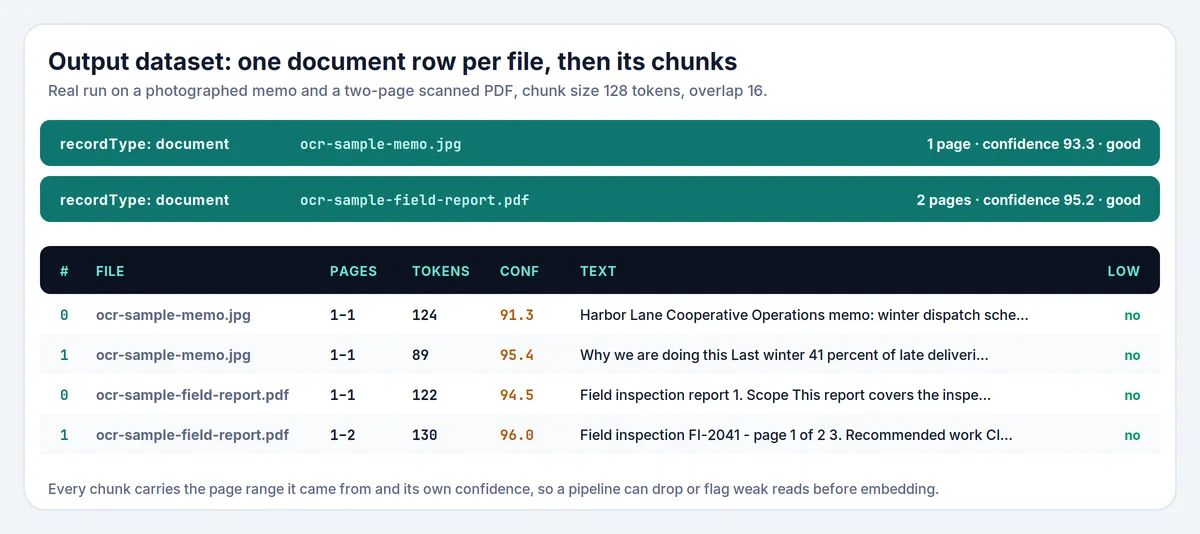
Field notes:
statusisprocessed,emptyorfailed. Only pages with text inside aprocessedfile are charged.failureReasonwhen a row is not processed:invalid_url,unsupported_type,too_large,blocked,stopped_after_block,http_error,network_error,password_protected,corrupt,ocr_error,budget_reachedorno_text_found.confidenceon the document is the mean over its pages with text;qualityis a plain band for it:good(85 or more),fair(60 to 84),poor(under 60). The bands are ours, not the engine's.- A page with fewer than three letters or digits is
blank; a page whose confidence is under 25 isunreadable. Both are listed inpagesWithoutTextand are free. pagesNotProcessedcounts pages cut off bystartPageormaxPagesPerFile.pageStartandpageEndon a chunk are the pages of the text inside it. A chunk that spans a page break reports both, which is why the citation is a range.headingslists the nearest heading before the chunk plus any heading inside it. Headings are inferred from text height, so they are right for typical memos, reports and forms and are a hint rather than a guarantee.isPartialistruewhen a paragraph had to be cut to respect the chunk size.textandmarkdownarenullwhen the file failed or the option is off.pagesisnullunlessincludePagesis on.- Page headers and footers are not removed: a "page 1 of 2" footer at the foot of a page appears in the text where it sits on the page.
How much does it cost?
You pay per OCR page, never per chunk, so changing the chunk size never changes the bill.
| Event | When | Free plan price |
|---|---|---|
| Actor start | once per run, one event per GB of memory (2 GB by default) | $0.0005 per event |
| OCR page | each page in which text was found and recognised | $0.004 |
Paid Apify plans get a lower per-page price: $0.0036 (Bronze), $0.0032 (Silver) and $0.0028 (Gold and above). Blank pages, pages that read as noise, failed and blocked downloads, unsupported and corrupt files, and pages outside your startPage/maxPagesPerFile window are free.
Examples
- One receipt photo: $0.001 + $0.004 = $0.005.
- A 20-page scanned contract: $0.001 + 20 × $0.004 = $0.081.
- 1,000 single-page scans: $0.001 + 1,000 × $0.004 = $4.00.
- 1,000 scans of which 100 are blank or unreadable: $0.001 + 900 × $0.004 = $3.60.
Set a maximum cost per run in the run options to cap spending. The Actor checks the remaining budget before each file and stops cleanly at the limit; files it did not reach are reported as budget_reached and cost nothing.
Measured cost. Runs on this Actor, 2026-11-04, default 2 GB of memory:
| Run | Pages | Chunks | Wall clock | Platform usage |
|---|---|---|---|---|
| Example input (1 photo, 1 two-page PDF) | 3 | 2 | 10.6 s | $0.0012 |
| 12 dense A4 pages, 2 pages at a time | 12 | — | 67 s | $0.0076 |
| 12 dense A4 pages, 3 pages at a time | 12 | — | 46 s | $0.0053 |
Recognition is CPU-bound, so the platform cost is about $0.0004 to $0.0007 per page on a dense page, with some variation from run to run. That is roughly 10 to 18% of the $0.004 list price on the Free plan.
Note on the numbers above: they were measured on runs on this Actor. As the Actor's owner, my own runs are not billed to a customer, so "list price" is what a customer would pay, not money this Actor has earned.
Image to text and scanned PDF OCR compared with other approaches
| This Actor | Other OCR Actors in the Store | Your own Tesseract setup | Cloud OCR API | |
|---|---|---|---|---|
| Output | Text, Markdown, token-counted chunks | Usually text only | You build it | Text and layout, JSON |
| Page numbers on every chunk | Yes | Rarely | You build it | Per page |
| Confidence per chunk, with a flag | Yes (lowConfidence) | Rarely | Raw per-word numbers | Per word or line |
| Blank pages and failures charged | No | Varies | Your time | Usually yes |
| Reads links from another dataset | Yes, datasetId | Sometimes | You build it | You build it |
| Needs an API key or cloud account | No | No | No | Yes |
| Handwriting | No | Mostly no | No | Often better |
| Price per 1,000 pages | $4.00 on the Free plan | About $2 to $15 | Your servers and time | About $1.50 and up |
Several image and PDF OCR Actors already exist, so this is not an empty niche — compare before you pick. Where this one is different is narrower than "we are the only ones": the output is shaped for retrieval (token-budgeted chunks with page ranges, the same row format as this developer's other RAG Actors), every chunk carries a confidence you can filter on, pages that are blank or unreadable are not charged, and a sideways or upside-down page is turned and read again automatically. It uses an open-source engine, so on handwriting and very poor photographs a cloud vision service will read better; this Actor is for printed text.
Competitor prices change; the figures above are from the Store listings on 2026-11-04 and are a range, not a quote.
Tips for best results
- Set the language. The wrong language is the most common reason for poor reads. Pick what is on the page; add a second only for genuinely mixed pages.
- Use 300 DPI for small type.
pdfDpi: 300is slower and reads six-point print better; 150 is faster for large, clean headings. - Keep
enhanceon unless your images are already clean scans at 300 DPI. Phone photos and small screenshots gain the most. - Filter on
lowConfidence. Drop or review chunks under your threshold before embedding; a badly read chunk is worse than a missing one. - Use
mode: "chunks"for a production embedding job: the dataset then contains only chunk rows and your loader needs no filter. - Skip the cover and the index of long PDFs with
startPage; each page with text is one charged page. - Look at
qualityon the document rows after a first small run before you pay for a thousand files.
Limits and good to know
- Printed text only. Handwriting is read poorly or not at all. Confidence will be low and
lowConfidencewill say so. - Not a table extractor. Table cells are read as text lines; the content is there but the grid is not rebuilt as a Markdown table.
- Multi-column pages are read in the engine's layout order, which is correct for most reports and papers and can interleave columns on busy magazine layouts.
- Repeated headers, footers and page numbers are left out when the same short line sits at the top or bottom of at least half the pages (two or more). A one-page image is unchanged, so a title is not removed. The document row says how many lines were left out.
- Password-protected PDFs are not opened. They are reported as
password_protectedand are not charged. - A viewer link is not a file link. If the URL returns an HTML page, the row says
unsupported_type; open the link in a browser, use the download button and copy the direct file URL. - Size limits. Up to 200 pages per file, 100 MB per file (50 MB by default) and images are shrunk when a side exceeds 4,500 pixels.
- Confidence is an estimate, not a measured accuracy. A clean scan scores 90 or more; a blurred phone photo can score 60 and still be mostly right.
- Text is not summarised, translated or corrected. What the engine reads is what you get, including its mistakes.
Use it from AI agents, the API and code
Apify MCP server (ChatGPT, Claude, Cursor and other MCP clients). Connect https://mcp.apify.com, then:
search-actorswith a query such asimage OCR to text RAG chunks.fetch-actor-detailsformmdincer/image-ocr-ragto read the input schema.call-actorwith the input below.get-dataset-itemswith the returned dataset ID andrecordType: "chunk"as your filter.
To give an MCP client this Actor as its own tool (no search step), connect https://mcp.apify.com?tools=mmdincer/image-ocr-rag.
JavaScript
Python
HTTP (one request, returns the rows)
The synchronous endpoint waits for the run, so use it for a handful of files. For a large batch, start the run asynchronously and read the dataset when it finishes.
Automation recipes
Scanned archive to vector store. Save the input as a task. After each run, send the chunk rows that are not lowConfidence to your embedding endpoint and upsert them keyed on url + chunkIndex.
Crawl, then OCR. Run a crawler or screenshot Actor into a dataset, then run this Actor with datasetId set to that dataset's ID. Image links are found in the rows and the text lands in a new dataset.
Review queue in a spreadsheet. Fetch the dataset as CSV and sort by confidence. status, failureReason and quality make it obvious which files need a better scan before you rely on them.
Zapier or Make. Use Apify as the trigger for a finished task run, add the step that gets dataset items, filter recordType equal to chunk, then send the rows on. See the Apify Zapier integration and the Apify Make integration.
Budget guard. Set a maximum cost per run on the task. The Actor stops with stoppedForBudget: true in the run summary instead of overspending.
Is it legal to OCR images and PDFs?
The Actor downloads the files you point it at, one at a time, at a low request rate, with a normal browser User-Agent. It does not crawl a site on its own, does not guess URLs, does not log in, does not read anything behind a paywall, and does not try to get around a 403, a 429 or a bot challenge: it reports the refusal in the dataset and stops asking that host.
That makes the legal question mostly about the files you choose, not about the tool. Documents you own, documents your organisation produced, public-domain material and openly licensed images are the normal case. An image you are not allowed to copy is not made lawful by recognising its text. Check the terms of the site you take it from and the licence of the document itself.
Personal data. Scans of IDs, medical records, payslips and similar documents contain personal data. The text goes to your dataset in your Apify account and nowhere else, but you remain responsible for having a lawful basis to process it and for how long you keep the dataset.
Copyright. Recognised text is a copy of the document. Indexing it for your own search is one thing; republishing it is another. The Actor claims no rights over the content and gives you none.
No affiliation. This Actor is an independent tool. It is not affiliated with, endorsed by or sponsored by Google, the Tesseract project, ABBYY, Adobe or any OCR vendor; product names are used only to describe what the Actor does and what it is built on. Tesseract is open-source software released under the Apache License 2.0.
If you are the owner of a file and want a source removed from your own runs' data, delete the run's dataset in your Apify account; the Actor itself stores nothing outside your run.
FAQ
How do I extract text from an image?
Paste the image URL in Image and PDF URLs, set Languages to the language on the picture and click Start. The document row has the text and Markdown, and the chunk rows have the same text cut for retrieval.
Does it work on scanned PDFs?
Yes. A scanned PDF is drawn page by page at pdfDpi (200 by default) and each page is read like an image. If your PDF has a selectable text layer, a text-layer extractor is cheaper and exact; this Actor will still read it, as a picture.
Which languages are supported?
37, listed in the table above, up to four per run. Add the language printed on the page; combining two (for example English and German) works for mixed documents but is slower.
Why is the confidence low?
Blur, a small image, a decorative font, handwriting, a heavy background or the wrong language. Try a larger image, pdfDpi: 300 for PDFs, enhance on, and make sure Languages matches the page. Chunks under your lowConfidenceBelow threshold are flagged, never silently dropped.
Why did my page come back as blank or unreadable?
A page with almost no letters or digits is blank; a page the engine could barely read is unreadable. Both are free. If you expected text, check the image at full size and the language setting.
How do I get chunks for a vector database?
Set What to return to Chunks only, choose a Chunk size that matches your embedding model's budget (512 is a good default) and leave the overlap at 64. Every chunk row has text, tokenCount, pageStart, pageEnd, headings and confidence.
Are the token counts real?
Yes. They are counted with cl100k_base, the tokenizer behind OpenAI's embedding and chat models, not estimated from characters. A different model family tokenizes slightly differently, but the numbers stay close enough to plan a budget.
Why does my link fail with unsupported_type?
The URL returned something that is not an image or a PDF — usually an HTML page. This happens when the link opens a viewer, when the file needs a login or when the site shows a cookie wall. Open the link in a browser, use the download button and copy the direct file URL.
Can I read image links from another Actor's dataset?
Yes, that is what Read links from a dataset is for. Give the dataset ID and the Actor looks for imageUrl, fileUrl, pdfUrl, screenshotUrl, url, link and similar fields. Both the pasted list and the dataset are merged and deduplicated.
Can I process only some pages?
Yes. First page and Maximum pages per file limit what is read and what is charged. A 200-page manual you need three pages from costs three pages.
Does it read handwriting?
Not reliably. The engine is built for printed text. Handwriting usually comes back with low confidence, and the flag tells you so.
What happens if one file fails in a batch?
Nothing else stops. The failed file writes its own row with failureReason and a readable message, the run continues with the next link, and the run summary lists the first failures. The run only fails when no file could be read at all.
How much does a run cost?
A single-page scan is about $0.005 on the Free plan; 1,000 one-page scans about $4.00. Pages with text are what drive the price, so maxPagesPerFile is the lever. Set a maximum cost per run to hard-cap it.
Do I need a proxy?
Normally no. Files are downloaded directly. Use Apify Proxy only when a host blocks data-centre IPs, and note that the Actor still stops at a refusal instead of trying to defeat a challenge.
Can I use the output commercially?
The Actor gives you recognised text; whether you may use that text commercially depends on the document's licence and the site's terms, not on this tool. See the legal section above and take your own advice.
Related Actors
These are other Actors by the same developer. They are separate tools; this README does not depend on them.
RAG family: the same chunk format for other sources
- PDF to Markdown & RAG Chunks Extractor — PDFs with a text layer to Markdown and token-counted chunks with page ranges. Use it first for digital PDFs and this Actor for scans.
- Audio & Video Transcriber — audio, video and podcast feeds to timestamped transcripts, SRT/VTT and token-counted chunks with time ranges.
- Video Frame Extractor & Scene Chunks for RAG — video files to scenes with keyframe images, time ranges and aligned transcript chunks.
Other tools
- Greenhouse, Lever, Ashby & Workable Jobs Scraper & Monitor — company job boards as one dataset with change monitoring.
- Shopify Price Tracker & Stock Monitor — new products, price changes and stock changes for any Shopify store.
- Autocomplete Keyword Scraper — Google, YouTube and Bing suggestions with an intent label.
- Eventbrite Events Scraper & Discovery — public events by city, category and date range.


