

Video Frame Extractor & Scene Chunks for RAG
Pricing
from $0.70 / 1,000 scene extracteds
Video Frame Extractor & Scene Chunks for RAG
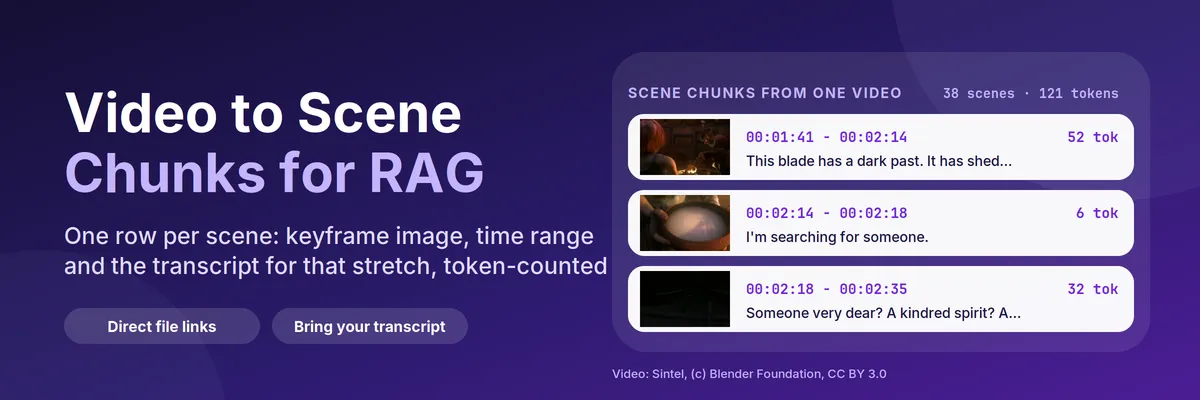
Video scene detection for direct video file links. Each scene is one row: a keyframe image, start and end time, and the transcript for that stretch from your own subtitles, token-counted for RAG. It does not transcribe. Not affiliated with any video platform.
Pricing
from $0.70 / 1,000 scene extracteds
Rating
0.0
(0)
Developer

Muhammet Mustafa Dincer
Maintained by CommunityActor stats
0
Bookmarked
2
Total users
1
Monthly active users
19 minutes ago
Last modified
Categories
Security
Limited permissionsShare
What is Video Frame Extractor & Scene Chunks for RAG?
Short answer: Video Frame Extractor & Scene Chunks for RAG is an Apify Actor that does video scene detection on direct video file links and returns one row per scene: a keyframe image, the start and end time, and the words spoken in that scene from subtitles or a transcript you provide, counted in tokens. On the Free plan it costs $0.001 per scene plus $0.0015 per video minute analysed. It does not transcribe audio and does not read YouTube or TikTok links.
Video Frame Extractor & Scene Chunks for RAG cuts a video file into scenes and returns one dataset row per scene:
- a keyframe image (a JPEG from the middle of the scene) that a vision model or a person can look at;
- the scene's start and end time, as seconds and as
HH:MM:SS, so any answer can cite "at 01:41"; - the text spoken during that scene, taken from subtitles or a transcript you provide, with a token count.
That row is the unit a video-RAG pipeline needs: the text goes to an embedding model, the keyframe goes to a vision model, and the time range goes back to the user as a citation. Each video also gets a video row (length, resolution, scene count, where the text came from, what was billed) and an optional contact sheet, one overview image of all its keyframes.
It works on direct video file links (an https://…/clip.mp4 URL). It does not download from YouTube, TikTok or other platforms, and it does not transcribe audio: you bring the subtitles or a transcript, so you never pay for speech-to-text you do not need.
Quick answer: when should you (or an AI agent) pick this Actor?
Pick this Actor when you have video files at public URLs and you want them as searchable, citable scenes: lecture and webinar libraries, product demos, ads and trailers, screen recordings, training videos, archive footage. It is especially useful when you already have the words: an .srt or .vtt file, subtitles inside the video, or a transcript from a transcription Actor. The Actor lines the words up with the scenes for you.
Pick something else when
- you only want frames or thumbnails. Several Actors do that well, and one of them costs about the same (see the comparison below). The extra value here is the aligned text, so without a transcript the rows carry keyframes and times only;
- you need the Actor to transcribe the audio in the same run. A combined frames-plus-Whisper Actor exists (see the comparison);
- your videos are on YouTube, Vimeo, TikTok, Instagram and similar sites. Those links are pages, not files, and this Actor refuses them with an explanation.
Defaults that work: send {"videoUrls": ["https://example.com/talk.mp4"], "subtitleUrls": {"https://example.com/talk.mp4": "https://example.com/talk.vtt"}} and you get one chunk row per detected scene, each with its keyframe link and its slice of the subtitles.
At a glance
| Does | Downloads a video file, detects scene changes with ffmpeg, saves one JPEG per scene, aligns subtitles or a transcript to the scenes and counts tokens |
| Input | videoUrls (or datasetId to read links from another dataset). Optional: subtitleUrls, transcriptDatasetId, segmentation, sceneThreshold, chunkSize, maxDurationMinutes, keyframeWidth and more |
| Output | recordType: "video" rows (one per video) and recordType: "chunk" rows (one per scene), plus keyframe JPEGs and a contact sheet in the key-value store |
| Needs | No login, no API key, no browser, no proxy. A public http(s) link to the video file |
| Speed | Measured on a 14.8-minute film at 1 GB: 3 minutes in total, of which about 40 s was the download |
| Pricing | Pay per event: $0.001 per scene, $0.0015 per minute of video analysed, $0.0005 per run on the Free plan. Failed videos are free |
| Does not | Transcribe speech, download from video platforms, read DRM-protected streams or follow a link that opens a player page |
Key terms used in this README
- Video scene detection: finding the cuts between shots. The Actor scores how much each frame differs from the previous one and cuts where the score passes
sceneThreshold. - Video to RAG: turning a video into retrievable rows. Here a row is a scene: the text goes to an embedding model, the keyframe to a vision model and the time range back to the user as a citation.
- Scene: a stretch of video between two cuts. The Actor finds cuts by comparing neighbouring frames with ffmpeg's scene score.
- Keyframe: the single JPEG that represents a scene. It is taken from the middle of the scene, which is rarely a fade or a title-card edge.
- Chunk row: a dataset row with
recordType: "chunk". One per scene, plus extra rows when one shot holds more speech thanchunkSize. - Video row: a dataset row with
recordType: "video". One per video, always written, even when the video failed; the reason is in the row. - Transcript source: where the text came from:
subtitle-file,transcript-dataset,embedded-subtitlesornone. - Token count: tokens in the row's text, counted with cl100k_base, the tokenizer behind OpenAI's embedding and chat models. It is counted, not estimated.
- Contact sheet: one overview image per video, a grid of its keyframes with their start times.
What can you use it for?
Video search and RAG
Embed each chunk's text, store url, startSeconds and keyframeUrl as metadata, and a question like "where do they explain the refund policy?" returns a timestamp and a picture. Chunks are already inside your token budget.
Multimodal agents
Give an agent a video and it gets a short list of scenes instead of a file it cannot read. The keyframes go to a vision model, the text goes to the language model, and both carry the same scene number.
Lecture, webinar and training libraries
Cut a course into scenes and attach the subtitles. Learners (or a chatbot) can jump straight to the scene where a slide changes. For lectures with few real cuts, use fixed intervals instead.
Ad, trailer and creative review
A scene list with keyframes shows how an ad is cut: hook, product shot, offer, end card. The contact sheet is a ready storyboard.
Chaining after other Actors
datasetId reads video links from another Actor's dataset, and transcriptDatasetId reads transcripts from a transcription run (for example mmdincer/audio-video-transcriber). The two datasets are joined on the url field, which both Actors keep identical.
How does it work?
- The video list is built from
videoUrlsand, if you set one, from the links found indatasetId. Duplicates are removed and every URL is validated. Links to private or local addresses and to video platform pages are rejected. - Each video is streamed to disk (never held in memory) with a size cap that applies to the bytes actually received. A 403 or 429 is treated as a refusal: the video is reported as
blockedand the Actor moves on instead of trying to get around it. ffprobereads the length, resolution and codec. Audio-only files and files that are not video are reported asnot_video.ffmpegdecodes the video at 5 frames per second, shrunk to 320 pixels, and scores how much each frame differs from the one before. Frames abovesceneThresholdare cuts.- Cuts become scenes: scenes shorter than
minSceneSecondsare joined to a neighbour, scenes longer thanmaxSceneSecondsare split into equal parts, and if there are more thanmaxScenesPerVideothe weakest cuts are dropped first. - One frame is cut from the middle of each scene. In scene mode, neighbouring scenes whose frames show the same shot (same difference hash and similar average colour) are merged, so a fade or a flicker does not become a row you pay for.
- The transcript is chosen: a subtitle file you gave, then a transcript from your dataset, then a text subtitle track inside the video. Each subtitle cue goes to the scene it overlaps most, exactly once.
- Rows are written. Videos are charged per minute analysed and per scene returned; keyframes, contact sheets and extra rows for long speech are free.
How to turn a video into scene chunks (step by step)
- Open the Actor and paste one or more Video URLs, one per line. They must be direct file links.
- If you have subtitles, add them in Subtitle files as
{"<video url>": "<.srt or .vtt url>"}. If you ran a transcription Actor, pick its dataset in Transcripts from a dataset instead. - Leave How to split the video on Scene changes. For a talk with one camera angle, choose Fixed intervals and set the length.
- Set Chunk size to 512 for general retrieval.
- Click Start. In the Output tab open Scene chunks; keyframes and contact sheets are in the Storage → Key-value store tab.
- Download the dataset as JSON, CSV or Excel, or read it from the API;
recordTypetells the two kinds of row apart.
Input
| Field | Type | Default | What it does |
|---|---|---|---|
videoUrls | list of text | one open film | Direct links to video files, up to 50 per run |
datasetId | text | empty | Read video links from an existing Apify dataset (videoUrl, mediaUrl, fileUrl, url, link and similar) |
segmentation | choice | scenes | scenes finds cuts; interval returns one row every intervalSeconds |
sceneThreshold | number | 0.3 | Cut sensitivity from 0.05 to 0.9. Lower finds more scenes |
intervalSeconds | number | 30 | Length of a scene in interval mode |
minSceneSeconds | number | 2 | Shorter scenes are merged into a neighbour |
maxSceneSeconds | number | 60 | Longer scenes are split into equal parts |
maxScenesPerVideo | number | 200 | Safety cap on rows (and cost) per video |
mergeSimilarFrames | yes/no | yes | Join neighbouring scenes that show the same shot (scene changes only, not fixed intervals) |
includeKeyframes | yes/no | yes | Save a JPEG per scene to the key-value store |
keyframeWidth | number | 640 | Width of the JPEG, never larger than the video |
contactSheet | yes/no | yes | Save one overview image per video (free) |
subtitleUrls | object | empty | {"<video url>": "<.srt/.vtt url>"}. Wins over every other transcript source |
transcriptDatasetId | text | empty | Dataset of a transcription run; rows are matched to videos by url and aligned through their segments |
useEmbeddedSubtitles | yes/no | yes | Read a text subtitle track from inside the file when nothing else covers the video |
chunkSize | number | 512 | Largest text per row in tokens (64 to 4096); longer speech in one scene becomes several rows |
maxVideos | number | 50 | Upper bound on videos per run |
maxDurationMinutes | number | 60 | Only the first N minutes of a longer video are analysed and billed |
maxFileSizeMb | number | 500 | Skip files larger than this |
proxyConfiguration | proxy | off | Only needed when a CDN blocks datacenter IPs |
Output
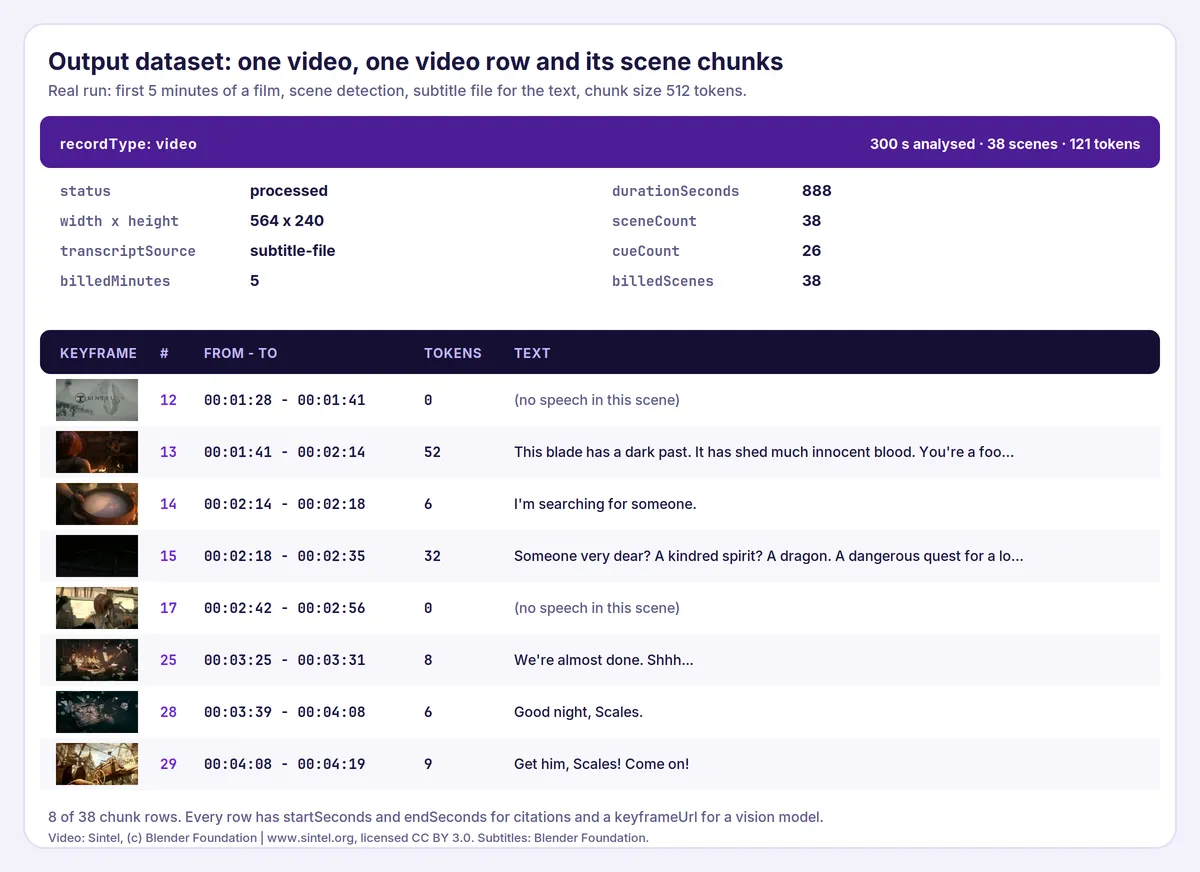
Every run writes one dataset with two kinds of rows. Filter on recordType. The real output below comes from the first 5 minutes of the open film Sintel (see the credit at the end), with the film's English subtitle file.
Video row (recordType: "video"):
Chunk row (recordType: "chunk"), one scene:
Field notes:
statusisprocessedorfailed. Onlyprocessedis charged.failureReasonwhen a video failed:invalid_url,unsupported_source,blocked,http_error,network_error,too_large,not_video,corruptorprocessing_error.truncatedistruewhen the result does not cover the whole video: the video is longer thanmaxDurationMinutes, it hitmaxScenesPerVideo, or the run reached its cost limit.chunkIndexstarts at 1 and is numbered like the chunks ofaudio-video-transcriber;sceneIndexis the scene, and several chunks share a scene (and its keyframe) whenisPartialistrue.- A scene with no speech still gets a row, with
text: ""andhasTranscript: false, because its keyframe is useful on its own. keyframeUrlpoints to the key-value store of the run. Stores are kept according to your data retention setting, so copy the images you need to your own storage.frameHashis a 64-bit difference hash. Two keyframes whose hashes differ in only a few bits (Hamming distance) show the same shot, which helps you de-duplicate frames across videos.
How much does it cost?
You pay for the minutes of video analysed and for the scenes returned. Chunk size, the number of extra rows for long speech, keyframes and contact sheets never change the bill.
| Event | When | Free plan price |
|---|---|---|
| Actor start | once per run | $0.0005 |
| Video minute analysed | each minute of video scanned, rounded up per video | $0.0015 |
| Scene extracted | each scene returned (after merging similar scenes) | $0.001 |
Failed, blocked and non-video links, and minutes beyond maxDurationMinutes, are free.
Examples (Free plan)
- A 1-minute product demo with 8 scenes: $0.0005 + 1 × $0.0015 + 8 × $0.001 = $0.0100.
- The 5-minute prefilled run (38 scenes): $0.0005 + 5 × $0.0015 + 38 × $0.001 = $0.0460.
- A whole 14.8-minute film (15 billed minutes, 68 scenes): $0.0005 + 15 × $0.0015 + 68 × $0.001 = $0.0910.
Set a maximum cost per run to cap spending. The Actor checks what the limit still allows before each video and trims that video's scenes to fit, and the platform never charges beyond the limit.
Measured cost. Runs on this Actor, 2026-11-03, at 1 GB of memory:
| Run | Video | Scenes | Wall clock | Platform usage |
|---|---|---|---|---|
| 14.8-minute film (77 MB, 564 x 240) | 888 s | 68 | 187 s | $0.0094 |
| Same film, 2 GB | 888 s | 68 | 126 s | $0.0132 |
| First 5 minutes of the film | 300 s | 38 | 118 s | $0.0060 |
For the full film, 39 s was the download, 78 s the scene scan and 51 s cutting 68 keyframes. Using the formula this project uses for unit economics, profit = 0.8 × revenue − platform cost, the full-film run earns $0.0634 on a list price of $0.0910: 20% goes to Apify, platform usage takes about 10%, and the rest is margin. More memory finished faster but cost more, so 1 GB is the default.
Note on the numbers above: they were measured on runs on this Actor. As the Actor's owner, my own runs are not billed, so "list price" is what a customer would pay, not money this Actor has earned. A high-resolution video (1080p or 4K) costs more compute than the 564 x 240 file measured here, because every frame must be decoded before it is shrunk; use
maxDurationMinutesand a cost limit when you first try long, high-resolution files.
Video Frame Extractor & Scene Chunks compared with other options
Prices were read from the Apify Store on 2026-11-03 and can change. "Same film" means the 68 scenes, 15 billed minutes and 77 MB measured above, assuming the other Actors find the same scenes.
| This Actor | kantolabs/video-frame-extractor | gazidev/video-frame-extractor | seemuapps/video-frame-extractor | kantolabs/video-to-llm-context | |
|---|---|---|---|---|---|
| Frames at scene changes | Yes | Yes | Yes | Yes | Yes |
| Text aligned to each scene | Yes, from your subtitles or transcript | No | No | No | Yes, transcribed inside the Actor |
| Token count per row | Yes | No | No | No | Not stated |
| Contact sheet | Yes | Yes | Yes | Yes | Not stated |
| Links accepted | Direct file links | Direct file links | Direct file links and HLS streams | File links and YouTube, TikTok, Instagram, Facebook, X pages | File links |
| Price model | $0.001 / scene + $0.0015 / min | $0.002 / frame | $0.001 / frame + $0.002 / video + $0.002 / scanned min | $0.002 / frame + $0.01 / video + $0.005 / min + $0.06 / MB | $0.002 / frame + $0.008 / min of transcribed audio |
| Same film | $0.091 | $0.136 | $0.100 | about $4.86 (the per-MB fee dominates) | $0.256 |
| Users in the last 30 days | new | 113 | 22 | 104 | 4 |
Frame extraction is a crowded, mature niche: if all you need is thumbnails or frames, kantolabs/video-frame-extractor has the most users and gazidev/video-frame-extractor is about as cheap as this Actor and can seek into long files without downloading them. seemuapps/video-frame-extractor is the one to use for platform links. What this Actor adds is narrow: each scene row carries the words spoken in it, counted in tokens and numbered like the chunks of the audio transcriber, and you bring the transcript, so there is no speech-to-text charge when you already have subtitles. kantolabs/video-to-llm-context does frames and transcription in one run; choose it when you want the Actor to do the transcribing, and this one when you already have, or prefer to choose, the transcript. This Actor is also new and has no reviews yet.
Part of a RAG family: documents, recordings and video
Three Actors by the same developer produce rows in the same shape (url, chunkIndex, text, tokenCount), so one embedding job can read all of them.
| Source | Actor | One row is | Location in the source |
|---|---|---|---|
| PDF files | PDF to Markdown & RAG Chunks Extractor | A token-counted chunk | Page numbers |
| Audio, video and podcasts | Audio & Video Transcriber | A token-counted chunk | startSeconds and endSeconds |
| Video files | This Actor | One scene with a keyframe image | startSeconds and endSeconds plus a keyframe |
Transcribe, then cut into scenes. The transcriber's rows carry segments with start and end seconds, which is what this Actor aligns to scenes. The two datasets are joined on url:
The transcription is billed by the transcriber ($0.006 to $0.016 per audio minute depending on the model, see its README); this Actor bills only scenes and video minutes.
Tips for best results
- Start with
maxDurationMinutesand a cost limit on a new kind of footage, then raise them once the scene count looks right. - Tune
sceneThresholdon one video first. Too many scenes on handheld footage: raise it to 0.4 or 0.5. Too few on soft cross-fades: lower it to 0.15. - Use
intervalfor lectures and screen recordings. One cut-less hour becomes one scene otherwise, split every 60 s bymaxSceneSeconds. - Subtitles beat nothing. A video with no transcript still gives you keyframes and times, but the text field is empty. Run a transcription Actor first and pass its dataset in
transcriptDatasetId. - Check
transcriptSourceandcueCounton the video row.noneor0means the transcript did not match the video, usually because the dataseturldiffers from the video link. - Keep
mergeSimilarFrameson unless you need every cut, for example when you review an edit.
Limits and good to know
- No transcription. The Actor aligns text you provide. Audio is never sent to a speech model.
- Direct file links only. A page with a video player returns HTML and is reported as
not_video; YouTube, Vimeo, TikTok and similar page links are refused asunsupported_source. - No DRM, no streams. Encrypted video and HLS or DASH manifests are not supported.
- The file is downloaded in full before it is analysed, up to
maxFileSizeMb, so slow servers make a run slow. - Picture subtitles (DVD, PGS) inside a video cannot be converted to text and are ignored.
- Scene detection is heuristic. Hard cuts are found reliably; slow cross-fades and animation can be missed or over-split. Adjust
sceneThresholdand the minimum and maximum scene length. - Subtitle timing decides alignment. If the subtitle file is offset from the video, the text lands in the wrong scene.
- Rotation from the video's metadata is applied to the keyframes and to
widthandheight.
Use it from AI agents, the API and code
Apify MCP server (ChatGPT, Claude, Cursor and other MCP clients). Connect https://mcp.apify.com, then:
search-actorswith a query such asvideo scene chunks keyframes.fetch-actor-detailsformmdincer/video-frame-extractorto read the input schema.call-actorwith the input below.get-dataset-itemswith the returned dataset ID.
To give an MCP client this Actor as its own tool (no search step), connect https://mcp.apify.com?tools=mmdincer/video-frame-extractor.
JavaScript
Python
HTTP (one request, returns the rows)
The synchronous endpoint waits for the run, so use it for a few short videos. For a large batch, start the run asynchronously and read the dataset when it finishes.
Automation recipes
Transcribe, then cut. Run a transcription Actor on your videos, then run this Actor with transcriptDatasetId set to that run's dataset. Each scene row gets the text spoken in it, and the join is done on url.
Scraper to scenes. Run any Actor that outputs direct video links, then pass its dataset in datasetId. Rows without a recognisable link are skipped and counted in the run summary.
Nightly index refresh. Save the input as a task with a schedule. After each run, embed the chunk rows and upsert them keyed on url + chunkIndex; an unchanged video produces the same scenes.
Budget guard. Set a maximum cost per run on the task. The Actor stops with stoppedForBudget: true in the run summary instead of overspending.
Is it legal to download videos?
The Actor downloads the files you point it at, one at a time, with a descriptive User-Agent. It does not crawl, does not guess URLs, does not log in, does not read anything behind a paywall, does not accept YouTube-style platform pages, and does not try to get around a 403, a 429 or a bot challenge: it reports the refusal in the dataset and stops reading that file.
The legal question is therefore about the videos you choose. Footage you own, your organisation's recordings and openly licensed films are the normal case. A video you are not allowed to copy does not become allowed because a tool analysed it; check the licence of the video and the terms of the site that hosts it.
Copyright. Keyframes and transcripts are copies or derivatives of the video. Indexing them for your own search is one thing; republishing them is another. The Actor claims no rights over the content and gives you none. The sample footage on this page is Sintel (c) Blender Foundation, www.sintel.org, licensed CC BY 3.0; subtitles by the Blender Foundation.
No affiliation. This Actor is an independent tool. It is not affiliated with, endorsed by or sponsored by YouTube, Google, Vimeo, TikTok, Meta, the FFmpeg project or any video platform or vendor; product and platform names are used only to describe what the Actor does and does not read.
FAQ
How do I split a video into scenes?
Paste the direct video link in Video URLs and click Start. The Actor detects cuts with ffmpeg and returns one row per scene with its time range and a keyframe image. If the result has too many or too few scenes, change Scene change sensitivity.
How do I get a transcript into the scene rows?
Give the Actor a subtitle file in Subtitle files, pick a transcription dataset in Transcripts from a dataset, or rely on subtitles stored inside the video. Check transcriptSource on the video row to see which one was used.
Can I combine it with a transcription Actor?
Yes. Run audio-video-transcriber on the same video link, then pass its dataset ID as transcriptDatasetId. The Actors keep the url identical so the rows join automatically, and the PDF counterpart pdf-rag-extractor uses the same chunk fields for documents.
Does it transcribe the audio?
No. It aligns text you provide. This keeps the price low when you already have subtitles and avoids sending your audio to a model you did not choose. If you need transcription, run a transcription Actor first and chain it with transcriptDatasetId.
Can I use a YouTube link?
No. A YouTube address is a web page, not a video file, and the Actor does not download from video platforms. It refuses such links with unsupported_source and says so in the row. Use a file link you are entitled to download.
Why did my link fail with not_video?
The URL returned a web page or a file that is not video. This happens when the link opens a player page or needs a login. Open the link in a browser and copy the direct file URL; it usually ends in .mp4, .webm or .mov.
Why did I get blocked?
The server answered HTTP 403 or 429, meaning it does not want automated downloads from this address. The Actor does not retry or work around that. Use a link from a host that allows it, or a proxy only where that is permitted.
How are scenes billed when similar scenes are merged?
You pay for the scenes that remain after merging. mergedScenes on the video row says how many were joined, and billedScenes is the number you were charged for.
Is the keyframe from the start of the scene?
No, from the middle, because the first frame of a scene is often a transition. keyframeSeconds tells you the exact moment.
How accurate is the text-to-scene alignment?
Each subtitle cue is placed in the scene it overlaps most, once. Alignment is as good as the subtitle timing: a cue that spans a cut lands in the scene that holds most of it.
What if one scene is very long?
Scenes longer than Longest scene are split into equal parts, and speech longer than Chunk size inside one scene becomes several rows that share the keyframe (isPartial: true). Neither changes the price per scene beyond the extra scenes from splitting.
How much does a run cost?
A one-minute video with eight scenes is about $0.01 on the Free plan; the 5-minute prefilled example is $0.046. Scenes and minutes drive the price, so maxScenesPerVideo and maxDurationMinutes are the levers, and a maximum cost per run is a hard cap.
What happens if one video fails in a batch?
Nothing else stops. The failed video writes its own row with failureReason and a readable message, and the run continues. The run only fails when no video could be read at all, and nothing is charged for failed videos.
Do I need a proxy?
Normally no. Files are downloaded directly. Use Apify Proxy only when a CDN blocks datacenter IPs, and note that the Actor still stops at a refusal.
Related Actors
These are other Actors by the same developer. They are separate tools; this README does not depend on them.
RAG family
- PDF to Markdown & RAG Chunks Extractor — PDF links to clean text and token-counted chunks with page numbers.
- Audio & Video Transcriber — audio, video and podcast feeds to timestamped transcripts, SRT/VTT and token-counted chunks. Its dataset is this Actor's transcript source.
Other tools
- Greenhouse, Lever, Ashby & Workable Jobs Scraper & Monitor — company job boards as one dataset with change monitoring.
- Shopify Price Tracker & Stock Monitor — new products, price changes and stock changes for any Shopify store.
- Autocomplete Keyword Scraper — Google, YouTube and Bing suggestions with an intent label.
- Eventbrite Events Scraper & Discovery — public events by city, category and date range.


