
PDF to Markdown & RAG Chunks Extractor
Pricing
from $2.10 / 1,000 processed pdfs
PDF to Markdown & RAG Chunks Extractor
Turn PDF links into clean text, LLM-ready Markdown and token-counted RAG chunks with page numbers. Reads one PDF or a whole dataset, with document metadata. No browser, no OCR. Not affiliated with any PDF vendor.
Pricing
from $2.10 / 1,000 processed pdfs
Rating
0.0
(0)
Developer
Muhammet Mustafa Dincer
Maintained by CommunityActor stats
0
Bookmarked
2
Total users
1
Monthly active users
2 days ago
Last modified
Categories
Security
Limited permissionsShare
What is PDF to Markdown & RAG Chunks Extractor?
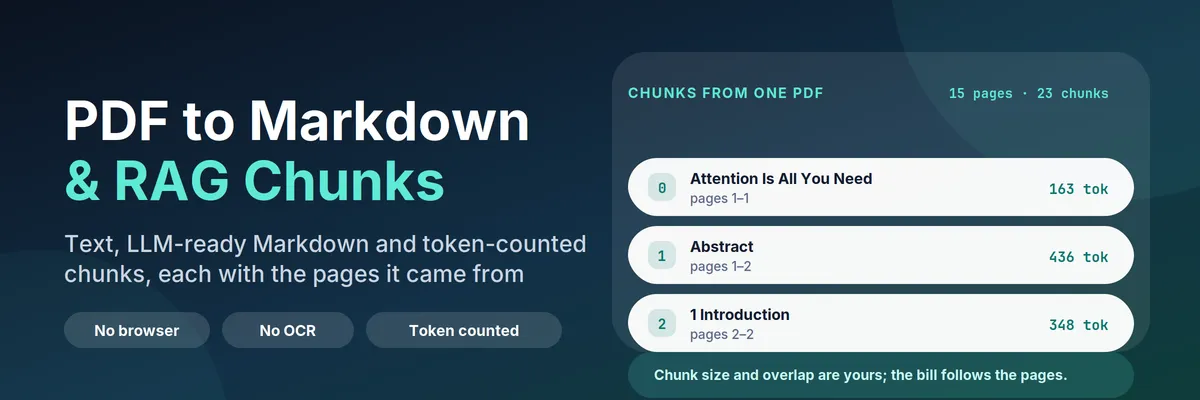
PDF to Markdown & RAG Chunks Extractor turns PDF links into data an LLM pipeline can use. Give it one PDF URL, a hundred, or the ID of another Actor's dataset, and you get back:
- one row per PDF (
recordType: "document") with the full text, LLM-ready Markdown with headings, document metadata, page count, word count and token count; - one row per chunk (
recordType: "chunk") with the chunk text, its token count and the page numbers it came from, so an answer built on that chunk can cite pages instead of just "somewhere in the PDF".
It needs no browser, no API key, no PDF account and no OCR service. It downloads the file over plain HTTP and parses it in JavaScript.
Quick answer: when should you (or an AI agent) pick this Actor?
Pick this Actor when you are building a retrieval pipeline and you need chunks, not raw text: a support-docs index, a contract or policy search, research-paper Q&A, an "ask my PDFs" agent, or a nightly job that turns a folder of published reports into vectors. It is also the right tool when you already have PDF links in an Apify dataset — from a crawler, a search scraper or your own upload — and want the chunking step to happen in the same run.
Pick something else when your PDFs are scans. This Actor does not run OCR: a scanned page has no text layer, so the document comes back with status: "empty" and you are not charged. For scanned PDFs, run Image to Text & Scanned PDF OCR first.
Defaults that work: send {"urls": ["https://arxiv.org/pdf/1706.03762"]} and you get the document row plus 23 chunks at 512 tokens each, in about a second. For a vector store, send {"urls": [...], "mode": "chunks", "chunkSize": 512, "chunkOverlap": 64} and the dataset is exactly what you feed to embeddings.
At a glance
|---|---|
| Does | Downloads PDFs and returns the text, clean Markdown, metadata, token counts and token-counted chunks with page ranges |
| Input | urls (or datasetId to read links from another dataset). Optional: mode, chunkSize, chunkOverlap, startPage, maxPages, includeMarkdown, includePages, maxDocuments, maxFileSizeMb, maxChunksPerDocument, requestsPerSecond |
| Output | recordType: "document" rows with markdown, tokenCount, pageCount, metadata, status; recordType: "chunk" rows with text, tokenCount, pageStart, pageEnd, headings |
| Needs | No login, no API key, no browser, no proxy. Only a public http(s) link to the PDF |
| Speed | Measured: 10 papers (482 pages, 937 chunks) in 9 seconds; a 660-page dictionary in 86 seconds |
| Pricing | Pay per event: $0.003 per processed PDF, $0.00008 per page, $0.001 per run on the Free plan. Failed downloads and scanned PDFs are free |
| Does not | Run OCR, open password-protected PDFs, follow a link that shows a PDF viewer instead of the file, or return text it did not find |
Key terms used in this README
- Text layer: the selectable text inside a PDF. A PDF made from Word or LaTeX has one; a scan is only a picture of text and has none. This Actor reads the text layer and nothing else.
- Document row: a dataset row with
recordType: "document". One per PDF, always written, even when the PDF failed — the failure reason is in the row. - Chunk row: a dataset row with
recordType: "chunk". A slice of the document of roughlychunkSizetokens, withpageStartandpageEndso you can cite it. - Token count: the number of tokens the text becomes in cl100k_base, the tokenizer used by OpenAI's embedding and chat models. It is counted, not estimated from characters.
- Overlap: how much of the end of one chunk is repeated at the start of the next, so a sentence that straddles a boundary is still retrievable.
- Markdown: the page rebuilt as
#headings, paragraphs and-lists, which is what most retrieval and prompt pipelines want instead of raw extracted lines.
What can you use it for?
RAG and vector stores
The mode: "chunks" output is a ready-made embedding input: one row per chunk, already inside your token budget, with the source URL and page range as metadata. Store pageStart/pageEnd next to the vector and your generated answer can cite "page 4" instead of guessing.
"Ask my documents" agents
Point an agent at this Actor through MCP, give it a PDF URL, and it receives citable text instead of an HTML page it cannot read. The chunk rows are flat and identical in shape, so the agent can filter and quote without knowing anything about PDF internals.
Turning a crawl into a knowledge base
Crawl a site that publishes PDFs (regulatory filings, research, manuals, board packs), then pass the crawler's dataset ID in datasetId. The Actor finds the PDF links in the rows and returns chunks; you never copy links by hand.
Academic and legal reading
Research papers and contracts are long, structured and full of headings. The Markdown output keeps that structure, and startPage/maxPages lets you skip the cover and the table of contents so you do not pay for pages you will not read.
Prompt-ready context on a budget
tokenCount on the document row tells you before you send a document to a model whether it fits the context window. A 15-page paper is about 9,000 tokens; a 100-page report can be 80,000, which is worth knowing.
Full-text search of a PDF archive
Keep the document rows and you have a searchable text dump of every file you processed, with metadata you can filter on: title, author, creationDate, producer.
How does it work?
- The URL list is built from your
urlsand, if you set one, from the links found indatasetId. Duplicates are removed and every URL is validated; non-http links and links with a username and password are rejected. - Each PDF is downloaded directly, with a timeout, a size cap and a retry for transient errors. A 403 or 429 is treated as a refusal: the file is reported as
blockedand the Actor moves on rather than trying to get around it. - The bytes are parsed with pdf.js (through
unpdf) — the same engine a browser uses to display a PDF — in a single pass, page by page. - Each page is rebuilt into Markdown: text items are grouped into lines by baseline, lines are classified as heading / list / body by font size relative to the page's body text, and body lines are re-flowed into paragraphs.
- Pages are split into paragraphs and packed into chunks until the token budget is reached. A paragraph longer than the budget is split on sentence ends first, and mid-sentence only as a last resort.
- Rows are written. The document row is charged once; pages are charged per page read; chunks are free. A PDF with no text layer, a failed download and a corrupt file write a row and cost nothing.
How to extract text and chunks from a PDF (step by step)
- Open the Actor and paste one or more PDF URLs in the input, one per line, for example
https://arxiv.org/pdf/1706.03762. - Leave What to return on Document and chunks for a first look, or choose Chunks only if you are feeding embeddings.
- Set Chunk size to 512 for general retrieval. Use 256 for narrow facts and 1024+ for long arguments.
- Optionally set First page and Maximum pages per PDF to read only part of a long document.
- Click Start. In the Output tab open the Documents view to read the text and metadata, or the Chunks view for the embedding input.
- Download the dataset as JSON, JSONL, CSV or Excel, or read it from the API;
recordTypetells the two kinds of row apart.
Input
| Field | Type | Default | What it does |
|---|---|---|---|
urls | list of text | two example papers | Direct links to PDF files, up to 100 per run. A link that opens a PDF viewer instead of the file will be reported as not_pdf |
datasetId | text | empty | Read PDF links from an existing Apify dataset. Looks for pdfUrl, fileUrl, documentUrl, url, link and similar fields |
mode | choice | both | both writes document and chunk rows; chunks writes only chunks; document skips chunking |
chunkSize | number | 512 | Token budget per chunk (64–4096), counted in cl100k_base |
chunkOverlap | number | 64 | Tokens repeated from the previous chunk, at most half of chunkSize |
startPage | number | 1 | First page to read, 1-based |
maxPages | number | 0 | Pages to read; 0 means the whole document |
includeMarkdown | yes/no | yes | Add the markdown field to the document row |
includePages | yes/no | no | Add a pages array with the text of every page |
maxDocuments | number | 100 | Upper bound on PDFs processed in one run |
maxFileSizeMb | number | 100 | Skip files larger than this instead of downloading them |
maxChunksPerDocument | number | 2000 | Safety cap on chunk rows for one PDF |
requestsPerSecond | number | 2 | Download rate. Lower it to 1 when every file comes from one small server |
proxyConfiguration | proxy | off | Only needed when a CDN blocks datacenter IPs |
Output
Every run writes one dataset with two kinds of rows. Filter on recordType.
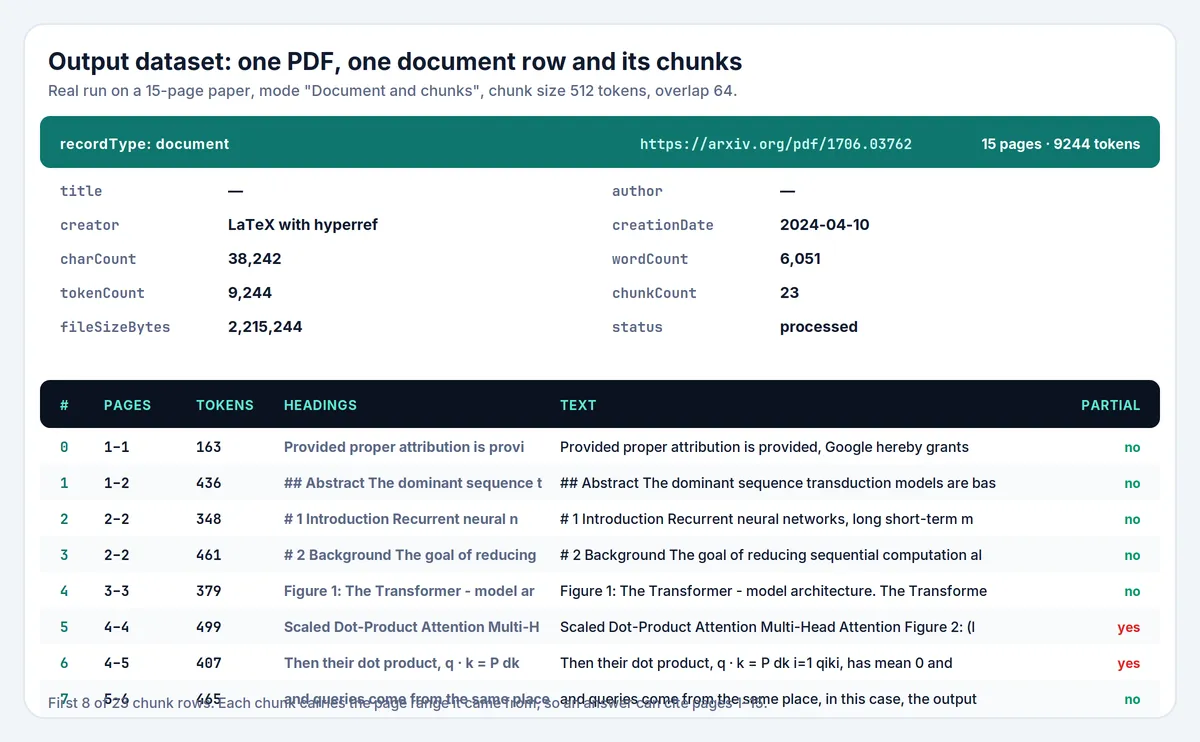
Document row. Real output for https://arxiv.org/pdf/1706.03762 (Markdown truncated here):
Chunk row. From the same document:
Field notes:
statusisprocessed,emptyorfailed. Onlyprocessedis charged.- A run where every file is a scan ends with status
FAILEDand the message "read but had no text layer" rather than a generic error, because the fix is on your side: for scanned PDFs, run Image to Text & Scanned PDF OCR first. failureReasonwhen a row is not processed:not_pdf,too_large,blocked,http_error,network_error,password_protected,corrupt,parse_errororno_text_layer.tokenCounton the document is the token count of the Markdown (the text when Markdown is off). ChunktokenCountcounts the chunk text. Both use cl100k_base, so they are comparable with your embedding model's budget, not with a character estimate.pageStartandpageEndon a chunk are the pages of the text inside it. A chunk that spans a page break reports both, which is why the citation is a range.headingslists the nearest heading before the chunk plus any heading inside it — useful as vector-store metadata for "which section is this".isPartialistruewhen a paragraph had to be cut to respect the chunk size (a table with no sentence structure, for example).markdownisnullwhenincludeMarkdownis off or the document failed.pagesisnullunlessincludePagesis on.
How much does it cost?
You pay per PDF and per page, never per chunk, so changing the chunk size never changes the bill.
| Event | When | Free plan price |
|---|---|---|
| Actor start | once per run | $0.001 |
| Processed PDF | each PDF with text | $0.003 |
| Processed page | each page read | $0.00008 |
Scanned PDFs (empty), failed downloads, blocked and corrupt files, and pages outside your startPage/maxPages window are free. Chunk rows are not billed separately.
Examples
- A 15-page paper: $0.001 + $0.003 + 15 × $0.00008 = $0.0052.
- 1,000 one-page invoices: $0.001 + 1,000 × $0.003 + 1,000 × $0.00008 = $3.08.
- 1,000 ten-page reports: $0.001 + $1,000 × $0.003 + 10,000 × $0.00008 = $3.80.
Set a maximum cost per run in the run options to cap spending; the Actor checks the remaining budget before each PDF and stops cleanly at the limit.
Measured cost. A run on this Actor, 2026-11-03:
| Run | PDFs | Pages | Chunks | Compute | Wall clock |
|---|---|---|---|---|---|
| 10 papers | 10 | 482 | 937 | 0.0032 CU | 9 s |
| 2 papers | 2 | 31 | 63 | 0.0008 CU | 3 s |
| 1 dictionary (660 pages) | 1 | 660 | 1,919 | — | 86 s |
The 10-paper run cost $0.0056 of platform usage (compute plus dataset writes) and its list price at the Free plan is $0.0696. Using the formula this project uses for unit economics — profit = 0.8 × revenue − platform cost — that is a profit of $0.0501, or 72% of the list price: 20% goes to Apify, platform usage takes 8%, and the rest is margin. The heavy part of the cost is the 937 dataset writes, not the parsing: a run with fewer chunks costs proportionally less, which is why chunk rows are not billed separately.
Note on the numbers above: they were measured on runs on this Actor. As the Actor's owner, my own runs are not billed (
accountedChargedEventCountsis 0), so "list price" is what a customer would pay, not money this Actor has earned.
PDF to Markdown & RAG Chunks compared with other approaches
| This Actor | Raw text extractor | PDF + OCR extractor | Your own script | |
|---|---|---|---|---|
| Markdown with headings and paragraphs | Yes | Usually plain text | Yes | You build it |
| Token-counted chunks | Yes, and the size is your setting | No | Sometimes | You build it |
| Page numbers on every chunk | Yes | Often only per document | Yes | You build it |
| Reads links from another dataset | Yes, datasetId | Rarely | Rarely | You build it |
| Scanned PDFs | No — reported as empty, not charged | No | Yes, costs more | Depends |
| Price per 1,000 PDFs | $3 plus $0.08 per page (a 15-page paper is $0.0052) | $1.80 (text only) to $5.00 | $20.00 | Your time |
Several PDF Actors in the Store already offer Markdown and some form of chunking, so this is not an empty niche — compare before you pick. Where this one differs is narrower than "we are the only ones": the chunk size is a token budget counted in cl100k_base rather than a character count, every chunk carries the pages it came from and its nearest heading, datasetId lets a crawl feed the chunker in the same run, and the price is per page read, so chunk size and chunk count never change the bill. It does not run OCR, and that is deliberate: OCR is a different job, it is slow and expensive, and mixing it in would raise the price for everyone, including the customers who do not need it.
Tips for best results
- Chunk size 512, overlap 64 is a good starting point for retrieval. Raise the size if your questions need long context, lower it if you need precise facts.
- Use
mode: "chunks"for a production embedding job: the dataset then contains only chunk rows and your loader needs no filter. - Skip the front matter of long reports with
startPage: a cover, a disclaimer and a table of contents can be ten pages you do not need. - Keep
includeMarkdownon for a first run so you can eyeball the quality on one document before paying for a thousand. - Look at
chunkCountbefore scaling up: one chunk is roughly one embedding call, and that is where your own cost will be. - Watch
statusrather than row count. Ablockedornot_pdfrow means the link is the problem, not the Actor.
Limits and good to know
- No OCR. A scanned PDF has no text layer; the document row says
emptywithfailureReason: no_text_layerand costs nothing. For scanned PDFs, run Image to Text & Scanned PDF OCR first. - Password-protected PDFs are not opened. They are reported as
password_protectedand are not charged. - A PDF viewer link is not a PDF link. If the URL returns an HTML page, the row says
not_pdfwith an explanation; open the link in a browser and copy the direct file URL. - Aligned tables become Markdown tables. When a row is drawn as separate columns on one baseline, the page Markdown keeps it as a table (
| col | col |). A table drawn as one column of text, or with merged cells, is still read as lines. - Two-column layouts are read in stream order, which is the order the document draws them — usually correct for academic papers, occasionally wrong for magazine layouts.
- Text is not summarised, translated or cleaned up. What the PDF says, the output says.
- Very large files are skipped above
maxFileSizeMb(100 MB by default) rather than risking the memory of the run.
Use it from AI agents, the API and code
Apify MCP server (ChatGPT, Claude, Cursor and other MCP clients). Connect https://mcp.apify.com, then:
search-actorswith a query such asPDF to markdown chunks.fetch-actor-detailsformmdincer/pdf-rag-extractorto read the input schema.call-actorwith the input below.get-dataset-itemswith the returned dataset ID andrecordType: "chunk"as your filter.
To give an MCP client this Actor as its own tool (no search step), connect https://mcp.apify.com?tools=mmdincer/pdf-rag-extractor.
JavaScript
Python
HTTP (one request, returns the rows)
The synchronous endpoint waits for the run, so use it for a handful of PDFs. For a large batch, start the run asynchronously and read the dataset when it finishes.
Automation recipes
Crawl a site, chunk what it publishes. Run your crawler into a dataset, then run this Actor with datasetId set to that dataset's ID. The PDF links are found in the rows, the chunks land in a new dataset, and no link is copied by hand.
Nightly knowledge-base refresh. Save the input as a task with a schedule. After each run, send the chunk rows to your embedding endpoint and upsert them keyed on url + chunkIndex; unchanged documents produce the same chunks, so the upsert is mostly a no-op.
Google Sheets or Airtable review. Fetch the dataset as CSV after a run and open it in a spreadsheet. recordType, status and failureReason make it obvious which links need attention before you pay for a large batch.
Zapier or Make. Use Apify as the trigger for a finished task run, add the step that gets dataset items, filter recordType equal to chunk, then send the rows to your vector store. See the Apify Zapier integration and the Apify Make integration.
Budget guard. Set a maximum cost per run on the task. The Actor checks the remaining budget before each PDF and stops with stoppedForBudget: true in the run summary instead of overspending.
Is it legal to download PDFs?
The Actor downloads the files you point it at, one at a time, at a low request rate, with a normal browser User-Agent. It does not crawl a site on its own, does not guess URLs, does not log in, does not read anything behind a paywall, and does not try to get around a 403, a 429 or a bot challenge — it reports the refusal in the dataset and stops reading that file.
That makes the legal question mostly about the files you choose, not about the tool. Public documents published for reading, documents you own, documents your organisation produced, and open-licence papers are the normal case. A PDF you are not allowed to download is not made legal by a parser; check the terms of the site you take it from and the licence of the document itself.
Copyright. Extracted text is a copy of the document. Chunking and embedding it for your own search is one thing; republishing the text is another. The Actor claims no rights over the content and gives you none.
No affiliation. This Actor is an independent tool. It is not affiliated with, endorsed by or sponsored by Adobe, Apryse, PDF Association or any PDF vendor; "PDF" is used only to describe the file format it reads.
FAQ
How do I turn a PDF into Markdown?
Paste the PDF URL in PDF URLs, keep Include Markdown on and click Start. The document row carries a markdown field with # headings, paragraphs and - lists rebuilt from the page layout, plus the plain-text statistics.
How do I get chunks for a vector database?
Set What to return to Chunks only, choose a Chunk size that matches your embedding model's budget (512 is a good default) and leave the overlap at 64. Every chunk row has text, tokenCount, pageStart, pageEnd and headings, which is everything a vector store needs as content plus metadata.
Are the token counts real?
Yes. They are counted with cl100k_base, the tokenizer behind OpenAI's embedding and chat models, not estimated from characters. A different model family tokenizes slightly differently, but the numbers stay close enough to plan a budget.
Why did my scanned PDF come back empty?
Because it has no text layer: the page is an image. The document row says status: "empty" and failureReason: "no_text_layer", and it is not charged. For scanned PDFs, run Image to Text & Scanned PDF OCR first.
Why does my link fail with not_pdf?
The URL returned an HTML page. This happens when the link opens a viewer (/view/12345), when the file needs a login, or when the site shows a cookie wall. Open the link in a browser, use the download button, and copy the direct file URL — it usually ends in .pdf.
Can I read PDF links from another Actor's dataset?
Yes, that is what Read PDF links from a dataset is for. Give the dataset ID and the Actor looks for pdfUrl, fileUrl, documentUrl, url, link and similar fields, which covers the usual crawler and scraper outputs. Both the pasted list and the dataset are merged and deduplicated.
Can I process only some pages?
Yes. First page and Maximum pages per PDF limit what is read and what is charged. A 400-page manual you need three pages from costs three pages.
Does it open password-protected PDFs?
No. Files that need a password are reported as password_protected and are not charged, because the text cannot be read without the password.
Are tables turned into Markdown tables?
No. Table cells are read as text lines, so the content is there but the structure is not. For documents where the table structure is the point, a table-focused extractor will serve you better.
How much does a run cost?
A 15-page paper is about $0.0052 on the Free plan; 1,000 one-page documents about $3.08. Pages are what drive the price, so maxPages is the lever. Set a maximum cost per run to hard-cap it.
Do I need a proxy?
Normally no. Files are downloaded directly, which works for most sites. Use Apify Proxy only when a CDN blocks datacenter IPs, and note that the Actor still stops at a refusal instead of trying to defeat a challenge.
What happens if one PDF fails in a batch?
Nothing else stops. The failed file writes its own row with failureReason and a readable message, the run continues with the next link, and the run summary lists the first failures. The run only fails when no PDF could be read at all.
Why is title sometimes null?
Because the PDF has no title in its metadata — many LaTeX and Word exports do not set one. The field is read from the document information dictionary, never guessed from the first line of text.
Can I use the output commercially?
The Actor gives you extracted text; whether you may use that text commercially depends on the document's licence and the site's terms, not on this tool. See the legal section above and take your own advice.
Related Actors
These are other Actors by the same developer. They are separate tools; this README does not depend on them.
RAG family: the same chunk format for other sources
- Audio & Video Transcriber — audio, video and podcast feeds to timestamped transcripts, SRT/VTT and token-counted chunks with time ranges.
- Video Frame Extractor & Scene Chunks for RAG — video files to scenes with keyframe images, time ranges and aligned transcript chunks.
Other tools
- Greenhouse, Lever, Ashby & Workable Jobs Scraper & Monitor — company job boards as one dataset with change monitoring.
- Shopify Price Tracker & Stock Monitor — new products, price changes and stock changes for any Shopify store.
- Autocomplete Keyword Scraper — Google, YouTube and Bing suggestions with an intent label.
- Eventbrite Events Scraper & Discovery — public events by city, category and date range.


