
Audio & Video Transcription: Whisper, SRT & RAG Chunks
Pricing
from $13.00 / 1,000 transcribed minute (small model)s
Audio & Video Transcription: Whisper, SRT & RAG Chunks
Transcribe audio, video files and podcast RSS feeds to timestamped text, SRT/VTT subtitles and token-counted RAG chunks with time ranges. Whisper speech to text runs inside the Actor, no API key, about 100 languages. No speaker labels. Not affiliated with OpenAI.
Pricing
from $13.00 / 1,000 transcribed minute (small model)s
Rating
0.0
(0)
Developer

Muhammet Mustafa Dincer
Maintained by CommunityActor stats
0
Bookmarked
2
Total users
1
Monthly active users
2 days ago
Last modified
Categories
Security
Limited permissionsShare
What is Audio & Video Transcriber?
Short answer: Audio & Video Transcriber is an Apify Actor that turns audio files, video files and podcast RSS feeds into a timestamped transcript, SRT/VTT subtitles and token-counted chunks that keep their time range. It uses Whisper speech to text inside the Actor, so there is no API key. On the Free plan it costs $0.006 per started minute with the Base or Tiny model and $0.016 with the Small model. It has no speaker labels and does not read YouTube or TikTok links.
Audio & Video Transcriber turns audio files, video files and podcast RSS feeds into text a program can use. Give it direct links to MP3, M4A, WAV, OGG, FLAC, MP4, WEBM or MOV files, a podcast feed, or the ID of another Actor's dataset, and you get back:
- one row per file (
recordType: "transcript") with the full text, every spoken segment with its start and end second, an SRT and/or WebVTT subtitle file as text, the detected language, the duration and the cost in billed minutes; - one row per chunk (
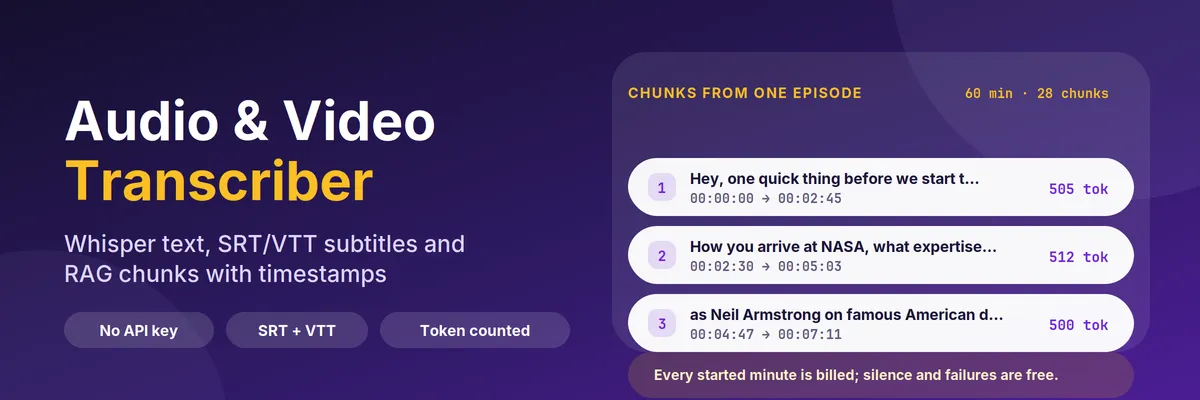
recordType: "chunk") with a slice of the transcript sized in tokens, and the start and end time it came from, so a retrieved answer can link to the exact moment in the recording.
The speech model is Whisper (through faster-whisper), baked into the Actor and run on CPU. It needs no API key, no OpenAI account, no browser and no proxy, and the audio never leaves the run. Whisper understands about 100 languages. Not affiliated with OpenAI: Whisper is an open-source model that OpenAI released under the MIT licence.
Quick answer: when should you (or an AI agent) pick this Actor?
Pick this Actor when you have audio or video at a URL and you need text with timestamps: podcast archives, recorded webinars and meetings you are allowed to process, interview and lecture libraries, call recordings, or files produced by another Actor. It is built for retrieval pipelines: the chunk rows are already inside your token budget and already carry a time range, so "ask my podcasts" and "search my recordings" need no extra step.
Pick something else when you need to know who is speaking (there is no speaker labelling), when you need a summary or translation (the Actor returns what was said, in the language it was said), or when the media only exists on YouTube, TikTok or Instagram. The Actor does not download from those platforms; it needs a link that returns the file itself.
Defaults that work: send {"urls": ["https://example.com/episode.mp3"]} and you get one transcript row, its SRT subtitles and the chunk rows, using the accurate Small model. For a vector store send {"urls": [...], "mode": "chunks", "chunkSize": 512, "chunkOverlap": 64} and the dataset is exactly what an embedding job wants. To follow a show send its feed URL with "onlyNewEpisodes": true on a schedule and you pay only for new episodes.
At a glance
| Does | Downloads audio or video over plain HTTP and returns the transcript, timestamped segments, SRT/VTT subtitles, language, duration and token-counted chunks with time ranges |
| Input | urls (files or podcast feeds) or datasetId. Optional: mode, model, language, chunkSize, chunkOverlap, subtitleFormat, includeSegments, maxEpisodesPerFeed, onlyNewEpisodes, maxFiles, maxDurationMinutes, maxFileSizeMb, maxChunksPerDocument |
| Output | recordType: "transcript" rows with text, segments, srt, vtt, language, durationSeconds, billedMinutes; recordType: "chunk" rows with text, tokenCount, startSeconds, endSeconds, startTimestamp, endTimestamp |
| Needs | A public http(s) link to the file or feed. No login, no API key, no proxy |
| Speed | Measured on a 4 GB run: about 3.5 times faster than real time with the Small model, 17 times with Base, 34 times with Tiny. A 60-minute podcast episode took 3 minutes with Tiny |
| Pricing | Pay per event: $0.016 per started minute with the Small model, $0.006 with Base or Tiny, and $0.0005 per GB of memory at start, on the Free plan. Silence, failures and unreadable files are free |
| Does not | Label speakers, summarise, translate, download from YouTube, TikTok or Instagram, open files behind a login, or transcribe from a page that only plays the media |
Key terms used in this README
- Whisper: the open-source speech-to-text model family released by OpenAI under the MIT licence. This Actor runs it through faster-whisper, on CPU, in sizes Tiny, Base and Small.
- Speech to text (audio transcription): turning spoken audio into written text. Here the result also keeps the time of every phrase.
- Podcast transcript: the text of one podcast episode. Give the Actor the show's RSS feed and it returns one transcript per episode.
- Transcript row: a dataset row with
recordType: "transcript". One per file, always written, even when the file failed: the reason is in the row. - Chunk row: a dataset row with
recordType: "chunk". A slice of the transcript of roughlychunkSizetokens, built from whole spoken segments, withstartSecondsandendSeconds. - Segment: one spoken phrase with a start second, an end second and its text, the unit subtitles are made of.
- Token count: the number of tokens the text becomes in cl100k_base, the tokenizer used by OpenAI's embedding and chat models. It is counted, not estimated from characters.
- Overlap: how much of the end of one chunk is repeated at the start of the next, so a sentence that straddles a boundary can still be retrieved.
- Billed minute: every started minute of audio. A 10-second clip is one minute and 61 seconds is two.
- SRT / WebVTT: the two common subtitle formats. The Actor returns them as text in the row; save the field as a
.srtor.vttfile and any video player reads it. - Podcast feed: an RSS or Atom address that lists a show's episodes. Give the Actor the feed and it transcribes the newest ones.
What can you use it for?
RAG and "ask my recordings" agents
mode: "chunks" writes only chunk rows, each inside your token budget with the source URL and the time range as metadata. Store startSeconds next to the vector and your answer can say "at 12:40 in episode 12" and link straight to it.
Podcast and show archives
Point the Actor at a feed, set maxEpisodesPerFeed, and get one transcript per episode with the title, the publication date and the feed URL on every row. Schedule it with onlyNewEpisodes: true and each run costs only the episodes that appeared since the last one.
Subtitles for your own video
Set subtitleFormat to srt, vtt or both. The srt and vtt fields are complete subtitle files built from the same segments as the text.
Meetings, lectures and interviews you are allowed to process
Share a recording from storage (a Dropbox share link works, and so does any direct file URL) and get searchable text with timestamps. Only process recordings you have the right to process, and mind consent rules for recorded conversations.
Building a transcript dataset for search or analysis
Keep the transcript rows and you have a searchable text corpus with language, durationSeconds, wordCount and tokenCount to filter on before you spend anything on embeddings.
Chaining after another Actor
Pass datasetId and the Actor reads media links from the items of another Actor's dataset (audioUrl, mediaUrl, videoUrl, enclosureUrl, fileUrl, url, link and similar fields), so a podcast directory scraper or a file lister feeds it without copying anything by hand.
How does it work?
- The link list is built from
urlsand, if you set one, from the items ofdatasetId. Duplicates are removed and every URL is validated; non-http links and links that contain a username and password are rejected. - Each link is downloaded directly with a size cap and a retry for transient server errors. A 401, 403 or 429 is treated as a refusal: the row says
blockedand the Actor moves on without trying to get around it. Links that resolve to a private or internal network address are refused. - If the link is a podcast feed, the newest
maxEpisodesPerFeedepisodes are added to the queue with their title and date. - The audio track is decoded to 16 kHz mono and transcribed by Whisper with voice-activity detection, so silences and music gaps do not produce invented text.
- Segments are packed into chunks until the token budget is reached. A single segment longer than the budget is split on sentence ends first, then on words, with the time spread across the pieces.
- The rows are written. A file is charged by its started minutes after the transcript is ready; silence, a failed download, an unreadable file and a file over your length limit write a row and cost nothing.
How to transcribe an audio file or a podcast (step by step)
- Open the Actor and paste one or more Media URLs, for example the link to an
.mp3file or a podcast feed address. - Leave What to return on Transcript and chunks for a first look, or choose Chunks only when you are feeding embeddings.
- Pick the Speech model: Small for accuracy, Base or Tiny when the audio is clean studio speech and you want it faster and cheaper.
- Set the Spoken language if you know it (
en,de,tr...), or leaveauto. - For a feed, set Episodes per podcast feed. Turn on Skip files already transcribed if you will run it again.
- Click Start. Open the Transcripts view for text and subtitles or the Chunks view for the embedding input, then download the dataset as JSON, CSV or Excel, or read it from the API.
Input
| Field | Type | Default | What it does |
|---|---|---|---|
urls | list of text | one public-domain clip | Direct links to audio or video files or to podcast RSS feeds, up to 100 per run |
datasetId | text | empty | Read media links from an existing Apify dataset. The Actor looks for audioUrl, mediaUrl, videoUrl, enclosureUrl, fileUrl, url, link and similar fields |
mode | choice | both | both writes transcript and chunk rows; chunks writes only chunks; transcript skips chunking |
model | choice | small | small is the most accurate; base and tiny are faster and cheaper per minute |
language | text | auto | Two-letter language code, or auto to detect it |
chunkSize | number | 512 | Token budget per chunk (64 to 4096), counted in cl100k_base |
chunkOverlap | number | 64 | Tokens repeated from the previous chunk, at most half of chunkSize |
subtitleFormat | choice | srt | srt, vtt, both or none |
includeSegments | yes/no | yes | Add the segments array with start, end and text |
maxEpisodesPerFeed | number | 3 | Newest episodes taken from each podcast feed (1 to 50) |
onlyNewEpisodes | yes/no | no | Skip links this Actor already transcribed for you; the memory is a named key-value store in your account |
maxFiles | number | 20 | Upper bound on files transcribed in one run, counting episodes |
maxDurationMinutes | number | 120 | Files longer than this are skipped and not charged (up to 360) |
maxFileSizeMb | number | 500 | Files larger than this are not downloaded |
maxChunksPerDocument | number | 2000 | Safety cap on chunk rows for one file |
proxyConfiguration | proxy | off | Only needed when a host blocks datacenter IP addresses |
Output
Every run writes one dataset with two kinds of rows. Filter on recordType.
Transcript row. Real output for one episode of a public podcast feed, shortened here:
Chunk row. From the same episode:
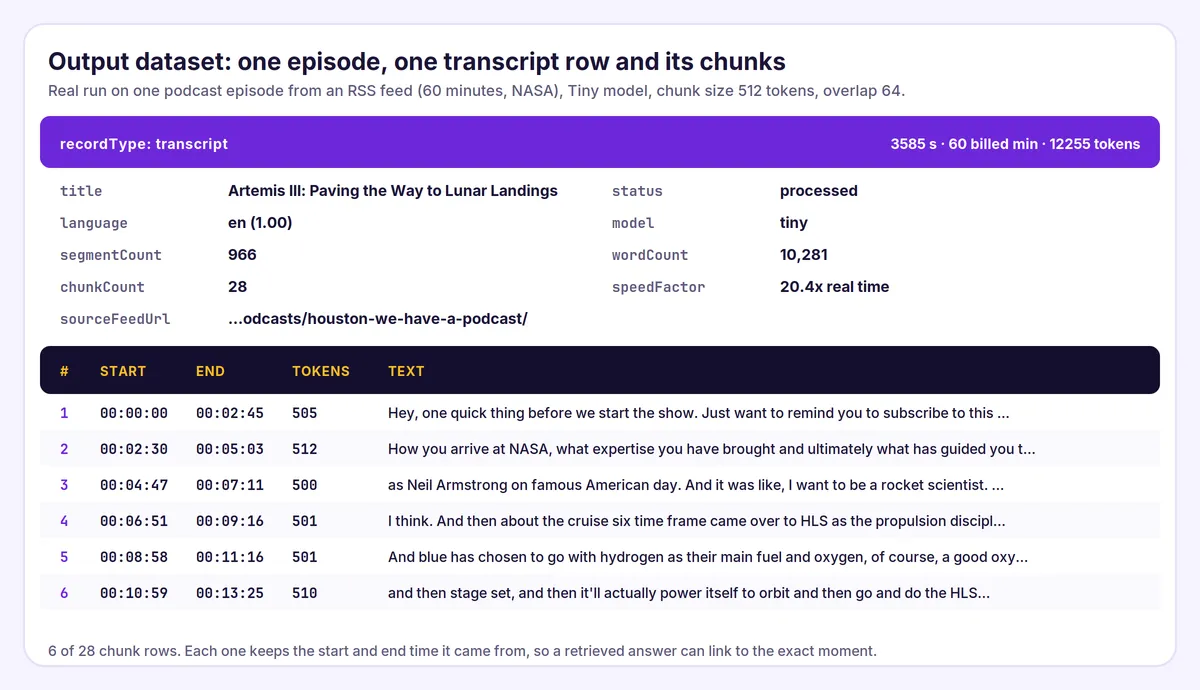
The episode above is from NASA's public podcast feed, which NASA publishes for the public; the Actor is not affiliated with NASA.
Field notes:
statusisprocessed,no_speechorfailed. Onlyprocessedis charged.failureReasonwhen a row is not processed:invalid_url,blocked,http_error,network_error,not_media,too_large,too_long,decode_error,no_speech,transcription_error,feed_errororover_budget.- A run where every file failed ends with status
FAILEDand a message that names the first reason, instead of a generic error. startSecondsandendSecondson a chunk are the times of the first and last segment inside it. With overlap on, the end of one chunk is a little later than the start of the next, which is the overlap.speedFactoris how many times faster than real time the file was transcribed, download included.- Transcript-only fields (
segments,srt,vtt,durationSeconds,billedMinutes) arenullon chunk rows, and chunk-only fields arenullon transcript rows. languageProbabilityis the detector's confidence. A low value on a short or noisy start usually means you should setlanguage.
How much does it cost?
You pay per started minute of audio, never per chunk or per segment, so chunk size and subtitle options never change the bill.
| Event | When | Free plan price |
|---|---|---|
| Actor start | once per run, per GB of memory (4 GB by default) | $0.0005 per GB |
| Transcribed minute (Small model) | each started minute of a file that had speech | $0.016 |
| Transcribed minute (Base or Tiny model) | each started minute of a file that had speech | $0.006 |
Paid plans pay less per minute: $0.0152 on Bronze, $0.0142 on Silver and $0.013 on Gold for the Small model, and $0.0054, $0.0048 and $0.0043 for Base or Tiny.
Files without speech, failed or blocked downloads, files that are not audio or video, files over your maxDurationMinutes and files that do not fit your cost limit are free.
Examples (Free plan, default 4 GB memory)
- A 24-second clip with the Small model: $0.002 + 1 × $0.016 = $0.018.
- A 60-minute podcast episode with the Small model: $0.002 + 60 × $0.016 = $0.96. With Base or Tiny: $0.002 + 60 × $0.006 = $0.36.
- Ten 45-minute episodes with the Small model: $0.002 + 450 × $0.016 = $7.20.
Set a maximum cost per run in the run options to cap spending. The Actor checks how many minutes are left before it starts a file and stops cleanly at the limit; the first file of a run is always attempted.
Measured speed on the platform. All runs used 4 GB of memory unless noted, on one 220-second public-domain speech, 2026-11-03.
| Model | Time to transcribe | Speed | Compute used per audio minute |
|---|---|---|---|
| Small | 63 s | 3.5 times real time | 0.023 CU |
| Small, 8 GB | 28 s | 7.8 times real time | 0.023 CU |
| Base | 13 s | 17 times real time | 0.005 CU |
| Tiny | 7 s | 34 times real time | 0.003 CU |
More memory makes a run faster, not cheaper or more expensive per minute, because the platform scales the CPU share with memory. The only extra cost of 8 GB is a second start event ($0.0005). Pick 8 GB when you are waiting for a long recording; keep 4 GB for batches.
Audio & Video Transcriber compared with other Store Actors
Prices and 30-day user counts were read from the Apify Store API on 2026-11-03 for the Free plan and can change. The prices are per audio minute; some Actors add a start fee or per-file fee that is not shown. "Not stated" means the Actor's Store description does not mention the feature; it may still exist. Model and quality are not equal across these Actors, so a lower price is not a like-for-like saving.
| Actor | Listed price per audio minute (Free plan) | Speaker labels | Token-counted chunks with time ranges | Podcast RSS | Platform links (YouTube, TikTok) | Users, last 30 days |
|---|---|---|---|---|---|---|
| This Actor | $0.006 Base or Tiny, $0.016 Small | No | Yes, token-counted | Yes | No | new |
steadyfetch/media-transcriber | $0.006 | Not stated | Not stated | Not stated | Some sites | 166 |
tidytools/audio-transcriber | $0.006 (diarized $0.015) | Yes | Not stated | Yes | Yes | 119 |
kaz_kakyo/audio-transcriber | $0.01 ($0.004 with your own key) | Yes | Not stated | Not stated | Not stated | 95 |
amanatools/whisper-transcriber | $0.008 + $0.005 per file | Not stated | Not stated | Yes | Not stated | 52 |
fguiraud/audio-video-transcriber | $0.006 Base, $0.012 Small | Yes (extra) | Not stated | Yes | Yes | 60 |
tinplatelabs/transcriber | $0.007 Base, $0.016 Small, $0.055 Medium | Yes | Not stated | Not stated | Not stated | 40 |
tiger19935/podcast-video-transcriber-rag | $0.015 + $0.01 RAG pack | Not stated | Yes (RAG pack, paid extra) | Yes | Yes | 1 |
What this means. Audio transcription is a crowded Store category (about 690 results for "audio transcription"), and the busiest listing had 166 users in the last 30 days. This Actor is not the cheapest. With the Base or Tiny model the price ($0.006) is the same as the cheapest listings. With the Small model ($0.016) it is in the same range as the other Actors that list a Small model ($0.012 to $0.016), and above the Actors that list a single price of $0.006 to $0.010 without naming the model. What this Actor adds is narrow: chunks that are already sized in tokens and keep their start and end time (no extra charge for chunking), podcast feeds with onlyNewEpisodes, reading media links from another Actor's dataset, and output that other Actors in the same family accept directly (see below). If you need speaker labels, summaries or video-platform links, pick one of the Actors that offer them. The Actor does not download from video platforms, and that is deliberate: those links are not files, and fetching them would put the Actor in breach of the platforms' rules. It is new and has no reviews yet.
Part of a RAG family: documents, recordings and video
Three Actors by the same developer produce rows in the same shape (url, chunkIndex, text, tokenCount), so one embedding job can read all of them.
| Source | Actor | One row is | Location in the source |
|---|---|---|---|
| PDF files | PDF to Markdown & RAG Chunks Extractor | A token-counted chunk | Page numbers |
| Audio, video and podcasts | This Actor | A token-counted chunk | startSeconds and endSeconds |
| Video files | Video Frame Extractor & Scene Chunks for RAG | One scene with a keyframe image | startSeconds and endSeconds plus a keyframe |
Transcribe, then cut into scenes. Transcribe a video here, then pass the dataset of that run to the video Actor as transcriptDatasetId. It matches rows by url and puts the words spoken in each scene next to the scene's keyframe:
Tips for best results
- Start with the Small model for anything you will search or quote; switch to Base or Tiny for clean studio speech or for a first pass over a large archive.
- Set
languagewhen you know it. Detection looks at the first 30 seconds, and a long intro of music can fool it. - Chunk size 512, overlap 64 is a good start for retrieval. Use 256 for narrow facts and 1024 for long arguments.
- Use
mode: "chunks"for a production embedding job so your loader needs no filter. - Keep
subtitleFormat: "none"andincludeSegments: falsewhen you only want chunks and small rows. - Try one file first. The transcript of a single file shows you the quality before you pay for a feed of fifty episodes.
- Use
maxFilesand a cost limit on a feed you have not seen. A feed can list hundreds of episodes of an hour each. - Watch
statusrather than the row count. Ablockedornot_mediarow means the link is the problem, not the Actor.
Limits and good to know
- No speaker labels. The text is one stream; two people talking appear as consecutive segments.
- Quality depends on the audio. Clean speech in a major language is very accurate; heavy accents, background music, crosstalk and old recordings produce errors. Whisper can also invent words in noisy passages. Check a sample before you rely on the output, and do not use it for anything where a wrong word matters without a human review.
- Names and jargon can be passed in Names and jargon (
vocabulary) and an optional one-sentence Context for the first minute (initialPrompt). The speech model uses them as a spelling hint. It still has no speaker labels, and a hint cannot fix a noisy recording. - A page that plays the media is not a media link. If the URL returns HTML, the row says
not_media. Use the direct file URL. - Video is read for its audio only. The Actor does not return frames or on-screen text.
- Long files need memory. About 1 GB per 90 minutes of audio on top of the model. The default limit is 120 minutes per file; raise
maxDurationMinutesand the memory together. - No translation. Output is in the spoken language.
- Private links expire. A signed link that expires before the Actor downloads it returns an error row.
Use it from AI agents, the API and code
Apify MCP server (ChatGPT, Claude, Cursor and other MCP clients). Connect https://mcp.apify.com, then:
search-actorswith a query such asaudio video transcriber whisper chunks.fetch-actor-detailsformmdincer/audio-video-transcriberto read the input schema.call-actorwith the input below.get-dataset-itemswith the returned dataset ID andrecordType: "chunk"as your filter.
To give an MCP client this Actor as its own tool (no search step), connect https://mcp.apify.com?tools=mmdincer/audio-video-transcriber.
JavaScript
Python
HTTP (one request, returns the rows)
The synchronous endpoint waits for the run, so use it for short clips. For a feed or a long recording, start the run asynchronously and read the dataset when it finishes.
Automation recipes
Follow a podcast. Save the input as a task with the feed URL, onlyNewEpisodes: true and a daily or weekly schedule. Each run transcribes only episodes it has not seen, so the bill follows the show's release rate.
Nightly knowledge-base refresh. After each run send the chunk rows to your embedding endpoint and upsert them keyed on url plus chunkIndex. Store startSeconds as metadata so answers can deep-link into the recording.
Chain after a scraper. Run an Actor that lists media files into a dataset, then run this Actor with datasetId set to that dataset's ID. The media links are found in the rows and the transcripts land in a new dataset.
Subtitles to storage. Fetch the dataset as JSON, write each srt field to <title>.srt and upload it next to the video.
Zapier or Make. Use Apify as the trigger for a finished task run, add the step that gets dataset items, filter recordType equal to chunk, then send the rows on. See the Apify Zapier integration and the Apify Make integration.
Budget guard. Set a maximum cost per run on the task. The Actor stops with stoppedForBudget: true in the run summary instead of overspending.
Is it legal to transcribe audio and video?
The Actor downloads the files you point it at, one at a time. It does not crawl a site on its own, does not guess URLs, does not log in, does not read anything behind a paywall, does not download from YouTube, TikTok or Instagram, and does not try to get around a 401, 403, 429 or a bot challenge: it reports the refusal in the dataset and stops reading that file.
That makes the legal question mostly about the recordings you choose, not about the tool. Your own recordings, recordings you have permission to process, public-domain and open-licence audio, and podcasts that publish a feed for listeners are the normal cases.
Copyright. A transcript is a copy of what was said. Processing it for your own search is one thing; republishing it is another. The Actor claims no rights over the content and gives you none.
Privacy. A recording of a person's voice can be personal data. If you transcribe calls or meetings, make sure you have the consent or the legal basis your jurisdiction requires. The Actor does not identify speakers, but the text can contain names and other personal details.
FAQ
How do I transcribe an MP3 or a podcast?
Paste the direct link to the file, or the podcast's RSS feed address, in Media URLs and click Start. For a feed, Episodes per podcast feed decides how many of the newest episodes are transcribed.
How do I get subtitles for a video?
Set Subtitle file to SRT, WebVTT or both. Read the srt or vtt field of the transcript row and save it as a file. Subtitles come from the same segments as segments.
What are the chunks for?
They are slices of the transcript sized in tokens, for embeddings and retrieval. Each carries startSeconds and endSeconds, so a search hit can link to the right moment of the recording.
Are the token counts real?
Yes. They are counted with the cl100k_base tokenizer used by OpenAI's embedding and chat models, so they are comparable with your model's budget. They are not an estimate from characters.
Does it label who is speaking?
No. There is no speaker diarization. If you need speaker names, use a transcriber that offers them, or add a diarization step on top of the segments.
Can it transcribe a YouTube video?
No. The Actor needs a link that returns the audio or video file itself, and it does not download from YouTube, TikTok or Instagram. If you own the file, upload it somewhere and pass that link.
Which languages work?
Whisper handles about 100 languages. Set language to a two-letter code if you know it, or leave auto. Quality varies: major languages with clean audio are the best.
Why did my file come back as no_speech?
The file was read, but Whisper found no speech in it: silence, music only or noise. It is not charged. If you expected speech, try the Small model and set language.
Why did my link fail with not_media?
The link returned a web page, not a file. Open it in a browser, find the download or enclosure address, and use that.
Can I read media links from another Actor's dataset?
Yes. Pick the dataset in Read media links from a dataset or pass its ID in datasetId. The Actor looks for audioUrl, mediaUrl, videoUrl, enclosureUrl, fileUrl, url, link and similar fields.
Is it the cheapest transcriber on the Store?
No. With the Base or Tiny model it costs $0.006 per minute, the same as the cheapest Whisper Actors we compared on 2026-11-03. With the Small model it costs $0.016 per minute, the same as the dearest Small listing we found and above some single-price Actors. See the comparison table above and pick the model that fits the audio: Base or Tiny for clean studio speech, Small when accuracy matters.
Can I use it with the PDF and video Actors?
Yes. The chunk rows use the same fields as pdf-rag-extractor, so one embedding job can read both. For video, pass the dataset of this Actor's run to video-frame-extractor as transcriptDatasetId to get the spoken words next to each scene's keyframe.
How much does a run cost?
$0.0005 per GB of memory at start (four events by default) plus $0.016 per started minute with the Small model or $0.006 with Base or Tiny, on the Free plan. A 60-minute episode with the Small model is about $0.96. Set a maximum cost per run to cap it.
What happens if one file in a batch fails?
It gets its own row with status: "failed" and a failureReason, it is not charged, and the Actor carries on with the next file.
How do I stop paying for episodes I already transcribed?
Turn on Skip files already transcribed. The Actor remembers each link in a named key-value store in your account and skips it next time.
Can I use the output commercially?
The Actor places no restriction on the transcript, but the recording's owner may. Check the licence of the audio, and see the copyright and privacy notes above.
Related Actors
These are other Actors by the same developer. They are separate tools; this README does not depend on them.
RAG family
- PDF to Markdown & RAG Chunks Extractor — PDF links to text, Markdown and token-counted chunks with page numbers. The same chunk format for documents.
- Video Frame Extractor & Scene Chunks for RAG — video files to scenes with keyframe images, time ranges and aligned transcript chunks. Accepts this Actor's dataset as its transcript source.
Other tools
- Greenhouse, Lever, Ashby & Workable Jobs Scraper & Monitor — company job boards as one dataset with change monitoring.
- Shopify Price Tracker & Stock Monitor — new products, price changes and stock changes for any Shopify store.
- Autocomplete Keyword Scraper — Google, YouTube and Bing suggestions with an intent label.
- Eventbrite Events Scraper & Discovery — public events by city, category and date range.


