

Google Business Profile Audit: GBP & GMB Local SEO Checker
Pricing
from $500.00 / 1,000 business audits
Google Business Profile Audit: GBP & GMB Local SEO Checker
Audit a Google Business Profile (Google My Business) and get a fix list, e.g. a dentist in Austin, a restaurant by name or a Maps link. About $0.62 per business. Score 0-100, Maps rank, reviews, reply rate, photos, posts, competitors. Leads mode: weakest profiles in a city, with phone. No login.
Pricing
from $500.00 / 1,000 business audits
Rating
0.0
(0)
Developer

mogged
Maintained by CommunityActor stats
0
Bookmarked
2
Total users
1
Monthly active users
9 days ago
Last modified
Categories
Share
Audit a Google Business Profile (Google My Business) and get a fix list: for example a dentist in Austin, a restaurant by name, or the 20 weakest plumber profiles in a city.
For local SEO agencies, marketing freelancers and business owners who want a clear Google Business Profile (GMB) audit without logging in to anything. Type a business name and city, or paste its Google Maps link, and get a score out of 100, what is missing, how it compares with the top local competitors, and a fix list in plain English.
Price: about $0.62 per business audited ($0.59 on Apify Starter, $0.56 on Scale, $0.50 on Business plans). Auditing 20 dentists costs about $12. A business that cannot be found is free.
Prospect lists cost under a cent per business: search "dentist" in "Austin, TX" and get every dentist Google Maps shows, weakest profile first, with phone, website and a reason to call. 100 prospects cost about $0.90.
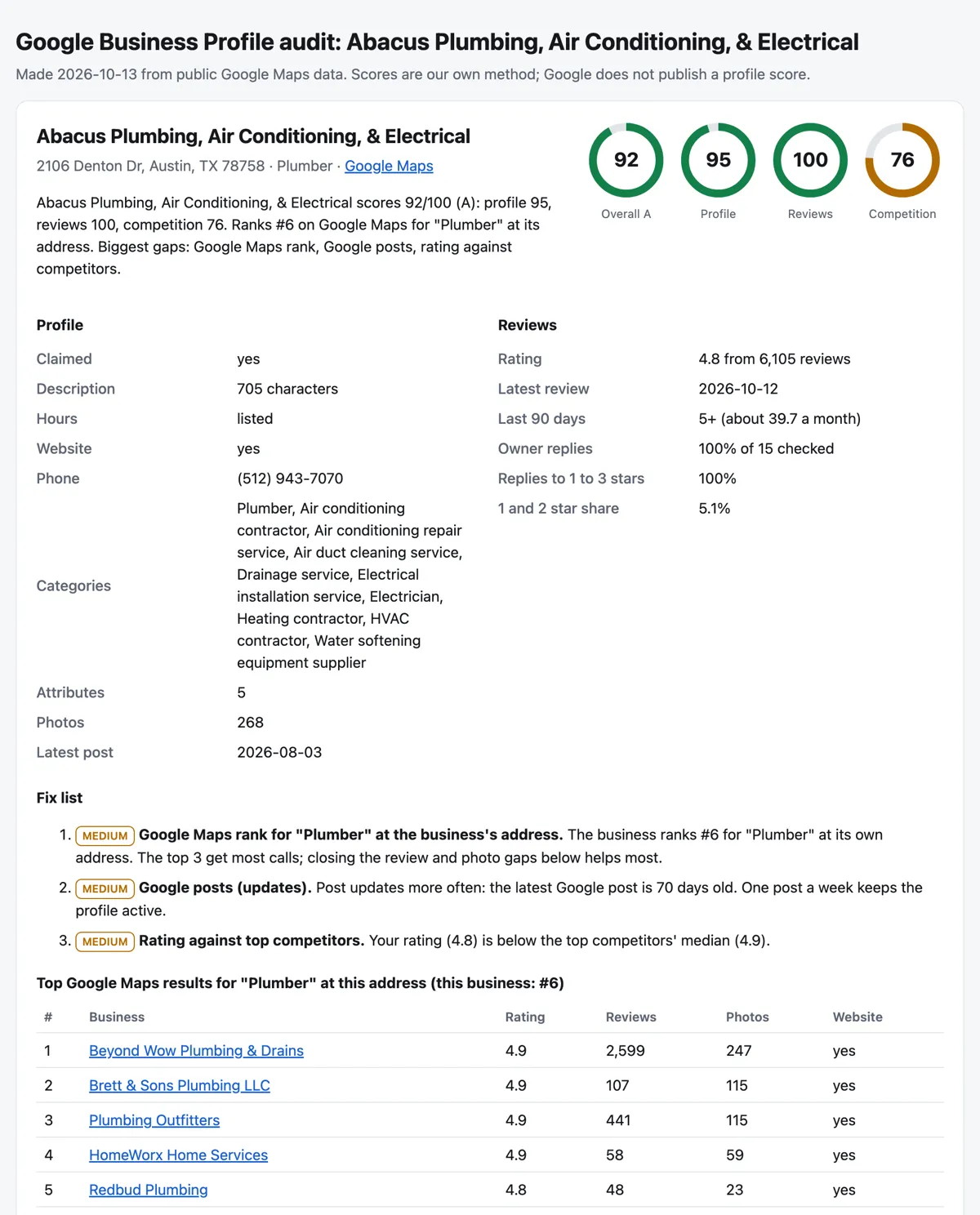
What you get
One row per audited business. The first fields are the answer; the details follow.
| Field | What it is |
|---|---|
overallScore, grade | Score 0 to 100 and a letter grade (A 85+, B 70+, C 55+, D 40+, F below 40) |
profileScore, reviewsScore, competitionScore | Sub-scores out of 100 for profile completeness, reviews and the local competition |
summary | One plain sentence: score, Maps rank and the biggest gaps |
topFixes | The top 5 fixes as one text, ready for a spreadsheet |
fixes | Every fix, in priority order: priority (high, medium, low), issue, fix in plain English, pointsAvailable |
mapsRank | The business's position in Google Maps for its main category, searched at its own address (1 to 20, empty when not in the top 20) |
profile | Claimed or not, description and its length, opening hours, website, phone, categories, attributes, photo count, latest Google post and its date, booking link, closed or "not open yet" status |
reviews | Rating, review count, star split (1 to 5), latest review date, reviews in the last 90 days, estimated reviews per month, owner reply rate (all, newest, and 1 to 3 star reviews), share of 1 and 2 star reviews, the latest negative reviews with their text, the topics people mention most |
competitors | The top 3 to 5 Google Maps results for the same category around the business: rank, rating, reviews, photos, website, phone, claimed, Maps link |
competitorMedians | The competitors' median rating, reviews and photos, so the gaps are concrete |
checks | Every check with its points and maximum, so the score can be explained line by line |
phone, website, address, mapsUrl, placeId, cid, latitude, longitude, categories | The listing itself |
Prospect rows (leads mode):
| Field | What it is |
|---|---|
weakestRank | 1 is the weakest profile in the search |
leadScore, grade | Quick profile score 0 to 100 from what Google Maps shows in search results |
reasonToCall | One sentence for the sales call, for example "Google profile scores 34/100: 14 reviews (median here 78); profile not claimed; no photos." |
issues | Every gap found |
phone, website, address, rating, reviewCount, photos, claimed, hasHours, category, mapsUrl | Contact and profile facts |
Every run also saves report.html: one page per run with the scores, fix lists, competitor tables and the prospect list, ready to send to a client. The link is in the Output tab.
Pricing
You pay only for what you get. Finding businesses, the report and failed lookups are free.
| Job | Price |
|---|---|
| 1 business audited (the default first run) | about $0.62 |
| 20 businesses audited | about $12.40 |
| 100 prospects for "dentist" in Austin, TX | about $0.90 |
| 300 prospects across a city, then full audits of the 10 weakest | about $2.70 + $6.20 |
Prices drop on Apify's paid plans: audits are $0.59 (Starter), $0.56 (Scale) and $0.50 (Business); prospects $0.0085, $0.0081 and $0.0072. The run stops before going over your maximum charge per run. On Apify's free plan a run audits up to 3 businesses and 20 prospects, enough to see the result; any paid Apify plan removes this limit.
How to use it
- Open the Actor and fill in the form. Click Try for free. In Businesses to audit, add one business per line: its name and city ("Abacus Plumbing, Austin TX") or its Google Maps link.
- For a prospect list, type a business type in Prospect search (for example "dentist") and a location ("Austin, TX"). Set Maximum prospects.
- Press Start. One audit takes about 10 seconds; 20 audits about a minute; 100 prospects under 30 seconds.
- Download the results. Open the Output tab: the Audits view has one row per business and the Prospects view one row per lead. Click Export for Excel, CSV or JSON, or open
report.html.
Input example
Output example (one audit, shortened)
How the score works
The score is our own method, built from what local SEO guides agree matters and from what Google Maps shows publicly. Google does not publish a profile score.
| Area | Points | Checks |
|---|---|---|
| Profile | 40 | Claimed (5), description (5), opening hours (5), website (5), phone (4), categories (4), attributes (3), photos against the area (5), Google posts in the last 30 days (4) |
| Reviews | 35 | Rating (10), number of reviews against the top competitors (8), latest review (6), reviews in the last 90 days (4), owner replies (7) |
| Competition | 25 | Google Maps rank for the main category at the business's address (10), rating, reviews and photos against the top competitors (5 each) |
Every lost point turns into a fix. Fixes are sorted by what they are worth, and an unclaimed profile, a rating under 4.0 or a "closed" or "not open yet" status always comes first.
Use it from code (API)
Replace YOUR_APIFY_TOKEN with your token from Apify Console (Settings, API & Integrations). Audit rows have type: "audit"; prospect rows have type: "lead".
Python (pip install apify-client)
JavaScript / Node.js (npm install apify-client)
cURL (waits for the run and saves a CSV)
n8n, Make and Zapier: use the Apify app's Run Actor action with moggedhq/gbp-audit, then send rows to Google Sheets, a CRM or email.
Use with AI agents (MCP)
The Apify MCP server (https://mcp.apify.com) lets Claude, ChatGPT, Cursor, VS Code and other MCP clients call this Actor as a tool with plain inputs (businesses, searchQuery, location, maxResults).
Claude Code:
Cursor, VS Code and other clients (mcp.json):
Example prompts:
Audit the Google Business Profile of Franklin Barbecue in Austin and tell me the three most important fixes.
Find dentists in Austin, TX with weak Google profiles and give me their phone numbers and a reason to call each one.
The agent reads summary, overallScore and fixes for an audit, or reasonToCall, phone and website for prospects.
Honest limits
- The score is our method. Google does not publish a profile score or how it ranks profiles; the weights follow common local SEO advice.
- Google shows different data in different places. Ranks change with the searcher's location, time of day, device and history. In our hand checks the Maps rank was within 1 to 2 places of what a signed-in browser showed.
- Review facts use a sample. Rating, review count and the star split cover all reviews. Dates, owner replies and negative reviews come from up to 15 reviews Google returns with the listing (the 5 newest, 5 lowest and 5 most relevant). "Reviews in the last 90 days" shows "5+" when all 5 newest are recent, with an estimated monthly rate.
- Not checked: Questions & Answers (Google retired Q&A on Business Profiles in December 2025), the products and services lists, and anything only the owner sees in the Business Profile manager (calls, clicks, insights).
- Prospect scores are lighter. They use only what a Google Maps search shows (claimed, website, phone, hours, photos, rating, reviews), not posts, descriptions or reviews.
- Prospect searches cover the city around the location, up to about 300 businesses per search.
FAQ
Do I need a Google account, the business's login or an API key? No. It reads the public Google Maps listing that anyone can see. No login, cookies, Places API key or CAPTCHA solving.
Can I audit a business that is not mine? Yes, the data is public. Agencies use it to prepare a sales call or a pitch deck for a prospect.
What if it picks the wrong branch of a chain? The row shows the address it audited. Add the neighbourhood after the name ("Dishoom Covent Garden, London") or paste the branch's Google Maps link.
Does it work outside the US?
Yes. We tested businesses in the US, the UK and Australia. Use language for categories and dates in another language; fix lists are in English.
How is this different from a Google Maps scraper? A scraper gives raw rows. This gives a verdict: a score, the gaps against the local competition and what to fix first, plus the facts behind each point.
Is this legal? It collects only public information shown on Google Maps without logging in: business details, ratings, review counts, review text and dates. It does not collect reviewer names or private data, does not log in and sends requests at a modest rate. Some results can still count as personal data (for example a sole trader listed under their own name), which laws such as the GDPR protect. Use the results for a legitimate purpose, and ask a lawyer if you are unsure.
Is this an official Google product? No. This Actor is not affiliated with, endorsed by or sponsored by Google. Google Maps and Google Business Profile are trademarks of Google LLC and are named here only to describe what the Actor checks.
More tools from mogged
- Google Maps Rank Tracker: a business's Google Maps rank at every point of a geo grid, with a heatmap. Use it after this audit to see where in town the business wins and loses.
- Technical SEO Audit Tool: a full website SEO audit with a score and a fix list, for the website the profile links to.


