Google Lens API: Reverse Image Search & OCR
Pricing
from $1.20 / 1,000 visual matches
Google Lens API: Reverse Image Search & OCR
Google Lens API for reverse image search. Send image URLs, uploads or base64 and get one row per image: similar images with their pages and prices, exact matches, web results, and OCR text with word boxes and translation. Pay per search type you pick; images that fail are free.
Pricing
from $1.20 / 1,000 visual matches
Rating
0.0
(0)
Developer

Mu0i
Maintained by CommunityActor stats
0
Bookmarked
5
Total users
3
Monthly active users
4 days ago
Last modified
Categories
Features
Share
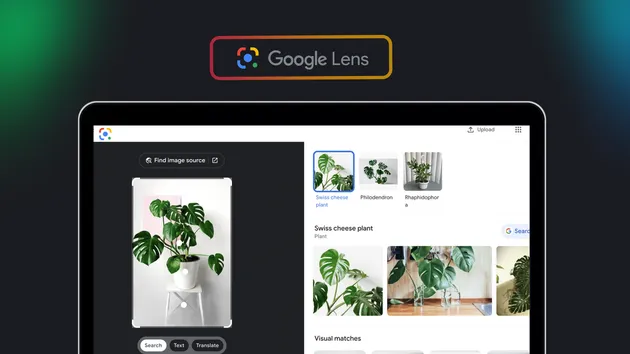
This Google Lens API runs a reverse image search on any image and returns what Google Lens shows as data: visually similar images with the pages they are on, exact matches, web results, product prices, and the text in the image (OCR) with a box for every word. You get one row per image and pay only for the search types you pick, from $1.20 per 1,000 images. Images that fail are free.
The easiest way to try it: click Start with the prefilled input to search one sample photo.
What can this Google Lens API do?
- Reverse image search in bulk. Send hundreds of images in one run and get the similar images Google Lens finds, each with its page, source site, image URL and size.
- Find where an image is used. Brand, copyright and marketplace teams check which pages carry a photo or a near-copy of it.
- Match products and compare sellers. Send product photos and get the shops showing the same item, with the price on each match where Google shows one.
- Read text from images (OCR). Signs, labels, screenshots and scans become text with word positions, optionally translated.
- Take images any way you have them. Public links, files uploaded to Apify, or base64 straight from your code. No public URL is needed.
- Give an AI agent eyes on the web. One call turns an image into structured matches.
- No browser, so no minutes-long waits. Each image is a few network requests, not a rendered page, so it comes back in seconds rather than the minutes a browser-based scraper can take.
What data does Google Lens return?
Choose any of these under What to return:
| Search type | Output field | What is in it |
|---|---|---|
visual-match | visualMatches | Similar images: title, link (the page), source, imageUrl (the image as hosted there), width, height, price and currency where the match shows one, and linkIsRedirect |
exact-match | exactMatches | Pages from Google's exact-matches tab: title, link, source, linkIsRedirect |
all | webResults | Pages about what is in the image |
products | products | Only the matches that show a price: title, price, currency, link, vendor, imageUrl, linkIsRedirect |
ocr | text, words | The text, and each word with top, left, width, height (0–1 of the image) and rotation |
translate-ocr | translation | That text translated: sourceLanguage, targetLanguage, text |
On any reverse-image run the row also carries regions: what Google Lens detected in your image,
each with a label, a Knowledge Graph entityId when Lens tied it to one, a box (cx, cy,
width, height, rotation, all 0–1, centre-based), and wholeImage. Lens answers both with
located objects and with "the subject is the whole picture" — wholeImage is true for the latter,
so filter on !wholeImage when you want only the located ones. regions is null if the image
never got far enough to report any. Regions come free with the search — no extra charge.
Every row also has status (ok, partial, failed, or skipped for an image the run never
searched, e.g. when your maximum charge was reached first, with error saying why), error, notAnswered, matchCount,
topMatchTitle, topMatchLink, charged, and index, the image's place in your input. Rows are
stored as images finish, so sort by index to get your input order back. Each match's link is the
destination's own address: we read it out of Google's redirect wrapper, so you don't get a
google.com/url?… link to unwrap. linkIsRedirect flags the rare link that is still a Google hop
(note a page that merely lives on a Google property, like Books or Arts & Culture, is a real
destination and is not flagged).
How to use the Google Lens API
- Open the actor and add your images: paste links, upload files, or point to a key-value store.
- Under What to return, tick the search types you want. Each is priced on its own.
- Optionally set the result language, the country, and a language to translate text into.
- Click Start. Each image becomes one row as soon as it is answered.
- Download the results as JSON, CSV or Excel, or read them through the API.
| Input | Use it when |
|---|---|
Image URLs (imageUrls) | The image is online. The actor downloads it itself, so the link only has to open without a login. |
Base64 (imagesBase64) | The file is on your machine and you call the API. Raw base64 or a data: URI. Apify caps a run's input at about 9 MB, so this suits a handful of images; for more, use a key-value store. |
Your key-value stores (imageKvsStores) | The files are on Apify. Choose the stores: every image in them is searched. |
Key-value store records (imageKvsRecords) | Only some records of a store, by key. The store must also be chosen in imageKvsStores, because Apify lets the actor read only the stores you choose there. |
JPEG, PNG, WebP, GIF, AVIF, TIFF and SVG are read, up to 20 MB each. Images are turned upright and sized the way the Google app sends them, so you don't have to prepare anything.
How much does the Google Lens API cost?
You pay per search type, per image, and only when that search type returned something: at least one match, some text, a translation. Pick one and you pay for one. Prices per 1,000 images:
| Search type | Free | Starter | Scale | Business and up |
|---|---|---|---|---|
Visual matches (visual-match) | $1.50 | $1.50 | $1.35 | $1.20 |
Exact matches (exact-match) | $1.50 | $1.50 | $1.35 | $1.20 |
Products (products) | $1.50 | $1.50 | $1.35 | $1.20 |
Web results (all) | $1.00 | $1.00 | $0.90 | $0.80 |
Text / OCR (ocr) | $2.50 | $2.50 | $2.25 | $2.00 |
Text with translation (translate-ocr) | $3.50 | $3.50 | $3.15 | $2.80 |
| A search type that failed or found nothing, or an image that couldn't be read | free | free | free | free |
Plus Apify's actor-start fee of $0.00005 per run. There is no charge per match, however many come back.
-
1,000 images, visual matches only: Starter $1.50, Business $1.20.
-
1,000 product photos, visual matches + products: Starter $1.50, Business $1.20. Products are included with visual matches.
-
1,000 photos, exact matches, of which 400 have none: you pay for 600, Starter $0.90.
-
5,000 screenshots, OCR only: Starter $12.50, Business $10.00.
-
100 links of which 12 are dead, visual matches: you pay for 88 images, $0.13.
-
Nothing found, nothing charged. An image with no exact matches, no text or no prices costs nothing for that search type.
chargedin each row lists what was charged. -
Products are included with visual matches. The prices are already on the visual matches, so
productsis charged only on images where visual matches were not. -
translate-ocrreturns the text as well as its translation, so you don't needocrbeside it.
Set a maximum charge for the run and the actor stops before the image that would pass it.
Free Apify plan: a run searches at most 10 images (it ends normally and says so). Ten images with visual matches cost $0.015, so the monthly free credit covers many trial runs.
Google Lens API input and output example
Input:
Output, one row per image (one of 59 matches shown):
Use the Google Lens API from code
It also works through Apify's integrations with Make, n8n, Zapier and Google Sheets, and as a tool for AI agents through Apify's MCP server.
Switch from another Google Lens scraper
The input names match borderline/google-lens (imageUrls, imagesBase64, imageKvsRecords,
searchTypes, translateLanguage, language), so an existing input runs unchanged. Three differences:
ai-modeandhomeworkare not available. They are skipped with a note and never charged.- A store on your account named in
imageKvsRecordsmust also be chosen inimageKvsStores, so that Apify lets the actor read it. - The output is one flat row per image with the fields above, not one object per search type.
Reverse image search limits
- Exact matches are broad, and often empty. Google's exact-matches tab mixes pages that carry the image with pages about it, and those entries have no titles. Treat it as leads to check, not as proof. Many images have none at all; those cost nothing.
- Products are the matches with a price. Google Lens no longer has a separate product list; a price now appears on some of the matches. In our test from a US address, 15 of 60 matches had one for a photo of earbuds, and 3 of 60 for a shoe and for a stand mixer. Images of things that aren't for sale return none. Prices appear as Google shows them, with their currency sign and no conversion, and depend on the country the search runs from: set Result country.
- Visual matches already include those prices in
price. Addproductswhen you want only the priced ones as their own list; it costs nothing extra beside visual matches. - Results change between runs. Two searches of the same image a day apart share most links, not all.
- No AI answers. Lens's AI mode is not part of this actor.
- Don't use it to identify people from photos of them.
More actors by this developer
| Actor | Use it with Google Lens to |
|---|---|
| Google Maps Scraper | get the business behind a shopfront or product you matched |
| Email Verifier | check the contact addresses of the sites that use your images |
| TikTok Shop Scraper | collect product photos to match against other shops |
FAQ
Is it legal to use Google Lens for reverse image search?
Searching with an image and reading the publicly shown results is generally lawful in many countries. What you do with the results is your responsibility: images you find remain their owners' copyright, and photos of people are personal data, which needs a lawful basis to process (for example under the GDPR). Do not use this actor to identify people. This is not legal advice.
Is this an official Google Lens API?
No. Google offers no public Lens API. This actor reads the results Google Lens shows and is not affiliated with or endorsed by Google.
How fast is the Google Lens API?
The actor starts no browser — that is what makes browser-based scrapers slow, and minutes-long runs and timeouts are the most common complaint about them. Each image is a few network requests rather than a full page render, so it answers in seconds, not minutes. Extra search types that each need their own results page, and larger batches (which are paced to stay reliable), take proportionally longer. A run that reaches its timeout can be resurrected to continue where it stopped.
Do I need a proxy or any other paid service?
No. The actor needs no proxy, no browser and no API key of yours, and it uses no Apify proxy credit. The prices above are the whole cost.
How do I see which images found something?
Each row has status, matchCount, topMatchLink and charged, and the default table shows
them. A link that is dead or is not an image gets a failed row with the reason in error, not
a silent empty result. If no image at all could be answered, the run ends as failed and says why.
What happens if Google blocks the search?
The image is retried. If it still gets no answer its row says so and it is free. If Google Lens stops answering altogether, the run ends early and tells you, without working through the rest of your list; resurrect it later and it continues where it stopped.
Can I upload an image instead of giving a URL?
Yes. Upload files to an Apify key-value store and choose it under Your key-value stores
(imageKvsStores), or send base64 from your code. Through the API, pass the store's id:
"imageKvsStores": ["<store id>"].
Am I charged for an image that fails?
No. Its row says what went wrong and it costs nothing. The same goes for one search type that fails or finds nothing while the others come back. The run itself fails only when no image at all could be answered.
What does partial mean?
Some of what you asked for came back and some didn't; notAnswered lists the rest. The actor has
already retried it. You are charged only for the search types that returned something; charged
lists them.
How many results do I get per image?
As many as Google Lens shows: the landmark photo in the example returned 59 visual matches, and an obscure subject returns fewer. Results per list caps each list if you want less.
Can I continue a run that stopped?
Yes. Resurrect it and it goes on with the images that were not stored yet, without charging any image twice.
Something is wrong or missing. Where do I report it?
Open an issue on the actor's Issues tab with the run ID. Issues are answered within a day.