

YouTube Comments Scraper: Replies, Creator Hearts, Pinned
Pricing
from $0.38 / 1,000 comments
YouTube Comments Scraper: Replies, Creator Hearts, Pinned
Scrape comments from YouTube videos and Shorts: text, author name and channel link, likes, reply counts, replies, creator hearts and pinned flags. Sort by top or newest and keep only comments newer than a date. No login. Not affiliated with YouTube. $0.50 per 1,000 comments.
Pricing
from $0.38 / 1,000 comments
Rating
0.0
(0)
Developer

Red Fox Scout
Maintained by CommunityActor stats
0
Bookmarked
2
Total users
1
Monthly active users
2 days ago
Last modified
Categories
Security
Limited permissionsShare
Scrape YouTube comments and replies from video and Shorts links. Each comment has its text, author name and channel link, likes, reply count, publish time and whether the creator hearted or pinned it. Sort by top or newest, and keep only comments newer than a date so repeat runs pay only for new ones. No login, no cookies, no API key, and not affiliated with YouTube.
Price: $0.50 per 1,000 comments. Failed videos and error rows are free, and a comment that two videos return is charged once. Apify's free plan ($5 monthly credit) covers about 10,000 comments a month.
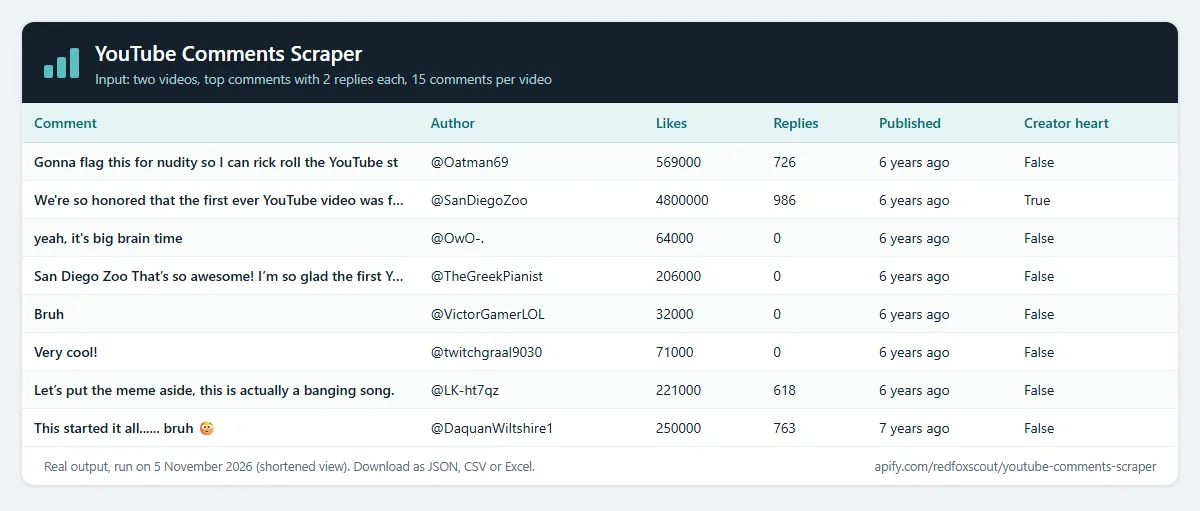
Questions it answers
- What are people saying under a video right now, and what was posted since yesterday?
- Which comments did the creator heart, pin or answer?
- Which comments get the most likes and replies on a video?
- What do viewers say across a set of competitor, product or campaign videos?
Who uses this
- 📣 Marketing and brand teams: watch the comments on campaign and competitor videos.
- 🎬 Creators and community managers: find new comments to answer and see what the audience reacts to.
- 📊 Researchers and analysts: collect comments for sentiment, topic and language analysis.
- 🤖 Developers and AI agents: feed a dashboard, spreadsheet or model with structured comments.
Why this YouTube Comments Scraper
- 🆕 Only new comments: newest first plus a date or a period like
1 daystops at the first older comment, so a daily schedule pays for new comments only. - ❤️ Creator signals: every comment says whether the creator hearted or pinned it, and whether the author is the channel owner. One tick keeps only those comments.
- 💬 Replies on request: tick one box to get replies after each comment, with a cap per comment.
- 🔗 Videos, Shorts and short links: paste watch, youtu.be or Shorts links, or bare video IDs.
- 🏷️ $0.50 per 1,000 comments: one charge per comment, with no start fee and no per-video fee.
How to use the YouTube Comments Scraper
- Click Try for free (a free Apify account is enough).
- Paste video or Shorts links, one per line.
- Choose top or newest, and optionally a date, replies or creator highlights only.
- Click Start, then download as JSON, CSV or Excel, or schedule it for a daily feed.
Input
| Field | Default | What it does |
|---|---|---|
videos | – | Video or Shorts links, or 11-character IDs, one per line. Required. |
sort | top | top (YouTube's ranking) or newest. |
commentsNewerThan | – | A date like 2026-11-01 or a period like 3 days. With newest the run stops at the first older comment. |
includeReplies | false | Also return replies after each comment. |
maxRepliesPerComment | 10 | Replies read per comment when replies are included. |
onlyCreatorHighlights | false | Only comments the creator hearted, pinned or wrote. |
maxItems | 100 | Comments per video, replies included (max 100,000). |
proxyConfiguration | off | Optional proxy. YouTube usually answers Apify's servers directly; turn it on if your runs return "YouTube answered HTTP 403" rows. |
Example (the input behind the output below):
Output
One row per comment or reply. A real row from that run:
authorNameis the public display name or handle as YouTube shows it. No emails or other personal details are collected.likeCountis what YouTube displays, so large counts are rounded (4.8Mbecomes 4800000).- YouTube shows only relative times such as
2 hours ago.approxPublishedAtis that time counted back from the run, so it is exact to the unit YouTube shows (hours for recent comments, years for old ones). parentCommentIdis set on replies and empty on top-level comments.searchQueryis the video a row came from. A video that fails adds one row with anerrorfield and no charge.
Example tasks
Ready-made inputs you can open, change and run:
Monitor a video for new comments
Set sort to newest and commentsNewerThan to a period that matches your schedule, for example 1 day for a daily run. The Actor reads comments newest first and stops at the first one older than the cutoff, so a quiet video costs almost nothing. Because YouTube gives relative times, a comment near the cutoff can appear in two runs; use commentId to remove repeats.
How much does it cost?
$0.50 per 1,000 comments.
- 100 comments: about $0.05
- 10,000 comments: about $5.00
- Failed videos and error rows: free. A comment that two videos return is charged once.
Apify's free plan gives $5 of credit every month, enough for about 10,000 comments.
FAQ
Is this legal? The Actor reads comments that YouTube shows to any visitor without logging in. It does not log in, use cookies or accounts, or solve CAPTCHAs, and it collects only the public display name and channel link a commenter shows. This is not legal advice, so check the terms and rules that apply to how you use the data.
Why are some videos returned as errors? Comments can be turned off, and private, age-restricted, members-only or removed videos show no comments to a logged-out visitor. Those videos give one free error row.
Can it return every comment of a huge video? The Actor pages through comments 20 at a time (about 1,500 per minute in tests) until it reaches maxItems or YouTube stops returning pages, which can happen before the video's total count. Use newest with a date for monitoring, and top for the most liked comments.
Are replies counted in maxItems? Yes. maxItems is the total of comments and replies per video.
Why do some rows say "YouTube answered HTTP 403"? YouTube sometimes refuses requests from cloud servers for a while. Those rows are not charged. Run again later, or turn on Apify Proxy in the proxyConfiguration input.
Related Actors
- YouTube Scraper: videos from YouTube searches and channels, with view and subscriber counts.
- Threads Scraper: public Threads posts and profiles without login.
- Telegram Channel Scraper: posts from public Telegram channels, newest first.
- Pinterest Scraper: public pins and boards by keyword or link.
- Google News Scraper: news articles for a keyword, to follow what is said outside YouTube.


