

YouTube Scraper: Videos, Channels, Search, New Videos Only
Pricing
from $1.50 / 1,000 videos
YouTube Scraper: Videos, Channels, Search, New Videos Only
Scrape YouTube videos from search terms, channel pages (videos, Shorts, streams) and video URLs. Returns title, channel, subscribers, views, publish date, duration, Short and live flags and description. Set a date to get only new videos. No login or API key. $2.00 per 1,000 videos.
Pricing
from $1.50 / 1,000 videos
Rating
0.0
(0)
Developer

Red Fox Scout
Maintained by CommunityActor stats
0
Bookmarked
2
Total users
1
Monthly active users
2 days ago
Last modified
Categories
Security
Limited permissionsShare
Scrape YouTube videos from search terms, channel pages (videos, Shorts and live streams) and video URLs. Each row has the title, channel, subscriber count, views, publish date, duration, Short and live flags and a description, and you can set a date to get only videos published after it, so a scheduled run pays for new uploads only. No login, no cookies, no API key. Not affiliated with YouTube.
Price: $2.00 per 1,000 videos. Failed searches and error rows are free, and a video that two searches return is charged once. Apify's free plan ($5 monthly credit) covers about 2,500 videos a month.
Questions it answers
- Which videos did these channels publish since yesterday, with views and duration?
- What are the newest or most viewed videos for a search term this week?
- What is a channel's most popular video of all time, and how big is the channel?
- What is the full description, tag list and exact publish date of each video in a list?
Who uses this
- 📈 Marketers and agencies: track competitor and creator channels and see what they publish and what gets views.
- 🎬 Creators and analysts: compare video length, views and upload rhythm across a niche.
- 🔎 Researchers and journalists: collect video lists for a topic with dates and links.
- 🤖 Developers and AI agents: feed a dashboard, spreadsheet or agent with structured YouTube data.
Why this YouTube Scraper
- 🆕 Only new videos: set
publishedAfterand schedule the Actor daily. Videos older than the date are skipped and never charged, and a channel read stops as soon as the list gets older than your date. - 👥 Channel stats on every row: channel name, ID, link and subscriber count come with each video from a channel.
- 📺 Videos, Shorts and live streams: pick the channel tab, and sort a channel by latest, most popular or oldest.
- 🔍 Search filters: sort by upload date, view count or rating, and limit by upload window and video length.
- 🏷️ $2.00 per 1,000 videos: one charge per video, with no add-on charges for dates, filters or full details.
How to use the YouTube Scraper
- Click Try for free (a free Apify account is enough).
- Add search terms, channel handles such as
@MrBeast, or video links, one per line. - Optional: set a published-after date, the channel tab, a sort order and search filters.
- Click Start, then download as JSON, CSV or Excel, or schedule it for a daily feed.
Input
| Field | Default | What it does |
|---|---|---|
searchTerms | – | Keywords to search on YouTube, one per line. |
channels | – | Channel handles or links (@MrBeast, /channel/UC..., /c/name), one per line. |
videoUrls | – | Video or Shorts links or 11 character IDs. Each returns the full description, tags and exact date. |
publishedAfter | – | Skip videos older than a date (2026-11-01) or a window (7 days, 24 hours, 2 weeks). |
channelTab | videos | videos, shorts or streams. |
channelSort | latest | latest, popular or oldest. |
searchSort | relevance | relevance, date, views or rating. |
uploadDate | any | Search window: hour, today, week, month or year. |
videoDuration | any | Search length: short (under 4 min), medium (4 to 20 min) or long (over 20 min). |
fetchFullDetails | false | Open every video page for the full description, tags, category and exact date. |
maxItems | 50 | Videos per search, channel or URL (max 2,000). |
proxyConfiguration | off | Optional proxy. YouTube usually answers Apify's servers directly; turn it on if your runs return "YouTube answered HTTP 403" rows. |
Example (the input behind the output below):
Output
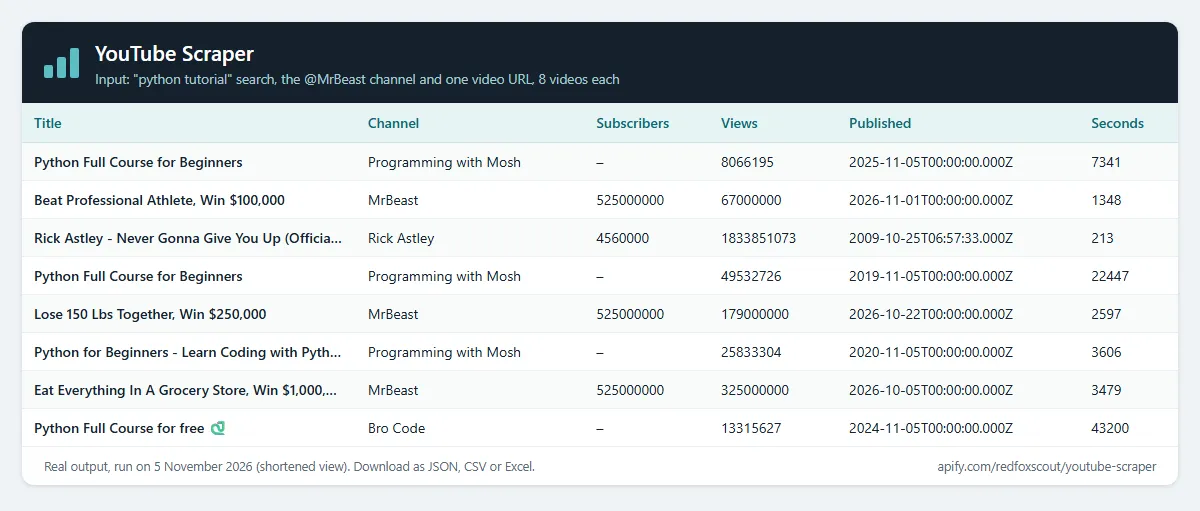
One row per video. Real rows from that run (descriptions shortened):
- Search results and channel lists show relative ages ("2 weeks ago").
publishedAtis counted back from the run time, andpublishedAtApproxistrue. Turn onfetchFullDetails, or pass the video URL, for the exact timestamp (publishedAtApproxisfalse). - Channel lists show view counts rounded by YouTube (for example 179M). Search results and video pages show exact counts.
descriptionis a snippet in search results, empty in channel lists, and the full text for video URLs or withfetchFullDetails.tagsandcategoryare filled only then.channelSubscriberscomes with channel and video-URL rows. YouTube does not show it in search results, so it isnullthere.searchQueryis the search, channel or URL a video came from. A failed search adds one row with anerrorfield and no charge.
Example tasks
Ready-made inputs you can open, change and run:
Monitor channels for new videos
Put your channels in channels, set publishedAfter to 1 day and schedule the Actor daily in Apify. Each run returns only videos published in the last day, so you pay for new uploads only. Shorts have no date in YouTube's lists, so on the Shorts tab the Actor opens each Short to read its exact date when publishedAfter is set.
How much does it cost?
$2.00 per 1,000 videos.
- 100 videos: about $0.20
- 10,000 videos: about $20.00
- Failed searches and error rows: free. A video that two searches return is charged once. Videos filtered out by
publishedAfterare not charged.
Apify's free plan gives $5 of credit every month, enough for about 2,500 videos.
FAQ
Is this legal? The Actor reads video pages and lists that YouTube shows to any visitor without logging in. It does not log in, use cookies or accounts, solve CAPTCHAs, or download video or audio. Channel names and links are shown as YouTube displays them. This is not legal advice, so check the terms and rules that apply to how you use the data.
Does it return comments or transcripts? No. This Actor returns video and channel data. For comments and replies, use YouTube Comments Scraper. It does not return transcripts or video files.
Why did a video URL come back with an error? YouTube sometimes answers a single video page with "Sign in to confirm you're not a bot". That row is an error row and is not charged. Run it again later, or find the video through a search or its channel, which use different pages and are not affected.
How many videos can one search return? YouTube search and channel lists load page by page and stop after a few hundred to a few thousand results. Set maxItems up to 2,000 per search or channel. For deeper history on a channel, use the tab and sort options to reach different slices.
Why are some subscriber counts empty? YouTube does not show a channel's subscriber count next to search results. Add the channel to channels or the video to videoUrls to get it.
Why do some rows say "YouTube answered HTTP 403"? YouTube sometimes refuses requests from cloud servers for a while. Those rows are not charged. Run again later, or turn on Apify Proxy in the proxyConfiguration input.
Related Actors
- YouTube Comments Scraper: comments and replies from any video, with pinned and creator-heart flags.
- Google Autocomplete Scraper: YouTube and Google search suggestions for video ideas.
- Telegram Channel Scraper: posts from public Telegram channels with views, dates and links.
- Threads Scraper: public Threads posts and profiles with no login.
- Pinterest Scraper: pins and boards from Pinterest searches.
- Google News Scraper: news articles by keyword and topic.


