

Google Trends API: Trending Now & Interest Over Time
Pricing
Pay per event
Google Trends API: Trending Now & Interest Over Time
Trending-now searches and new-trends alerts/monitoring per country with the news behind them, plus interest over time, interest by region, and related and rising queries for any keyword. For SEO, content and marketing teams. No API key, plain HTTP, MCP/API-ready; pay only for data delivered.

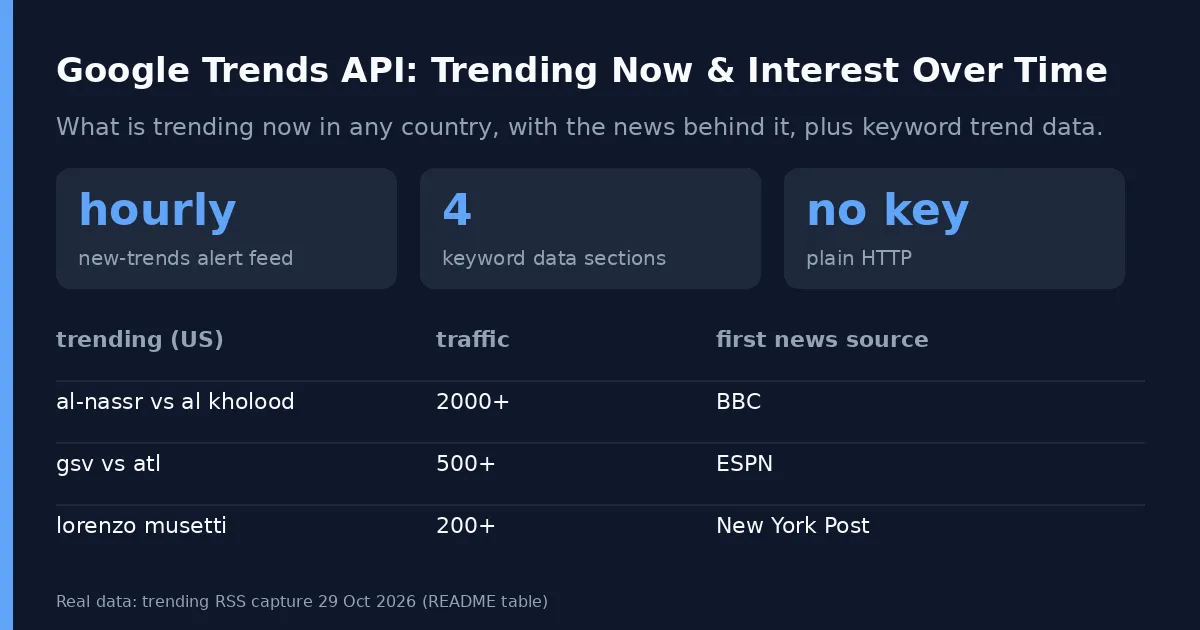
For SEO, content and marketing teams who plan around search demand: get what is trending right now in any country (with the news stories behind each trend), and for any keyword its interest over time, interest by region, and related and rising queries. No API key, plain HTTP, runs finish in seconds.
Real trending-now rows for the US (captured 29 Oct 2026):
| title | approxTraffic | publishedAt | first news source |
|---|---|---|---|
| al-nassr vs al kholood | 2000+ | 2026-10-29T10:10:00-07:00 | BBC |
| julian lewis | 500+ | 2026-10-29T10:10:00-07:00 | ESPN |
| gsv vs atl | 500+ | 2026-10-29T10:10:00-07:00 | ESPN |
| lorenzo musetti | 200+ | 2026-10-29T10:10:00-07:00 | New York Post |
| arthur kaliyev | 200+ | 2026-10-29T10:10:00-07:00 | Yahoo Sports |
What it does
- New-trends alerts & monitoring: Turn on
onlyNewTrendingand run on an hourly schedule to get only the trending searches a country has not shown in the last 7 days. Send each run to a webhook, Make, n8n, Slack, or Google Sheets for SEO/content monitoring alerts. You pay only for the new trends, and a summary row per country shows how many were new vs already reported. - Keyword data: Interest over time, by region, and related and rising queries, for Web, Image, News, YouTube or Google Shopping search, any country or region, any time range including custom dates. Each term row also carries
trendDetail— average interest, direction, peak, growth rate, volatility and trend score derived from its interest series — so a team can read the verdict without averaging points themselves. - Shopping unified view: Turn on
includeShoppingProductsto put Google Shopping products (title, numeric price, original price, merchant, rating, review count) in the same row as the trend data for each term, so one dataset shows demand and what is on offer to buy. - Compare mode: Put up to 5 terms in one comparison so values are relative to each other, like the Compare box on the Trends site.
- Bounded run time: Every term has a time budget. If Google blocks a request, the next attempt uses a new IP and fresh cookies. A term that still cannot be fetched gets a status row with the reason, and the run moves on.
- Pay for data delivered: Charged per data section delivered for each term. Failed terms and empty sections cost nothing, and your spend cap is respected.
Use cases
- SEO/content monitoring alerts: watch trending now searches by country and alert your team only when a new trend appears.
Input
| Field | What it does |
|---|---|
| Search terms | Keywords to look up |
| Compare terms | Group terms in fives into one comparison |
| Country or region | US, IN, GB, US-CA and so on. Empty means worldwide. Also accepts comma-separated regions (e.g., US,GB,IN) to fetch multi-region slices in one run; alias regionFilter is also supported. |
| Time range | Past hour to 2004 onwards, or a custom YYYY-MM-DD YYYY-MM-DD range |
| Data to fetch | Any of: interest over time, by region, related queries, related topics |
Interest by region: geo resolution (geoResolution) | COUNTRY, REGION (state/province, default), CITY, or DMA (US) granularity for interest-by-region results |
Interest by region: include low-volume geos (includeLowSearchVolumeGeos) | Include low-search-volume regions/cities in interest-by-region (default false) |
| Search type | Web, Images, News, YouTube, Shopping |
Shopping products (includeShoppingProducts) | When true, also fetch Google Shopping products for each term and add them to the same row. Default false. |
Shopping max products (shoppingMaxProducts) | Products per term when shopping products are on (default 10, 1–20). |
| Trending now: countries | Also fetch today's trending searches for these countries. An empty input (no terms, no countries) returns today's US trending searches |
Trending now: only new searches (onlyNewTrending) | Return only trending searches not reported in the last 7 days (see the recipe below) |
Output
One row per search term:
Trending searches come as "type": "trendingNow" rows with title, approxTraffic, publishedAt and a news list.
status is ok, partial (some sections failed, listed in errors) or failed (with error).
Trends + Shopping unified view
For e-commerce and marketing teams who need demand and supply together: set includeShoppingProducts to true and each searchTerm row carries the Google Shopping products for that term alongside its interest over time, interest by region, and related queries. Shopping products are fetched through the Google SERP proxy, so they need the same budget as any SERP page and carry no charge per product.
Example input:
Real output for coffee (US, captured 6 Nov 2026; first 3 of 10 products):
| title | price | priceOriginal | merchant | rating | reviewsCount | discountPercent |
|---|---|---|---|---|---|---|
| Folgers Classic Roast Ground Coffee | 19.96 | 21.00 | Walmart | 4.5 | 5000 | 6 |
| Cafe Bustelo Coffee Espresso | 7.88 | null | Vitacost.com | 4.6 | 5100 | null |
| Maxwell House Original Roast Ground Coffee | 8.99 | null | Target | 4.5 | 1900 | null |
Each product also has productId, offerId, currency, unitPrice, hasMoreSellers, delivery, returnsInfo, nearby, searchTerm, geo, and sourceUrl (the Google Shopping search URL for the term). Prices are numbers, so discounts are easy to calculate: priceOriginal is present on 6%-off Folgers above and unitPrice is $0.79/oz on Cafe Bustelo. When the shopping page cannot be fetched, the row keeps its trend data, shoppingProducts is empty, and the reason appears in errors.shoppingProducts.
What you get
searchTerm rows
| Field | Type | Description |
|---|---|---|
type | string | Always "searchTerm". |
searchTerm | string | The keyword looked up. |
comparedWith | string[] | Other terms in the same comparison group. |
geo | string | Geo code or "worldwide". |
timeRange | string | Time range used for the request. |
category | number | Trends category ID. |
property | string | Search property: web, images, news, youtube, or froogle (empty for web). |
scrapedAt | string (ISO 8601) | Time the data was fetched. |
status | string | ok, partial (some sections failed), or failed. |
interestOverTime | object[] | Time series points with date, formattedTime, value, hasData, isPartial. |
trendDetail | object | null | Derived metrics from interestOverTime (see below); null when no usable interest series was delivered. Always present on searchTerm rows. |
interestByRegion | object[] | Regional interest with geoCode, geoName, value. Granularity follows geoResolution (COUNTRY, REGION default, CITY, DMA); set includeLowSearchVolumeGeos to include low-volume areas. |
relatedQueries | object | { "top": [...], "rising": [...] } where items include query, value, formattedValue, link. |
relatedTopics | object | { "top": [...], "rising": [...] } where items include title, type, topicId, value, formattedValue, link. Currently always empty: Google's data endpoint returns no related topics (checked 3 Nov 2026 on coffee, bitcoin and taylor swift). It fills again if Google resumes sending them, at no charge while empty. |
shoppingProducts | object[] | Only when includeShoppingProducts is on. Google Shopping products for the term with productId, title, numeric price, priceOriginal, currency, unitPrice, merchant, hasMoreSellers, rating, reviewsCount, delivery, returnsInfo, nearby, discountPercent, searchTerm, geo and sourceUrl. |
shoppingSourceUrl | string | null | The Google Shopping search URL the products came from (only with includeShoppingProducts). |
errors | object | null | Per-section errors when status is partial or failed, including shoppingProducts when the shopping fetch fails. |
Trend detail (trendDetail)
Every searchTerm row carries trendDetail: analyst-ready metrics derived on the same request from that term's interestOverTime series, so you do not need to compute averages or growth yourself. The object has a stable shape:
| Field | Type | Description |
|---|---|---|
averageInterest | number | Mean of usable values (rounded to 2). |
direction | string | "up", "down", or "stable". |
peak | number | Highest usable value (rounded to 2). |
growthRate | number | null | Percent change from first to last usable value, rounded to 2; null when the series starts at 0 and ends above 0 (percent change is undefined) and 0.0 when it starts and ends at 0. |
volatility | number | Population standard deviation of usable values (rounded to 2); lower is steadier. |
trendScore | number | Composite 0–100 score combining average interest, growth and stability (rounded to 2). |
direction follows growthRate: above +5 is "up", below -5 is "down", otherwise "stable". When growthRate is null (zero start), direction follows the first-vs-last comparison instead and that term's growth contribution is omitted from the score. Points with hasData false are skipped (Google's placeholder zero is not real interest); missing, null and non-numeric values are skipped, while isPartial points are included. When interestOverTime was not requested, failed, or has no usable point, trendDetail is null instead of an object.
Real example for coffee in the US from the captured series [71, 100, 68] above:
Here the average is (71 + 100 + 68) / 3 = 79.67, growth is (68 - 71) / 71 * 100 = -4.23% (inside the ±5 band, so "stable"), peak is 100, and volatility measures how spread out those three points are around their average.
trendingNow rows
| Field | Type | Description |
|---|---|---|
type | string | Always "trendingNow". |
geo | string | Country/region code for the trending feed. |
title | string | Trending search term. |
approxTraffic | string | Approximate traffic indicator from Google Trends (e.g. "2000+"). |
publishedAt | string (ISO 8601) | When Google published the trend. |
picture | string | null | Trend image URL if present. |
pictureSource | string | null | Source of the trend image if present. |
news | object[] | News articles behind the trend: title, url, source, picture. |
firstSeenAt | string (ISO 8601) | When first seen (only when onlyNewTrending is enabled). |
status | string | ok or failed. |
Summary row (trendingNowSummary)
| Field | Type | Description |
|---|---|---|
type | string | Always "trendingNowSummary". |
geo | string | Country/region code. |
status | string | ok. |
new | number | Number of new trends returned in this run. |
alreadyReported | number | Number of trends seen before (within the last 7 days). |
Pricing
Pay per event:
- Trend data section: one charge per term per data section delivered (for example, interest over time for "coffee").
- Trending search: one charge per trending search row.
Prices: $0.002 per data section, $0.002 per trending search row, $0.02 per run. Examples: 1,000 data sections ≈ $2.00; one keyword with all four sections ≈ $0.03 per run; an hourly new-trends feed for one country that finds 5 new trends an hour ≈ $0.03 per run (about $22 a month).
Reliability: 0% failed runs in last 30 days.
New-trends alerts & monitoring recipe (onlyNewTrending)
Use onlyNewTrending to turn trending now into an alert feed: schedule it hourly and get only searches your country has not shown in the last 7 days.
Example input:
- Save the task with the input above.
onlyNewTrendingkeeps the feed focused on new trends, not repeats. - Schedule it hourly in Apify Console so new trending searches are checked regularly.
- Add a "run succeeded" webhook and send new rows to Slack, Make, n8n, or export the dataset to Google Sheets for SEO/content monitoring alerts.
- Each alert row has
title,approxTraffic,publishedAt,firstSeenAtand thenewsstories behind it, plus atrendingNowSummaryrow per country.
FAQ
- Why are values 0 to 100, not search counts? Google Trends only publishes relative interest. Use compare mode to put terms on one scale.
- Why do the same terms give slightly different numbers on two runs? Google samples its data; small differences between requests are normal on the Trends site too.
- Does it need an API key or a Google account? No.
What this does not do
It does not return absolute search volumes (Google does not publish them), keyword difficulty or CPC, and it does not log in to Google. Shopping products include price, merchant, rating and delivery text from the search page, but not product thumbnails, seller-level stock or direct product-page links: Google serves those only after a click or in a browser.
Sibling Actors: Google Jobs API Scraper and Greenhouse Jobs Scraper with Salaries.
Tips
- Values are relative (0 to 100) within each request, as on the Trends site. Use compare mode when you need terms on the same scale.
- For hundreds of terms, keep parallel terms at 3 to 5. Residential proxy (the default) gives the best success rate.
- Multi-region: Set
geoto comma-separated codes (e.g."US,GB,IN") or useregionFilterto fetch the same terms across multiple regions in one run. Each result is tagged by itsgeo. You can also pass comma-separated values totrendingNowGeos.
Using it from code or AI agents
Works with the Apify API, the Python and JavaScript clients, and the Apify MCP server, so AI agents can call it as a tool for "trend data for a keyword".
Use it from AI agents (MCP) and Python
AI agents. Add this Actor as a tool in Claude, Cursor, VS Code or any MCP client through the Apify MCP server. The agent reads the input schema, so a plain request is enough.
Python. pip install apify-client, then:
More from us
- Ashby Jobs Scraper with Salaries: Ashby jobs scraper for any startup careers board (OpenAI, Ramp, Notion and thousands more), with salary ranges as numbers: min, max, currency, period, plus equity and bonus flags
- ATS Jobs Search: Greenhouse, Lever & Ashby Jobs API: Search 328,000+ open jobs from 11,000+ companies on Greenhouse, Lever and Ashby in one run
- Google Jobs Scraper - Job Postings API: Google Jobs and job postings scraper: get job title, company, location, posted date, salary, full description and every apply link for any search
- Greenhouse Jobs Monitor & Scraper: Monitor Greenhouse jobs from any company careers board (Airbnb, Stripe, Discord and thousands more)
- Lever Jobs Scraper with Salaries: Lever jobs scraper for any company's careers page (Palantir, Spotify, Zoox, Shield AI and thousands more): flat rows with title, team, location, workplace, commitment, apply link, salary as numbers and the full description merged


