

SIRENE France Company Scraper: SIREN, NAF, Revenue, Status
Pricing
from $2.00 / 1,000 companies
SIRENE France Company Scraper: SIREN, NAF, Revenue, Status
French companies from the official Recherche d'entreprises API (INSEE SIRENE + INPI): SIREN and SIRET, legal form, NAF activity, head-office address, employee band, revenue, net income, labels, VAT number and optional directors (no birth dates). Search by text, activity, area, radius or SIREN list.
Pricing
from $2.00 / 1,000 companies
Rating
0.0
(0)
Developer

Rowcraft
Maintained by CommunityActor stats
0
Bookmarked
1
Total users
1
Monthly active users
4 days ago
Last modified
Categories
Security
Limited permissionsShare
Export French companies from the official French government company search API (data from INSEE's SIRENE register and the INPI national company register, RNE). You get clean, flat JSON, CSV or Excel. The actor calls the public API directly, not a website, so it is fast, stable and does not break when a page changes.
Search by activity (NAF/APE code), department, region, postcode, employee band, legal form, revenue, net income, creation date and labels (RGE, Qualiopi, ESS, organic and more), or around a point on the map. You can also paste SIREN or SIRET numbers and get each company's record.
Past the 10,000-result cap. The API returns at most 10,000 results per search. When your search matches more, the actor splits it automatically (by department, activity, employee band, then legal form) and merges the parts without duplicates.
Companies, with directors on request. Sole traders (entrepreneurs individuels) are never delivered. The company's directors are read only when you switch on includeOfficers, and then only their name, role and nationality as the register publishes them: never a date or year of birth. See the privacy section.
What you get
Price: $3.00 per 1,000 companies on the Free plan, $2.00 on the Business plan, paid per row delivered; the $5 monthly credit of a free Apify account covers about 1,600 companies. Details in Pricing below.
Each company becomes one row with about 60 fields:
- Identity: SIREN, SIRET of the head office, name, acronym, trade names and signs, legal form (code and label), status (active or closed), creation and closure dates
- Activity: main NAF code and label, the new NAF 2025 code, section (code and English label)
- Size: employee band (code and English label) and its year, employer or not, category (PME, ETI, GE), number of establishments and of open establishments
- Head office: street, postcode, city, INSEE city code, department and region (code and name), country, one-line address, latitude and longitude
- Finances: latest published revenue and net income with the year, plus every published year
- VAT number
- Labels and registers: ESS, RGE, organic, Qualiopi, training organisation, société à mission, SIAE, association (with RNA number), public administration, local authority, living heritage company (EPV), collective agreements (IDCC), Egapro index filed, greenhouse-gas report filed
- Link to the company's page on the official Annuaire des Entreprises, and the date the record was last updated
- Optional: the company's establishments that match your place filters (SIRET, address, coordinates, activity, employee band, status)
- Optional: the company's directors from the national register (
officersTotalplus a list with name, role, nationality when published, and whether the director is itself a company), with no date of birth, year of birth or address
Why this actor
- Official source, no blocking. The public API of the French State. No browser, no proxies, no API key.
- All results, not only the first 10,000. Automatic splitting of large searches, with duplicates removed.
- Head office in your area. The API matches a company when any of its establishments is in the place you chose. By default the actor keeps only companies whose head office is there, so a Paris search does not return companies with just one shop in Paris. Turn it off to get both.
- Creation-date filter, which the API itself does not offer.
- Around a point: latitude, longitude and a radius up to 50 km, with all the other filters still applied.
- Labels in English for sections and employee bands, with the French codes kept.
- No personal data by default. Sole traders are excluded at the source and directors are requested only if you switch on
includeOfficers, in their business role and at no extra price. - You stay in control of cost. Pay per company. The run stops cleanly when your maximum charge is reached.
How to use it
- Open the Actor and fill in Search text (the other fields are optional filters).
- Set Maximum companies to a small number for a first try (the default is a safe start).
- Optional: tick Count only and start once. You get the number of matching rows and the estimated cost, for free (only the start event is charged). Untick it to get the data.
- Click Start. The status line shows progress; the run stops cleanly at your limit or at the charge limit you set in the run options.
- Open the Dataset tab and download JSON, CSV, Excel, XML or HTML, or send the rows to Google Sheets, Slack, Make, n8n or Zapier with the Integrations tab.
- To run it on a schedule, use Schedules in Apify Console and turn on Only new rows since the last run below: every run then costs only the new rows, and a webhook URL tells you when something new came in.
Input
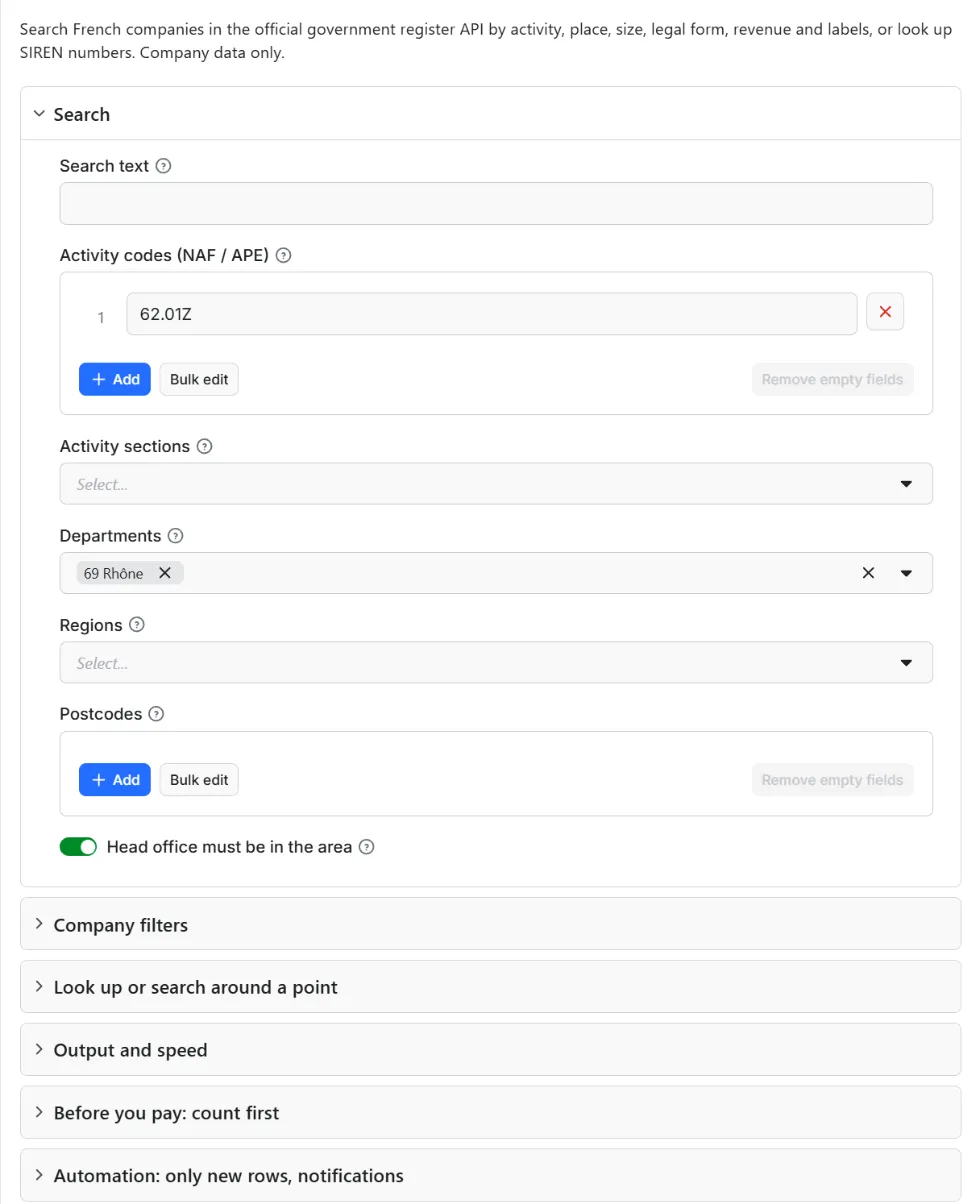
Quick start. This input is ready to run (it is also the example in the API tab):
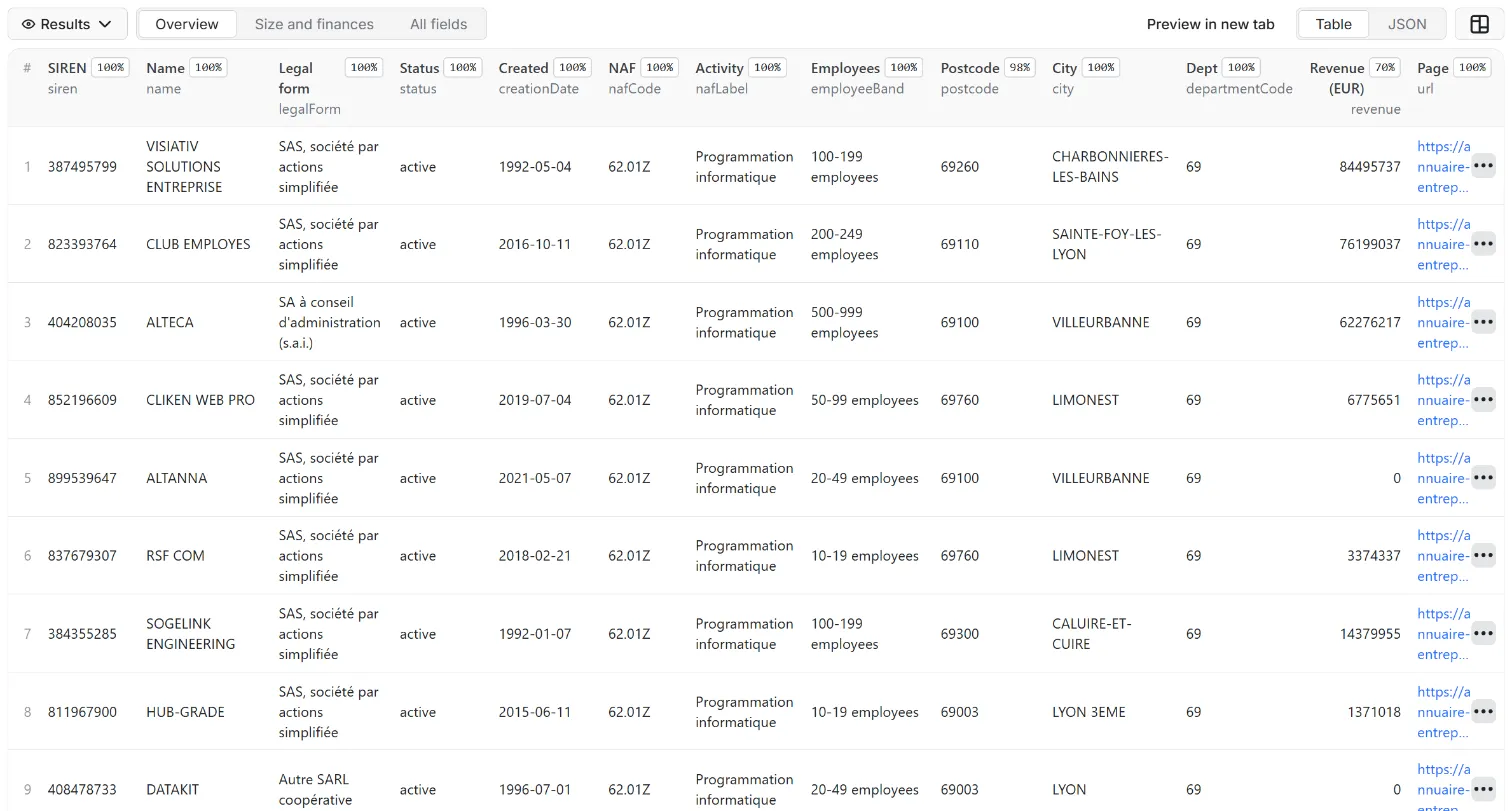
One real row it returns (long texts shortened here):
| Field | What it does |
|---|---|
query | Name, brand or address words. Optional when you use filters. With includeOfficers on it must match the company itself, never a person (see Privacy) |
nafCodes | NAF codes or prefixes: 62.01Z, 6201Z, 62 (whole division), 56.10 |
sections | Broad sectors A to U |
departments, regions, postcodes | Place filters |
headOfficeInArea | Keep only companies whose head office is in that place (default on) |
status | active (default), closed or any |
legalForms | INSEE legal-form codes, e.g. 5710 SAS, 5499 SARL, 5720 SASU, 6540 SCI, 9220 association |
employeeBands, companyCategories | Size filters |
labels | RGE, Qualiopi, ESS, organic, SIAE, société à mission and more; all chosen labels must apply |
revenueMin, revenueMax, netIncomeMin, netIncomeMax | In euros, on the latest published accounts |
createdAfter, createdBefore | YYYY-MM-DD |
sirenList | Look up these SIREN or SIRET numbers (or links that contain them) instead of searching |
latitude, longitude, radiusKm | Search around a point instead, up to 50 km |
maxItems | Stop after this many companies. 0 = all matches. Default 500 |
includeEstablishments | Add the matching establishments to each company |
includeOfficers, maxOfficersPerCompany | Add the company's directors to each row (name, role, nationality when published), up to 50 per company by default and 500 at most; same request, no extra price |
countOnly, onlyNew, stateName, notifyUrl, notifyWhenEmpty | Count before you pay, only new rows, notifications: see Automation below |
Example: software companies (NAF 62.01Z) with their head office in the Rhône department, 10 to 49 employees.
Example: RGE-certified companies in Gironde with at least €1 million in revenue.
Example: restaurants within 1 km of a point in Lyon.
Output
61 fields per row. Empty values are null, never missing, so CSV and Excel columns are stable.
| Field | Type | Example |
|---|---|---|
siren | string | 552032534 |
siretHeadOffice | string | 55203253400646 |
name | string | DANONE |
acronym | string | Acronym |
tradeNames | array | Trade names and signs |
legalFormCode | string | 5599 |
legalForm | string | SA à conseil d'administration (s.a.i.) |
status | string | active |
creationDate | string | 1955-01-01 |
closureDate | string | Closed |
nafCode | string | 70.10Z |
nafLabel | string | Main activity label |
naf2025Code | string | Main activity (NAF 2025) |
sectionCode | string | M |
section | string | Section |
employeeBandCode | string | 41 |
employeeBand | string | 500-999 employees |
employeeBandYear | integer | Employee band year |
isEmployer | boolean | Has employees |
companyCategory | string | GE |
establishments | integer | Establishments |
openEstablishments | integer | Open establishments |
street | string | Street |
addressComplement | string | Address complement |
postcode | string | 75009 |
city | string | PARIS |
cityCode | string | City code (INSEE) |
departmentCode | string | 75 |
department | string | Paris |
regionCode | string | 11 |
region | string | Île-de-France |
country | string | Country |
address | string | Full address |
addressHidden | boolean | Address withheld by the owner (partial diffusion) |
latitude | number | Latitude |
longitude | number | Longitude |
vatNumber | string | FR27552032534 |
revenue | number | Revenue (EUR, latest year) |
netIncome | number | Net income (EUR, latest year) |
financialYear | integer | Financial year |
finances | array | Revenue and net income by year |
isEss | boolean | Social and solidarity economy |
isRge | boolean | RGE certified |
isBio | boolean | Organic certified |
isQualiopi | boolean | Qualiopi |
isTrainingOrganisation | boolean | Training organisation |
isMissionCompany | boolean | Société à mission |
isSiae | boolean | SIAE |
isAssociation | boolean | Association |
isPublicAdministration | boolean | Public administration |
isLocalAuthority | boolean | Local authority |
isLivingHeritage | boolean | Living heritage company |
collectiveAgreementIds | array | Collective agreements (IDCC) |
associationId | string | Association ID (RNA) |
egaproFiled | boolean | Egapro index filed |
ghgReportFiled | boolean | GHG report filed |
lastUpdated | string | Last updated in the register |
url | string | Annuaire des Entreprises page |
matchingEstablishments | array | Matching establishments |
officersTotal | integer | 13 |
officers | array | Officers (name, role, nationality, legal person or not) |
Example rows
Two real rows from a run (long texts shortened here, complete in the dataset):
Results can be downloaded as JSON, CSV, Excel, XML or HTML from the Dataset tab, or read through the Apify API.
The second row comes from a run with includeOfficers on and maxOfficersPerCompany set to 3: officersTotal is the number of directors the register lists, officers the first three. With includeOfficers off, rows have neither field.
Pricing
Pay per result. You pay for each company delivered to your dataset, nothing else: no subscription, no minimum, no charge for rows your filters drop or for the requests behind them.
| Your Apify plan | Price per 1,000 rows | Price per row |
|---|---|---|
| Free plan | $3.00 | $0.003 |
| Starter plan | $2.67 | $0.00267 |
| Scale plan | $2.33 | $0.00233 |
| Business plan and above | $2.00 | $0.002 |
Example: 1,000 companies cost $3.00 on the Free plan and $2.00 on the Business plan. Platform usage of the run (compute, storage) is included in that price and is not billed to you separately (pay per event: the actor covers it).
A start event of $0.00005 is charged once per run (Apify default).
Cap your spend: set Maximum total charge in the run options. The actor stops cleanly when the cap is reached and you keep everything delivered until then. The run summary (RUN_SUMMARY in the key-value store) says why a run stopped.
Check before you pay: turn on Count only to see how many rows match and what they would cost at your tier. That run delivers nothing and costs only the start event.
Automation: only new rows, notifications, schedules
Only new rows since the last run. Turn on onlyNew and the actor remembers every company it delivered to you (in a key-value store named rowcraft-france-company-register-state in your Apify account). The next run with the same stateName skips what you already have and you pay only for new rows. The first run delivers everything that matches. Use a different stateName for each schedule or search so they keep separate memories.
Notification when the run ends. Put a webhook address in notifyUrl and the actor sends one JSON POST with the number of new rows, links to the dataset (JSON and CSV) and the run. It works out of the box with Slack and Discord incoming webhooks (the message is in text and content), with Make, n8n and Zapier catch hooks, and with your own endpoint. By default it is sent only when there is at least one new row; notifyWhenEmpty sends it every time.
Schedules. Create a schedule in Apify Console (hourly, daily, weekly or cron) with onlyNew on. A daily schedule gives you a feed of new companies for the price of the new rows only.
Integrations. Send the results to Make, n8n, Zapier, Google Sheets, Slack, Google Drive, Airtable or any webhooks from the Integrations tab of the Actor, with no code. Apify also offers native actions for Make, n8n and Zapier.
API, SDKs and AI agents. Every run is available through the Apify API and the official JavaScript and Python clients; the Actor can also be called by AI agents through the Apify MCP server. The example input in the API tab is a working call.
Count only. countOnly returns the number of matching companies and the estimated cost without delivering anything, so you can size a job before paying for it.
Use with AI agents (MCP). Add the Apify MCP server to Claude, Cursor, VS Code or any MCP client and the agent can run this Actor as a tool:
Call it from a shell or any language. One request runs the Actor with the input below and returns the rows as JSON:
Python (pip install apify-client):
JavaScript / Node.js (npm install apify-client):
Use cases
- B2B prospecting lists: every company of a trade in a department or region, sized by employees and revenue, with a head-office address and coordinates for mapping.
- Market sizing: how many companies of which activity, size and legal form exist where.
- Supplier and partner search: RGE, Qualiopi, organic, ESS or SIAE companies near a site.
- Enrichment and checks: paste SIREN or SIRET numbers to get status, activity, size, VAT number and published finances.
- New-company watch: filter by creation date inside a department or activity and schedule the run.
- Due diligence and supplier checks: switch on directors to see who sits on a company's board or manages it, next to its legal form, size and published finances.
Ready-made examples, each with the input filled in (open one and press Start, or save it as your own task):
What this actor does not do
- Sole traders (entrepreneurs individuels) and other legal forms made of natural persons: excluded by design.
- Date of birth, year of birth, home address, phone or e-mail of a director, and any list of the other companies a person directs: never returned. With directors on, a search by a person's name returns no rows.
- Elected officials of local authorities: never read.
- Appointment dates, country of residence and occupation of directors: the API does not provide them, so they are not in the rows.
- Documents (statuts, published accounts as PDF): not delivered; the published revenue and net income figures are.
- Companies outside France.
Limits and fair use
- One request per second by default; each request returns up to 25 companies, so up to about 1,500 companies per minute. You can slow it down; you cannot go below 250 ms.
- The creation-date filter is applied after reading, because the API cannot filter by date. Over a large search (a whole activity across France) the actor reads many companies to find the recent ones; only matches are charged. Narrow it with a department or activity.
- Around a point, the API applies only the activity filters, so the actor applies the others itself after reading.
- If one part of a split search still has 10,000+ results at the finest level, only its first 10,000 are read and the run summary says so.
- Revenue and net income exist only for companies whose accounts are published.
- Some companies asked INSEE not to publish their address. For them street, postcode and coordinates are empty and
addressHiddenistrue; the city and department stay.
Data source and licence
Source: the public API Recherche d'entreprises (recherche-entreprises.api.gouv.fr), run by the French government's digital agency (DINUM), with data from INSEE (SIRENE) and INPI (RNE). The data is published under the Licence Ouverte / Open Licence 2.0, which allows commercial reuse provided the source and the date of the last update are mentioned. Each row carries lastUpdated and a link to its official page for that purpose. The directors come from the same API (field dirigeants, source INPI): the national register of companies (RNE) is kept by INPI, which makes its public data available for consultation and reuse. INPI's licence for RNE data allows commercial reuse if the source and the date of the last update are mentioned and the data-protection rules are respected. This actor is independent and not affiliated with or endorsed by DINUM, INSEE or INPI.
Privacy: company data, directors only in their business role
With directors switched off, which is the default, a row holds no personal data about directors or owners. With includeOfficers on:
- Only the directors list of each company is read, the one the national register (RNE) publishes. Each director keeps name, role and nationality when published. A company that is itself a director (a statutory auditor, for example) keeps its name and role and is marked
isCorporate. Date of birth, year of birth and every other field of the source item are dropped before the row is saved. - Nothing else about a person is requested: no address, phone, e-mail or identification number of a person, and the elected officials of local authorities stay unread.
- Sole traders (entrepreneurs individuels) and legal forms made of natural persons (indivisions, de facto partnerships between people) are excluded. In a SIREN lookup they are reported as excluded, not delivered.
- Address complements that name a person ("chez M. …", "c/o …") are dropped.
- E-mail addresses and phone numbers that appear in names or addresses are masked.
- No search by a person's name. The API matches the search text against company names, addresses and also directors' names. With
includeOfficerson, the actor therefore delivers a company only when every word of the search text is found in the company's own data: name, acronym, trade name, head-office address or SIREN/SIRET (one typo and plurals are tolerated). A company found only through a director's name is not delivered and not charged; the run summary counts them indroppedPersonNameMatchesand adds a warning. So a director's name typed as the search text returns no rows, and nobody can use the actor to list everything one person is appointed to. A SIREN or SIRET typed as the search text is a direct company lookup and always works. - The actor keeps no copy of the rows: they go only to your own dataset. If you are a director shown in an example on this page and want it removed, open an issue on the Issues tab and it is removed within 14 days; the register itself is changed only through the French register (INPI).
Director data is personal data under the GDPR. Use it for business purposes such as due diligence, compliance, supplier checks and company research, with a lawful basis of your own, and do not combine it with other sources to profile individuals. You are responsible for using the data in line with the law that applies to you, including the GDPR and French rules on direct marketing.
Other Rowcraft actors
Related Rowcraft actors. All of them read official or public sources, deliver flat rows without private contact details and support only-new runs and notifications; the full list is on the Rowcraft profile:
- Brazil CNPJ Companies Scraper: Receita Federal Register Data — Company records from the Brazilian CNPJ register for a list of CNPJ numbers or a search by state, city and CNAE activity: legal name, trade name, status, legal nature, capital, address, opening date and size.
- Company Register Lookup Europe: Name, ID, Domain or LEI — Look up a European company by name, domain or registry number and get one unified profile from the official registers of France, Norway, Poland, the UK and the LEI index.
- KRS Poland Companies Scraper: Register Data, PKD, Status — Polish companies from the official KRS register API of the Ministry of Justice: name, KRS, NIP and REGON numbers, legal form, status, address, PKD activity codes, share capital, branches and registration dates.
- Norway Company Register Scraper: Brønnøysund Business Data — Norwegian companies from the Central Coordinating Register for Legal Entities (Brønnøysund, NLOD open data): organisation number, legal form, industry, employees, share capital, addresses, website, VAT and bankruptcy status; optional directors and board (name and role only).
- UK Companies House Scraper: Company Search & Profiles API — UK companies from the official Companies House API with your free key: search by name, status, type, SIC code, date or location, or look up company numbers.
- Email List Hygiene API: Syntax, MX, Disposable Check — Clean an e-mail list for $0.50 per 1,000 addresses without contacting any mail server: syntax, MX records, null MX, disposable domains, typos and repeats checked from DNS.
FAQ
Is this web scraping? No. It uses the official public API of the French government. No login or API key is needed.
What is the difference between SIREN and SIRET? SIREN (9 digits) identifies the company; SIRET (14 digits) identifies one establishment. The actor returns one row per company with the head office SIRET, and optionally the matching establishments.
Why are sole traders not included? Because a sole trader is a person, not a company. The actor delivers companies; directors only when you ask for them.
Can I get the directors? Yes: switch on includeOfficers. Each row then has officersTotal (how many the register lists) and officers, a list with name, role, nationality when published, and isCorporate. maxOfficersPerCompany caps the list (50 by default, 500 at most). Directors are included in the company price. The register's list also holds roles such as statutory auditors; the role field says which.
Can I search by a director's name? No. With includeOfficers on, the search text must match the company itself (name, acronym, trade name, head-office address or SIREN/SIRET). Companies that only match through a director's name are dropped, counted in droppedPersonNameMatches in the run summary, and never charged. Use a company name, a SIREN or filters such as activity and place instead.
Why are there no birth dates, ages or addresses? The actor delivers directors only in their business role. Date and year of birth and addresses say more about the person than about the company, so they are dropped before the row is saved. The company page linked in every row shows what the register itself publishes.
Why is nationality often empty? The API gives it only for some directors and the actor never guesses it. The same goes for appointment dates, country of residence and occupation: the API does not provide them.
Is it legal to use this data? The register is public and INPI's licence allows reuse, including commercial reuse, if you mention the source and the date of the last update. Directors' names and roles are still personal data under the GDPR: you need a lawful basis of your own, such as a legitimate business interest in due diligence, and the purpose must fit it. How you use the data is your responsibility under the law that applies to you.
Does it collect personal data? Only when includeOfficers is switched on, and then only the fields listed above. Without it a row holds company data only. E-mail addresses and phone numbers are never delivered. See the Privacy section.
Why do I get fewer companies with a department filter than on other sites? By default the actor keeps only companies whose head office is in that department. Set headOfficeInArea to false to also get companies with only an establishment there.
Can I get every company in France? Yes in principle: leave maxItems at 0 and use a broad filter. The actor splits the search as needed. Large exports take time at one request per second.
Can I pay only for new companies? Yes. Turn on Only new rows since the last run: the actor remembers what it delivered to you and later runs with the same state name deliver (and charge) only the new rows.
How do I get the results into Slack, Google Sheets, Make, n8n or Zapier? Use the Integrations tab of the Actor for the data, and the notifyUrl field for a message when a run ends (Slack and Discord webhooks work directly; catch hooks of Make, n8n and Zapier too).
Can I call it from code or from an AI agent? Yes: through the Apify API, the JavaScript and Python clients, and the Apify MCP server. The API tab shows a working example with the input of this Actor.
The run finished with 0 rows. Did I pay? No: with no rows delivered nothing is charged apart from the start event. Check the run summary (RUN_SUMMARY) for warnings, widen the filters, or run with Only new rows off if everything matching was already delivered to you.
Support and reviews
Problems, missing fields, questions: open an issue on the Issues tab of this Actor. We answer within one working day and fix confirmed bugs in the next release; the changelog lists every change.
If this Actor saved you time, a short review on its page helps other users find it and helps us keep improving it.


