

Email List Hygiene API: Syntax, MX, Disposable Check
Pricing
from $0.35 / 1,000 address checkeds
Email List Hygiene API: Syntax, MX, Disposable Check
Clean an e-mail list for $0.50 per 1,000 addresses without contacting any mail server: syntax, MX records, null MX, disposable domains, typos and repeats checked from DNS. The result holds no addresses by default, so it carries no personal data.
Pricing
from $0.35 / 1,000 address checkeds
Rating
0.0
(0)
Developer

Rowcraft
Maintained by CommunityActor stats
0
Bookmarked
2
Total users
1
Monthly active users
4 days ago
Last modified
Categories
Security
Limited permissionsShare
Clean an email list before you send to it. Paste your addresses and the actor returns one verdict per address (ok, risky, invalid) with the reasons: broken syntax, a top-level domain that does not exist, a domain that does not exist, a domain that publishes a null MX and so receives no mail, a disposable domain, a likely typo such as gmial.com, a role name such as info@, a free provider and repeated addresses. It reads public DNS and lists that ship inside the actor, and it never contacts a mail server.
It does not check that a mailbox exists. No message is sent and no mail server is asked about the address, so the actor cannot tell real.person@company.com from nobody@company.com when the domain is fine. What it removes is the part of a list that is certainly or probably unusable, cheaply and without sending your addresses to anyone.
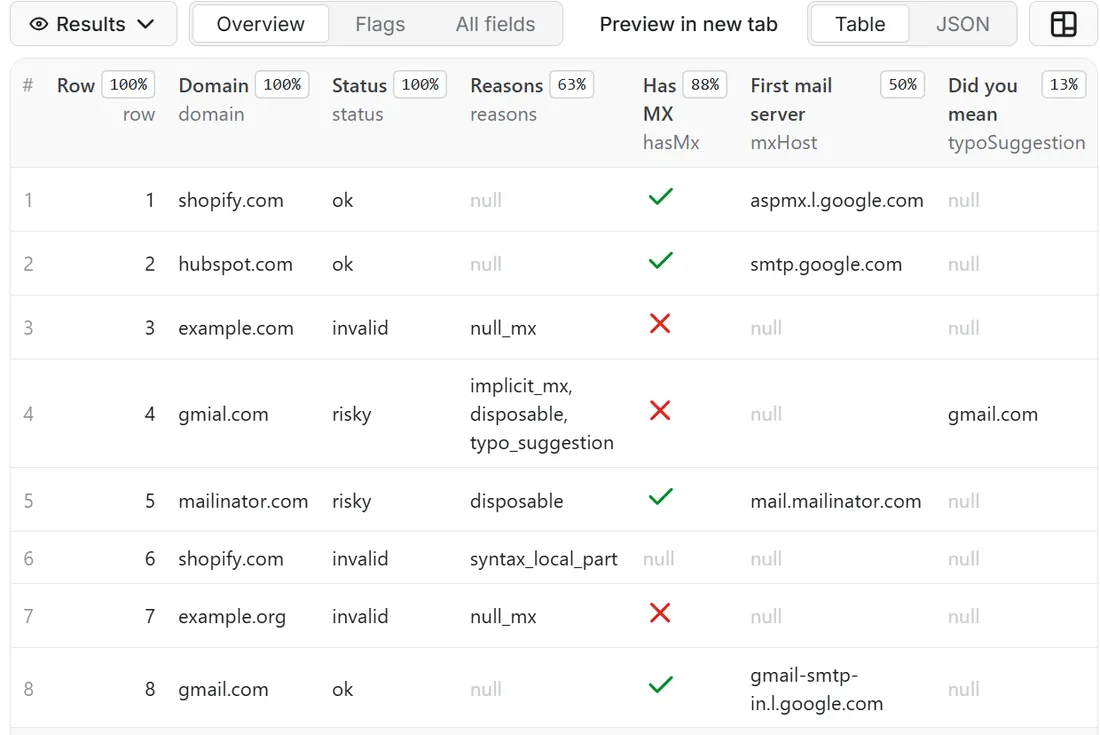
What you get
Price: $0.50 per 1,000 addresss on the Free plan, $0.35 on the Business plan, paid per row delivered; the $5 monthly credit of a free Apify account covers about 10,000 addresss. Details in Pricing below.
One row per address, in the order of your list:
- A verdict:
statusisok,risky,invalidorunknown, andreasonslists the codes behind it (syntax_local_part,syntax_domain,tld_unknown,domain_not_found,null_mx,no_mail_servers,implicit_mx,disposable,typo_suggestion,role_account,free_provider,non_ascii_local_part,no_at_sign,dns_unavailable,duplicate). - The facts behind it:
syntaxOk,tldKnown,domainExists,hasMx,usesImplicitMx,nullMx,mxHost(the first mail server by priority, a server name and never a person),disposable,roleAccount,freeProvider,plusTag. - A suggestion:
typoSuggestionnames the well-known domain a mistyped one was probably meant to be. It is a hint, never a verdict. - A way back to your list:
rowis the position of the address in your list andduplicateOfRowpoints to the first occurrence of a repeated address. - Run records:
RUN_SUMMARY(counts per status, the most frequent reasons, the version and date of the lists) andCOVERAGE(the entries that were not delivered as a charged row, with the reason; it holds no addresses).
By default the rows carry the domain and the position in your list, not the address. If you want the address in the rows you can ask for a masked or a full one.
Why this actor
- The address stays with you. DNS is asked about the domain only; the part before the @ never leaves the run. Nothing is logged, nothing is written to a record, and the default result contains no address, so it holds no personal data. Three tests in the build check exactly this on every release.
- No mail server is touched. Probing mail servers (SMTP) sends each address to a third party and is blocked or answered unreliably by large providers. This actor stays on DNS, which is open and stable.
- Pay for verdicts, not for noise. Repeats of an address, entries without an @, empty entries and rows where DNS could not answer are not charged.
- Honest wording.
okmeans: well formed, the domain says it receives mail, nothing suspicious found. It does not mean that the mailbox exists. - Lists that ship with the actor. Nothing is downloaded when a run starts. The disposable-domain list has 9,927 domains (list of 2026-10-26) and the top-level domain list is the IANA list of the same date; both are in
RUN_SUMMARY.listsVersionand are refreshed with each release.
How to use it
- Open the Actor and fill in Email addresses (the other fields are optional filters).
- Set Maximum addresss to a small number for a first try (the default is a safe start).
- Click Start. The status line shows progress; the run stops cleanly at your limit or at the charge limit you set in the run options.
- Open the Dataset tab and download JSON, CSV, Excel, XML or HTML, or send the rows to Google Sheets, Slack, Make, n8n or Zapier with the Integrations tab.
- To run it on a schedule, use Schedules in Apify Console and turn on Only new rows since the last run below: every run then costs only the new rows, and a webhook URL tells you when something new came in.
Input
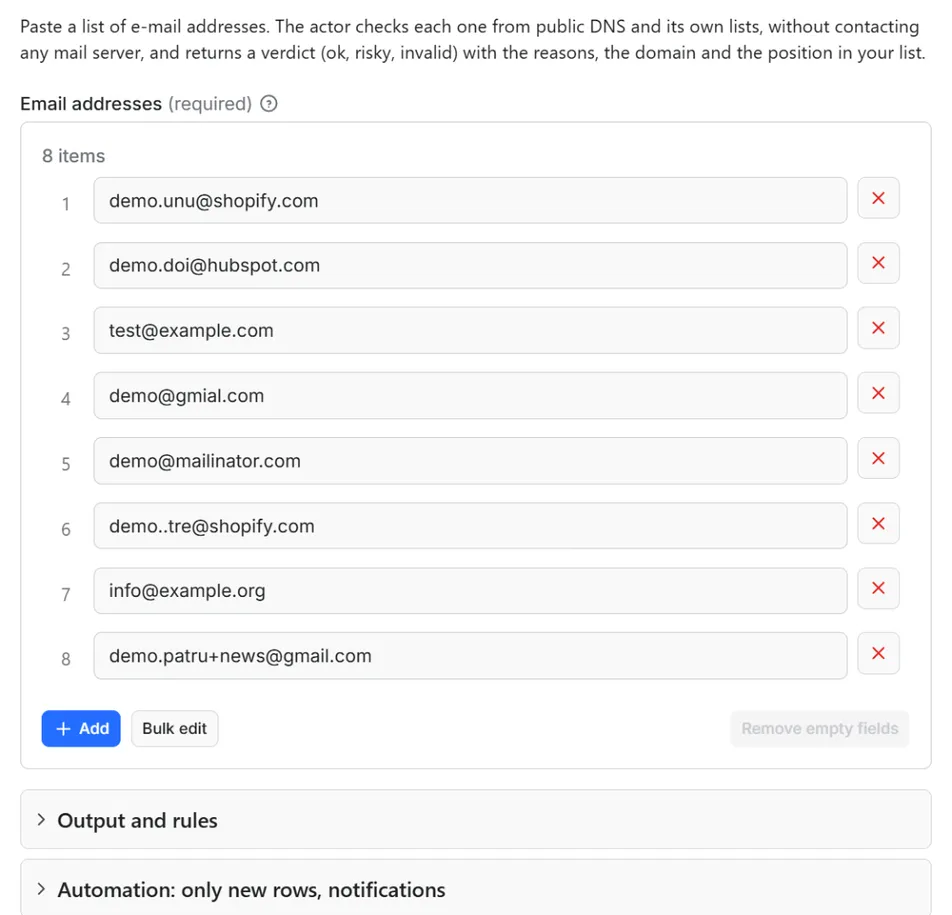
Quick start. This input is ready to run (it is also the example in the API tab):
One real row it returns (long texts shortened here):
| Field | What it does |
|---|---|
emails | Addresses, one per line. Name <a@b.com> is accepted and the name is dropped. A cell holding several addresses separated by commas, semicolons or line breaks is split. Up to 100,000 per run. |
addressOutput | none (default): no address in the rows. masked: j***@domain. full: the address as given. |
treatRoleAsRisky, treatFreeAsRisky | Give role accounts (info, sales, support) or free providers (Gmail, Outlook, Yahoo and about 130 more) the status risky. They are always flagged in roleAccount and freeProvider. |
emailField | When an entry is an object (the output of another actor), the name of the field that holds the address. Everything else in the object is ignored and never copied. |
maxItems | Stop after this many addresses were checked and charged. 0 = the whole list. |
onlyNew, stateName | Deliver only addresses not delivered in an earlier run with the same state name |
notifyUrl, notifyWhenEmpty | A webhook that receives one message when the run ends; see Automation |
requestIntervalMs | Optional pause between domains, default 0 |
Output
20 fields per row. Empty values are null, never missing, so CSV and Excel columns are stable.
| Field | Type | Example |
|---|---|---|
row | integer | 3 |
domain | string | example.com |
status | string | invalid |
reasons | string | null_mx |
syntaxOk | boolean | True |
tldKnown | boolean | True |
domainExists | boolean | True |
hasMx | boolean | False |
usesImplicitMx | boolean | False |
nullMx | boolean | True |
mxHost | string | aspmx.l.google.com |
disposable | boolean | False |
roleAccount | boolean | False |
freeProvider | boolean | False |
typoSuggestion | string | A well-known domain this one is probably a typo of (a domain, not an address); null when none |
plusTag | boolean | False |
duplicateOfRow | integer | Set when the entry repeats an earlier one: the position of the first occurrence. Repeats carry the verdict of the first one and are not charged |
checkedAt | string | 2026-10-26T08:00:00.000Z |
address | string | demo@example.com |
maskedAddress | string | d***@example.com |
address and maskedAddress exist only when you ask for them with addressOutput; all other fields are always present. Lists of codes are one text separated by a comma and a space.
Example rows
Two real rows from a run (long texts shortened here, complete in the dataset):
Results can be downloaded as JSON, CSV, Excel, XML or HTML from the Dataset tab, or read through the Apify API.
How the verdict is decided
| Status | When |
|---|---|
invalid | Broken syntax, an unknown top-level domain, a domain that does not exist (NXDOMAIN), a null MX (RFC 7505: the domain says it receives no mail), or a domain with neither mail servers nor an address record |
risky | A disposable domain, a likely typo, mail that would go to the domain's own address because there is no MX record (implicit MX, RFC 5321), a non-ASCII local part, and, if you ask, role names or free providers |
ok | Well formed, the domain publishes mail servers, nothing else found |
unknown | DNS could not answer after one retry (server failure, timeout). Never turned into invalid, never charged |
The checks run in two phases. First the unique domains are resolved (MX, then A and AAAA only when there is no MX), so the cost depends on the number of domains, not addresses. Then the rows are built in the order of your list.
Pricing
Pay per result. You pay for each address delivered to your dataset, nothing else: no subscription, no minimum, no charge for rows your filters drop or for the requests behind them.
| Your Apify plan | Price per 1,000 rows | Price per row |
|---|---|---|
| Free plan | $0.50 | $0.0005 |
| Starter plan | $0.45 | $0.00045 |
| Scale plan | $0.40 | $0.0004 |
| Business plan and above | $0.35 | $0.00035 |
Example: 1,000 addresss cost $0.50 on the Free plan and $0.35 on the Business plan. Platform usage of the run (compute, storage) is included in that price and is not billed to you separately (pay per event: the actor covers it).
A start event of $0.00005 is charged once per run (Apify default).
Cap your spend: set Maximum total charge in the run options. The actor stops cleanly when the cap is reached and you keep everything delivered until then. The run summary (RUN_SUMMARY in the key-value store) says why a run stopped.
Automation
Only new rows since the last run. Turn on onlyNew and the actor remembers every address it delivered to you (in a key-value store named rowcraft-email-list-hygiene-state in your Apify account). The next run with the same stateName skips what you already have and you pay only for new rows. The first run delivers everything that matches. Use a different stateName for each schedule or search so they keep separate memories.
Notification when the run ends. Put a webhook address in notifyUrl and the actor sends one JSON POST with the number of new rows, links to the dataset (JSON and CSV) and the run. It works out of the box with Slack and Discord incoming webhooks (the message is in text and content), with Make, n8n and Zapier catch hooks, and with your own endpoint. By default it is sent only when there is at least one new row; notifyWhenEmpty sends it every time.
Schedules. Create a schedule in Apify Console (hourly, daily, weekly or cron) with onlyNew on. A daily schedule gives you a feed of new addresss for the price of the new rows only.
Integrations. Send the results to Make, n8n, Zapier, Google Sheets, Slack, Google Drive, Airtable or any webhooks from the Integrations tab of the Actor, with no code. Apify also offers native actions for Make, n8n and Zapier.
API, SDKs and AI agents. Every run is available through the Apify API and the official JavaScript and Python clients; the Actor can also be called by AI agents through the Apify MCP server. The example input in the API tab is a working call.
Use with AI agents (MCP). Add the Apify MCP server to Claude, Cursor, VS Code or any MCP client and the agent can run this Actor as a tool:
Call it from a shell or any language. One request runs the Actor with the input below and returns the rows as JSON:
Python (pip install apify-client):
JavaScript / Node.js (npm install apify-client):
Use cases
- Before a campaign: drop invalid, disposable and mistyped addresses so bounces stay low.
- After a scraper or a form export: chain this actor to clean the contact column; set
emailFieldto the field name. - Signup forms and CRMs: run a nightly list with
onlyNewand a webhook, and inspect only theriskyrows. - Cheap pre-filter: run it first and send only the survivors to a mailbox-level verifier.
Ready-made examples, each with the input filled in (open one and press Start, or save it as your own task):
What this actor does not do
- It does not check that a mailbox exists, and it does not detect catch-all domains, full mailboxes or spam traps. Those need a conversation with the mail server.
- It does not contact any mail server and does not send any message.
- It does not look at who owns an address and does not tell personal from company addresses;
roleAccountandfreeProviderare hints. - It does not score addresses from 0 to 100. A score without a mailbox check would be precision it does not have.
- It does not find addresses and does not enrich them with names, phones or companies.
Limits and fair use
- Up to 100,000 addresses per run. Split larger lists; with
onlyNewthe next run skips what was delivered. - The disposable list is a public list of 9,927 domains. Newer or private disposable services are not on it, so
disposable: falsemeans "not on the list". - Local parts with quotes are treated as invalid; non-ASCII local parts are accepted and marked
risky. - The actor asks at most 10 domains and 20 DNS queries at a time and retries a failed query once. If 10 domains in a row cannot be resolved, it stops and says so in
RUN_SUMMARY.
Data source
The actor reads public DNS (MX, A and AAAA records) through the resolver of the platform, and checks addresses against lists included in the build: the disposable-email-domains list (CC0 1.0, from the public GitHub repository), the IANA root zone list of top-level domains, and tables written by Rowcraft for free providers, role names and frequent typos. This actor is independent and not affiliated with or endorsed by the maintainers of those lists, IANA or any mail provider named in the results. The standards behind the checks are RFC 5321 and 5322 (addresses, implicit MX) and RFC 7505 (null MX), see rfc-editor.org, and the TLD list is at data.iana.org.
Privacy
The actor does not contact mail servers. It asks DNS about domain names only, as any mail client does, and your addresses or their local parts are never part of a DNS query, a log line, RUN_SUMMARY, COVERAGE, the status message or the notification. By default the dataset holds no address and therefore no personal data. With addressOutput set to masked or full the address appears in your own dataset, in your account, and masking is cosmetic. onlyNew stores only HMAC-SHA-256 codes under a random salt per state name, never addresses. You are responsible for having a legal basis to process the list you provide.
Other Rowcraft actors
Related Rowcraft actors. All of them read official or public sources, deliver flat rows without private contact details and support only-new runs and notifications; the full list is on the Rowcraft profile:
- Brazil CNPJ Companies Scraper: Receita Federal Register Data — Company records from the Brazilian CNPJ register for a list of CNPJ numbers or a search by state, city and CNAE activity: legal name, trade name, status, legal nature, capital, address, opening date and size.
- Company Register Lookup Europe: Name, ID, Domain or LEI — Look up a European company by name, domain or registry number and get one unified profile from the official registers of France, Norway, Poland, the UK and the LEI index.
- Domain Email and DNS Checker API: MX, SPF, DMARC, Providers — Find which email provider, sending services and DNS host each domain uses, from public DNS records only.
- SIRENE France Company Scraper: SIREN, NAF, Revenue, Status — French companies from the official Recherche d'entreprises API (INSEE SIRENE + INPI): SIREN and SIRET, legal form, NAF activity, head-office address, employee band, revenue, net income, labels, VAT number and optional directors (no birth dates).
- KRS Poland Companies Scraper: Register Data, PKD, Status — Polish companies from the official KRS register API of the Ministry of Justice: name, KRS, NIP and REGON numbers, legal form, status, address, PKD activity codes, share capital, branches and registration dates.
- Norway Company Register Scraper: Brønnøysund Business Data — Norwegian companies from the Central Coordinating Register for Legal Entities (Brønnøysund, NLOD open data): organisation number, legal form, industry, employees, share capital, addresses, website, VAT and bankruptcy status; optional directors and board (name and role only).
FAQ
Does it check that a mailbox exists? No. It does not contact mail servers, so it can say that the domain can receive mail and that the address is well formed, not that the mailbox is real.
Why is the address not in the result? To keep the result free of personal data by default. Use row to join the verdicts back to your list, or set addressOutput to masked or full.
What is the difference between invalid, risky and unknown? Invalid addresses cannot receive mail. Risky ones can, but are suspect (disposable, typo, implicit MX, or role and free provider if you asked). Unknown means DNS did not answer and the row is free.
What is a null MX? A domain that publishes a single MX record with an empty host says it receives no mail (RFC 7505). Example domains such as example.com do this, and every address there is invalid.
What is an implicit MX? A domain with no MX record but an A or AAAA record can still receive mail at its own address by the SMTP rules. It is marked risky, because most real mail domains publish MX records.
Are repeated addresses charged? No. The repeat is delivered with the verdict of the first one, duplicateOfRow set and the reason duplicate, free of charge. Case and display names do not matter: A@x.com and Name <a@X.com> are the same address.
Is it legal to use? The actor reads public DNS and lists published under open terms, and it processes only the list you give it. Whether you may process the addresses is your responsibility under the law that applies to you.
Does the result contain personal data? By default no: only the position in your list, the domain and flags. If you choose masked or full, the address you supplied is echoed into your own dataset.
The run finished with few or empty rows. Why? Empty entries are skipped and counted, and unknown, repeat and no-@ rows are free. Check RUN_SUMMARY and COVERAGE for the counts and the reason; a run can also stop early on the time limit or the charge limit you set.
How much does it cost? $0.50 per 1,000 addresss on the Free plan, less on paid plans (see Pricing). You pay only for rows delivered to your dataset; set a maximum total charge in the run options to cap a run.
Can I pay only for new addresss? Yes. Turn on Only new rows since the last run: the actor remembers what it delivered to you and later runs with the same state name deliver (and charge) only the new rows.
How do I get the results into Slack, Google Sheets, Make, n8n or Zapier? Use the Integrations tab of the Actor for the data, and the notifyUrl field for a message when a run ends (Slack and Discord webhooks work directly; catch hooks of Make, n8n and Zapier too).
Can I call it from code or from an AI agent? Yes: through the Apify API, the JavaScript and Python clients, and the Apify MCP server. The API tab shows a working example with the input of this Actor.
Does it collect personal data? No. Contact persons, e-mails and phone numbers are removed and fields about people are never requested. See the Privacy section.
The run finished with 0 rows. Did I pay? No: with no rows delivered nothing is charged apart from the start event. Check the run summary (RUN_SUMMARY) for warnings, widen the filters, or run with Only new rows off if everything matching was already delivered to you.
Support and reviews
Problems, missing fields, questions: open an issue on the Issues tab of this Actor. We answer within one working day and fix confirmed bugs in the next release; the changelog lists every change.
If this Actor saved you time, a short review on its page helps other users find it and helps us keep improving it.


