

France Fuel Prices Scraper – Official Open Data by Station
Pricing
from $0.50 / 1,000 fuel stations
France Fuel Prices Scraper – Official Open Data by Station
Current fuel prices at every French station, straight from the official open-data feed (Licence Ouverte 2.0): gazole, SP95, SP98, E10, E85 and GPLc, each with its update time. Filter by department, city or radius. No personal data, no proxies.
Pricing
from $0.50 / 1,000 fuel stations
Rating
0.0
(0)
Developer

Rowcraft
Maintained by CommunityActor stats
0
Bookmarked
2
Total users
1
Monthly active users
9 days ago
Last modified
Categories
Features
Share
Get the current fuel prices of every petrol station in France from the official open-data feed of the French Ministry of the Economy. This France fuel prices scraper reads the government's own price file once per run, so it is fast (most runs finish well under a minute), complete (about 9,800 stations) and does not break when a website changes its layout. Each station comes back as one flat row: address, postal code, city, department, coordinates, opening hours, services and the price of gazole, SP95, SP98, E10, E85 and GPLc, each with the time that price was last updated, as JSON, CSV or Excel.
Filter by department, postal code, city, fuel or distance from a point, or take the whole country. Schedule it with Only new rows to get only the stations whose price changed since the last run, for the price of those rows.
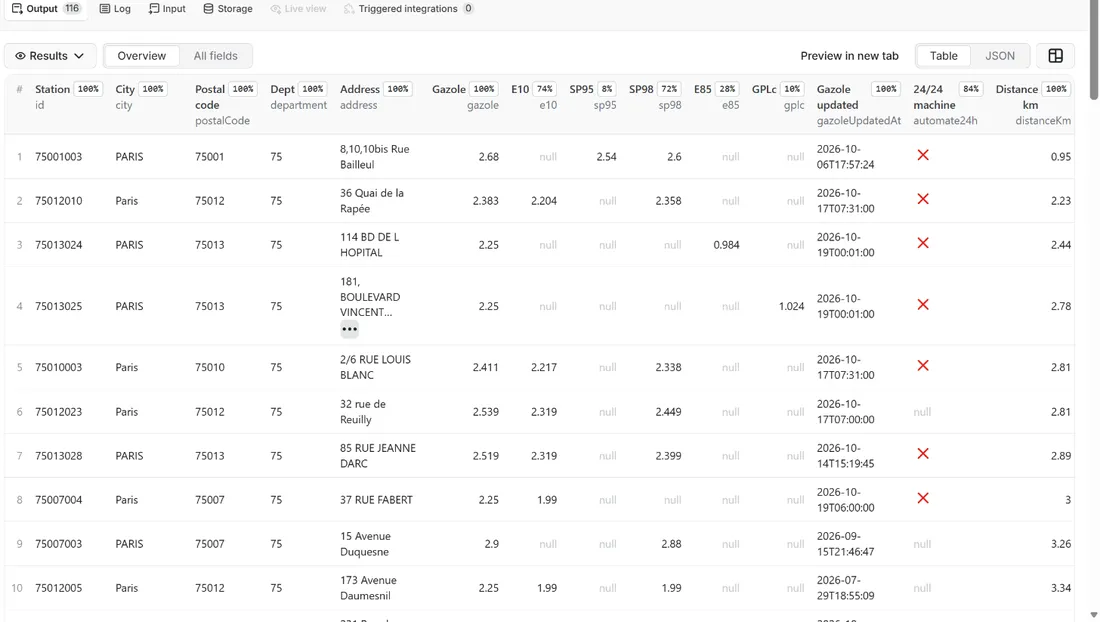
What you get
Price: $0.80 per 1,000 fuel stations on the Free plan, $0.50 on the Business plan, paid per row delivered; the $5 monthly credit of a free Apify account covers about 6,200 fuel stations. Details in Pricing below.
One row per station, the same 28 columns for every station:
- Station: the official station ID, street address, postal code, city, department code and name (Corsica as 2A and 2B), latitude and longitude in decimal degrees, road type (ordinary road or motorway service area)
- Prices:
gazole,sp95,sp98,e10,e85andgplcin euros per litre, and next to each one...UpdatedAt, the moment that price was last updated at the station. A fuel the station does not sell isnull - Availability: the list of fuels that have a price, and the list of fuels reported out of stock
- Opening hours and services: opening hours as readable text ("Mon-Fri 07:00-21:00; Sat-Sun 08:00-20:00"), whether the station has a 24/24 card machine, and the services it lists (car wash, tyre inflation, shop, toilets, electric charging, LPG and more)
- Search helpers:
distanceKmwhen you search around a point, andchangedFuelswhen you use Only new rows
Prices are current prices only. The feed holds no history, so to build one you run the actor on a schedule.
Why this actor
- The official feed, not a web page. The Ministry publishes the prices as an open-data file under the Licence Ouverte 2.0. The actor downloads that file once per run (about 1 MB zipped), after reading the robots.txt of the host. There is no page to break, no proxy and no CAPTCHA.
- A timestamp for every price. A price that has not changed for three weeks looks the same as one updated ten minutes ago in most price lists. Here every fuel has its own
UpdatedAt, so you can drop stale prices or rank by freshness. - Filters that read like a map. Departments by code or name (Gironde, 33, 2A), postal codes, cities written any way you like (st sever finds Saint-Sever), fuels, and a centre point with a radius that delivers the nearest stations first.
- Only the prices that changed. Turn on Only new rows and a station comes back only when one of its prices carries a timestamp you have not received before. A daily or hourly schedule then costs you the changes, not the whole country.
- Clean values. Coordinates are real degrees (the feed gives them multiplied by 100,000), text is decoded from the feed's ISO-8859-1 encoding, department codes are derived from postal codes, and empty values are
null, never missing. - No personal data, no surprises on the bill. The feed describes stations, not people. You pay per delivered station, with a charge cap you control.
How to use it
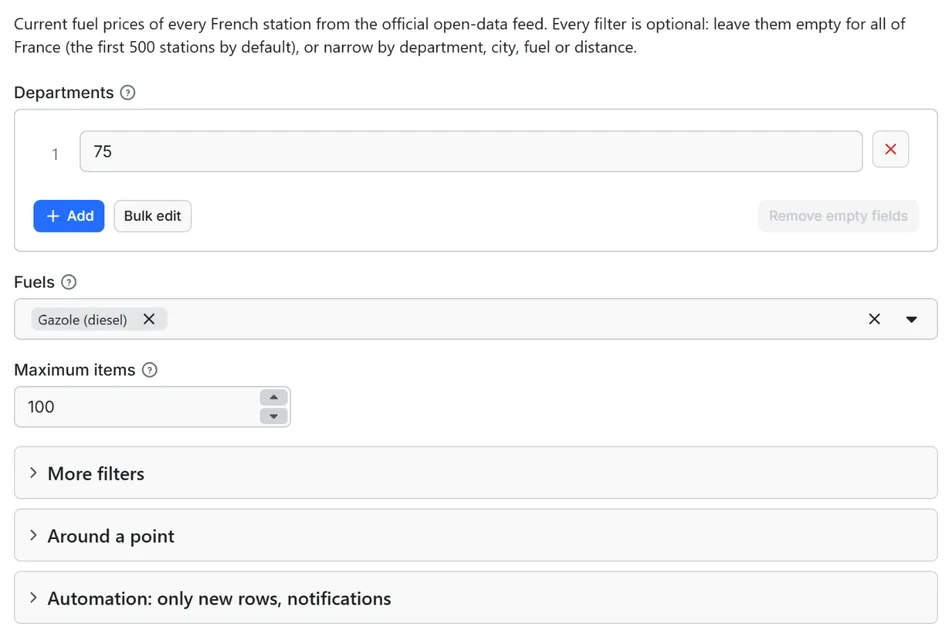
- Open the Actor and fill in Departments (the other fields are optional filters).
- Set Maximum fuel stations to a small number for a first try (the default is a safe start).
- Click Start. The status line shows progress; the run stops cleanly at your limit or at the charge limit you set in the run options.
- Open the Dataset tab and download JSON, CSV, Excel, XML or HTML, or send the rows to Google Sheets, Slack, Make, n8n or Zapier with the Integrations tab.
- To run it on a schedule, use Schedules in Apify Console and turn on Only new rows since the last run below: every run then costs only the new rows, and a webhook URL tells you when something new came in.
Input
Quick start. This input is ready to run (it is also the example in the API tab):
One real row it returns (long texts shortened here):
| Field | What it does |
|---|---|
departments | Department codes or names, one per line: 75, 33, 2A, 971, Gironde. Empty = all of France. The old code 20 covers both Corsican departments |
fuels, fuelsMatch | Keep only stations that have a price for these fuels. With several fuels, fuelsMatch chooses between all of them (default) and at least one |
maxItems | Stops after this many stations. Default 500; 0 = no limit |
postalCodes, cities | Five-digit postal codes (a dropped leading zero is repaired: 5100 = 05100); city names in any capitalisation, with or without accents and hyphens. Paris, Lyon and Marseille also match their arrondissements |
center, radiusKm | Latitude and longitude as Google Maps shows them (48.8566, 2.3522) and a radius in kilometres (default 10). The nearest stations come first and each row carries distanceKm |
onlyNew, stateName, notifyUrl, notifyWhenEmpty | Only the stations whose prices changed since the last run, and a webhook message at the end; see Automation below |
Different filters narrow each other (department and city and fuel); several values inside one filter widen it (Paris or Lyon). A value that matches nothing is reported in the run summary instead of silently returning an empty result.
Example: the diesel price of every station within 15 km of the centre of Bordeaux, nearest first.
Example: all stations of three departments that sell E85, in one file.
More recipes, all of them plain input you can paste into the form's JSON view:
The stations of four postal codes that sell E10 or SP95. Use fuelsMatch: "all" (the default) to keep only stations that sell both.
Every station of three neighbouring cities, whatever it sells, for a regional table.
A national diesel watch for a schedule: the first run delivers every station with a diesel price, each later run delivers only the stations whose diesel price changed, and a message goes to your webhook when new rows came in.
Output
28 fields per row. Empty values are null, never missing, so CSV and Excel columns are stable.
| Field | Type | Example |
|---|---|---|
id | string | 75015036 |
address | string | 21 AVENUE EMILE ZOLA |
postalCode | string | 75015 |
city | string | PARIS |
department | string | 75 |
departmentName | string | Paris |
latitude | number | 48.846443 |
longitude | number | 2.280126 |
roadType | string | road |
automate24h | boolean | True |
openingHours | string | Mon-Fri 07:00-21:00; Sat-Sun 08:00-20:00 |
services | array | ["Toilettes publiques", "Boutique alimentaire", "Station de gonflage"] |
fuelsAvailable | array | ["gazole", "e85", "gplc", "… 2 more"] |
outOfStock | array | [] |
gazole | number | 2.449 |
gazoleUpdatedAt | string | 2026-10-07T15:48:53 |
sp95 | number | 1.99 |
sp95UpdatedAt | string | 2026-07-10T19:40:00 |
sp98 | number | 2.419 |
sp98UpdatedAt | string | 2026-10-07T15:48:53 |
e10 | number | 2.339 |
e10UpdatedAt | string | 2026-10-07T15:48:53 |
e85 | number | 0.995 |
e85UpdatedAt | string | 2026-10-07T15:48:53 |
gplc | number | 0.825 |
gplcUpdatedAt | string | 2025-09-04T23:16:00 |
distanceKm | number | 3.24 |
changedFuels | array | ["gazole"] |
Working with the data
- Prices are euros per litre, as numbers, with up to three decimals. E85 is much cheaper per litre than the others because it is mostly ethanol, so do not rank it against gazole or E10 without allowing for the higher consumption.
- Rank by price, filter by freshness. Sort the dataset on the fuel column and keep rows whose
...UpdatedAtis recent. A price that nobody has touched for weeks is often correct, but it is the first one to check when you plan a trip. - The
idis the station's identifier in the official feed. Use it to join runs over time, to keep a price history of your own, or to match stations with another list. Postal code and department are derived from the address in the feed and are always strings, so leading zeros survive in CSV and Excel. - Group on
departmentordepartmentNameto compute regional averages in a spreadsheet; Corsica is split into 2A and 2B as in the official numbering. - Empty is
null. A missing price, a missing opening-hours text or a missing distance isnull, never an empty string or a zero, so a filter such as "gazole is not empty" works the same in every tool.
Run summary and coverage
Every run writes a RUN_SUMMARY record to the key-value store: how many stations the feed held, how many matched your filters, how many were delivered, why the run stopped (all read, maximum reached, charge limit, or a refusal of the source), the filters as the actor understood them, warnings, and the memory peak. A second record, COVERAGE, lists every department, postal code and city you asked for with the number of stations that matched it on its own, so a misspelt city shows up as not_found instead of a silent empty dataset.
Example rows
Two real rows from a run (long texts shortened here, complete in the dataset):
Results can be downloaded as JSON, CSV, Excel, XML or HTML from the Dataset tab, or read through the Apify API.
Pricing
Pay per result. You pay for each fuel station delivered to your dataset, nothing else: no subscription, no minimum, no charge for rows your filters drop or for the requests behind them.
| Your Apify plan | Price per 1,000 rows | Price per row |
|---|---|---|
| Free plan | $0.80 | $0.0008 |
| Starter plan | $0.70 | $0.0007 |
| Scale plan | $0.60 | $0.0006 |
| Business plan and above | $0.50 | $0.0005 |
Example: 1,000 fuel stations cost $0.80 on the Free plan and $0.50 on the Business plan. Platform usage of the run (compute, storage) is included in that price and is not billed to you separately (pay per event: the actor covers it).
A start event of $0.00005 is charged once per run (Apify default).
Cap your spend: set Maximum total charge in the run options. The actor stops cleanly when the cap is reached and you keep everything delivered until then. The run summary (RUN_SUMMARY in the key-value store) says why a run stopped.
A run over the whole of France (about 9,800 stations, maxItems set to 0) costs about $7.84 at the Free plan price and $4.90 at the Business plan price. A department holds between about 20 and 275 stations, so one department costs between 1 and 22 cents at the Free plan price.
Automation: only new rows, notifications, schedules
Only new rows since the last run. Turn on onlyNew and the actor remembers every fuel station it delivered to you (in a key-value store named rowcraft-france-fuel-prices-scraper-state in your Apify account). The next run with the same stateName skips what you already have and you pay only for new rows. The first run delivers everything that matches. Use a different stateName for each schedule or search so they keep separate memories.
Notification when the run ends. Put a webhook address in notifyUrl and the actor sends one JSON POST with the number of new rows, links to the dataset (JSON and CSV) and the run. It works out of the box with Slack and Discord incoming webhooks (the message is in text and content), with Make, n8n and Zapier catch hooks, and with your own endpoint. By default it is sent only when there is at least one new row; notifyWhenEmpty sends it every time.
Schedules. Create a schedule in Apify Console (hourly, daily, weekly or cron) with onlyNew on. A daily schedule gives you a feed of new fuel stations for the price of the new rows only.
Integrations. Send the results to Make, n8n, Zapier, Google Sheets, Slack, Google Drive, Airtable or any webhooks from the Integrations tab of the Actor, with no code. Apify also offers native actions for Make, n8n and Zapier.
API, SDKs and AI agents. Every run is available through the Apify API and the official JavaScript and Python clients; the Actor can also be called by AI agents through the Apify MCP server. The example input in the API tab is a working call.
Use with AI agents (MCP). Add the Apify MCP server to Claude, Cursor, VS Code or any MCP client and the agent can run this Actor as a tool:
Call it from a shell or any language. One request runs the Actor with the input below and returns the rows as JSON:
Python (pip install apify-client):
JavaScript / Node.js (npm install apify-client):
What counts as new here. The feed gives every price a timestamp. With Only new rows the actor remembers each combination of station, fuel and timestamp it has delivered to you. A station is delivered again when at least one of its prices has a timestamp you do not have yet; the changedFuels column then says which fuels changed, and the row still carries all current prices of the station. Stations whose prices have not changed are skipped and are not charged.
Use cases
- Price monitoring: a scheduled run per department, a webhook into Slack or a spreadsheet, and an alert when the cheapest diesel of your area moves.
- Fleet and logistics: the cheapest stations along a route or around a depot, with the fuel you need and a 24/24 card machine, ranked by distance.
- Price comparison and apps: a fresh, normalised table of stations with coordinates for a map or a comparison page, refreshed on a schedule.
- Journalism and research: regional price differences, the spread between diesel and E10, and how many stations report a shortage, from an official source you can cite.
- Spreadsheets and dashboards: send the dataset to Google Sheets, Airtable or a BI tool and compute your own averages per department or per road type.
Ready-made examples, each with the input filled in (open one and press Start, or save it as your own task):
What this actor does not do
- Deliver the brand or network of a station. The feed does not carry it, and the actor does not guess it from the address.
- Deliver price history. It reads the current prices of the feed; use a schedule to collect your own history.
- Look up addresses or place names for the radius search. Give coordinates in
center; the actor does not call a geocoder or any other website. - Cover other countries, electric charging prices or heating oil.
- Compute averages, rankings or forecasts. It delivers the rows; the calculation is yours.
- Use proxies, log in, solve CAPTCHAs or read the portal's own API.
Limits and fair use
- One download per run. The actor reads the robots.txt of the data host, then downloads the ZIP file once (about 1 MB; about 12 MB of XML once unpacked). It never requests the file again during the run, and the minimum pause between the two requests is 500 ms.
- Freshness. The source states that it updates the file every 10 minutes. Each price carries its own timestamp, and a station updates a price only when it changes or when the operator reports it, so some prices are hours, days or months old. Filter on the
...UpdatedAtfields if you need recent prices only. - Default of 500 stations. Without filters the first 500 stations are delivered; the run summary says how many more match. Set Maximum items to 0 for everything that matches.
- Coverage of the feed. At the time of writing (19 October 2026) the feed lists about 9,800 stations in mainland France and Corsica. It lists no station in the overseas departments, and not every station reports every fuel.
- If the source is down or refuses the request, the run ends normally, delivers nothing and charges only the start event. The run summary says what the host answered; run again later.
- Memory. The default of 256 MB is enough for the whole country.
What a run does, step by step
- It reads your input and checks the values that could cost you money if misread: a centre point that is not a coordinate, a radius that is not a number, a fuel it does not know. A bad value stops the run before any request is sent.
- It requests the robots.txt of the data host and stops if the feed path is disallowed.
- It waits for the request interval, then downloads the feed ZIP once.
- It unpacks the XML in memory, decodes it from ISO-8859-1 and reads the stations one at a time.
- It maps every station to a row, applies your filters and, with Only new rows, drops the stations whose prices you already have.
- It delivers the rows in batches of 500 and stops at your maximum or your charge limit.
- It writes the run summary and the coverage report, and sends the webhook message if you set one.
Data source (and licence)
The data is Prix des carburants en France, the instant price feed published by the French Ministry of the Economy and distributed on donnees.roulez-eco.fr as a ZIP file with one XML file. It is described on the data.gouv.fr dataset page and shown to the public on prix-carburants.gouv.fr. The data is open data under the Licence Ouverte 2.0 (Etalab): it may be reused, including commercially, if you name the source and the date of the last update, so keep the ...UpdatedAt timestamps next to the prices you publish and credit the Ministry of the Economy as the source.
The actor reads only that file. It does not use the Opendatasoft API of the portal, and it does not read any other website. Rowcraft is independent and not affiliated with or endorsed by the French Ministry of the Economy or any of its services; the names belong to their owners.
Privacy: no personal data
Rowcraft actors are built not to collect personal data:
- The feed describes fuel stations, which are business locations: an address, prices and services. It contains no names of managers, no e-mail addresses and no phone numbers, and the actor does not add any.
- The only coordinates delivered are those of the stations.
You are responsible for using the data in line with the law that applies to you.
Other Rowcraft actors
Related Rowcraft actors. All of them read official or public sources, deliver flat rows without private contact details and support only-new runs and notifications; the full list is on the Rowcraft profile:
- Europe Fuel Prices Scraper: Spain and Portugal Stations — Current fuel prices at every station in Spain and Portugal, straight from the official government sources: diesel, petrol 95 and 98, LPG and more, each with its update time.
- Brazil CNPJ Companies Scraper: Receita Federal Register Data — Company records from the Brazilian CNPJ register for a list of CNPJ numbers or a search by state, city and CNAE activity: legal name, trade name, status, legal nature, capital, address, opening date and size.
- Company Register Lookup Europe: Name, ID, Domain or LEI — Look up a European company by name, domain or registry number and get one unified profile from the official registers of France, Norway, Poland, the UK and the LEI index.
- SIRENE France Company Scraper: SIREN, NAF, Revenue, Status — French companies from the official Recherche d'entreprises API (INSEE SIRENE + INPI): SIREN and SIRET, legal form, NAF activity, head-office address, employee band, revenue, net income, labels, VAT number and optional directors (no birth dates).
- KRS Poland Companies Scraper: Register Data, PKD, Status — Polish companies from the official KRS register API of the Ministry of Justice: name, KRS, NIP and REGON numbers, legal form, status, address, PKD activity codes, share capital, branches and registration dates.
- LEI Records Scraper: Legal Entity Identifier Lookup API — Legal Entity Identifier (LEI) records from the Global LEI Index, read through the public GLEIF API: legal name, legal form, register number, addresses, status, renewal date and parent companies.
FAQ
How fresh are the prices? The source updates the feed every 10 minutes, and the actor downloads it at the start of the run, so a run shows what the feed held a few minutes earlier. Every price has its own UpdatedAt timestamp, which tells you when the station last changed or confirmed it.
Why is a fuel null? The station does not sell that fuel, or it has no price for it at the moment (not reported, or a temporary shortage). fuelsAvailable lists the fuels that do have a price and outOfStock lists the fuels the feed reports as out of stock.
Why is there no brand or network name? The official feed does not carry it. Some street addresses contain a network name (for example a line such as "Station TOTAL - Quartier La Poretta"), but this is free text, so the actor leaves it in address and does not guess a brand.
Why do some prices have a date from last year? A price stays in the feed until the station changes it. A fuel that sells slowly, for example GPLc, can keep a price from months ago, which is why every price has its own timestamp.
What does the time in ...UpdatedAt mean? It is the time published by the feed, in France local time. The feed carries no time zone, so the actor does not add one.
How do I find the cheapest stations near me? Set center to your coordinates, radiusKm to the distance you accept and fuels to your fuel, then sort the dataset by the price column. The nearest stations are delivered first and distanceKm shows how far each one is.
What do I do with a station that has no price at all? It stays in the dataset unless you filter by fuel, because the feed lists it. Pick a fuel in fuels to keep only stations that sell it.
What does automate24h mean? It is true when the station has an automatic payment machine that works day and night, which is how the feed describes it. openingHours describes the attended station or shop, so a station can be closed in openingHours and still pump at night with a card.
Can I rely on the opening hours? Treat them as indicative. Operators fill them in themselves and the feed is sometimes inconsistent: a motorway station that sells fuel can have every day marked closed. The actor reports what the feed says, with days marked closed shown as closed, and does not correct it.
Is it legal? Yes, for the data as published. The prices are open data under the Licence Ouverte 2.0, which allows reuse including commercial use when you name the source and the date of the last update. The actor reads the file politely: robots.txt first, one download per run, no proxy. How you use the data is your responsibility under the law that applies to you.
Can I pay only for new fuel stations? Yes. Turn on Only new rows since the last run: the actor remembers what it delivered to you and later runs with the same state name deliver (and charge) only the new rows.
How do I get the results into Slack, Google Sheets, Make, n8n or Zapier? Use the Integrations tab of the Actor for the data, and the notifyUrl field for a message when a run ends (Slack and Discord webhooks work directly; catch hooks of Make, n8n and Zapier too).
Can I call it from code or from an AI agent? Yes: through the Apify API, the JavaScript and Python clients, and the Apify MCP server. The API tab shows a working example with the input of this Actor.
Does it collect personal data? No. Contact persons, e-mails and phone numbers are removed and fields about people are never requested. See the Privacy section.
The run finished with 0 rows. Did I pay? No: with no rows delivered nothing is charged apart from the start event. Check the run summary (RUN_SUMMARY) for warnings, widen the filters, or run with Only new rows off if everything matching was already delivered to you.
Support and reviews
Problems, missing fields, questions: open an issue on the Issues tab of this Actor. We answer within one working day and fix confirmed bugs in the next release; the changelog lists every change.
If this Actor saved you time, a short review on its page helps other users find it and helps us keep improving it.


