

Website Tech Stack Detector – Technology Lookup API
Pricing
from $1.00 / 1,000 domains
Website Tech Stack Detector – Technology Lookup API
Find the technologies behind a list of websites: CMS, e-commerce platform, analytics, tag managers, ad pixels, consent tools, chat, CDN and payments, from one polite home-page request per domain. robots.txt obeyed, no personal data, pay only per analysed domain.
Pricing
from $1.00 / 1,000 domains
Rating
0.0
(0)
Developer

Rowcraft
Maintained by CommunityActor stats
0
Bookmarked
2
Total users
1
Monthly active users
4 days ago
Last modified
Categories
Security
Limited permissionsShare
Website Tech Stack Detector: Technology Lookup API
Find out which technologies a website runs on: its CMS, e-commerce platform, analytics, tag manager, ad pixels, cookie consent tool, live chat, CDN, hosting, web server, payment providers, frameworks, A/B testing, e-mail marketing and rating widgets. Give the actor a list of domains or URLs; it reads each home page once, politely, and returns one row per website with every technology it found, its version when the page shows it, and the evidence behind each detection, as JSON, CSV or Excel.
The detection rules are Rowcraft's own: 336 fingerprints in 41 categories, written and checked on real home pages, built for precision first. A technology is reported only when the page shows a clear sign of it, so a WooCommerce shop is not tagged as VTEX because the word "vtex" appears somewhere in its code.
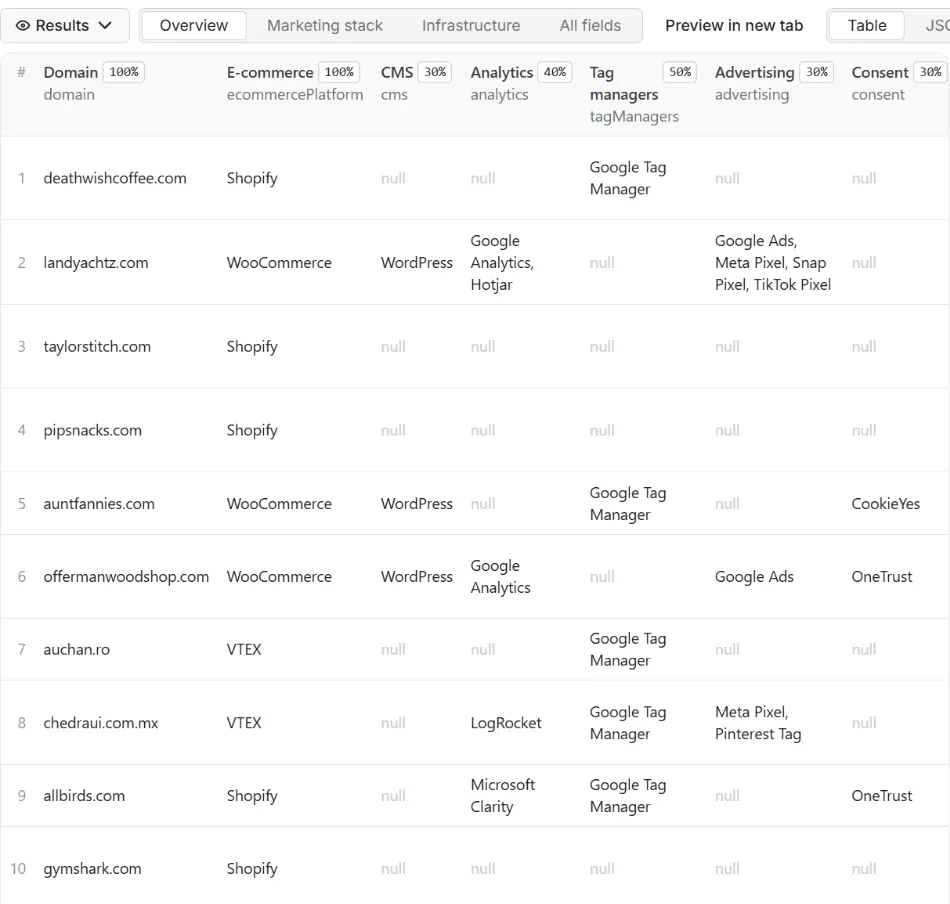
What you get
Price: $1.50 per 1,000 websites on the Free plan, $1.00 on the Business plan, paid per row delivered; the $5 monthly credit of a free Apify account covers about 3,300 websites. Details in Pricing below.
One row per website:
- Identity: the domain, the address you gave, the home page address after redirects, HTTP status, page title and declared language
- E-commerce platform: one name (Shopify, WooCommerce, Magento, PrestaShop, VTEX, Salesforce Commerce Cloud, BigCommerce, Shopware...) or null
- Every technology found: name, category, version (when the page shows it, for example WordPress 7.2 or jQuery 3.7.1) and the evidence: the header, cookie name, generator tag, script address or code snippet that gave it away
- 16 ready-made columns for filtering in a spreadsheet, each a comma-separated list of names (empty when nothing of that kind was found):
cms,ecommerce,analytics,tagManagers,advertising,consent,chat,cdn,hosting,server,payments,frameworks,abTesting,emailMarketing,ratings,other - Change tracking: a
stackHashof the set of technologies, which changes when a tool is added or removed, and the time of the check
The run also writes a COVERAGE record with one line per domain you asked for (ok, blocked, robots_disallowed, not_found, error or not_checked, with the reason) and a RUN_SUMMARY with counts and the most frequent technologies of the list.
Why this actor
- Evidence with every detection. Each technology comes with what was seen on the page, so you can trust it, check it in the page source, or filter it out.
- Precision first. A technology needs one strong sign (a header, a cookie name, a script from its own servers) or two independent weaker ones. Words that only look like a product name in minified code do not count.
- Own rules, no third-party database. The 336 fingerprints were written by Rowcraft on the home pages of 126 real websites (shops on Shopify, WooCommerce, VTEX, PrestaShop, Magento, Salesforce Commerce Cloud and others, publishers, software companies and framework sites), then checked on 29 more that were not used to write them.
- Shopify app detection. Apps that Shopify loads through its own loader (Klaviyo, Attentive, Smile.io, Postscript, Klevu and more) are read from the loader list, where a plain script scan misses them.
- Pay only for websites read. Domains behind an anti-bot page, disallowed by robots.txt, not found, invalid or repeated in your list are never charged.
- Polite by design. robots.txt is read and obeyed first, then one request for the home page, one request per second by default.
How to use it
- Open the Actor and paste your domains or URLs into Domains or URLs, one per line. A column copied from a spreadsheet works, and so do entries separated by commas.
- For a first try keep the list short, or set Maximum domains delivered to a small number.
- Click Start. The status line shows progress; the run stops cleanly at your maximum or at the charge limit you set in the run options.
- Open the Dataset tab: the Overview, Marketing stack and Infrastructure views show the main columns. Download JSON, CSV, Excel, XML or HTML, or send the rows to Google Sheets, Slack, Make, n8n or Zapier with the Integrations tab.
- Open the
COVERAGErecord in the key-value store to see which domains could not be read and why. - To watch a list over time, run it on a schedule with Only new rows since the last run turned on: a website is delivered, and charged, again only when its technologies changed.
Input
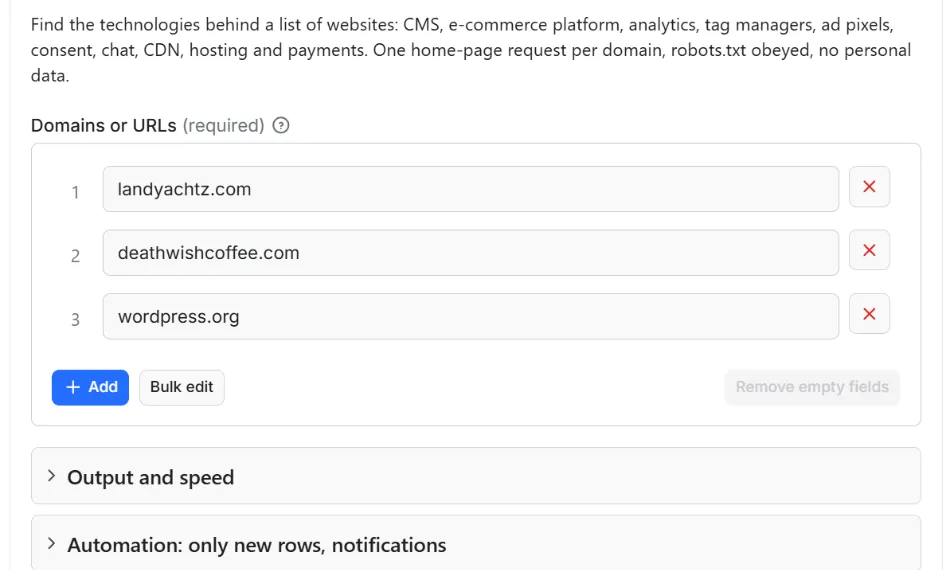
Quick start. This input is ready to run (it is also the example in the API tab):
One real row it returns (long texts shortened here):
| Field | What it does |
|---|---|
domains | Domains (example.com) or addresses (https://www.example.com/shop), one per line. Only the home page is read; the path is ignored. Up to 100,000 per run. |
maxItems | Stop after this many delivered rows. 0 = the whole list. |
onlyNew, stateName | Deliver a website only when its set of technologies changed since the last run with the same state name |
notifyUrl, notifyWhenEmpty | A webhook that receives one message when the run ends; see Automation below |
requestIntervalMs | Pause between requests, default 1000 ms, minimum 250 ms |
Example: three websites, one row each.
Example: a weekly check of competitors that reports only the websites whose stack changed, with a Slack message.
Output
28 fields per row. Empty values are null, never missing, so CSV and Excel columns are stable.
| Field | Type | Example |
|---|---|---|
id | string | pipsnacks.com |
domain | string | pipsnacks.com |
inputUrl | string | https://www.pipsnacks.com/collections |
url | string | https://www.pipsnacks.com/ |
statusCode | integer | 200 |
siteTitle | string | Pip's Heirloom Snacks | The Classics, Made Better with Heirloom Corn |
language | string | en |
ecommercePlatform | string | Shopify |
technologyCount | integer | 10 |
technologies | array | [{"name": "Shopify", "category": "E-commerce", "version": null, "ev… |
cms | string | WordPress |
ecommerce | string | Shopify |
analytics | string | Google Analytics, Hotjar |
tagManagers | string | Google Tag Manager |
advertising | string | Meta Pixel, TikTok Pixel |
consent | string | OneTrust |
chat | string | Gorgias |
cdn | string | Cloudflare |
hosting | string | Netlify |
server | string | Nginx, PHP |
payments | string | PayPal, Klarna |
frameworks | string | Tailwind CSS |
abTesting | string | Optimizely |
emailMarketing | string | Klaviyo, Postscript |
ratings | string | Yotpo |
other | string | accessiBe, Adobe Fonts |
stackHash | string | ecd687c9fdc5c713 |
checkedAt | string | 2026-10-12T16:36:39.772Z |
Example rows
Two real rows from a run (long texts shortened here, complete in the dataset):
Results can be downloaded as JSON, CSV, Excel, XML or HTML from the Dataset tab, or read through the Apify API.
Pricing
Pay per result. You pay for each website read and delivered to your dataset, nothing else: no subscription, no minimum, no charge for domains that could not be read (anti-bot page, robots.txt, not found, errors), for invalid or repeated entries, or for websites skipped by Only new rows because nothing changed.
| Your Apify plan | Price per 1,000 rows | Price per row |
|---|---|---|
| Free plan | $1.50 | $0.0015 |
| Starter plan | $1.30 | $0.0013 |
| Scale plan | $1.20 | $0.0012 |
| Business plan and above | $1.00 | $0.001 |
Example: 1,000 websites cost $1.50 on the Free plan and $1.00 on the Business plan. Platform usage of the run (compute and storage) is included in that price and is not billed to you separately; the actor runs in 256 MB and spends most of its time waiting between requests.
A start event of $0.00005 is charged once per run (Apify default).
Cap your spend: set Maximum total charge in the run options. The actor stops cleanly when the cap is reached and you keep everything delivered until then. The run summary (RUN_SUMMARY in the key-value store) says why a run stopped.
Automation: only new rows, notifications, schedules
Only new rows since the last run. Turn on onlyNew and the actor remembers, for every website it delivered to you, the set of technologies it had (in a key-value store named rowcraft-website-tech-stack-detector-state in your Apify account). The next run with the same stateName delivers a website again only when a technology was added or removed; websites with the same stack are skipped and not charged. A version change alone (WordPress 7.1 to 7.2) does not count as a change. The first run delivers every website it can read. Use a different stateName for each list so they keep separate memories.
Notification when the run ends. Put a webhook address in notifyUrl and the actor sends one JSON POST with the number of delivered rows, links to the dataset (JSON and CSV) and the run. It works with Slack and Discord incoming webhooks (the message is in text and content), with Make, n8n and Zapier catch hooks, and with your own endpoint. By default it is sent only when at least one row was delivered; notifyWhenEmpty sends it every time.
Schedules. Create a schedule in Apify Console (daily, weekly, monthly or cron) with onlyNew on, and you get a feed of the websites in your list that changed their stack, for the price of those rows only.
Integrations. Send the results to Make, n8n, Zapier, Google Sheets, Slack, Google Drive, Airtable or any webhook from the Integrations tab of the Actor, with no code.
API, SDKs and AI agents. Every run is available through the Apify API and the official JavaScript and Python clients; the Actor can also be called by AI agents through the Apify MCP server. The example input in the API tab is a working call.
Use with AI agents (MCP). Add the Apify MCP server to Claude, Cursor, VS Code or any MCP client and the agent can run this Actor as a tool:
Call it from a shell or any language. One request runs the Actor with the input below and returns the rows as JSON:
Python (pip install apify-client):
JavaScript / Node.js (npm install apify-client):
Use cases
- Lead lists by platform: from a list of shop domains, keep the ones on Shopify, WooCommerce or Magento, or the ones without a consent tool, a live chat or an e-mail marketing tool, and sell to exactly those.
- Agency and SaaS prospecting: find the websites that use a competitor's product (a chat widget, a rating widget, an A/B testing tool) and offer yours.
- Competitor monitoring: a weekly schedule with Only new rows tells you when a competitor adds a new analytics tool, payment provider or marketing platform.
- Market research: the share of each CMS, platform or consent tool in a list of thousands of websites, from the
topTechnologiesof the run summary or the dataset. - CRM enrichment: add platform and marketing stack columns to company accounts before a campaign.
- Before scraping a shop: check the platform first, then use the matching Rowcraft actor, such as the Shopify Products Scraper, the WooCommerce Products Scraper or the VTEX Products Scraper.
Ready-made examples, each with the input filled in (open one and press Start, or save it as your own task):
- E-commerce platform of a list of online stores
- Marketing tools of SaaS websites: analytics, pixels, chat
What this actor does not do
- Collect contacts: no e-mail addresses, phone numbers, names of people or social profiles, and no page text apart from the title.
- Crawl a website: only the home page is read, never other pages, the shop, the checkout or the sitemap.
- Use BuiltWith or Wappalyzer data: no third-party database is queried or copied; every detection comes from the page read during your run.
- Return history: each row is the stack seen at the time of the run; for changes over time use Only new rows on a schedule.
- Run JavaScript, log in, accept cookie banners, use proxies or solve CAPTCHAs: websites that answer with an anti-bot page are reported as blocked and not charged.
Limits and fair use
- One request per second by default (minimum 250 ms). A website takes two to four requests: robots.txt, the home page and any redirects. In our test runs that came to about three seconds per website, roughly 1,200 websites an hour.
- What is visible on the first load only. The actor reads the HTML and headers of the home page without running JavaScript. Tools that are added later by a tag manager, after cookie consent, on scroll or only on other pages (the checkout, a contact page) are not seen.
- Anti-bot pages. Websites behind a bot challenge (Cloudflare, Akamai, DataDome and similar) are reported as
blockedand not charged. In our tests 38 of 198 websites, mostly large brands and retailers, answered with an anti-bot page. After 10 blocked websites in a row the run stops and says why in the run summary, because the rest of the list would most likely be blocked too. - robots.txt is obeyed for every address the visit touches, including redirect targets. If robots.txt disallows the home page the domain is
robots_disallowed; if robots.txt answers with a server error the site is not read, as the robots.txt standard (RFC 9309) requires. - Page size: the first 2 MB of a home page are read; larger pages are cut there and counted in the run summary.
- Up to 100,000 domains per run. The run stops 90 seconds before its timeout with the summary, the coverage and the Only new rows memory saved; for long lists raise the timeout or split the list.
Data source and licence
The data is what each website sends to every visitor: the response headers, the names of the cookies it sets, and the HTML of its home page. The actor reads that page once, as a browser does on the first visit, after checking robots.txt, and keeps only the names of the technologies, their versions and short evidence (a header name, a script address, a code fragment of a few words). The page text, images and cookie values are not stored or delivered.
The detection rules are Rowcraft's own work, written and tested on real websites; they are not derived from Wappalyzer, webappanalyzer, BuiltWith or any other fingerprint database.
Rowcraft is independent: this actor is not provided, endorsed or authorised by the websites it reads or by the makers of the technologies it names. Product names and trademarks belong to their owners and are used only to say which product a website uses.
Privacy: no personal data
Rowcraft actors are built not to collect personal data:
- Only the home page of a website is read, and the row holds technology names, categories, versions and evidence, plus the page title and language.
- Cookie values are never read or stored, only cookie names (such as
_shopify_essential), which identify a product, not a person. - An e-mail address or phone number inside the page title or a code fragment is removed, and a script address that would contain one is reduced to its host name.
- The actor sends no cookies, fills no forms and never logs in.
You are responsible for using the data in line with the law that applies to you.
Other Rowcraft actors
Related Rowcraft actors. All of them read official or public sources, deliver flat rows without private contact details and support only-new runs and notifications; the full list is on the Rowcraft profile:
- Domain Email and DNS Checker API: MX, SPF, DMARC, Providers — Find which email provider, sending services and DNS host each domain uses, from public DNS records only.
- Website Intelligence API: Tech, Social, SSL, DNS Profile — One row per domain with the whole website profile: technologies, social profile links, logo and brand assets, SSL expiry, DNS and mail providers, sitemap size, robots.txt and llms.txt.
- Email List Hygiene API: Syntax, MX, Disposable Check — Clean an e-mail list for $0.50 per 1,000 addresses without contacting any mail server: syntax, MX records, null MX, disposable domains, typos and repeats checked from DNS.
- Brazil CNPJ Companies Scraper: Receita Federal Register Data — Company records from the Brazilian CNPJ register for a list of CNPJ numbers or a search by state, city and CNAE activity: legal name, trade name, status, legal nature, capital, address, opening date and size.
- Company Register Lookup Europe: Name, ID, Domain or LEI — Look up a European company by name, domain or registry number and get one unified profile from the official registers of France, Norway, Poland, the UK and the LEI index.
- SIRENE France Company Scraper: SIREN, NAF, Revenue, Status — French companies from the official Recherche d'entreprises API (INSEE SIRENE + INPI): SIREN and SIRET, legal form, NAF activity, head-office address, employee band, revenue, net income, labels, VAT number and optional directors (no birth dates).
FAQ
Which technologies can it detect? 336 technologies in 41 categories, including 26 CMS and site builders (WordPress, Drupal, Wix, Squarespace, Webflow...), 15 e-commerce platforms, 27 analytics tools, 6 tag managers, 21 advertising and affiliate tags, 17 consent tools, 15 chat tools, 13 payment providers, 12 rating widgets and 14 e-mail and marketing automation tools, plus CDNs, hosting, servers, frameworks, search, security, video, fonts and more.
How accurate is it? The rules favour precision over recall. On the 126 home pages used to write them the actor makes 818 detections, each checked by hand against its evidence; the false positives found there (for example the letters "vtex" inside minified code of a WooCommerce shop) were fixed. On 29 further websites that were not used to write the rules, all 162 detections named a technology the page really loads; one version was wrong (a cache-busting number read as the jQuery version) and has been fixed. Expect some technologies to be missed, and check any detection against its evidence.
Why does a tool I know the website uses not appear? The actor sees what the home page sends on the first load, without running JavaScript. Tools injected later by a tag manager, after cookie consent, or present only on other pages are not visible there. A tool can also be outside the 336 the actor knows.
Why is the result empty? Every domain in the list could not be read, or was skipped. The COVERAGE record gives the reason per domain: an anti-bot page (blocked), robots.txt (robots_disallowed), no website at that address (not_found), an invalid entry or a connection problem (error). With Only new rows on, websites whose stack did not change are skipped too. Nothing is charged for those, apart from the start event.
Is it legal? The actor reads one public page per website, the home page any visitor gets, obeys robots.txt and collects which tools the page loads, not personal data or page content. Whether and how you may use the results (for example for marketing) depends on the law that applies to you.
Does it collect personal data? No personal data: no e-mail addresses, phone numbers, people's names or cookie values. See the Privacy section.
Do I pay for websites that block the actor? No. Blocked, robots-disallowed, not found and invalid entries are never charged, and neither are duplicates in your list.
Does it show versions? When the page shows them: a generator tag (WordPress 7.2, Elementor 4.3.2) or a version in a file name (jQuery 3.7.1). Otherwise version is null.
Can I give full URLs instead of domains? Yes. The address is reduced to its website and only the home page is read; inputUrl keeps what you gave and url shows the home page that answered after redirects.
How does Only new rows work here? The actor remembers the set of technologies of each website delivered to you. The next run with the same state name delivers a website only when a technology was added or removed, so a weekly schedule costs only the websites that changed.
Support and reviews
Problems, missing fields, questions: open an issue on the Issues tab of this Actor. We answer within one working day and fix confirmed bugs in the next release; the changelog lists every change.
If this Actor saved you time, a short review on its page helps other users find it and helps us keep improving it.


