
Website Intelligence API: Tech, Social, SSL, DNS Profile
Pricing
from $2.00 / 1,000 domain profileds
Website Intelligence API: Tech, Social, SSL, DNS Profile
One row per domain with the whole website profile: technologies, social profile links, logo and brand assets, SSL expiry, DNS and mail providers, sitemap size, robots.txt and llms.txt. Four to six requests per domain, no personal data, pay only per profiled domain.
Pricing
from $2.00 / 1,000 domain profileds
Rating
0.0
(0)
Developer

Rowcraft
Maintained by CommunityActor stats
0
Bookmarked
2
Total users
1
Monthly active users
a month ago
Last modified
Categories
Features
Share
Get the whole public profile of a website in one row. Give the actor a list of domains and it returns, for each one, the technologies it runs, the social profile links of the organisation, its logo and brand assets, its Organization structured data, how many days its SSL certificate has left and who issued it, which security headers it sends, its name servers and mail provider, whether SPF and DMARC exist, how many URLs its sitemap lists, and whether robots.txt and llms.txt are there. JSON, CSV or Excel, ready for a CRM, a spreadsheet or an AI agent.
Four to six requests per domain on the website itself, plus a few public DNS lookups and one TLS handshake. No browser, no proxy, no login. The actor reads robots.txt first and obeys it, and you pay only for the domains it profiled.
What you get
Price: $3.00 per 1,000 domains on the Free plan, $2.00 on the Business plan, paid per row delivered; the $5 monthly credit of a free Apify account covers about 1,600 domains. Details in Pricing below.
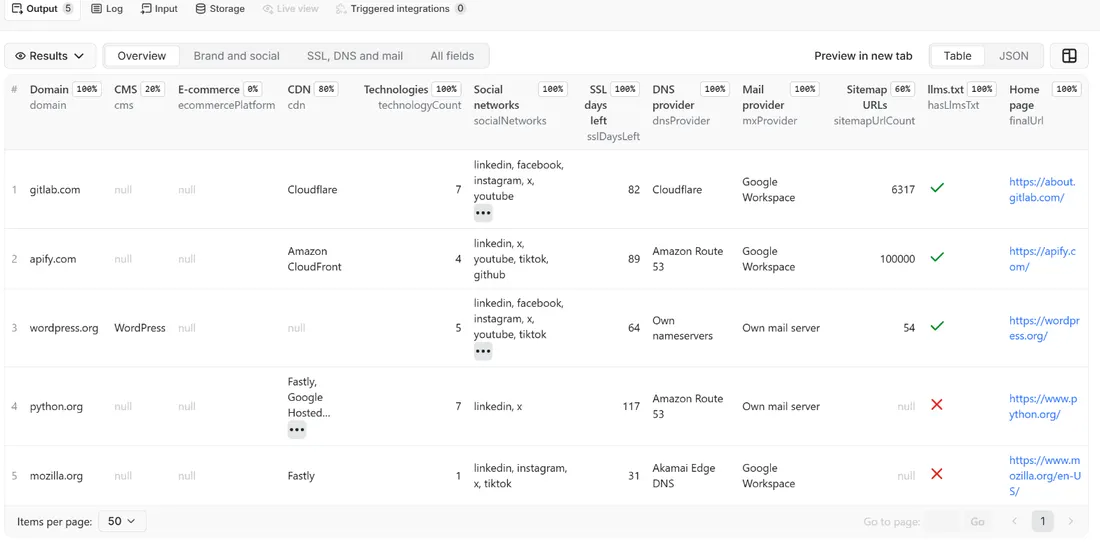
One row per domain, 39 fields in seven groups. You choose the groups with the What to read field, so a run that only needs SSL expiry or only the sitemap size does not read the rest.
- Identity: the domain, the address you gave, the home page address after redirects, the HTTP status, the page title and the declared language
- Technologies: every technology the home page shows (name and category), the number of them, and ready-made columns for the CMS, the e-commerce platform, the analytics tools, the CDN and the web server. Rowcraft's own rules: 336 fingerprints in 41 categories
- Social links: the profile links of the organisation found in the home page markup (LinkedIn company page, Facebook, Instagram, X, YouTube, TikTok, Pinterest, GitHub, Telegram, WhatsApp), as an object and as a comma-separated list of networks. No profile is ever opened
- Brand assets: the logo address, the best favicon, the share image (Open Graph), the theme colour and the site name
- Structured data: the Organization found in the page's JSON-LD (name, website address and the
sameAslinks) and the list of schema types the page declares. Person, contact points, e-mail addresses and phone numbers are never read - SSL and security: days left on the certificate, the issuer organisation, whether the certificate is valid for that name, and six security headers as true or false (HSTS, Content-Security-Policy, X-Frame-Options, X-Content-Type-Options, Referrer-Policy, Permissions-Policy)
- DNS and mail: the name servers, the DNS provider, the mail provider, and whether SPF and DMARC records exist
- Sitemap and crawl files: the number of URLs in the sitemap, how many sitemap files were read, whether that count is complete, and whether
robots.txtandllms.txtexist - Notes: a
moduleNotesobject that says why a field is empty (for example "the home page is served over plain HTTP, so no certificate was read") and the time of the check
The run also writes a COVERAGE record with one line per domain you asked for (ok, blocked, robots_disallowed, not_found, error, not_checked or already_delivered, with the reason) and a RUN_SUMMARY with counts, the most frequent technologies of the list and how many domains had social links, structured data, a sitemap or an expiring certificate.
Why this actor
- One row instead of five tools. Technology detection, social links, brand assets, structured data, SSL, security headers, DNS and sitemap size normally take separate tools, separate rows and separate bills. Here they share one read of the home page.
- Light on the website you profile. Four to six requests per domain on its own host: robots.txt, the home page (plus redirects), up to three sitemap files and llms.txt. DNS goes to public resolvers and the certificate is read with a single TLS handshake, neither of which touches the website's pages. Requests to one website are spaced out, and a
Crawl-delayin its robots.txt is honoured up to 10 seconds. - Evidence-based, precision first. A technology is reported only when the page shows a clear sign of it. A field that could not be read is
nulland explained inmoduleNotes, never guessed and neverfalseby default. - Pay only for domains profiled. Domains behind an anti-bot page, disallowed by robots.txt, not found, without DNS, invalid or repeated in your list are never charged.
- No personal data by design. The social links of a person, mailto and tel links, structured data about people and certificate subjects are dropped before the row is built.
- Built for automation. Schedules, webhooks, Make, n8n, Zapier, Google Sheets, Slack and the Apify API, with a stable field order.
How to use it
- Open the Actor and paste your domains or URLs into Domains or URLs, one per line. A column copied from a spreadsheet works, and so do entries separated by commas.
- Leave What to read as it is to get everything, or untick the groups you do not need.
- For a first try keep the list short, or set Maximum domains delivered to a small number.
- Click Start. The status line shows progress; the run stops cleanly at your maximum or at the charge limit you set in the run options.
- Open the Dataset tab: the Overview, Brand and social and SSL, DNS and mail views show the main columns. Download JSON, CSV, Excel, XML or HTML, or send the rows to Google Sheets, Slack, Make, n8n or Zapier with the Integrations tab.
- Open the
COVERAGErecord in the key-value store to see which domains could not be read and why. - To track a list over time, run it on a schedule with Only new rows since the last run turned on: a domain is delivered, and charged, only the first time.
Input
Quick start. This input is ready to run (it is also the example in the API tab):
One real row it returns (long texts shortened here):
| Field | What it does |
|---|---|
domains | Domains (example.com) or addresses (https://www.example.com/shop), one per line. Only the home page is read; the path is ignored. Up to 100,000 per run. |
modules | What to read: technologies, social, brand, structuredData, ssl, dns, sitemap. Empty means all seven. A group you leave out stays null in the row. |
maxItems | Stop after this many delivered rows. 0 = the whole list. |
onlyNew, stateName | Deliver a domain only if an earlier run with the same state name has not delivered it yet |
notifyUrl, notifyWhenEmpty | A webhook that receives one message when the run ends; see Automation below |
requestIntervalMs | Pause between requests to one website, default 1000 ms, minimum 250 ms |
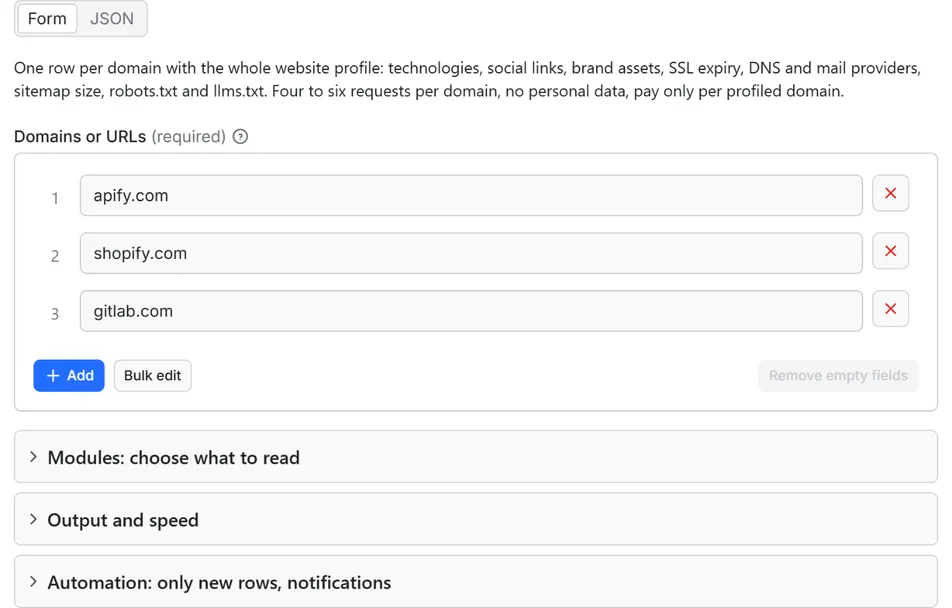
Example: three companies, everything in one row each.
Example: only SSL expiry and DNS for a list of customer domains.
Output
39 fields per row. Empty values are null, never missing, so CSV and Excel columns are stable.
| Field | Type | Example |
|---|---|---|
id | string | apify.com |
domain | string | apify.com |
inputUrl | string | https://apify.com/store |
finalUrl | string | https://apify.com/ |
status | integer | 200 |
title | string | Apify: Full-stack web scraping and data extraction platform |
language | string | en |
technologies | array | [{"name": "Next.js", "category": "JavaScript framework"}] |
technologyCount | integer | 4 |
cms | string | WordPress |
ecommercePlatform | string | Shopify |
analytics | array | ["Google Analytics"] |
cdn | string | Cloudflare |
server | string | Nginx |
socialLinks | object | {"linkedin": "linkedin.com/company/apify", "x": "x.com/apify"} |
socialNetworks | string | linkedin, x, youtube |
logoUrl | string | https://apify.com/img/logo.png |
faviconUrl | string | https://apify.com/favicon.ico |
ogImageUrl | string | https://apify.com/og-image.png |
themeColor | string | #020202 |
siteName | string | Apify |
organizationSchema | object | {"name": "Apify", "url": "apify.com", "sameAs": ["github.com/apify"]} |
schemaTypes | string | Organization, WebSite |
sslDaysLeft | integer | 89 |
sslIssuer | string | Let's Encrypt |
sslValid | boolean | True |
securityHeaders | object | {"hsts": true, "csp": false, "xfo": true, "xContentTypeOptions": tr… |
nameservers | array | ["ns-1.example-dns.com", "ns-2.example-dns.net"] |
dnsProvider | string | Cloudflare |
mxProvider | string | Google Workspace |
spf | boolean | True |
dmarc | boolean | True |
sitemapUrlCount | integer | 1029 |
sitemapFilesRead | integer | 3 |
sitemapComplete | boolean | False |
hasRobotsTxt | boolean | True |
hasLlmsTxt | boolean | True |
moduleNotes | object | {"sitemap": "no sitemap found (checked robots.txt and /sitemap.xml)"} |
fetchedAt | string | 2026-10-19T17:06:16.601Z |
Example rows
Two real rows from a run (long texts shortened here, complete in the dataset):
Results can be downloaded as JSON, CSV, Excel, XML or HTML from the Dataset tab, or read through the Apify API.
Pricing
Pay per result. You pay for each domain profiled and delivered to your dataset, nothing else: no subscription, no minimum, no charge for domains that could not be read (anti-bot page, robots.txt, DNS missing, not found, errors), for invalid or repeated entries, or for domains skipped by Only new rows because an earlier run delivered them.
| Your Apify plan | Price per 1,000 rows | Price per row |
|---|---|---|
| Free plan | $3.00 | $0.003 |
| Starter plan | $2.70 | $0.0027 |
| Scale plan | $2.40 | $0.0024 |
| Business plan and above | $2.00 | $0.002 |
Example: 1,000 domains cost $3.00 on the Free plan and $2.00 on the Business plan. Platform usage of the run (compute and storage) is included in that price and is not billed to you separately; the actor runs in 256 MB and spends most of its time waiting between requests.
A start event of $0.00005 is charged once per run (Apify default).
Cap your spend: set Maximum total charge in the run options. The actor stops cleanly when the cap is reached and you keep everything delivered until then. It does not read more domains than the cap still pays for, so no website is visited for a row you would not receive. The run summary (RUN_SUMMARY in the key-value store) says why a run stopped.
Automation: only new rows, notifications, schedules
Only new rows since the last run. Turn on onlyNew and the actor remembers every domain it delivered to you (in a key-value store named rowcraft-website-intelligence-profiler-state in your Apify account). The next run with the same stateName skips what you already have and you pay only for new rows. The first run delivers everything that matches. Use a different stateName for each schedule or search so they keep separate memories.
Notification when the run ends. Put a webhook address in notifyUrl and the actor sends one JSON POST with the number of new rows, links to the dataset (JSON and CSV) and the run. It works out of the box with Slack and Discord incoming webhooks (the message is in text and content), with Make, n8n and Zapier catch hooks, and with your own endpoint. By default it is sent only when there is at least one new row; notifyWhenEmpty sends it every time.
Schedules. Create a schedule in Apify Console (hourly, daily, weekly or cron) with onlyNew on. A daily schedule gives you a feed of new domains for the price of the new rows only.
Integrations. Send the results to Make, n8n, Zapier, Google Sheets, Slack, Google Drive, Airtable or any webhooks from the Integrations tab of the Actor, with no code. Apify also offers native actions for Make, n8n and Zapier.
API, SDKs and AI agents. Every run is available through the Apify API and the official JavaScript and Python clients; the Actor can also be called by AI agents through the Apify MCP server. The example input in the API tab is a working call.
Use with AI agents (MCP). Add the Apify MCP server to Claude, Cursor, VS Code or any MCP client and the agent can run this Actor as a tool:
Call it from a shell or any language. One request runs the Actor with the input below and returns the rows as JSON:
Use cases
- Lead qualification: from a list of company domains, keep the ones on Shopify or WordPress, with a Facebook page and an Instagram profile but no Organization structured data, and send them to the right sales sequence.
- Agency prospecting: find websites with an expiring certificate, no HSTS, no DMARC record or a mail provider you can replace, and open the conversation with a fact the owner can check.
- Competitor and market mapping: the technology mix, social presence and sitemap size of fifty competitors in one table, refreshed by a schedule.
- Certificate and DNS watch: a weekly run on your own and your customers' domains with
modulesset tosslanddns, and a webhook when the run ends. ThesslDaysLeftcolumn does the alerting. - CRM and database enrichment: add the logo, the social profile links, the CMS and the mail provider to company accounts before a campaign, without scraping profiles.
- AI agents and RAG: a compact, structured profile of a domain that an agent can read through the Apify API or MCP server;
hasLlmsTxtandhasRobotsTxtshow how a site speaks to machines. - Before a deeper job: the profile tells you the platform and the sitemap size first, so you can choose the matching Rowcraft actor, such as the Shopify Products Scraper or the Sitemap URL Extractor, for the sites that deserve it.
Ready-made examples, each with the input filled in (open one and press Start, or save it as your own task):
What this actor does not do
- Collect contacts: no e-mail addresses, phone numbers or names of people, and no personal profiles. Links of the form
linkedin.com/in/,/user/or/people/,mailto:,tel:and phone-number WhatsApp links are dropped. - Visit social profiles: it reads the links that the website itself shows, never the profile pages, and gives no follower counts or posts.
- Crawl a website: the home page, robots.txt, up to three sitemap files and llms.txt are the only pages read. Nothing else on the site is opened, and the pages listed in a sitemap are counted, not fetched.
- Grade a site or audit its pages: SSL gives the days left, the issuer and the validity, not a letter grade. For a full report use the SSL & Security Headers Checker or the Domain Email DNS Checker.
- Read WHOIS or registration data, traffic, rankings, or the content of the pages.
- Run JavaScript, log in, accept cookie banners, use proxies or solve CAPTCHAs: websites that answer with an anti-bot page are reported as blocked and not charged.
Limits and fair use
- Four to six requests per domain on the website: robots.txt, the home page, up to three sitemap files and llms.txt; redirects of the home page come on top. Requests to one website are at least one second apart by default (minimum 250 ms), and four domains are processed side by side. A domain takes about five to ten seconds, so a list of 1,000 domains finishes in under an hour. The first 3 MB of a home page are read.
- What is visible on the first load only. Technologies and links are read from the HTML and headers of the home page without running JavaScript. Tools added later by a tag manager, after cookie consent or on other pages are not seen, and neither are social links that a script draws after the page loads.
- Sitemap counts can be partial. At most three sitemap files are read per domain. If a sitemap index lists more files than that, the count covers the files that were read and
sitemapCompleteisfalse; the number is then a lower bound. A sitemap file over 10 MB is counted up to its first 10 MB. - Certificates that browsers refuse. The certificate is read with a TLS handshake. If a website's certificate is invalid for its name (expired, self-signed, wrong host), the home page cannot be read over HTTPS either, so that domain is reported as an
errorinCOVERAGEand not charged. Use the SSL & Security Headers Checker for such domains. - Anti-bot pages. Websites behind a bot challenge (Cloudflare, Akamai, DataDome and similar) are reported as
blockedand not charged. After 10 blocked websites in a row the run stops and says why in the run summary, because the rest of the list would most likely be blocked too. - robots.txt is obeyed for every address the visit touches, including redirect targets and sitemap files. If robots.txt disallows the home page the domain is
robots_disallowed; if robots.txt answers with a server error the site is not read, as the robots.txt standard (RFC 9309) requires. A sitemap orllms.txtthat robots.txt disallows is not fetched, and its field staysnullwith a note. - DNS needs a domain name. An entry that is an IP address gets no DNS fields. DNS answers come from public resolvers; a lookup that times out leaves its field
nullinstead of a wrongfalse. - Up to 100,000 domains per run. The run stops 90 seconds before its timeout with the summary, the coverage and the Only new rows memory saved; for long lists raise the timeout or split the list.
Data source and licence
The data is what each website and the public Internet infrastructure send to every visitor: the response headers and the HTML of the home page, the TLS certificate presented on port 443, the public DNS records of the domain, the robots.txt, the sitemap and llms.txt files that the site publishes. The actor reads each once, as a browser or a search engine does, after checking robots.txt. It keeps only short facts (technology names, link addresses, dates, counts, true or false flags); page text, images, cookie values and the pages listed in a sitemap are not stored or delivered.
The technology rules are Rowcraft's own work, written and tested on real websites. The structured-data fields follow the open schema.org vocabulary, and the sitemap count follows the sitemaps.org protocol.
Rowcraft is independent: this actor is not provided, endorsed or authorised by the websites it reads or by the makers of the technologies it names. Product names and trademarks belong to their owners and are used only to say which product a website uses.
Privacy: no personal data
Rowcraft actors are built not to collect personal data:
- Only the home page and a few public files of a website are read, and the row holds technology names, public link addresses of the organisation, brand assets, certificate dates, DNS facts and counts.
- Social links are kept only when they point to an organisation or a brand. Links to personal profiles (
/in/,/user/,/people/) and phone-number links are removed. - Structured data is limited to the Organization: its name, its website address and its
sameAslinks. Person records, contact points, e-mail addresses and phone numbers are not read. - The certificate subject is never kept, only the issuer organisation, so a certificate issued to a person cannot put a name in the dataset. An e-mail address or phone number inside a page title or a link is removed.
- Cookie values are never read, and the actor sends no cookies, fills no forms and never logs in.
You are responsible for using the data in line with the law that applies to you.
Other Rowcraft actors
Related Rowcraft actors. All of them read official or public sources, deliver flat rows without personal data and support only-new runs and notifications; the full list is on the Rowcraft profile:
- Domain Email and DNS Checker API: MX, SPF, DMARC, Providers — Find which email provider, sending services and DNS host each domain uses, from public DNS records only.
- Website Tech Stack Detector – Technology Lookup API — Find the technologies behind a list of websites: CMS, e-commerce platform, analytics, tag managers, ad pixels, consent tools, chat, CDN and payments, from one polite home-page request per domain.
- Brazil CNPJ Companies Scraper: Receita Federal Register Data — Company records from the Brazilian CNPJ register for a list of CNPJ numbers or a search by state, city and CNAE activity: legal name, trade name, status, legal nature, capital, address, opening date and size.
- Company Register Lookup Europe: Name, ID, Domain or LEI — Look up a European company by name, domain or registry number and get one unified profile from the official registers of France, Norway, Poland, the UK and the LEI index.
- SIRENE France Company Scraper: SIREN, NAF, Revenue, Status — French companies from the official Recherche d'entreprises API (INSEE SIRENE + INPI): SIREN and SIRET, legal form, NAF activity, head-office address, employee band, revenue and net income, labels, creation date and VAT number.
- KRS Poland Companies Scraper: Register Data, PKD, Status — Polish companies from the official KRS register API of the Ministry of Justice: name, KRS, NIP and REGON numbers, legal form, status, address, PKD activity codes, share capital, branches and registration dates.
FAQ
What exactly is in one row? 39 fields: identity (domain, final address, status, title, language), technologies, social links, brand assets, Organization data, SSL days left and issuer with six security-header flags, name servers, DNS and mail provider with SPF and DMARC flags, sitemap size, robots.txt and llms.txt flags, and a moduleNotes object. The Output section above lists every field and its type.
Why is a module empty? A field is null when its group was not ticked in What to read, or when it could not be answered, and moduleNotes says which. Typical reasons: the home page is served over plain HTTP (no certificate), the entry is an IP address (no DNS), a DNS lookup timed out, the site has no sitemap at the address robots.txt names or at /sitemap.xml, or robots.txt disallows the file. An empty list or false means the check ran and found nothing; null means it did not run or could not finish.
Why is the result empty? Every domain in the list could not be read, or was skipped. The COVERAGE record gives the reason per domain: an anti-bot page (blocked), robots.txt (robots_disallowed), no website at that address (not_found), an invalid entry, a missing DNS record or a connection problem (error). With Only new rows on, domains delivered earlier are skipped too. Nothing is charged for those, apart from the start event.
Is it legal? The actor reads the public files that every visitor or search engine gets, obeys robots.txt, and collects facts about a website and its infrastructure, not personal data or page content. Whether and how you may use the results (for example for marketing or outreach) depends on the law that applies to you.
Does it collect personal data? No personal data: no e-mail addresses, phone numbers, names of people, personal social profiles or cookie values. See the Privacy section.
Do I pay for domains that block the actor? No. Blocked, robots-disallowed, not found, DNS-missing and invalid entries are never charged, and neither are duplicates in your list.
How accurate are the technologies? The rules favour precision over recall. A technology needs one strong sign (a header, a cookie name, a script from its own servers) or two independent weaker ones. Expect some technologies to be missed, especially those loaded later by a tag manager, and check a surprising detection in the page source.
Do you follow the social links? No. The links are read from the home page markup and the Organization data. The profile pages themselves are never opened, so there are no follower counts, posts or profile details.
How is the sitemap count made, and is it exact? The actor reads the sitemap that robots.txt declares, or /sitemap.xml when none is declared, and counts its loc entries. A sitemap index counts as one file and then its most promising child files are read, up to three files in all. When files remain unread, sitemapComplete is false and the count is a lower bound.
Can I run only some of the checks? Yes. Set modules to the groups you need, for example ["ssl", "dns"]. The groups you leave out are not read and cost no extra requests, but the price per delivered domain stays the same.
How does Only new rows work here? The actor remembers every domain it delivered to you, in a key-value store of your account. The next run with the same state name skips those domains without reading them and without charging them, so a schedule that adds new domains to the list pays only for the new ones.
Support and reviews
Problems, missing fields, questions: open an issue on the Issues tab of this Actor. We answer within one working day and fix confirmed bugs in the next release; the changelog lists every change.
If this Actor saved you time, a short review on its page helps other users find it and helps us keep improving it.


