

Facebook Reactions (Likes) Scraper
Pricing
from $2.00 / 1,000 result items
Facebook Reactions (Likes) Scraper
Extract reaction data from Facebook posts, such as who reacted, their profile information, and the type of reaction (like, sad, haha, angry etc.). Ideal for audience analysis, influencer insights, engagement tracking and social media monitoring.
Pricing
from $2.00 / 1,000 result items
Rating
3.8
(7)
Developer

Scraper One
Maintained by CommunityActor stats
6
Bookmarked
1K
Total users
59
Monthly active users
16 hours ago
Last modified
Security
Limited permissionsShare
Facebook Reactions Scraper

This Apify Actor extracts reaction data from Facebook posts (like, love, haha, wow etc.), such as who reacted, their profile information, and the type of reaction. It’s ideal for audience analysis, influencer insights, engagement tracking and social media monitoring. 🌟
Features
- 👍 Extract detailed reactions for one or more Facebook posts
- 👤 Get reactor profile info, including name and profile picture
- 🔢 Limit the number of reactions per post
Input Parameters
| Parameter | Type | Required | Description |
|---|---|---|---|
postUrls | string[] | ✅ | Array of Facebook post URLs to extract reactions from. |
resultsLimit | number | ❌ | Maximum number of reactions per post (optional). |
reactionType | string | ❌ | Reaction type to collect: ALL, LIKE, LOVE, CARE, HAHA, WOW, SAD, or ANGRY. Defaults to ALL. |
Example Inputs
Default: all reactions without a filter
Omit reactionType to collect up to 20 reactions of any type per post.
All reactions
Collect up to 20 reactions of any type per post.
Care reactions only
Collect up to 10 Care reactions per post.
Haha reactions only
Collect up to 50 Haha reactions per post.
Omitting reactionType also collects all reaction types. When a specific type is selected,
resultsLimit applies to that type per post.
Output Data
The actor returns an array of JSON objects representing individual reactions to the given posts.
inputUrl identifies the original input URL for each reaction or error record, including share links.
For backward compatibility, reaction records retain postUrl with its existing value (the original input URL).
Use inputUrl to associate results with input URLs consistently across Facebook Reactions, Posts and Comments Scrapers.
Example Output
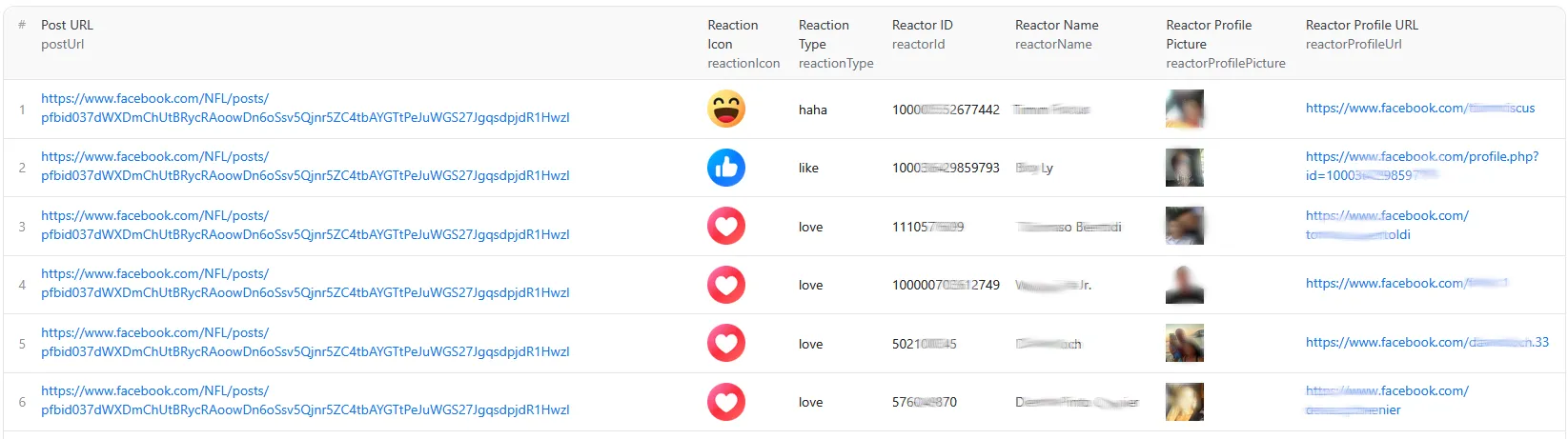
If you need additional fields, feel free to open an issue through Apify or direct email
URL errors
Errors are saved as separate dataset rows with one of two codes:
INVALID_URL: invalid or unsupported URL.PAGE_UNAVAILABLE: content confirmed unavailable.
Each error record contains only the original inputUrl and error.
Example error record
Successful records do not include error. Error rows are not billed as scraped results and do not consume resultsLimit; the run initialization charge still applies. The actor continues processing the other input URLs.
Example dataset with results and an error record
One complete reaction record from a share link and one complete error record for another input.
Both successful reaction records and error records identify the original input URL in inputUrl.
Reaction records also retain postUrl for backward compatibility:
Zero reactions, login errors and technical failures do not mark a post as unavailable. An accessible post with no reactions can return no rows.
Usage
- Create an Apify account and open the Facebook Reactions Scraper actor.
- Set the input parameters (post URLs, reaction type, and optional limit).
- Run the actor and monitor progress in the logs.
- Download the results in JSON, Excel, or CSV.
Limitations & Notes
- Facebook content scraping must follow Facebook’s Terms of Service.
- Make sure posts are public and reactions are visible.
- Free users can process up to 5 post URLs per run and retrieve up to 100 reactions per post URL.
- Free users are rate-limited to a certain number of processed post URLs per day.
- For higher usage limits, upgrade to a paid Apify plan.
Use Case: Analyze Who Reacted
- 🎯 Use Facebook Posts Search to gather posts by topic or page.
- 💬 Use this Reactions Scraper to fetch all visible reactions to those posts.
- 📊 Combine both datasets to gain insight into who engages with what content.
Other Recommended Scrapers
- 🐦 X (Twitter) Posts Search — Find posts/tweets based on keywords, hashtags, and more
- 🐦 X (Twitter) Post Replies Scraper — Scrap replies of multiple X (Twitter) posts
- 🐦 X (Twitter) Profile Posts Scraper — Scrap posts by specified X profiles/users
- 📘 Facebook Posts Search — Discover Facebook posts for a given topic or page
- 📘 Facebook Comments Scraper — Extract comments from public Facebook posts
- 📘 Facebook Reactions Scraper — Scrap reactions from Facebook posts (like, sad, haha, angry etc.)
- 📘 Facebook Posts Scraper — Scrap posts from Facebook pages, groups etc.
- 💬 YouTube Search Scraper — Extract search results from YouTube
- 💬 YouTube Comments Scraper — Extract comments from YouTube videos
- 🎬 YouTube Downloader — Download youtube videos
Support & Contact
Need help or want a feature added?
📧 scraper1one@gmail.com 🐞 Open an issue directly via the Apify Actor page


