

SEC Scraper | EDGAR Filings and Company Data
Pricing
from $1.66 / 1,000 filings
SEC Scraper | EDGAR Filings and Company Data
Extract SEC EDGAR filings by ticker, CIK, company name or full-text keyword: 10-K, 10-Q, 8-K, Form 4, Form D, S-1, 13F and more, with dates, decoded 8-K items, linked exhibits and the filer's profile (SIC industry, state, addresses, EIN). No login or API key needed. Export to JSON, CSV or Excel.
Pricing
from $1.66 / 1,000 filings
Rating
0.0
(0)
Developer

SilentFlow
Maintained by CommunityActor stats
0
Bookmarked
2
Total users
1
Monthly active users
14 days ago
Last modified
Categories
Security
Limited permissionsShare
SEC Scraper
Every SEC EDGAR filing, with the company behind it, as one clean row. List the filings of your watchlist, search the full text of 10-K, 10-Q and 8-K filings and their exhibits by keyword, or pull this week's Form D and S-1 filings, each row with the press release or exhibit linked and the filer's profile attached. 100 filings in 14 seconds, no account, no API key.
How it works
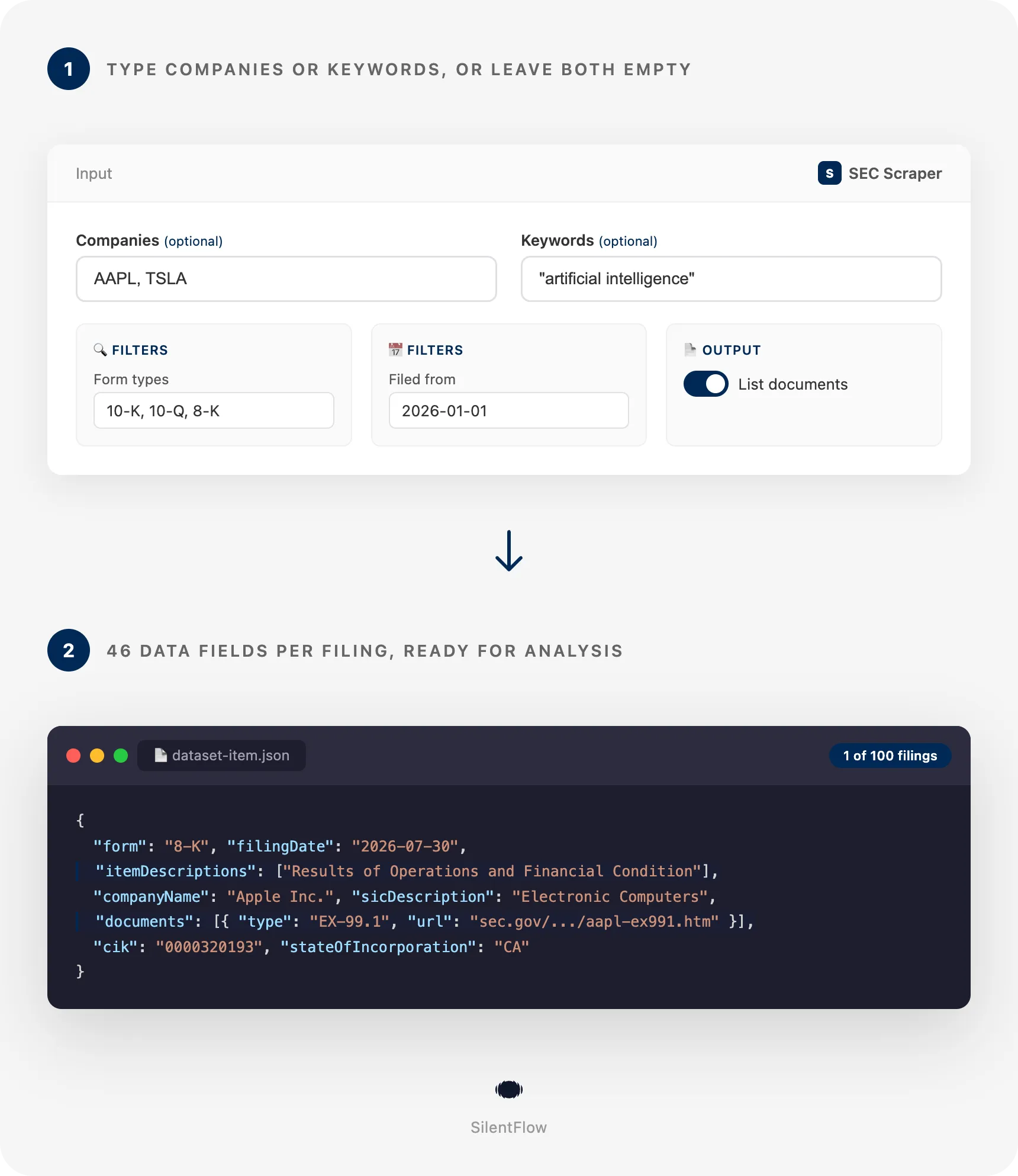
- Type companies or keywords. Paste tickers, CIKs or company names one per line (
AAPL,320193,Berkshire Hathaway) to list their filings. Type keywords instead ("artificial intelligence") to search inside every filing on EDGAR. Leave both empty to get the latest filings of the form types you pick. Filter by form type and filing date. - Get one row per filing. Each row carries the filing (form, dates, decoded 8-K items, primary document, exhibits with direct links) and the filer's company profile (tickers, exchanges, SIC industry, state of incorporation, filer category, fiscal year end, addresses, phone, EIN, former names). Export to JSON, CSV or Excel, or pull it through the API on a schedule.
✨ Why teams choose this over other SEC scrapers
Copying accession numbers out of EDGAR tabs? Running a filings script that stops the day SEC changes a rule? Getting 16 fields per filing and no way to search inside the documents?
- 🧾 46 fields per filing, 40 filled on a typical row. The most used SEC actors of the Store return 16 and 19 fields per filing. Here every row also carries the filer's SIC industry, industry group, state of incorporation, filer category, fiscal year end, business and mailing addresses, phone, EIN and former names, plus the decoded 8-K items and the list of exhibits. Measured on the default run (Apple and Tesla, 100 filings, September 23, 2026): 40.4 fields filled per row.
- 🔀 Three ways in, one form, no mode switch. Companies (tickers, CIKs and names mixed in one list), full-text keywords across every filing since 2001, or the latest filings of the form types you choose. Give companies and keywords together and the search runs inside those companies' filings only. The most used free SEC actor has no full-text search and asks you to pick a search type first.
- 📑 Every EDGAR form type. Type the form exactly as EDGAR names it:
10-K,8-K,4,D,S-1,DEF 14A,13F-HR,SC 13D,6-K,20-F,144, or leave the list empty for all of them. 100 form types come with a plain-words description on the row. The second most used SEC actor of the Store reads one form type, the leader offers a list of 16. - 📎 The exhibit you need, linked. With documents on, an 8-K row lists its EX-99.1 press release, investor presentation, graphics and XBRL files with type, size and direct URL. No more opening the filing index to find the one file that matters.
- 🏷️ 8-K items decoded.
2.02becomesResults of Operations and Financial Condition,5.02becomesDeparture or Election of Directors and Certain Officers. Form D exemption codes are decoded too (06CisRule 506(c)). Filter your feed on the event, not on a number. - 💸 Priced per filing delivered, below the other paid SEC actors of the Store. The current rate is on the Monetization tab of this page.
- 🔓 No account, no API key, no setup. EDGAR is public. The Actor reads it the way SEC asks automated tools to, and runs from the prefilled form as is.
- ⏱️ Fast enough to run every hour. 100 filings of two companies with their exhibits in 14 seconds. 40 Form D filings of the week in 5 seconds. 30 full-text hits with documents in 8 seconds.
- 🧭 A watchlist shared fairly. Several companies split the cap one filing each in turn, newest first, so a filer with a long history never crowds out the others.
- ✅ Rows only, never error rows. Every row is a filing. A run that finds nothing says why on the run itself: unknown company, nothing in the period, or SEC unreachable.
🎯 What you can do with SEC EDGAR data
| Team | What they build |
|---|---|
| Equity research | A daily 8-K feed of 200 covered companies with the item codes decoded and the earnings press release linked on every row |
| Quant and data engineering | A filings table keyed on cik and accessionNumber, refreshed on a schedule, joined to price data by ticker |
| M&A and private equity | Weekly lists of 2.01 acquisitions, 5.02 executive changes and SC 13D activist stakes across a sector's tickers |
| Venture scouts and sales teams | This week's Form D private placements with the issuer's address, phone, state of incorporation and the filing document, before they reach the databases |
| Compliance and governance | Proxy statements (DEF 14A), late filing notices (NT 10-K) and auditor changes (4.01) for a peer group, with the official filing index linked |
| Thematic research | Every 10-K and 10-Q that mentions "supply chain", "tariffs" or "cybersecurity incident" this year, with the company profile beside each hit |
| Financial journalism | The latest S-1 registration statements and 424B4 prospectuses, with the exhibits list to reach the underwriting agreement |
| AI and LLM products | Filing metadata and direct document URLs to feed a retrieval pipeline, one JSON shape for every mode |
📥 Input parameters
Type at least one company or one keyword, or leave both empty for the latest filings of the chosen form types. Everything else is optional.
| Field | Type | Default | What it does |
|---|---|---|---|
companies | list | AAPL, TSLA | Tickers, CIKs or company names, one per line. Each company's filings are listed newest first with its profile on every row. With keywords, the search runs inside these companies only. |
keywords | list | empty | Words or phrases to find inside filings and exhibits. Quotes keep a phrase together; AND, OR, NOT combine terms. One row per matching filing, with the document that matched. |
maxItems | integer | 100 | How many filings to save. No fixed limit; the full-text index answers up to 10,000 filings per query. |
🔍 Filters
| Field | Type | Default | What it does |
|---|---|---|---|
formTypes | list | 10-K, 10-Q, 8-K | Form types to keep, as EDGAR names them. Amendments are separate types (10-K/A). Empty means every form type. |
dateFrom | string | empty | Earliest filing date, 2026-01-01. In latest-filings mode, empty means the last 7 days. |
dateTo | string | empty | Latest filing date, 2026-06-30. Empty means today. |
📄 Output
| Field | Type | Default | What it does |
|---|---|---|---|
includeDocuments | boolean | true | Lists the files of each filing (primary document, exhibits, graphics, XBRL) with type, size and direct link. One extra read per filing. |
⚙️ Advanced
| Field | Type | Default | What it does |
|---|---|---|---|
debugMode | boolean | false | Adds detailed lines to the run log. |
📊 Output data
One row per filing. A row from the default run (Apple, 8-K), documents trimmed to three:
A row from a keyword search ("artificial intelligence" in 10-K filings since June 2026) has the same shape, plus the search context:
Unknown values are null, never empty strings. id and url are stable: the accession number and the permanent filing index page. acceptanceDateTime and scrapedAt are RFC 3339 timestamps in UTC; filingDate and reportDate are calendar dates as EDGAR reports them.
🗂️ Data fields
46 fields per row. documents[] entries carry 6 more each, businessAddress and mailingAddress 6 each, formerNames[] 3 each.
| Group | Fields |
|---|---|
| Identity (5) | id (accession number), url (filing index page, permanent), accessionNumber, form, formDescription (plain words, 100 forms known) |
| Filing (17) | filingDate, reportDate (period or event date), acceptanceDateTime, act (33 or 34), fileNumber, filmNumber, items (8-K item codes or Form D exemption codes), itemDescriptions, size (bytes of the full submission), isXBRL, isInlineXBRL, primaryDocument, primaryDocumentDescription, documentUrl (primary document), fullTextUrl (complete submission text), documents (with includeDocuments), documentsCount |
| Company (19) | cik (10 digits), companyName, ticker, tickers, exchanges, sic, sicDescription, industry (SEC industry office), entityType, filerCategory (large accelerated filer, smaller reporting company...), fiscalYearEnd (MM-DD), stateOfIncorporation, ein, phone, website, businessAddress, mailingAddress, formerNames, companyUrl (EDGAR company page) |
| Search context (4) | keyword (the phrase that matched, null outside keyword mode), matchedDocument, matchedDocumentType (10-K, EX-99.1...), matchedDocumentUrl |
| Meta (1) | scrapedAt |
documents[]: sequence, description, name, type (8-K, EX-99.1, GRAPHIC, EX-101.SCH, XML), size, url. The complete submission text file is not repeated in the list, it is fullTextUrl.
Company fields come from the filer's EDGAR profile, so rows found by keyword or in the latest feed carry them too. Funds and shell companies often have no ticker, SIC or EIN; those fields are null.
🚀 Examples
Get the latest 10-K, 10-Q and 8-K filings of a watchlist
Track 8-K events of the last quarter with the press release linked
Find every 10-K that mentions artificial intelligence this year
Search a phrase inside the filings of specific companies
Pull this week's Form D private placements
List insider transaction filings and institutional holdings reports
Get the S-1 registration statements and final prospectuses of the month
🤖 Copy to your AI assistant
Paste this block into Claude, ChatGPT or Cursor to give it full context about this scraper:
💻 Integrations
Build an 8-K event feed for a watchlist in Python
Turn this week's Form D filings into a lead list in Node.js
Refresh a filings table every morning with the Apify CLI and a schedule
Then create a schedule on the Actor page (daily after 6 pm New York time catches the whole day's filings) and add a webhook to push each finished run into your warehouse, Slack or Google Sheets.
📈 Performance
Measured on September 23, 2026, default settings unless stated.
| Run | Rows | Time |
|---|---|---|
| Two companies (AAPL, TSLA), 10-K, 10-Q, 8-K, documents on | 100 | 14 s |
Full-text "artificial intelligence" in 10-K since June, documents on | 30 | 8 s |
| Latest Form D filings of the week, documents off | 40 | 5 s |
"supply chain" inside three companies' 10-K and 10-Q | 25 | 2 s |
A company's list of filings is read in one call; the documents of a filing take one more each. Full-text searches read 100 hits per page. Runs use a fraction of the default 256 MB memory.
💾 Data export
Download the dataset from the Output tab as JSON, CSV, Excel, XML or HTML, or pull it programmatically:
The overview view shows company, form, filing date, decoded items, ticker and the two links; the companies view shows the filer columns (SIC, industry group, state, filer category, fiscal year end). Nested fields (documents, addresses, formerNames) flatten into columns in CSV and Excel.
💡 Tips for best results
- Use tickers or CIKs for listed companies, names for the rest. A ticker resolves through SEC's own list; a name goes through EDGAR's filer index and the best match wins, so
Berkshire Hathawayfinds the parent, not its energy subsidiary. Check the log line that shows which filer was matched. - Name amendments explicitly.
10-Kdoes not include10-K/A; add both when you want originals and amendments. LeaveformTypesempty to see everything a company files, including Form 4 and 144. - Quote phrases in keywords.
"supply chain"finds the phrase;supply chainfinds either word. Combine withAND,OR,NOT, and narrow withformTypesand dates: the index stops at 10,000 filings per query. - Keep documents on for 8-K and 10-K, off for volume. The exhibits list is where the press release (EX-99.1) and the subsidiaries list (EX-21) live. For thousands of Form D or Form 4 rows, turn it off: the primary document link stays on every row.
- Give the cap what you need.
maxItemscounts filings across all companies, shared one each in turn. For a 20-company watchlist and the last three 8-Ks of each, setmaxItemsto 60 anddateFromto the quarter. - Schedule after the close. EDGAR accepts filings until 10 pm New York time; a daily run at 11 pm with
dateFromset to today catches the full day.
❓ FAQ
Do I need an SEC API key or an account? No. EDGAR is a public system. The Actor identifies itself to SEC as its access policy asks and needs nothing from you.
Which companies can I look up? Any EDGAR filer: listed companies by ticker, any filer by CIK, and any filer by name (funds, private companies filing Form D, foreign issuers). Ticker lookups cover the companies SEC lists with a ticker; use the CIK for delisted or OTC names.
How fresh is the data? A filing appears in its company's list within minutes of acceptance by SEC. The full-text index used by keyword and latest-filings runs follows within about half an hour. Nothing is cached: every run reads EDGAR live.
What exactly does a keyword search cover?
The text of filings and their exhibits from 2001 onwards, the same index as EDGAR's full-text search. A filing with several matching documents gives one row, with the best matching document named in matchedDocument. Up to 10,000 filings per query; narrow the dates or forms for more.
Can I combine companies and keywords? Yes. With both, the keywords are searched inside the filings of those companies only, filtered by the same form types and dates.
What does the latest-filings mode return?
Without companies or keywords, the newest filings of the chosen form types, newest first, over the last 7 days unless you set dates. Set formTypes to D for private placements, S-1 for IPO registrations, 8-K for every current report of the day.
Is there a limit on the number of filings?
No fixed limit from the Actor. A company's history is read page by page as far as maxItems and the dates ask. The full-text index answers up to 10,000 filings per query.
Does it parse the financial statements or Form 4 transactions? Not in this version. Each row gives the filing and its documents, including the XBRL files and the Form 4 XML with direct links, so a downstream parser has everything it needs.
Why are some company fields empty?
Funds, trusts and shell companies often have no ticker, exchange, SIC code or EIN on EDGAR; those fields are null. website is rarely filled by SEC.
Are the URLs permanent?
Yes. url, documentUrl, fullTextUrl and every documents[].url point to the SEC Archives, which keep filings indefinitely.
Can I run it on a schedule with only new filings?
Yes. Schedule the Actor and set dateFrom to the day (or the week) you want; rows are deduplicated within a run by accession number, and id lets you deduplicate across runs in your own store.
What is a CIK?
The Central Index Key, SEC's permanent identifier of a filer. It is on every row as cik, 10 digits, and works as an input.
⚖️ Legal
This Actor extracts publicly available data from SEC EDGAR, a U.S. government system that publishes corporate disclosures for public use. It does not bypass any login, paywall or CAPTCHA, and it follows SEC's published fair access guidelines for automated tools. Users are responsible for complying with SEC.gov's terms and with applicable data protection laws (GDPR and CCPA where relevant). Company addresses and phone numbers in the output are those the filers disclose publicly; handle any personal data the documents themselves contain accordingly. The data is informational; verify it against the linked filing for regulated use cases.
🔗 Related scrapers
- Company Data Scraper: emails, phones and tech stack of any company website
- Northdata Scraper: German and European company registry data
- BuiltWith Scraper: technology profiles and top sites
- ImportYeti Scraper: US customs records and suppliers
- Google News Scraper: news coverage of any company or topic
📬 Support
Need something this scraper does not do yet? We ship features fast.
- Feature requests go straight to our backlog
- Enterprise needs? We do custom integrations and high-volume plans
- Pricing questions? Check the Monetization tab on the actor page
Response time: usually under 24 hours.
Check out our other scrapers: silentflow on Apify


