
Google News Scraper
Pricing
from $2.00 / 1,000 results
Google News Scraper
Scrape Google News by keyword, topic, or section. Get real publisher article URLs, not Google redirect links, plus descriptions, images, sources, and publish dates. Break past the 100-result limit, cover 70+ countries and languages, and export to JSON, CSV, or Excel for media monitoring and PR.
Pricing
from $2.00 / 1,000 results
Rating
0.0
(0)
Developer

SilentFlow
Maintained by CommunityActor stats
1
Bookmarked
2
Total users
1
Monthly active users
a month ago
Last modified
Categories
Share
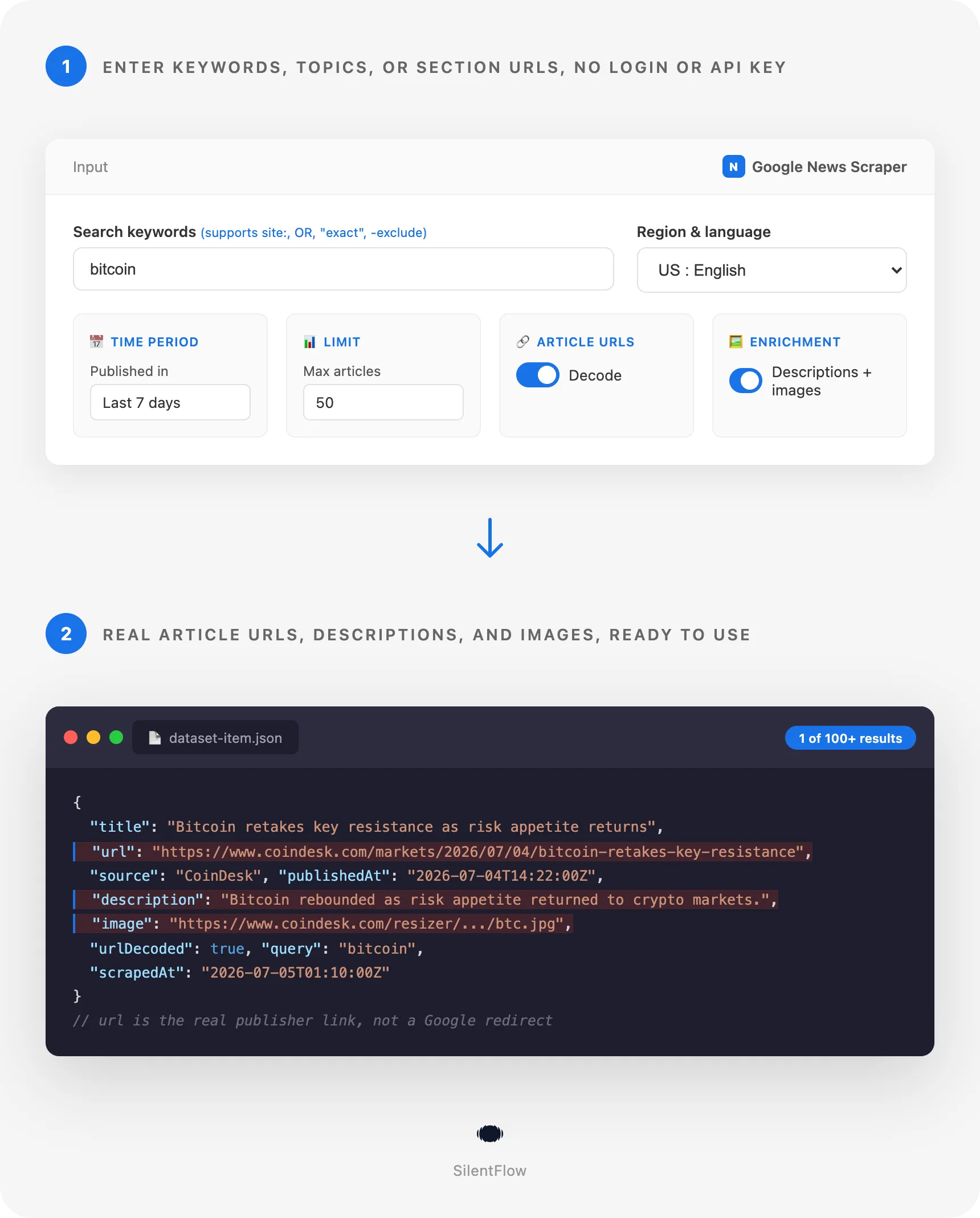
Get real, ready-to-click article URLs from Google News, not redirect links you have to decode yourself. Search any keyword or browse a topic and get titles, descriptions, images, and publish dates in structured JSON. 10 articles with full details in under 4 seconds.
How it works
✨ Why teams choose this over other Google News scrapers
Ever run a Google News scraper and gotten a dataset full of news.google.com/rss/articles/CBMi... links instead of the actual article? Ever had to write your own script just to turn those links into something clickable? Ever hit a wall at exactly 100 results and wondered why?
- 🔗 Real article URLs, on by default. Other Google News scrapers ship Google's internal redirect links out of the box and make you flip on a "decode" option they warn is slow. Here, every
urlfield is already the publisher's real link. No extra setup, no extra step. - 📝 Descriptions and preview images included from the first run. Most competitors turn this off by default too. You get the article snippet and the
og:imagepreview picture without touching a single setting. - 📈 Break past the 100-article ceiling. Google News caps a single feed at around 100 results. Competitors stop there. This scraper automatically slices your time window into smaller chunks and stitches the results back together with zero duplicates, so a
maxItemsof 220 or more actually returns 220 or more. - 🌍 70+ country and language combinations. Search news the way people actually read it locally: US English, French from France or Quebec, Brazilian Portuguese, Simplified or Traditional Chinese, Arabic, Hindi, and dozens more.
- 🎯 Search operators just work. Use
site:reuters.com,"exact phrase",OR, and-excludethe same way you would on Google itself. No special query language to learn. - 🗞️ Predefined topics and custom sections. Pull the World, Business, Technology, Entertainment, Sports, Science, or Health feed directly, or point the scraper at any Google News section URL for a niche category.
- ⚡ Zero configuration. No login, no API key, no cookies to manage. Add a keyword or pick a topic and start the run.
- 💰 Pay for the articles you actually get delivered. No fixed monthly commitment standing between you and a first test run.
🎯 What you can do with Google News data
| Team | What they build |
|---|---|
| PR and communications | Real-time brand and executive mention monitors that alert the moment a competitor or your own company gets covered |
| Market and finance research | News-driven trading signals and sector watchlists built from headline volume and sentiment over time |
| Growth and SEO | Content gap trackers that show which publishers already cover a keyword you're targeting, and how often |
| Data science and NLP | Labeled datasets of headlines, descriptions, and publish dates for sentiment models and topic classifiers |
| Competitive intelligence | Daily digests of every article mentioning a competitor's product launches or funding rounds |
| Crisis communications | Early-warning feeds that catch a story spreading across outlets within the hour it breaks |
| Academic and policy research | Longitudinal datasets tracking how a topic (a bill, an election, a public health issue) gets covered across outlets |
| Content aggregators and newsletters | Curated topic digests pulled straight from predefined sections like Business or Technology |
📥 Input parameters
Search
| Parameter | Type | Description |
|---|---|---|
keywords | Array | Keywords or phrases to search. Supports Google search operators: quotes for an exact phrase, OR, - to exclude a term, and site: to restrict to one publisher. |
topics | Array | Predefined Google News topics: World, Nation, Business, Technology, Entertainment, Sports, Science, Health. |
topicUrls | Array | Any Google News topic or section URL, for niche categories not covered by the predefined list. |
At least one of keywords, topics, or topicUrls is required.
Filters
| Parameter | Type | Description |
|---|---|---|
timeframe | Select | How far back to search: last hour, last 24 hours, last 7 days, last 30 days, last year, or all time. Default 7d. Applies to keyword searches. |
regionLanguage | Select | Region and language pair for results, for example US:en, FR:fr, or JP:ja. 70+ combinations available. Default US:en. |
Options
| Parameter | Type | Description |
|---|---|---|
maxItems | Integer | Maximum articles per keyword or topic. Default 50. Set above 100 and the scraper automatically extends the search across additional time windows to keep delivering results. |
decodeUrls | Boolean | Resolve each Google News link to the real article URL on the publisher's site. Default true. |
enrichArticles | Boolean | Fetch each article's page to pull its description and preview image. Default true. |
📊 Output data
Searching bitcoin with defaults:
Browsing the Technology topic instead of searching a keyword swaps query for topic:
🗂️ Data fields
| Category | Fields |
|---|---|
| Article | title, publishedAt, description, image, position |
| Links | url (real publisher URL, present when urlDecoded is true), googleNewsUrl (the original Google News link), urlDecoded, ampUrl (the article's AMP version, included when the publisher offers one) |
| Source | source (publisher name), sourceUrl (publisher domain) |
| Provenance | query (the keyword that returned this article) or topic (the topic or section that returned it) |
| Metadata | scrapedAt |
Structured fields per article. publishedAt and scrapedAt are both UTC timestamps in ISO 8601 format, ready to sort or filter on directly. url is the publisher's own link and does not expire. description and image come from the publisher's own page metadata: most mainstream outlets publish both, but a share of smaller or paywalled sites omit one or both tags, in which case the field ships as an empty string rather than a missing key, so your schema stays consistent across every row.
🚀 Examples
Track mentions of a company
Watch a competitor with an exact phrase and a niche exclusion
Pull the daily Business and Technology digest
Go past 100 results on a broad keyword
Monitor one publisher for a niche keyword in French
Fast headline sweep with links and descriptions turned off
🤖 Copy to your AI assistant
Paste this block into Claude, ChatGPT, or Cursor to give it full context about this scraper:
💻 Integrations
Python: feed a brand-monitoring pipeline
JavaScript: build a daily topic digest
Export straight to CSV with the Apify CLI
📈 Performance
| Metric | Value |
|---|---|
| Articles per feed before time-window extension | ~100 |
| Small run (10 articles, URLs decoded, description and image enriched) | Under 4 seconds |
| Larger run past the 100-article cap (220 articles via automatic time slicing) | ~28 seconds, zero duplicates |
Fast mode (decodeUrls and enrichArticles off) | 20 headlines in under 1 second |
| URL decode success rate | Effectively 100% across tested keywords and topics |
| Region and language combinations | 70+ |
| Predefined topics | 8 |
| Fields per article | 12 |
💾 Data export
Every run's results are available on the dataset page in JSON, CSV, Excel, HTML table, and RSS formats, downloadable directly from the Apify Console. To pull results programmatically:
Swap format=csv for json, xlsx, html, or rss depending on what your pipeline needs. The dataset ID is returned by every run and visible on the Console's run overview page.
💡 Tips for best results
- Leave
decodeUrlsandenrichArticleson unless you only need raw headlines fast. The default already returns real URLs, descriptions, and images, so most users never need to touch these toggles. - Use
site:to scope a keyword to one or two trusted publishers when you want signal, not noise, from a broad term like a company name. - Set
maxItemsabove 100 for broad, evergreen keywords like an industry term or a public figure. The automatic time-window extension keeps returning fresh, non-duplicate articles well past the single-feed limit. - Match
regionLanguageto where the story is actually being covered. A US-based search on a European election will miss most of the local coverage; switching to the right country and language surfaces it. - Combine multiple keywords in one run (e.g. a brand name and its main competitors) to build a single comparative dataset instead of running the actor multiple times.
- Narrow
timeframeto1hor1dfor breaking-news monitoring and widen it to30dor1yfor trend and retrospective research.
❓ FAQ
Q: What exactly does this scraper extract? A: Structured articles from Google News: headline, real publisher URL, source, publish date, description, and preview image, one row per article.
Q: What is Google News, for anyone unfamiliar? A: Google's aggregated news feed. It indexes articles from thousands of publishers worldwide and organizes them by keyword search, topic (World, Business, Technology, and so on), and region or language.
Q: Do the article URLs actually work, or are they Google redirect links?
A: By default they resolve to the real article on the publisher's own site. The original Google News link is also kept in googleNewsUrl in case you want it, and urlDecoded tells you whether the resolution succeeded for that row.
Q: Can I search more than 100 articles for one keyword?
A: Yes. Set maxItems above 100 and the scraper automatically searches additional time windows and merges the results with no duplicates.
Q: Do I need a Google account or API key? A: No. The scraper reads publicly available news feeds. No login, no API key, no cookies.
Q: Can I run multiple keywords and topics in the same run?
A: Yes. keywords, topics, and topicUrls can all be set at once; each one is processed and tagged so you know which query or topic returned which article.
Q: Why are description or image sometimes empty?
A: Those two fields come from the publisher's own page metadata. Most mainstream outlets publish both, but some smaller sites or specific article types omit one or both tags. The row still ships with every other field filled in; only description and/or image come back empty for that article.
Q: How fresh is the data? A: Every run fetches live from Google News at the moment you start it. There is no caching layer, so results reflect what is published right now for your timeframe.
Q: Can I combine a timeframe filter with a specific region and language?
A: Yes, filters stack. A timeframe of 1d with regionLanguage set to FR:fr returns only French-language articles from the last 24 hours, for example.
Q: Are the article URLs permanent, or do they expire?
A: The decoded url is the publisher's own permanent article link. googleNewsUrl and image point to third-party infrastructure and can change over time at the publisher's discretion; the same is true of any article you'd bookmark directly from a browser.
⚖️ Legal
This Actor extracts publicly available data from Google News and the linked publisher pages. It does not bypass any login, paywall, or CAPTCHA. Users are responsible for complying with Google's and each publisher's terms of service and with applicable data protection laws (GDPR, CCPA, and other regional regulations where relevant). The data returned reflects publicly published news content; verify accuracy independently before using it for regulated or high-stakes decisions.
🔗 Related scrapers
Looking for other data sources to pair with news monitoring? Check the full catalog: silentflow on Apify, including social listening, e-commerce, and job market scrapers that combine well with news-driven research.
📬 Support
Need something this scraper doesn't do yet? We ship features fast.
- Feature requests go straight to our backlog
- Enterprise needs? We do custom integrations and high-volume plans
- Pricing questions? Check the Monetization tab on the actor page
Response time: usually under 24 hours.
Check out our other scrapers: silentflow on Apify


![Google News Scraper [only $0.7/1K] avatar](https://images.apifyusercontent.com/Twu1TG04ITI_hwjby-GKjS3ch9YgJ3AaSAGKR67WRFo/rs:fill:76:76/cb:1/aHR0cHM6Ly9hcGlmeS1pbWFnZS11cGxvYWRzLXByb2QuczMudXMtZWFzdC0xLmFtYXpvbmF3cy5jb20vUmVkNnNHSEFOa0x6b3NzdkUtYWN0b3ItemVOd3Z2dk5VNnpWMWFra1MtMTBnTFVnUzdoSS1nb29nbGVfbmV3c19zY3JhcGVyX2Zhc3QucG5n.webp)


