

Weibo Scraper 微博 – Search, Posts, Comments & Hot Search
Pricing
from $8.00 / 1,000 posts
Weibo Scraper 微博 – Search, Posts, Comments & Hot Search
Scrape Weibo (新浪微博) without login: keyword search with date ranges, posts, comments and replies, profiles and hot search (热搜). Comments and hot-search topics from $1 per 1,000. Posts $8 per 1,000. No cookies, no proxy setup.
Pricing
from $8.00 / 1,000 posts
Rating
0.0
(0)
Developer

Smoldesk Studios
Maintained by CommunityActor stats
0
Bookmarked
1
Total users
1
Monthly active users
3 hours ago
Last modified
Categories
Security
Limited permissionsShare
Weibo Scraper – Search, Posts, Comments & Hot Search
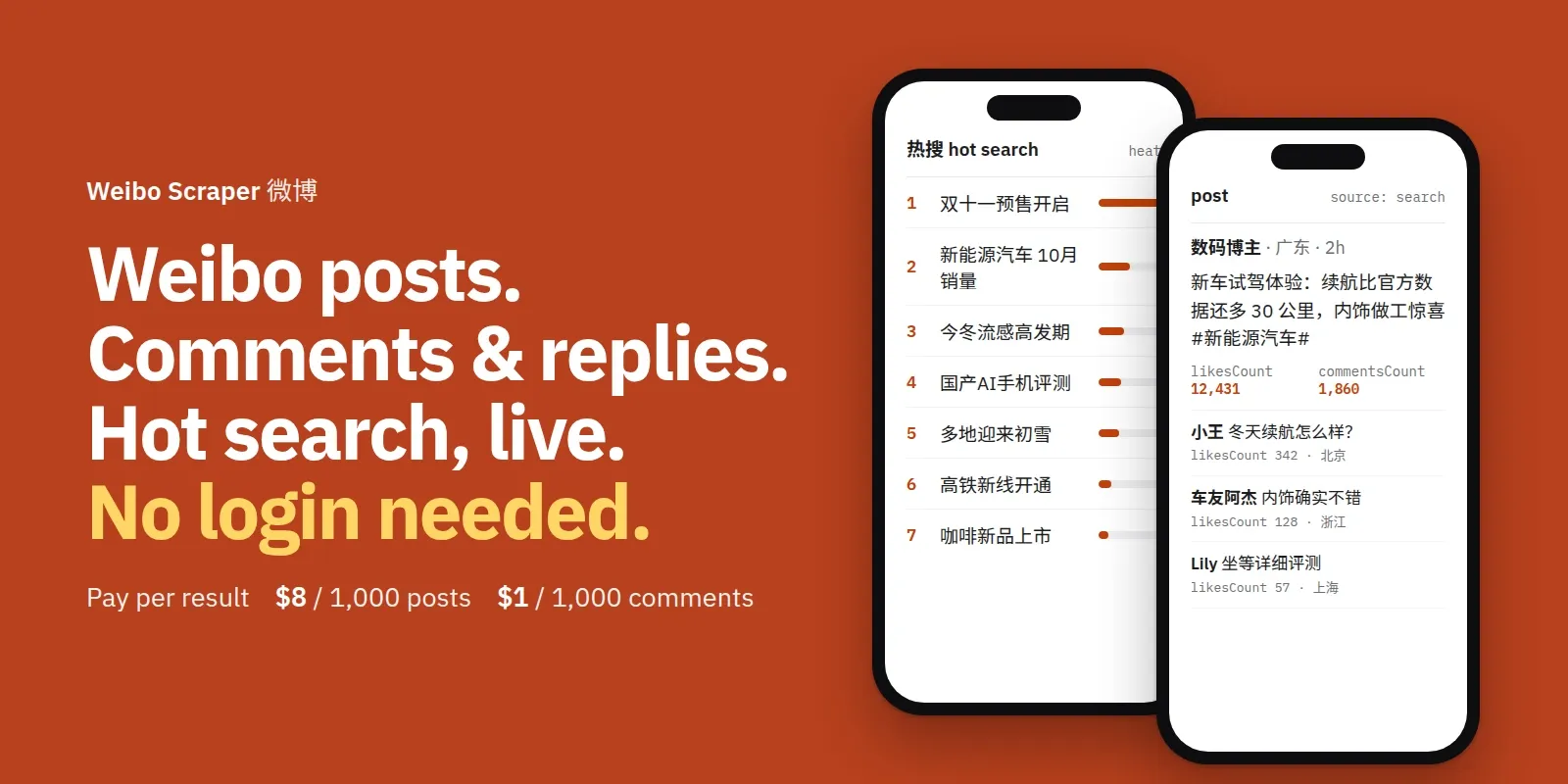
Scrape Weibo (新浪微博) without login, cookies or an API key, for brand monitoring, social listening and China market research from outside China. Search any keyword or #hashtag with date ranges, get full post text (long posts are expanded), engagement counts (likes, comments, reposts), images and video links, topics and @mentions, the reposted post, comments and reply threads, user profiles (followers, following, verification, bio, location) and Weibo's hot-search board (热搜) with heat values.
Mix sources in one run: keywords, post links, profiles and trending together. Posts found twice are saved once. Comments, replies and hot-search topics cost $1 per 1,000; posts and profiles $8 per 1,000. No monthly fee.
**中文用户:**本页下方有完整的「中文使用说明」。
What you can use it for
- Brand and product monitoring in China: every public post that mentions your brand, product or competitor, newest first, with the author's region.
- Trend and crisis tracking: snapshot the hot-search board every hour and see how fast a topic grows.
- Sentiment and market research: Chinese posts and comments with clean text and engagement counts, ready for analysis.
- Influencer (KOL) research: find who posts about a niche, then pull their profile with followers and verification.
- AI / NLP datasets: posts and comments with a clean
textandmarkdownfield for RAG and training. - Scheduled feeds: turn on Only new posts to get just the new posts for a keyword on every run.
Brand monitoring & market research in China
Weibo is where Chinese consumers praise, complain about and compare brands in public. You can follow it from anywhere: no Chinese phone number, no Weibo account, no VPN.
- Watch your brand, campaign or competitor. Add the brand name in Chinese and English (for example
苹果andApple), product names and campaign #hashtags as Search keywords. - Get only what is new. Switch on Only new posts, then add an hourly or daily schedule. Each run returns and charges only posts you haven't seen yet, so a quiet day costs almost nothing.
- Read the reaction, not just the post. Turn on Include comments to collect the discussion under each post, with likes and the commenter's region.
- Send it where your team works. Connect the dataset to Google Sheets, Slack, email or a webhook through Apify integrations, Make, Zapier or n8n.
- Sentiment and summaries. Feed the
textof posts and comments to your own LLM (ChatGPT, Claude, Gemini) to score sentiment, translate, or write a daily summary in English. Themarkdownfield keeps links and hashtags. - Spot crises early. Schedule the hot-search board (热搜) hourly and alert when your brand or category shows up.
Ready-made examples you can run in one click: Monitor a brand on Weibo (new posts only) · Weibo posts + comments for sentiment research · Weibo hot search board.
Schedule it — no cron needed
Let the Actor run on its own, at the times you pick:
- Open one of the ready-made examples above (or set up your own input) and click Save as a new task.
- Go to Schedules → Create new.
- In Schedule setup, pick the days and time in the visual picker and choose your timezone. No cron syntax needed.
- Under Add, choose your saved task, then switch the schedule on.
| What you want | Suggested schedule | Input tips |
|---|---|---|
| Brand / competitor monitoring | Once a day (e.g. 09:00 your time) | Your brand + competitor keywords, Only new posts on |
| Crisis / campaign watch | Every hour | 1–3 keywords, Only new posts on, Include comments on |
| Trending topics (热搜) | Every hour | Trending = Hot search board (热搜), no keywords needed |
| Weekly report | Once a week, Monday morning | Keywords + Posted after = last week |
With Only new posts on, a scheduled run returns and charges only posts it hasn't seen before, so a quiet day costs almost nothing. Add an Integration on the task (Google Sheets, Slack, email, webhook) to get the results delivered.
How to use it
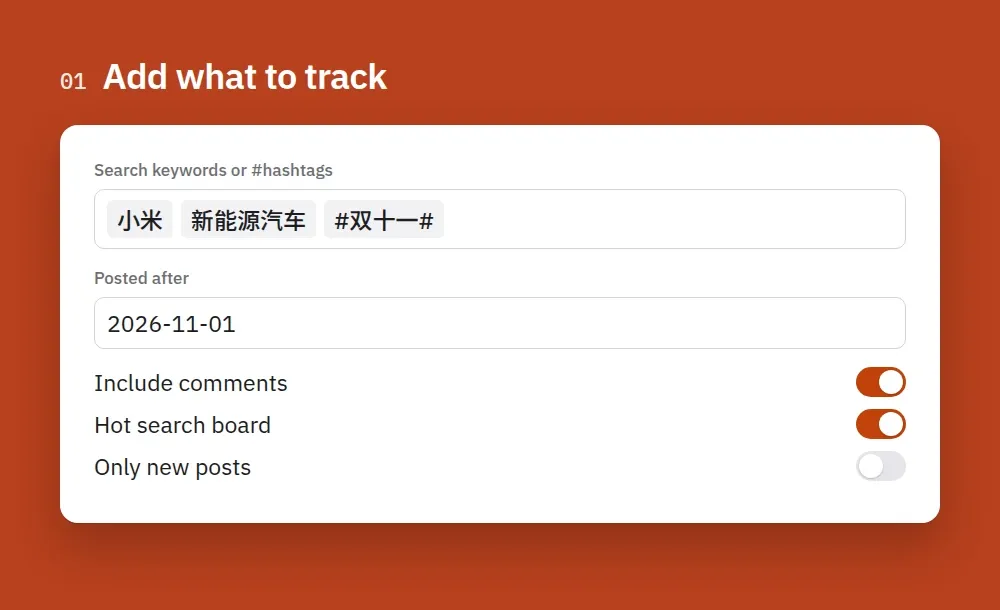
1. Add what to track. Type keywords or #hashtags, pick a date range and switch on comments or the hot-search board if you want them.
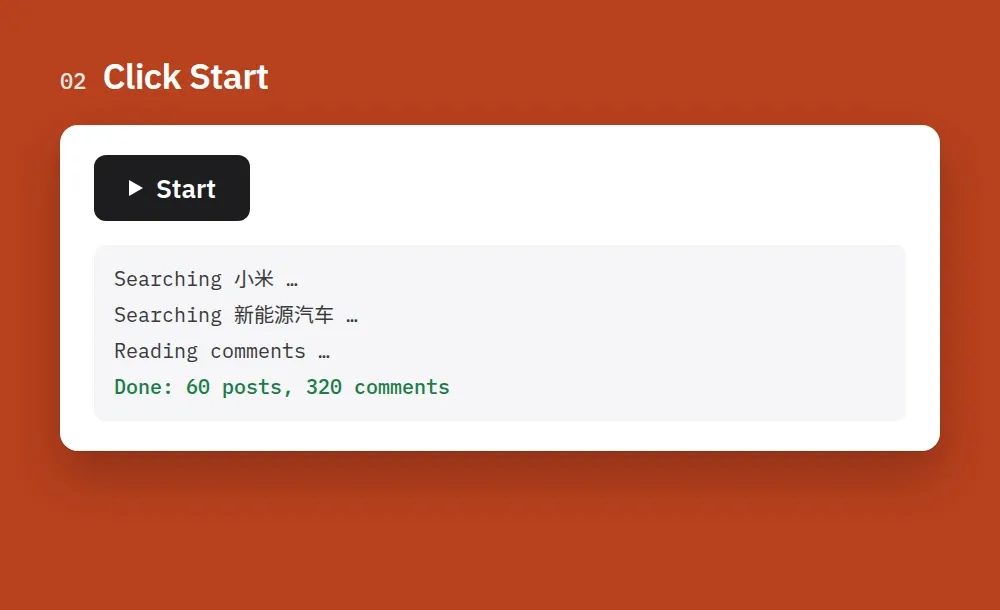
2. Click Start. A search of 100 posts takes under a minute, and you can watch the run log as it goes.
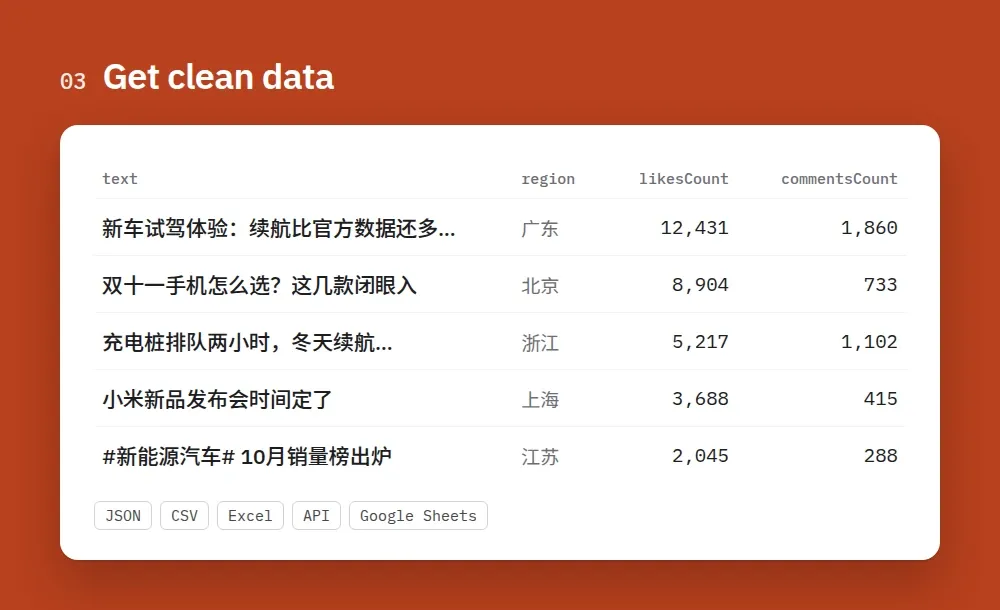
3. Get clean data. Every post comes with text, region, likes, comments and reposts. Export it as JSON, CSV or Excel, or send it to Google Sheets or your app through the API.
How to scrape Weibo
-
Create a free Apify account (no credit card needed to start) and open this Actor.
-
Pick what you want in the input form. Add Search keywords (Chinese or English, or a #hashtag) for posts, Post URLs for single posts, Profile URLs or user IDs for profiles, or switch on Trending for the hot-search board. You can fill several at once.
-
Set the limits. Max posts per search is how many posts each keyword returns. Use Posted after / Posted before to focus on a period. Turn on Include comments if you want the discussion under each post.
-
Click Start. A search of 100 posts takes under a minute. Results appear in the Output tab while it runs.
-
Download or connect. Export as JSON, CSV, Excel or HTML, or read the dataset through the API, Make, Zapier, n8n, Google Sheets or a webhook.
-
Automate it. Open Schedules, add a daily or hourly schedule, and switch on Only new posts so every run returns just what is new for your keywords.
Tips
- To follow a person, search their name or a hashtag they use. Weibo hides a logged-out visitor's view of anyone's own timeline.
- One keyword returns about 650 posts at most. To collect a whole month, run one search per week with Posted after / before.
- Keep Full text of long posts on. Weibo cuts long posts in search results, and this fetches the rest at no extra cost.
- The hot-search board changes every few minutes. Schedule it hourly and compare the
rankandheatfields over time.
中文使用说明
无需登录、Cookie 或 API 密钥,即可采集新浪微博的公开数据:关键词和话题搜索结果、帖子全文、评论与回复、用户资料,以及微博热搜榜。输入表单中的字段名为英文,下文以粗体标出,方便对照。
- 注册免费的 Apify 账号(开始使用无需绑定信用卡),然后打开本 Actor。
- 选择要采集的内容(可同时填写多项):
- Search keywords:关键词或话题,中英文均可,例如
小米、#新能源汽车#。 - Post URLs or IDs:单条微博的链接或数字 ID。
- Profile URLs or user IDs:用户主页链接或 UID,用于采集用户资料。
- Trending:选择 Hot search board (热搜) 采集热搜榜,选择 Trending posts feed 采集热门微博。
- Search keywords:关键词或话题,中英文均可,例如
- 设置数量和时间范围:Max posts per search 是每个关键词返回的帖子数量;Posted after / Posted before 用于限定发布时间段。
- (可选)采集评论:打开 Include comments,再用 Max comments per post 和 Max replies per comment 设置每条微博的评论数和每条评论的回复数。
- 点击 Start。采集 100 条帖子通常不到一分钟,运行期间结果会实时显示在 Output 标签页中。
- 导出或对接数据:可导出为 JSON、CSV、Excel 或 HTML,也可以通过 API、Make、Zapier、n8n、Google Sheets 或 Webhook 获取数据。
- 定时监测:在 Schedules 中添加每天或每小时运行的定时任务,并打开 Only new posts (monitor mode)。之后每次运行只返回此前未采集过的新帖子,也只对这些帖子收费。
价格(每 1,000 条):帖子 $8,用户资料 $8,评论或回复 $1,热搜话题 $1。无月费,未保存的数据不收费。可在运行选项中设置单次运行的最高费用,达到上限后 Actor 会自动停止。
限制:本 Actor 从不登录,因此无法获取用户自己的主页时间线和粉丝/关注列表(用户资料中会显示粉丝数和关注数)。每个关键词最多返回约 650 条帖子;如需更多,请用 Posted after / Posted before 按周拆分时间段。
Output: post
Output: comment or reply
Output: profile
Output: hot-search topic
Input
Leave the input empty to get a small sample.
Pricing
You pay per result, plus a tiny start fee. No monthly fee, and you are never charged for items that were not saved.
| Result | Price per 1,000 |
|---|---|
| Post | $8.00 |
| Profile | $8.00 |
| Comment or reply | $1.00 |
| Hot-search topic | $1.00 |
Set the maximum cost per run in the run options and the Actor stops there. Example: 8 keywords × 300 posts (2,400 posts) plus 3,200 comments and replies is about $22.
Use with AI agents (Claude, ChatGPT, Cursor, MCP)
Add the Actor as a tool through the Apify MCP server: https://mcp.apify.com?actors=smoldesk/weibo-scraper. Then paste this into your agent's system prompt or tool notes, so it knows when to call it:
Questions an agent can answer with it:
- What are Weibo users saying about Xiaomi's new car this week? Summarize the main complaints in English.
- What's on the Weibo hot search right now, and which topics are about tech?
- Pull the top comments under this Weibo post and tag their sentiment.
Your agent can pay for its own runs. This Actor is approved for agentic payments on Apify, so an agent with a Skyfire token or an x402 wallet can call it and pay per result without an Apify account. Skyfire: use https://mcp.apify.com?payment=skyfire. x402: buy a prepaid Apify token with USDC. Setup: Apify agentic payments docs.
Use with AI (LangChain / LlamaIndex / CrewAI)
Each post has a markdown field (text with links and hashtags kept) ready for LLMs. With LangChain (pip install langchain-apify):
Already have a run? Use ApifyDatasetLoader(dataset_id="<run's dataset ID>", dataset_mapping_function=...). LlamaIndex: ApifyActor from llama-index-readers-apify. CrewAI: use the Apify MCP server above.
Limitations
Weibo shows logged-out visitors less than logged-in users. This Actor never logs in, so:
- A user's own post timeline is not available (Weibo asks for a login). To collect what a person posts, search keywords or hashtags, or read single posts by link.
- Followers and following lists are not available (login required). Profiles show the counts.
- Weibo returns about 48 posts per page and roughly 14 pages (about 650 posts) per search. For more, split the period with Posted after / Posted before (for example one search per week).
- Search results are newest first. Weibo's own "hot" and "people" search tabs are not available.
- Two fields are currently always
null: hot-searchcategory(Weibo stopped sending topic categories) and profileipLocation(Weibo hides it from logged-out visitors). They stay in the output so your sheets and code keep working, and will fill again if Weibo brings them back. - Weibo sometimes limits requests. The Actor retries with fresh sessions and switches to datacenter proxies on its own, so very large runs can take a few minutes.
FAQ
Does Weibo have a public API? Weibo's official API needs an approved app and mostly returns your own account's data. This Actor reads the same public endpoints the Weibo website loads for any visitor, and returns clean, English-named JSON.
Do I need a Weibo account, cookies or a Chinese phone number? No. Nothing to log in to, nothing to configure.
Do I need a proxy or VPN? No. It works from Apify's servers as is.
Can I search in English? Yes. Keywords and #hashtags work in Chinese and English.
How do I scrape Weibo comments? Turn on Include comments, choose how many comments per post and how many replies per comment. Comments come with their author, likes and the region Weibo shows.
How do I get only new posts? Turn on Only new posts and schedule the Actor. Each run returns posts that earlier runs with the same keyword and dates haven't seen.
Is it legal? It collects only data Weibo shows publicly to every visitor, with no login. Follow copyright and privacy laws (e.g. PIPL, GDPR) when you reuse it.
Feedback
Found a bug or missing a field? Open an issue in the Issues tab. If the Actor saved you time, a short review on this page helps other people find it.
Code examples and a quick reference are also on GitHub: smoldesk/weibo-scraper.
More Actors from Smoldesk Studios
- Contact Details Scraper: emails, phone numbers, social profiles and contact forms from any list of websites, with email domains checked and junk removed, charged only when contacts are found
- Google Maps Scraper: places with phones, websites, ratings and hours from any search, plus emails and social profiles from each business website, lead filters and new-place monitoring
- WeChat Articles Scraper: WeChat Official Account (公众号) articles from keyword search, full text as Markdown, images, account IDs and publish dates, no login
- Toutiao Scraper: Toutiao (今日头条) news search with date ranges, reads and likes, comments and the hot board (热榜), no login
- YouTube Scraper: videos, Shorts, channels and comments from search, channels and playlists — exact views, likes, publish dates and durations, no API key
- YouTube Comments Scraper: comments and replies from videos, channels, playlists or keyword searches, with likes, pinned/hearted flags and authors
- YouTube Channel Scraper: subscribers, exact total views, join date, country and social links of any channel, plus its latest videos
- Google Ads Transparency Scraper: every ad a competitor runs on Google Search, YouTube and Shopping — creatives, landing pages, countries, EU impressions and new-ad alerts
- Tennis Scraper: ATP, WTA, Challenger and ITF results and fixtures with odds from 15 bookmakers, H2H, players and rankings, back to the 2000s
- Bilibili Scraper: videos, stats, danmaku, comments and creators from China's video site, no login
- Google Hotels Scraper: hotel prices for your dates in any currency, ratings, review aspects and booking-site prices, worldwide
- Google Hotels Price Calendar: the cheapest nightly rate for every check-in date up to a year ahead, for any hotel, with taxes and booking-site prices
- Google Trends Scraper: interest over time, by region and city, related queries and Trending now — no API key
- Telegram Channel Scraper: public channel posts, views, reactions and subscribers
- Substack Scraper: newsletters, subscriber counts and posts
- Shopify Store Analyzer: apps, contacts and products of any Shopify store
- Career Site Jobs Scraper: live jobs from 12,000+ company career sites (Greenhouse, Lever, Workday, Ashby) with salary and seniority
- SEEK, JobStreet & JobsDB Scraper: jobs and salaries across Australia and Southeast Asia


