

Google Trends Scraper – Interest, Regions, Related & Trending
Pricing
from $1.50 / 1,000 keyword or comparison results
Google Trends Scraper – Interest, Regions, Related & Trending
Google Trends API without browser or login: interest over time, by region & city, related queries (rising/breakout), compare up to 5 terms, Trending now with search volume & news. Fast, 100% HTTP, no start fee.
Pricing
from $1.50 / 1,000 keyword or comparison results
Rating
0.0
(0)
Developer

Smoldesk Studios
Maintained by CommunityActor stats
0
Bookmarked
2
Total users
1
Monthly active users
3 hours ago
Last modified
Security
Limited permissionsShare
Google Trends Scraper – Interest Over Time, Regions, Related Queries & Trending Now
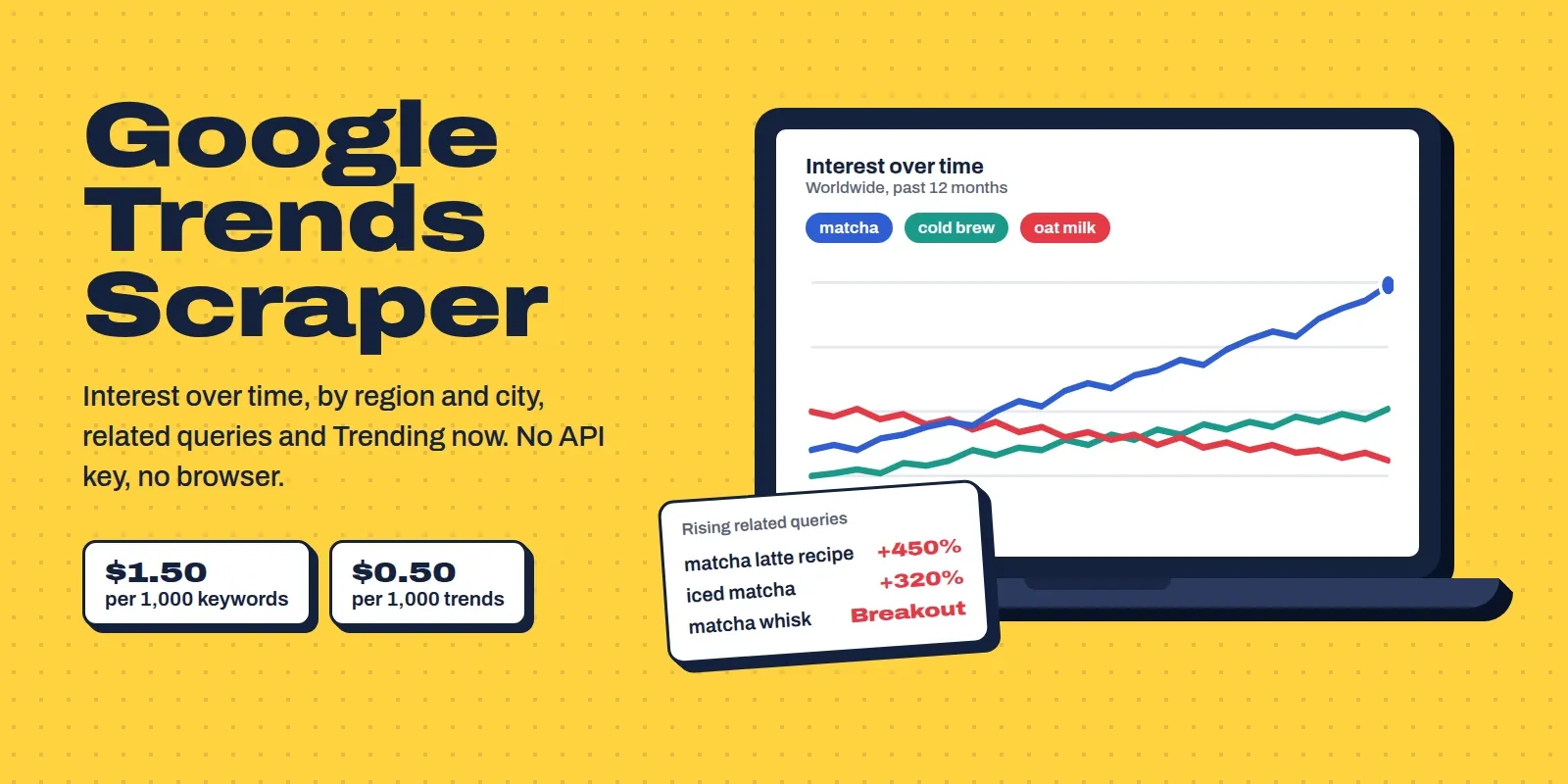
A Google Trends API without a browser, login or API key. For any keyword, in any country or worldwide, you get interest over time, interest by region, city and US metro area, and top and rising related searches (with "Breakout" and +% growth). You can also compare up to 5 keywords on one chart, or pull Google's Trending now list with search volume, % increase, start time, related searches and news articles.
It calls Google Trends' own data endpoints directly over plain HTTP, so runs are fast and cheap. When Google rate-limits, the Actor slows down, switches IP and retries on its own. Each keyword is one clean result with summary numbers already worked out (average, peak, latest value, % change, rising/falling) and a plain-English summary that an LLM can read directly. No start fee.
What you can use it for
- SEO & content planning: find rising queries and seasonal peaks before you write, and see which states and cities search for a topic most.
- Market research & product validation: compare brands, products or ideas ("notion vs obsidian vs evernote") over 5 years in any country.
- Trend monitoring: schedule a daily run on your keywords and alert when
trendDirectionturnsrisingor a rising query shows "Breakout". - News, social & newsletter teams: pull what's trending right now in the US, UK, Malaysia or 120+ other countries, with the news stories behind each trend.
- E-commerce & ads: use Google Shopping or YouTube search interest, and US metro (DMA) data for local ad targeting.
- AI agents & dashboards: every result has a
summarysentence and flat stats fields, ready for LLMs, Sheets or BI tools.
How to use it
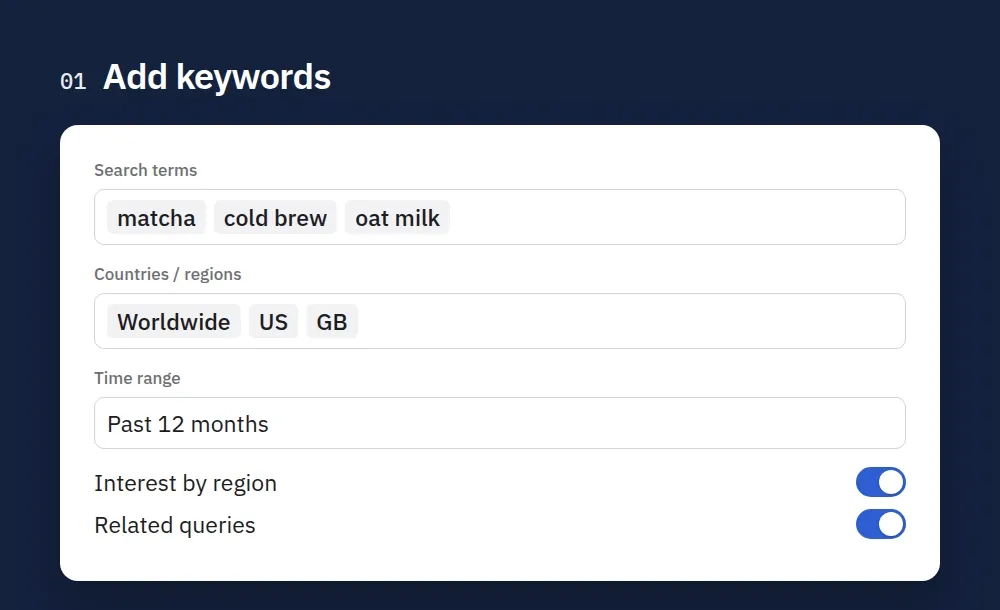
1. Add keywords. Type search terms, pick countries and a time range, and switch on regions or related queries.
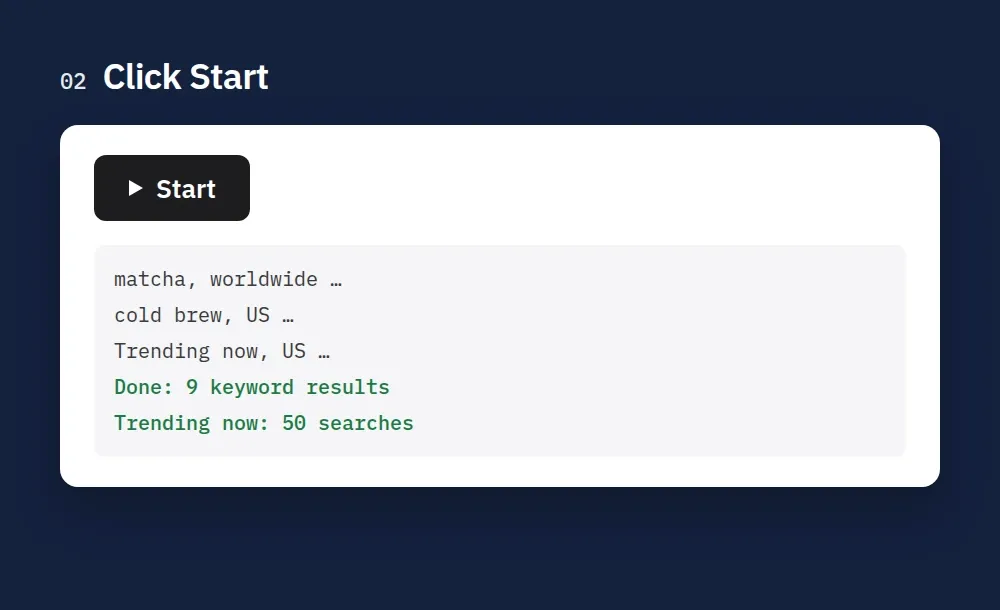
2. Click Start. Each keyword and country takes a few seconds. Trending now lists come back in one request.
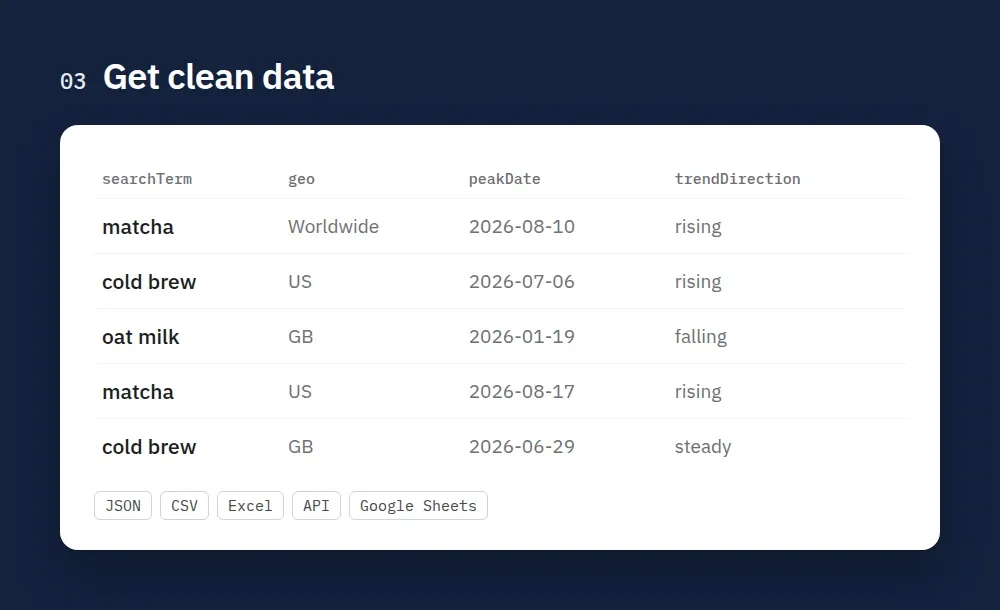
3. Get clean data. Every keyword comes with its timeline, peak, latest value and trend direction. Export it as JSON, CSV or Excel, or read it through the API.
How to scrape Google Trends
- Create a free Apify account (no credit card needed to start) and open this Actor.
- Add terms. Type search terms in Search terms (one result per term and country), or put up to five in Compare terms to compare them on the same chart.
- Choose where and when. Pick Countries / regions (or leave worldwide), a Time range or a custom date range, and optionally a Category and Search type (web, images, news, shopping, YouTube).
- Pick the breakdowns. Switch on Interest by region, Interest by city / metro and Related queries as needed. For what is trending right now, fill the Trending now fields instead.
- Click Start. Results appear in the Output tab while it runs.
- Download or connect. Export as JSON, CSV, Excel or HTML, or read the dataset through the API, Make, Zapier, n8n, Google Sheets or a webhook.
- Automate it. Open Schedules and run daily to build your own history of interest over time or of the trending list.
Tips
- Related topics are currently empty for automated requests on Google's side, so they are off by default.
- Terms without enough data are returned empty and are not charged.
- Pasting a Google Trends link into Google Trends URLs reproduces exactly that chart.
Three ways to use it
- Keywords: add
searchTermsandgeos. You get one result per keyword per location. - Compare: turn on
compareTermsand up to 5 keywords share one chart, so their values are relative to each other, exactly like the Compare button on Google Trends. Or paste a Google Trends URL intostartUrls. - Trending now: add country codes to
trendingGeosto get today's trending searches.
You can mix all three in one run.
Output
Keyword (type: "keyword")
Values are Google's 0–100 index: 100 is the busiest point in the period and location, not a search count. changePercent compares the average of the last quarter of the period with the first quarter. trendDirection is rising above +10%, falling below −10%, otherwise stable. The last point is often isPartial: true (the current week or day isn't finished yet) and is left out of the change.
Comparison (type: "comparison")
Same fields, but interestOverTime[].values, averages, termStats and interestByRegion[].values are keyed by term, and relatedQueries holds top/rising lists per term:
Trending now (type: "trending")
Input
| Field | Description |
|---|---|
searchTerms | Keywords. Each one × each location = one result |
compareTerms | Put up to 5 terms on one chart (one result per group) |
geos | Country codes (US, GB, DE, MY…), sub-regions (US-CA, GB-ENG, AU-NSW) or empty for worldwide |
timeRange | Past hour, 4 h, day, 7 days, 30 days, 90 days, 12 months, 5 years, or 2004–present |
customTimeRange | Exact dates, e.g. 2024-01-01 2024-12-31 |
category | Google Trends category, e.g. Finance, Shopping, Travel |
property | Web, image, news, Google Shopping or YouTube search |
startUrls | Google Trends explore URLs; their terms, location, dates, category and search type are used |
includeRegions / includeCities / includeRelatedQueries | Choose which breakdowns to fetch. Cities also add US metro areas (DMA) for US locations |
trendingGeos | Countries for Trending now |
trendingHours | Trending window: 4, 24, 48 hours or 7 days |
trendingCategory / trendingActiveOnly | Filter trending searches by category or keep only those still active |
maxTrendingPerGeo | Keep the N biggest trends per country (0 = all, up to ~500) |
includeTrendingNews / newsPerTrend | News articles per trending search (1–10) |
maxItems | Hard cap on results (and on what you pay) |
Pricing
Pay per result. No start fee, no monthly rental:
| Result | Price |
|---|---|
| Keyword or comparison (timeline + regions + cities + related queries, all in one result) | $1.50 per 1,000 |
| Trending now search (with news articles) | $0.50 per 1,000 |
Example: tracking 100 keywords in 3 countries every day costs about $0.45 a day. The top 50 trends in 5 countries cost $0.13. A keyword Google has no data for (too few searches) is returned with hasData: false and is not charged. Set "Maximum cost per run" to cap spending. The Actor stops cleanly at your limit.
Use with AI agents (Claude, ChatGPT, Cursor, MCP)
Add the Actor as a tool through the Apify MCP server: https://mcp.apify.com?actors=smoldesk/google-trends-scraper. Then paste this into your agent's system prompt or tool notes, so it knows when to call it:
Questions an agent can answer with it:
- Is interest in Claude growing faster than ChatGPT in the US over the last year?
- Which US states search most for heat pumps, and what are the rising related queries?
- What's trending on Google in Malaysia today, and why?
Your agent can pay for its own runs. This Actor is approved for agentic payments on Apify, so an agent with a Skyfire token or an x402 wallet can call it and pay per result without an Apify account. Skyfire: use https://mcp.apify.com?payment=skyfire. x402: buy a prepaid Apify token with USDC. Setup: Apify agentic payments docs.
Use with AI (LangChain / LlamaIndex / CrewAI)
Every result has a summary sentence with the key numbers, so an LLM can reason about trends without parsing time series. With LangChain (pip install langchain-apify):
Already have a run? Use ApifyDatasetLoader(dataset_id="<run's dataset ID>", dataset_mapping_function=...). LlamaIndex: ApifyActor from llama-index-readers-apify. CrewAI: use the Apify MCP server above.
Tips
- Values are relative. Two separate keyword results can't be compared by their numbers. Turn on
compareTermsto put them on the same scale. - Finer data: past 7 days gives hourly points, past day 8-minute points, past 30/90 days daily points.
- Ambiguous words ("jaguar", "apple"): set a
category. - Big lists: hundreds of keywords are fine. The Actor paces itself to Google's limits, so expect roughly 20–30 keywords a minute (60 keywords with cities took 2 minutes in our tests). If Google throttles, it slows down instead of failing.
- Monitoring: schedule daily, then filter on
trendDirectionor ongrowth: "Breakout"inrelatedQueriesRising.
FAQ
Is there an official Google Trends API? Google announced an alpha Trends API in 2025 for a small group of approved testers only. This Actor gives you the same data as a ready-made API today: call it from Python, JavaScript, Make, Zapier, n8n or plain HTTP and get JSON, CSV or Excel back.
Is this a pytrends alternative? Yes. pytrends is no longer maintained and gets HTTP 429 errors quickly. This Actor handles rate limits, IP rotation and retries for you, and needs no Python setup.
Do I need a Google account or proxies? No. No login is needed. Apify datacenter proxy (on by default) is enough. Residential proxies are not needed.
Why are related topics empty? Since September 2026 Google returns an empty related-topics list to almost all automated requests, from any IP. Related queries (top and rising) are not affected and are included by default. You can still turn on includeRelatedTopics in case Google brings topics back.
Why do some cities have no data? Google only shows cities with enough searches, so niche keywords may have few or no cities. Regions and US metro areas usually have full coverage.
Is it legal? The Actor only reads public, aggregated, anonymised Google Trends data that anyone can see without logging in. No personal data is collected.
Feedback
Found a bug or missing a field? Open an issue in the Issues tab. If the Actor saved you time, a short review on this page helps other people find it.
Code examples and a quick reference are also on GitHub: smoldesk/google-trends-scraper.
More Actors from Smoldesk Studios
- Contact Details Scraper: emails, phone numbers, social profiles and contact forms from any list of websites, with email domains checked and junk removed, charged only when contacts are found
- Google Maps Scraper: places with phones, websites, ratings and hours from any search, plus emails and social profiles from each business website, lead filters and new-place monitoring
- WeChat Articles Scraper: WeChat Official Account (公众号) articles from keyword search, full text as Markdown, images, account IDs and publish dates, no login
- Toutiao Scraper: Toutiao (今日头条) news search with date ranges, reads and likes, comments and the hot board (热榜), no login
- YouTube Scraper: videos, Shorts, channels and comments from search, channels and playlists — exact views, likes, publish dates and durations, no API key
- YouTube Comments Scraper: comments and replies from videos, channels, playlists or keyword searches, with likes, pinned/hearted flags and authors
- YouTube Channel Scraper: subscribers, exact total views, join date, country and social links of any channel, plus its latest videos
- Google Ads Transparency Scraper: every ad a competitor runs on Google Search, YouTube and Shopping — creatives, landing pages, countries, EU impressions and new-ad alerts
- Weibo Scraper: keyword and hashtag search, posts, comments, profiles and the hot-search board from China's biggest microblog, no login
- Tennis Scraper: ATP, WTA, Challenger and ITF results and fixtures with odds from 15 bookmakers, H2H, players and rankings, back to the 2000s
- Google Hotels Scraper: hotel prices for your dates in any currency, ratings, review aspects and booking-site prices, worldwide
- Google Hotels Price Calendar: the cheapest nightly rate for every check-in date up to a year ahead, for any hotel, with taxes and booking-site prices
- Bilibili Scraper: videos, danmaku, comments and creator stats from China's YouTube (哔哩哔哩)
- Career Site Jobs Scraper: jobs from 12,000+ company career pages (Greenhouse, Lever, Ashby, Workday…)
- SEEK, JobStreet & JobsDB Scraper: jobs and salaries in 8 APAC countries
- Shopify Store Analyzer: products, prices, apps and theme of any Shopify store
- Substack Scraper: newsletters, subscriber counts and posts
- Telegram Channel Scraper: public channel posts, views and media without an API key


