
Booking Reviews Scraper - New Guest Reviews Monitor by Hotel
Pricing
from $1.00 / 1,000 reviews
Booking Reviews Scraper - New Guest Reviews Monitor by Hotel
Monitor new guest reviews of Booking.com hotels, or scrape a hotel's review list, by name or URL. A scheduled run returns only reviews posted since the previous one. Rows: score, likes and dislikes, language, room, stay, guest country, hotel reply. $2 per 1,000 reviews; hotels not found are free.
Pricing
from $1.00 / 1,000 reviews
Rating
0.0
(0)
Developer

Tenfold Fleet
Maintained by CommunityActor stats
0
Bookmarked
1
Total users
0
Monthly active users
a day ago
Last modified
Categories
Features
Share
What does Booking Reviews Scraper do?
Booking Reviews Scraper reads the guest reviews Booking.com shows for a hotel and keeps watch for new ones. Run it once and you have a hotel's reviews, newest first. Put it on a schedule with Only new reviews switched on and it becomes a new reviews monitor: every run delivers just what guests posted since the previous run, and a review is delivered, and billed, once per hotel.
You say which hotels by name or booking.com hotel URL. Each row is one review: the score, the title, what the guest liked and what they disliked in two separate fields, the language, the guest's name and country as shown publicly, traveller type, room, length and date of stay, and the hotel's reply when one exists. Use it as a Booking.com reviews API: plain HTTPS requests, no browser, no login, results as JSON, CSV or Excel.
Not affiliated with, endorsed or sponsored by Booking.com or Booking Holdings.
Why use a Booking.com reviews monitor?
- Reputation management: get every new review of your properties each morning, and see which ones still have no reply from the hotel.
- Hotel groups and revenue teams: follow your own hotels and the competitors next door in one dataset.
- Alerts on bad stays: set a maximum score of 6 and a schedule, and only low-scoring new reviews arrive.
- Sentiment and topic analysis: feed liked and disliked text, split into two fields, into your own models or an AI agent.
- Market research: compare guest mix by country and traveller type across hotels.
What data can Booking Reviews Scraper extract?
| Field | Description |
|---|---|
hotelId, hotelName, hotelUrl | The hotel the review belongs to |
reviewId | Booking.com's id of the review (a stable hash when it has none) |
reviewDate | When the review was posted (ISO 8601) |
score | Guest score, 1 to 10 |
title, positiveText, negativeText | Review title, what the guest liked, what the guest disliked |
language | Language code of the review (en, de, fr ...; regional variants as en-us, pt-br, es-ar, es-mx, zh-tw) |
guestName, guestCountry, guestCountryCode | As shown publicly on the review; Anonymous when the guest hid the name |
travellerType | Couple, Family, Solo traveller, Group, Business |
roomType, stayNights, stayDate, checkoutDate | Room booked, number of nights, check-in and check-out date |
partnerReply, partnerReplyDate | The hotel's public reply; the date is filled only when Booking.com publishes it |
helpfulVotes | Number of "helpful" votes |
hotelReviewsCount, hotelScore | Reviews listed for the hotel and its overall score |
isNew | false when an earlier only-new run already returned this review |
scrapedAt | Time of the run |
How to scrape Booking.com reviews
- Open the Actor and add your hotels: a name with its city (
The Hoxton, Amsterdam) or a hotel URL (booking.com/hotel/nl/toren.html). - Set Max reviews per hotel. Optionally filter by language, score range or a start date.
- Click Start and download the dataset as JSON, CSV or Excel, or read it through the Apify API.
How to monitor new Booking.com reviews
- Switch on Only new reviews.
- Save the input as a task and add a schedule (daily or weekly).
- The first run returns the newest reviews up to your limit and remembers them. Every later run returns only what was posted since. A hotel with nothing new produces one free status row, so a quiet day costs nothing beyond the start fee of $0.00005.
The memory is a key-value store named booking-reviews-monitor-state in your own account, one record per hotel. Reviews older than the first run's window are treated as backlog and are not returned later. To start again, switch on Reset the only-new memory for one run.
From the second run on, a run that stops at Max reviews per hotel leaves nothing behind: the next run returns the reviews that were left, still once each. The same holds for any run, the first one included, that stops at its maximum charge or near its time limit.
How much does it cost to scrape Booking.com reviews?
$2 per 1,000 reviews ($0.002 per review), plus $0.00005 per run. No monthly rental.
Free of charge: hotels that cannot be found, hotels without reviews, only-new runs that find nothing new, and pages that fail after retries. In only-new mode you never pay twice for the same review. The free Apify plan has no separate limit here: its monthly credit covers about 2,500 reviews.
Example: 20 hotels checked daily with about 3 new reviews each is 60 reviews a day, about $3.60 a month.
Input
since (a date such as 2026-10-01), minScore, sort (newest, oldest, relevant, highest, lowest) and proxy are optional. A numeric Booking.com hotel id is accepted in hotels too.
Output
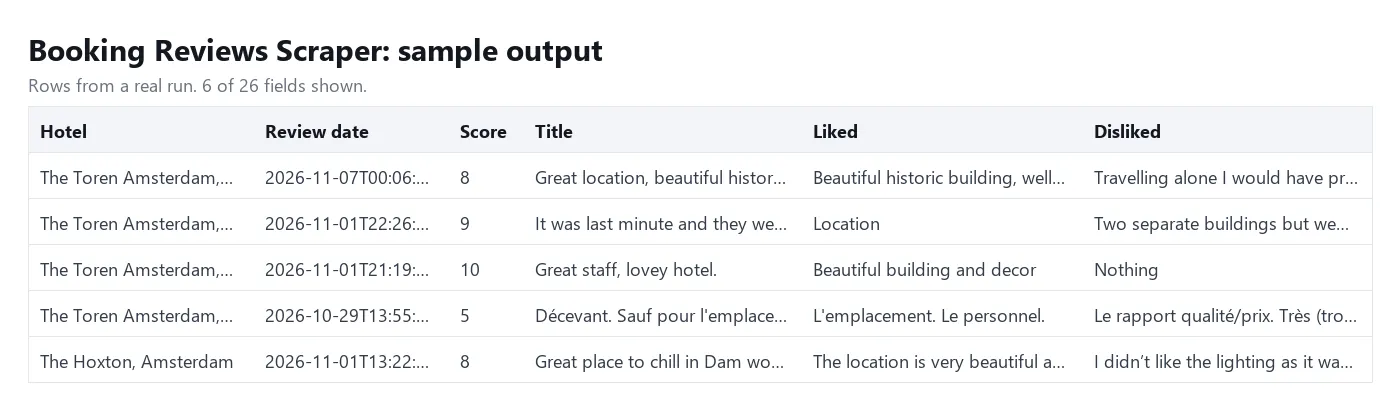
Rows without a review carry either an error (hotel not found, reviews not loaded) or a status (no-new-reviews, no-reviews, no-matching-reviews, duplicate, skipped) with a message. They are free. When a run stops at its maximum charge or time limit, the hotels it did not reach are listed together in one skipped row (skippedInputs).
Tips
- Names: add the city, and check
hotelNamein the first run. The Actor takes the Booking.com suggestion that fits the words you typed. A name that is too general (hotel) or that no suggestion resembles gets a free error row instead of a guess. - URLs: a URL is matched through Booking.com's search and accepted only when the listing's page name is identical to the one in the URL, so it never returns another hotel's reviews. In our tests about 94% of URLs matched (76 of 81, none to a wrong hotel). A listing whose page name shares nothing with its current name and does not mention its city may not be found: use its name or numeric hotel id instead. A matched URL is remembered for later runs.
- Many new reviews: in only-new mode keep Max reviews per hotel above the number of reviews a hotel collects between two runs. If a hotel collects more, the newest are returned first and the next run returns the rest.
- Languages: use two-letter codes (
en,de,fr).encovers British and American English. An entry that is not a language code stops the run before anything is charged. - Filters in only-new mode: reviews that your score or date filter rejects are remembered as seen.
- Prices instead of reviews: our Booking hotel prices Actor reads room rates through the same public Booking.com endpoint; this one reads reviews only.
FAQ
Does Booking.com have a public reviews API?
Booking.com offers APIs to its partners, not a public one for reviews. This Actor reads the same public review list a visitor sees on the hotel page.
How far back can it go?
As far as Booking.com lists reviews for the hotel. hotelReviewsCount shows how many are available; set Max reviews per hotel to that number to export all of them.
Why is partnerReplyDate empty?
Booking.com shows the reply text but rarely publishes its date. The field is filled when the date is available.
Can I use it from an AI agent or MCP client?
Yes. Call it through the Apify API or the Apify MCP server with a list of hotel names; rows are flat JSON with one review each.
Does it need a proxy?
The default Apify datacenter proxy is enough. If a run reports blocked requests, switch the proxy input to residential.
Disclaimer
This Actor collects publicly visible review data only and uses no login. Reviews can contain personal data (a guest's first name and country, as shown on the public page). Make sure you have a lawful basis for processing it under GDPR and similar rules, and do not use it to contact or profile individuals. Respect Booking.com's terms when you use the data.
More tools from Tenfold Fleet
All 122 tools: apify.com/tenfoldfleet. If this Actor saves you time, save it (the bookmark on its Store page) and leave a review: both help other people find it. Found a bug or need another field? Tell us on the Issues tab of this page.


