

Trustpilot Reviews Scraper - New Reviews Monitor & TrustScore
Pricing
from $0.30 / 1,000 reviews
Trustpilot Reviews Scraper - New Reviews Monitor & TrustScore
Get the newest Trustpilot reviews of any company by domain with TrustScore and review count, or schedule it to return only reviews posted since the last run. Rows: rating, title, text, language, date, reviewer, company reply. $0.60 per 1,000 reviews plus $0.01 per company; failures are free.
Pricing
from $0.30 / 1,000 reviews
Rating
0.0
(0)
Developer

Tenfold Fleet
Maintained by CommunityActor stats
0
Bookmarked
1
Total users
0
Monthly active users
a day ago
Last modified
Categories
Features
Share
What does Trustpilot Reviews Scraper do?
Trustpilot Reviews Scraper reads the newest reviews of any company on Trustpilot by its domain, together with the company's TrustScore and total review count. Put it on a schedule and it is a new reviews monitor: each run delivers only what customers posted since the previous run, and a review is delivered, and billed, once.
Each review row has the star rating, title, full text, language, publication date, the verified flag, the reviewer's public name, country and review count, and the company's reply when there is one. Every company also gets a summary row with its name, TrustScore, review count and the number of new reviews. Use it as a Trustpilot reviews API: no browser, no login, no proxy to set up, results as JSON, CSV or Excel.
Not affiliated with, endorsed or sponsored by Trustpilot.
Limit to know before you start: one run reads at most the newest 200 reviews of a company. This Actor is built for recent reviews and ongoing monitoring. It does not export a company's full review history.
Why use a Trustpilot new reviews monitor?
- Reputation management: get every new review of your brand each morning and see which ones still have no company reply.
- Bad review alerts: set the maximum stars to 2, schedule a run every hour, and forward the rows to Slack or email through an Apify integration.
- Competitor tracking: follow the TrustScore and review count of a list of competitors over time, one summary row per company per run.
- Customer feedback analysis: feed fresh review text into your own model or an AI agent to tag topics and sentiment.
- Agencies: watch all your clients' domains in one scheduled run and one dataset.
What data can Trustpilot Reviews Scraper extract?
| Field | Description |
|---|---|
type | review, company (summary row), error or notice |
domain, companyName | The company the row belongs to |
trustScore | The company's TrustScore, 1 to 5 |
totalReviews | Number of reviews the company has on Trustpilot |
reviewId, reviewUrl | Trustpilot's id of the review and its address |
rating | Stars given by the reviewer, 1 to 5 |
title, text | Review title and full text |
language | Language the review is written in (two-letter code) |
publishedAt | When the review was published (ISO 8601) |
verified | true when Trustpilot marks the review as verified |
reviewerName, reviewerCountry, reviewerReviewCount | As shown publicly on the review |
images | Links to pictures attached to the review, when available (usually empty) |
companyReply | { text, date }, or null when the company has not replied |
isNew | true in only-new mode, null otherwise |
scrapedAt | When the row was produced |
Company summary rows add companyCountry, trustpilotUrl, reviewsReturned, newReviews and status (ok, no-new-reviews or no-reviews).
How to scrape Trustpilot reviews
- Open the Actor and add one or more company domains, for example
www.shopify.com. The address of a Trustpilot review page works too. - Set Max reviews per company (20 by default, 200 at most).
- Leave Only new reviews on for monitoring, or switch it off to get the newest reviews on every run.
- Optionally set minimum or maximum stars and a review language.
- Click Start. The newest 20 reviews of a company are usually ready in under a minute; asking for more than 20 adds a second read and takes about twice as long.
- Download the dataset as JSON, CSV or Excel, or read it through the Apify API.
How to monitor new Trustpilot reviews on a schedule
Save the input as a task and add an Apify schedule (hourly, daily or weekly). The first run returns the newest reviews up to your limit and remembers them. Every later run returns only reviews it has not returned before. The memory lives in a key-value store named trustpilot-reviews-monitor-state in your own account, one record per company; delete a record to start that company again.
If a company receives more new reviews between two runs than one run can read (200), the summary row carries a note and you should schedule runs more often.
How much does it cost to scrape Trustpilot reviews?
Pay per result, with no subscription:
- $0.60 per 1,000 reviews returned ($0.0006 each; $0.30 per 1,000 on the Gold plan and above).
- $0.01 per company checked, which covers the summary row with TrustScore and review count.
- $0.00005 per run start.
The newest 20 reviews of one company cost $0.022. A daily monitor of 10 companies that finds 30 new reviews costs about $0.12 per day. In only-new mode a company with nothing new costs only the $0.01 check.
Free: domains that are not valid, companies with no Trustpilot page, failed or timed-out reads, and reviews left out by your star or language filter.
A list in which almost no domain has a Trustpilot page is stopped early: the first 25 companies are tried, the rest are named in one free notice row, and nothing is charged for them.
Free Apify plan: 1 company and 20 reviews per run.
Input
Output
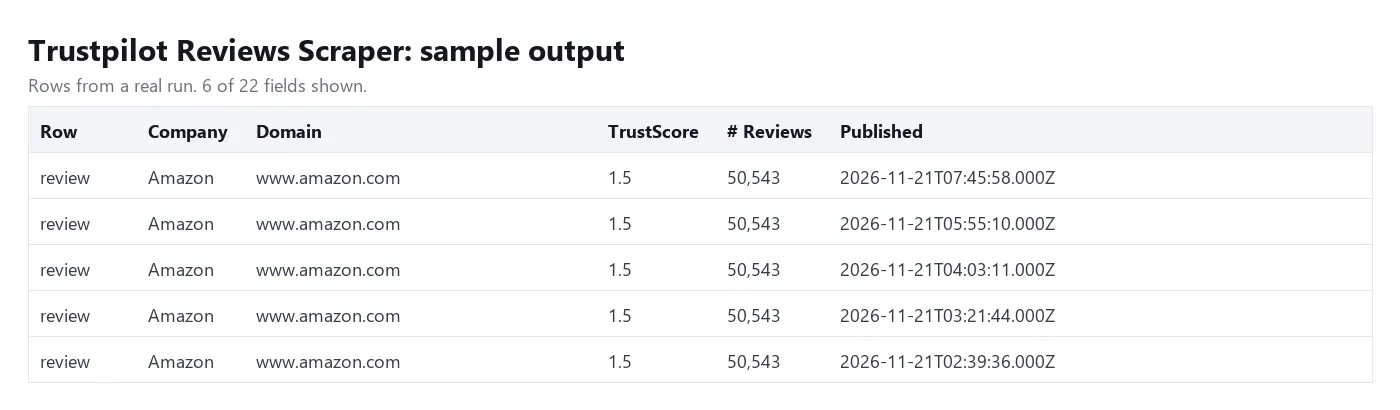
One row per review, newest first, followed by one summary row per company. You can download the dataset as JSON, CSV, Excel, XML or HTML.
Tips
- Use the domain exactly as it appears in the company's Trustpilot address (the part after
/review/). Some companies are listed withwww., some without. - For alerts on unhappy customers, set
maxRatingto 2. Filtered-out reviews are free, and the monitor does not offer them again later. - To follow only the TrustScore, set
maxReviewsPerCompanyto 1 and keep only-new on: after the first run most runs cost just the company check. - Set a maximum charge per run in the run options if you want a hard spending cap. The Actor stops cleanly when it is reached.
FAQ
Can I get all reviews of a company?
No. One run reads the newest 200 reviews of a company at most. If you need a complete multi-year history, this is not the right tool. For the latest reviews and for continuous monitoring it is fast and cheap.
How fresh is the data?
Every run reads the company's Trustpilot page live, so the TrustScore, review count and reviews are current at the time of the run.
Does it need a Trustpilot account, cookies or proxies?
No. Only public review pages are read and there is nothing to configure.
What happens when a company is not on Trustpilot?
You get a row with an error field that explains why, and you are not charged for it.
Why were some companies skipped?
A notice row with the status skipped names the companies a run did not read and says why: the maximum charge of the run was reached, the run timeout was too close to wait for more reads, or too many domains of the list had no Trustpilot page. Skipped companies cost nothing. Raise the limit or fix the list and run them again.
Can I use it from an AI agent or through MCP?
Yes. The Actor works with the Apify MCP server and the Apify API: pass a domain and read the dataset rows.
Can I watch the same company from two schedules?
Both schedules share one memory per company in your account, so a review is returned by whichever run sees it first. For independent exports, switch only-new off in one of them.
Disclaimer
This Actor reads publicly available reviews only. Reviews contain personal data such as reviewer names; make sure your use of the data complies with the GDPR and other laws that apply to you. Trustpilot is a trademark of its owner; this Actor is an independent tool and is not affiliated with Trustpilot.
More tools from Tenfold Fleet
All 122 tools: apify.com/tenfoldfleet. If this Actor saves you time, save it (the bookmark on its Store page) and leave a review: both help other people find it. Found a bug or need another field? Tell us on the Issues tab of this page.


