

Instagram Search Scraper - Accounts, Hashtags & Places
Pricing
from $1.30 / 1,000 account founds
Instagram Search Scraper - Accounts, Hashtags & Places
Search Instagram by keyword for accounts, hashtags and places: followers, verified flag, linked Facebook page and the full public profile; hashtag post counts and related hashtags; place address, phone, coordinates, category and top posts. Filters and monitor mode. No login.
Pricing
from $1.30 / 1,000 account founds
Rating
0.0
(0)
Developer

Top Api
Maintained by CommunityActor stats
0
Bookmarked
2
Total users
1
Monthly active users
3 days ago
Last modified
Categories
Share
What does Instagram Search Scraper do?
Instagram Search Scraper searches Instagram by keyword and returns one row per result: accounts (username, followers, verified flag, the linked Facebook page and, optionally, the full public profile), hashtags (post count and related hashtags) and places (Instagram locations with address, phone, coordinates, category, opening status and their top or recent posts). Built for marketers, agencies and researchers who need Instagram search results as a spreadsheet or an API feed.
Instagram search scraper · Instagram user search · Instagram hashtag search · Instagram location search
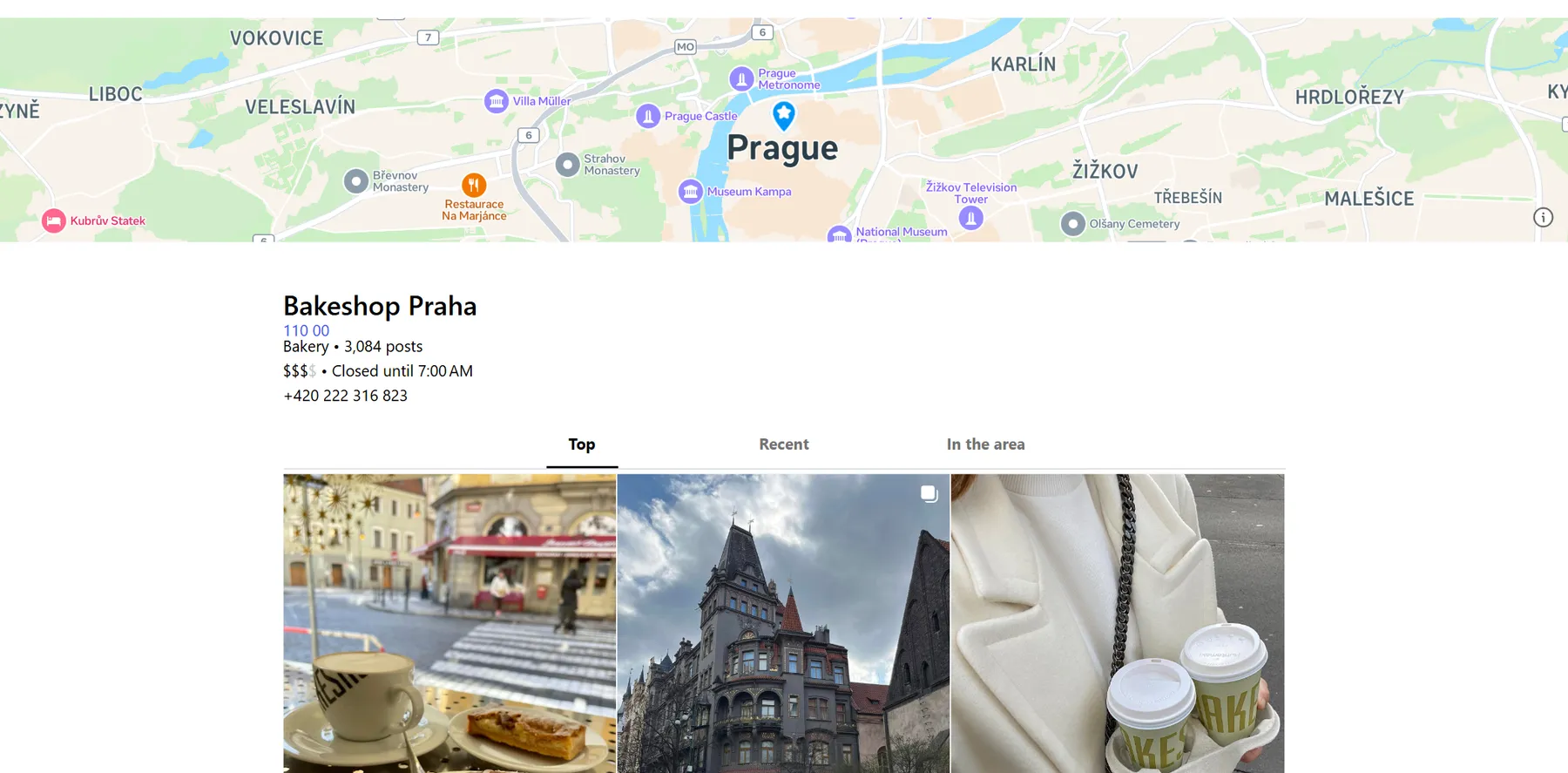
- Three searches in one actor: places, accounts or hashtags for every keyword, or all three at once (
searchType: "all"). - Accounts with their profile: followers, verified badge and the linked Facebook page on every account, plus bio, links, exact counts, category, business address and the 12 latest posts with engagement when the profile add-on is on.
- Hashtags with related hashtags: Instagram's post count for each hashtag and its related hashtags with their own counts, grouped as frequent, average and rare.
- Places with posts: address, phone, coordinates, category, price range, opening status, the linked business account and 12-18 top posts (or the 12 most recent).
- No login, cookies or Instagram API key: type keywords, or paste place and hashtag URLs.
- Pay only for delivered results: no start fee; a keyword that finds nothing, and results your filters remove, cost nothing.
- Schedule-ready: monitor mode returns only results that are new since the last run.
- Export anywhere: JSON, CSV, Excel, XML; schedules, webhooks, Make, Zapier, n8n, Google Sheets, the Apify API and MCP.
What data can you get from Instagram search?
| 👤 Username, name and profile URL | 👥 Followers and following (`followersCount`) | ✅ Verified badge, private flag |
| 🏢 Business category and account type | 🔗 Bio links and website (`externalUrls`) | 📘 Linked Facebook page (`facebookPage`) |
| 🖼️ 12 latest posts with likes and comments | 📈 Engagement rate and posts per week | 🏷️ Hashtag name and post count (`postsCount`) |
| 🔁 Related hashtags with counts (`related`) | 📊 Frequent / average / rare hashtags | 📍 Place name, category and location id |
| 🏠 Street address, zip and coordinates | ☎️ Place phone and price range | 🕒 Opening status (`hours`) |
| 📸 Top and recent posts tagged at the place | 🔎 Keyword, rank and source of every result | 🗓️ Date of the newest post (`lastPostAt`) |
On the test runs: 100% of account rows had followers and a bio, 86% a link in bio and 54% a business category; 100% of hashtag rows had a post count and 99% related hashtags; of 271 place rows 100% had a category, 94% coordinates, 87% top posts (12 per row on average), 77% an opening status, 60% a linked business account and 32% a phone.
How to scrape Instagram search results with Instagram Search Scraper
- Create a free Apify account: $5 of monthly credit, no card needed.
- Open Instagram Search Scraper and click Try for free.
- Type one or more keywords into Search terms (comma-separated) and pick what to Search for: places, accounts, hashtags or all three.
- Set Results per keyword, and the filters you need.
- Click Start. Results appear in the dataset as they are found.
- Open the Storage tab and Export as JSON, CSV or Excel, or schedule the run.
⬇️ Instagram Search Scraper input
| Parameter | Type | Description |
|---|---|---|
| 🔍 What to scrape | ||
search | string | Keywords, comma-separated, e.g. "cakes prague, dentist chicago". Without any keyword the run searches places for "restaurant prague". |
searchType | string | place (default), user (accounts), hashtag, or all. |
startUrls | array | Instagram place pages or ids and hashtag pages to read directly. |
searchLimit | integer | Results per keyword and type, 1-250. Default 20. |
| 🎯 Filters | ||
countries | array | Country codes the Meta Ad Library search is run in for accounts and places (each adds up to 15 matches). Default: ALL plus 9 large markets. |
placePosts | string | top (default), recent, both or none: the posts nested in each place row. |
placeSourceOrder | string | adLibraryFirst (default, more places) or googleFirst (pages about the keyword, usually closer to the city you typed). |
| ✂️ Refine results | ||
minFollowers / maxFollowers | integer | Accounts with at least / at most this many followers. |
verifiedOnly | boolean | Accounts with the verified badge only. |
accountType | string | any, business, creator, professional or personal. |
excludePrivate | boolean | Leave out private accounts. |
minPosts | integer | Minimum posts (a hashtag's or place's post count, an account's posts). |
keywordFilter | string | Keep results whose name, username, category, bio or address contain one of these words. |
activeWithinDays | integer | Accounts and places with a post in the last N days. |
| ➕ Extra data | ||
enrichProfiles | boolean | Add each account's full public profile (the profile add-on). Default on. |
includeRelated | boolean | Add related hashtags with their counts to hashtag rows. Default on, no extra charge. |
| 🔁 Monitoring | ||
monitorMode | boolean | Only results not delivered by previous runs with the same memory name. |
monitorStoreName | string | Name of the memory, one per watchlist. |
| 📦 Output | ||
maxItems | integer | Hard cap across the whole run. 0 = no total cap. |
compact | boolean | Core fields only, for AI agents and MCP clients. |
| ⚙️ Advanced | ||
proxyConfiguration | object | Apify Proxy by default. |
maxConcurrency | integer | Places or profiles read at once. Default 8. |
maxSerpPagesPerRun | integer | Google searches the run may use to find places beyond the Ad Library matches (one per keyword). Default 10, 0 = none. |
The input names of the most-used Instagram search actor work unchanged: search as a comma-separated string, searchType place / user / hashtag, searchLimit.
Input JSON
Pick the search type before anything else
place returns Instagram locations (the businesses, venues and landmarks people tag), user returns accounts, hashtag returns hashtags. The same keyword gives different results per type: cakes prague finds bakeries and cafes as places, and cake makers and shops as accounts. all runs the three for every keyword, each with its own searchLimit.
Write keywords the way people name things
Accounts and places first come from Meta's own page search, which matches names: yoga studio, dentist chicago and cakes prague work better than long sentences. Because it matches names, sushi tokyo also finds restaurants called Sushi Tokyo outside Japan. When the city matters more than the name, set placeSourceOrder to googleFirst: Google's results are pages about the keyword (florists in Amsterdam, barbers in Toronto in testing). Hashtags match from the start of the word: coffee returns coffeehouse, coffeelife and 53 more.
Paste places you already know
A place URL (https://www.instagram.com/explore/locations/270309914/bakeshop-praha/) or a bare location id in startUrls returns that place's row with its posts, without a search.
⬆️ Instagram Search Scraper output
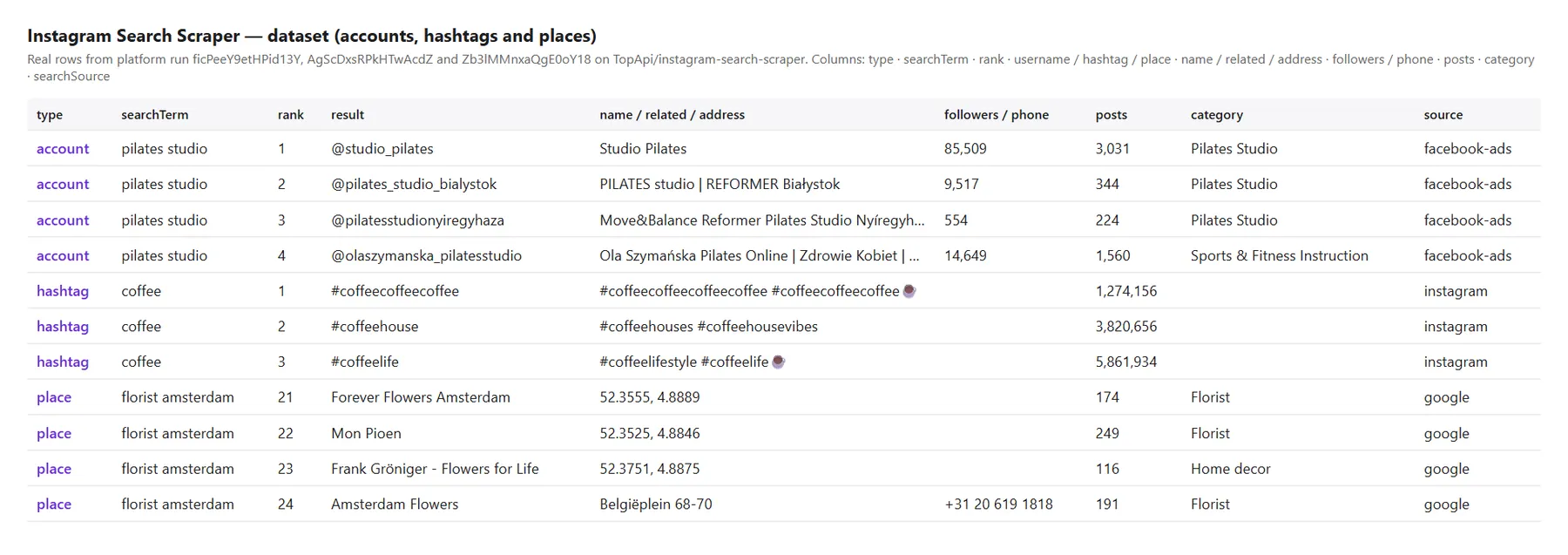
Each row has type (account, hashtag or place), the searchTerm that found it, its rank for that keyword and the searchSource it came from.
Account row (profile add-on on)
From platform run ficPeeY9etHPid13Y ("pilates studio", 100 accounts), long values shortened:
Hashtag row
From platform run AgScDxsRPkHTwAcdZ (20 keywords, 951 hashtags):
Place row
From platform run Zb3lMMnxaQgE0oY18 (20 keywords, 271 places), posts shortened:
The Overview, Accounts, Hashtags and Places views in the dataset show the fields of each type as a table.
How can I use Instagram search data?
- 🎯 Influencer and creator discovery: find accounts by niche and city, filter by followers, keep the ones with a website.
- 🏪 Local lead lists: places with phone, address and the linked business account for a category in a city.
- #️⃣ Hashtag research: post counts and related hashtags to plan captions and campaigns.
- 📍 Location intelligence: what is tagged where, how many posts a venue has, what was posted there this week.
- 🔁 Brand and competitor watch: a weekly monitor run returns only the new accounts, places or hashtags for your keywords.
- 🤖 AI agents: compact rows over the API or MCP for assistants that answer "find yoga studios in Austin on Instagram".
How much does it cost to scrape Instagram search results?
Instagram Search Scraper is pay-per-result, with no start fee and Apify platform usage included:
| Result | Price per 1,000 |
|---|---|
| Hashtag row | $0.27 |
| Account row | $1.30 |
| Profile add-on (on account rows that carry the full profile) | $1.10 |
| Place row (with its posts) | $1.80 |
| Run | Cost |
|---|---|
| 50 hashtags | $0.0135 |
| 100 accounts with profiles | $0.24 |
| 100 accounts without profiles | $0.13 |
| 20 places | $0.036 |
| 1,000 places | $1.80 |
Free notice rows (a keyword that found nothing) are not charged.
Integrations, API, scheduling & MCP
- Schedules: run the same keywords daily or weekly; with
monitorModeeach run returns only what is new. - Webhooks: call a URL when a run finishes and push the rows to a CRM, Slack or a sheet.
- No-code: Make, Zapier, n8n, Google Sheets, Airtable and Slack through Apify integrations.
- API: start runs and read datasets from Node.js or Python with
apify-client; code is on the API tab. - MCP / AI agents: connect Claude, Cursor or any MCP client through the MCP tab;
compactkeeps rows small.
More TopApi scrapers
| 📸 Instagram Scraper - posts and reels by profile, hashtag or keyword (use it for popular reels by keyword) | 👤 Instagram Profile Scraper - full profiles for a list of usernames | ✉️ Instagram Email Scraper - emails, phones and websites of accounts |
| 🔎 Facebook Search Posts Scraper - public posts by keyword | 🎵 TikTok Scraper - videos by profile, hashtag or URL | 🧭 All TopApi actors - social, reviews and lead-gen scrapers built for scheduled runs |
Instagram search limits & empty runs
- Where results come from: Instagram shows its own account and place search only to logged-in users, so accounts come from Meta's public Ad Library page search (
searchSource: "facebook-ads") and Threads search ("threads"), places from Facebook pages that are Instagram locations and from Google ("google"), and hashtags from Instagram's hashtag search ("instagram"). Results are what these public searches return, not your personal Instagram search. - Results per keyword: hashtags at most 55 (Instagram's fixed page); accounts about 60-115 (Ad Library matches across 10-20 countries plus about 20 Threads authors; 112-114 candidates for "pilates studio" and "yoga studio" with 20 countries); places about 10-38 candidates, of which 60-100% are Instagram places (271 places for 20 keywords at 20 per keyword).
- Google varies by keyword: one Google search per keyword adds about 10 places, but for some keywords Google answers without Instagram place pages (6 of 20 keywords in one test run); those keywords get Ad Library places only. The run summary shows
fromGoogleper keyword. - Place posts: the first page Instagram shows a signed-out visitor: 12-18 top posts, or the 12 most recent. Older posts need a login.
- Profiles: for many business accounts Instagram's profile answer is read from its web profile instead (
profileSource: "web"), which carries the 6 latest posts instead of 12 and no IGTV count. Business email and phone buttons are hidden from signed-out visitors, soemailsandphonescome from the bio. - Related hashtags: each hashtag's own Instagram search (
relatedSource: "hashtag-search"). Instagram allows about 50 hashtag searches per IP before it asks to wait; on long runs, once every session is refused, rows carry the keyword's results that share the hashtag's name instead (relatedSource: "keyword-search"). No extra charge either way. - Not in this actor: popular reels by keyword (they are posts: use Instagram Scraper), live account search and places near a GPS point (both need a login), hashtag posts-per-day and difficulty scores.
- Empty dataset: the keyword matched nothing, or your filters removed everything; the status message and
RUN_SUMMARYsay which, and nothing is charged.
FAQ
How much does Instagram Search Scraper cost?
$0.27 per 1,000 hashtags, $1.30 per 1,000 accounts (plus $1.10 per 1,000 for the full profile) and $1.80 per 1,000 places, with no start fee. A run of 50 hashtags costs about one cent.
How many results can Instagram Search Scraper return per keyword?
Up to 250 per keyword and type can be requested. In testing a keyword gave up to 55 hashtags, about 60-115 accounts and 10-38 place candidates. More keywords, and more countries for accounts, give more results.
Can Instagram Search Scraper find Instagram accounts by keyword?
Yes. It returns accounts whose Facebook page or Threads posts match the keyword, with their followers and, with the profile add-on, the full public profile.
Can I search Instagram places and locations with Instagram Search Scraper?
Yes: searchType: "place" returns Instagram locations with address, phone, coordinates, category, opening status and their posts. A location URL or id in startUrls reads that place directly.
Can I run Instagram Search Scraper on a schedule?
Yes. Create a schedule in the Console and turn on monitorMode: each run returns only accounts, hashtags and places that earlier runs did not deliver.
Do I need an Instagram account, cookies or an API key?
No. Instagram Search Scraper uses public, signed-out pages and searches only.
Can I use Instagram Search Scraper with the Apify API?
Yes. Start runs and read results with the Apify API or apify-client for Node.js and Python; examples are on the API tab.
Can I use Instagram Search Scraper through an MCP server?
Yes. Add it to Claude, Cursor or another MCP client from the MCP tab; compact keeps each row short.
Why did my Instagram Search Scraper run return no results?
The keyword matched nothing in that search type (try a shorter keyword or another type), or the filters removed every result. The free notice row and RUN_SUMMARY show the counts per keyword.
Is it legal to scrape Instagram search results?
Instagram Search Scraper collects only publicly available data and does not log in. Results can contain personal data, which is protected by regulations such as the GDPR, so make sure you have a legitimate reason to process it.
Your feedback
Found a bug or missing a field? Open an issue on the Issues tab and we will look at it.


