
Google Trends Scraper: Compare, Related, Trending Now
Pricing
from $0.10 / 1,000 result rows
Google Trends Scraper: Compare, Related, Trending Now
Google Trends without a browser: interest over time, interest by region, city and metro, related queries and topics (top and rising), side-by-side compare of up to 5 keywords, and Trending now with search volume and news. Clean JSON rows, any country, any period.
Pricing
from $0.10 / 1,000 result rows
Rating
0.0
(0)
Developer

Detroit Web Agent - Open Data
Maintained by CommunityActor stats
0
Bookmarked
2
Total users
1
Monthly active users
17 hours ago
Last modified
Categories
Share
Google Trends Scraper: interest over time, related queries, compare and Trending now, no API key
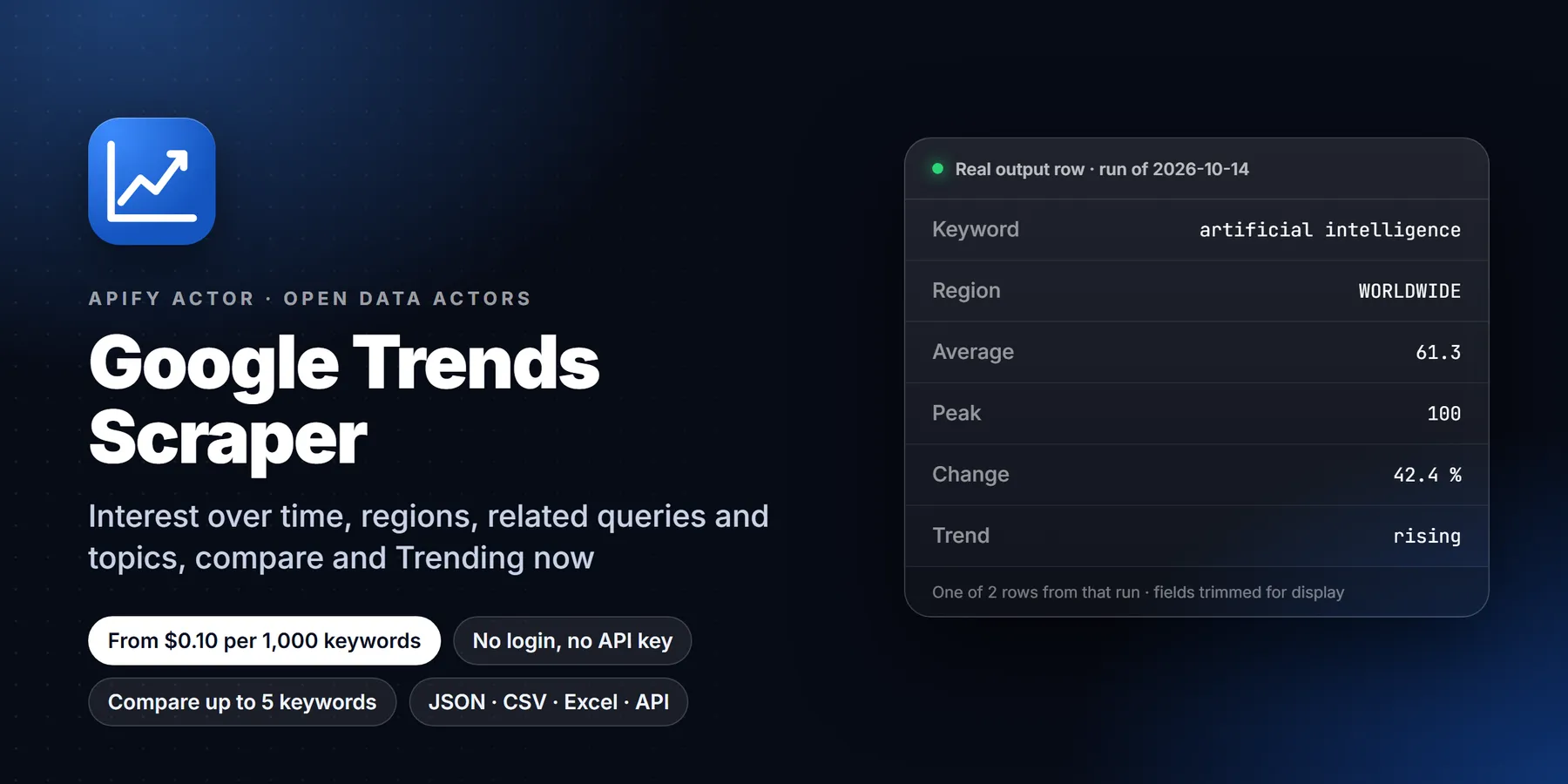

| Price per 1,000 keywords | Free plan | Starter | Scale | Business |
|---|---|---|---|---|
| This Actor | $1.50 | $0.70 | $0.35 | $0.10 |
| Most-used alternative | $3.00 | $1.00 | $0.50 | $0.30 |
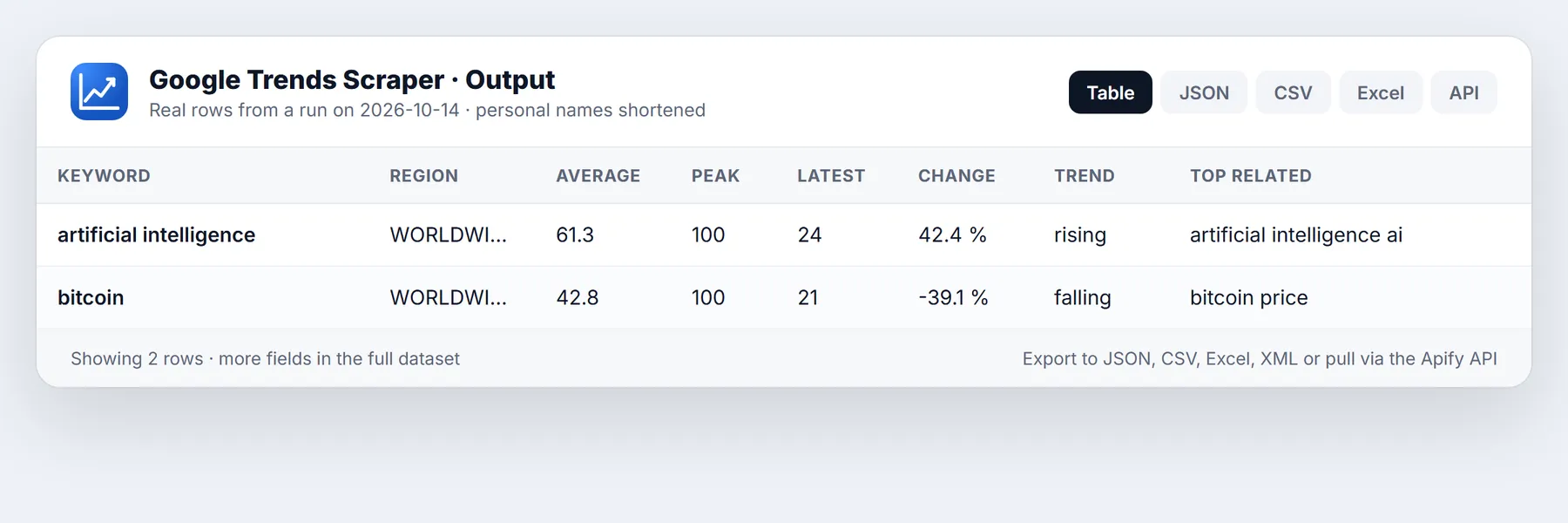
Pull Google Trends data as clean JSON, CSV or Excel without a browser, a login or a Google API key. Give it keywords and a country and it returns one row per keyword with the full interest-over-time series, a ready-made summary (average, peak, latest value, change, trend direction), interest by country, state, city and US media market, and the top and rising related queries and topics. Switch to compare mode to chart up to five keywords against each other, or to Trending now mode to list what people are searching for at this moment with search volume, growth and related searches.
Run in 30 seconds
- Open the Actor and click Start. The default input (two example keywords, worldwide, last 12 months) returns real rows in well under a minute, so you can see the output before changing anything.
- Replace the example keywords in Search terms with your own, for example
electric bike,standing desk,rizz. Add a Region such asUS,GBorDEif you want one country. - Press Start again, then open the Output tab and export to JSON, CSV, Excel, XML or HTML, or call the dataset through the Apify API.
That is the whole workflow. Everything else on this page is optional detail.
What it does and who it is for
Google Trends shows how often people search for a term, on a scale from 0 to 100, relative to the peak in the chosen period and region. The website is easy to use for one keyword and painful for fifty. This Actor reads the same data the website shows and turns it into rows you can sort, chart and join with your own data.
Typical users:
- SEO and content teams who decide which topic to write about next, check whether a keyword is seasonal, and find rising related queries before competitors do.
- E-commerce and product teams who compare product names, brands or categories over years, and check which regions or cities lean toward a product.
- Marketers and agencies who build a monthly report of keyword demand for clients and want it in a spreadsheet.
- Analysts, researchers and journalists who need a time series for a topic, a list of what is trending today, or a geographic breakdown.
- Founders and investors who watch interest in a market, a company or a technology as an early demand signal.
- Developers who feed Trends data into a dashboard, a Slack digest or a model, and want a stable JSON shape.
Four modes
| Mode | What you get | Rows |
|---|---|---|
interest | One row per keyword and region: timeline, summary, regions, optional cities and metros, related queries and topics | one per keyword (and region) |
compare | Keywords charted against each other in one scale, in groups of up to five, with a summary for each keyword | one per group |
trendingNow | The Trending now list for a country: query, rank, search volume, growth, categories, related queries, optional news articles | one per trend |
suggest | Google's topic suggestions for a keyword, with Knowledge Graph ids | one per keyword |
What you get: output fields
Interest rows contain:
searchTerm,geo,timeRange,category,property,language,exploreUrl(a link that opens the same view on trends.google.com).summary:average,peak,peakDate,lowest,latest,latestDate,points,changePct(first quarter of the period against the last quarter), andtrend(rising,fallingorflat). The summary ignores the last, still incomplete data point so a partial day does not distort the numbers.interestOverTime: a list of points withdate,timestamp,label,value(0 to 100),isPartialandhasData.interestByRegion: countries when you run worldwide, states or regions inside a country, each withgeoName,geoCodeandvalue.interestByCity: cities withvalue, latitude and longitude (optional).interestByMetro: US media markets, called DMA regions (optional, US only).relatedQueriesTopandrelatedQueriesRising: the searches that go with your keyword, withvalue,formattedValueand anisBreakoutflag for queries Google marks as Breakout (growth above 5,000 percent).relatedTopicsTopandrelatedTopicsRising: Knowledge Graph topics withmid,titleandtype.scrapedAt: UTC timestamp.
Compare rows contain searchTerms, a summary object per keyword, the shared interestOverTime with valuesByTerm on each point, regions with valuesByTerm and topTerm (the keyword that wins in that region), and related queries and topics per keyword.
Trending now rows contain rank, query, geo, hours, startedAt, endedAt, isActive, searchVolume and searchVolumeLabel (for example 100K+), increasePercent, categories, relatedQueries, exploreUrl and, when requested, articles with title, URL, source, publication time and image.
Sample output
An interest row, shortened:
A Trending now row, shortened:
Input options
| Field | What it does |
|---|---|
mode | interest, compare, trendingNow or suggest. |
searchTerms | Keywords or topics. In compare mode they are charted together in groups of five. |
startUrls | Paste trends.google.com explore links. Keywords, region, period, category and property are read from the link. |
timeRange | now 1-H, now 4-H, now 1-d, now 7-d, today 1-m, today 3-m, today 12-m, today 5-y or all (since 2004). |
customTimeRange | 2024-01-01 2024-06-30, or one start date to run until today. Overrides timeRange. |
geo | Empty for worldwide, a country code such as US, a region such as US-CA or GB-ENG, or a US metro code. |
geos | More regions. Every keyword is run once per region, so you can compare countries in one run. |
category | Google category id, 0 for all. For example 7 is Finance and 5 is Computers and Electronics. |
property | web, images, news, youtube or shopping. |
includeTimeline, includeRegions, includeCities, includeMetros, includeRelatedQueries, includeRelatedTopics | Switch sections on and off. Turning off what you do not need makes a run faster. |
trendingHours, trendingCategories, activeOnly, includeNewsArticles, maxArticlesPerTrend | Trending now filters: window of 4, 24, 48 or 168 hours, topic filter, only trends still active, and attach news articles. |
language, timezoneOffset | Language for labels and the time zone for timestamps. |
maxItems | Hard cap on rows. It also caps what you pay. |
maxConcurrency | Keywords fetched in parallel. |
proxyConfiguration | Apify Proxy by default. You normally do not need to change it. |
Pricing
You pay per row you receive: one result event per delivered row. No monthly rental.
| Apify plan | Price per 1,000 rows |
|---|---|
| Free | $1.50 |
| Starter | $0.70 |
| Scale | $0.35 |
| Business and above | $0.10 |
Rows are not charged when a keyword has too little search volume for Google to publish data, when a keyword fails after all retries, or when a row would pass your maxItems limit. A 10-keyword run on the Free plan costs about one and a half cents.
How to run it
In the Apify Console. Open the Actor, fill the form, press Start. Use Saved tasks for inputs you run often and Schedules to run them daily, weekly or monthly.
From the API. Start a run with one HTTP request and read the dataset when it finishes:
From Python.
From JavaScript.
You can also connect runs to Google Sheets, Make, Zapier, n8n, Slack or a webhook from the Integrations tab.
Reliability and blocking
Google rate-limits automated traffic, and a request without a warmed-up session is answered with HTTP 429. The Actor handles this for you. It warms every session first, retries a blocked session on a fresh one, and when a datacenter address is blocked it moves on to residential proxies on its own. A run reports how many requests were made, how many were retried and how many used the residential fallback in its output summary, so you can see exactly what happened. If a section of one keyword cannot be loaded after all attempts, the row is still delivered and a warning explains which section is empty. Keywords that fail completely are listed and never charged.
Limits and honest caveats
- Google Trends reports relative interest, not search counts. 100 is the peak of your chosen period and region, and values are not comparable across separate runs unless you use compare mode, which puts keywords on one shared scale.
- Very low volume keywords return no data. Those rows are skipped and not charged.
- Trending now shows approximate volume buckets (such as 50K+), exactly as Google publishes them.
- Related topics are best-effort. Google returns an empty topics list for some keywords and some sessions even though related queries are present. The Actor returns what Google returns and never invents entries. Related queries are the reliable section.
- Metro (DMA) data exists only for the United States.
- Hourly and 4-hour data covers only the last hours, and the newest point is flagged
isPartial. - The Actor reads public Google Trends data. It does not log in and does not read private Google accounts.
Use cases
- Keyword research. Run 50 keywords for the last five years with
includeRegionsoff. Sort bysummary.changePctto find topics that are rising and bysummary.averageto find the steady ones. - Seasonality planning. Use
customTimeRangeonallortoday 5-yand read the peak month insummary.peakDatefor each product. - Breakout detection. Read
relatedQueriesRisingand filter onisBreakoutto spot queries that exploded in a week. - Brand tracking. Compare your brand against competitors in compare mode every month on a schedule and chart
valuesByTerm. - Local demand. Turn on
includeCitiesandincludeMetrosto find the cities and media markets where a product is searched the most. - News and PR. Run Trending now every few hours, attach news articles, and push new trends into Slack with a webhook.
- Content calendars. Use Trending now categories such as Sports, Entertainment or Technology to build a daily list of subjects.
- Academic and market research. Pull a clean time series per country with
geosand export it for a statistics package.
Input guide
Choosing a time range. Google changes the granularity with the period. Up to four hours gives minute data, up to seven days gives hourly data, up to 90 days gives daily data, up to five years gives weekly data and longer gives monthly data. For a smooth seasonal chart use today 5-y. For a "what happened this week" view use now 7-d.
Keywords versus topics. A plain keyword matches searches that contain those words. Use suggest mode to find the Knowledge Graph topic for a term when you want the topic rather than the text, for example the company Apple rather than the fruit.
Region codes. Use ISO country codes (US, GB, DE, FR, IN, BR, JP), subregion codes such as US-NY or GB-SCT, or leave the field empty for the whole world.
Many keywords. In interest mode every keyword is one row and keywords run in parallel, six at a time by default. For a list of several hundred keywords raise maxConcurrency a little and keep the timeline on; for a list of thousands, turn off regions and related sections to keep each keyword to a single request.
Compare mode groups. Google compares at most five keywords in one chart. If you pass 12 keywords, the Actor makes three groups (five, five, two). Values inside a group share a scale. Values in different groups do not. To rank many keywords on one scale, include the same anchor keyword in every group.
Worked examples
1. Which sneaker brand is gaining?
One row. Read summary for each brand and interestByRegion.topTerm to see which brand leads in each state.
2. Rising searches around a topic in three markets.
Three rows. Open relatedQueriesRising in each.
3. What is trending right now, with news.
4. Reuse a link from the Trends website.
5. YouTube search interest for a topic.
Tips to reduce cost and runtime
- Turn off sections you do not use. Each section is one request, so
includeRegions,includeCities,includeMetrosand related topics cost time. - Set
maxItemsfor scheduled runs so a long keyword list can never surprise you. - Use compare mode when you need keywords on one scale: five keywords come back as a single row.
- Keep
maxConcurrencyat the default unless you have hundreds of keywords. - For daily monitoring, schedule one task with
now 7-dand diff thesummary.latestvalue against yesterday.
More questions
Do I need a Google account or API key? No.
Is the data the same as the Trends website? Yes. The Actor reads the same data the website shows, and every row includes an exploreUrl so you can open the same view.
Why does a value of 100 appear in every row? Each keyword is scaled to its own peak. Use compare mode to see how keywords rank against each other.
Why is my row empty? The keyword had too little search volume in that region and period. Try a wider region or period.
Can I get data older than five years? Yes. Use timeRange set to all for monthly data since 2004.
Related actors
More tools from the same publisher that fit this workflow:
- Technical SEO Audit: crawl a site for a 0-100 technical SEO score
- Sitemap Extractor & Broken Link Checker: list every sitemap URL and check for broken links
- Website Tech Stack Detector: detect the CMS, frameworks and hosting behind any site
- WHOIS & Domain Lookup: WHOIS/RDAP, DNS, subdomains and SSL for a domain
- Company Enrichment by Domain: enrich a domain with socials, emails and tech stack
- Website Email Extractor: pull emails, phones and socials from each business website
Use from AI agents: every actor here is callable through the Apify MCP server (mcp.apify.com).
Ready-made examples
Three saved tasks are available on the Actor page. Open one, press Start, and adjust the keywords:
- Compare brands over 5 years: three keywords on one scale in the US, with the leading keyword per state.
- What is trending in the US right now: the Trending now list for the last 24 hours with search volume and growth.
- Rising queries for a keyword in 3 countries: top and rising related queries for one keyword in the US, UK and Germany.
FAQ
How fast is it? A default run with two keywords finishes in under a minute. A compare row takes about as long as one keyword.
Can I run it on a schedule? Yes, use Schedules in the Apify Console and a webhook or integration to send the results onward.
What formats can I export? JSON, CSV, Excel, XML, HTML and RSS from the dataset, or directly through the API.
Can I use proxies of my choice? Yes, set proxyConfiguration. By default Apify Proxy is used and the residential fallback is automatic.
What happens when Google blocks a request? The Actor retries on a fresh session, then falls back to residential proxies. The run summary shows how many retries were needed.
Terms and responsible use
The Actor reads publicly available Google Trends data. Use the results in line with Google's terms and the laws that apply to you, and do not use them to process private personal data. Search interest is aggregated and anonymous.
Use it from AI assistants (MCP)
Apify Actors can be called as tools from AI assistants through the Apify MCP server. Add this Actor to your MCP configuration, then ask your assistant things such as "Compare interest in heat pumps and gas furnaces in the US over five years" or "List what is trending in Germany right now". The assistant fills the input, runs the Actor and reads the rows.
Changelog
- 0.1.5: faster start on blocked datacenter addresses (goes straight to residential after repeated blocks), related queries and compare mode verified.
- 0.1.4: Trending now with news articles, suggest mode, start URL import.
Support
Open an issue from the Actor page if a section is missing or a keyword that works on the Trends website does not work here. Include the run link and the keyword and region.
More from DWA Open Data
Browse all 69 data Actors, with live prices and sample output, at open-data-actors.pages.dev.
Feedback: if this Actor was useful, or if it fell short, an honest review on the Reviews tab helps other users decide. Problems or feature requests: please open an Issue and we usually reply within one business day.


