

Website Contacts with Role & Named Emails: Phones, Socials
Pricing
Pay per event
Website Contacts with Role & Named Emails: Phones, Socials
From $2.00 per 1K websites. One row per website with every email tagged role (info@, sales@) or named (a person), E.164 phones, 11 social profiles, address and contact page, each with the page it was found on. Paste websites or domains. Dead or blocked sites are free.
Pricing
Pay per event
Rating
0.0
(0)
Developer

Detroit Web Agent - Open Data
Maintained by CommunityActor stats
0
Bookmarked
4
Total users
4
Monthly active users
2 days ago
Last modified
Categories
Share
Website contact extractor: give it a list of websites and get one row per site with emails, phones and social profiles, each email labeled as a role or a named address, with the pages it was found on.

| Price per 1,000 websites | Free plan | Starter | Scale | Business |
|---|---|---|---|---|
| This Actor | $2.00 | $2.00 | $2.00 | $2.00 |
Paste a list of websites or bare domains. Get one row per site with every published email (tagged role or named), phone numbers in E.164, 11 social profiles, the street address and the contact page, plus the exact page each contact was found on. $0.002 per site with up to 5 pages crawled by default, and sites that fail to load are free.
| What you get | Who it is for | Price |
|---|---|---|
| Emails (role or named, with source page), phones normalized to E.164, LinkedIn, Facebook, Instagram, X, YouTube, TikTok, Pinterest, GitHub, WhatsApp, Telegram, Discord, company name, address, contact page URL | Lead-generation agencies, sales teams enriching a domain list, local-business marketers, recruiters, anyone turning a list of URLs into a contact sheet | $0.002 per site crawled ($2.00 per 1,000 sites), plus $0.00005 per run start. Dead, blocked, parked and robots-disallowed sites are free |
A real row from our run on Oct 15, 2026 (business contacts as published on the site):
| Site | Company | Emails | Phone | Socials | Address | Pages read |
|---|---|---|---|---|---|---|
| batchbrewingcompany.com | Batch Brewing Company | events@, contact@ (both role, found on /contact) | +13133388008 | Facebook, Instagram, TikTok | 1400 Porter Street, Detroit, MI | 2 |
- In short: Website Contact Extractor (Apify actor
transparent_meteorite/website-contact-extractor) crawls each website's home, contact, about, team, impressum and privacy pages and returns one clean row of contact details per site. - Who it is for: lead-generation agencies, sales teams enriching domain lists, marketers building outreach lists from their own site lists.
- Input: start URLs or domains, crawl depth, max URLs per domain, URL include/exclude patterns, same domain only, include named (personal) emails, only with contacts, default country for phones, monitor mode (new or changed since last run).
- Output: emails tagged role or named, phones in E.164, 11 social networks (LinkedIn, Facebook, Instagram, X, YouTube, TikTok, Pinterest, GitHub, WhatsApp, Telegram, Discord), page title, address, and the source URL and page title for every email, phone and social.
- Price: $0.002 per site crawled plus $0.00005 per run start; sites that fail to load are not charged. A site that loads but publishes no email is still charged, because it was crawled. Pay per result, no subscription; Apify's free plan credit covers a first test.
- Limits: finds only contacts published on the site; no guessing or verification of email addresses.
Key facts
- Actor name: Website Contact Extractor
- Actor ID:
transparent_meteorite/website-contact-extractor - Store page: https://apify.com/transparent_meteorite/website-contact-extractor
- Data source: the public website itself
- Pricing model: pay per event (
apify-actor-start$0.00005,site-crawled$0.002) - Output formats: JSON, CSV, Excel, XML, HTML table, RSS (Apify dataset)
- Access: Apify Console, REST API, JavaScript/Python clients, schedules, webhooks, Apify MCP server
- Login or third-party API key needed: no, only an Apify account
- Also known as: email extractor, contact details scraper, website email scraper, phone number extractor, social media links finder
- Maintainer: transparent_meteorite (independent developer)
- Last updated: 2026-10-13
Video: watch the 1-minute demo on YouTube.
What is Website Contacts with Role & Named Emails: Phones, Socials?
One row per website with every email tagged role (info@, sales@) or named (a person), E.164 phones, 11 social profiles, address and contact page, each with the page it was found on. Paste websites or domains. Dead or blocked sites are free. Run it from the Apify Console, the API or a schedule, and export the results as JSON, CSV, Excel or HTML.
Run in 30 seconds
- Open the prefilled run (free Apify account; it creates a saved task with a working input).
- Press Start. The input is small on purpose, so the first run is quick and costs a few cents at most.
- Open the Output tab, switch to Table view, download as CSV, Excel or JSON.
Prefilled input:
Ready-made presets by use case (each opens as a saved task you can edit):
Why choose this actor
- Priced per website, not per page. One site costs $0.002 whether 1 or 5 of its pages are crawled (up to 20 configurable, or 50 with a hard cap).
- One row per site. Emails, phones, 11 social networks and the address arrive merged, with flat
emailsList,phonesList,linkedin,facebookcolumns ready for CSV or Excel. - Every contact is traceable. Each email, phone and social link carries the URL and title of the page it was found on. No guessed addresses.
- You only pay for sites that load. Dead, blocked, parked and robots-disallowed sites come back with a
statusand are never charged.
Output
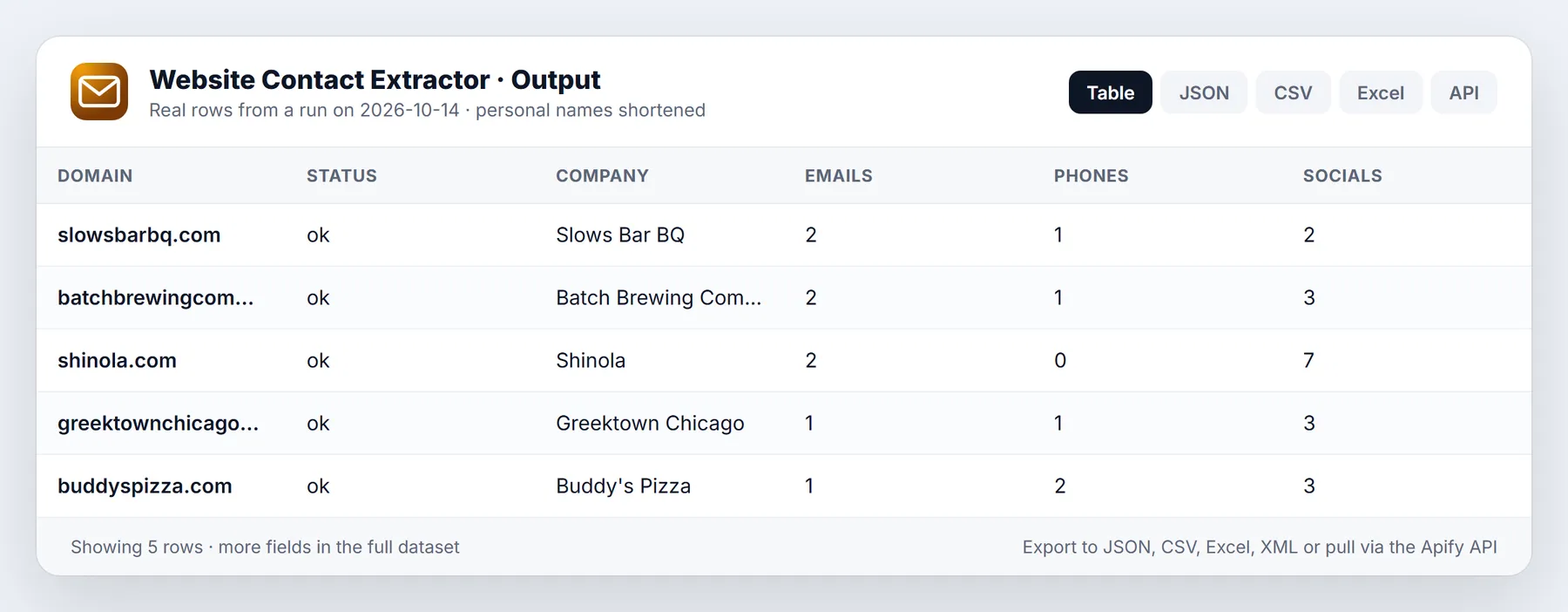
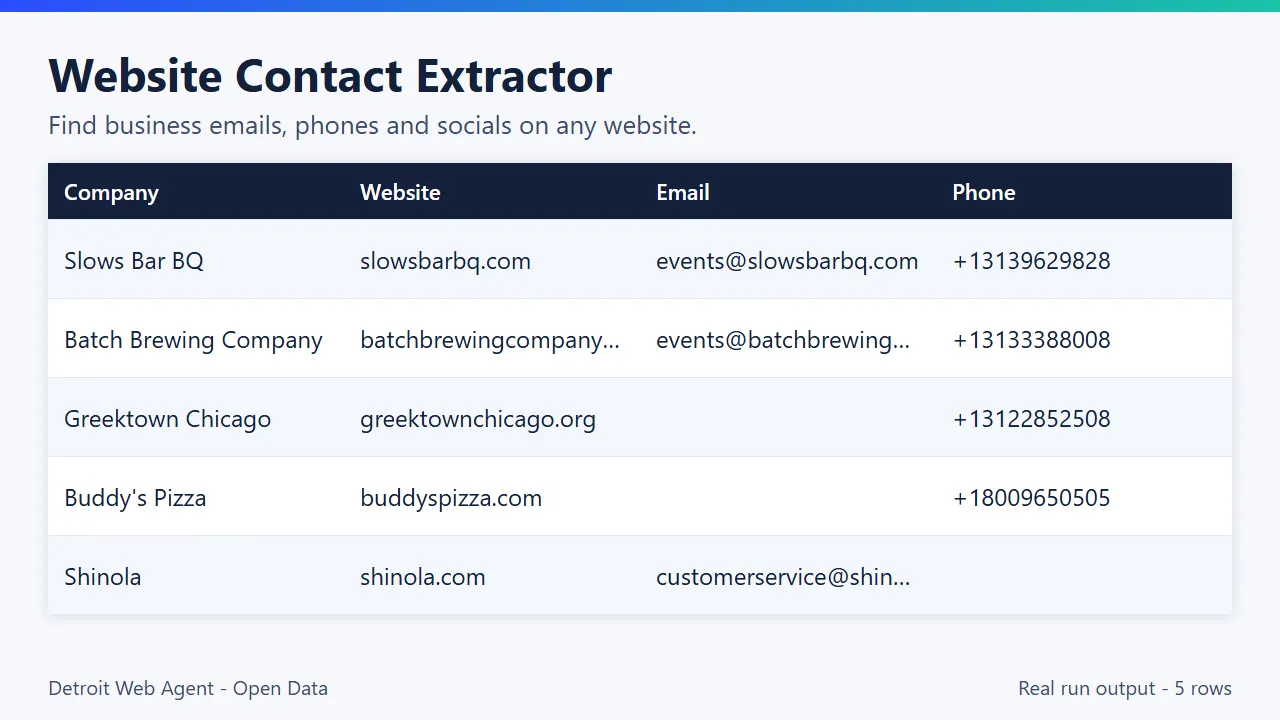
Real rows from our run on Oct 15, 2026 (5 Detroit-area business sites, maxPagesPerSite: 3; three of the five rows shown). These are business contacts the sites publish themselves:
| Domain | Company | Emails | Phones | Socials | Contact page | Pages |
|---|---|---|---|---|---|---|
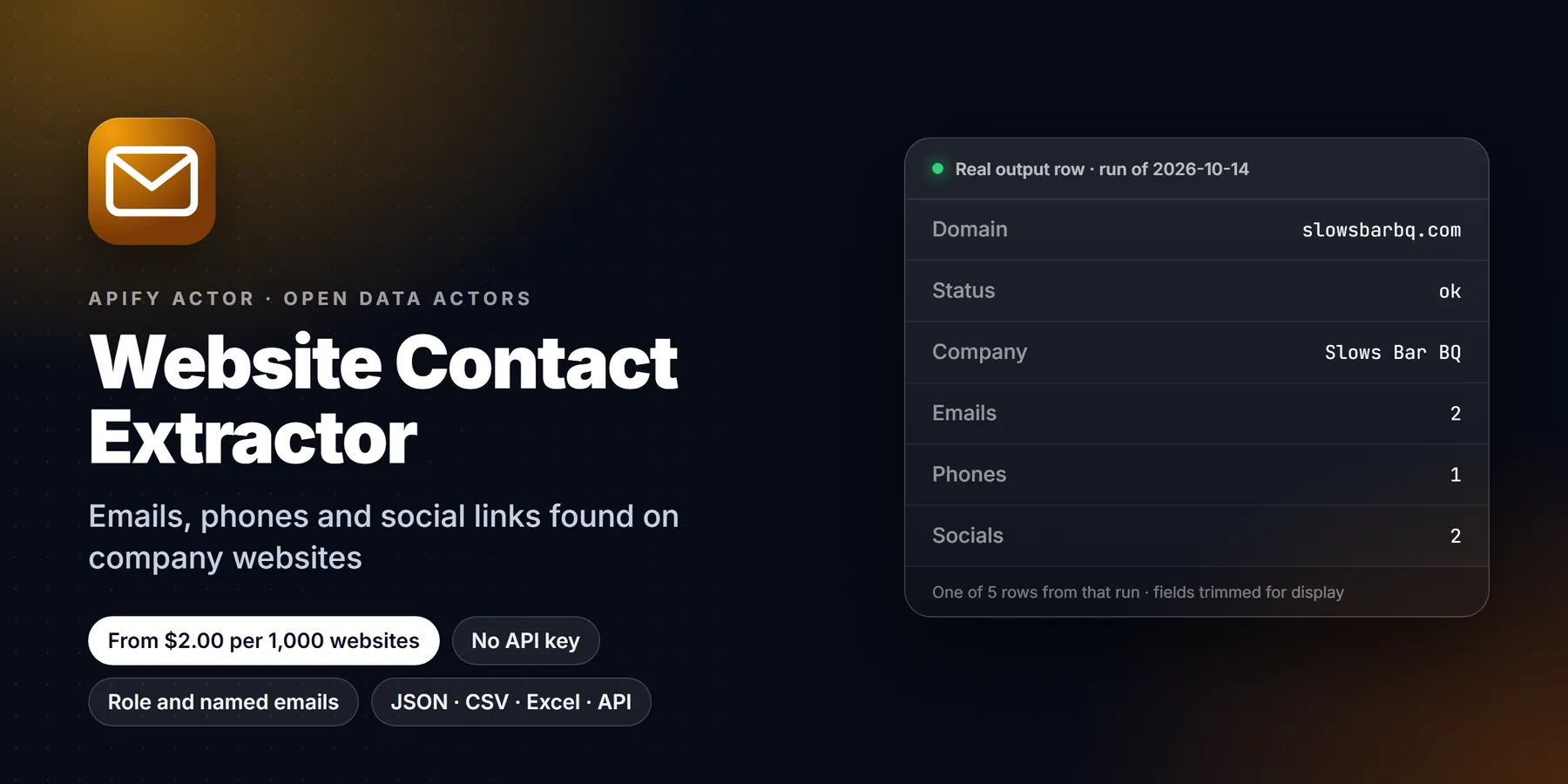
| slowsbarbq.com | Slows Bar BQ | events@slowsbarbq.com, manager@slowsbarbq.com | +13139629828 | facebook, instagram | - | 1 |
| batchbrewingcompany.com | Batch Brewing Company | events@batchbrewingcompany.com, contact@batchbrewingcompany.com | +13133388008 | facebook, instagram, tiktok | batchbrewingcompany.com/contact | 2 |
| buddyspizza.com | Buddy's Pizza | buddyspizza@buddyspizza.com | +18009650505, +18334510774 | facebook, instagram, x | buddyspizza.com/contact/ | 4 |
One item from that run (shortened):
Output fields
| Field | Description |
|---|---|
domain, url, inputUrl, status | Site identity and crawl status (ok, blocked, unreachable, parked, robots_disallowed...) |
companyName, companyNameSource | Name from schema.org, og:site_name or the cleaned title |
pageTitle, metaDescription, language | Start page title, meta description and html lang |
emails[] | Per email: email, type (role/named), sameDomain, sourceUrl (= foundOn), pageTitle of that page, pageType, method |
primaryEmail, emailsList, roleEmails, namedEmails | Best email and flat comma lists |
phones[], primaryPhone, phonesList | E.164 phones with country, sourceUrl, pageTitle, method |
linkedin, facebook, instagram, x, youtube, tiktok, pinterest, github, whatsapp, telegram, discord | Social profile URLs (null when absent). Also nested in socials |
socialSources, socialCount | Page where each social was found; number of socials found |
address, addressFull, contactPageUrl | schema.org address and contact page |
pagesCrawled, pagesCrawledUrls, maxDepthReached, skippedByRobots, scrapedAt | Crawl diagnostics |
changeStatus, changes, previousRunAt | Only with monitorMode |
status values: ok, blocked (403/429/bot challenge), http_error, unreachable (DNS/timeout), parked (domain for sale), robots_disallowed, not_html. Only ok sites with at least one crawled page are charged.
How it works
For each website you give it, the actor:
- Fetches the homepage (plain HTTP, no browser, robots.txt respected).
- Finds the pages where businesses actually publish contact details, by link text and URL in 10+ languages: contact, impressum/imprint, about, team, privacy, and crawls the best ones (default 5 pages per site, configurable 1-20, or up to 50 with Max URLs per domain). Set Crawl depth 2-5 to also follow links found on those pages, and use URL include / exclude patterns to steer the crawl.
- Extracts and merges everything into one row:
- Emails from
mailto:links, visible text, schema.org data, Cloudflare-protected addresses (cfemail decoded) and obfuscated forms likejane [at] acme [dot] com,info(at)acme.de,sales AT acme DOT com. - Each email is tagged
role(info@, sales@, support@, bookings@...) ornamed(jane.doe@...), withfoundOnpage URL, page type and how it was found. - Phones from
tel:links, schema.org and page text, validated and normalized to E.164 (+13135550142) with country. - Socials: LinkedIn, Facebook, Instagram, X/Twitter, YouTube, TikTok, Pinterest, GitHub, WhatsApp, Telegram, Discord (share buttons and post links filtered out), each with the page it was found on (
socialSources). - Page context:
pageTitle,metaDescriptionandlanguageof the start page, plussourceUrlandpageTitleon every email and phone. - Company name (schema.org, og:site_name or cleaned page title), address (schema.org PostalAddress), contact page URL.
- Emails from
- Flags dead, blocked and parked sites with a clear
statusso you never pay for them.
It is fast and light: plain fetch and HTML parsing, no headless browser. Our 5-site test run on Oct 15, 2026 finished in about 6 seconds on 512 MB.
Example inputs from real runs
Each input below was used in a real run of this Actor in October 2026. Paste one into the Input tab (JSON view) to start from it.
1. Contacts from two SaaS websites (that run returned 2 rows)
2. Contacts from two Detroit law firm websites (that run returned 2 rows)
3. Contacts from five restaurant and retail websites (that run returned 5 rows)
4. Contacts from one brand website (that run returned 1 row)
5. Contacts from one software company website (that run returned 1 row)
Input
Paste URLs or bare domains into Websites (or upload a CSV/TXT file of URLs), adjust the options below if you need to, and press Start. Each site appears as a row as soon as it finishes. Open the Emails view for one row per email with its type and source page.
| Field | Type | Default | What it does |
|---|---|---|---|
startUrls / domains | list | 5 example sites | Websites or bare domains (merged, de-duplicated). Empty input runs the 5 examples |
maxPagesPerSite | 1-20 | 5 | Pages crawled per site, all included in the per-site price |
maxUrlsPerDomain | 1-50 | off | Hard cap on pages per site; replaces maxPagesPerSite when set |
maxDepth | 0-5 | 1 | Link levels to follow. 0 = start page only, 1 = contact/about/team/impressum/privacy pages, 2-5 = also links found on those pages (best pages first) |
urlIncludePatterns | list | none | Only follow matching URLs. Plain text = contains (case-insensitive, * wildcard) or /regex/ |
urlExcludePatterns | list | none | Never follow matching URLs (same syntax), e.g. /blog, /shop |
sameDomainOnly | yes/no | on | Follow only the site's own domain and subdomains |
includeNamedEmails | yes/no | on | Turn off for role addresses only (info@, sales@...) |
onlyWithContacts | yes/no | off | Skip rows with no email, phone or social |
defaultCountry | text | US | ISO country used to normalize local phone numbers to E.164 |
monitorMode | yes/no | off | Return only sites that are new or changed since your last run (see below) |
monitorStateName | text | website-contact-extractor-monitor | Key-value store holding monitor state; use different names for separate watch lists |
maxSites, maxConcurrency, pageTimeoutSecs, siteTimeoutSecs | number | 100 / 8 / 15 / 60 | Run limits |
Monitor mode: new or changed since last run
Turn on monitorMode and schedule the actor. The first run returns every site as changeStatus: "new". Later runs return only sites whose emails, phones or socials changed (changeStatus: "changed" with a changes object listing emailsAdded, emailsRemoved, phonesAdded, phonesRemoved, socialsAdded, socialsChanged, socialsRemoved). Unchanged sites are skipped from the dataset but still crawled and billed once ($0.002), because the crawl happened. State lives in a named key-value store in your own account.
Example
Input example
Sample output
Three real rows from a recent run of this Actor. Personal data is masked, some fields are left out and long values are shortened for readability.
Pricing
Pay per event, no subscription:
| Event | Price |
|---|---|
| Actor start | $0.00005 per run |
| Site crawled | $0.002 per site (up to 20 pages included) |
Example: 1,000 websites = 1,000 x $0.002 + $0.00005 = about $2.00, whether you crawl 1 or 5 pages per site. If 120 of them are dead, parked or blocked you pay about $1.76. Set a max charge in the run options and the actor stops cleanly when it is reached.
Volume pricing is scheduled on Apify for October 30, 2026: the Free plan price stays $0.002 per site, and paid Apify plans get $0.0018 (Bronze), $0.0015 (Silver) and $0.001 (Gold and higher). The Pricing tab always shows the price that applies to your run.
Apify's free plan includes $5 of monthly platform credit. At $0.002 per crawled site that covers about 2,500 websites with this actor.
Use cases
- Lead generation agencies: turn a scraped directory or Google Maps export into one contact row per business, with the source page kept for every email.
- Sales teams: enrich a domain list from a CRM or spreadsheet with emails, phones and LinkedIn pages, then route
roleaddresses to outreach andnamedones to careful, compliant handling. - Local marketing: build outreach lists for restaurants, clinics, contractors and shops from their own websites.
- Partnerships and PR: find the press, partnerships or bookings inbox a brand publishes.
- Data hygiene: schedule monitor mode on an account list and get only the sites whose contacts changed.
Run a big list (hundreds to thousands of websites)
This actor is built for bulk lists, not just a handful of URLs:
- Paste a column of URLs or bare domains into Websites, upload a CSV or text file there, or use Domains (alternative bulk list). Duplicates are merged into one row.
- Max sites defaults to 100 so a first run stays cheap. Raise it (up to 100,000) to cover your whole list; you only pay for sites that were actually crawled.
- Dead, parked, blocked and robots-disallowed sites are never charged. Turn on Only output sites with contacts to get a ready-to-use sheet.
- Sites in parallel (default 8, up to 20) controls speed. Set a max charge in the run options as a budget guard: 2,000 crawled websites cost about $4.00 at $0.002 per site.
Use from AI agents (MCP, ChatGPT, Claude, Perplexity)
Website Contact Extractor works as a tool for AI assistants through the official Apify MCP server. Add this server URL to any MCP client (Claude Desktop, Claude Code, Cursor, ChatGPT connectors, VS Code):
Claude Desktop / Cursor config:
Then ask in plain language, for example: "How do I get emails and phone numbers from a list of websites?"
Call it directly over HTTP (runs the actor and returns the dataset items in one request):
Python:
The same actor works in n8n, Make, Zapier, LangChain, LlamaIndex and CrewAI through their Apify integrations.
Questions people ask
How do I get emails and phone numbers from a list of websites? Paste the URLs into startUrls; you get one row per site with emails, phones and social profiles.
Does it guess or verify emails? No, it only returns emails published on the site, with the page it was found on.
Am I charged for sites that are down? No, only sites that were crawled are charged.
Am I charged for a site that has no email? Yes. The price is per site crawled, not per email found: a site that loads and is crawled is charged even if it publishes no email (for example a restaurant that only lists a phone number). Its row still shows the phones and social links that were found.
Use it from code
Small real input: it returns only a couple of rows, so a test run costs very little (see Pricing). Set the APIFY_TOKEN environment variable to your token from Apify Console > Settings > API & Integrations.
Python (pip install apify-client)
JavaScript / Node.js (npm install apify-client)
curl (runs the actor and returns the dataset items in one call)
Send results to Google Sheets, Zapier, Make or n8n
- Google Sheets: every run's dataset has a CSV export link:
https://api.apify.com/v2/datasets/<DATASET_ID>/items?format=csv&clean=true(the dataset ID is on the run's Storage tab). In Sheets,=IMPORTDATA("<that link>")loads it. Anyone with the link can read that dataset, so share it carefully. To export to Google Drive automatically, use the Google Drive integration on the actor's Integrations tab. - Zapier: in the Apify app, use the trigger Finished Actor run (or Run Actor as an action) with
transparent_meteorite/website-contact-extractor, then Fetch dataset items and pass the rows to Google Sheets, a CRM or Slack. - Make: the Apify app has Watch Actor Runs, Run an Actor and Get Dataset Items modules; connect them to any Make app.
- n8n: install the Apify node (
@apify/n8n-nodes-apify) and use Run an Actor and get dataset, or the On new Apify event trigger. - Schedule and webhooks: create a Task with your input, add a Schedule in Apify Console, and add a webhook if you want a call when a run finishes.
See the Apify integrations docs for setup steps.
How this compares
Email-finder services often guess or verify addresses from patterns; this actor does not. It returns only what each site publishes, with the page where it was found, and you pay per site crawled.
Limits
- JavaScript-only sites and sites behind Cloudflare/bot challenges return
blockedor few results. - Up to 50 emails and 15 phones per site are kept (most relevant first: same-domain, mailto/schema, role).
- Addresses are taken from schema.org markup only (no free-text address guessing).
- Contact forms are detected only as a contact page URL; the actor does not submit forms.
Reliability
Last 30 days, measured from Apify run records (all runs, including our own daily health checks): 22 of 22 finished runs succeeded (100.0%), median run time 4.8 s (90th percentile 15.2 s). Aborted runs (0) are not counted.
Updated 2026-10-11 automatically every week from the run history. Report any failure on the Issues tab with the run URL.
More resources
- Guide & examples: mamoo85.github.io/open-data-actors/website-contact-extractor.html
- Sample output and example input on GitHub (masked sample CSV): github.com/Mamoo85/apify-actor-samples/website-contact-extractor
- Workflow templates: n8n, Make, Zapier recipe
- Video walkthrough: Watch the 1-minute demo on YouTube
Support
Found a site that should have worked, or need a field added? Open an issue on the actor's Issues tab with the URL and what you expected.
Feedback
Found this useful? A quick review on the Store page helps other people find it.
FAQ
How do I get emails and phone numbers from a list of websites?
Put the sites in startUrls or domains. The actor visits the home, contact, about, team, impressum and privacy pages and returns one row per site.
Is it legal to extract contact details from websites? The actor only reads public pages that businesses publish themselves, without logins, captcha bypass or proxies, and it obeys robots.txt. Business contact data is generally public, but named personal emails can be personal data under GDPR, CCPA and similar laws. You are responsible for having a lawful basis for how you store and use the results (for example B2B legitimate interest, honoring opt-outs, CAN-SPAM). Turn Include named emails off if you only want role addresses.
Does it guess or verify email addresses? No. It returns only contacts published on the site, each with the page it was found on.
Why did a site return no emails? Many sites only offer a contact form, or render contacts with JavaScript. The row still includes phones, socials and the contact page URL when found. Sites that load everything with JavaScript may need a browser-based scraper.
What does role vs named mean?
role = a function mailbox such as info@, sales@, support@, bookings@ or brand@brand.com. named = an address that looks like a person (jane.doe@, jsmith@).
Which pages are crawled?
The homepage, then links classified as contact, impressum/imprint, about, team and privacy (English, German, French, Spanish, Italian, Dutch, Portuguese), in that priority. If no contact link exists, /contact and /contact-us are tried.
Am I charged for a site with no email? Yes. The price is per site crawled, not per email found: a site that loads and is crawled is charged even if it publishes no email (for example a restaurant that only lists a phone number). Its row still shows the phones and social links that were found. Sites that fail to load are not charged.
Do I pay for failed sites? No. Invalid input, DNS failures, timeouts, 403/429/captcha pages, parked domains and robots.txt-disallowed sites are returned with a status and are not charged.
How are phones normalized?
With libphonenumber. International numbers are parsed as written; local numbers use the site's country-code domain (.de, .co.uk...) or the Default phone country input. Numbers that cannot be validated are dropped from text, and kept unnormalized when they come from an explicit tel: link.
Can it crawl a whole website?
It is built for contact discovery, not full-site crawling: up to 20 targeted pages per site (50 with maxUrlsPerDomain) keeps it fast and cheap.
Does it use proxies? No. Requests go out directly with an honest user agent at polite speed (pages of one site are fetched one by one).
Can I keep only sites with contacts?
Yes, with onlyWithContacts. Skipped sites still count as crawled.
This Actor vs delicious_zebu/contact-info-scraper-pay-per-result: that one checks 14 platforms and has URL filters. This one gives one row per site with role and named email labels and source pages, and dead or blocked sites are not charged.
Pairs well with
- Company Enrichment by Domain: domain list in, company profile, socials, careers page, emails, MX and tech stack out.
- Local Business Leads: OpenStreetMap businesses, including ones with no website.
- Google Maps Places Scraper: places, phones, websites and reviews by category and city.
- Website Tech Stack Detector: CMS, frameworks and hosting behind any site.
What the free plan gets you
Free plan: about 2,500 crawled websites from your $5 monthly Apify credit (at $0.002 each, today's price). The default input crawls one sample site; add more start URLs to scale. Need more? Upgrade your Apify plan or raise Max sites in the input.
Built and maintained by Detroit Web Agent - Open Data (Detroit, Michigan). Questions, bugs or a field you need: open an issue on this Actor's Issues tab and we will reply there.
Did this actor do the job? If it saved you time, a short honest review on the Reviews tab helps other people judge it. If something was off, open an Issue on this page with the input you used. I read every one and fix real bugs, usually the same day.
Changelog
- 2026-10-07: Launched: emails, phones, social links, address and contact-page discovery.
- 2026-10-09: Pricing line and FAQ now state that a crawled site with no email is still charged; Output tab table view.
- 2026-10-09: Input sections, status messages, examples.
- 2026-10-09: Branding: maintained by Detroit Web Agent - Open Data.
- 2026-10-09: README free-credit note; clear log line and status when your Maximum cost per run is reached.
- 2026-10-11: Closing log line points to the Issues tab; Reliability section added to this README.
- 2026-10-12: Added a "Run a big list" section (bulk input, Max sites, budget guard).
- 2026-10-13: Crawl depth, max URLs per domain, URL include/exclude patterns, WhatsApp/Telegram/Discord, page title and per-contact source URL, monitor mode (new or changed since last run), crash-proof empty-input run.
- 2026-10-13: Added a Run in 30 seconds section with a one-click prefilled run link, saved use-case presets, cross-links to pairing actors and Store title and search description reworded around how buyers search.
- 2026-10-19: README reorganized: real rows from a recent run, scheduled October 30 volume pricing documented, duplicate code and FAQ sections merged.
- 2026-10-25: Listing refresh: new Store icon, README reorganised (overview, data fields, pricing, FAQ) and changelog tab added. No code change.
![✨Leads Finder - $1.5/1k leads with Emails [Apollo Alternative] avatar](https://images.apifyusercontent.com/hQh95d2BMIK4aiNBVTAopmRKraOLFaDFmflsEsCTEKM/rs:fill:76:76/cb:1/aHR0cHM6Ly9hcGlmeS1pbWFnZS11cGxvYWRzLXByb2QuczMudXMtZWFzdC0xLmFtYXpvbmF3cy5jb20vaUpPU0hXZDl4ZmFoRzBTWm0tYWN0b3ItSW9TSHF3VFI5WUdoemNjZXotYmdMcjdPbmo0Qy1jb21wYW55X3NjcmFwZXIucG5n.webp)


