
YouTube Sponsorship Tracker: Brand Deals, Promo Codes $2/1K
Pricing
from $1.20 / 1,000 sponsorship founds
YouTube Sponsorship Tracker: Brand Deals, Promo Codes $2/1K
Find which YouTubers a brand sponsors, or every sponsor in a channel or niche. One row per video and sponsor: brand, domain, promo code, tracked link, ad timestamp, evidence and confidence. No login, no API key. $2 per 1,000 rows.
Pricing
from $1.20 / 1,000 sponsorship founds
Rating
0.0
(0)
Developer

Detroit Web Agent - Open Data
Maintained by CommunityActor stats
0
Bookmarked
2
Total users
1
Monthly active users
16 hours ago
Last modified
Categories
Share
YouTube Sponsorship Tracker: Brand Deals, Promo Codes
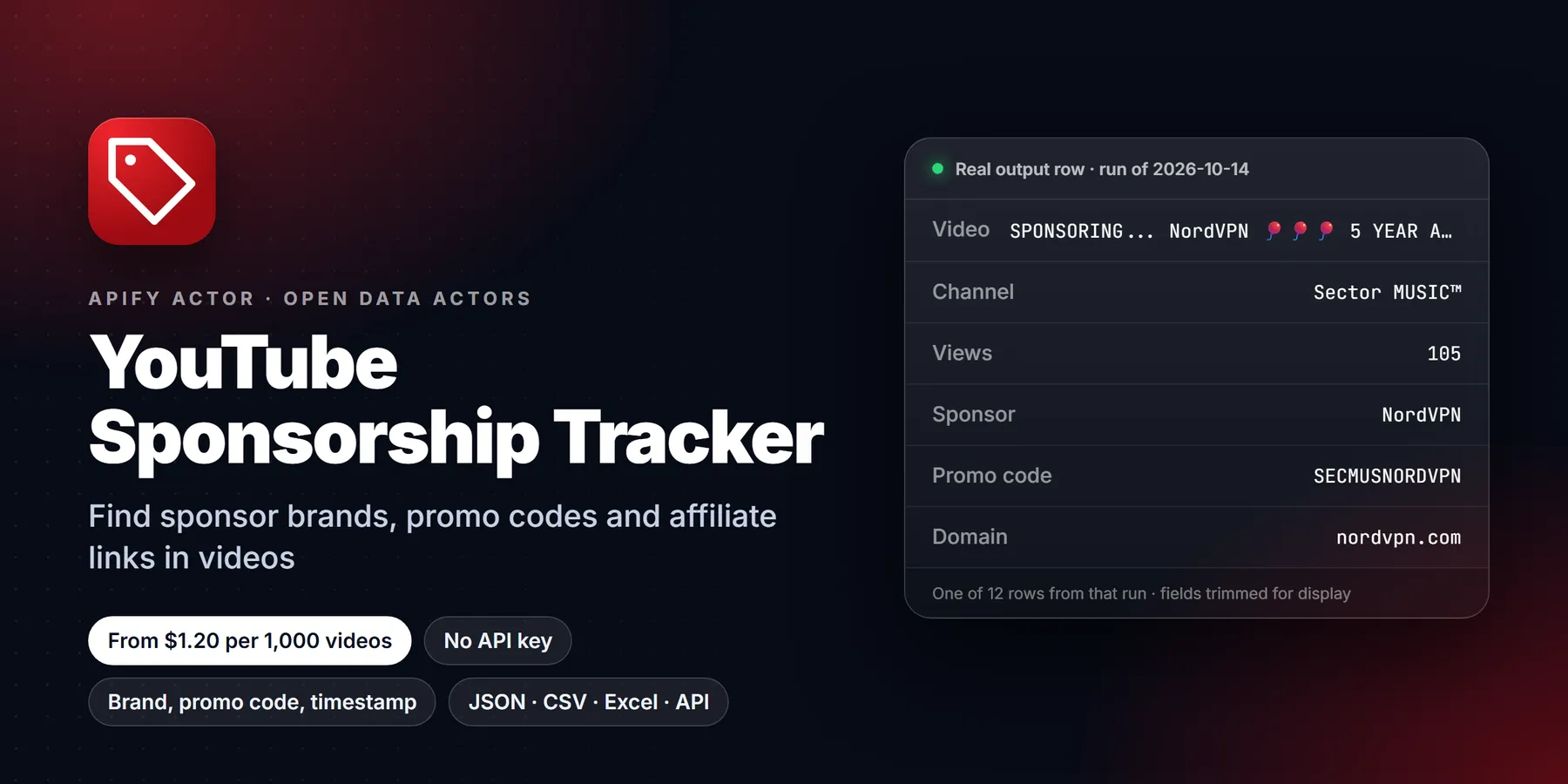

| Price per 1,000 videos | Free plan | Starter | Scale | Business |
|---|---|---|---|---|
| This Actor | $2.00 | $1.70 | $1.50 | $1.20 |
| Most-used alternative | $12.00 | $12.00 | $12.00 | $12.00 |
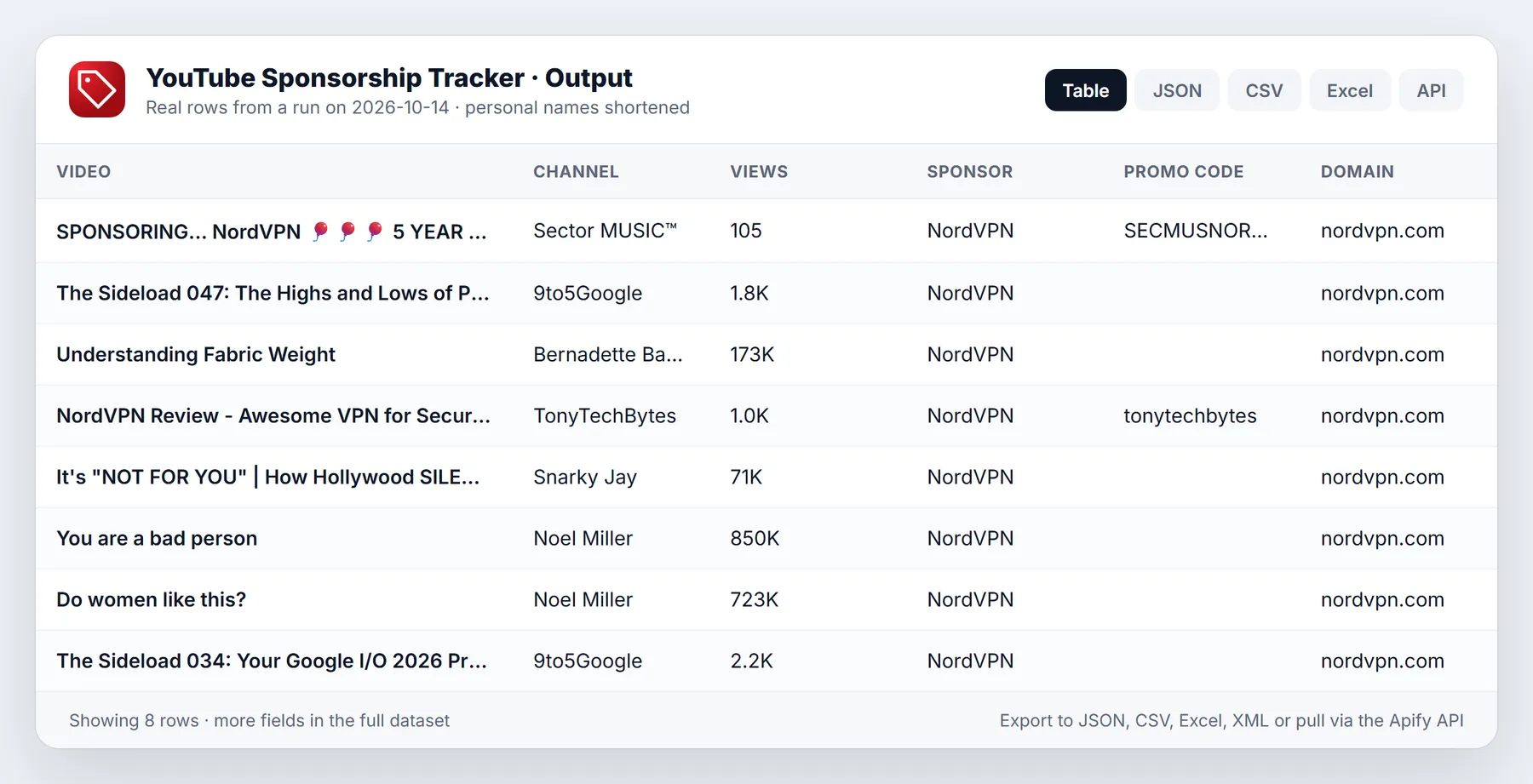
Find out which YouTubers a brand sponsors, or which brands sponsor a channel or a niche. Every row is one video and one sponsor, with the brand, its domain, the promo code, the tracked link and its UTM/coupon parameters, the timestamp of the ad read, the description lines that prove it and a confidence score. No login, no YouTube API key, no daily quota. $2 per 1,000 sponsorships found.
- In short: YouTube Sponsorship Tracker (Apify actor
transparent_meteorite/youtube-sponsorship-tracker) reads public YouTube pages and detects sponsor reads in video descriptions, chapters and the paid-promotion flag. It returns one flat row per (video, sponsor brand). - Who it is for:
- brand and influencer marketing teams checking where competitors spend
- agencies building creator shortlists from proven sponsor history
- creators and managers looking for brands that already buy YouTube ads in their niche
- analysts tracking sponsor share of voice over time
- Input: brand names, channels, niche keywords, or pasted video / channel / search URLs. Empty input runs a NordVPN sample.
- Output: sponsorBrand, sponsorDomain, promoCode, trackedLink, linkParams, sponsorTimestamp, evidence, confidence, plus video and channel stats.
- Detection: deterministic rules, no AI model. Same input, same answer.
- Pricing: pay per sponsorship row, $0.002 on the free plan down to $0.0012 on Gold and higher.
- Access: Apify Console, REST API, JavaScript/Python clients, schedules, webhooks, Apify MCP server
- Login, cookies or YouTube API key needed: no
- Also known as: YouTube sponsor finder, YouTube brand deal tracker, influencer sponsorship database, YouTube ad read tracker, competitor sponsorship monitor
Run in 30 seconds
- Press Try for free.
- Keep the prefilled brand (NordVPN) or type your own, then press Start. Ten sponsored videos take about 10 seconds.
- Open the Output tab: one row per sponsorship. Download as CSV, Excel or JSON.
What it does
The mode is picked from what you fill in:
| You fill in | What happens | Rows returned |
|---|---|---|
| brands only | Searches YouTube for videos that brand sponsors ("thanks to X for sponsoring", "sponsored by X", promo-code searches), then checks each video page | Only that brand's sponsorships: which creators it pays |
| channels | Checks the channel's newest videos | Every sponsor found in each video |
| keywords | Checks the top YouTube results for a niche search | Every sponsor found in each video |
| startUrls | Checks the pasted videos, channels or search pages | Every sponsor found |
| brands + channels/keywords/URLs | Scans as above | Only rows for the listed brands |
| nothing | Sample run for NordVPN | 20 rows |
A sponsorship is detected from signals a human reviewer would use, each with a weight:
- explicit phrases: "sponsored by", "thanks to X for sponsoring", "today's sponsor", "in partnership with", "#ad"
- offer links: tracked links with
coupon=,utm_*,ref=and similar, creator vanity links (brand.com/creatorname), short links resolved once to the real domain - promo codes ("use code CREATOR20")
- sponsor chapters ("1:14 NordVPN Ad Spot") giving the timestamp of the ad read
- YouTube's paid promotion flag and #ad disclosures
Rows below your confidence threshold, the creator's own merch and socials, negated mentions ("not sponsored by...") and Amazon gear lists are left out. Videos that only review a product with an affiliate link ("NordVPN review") are skipped unless you turn on includeAffiliateReviews.
Input
| Field | Type | Default | Notes |
|---|---|---|---|
brands | array | NordVPN (sample) | Brand names to find, or to filter on |
channels | array | @handle, channel URL or UC id | |
keywords | array | Niche search terms | |
startUrls | array | Video, Shorts, channel or search URLs | |
maxVideos | integer | 20 | Brand mode: sponsored videos to find per brand. Channel/keyword mode: videos to check per source |
maxItems | integer | 0 | Hard cap on rows for the run (0 = none) |
publishedAfter | string | 2025-01-31 or 30 days | |
minConfidence | integer | 50 | 0-100. 80 keeps only explicit sponsor reads |
searchSort | string | relevance | relevance, date or views |
includeAffiliateReviews | boolean | false | Keep affiliate-only review videos |
resolveShortLinks | boolean | true | Follow bit.ly / geni.us once to find the sponsor domain |
onlyNew | boolean | false | Monitor mode: only sponsorships not delivered before |
maxTotalChargeUsd | number | Stop before spending more than this | |
proxyConfiguration | object | none | Not needed for normal runs |
Example inputs
Who does Surfshark sponsor this year?
All sponsors of three tech channels
Sponsors in the budget travel niche
Output sample
Values above come from a real run (views change over time). The Overview table in the Output tab shows sponsor, channel, video, views, date, domain, promo code, link, ad timestamp and confidence. The run's OUTPUT record has per-source counts (videos scanned, rows, skipped) and warnings.
Pricing
Pay per event: you pay only for sponsorship rows delivered. Duplicates, rows below your confidence threshold, filtered rows and (in monitor mode) already-seen rows are never charged.
| Apify plan | Price per sponsorship | Per 1,000 |
|---|---|---|
| Free | $0.002 | $2.00 |
| Bronze | $0.0017 | $1.70 |
| Silver | $0.0015 | $1.50 |
| Gold, Platinum, Diamond | $0.0012 | $1.20 |
Set maxItems or maxTotalChargeUsd to cap a run. A 20-row sample costs about 4 cents.
Use it from code, schedules or AI agents
- API:
POST https://api.apify.com/v2/acts/transparent_meteorite~youtube-sponsorship-tracker/run-sync-get-dataset-items?token=YOUR_TOKENwith the input JSON as the body. - Schedules: set
onlyNew: true, list your competitor brands, and schedule it weekly to get only new sponsorships. - MCP / AI agents: add
https://mcp.apify.com?actors=transparent_meteorite/youtube-sponsorship-trackerto Claude, Cursor or any MCP client and ask "which YouTubers did Squarespace sponsor in the last 3 months?".
Honest limits
- Detection reads the description, chapters and paid-promotion flag, not the spoken audio. A sponsor that is only spoken in the video, with no link or code in the description, is missed.
- Brand mode finds videos through YouTube search, so it returns what search surfaces for sponsor phrases: strong for big advertisers (VPNs, Squarespace, HelloFresh, Skillshare), thinner for brands that rarely appear in descriptions.
- Brand names are taken from the text or the link domain. Unknown brands behind odd tracking domains can come out as the domain name (for example
ankerfast.club); the tracked link is always included so you can check. - Confidence is a rule-based score, not a probability. 0.9+ means an explicit sponsor read; 0.5-0.7 means an offer link without a sponsor phrase.
- YouTube's paid-promotion flag is not always shown to logged-out visitors, so
isPaidPromotionFlag: falsedoes not prove a video is unsponsored. - Only public videos. Members-only, private and age-restricted videos are skipped.
Use cases
- Competitive intelligence for a brand team. Enter the names of three competitors and see which creators carry their ads, how large those channels are, which promo codes and tracked links are used, and where in the video the ad read sits. Run it again every month to see which creators are new.
- Shortlist building for an agency. A creator that already carries ads for brands in your category is proven to accept sponsors. Search a niche keyword and read the
sponsorBrand,channelNameandchannelSubscriberscolumns to build a short list of channels with sponsor history. - Lead lists for creators and managers. Choose a niche, collect the brands that already buy YouTube ads there, and pitch those brands.
sponsorDomaingives the company website directly. - Share of voice tracking. Count rows per
sponsorBrandacross a fixed set of channels to see which advertisers dominate a category, then repeat on a schedule. - Disclosure and compliance checks.
isPaidPromotionFlag,hasAdDisclosureandsignalsshow whether a sponsored video also carries the platform's paid-promotion flag or an explicit ad disclosure. - Promo code and link research.
promoCode,trackedLinkandlinkParamslist the offer codes and the UTM or coupon parameters each creator uses.
Input guide
brandsare company names. Alone, the actor searches YouTube for videos that those brands sponsor and returns the creators behind them. Combined withchannels,keywordsorstartUrls, brands act as a filter and only rows for those brands are kept.channelsaccept an@handle, a channel URL or aUC...channel id. The newest videos of each channel are checked and every sponsor found is returned.keywordsare YouTube search terms for a niche, such ashome espresso. The top results are checked and every sponsor found is returned.startUrlsaccepts video, Shorts, channel or search page URLs. Use it to check a hand-picked list of videos.maxVideos(1 to 5,000, default 20) means different things per mode. In brand mode it is the number of sponsored videos to find per brand, and the actor checks up to four times as many candidates. In channel and keyword mode it is the number of videos to check.maxItemscaps the total number of rows for the run. 0 means no cap.publishedAfterskips older videos. Use a date such as2026-01-01or a period such as30 days.minConfidence(0 to 100, default 50) drops weaker rows, and dropped rows are not charged. At 50 the output keeps clear sponsor reads and offer links. At 80 it keeps only explicit cases such as "sponsored by", a promo code or an ad chapter.searchSortsets the YouTube search order used in brand and keyword mode:relevance,dateorviews. Usedatefor a recent view,viewsto surface the biggest placements.includeAffiliateReviewskeeps review videos that only carry an affiliate link. They are flaggedisAffiliateReview. It is off by default because most of them are not paid sponsorships.resolveShortLinksfollows short links such as bit.ly once to find the real sponsor domain. Leave it on unless every link in your sources is already direct.onlyNewwithstateStoreNameturns on monitor mode: video and brand pairs that were already delivered are remembered by name and not returned or charged again. Use a different name for each monitor.maxConcurrencysets parallel page fetches, 1 to 5, default 2.autoProxyFallbackswitches to Apify residential proxy by itself when YouTube starts limiting the IP.proxyConfigurationis rarely needed.
Output field reference
| Field | Meaning |
|---|---|
videoId, url, title | The video |
channelName, channelId, channelUrl, channelSubscribers | The channel |
views, publishedAt, durationSec | Video statistics and date |
sponsorBrand, sponsorDomain | The detected sponsor and its website domain |
promoCode | Offer code read from the description, when one exists |
trackedLink, linkParams | The sponsor link and its UTM, coupon or referral parameters |
sponsorTimestamp, sponsorTimestampSec, sponsorUrlAtTimestamp | Where the ad read begins, from a sponsor chapter, and a link that opens the video at that second |
isPaidPromotionFlag, hasAdDisclosure, isAffiliateReview | Disclosure and affiliate flags |
signals | The detection signals that fired, for example thanksForSponsoring or sponsorChapter |
evidence | The description lines that support the match |
confidence | Rule-based score from 0 to 1 |
sponsorsInVideo | Number of distinct sponsors found in the video |
matchedBrand, fromSource, fromInput | How the row relates to your input |
scrapedAt | Snapshot time |
More worked examples
Recent sponsors of one competitor, high confidence only
Who sponsors a single creator, and where in the video
Weekly monitor for new deals of several brands
Check a hand-picked list of videos
Reading confidence and signals
Confidence comes from adding up weighted signals. A phrase such as "thanks to X for sponsoring" or a sponsor chapter in the timeline is strong evidence. A tracked offer link with a coupon or referral parameter is moderate evidence. A promo code adds to either. The paid-promotion flag and an ad disclosure also raise the score.
For outreach lists, minConfidence: 80 gives fewer rows with fewer false positives. For market sizing, the default of 50 finds more placements, and a manual look at the evidence column settles the borderline cases. The evidence text is copied from the video description, so each row can be verified in one click through url or sponsorUrlAtTimestamp.
Tips to reduce cost and runtime
- Start with
maxVideos10 and check the first rows before a large run. Rows belowminConfidenceare not charged, so a stricter threshold lowers the bill and the clean-up work. - Add
publishedAfterto avoid old videos. Sponsor deals change quickly, so a 6 to 12 month window is usually enough. - Use
maxItemsas a hard cap on rows. - In brand mode, search sorted by
dateshows what is new. Sorted byviewsit shows the largest placements. - For repeat runs use
onlyNew. Each pair of video and brand is delivered once. - Keep
resolveShortLinkson, so the real sponsor domain is found instead of a link shortener.
Calling it from code
More questions
Can it find the sponsor of a video that only mentions the brand in speech? No. Detection reads the description, chapters and paid-promotion flag, not the audio.
Why does a brand search return fewer videos than I asked for? Brand mode relies on what YouTube search surfaces for sponsor phrases. Brands that rarely appear in descriptions give fewer rows.
Does it work on Shorts? Shorts URLs can be pasted in startUrls and are checked like other videos.
Can I filter by channel size? The output has channelSubscribers, so filter in your table or spreadsheet.
What does sponsorsInVideo mean? It is the number of distinct sponsors found in that one video. Each sponsor has its own row.
Are results the same on every run? Detection uses fixed rules, so the same videos give the same answer. New videos, view counts and search results change over time.
How do I export for a spreadsheet? Use the Output tab to download CSV or Excel. The Overview table shows the main columns.
FAQ
Do I need a YouTube API key? No. The actor reads the same public pages a logged-out browser sees.
Does it use AI? No. Detection is deterministic rules, so results are repeatable and cheap.
Can I get only new sponsorships every week? Yes. Turn on onlyNew; delivered video + brand pairs are remembered in a named key-value store and not charged again.
Does it find the creator's email? No. It returns the channel URL and handle; contact details are out of scope.
Do I need a proxy? No for normal runs. If YouTube rate-limits the IP, the run switches to Apify residential proxy by itself (turn autoProxyFallback off to prevent this).
Legal note
The actor reads only public YouTube pages that anyone can open without logging in, and returns business information about public sponsorship placements: brands, public videos and public channel pages. It does not collect private personal data. You are responsible for using the results in line with YouTube's terms and the laws that apply to you.
New to Apify? Create a free account and run this Actor in under a minute. Some links are affiliate links.


