

Weidian Scraper 微店 - Products, Shops & Seller Contacts
Pricing
from $2.99 / 1,000 products
Weidian Scraper 微店 - Products, Shops & Seller Contacts
Scrape Weidian (微店) products with lifetime units sold, price, stock and the seller's WeChat ID. 70 fields per product: SKU variants with price and stock, images, buyer reviews with rating breakdowns, shop credit and fans. Shop catalogues, keyword search, or trending with no link. No login.
Pricing
from $2.99 / 1,000 products
Rating
0.0
(0)
Developer

Zen Studio
Maintained by CommunityActor stats
0
Bookmarked
15
Total users
3
Monthly active users
14 days ago
Last modified
Categories
Share
Weidian Scraper (微店) | Products, Shops, Variants & Seller Contacts (2026)
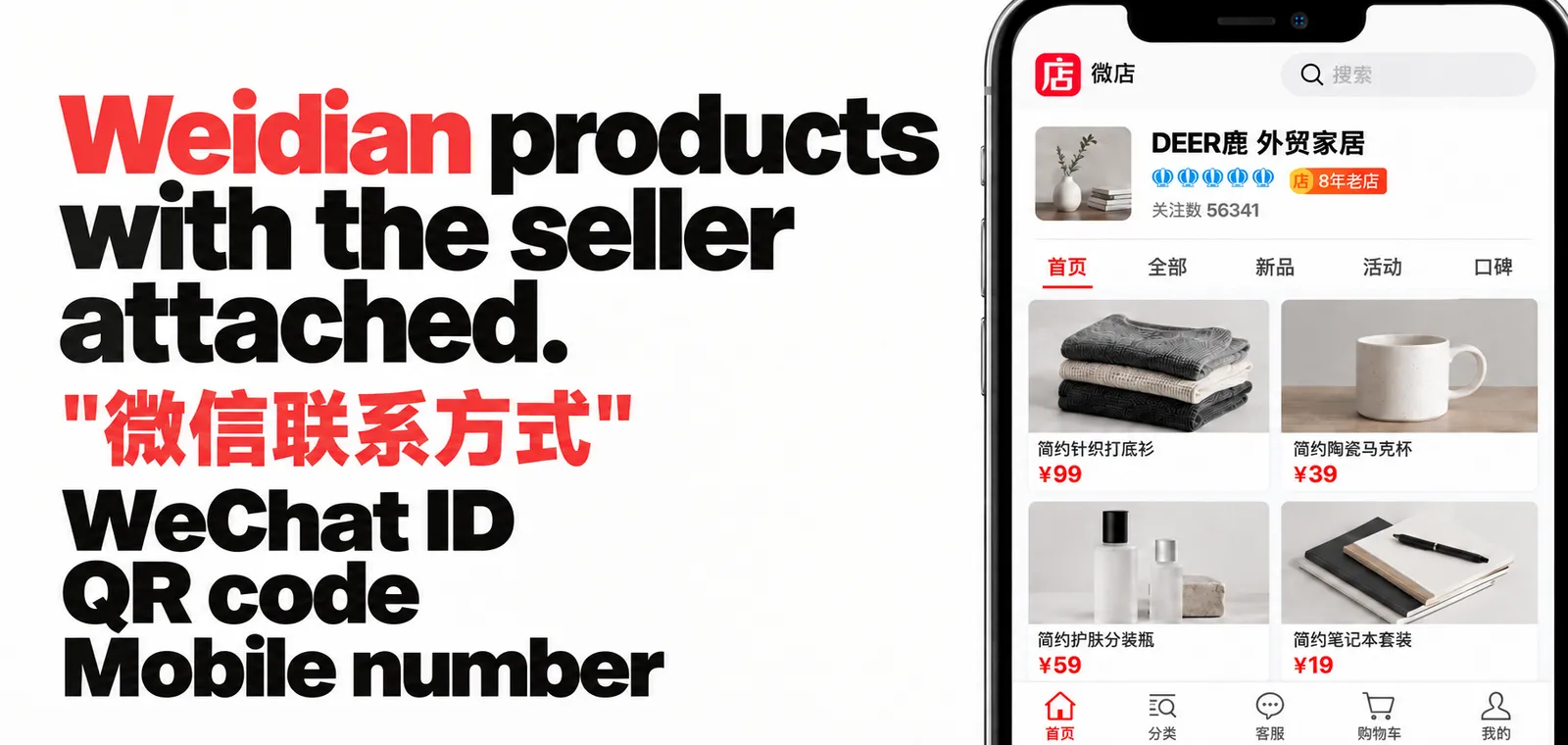
From Zen Studio, creators of 1688 Wholesale Scraper and Taobao Detail Scraper, with 130,000+ combined lifetime runs across those two actors.
Why choose this actor?
- The seller, not just the listing. Get the seller's WeChat ID or mobile number and their WeChat QR code, wherever they publish one. You are charged only for the shops that do, never for the ones without a contact.
- Start without a link. Leave the links field empty and you get trending products from across Weidian. A recorded run collected 500 products from 372 shops in 100 seconds. Paste a shop or product link instead when you already have one.
- Judge a storefront before you write to it. Credit level and score, fans, repurchase rate, the date the shop opened and when the seller was last active, alongside each product's lifetime units sold, price, stock and variants.

Try it on trending shops
Open the Actor's input page, switch to JSON and paste this. With no links supplied, the Actor browses trending products, so you see sellers from across Weidian on the first run. Then click Start.
No account, login or cookies needed. Products cost $3.99 per 1,000 and seller contact is $1.99 per 1,000, charged once per shop that publishes one, never for shops that do not.
| Zen Studio · China sourcing suite • Weidian (微店), 1688, Taobao (淘宝), Goofish (闲鱼) | ||||
 Weidian 微店 Weidian 微店➤ You are here |
 1688 Wholesale 1688 WholesaleFactory-direct, tiered pricing |
 Taobao Detail Taobao DetailProduct detail, SKUs, reviews |
 Taobao Search Taobao SearchTaobao and Tmall by keyword |
 Goofish 闲鱼 Goofish 闲鱼Secondhand listings and sellers |
Copy to your AI assistant
Key Features
- Seller contact details. The seller's WeChat ID or mobile number, plus their WeChat QR code, where they publish them. Present on roughly 39% of shops (QR on about 96%). Most Weidian tools do not surface this at all.
- Shop intelligence. Fans, credit level, repurchase rate, region, the date the shop opened and when the seller was last active, so you can tell a serious storefront from a dormant one before you contact anybody.
- Discovery mode. Find trending products and new sellers across Weidian with no URL at all. Leave the links field empty and run.
- Lifetime units sold per product. Not a rating, not a review count: the actual number of units each listing has sold. Public on every product, and the single best signal of what is really moving.
- Variants with their own price and stock. Every size, colour and style option, with its option names resolved rather than left as raw ids.
- Keyword search inside any shop. Search a seller's catalogue in Chinese or English instead of paging through everything.
- Mixed input. Shop links, product links, share links (
k.youshop10.com) and bare numeric IDs, all in one run. The Actor works out which is which.
How to Scrape Weidian in Four Steps
- Open the Weidian Scraper and click Try for free.
- Paste a Weidian shop or product link into Shop or product links. Leave it empty to browse trending products instead.
- Optionally add a Keyword to search inside those shops, and pick how to sort.
- Click Start, then download the results as JSON, CSV, Excel, XML or HTML.
How to Scrape Weidian Products and Shops
A shop's whole catalogue
Search inside specific shops
One product, with every variant
Trending products, no link needed
Many shops at once, sampled evenly
Every run's results download as JSON, CSV, Excel, XML or HTML, or stream straight into your own tooling.
Weidian Scraper Input Parameters
| Field | Type | Default | Description |
|---|---|---|---|
urls | array | none | Shop links, product links, share links or bare numeric IDs. Leave empty for trending products. |
keyword | string | none | Search inside the shops listed above. Chinese or English. |
maxItems | integer | 100 | Ceiling for the whole run, across every link. |
maxItemsPerShop | integer | 200 | Ceiling for each individual shop. |
sortBy | select | composite | composite, sold, price or newest. Decides what you keep when a cap cuts a big shop short. |
includeSellerInfo | boolean | true | Shop name, seller name, logo, region, credit level and score, fans, repurchase rate, buyer review tags, opening date. |
includeSellerContact | boolean | true | Seller WeChat ID or mobile, plus WeChat QR code. |
includeSkus | boolean | false | Variants with per-variant price and stock, plus instalment plans. Adds noticeably to a large run. |
maxReviewsPerProduct | integer | 0 | Buyer reviews and the rating breakdown. 0 is off, 20 is the cheapest useful setting. |
Accepted link formats
What Data Can You Extract from Weidian?
| Group | Fields |
|---|---|
| Product | itemId, itemName, description, price, originalPrice, priceMax, originalPriceMax, currency, discountLabel, stock, soldCount, soldCountIsMinimum, images, itemUrl, listedAt, hasVariants, onSale, preSale, tags, categoryId, categoryName, wishlistCount |
| Offers | promotions, coupons, servicePromises, instalments |
| Variants | variantAxes, variants (each with variantId, title, options, stock, price, originalPrice, image) |
| Shop | shopId, shopName, sellerName, shopUrl, shopLogo, shopCoverImage, shopLocation, shopProvince, shopCity, shopAddress, shopLatitude, shopLongitude, shopFansCount, shopCreditLevel, shopCreditTier, shopCreditScore, repurchaseRate, avgDeliveryTime, shopRegisteredAt, shopUpdatedAt, shopLastActiveAt, shopNote, shopReviewTags, shopBadgeCodes, shopPromotion, isEnterpriseShop, shopCertifiedUrl |
| Contact | sellerWeixin, sellerQrCode |
| Ratings | reviewCount, reviewPositiveRate, reviewGoodCount, reviewMediumCount, reviewBadCount, reviewWrittenCount, reviewAutoCount, reviewWithPhotoCount, reviewWithVideoCount |
| Reviews | reviews (each with text, score, date, images, variant, buyerName, buyerLevel, buyerAvatar, tags, sellerReply, sellerReplyDate, isAutoReview) |
| Run | source, input, error |
Every row carries all of these keys, so your columns stay stable across runs. A field the
seller has not filled in comes back null.
Some fields depend on which mode produced the row, because Weidian exposes them on
different surfaces. The source field on every row tells you which one it was.
| Field | Shop catalogue | Product link | Trending |
|---|---|---|---|
listedAt, discountLabel, preSale, tags | yes | no | no |
categoryName | no | no | yes |
wishlistCount, categoryId, avgDeliveryTime, shopAddress, shopLatitude, shopLongitude | no | yes | no |
promotions, coupons, servicePromises | no | yes | no |
priceMax, originalPriceMax, instalments | with variants on | yes | with variants on |
full images gallery | first image only | all images | first image only |
reviews and the rating fields | with reviews on | with reviews on | with reviews on |
| everything else | yes | yes | yes |
Three fields worth reading carefully
soldCountis lifetime units sold, and Weidian caps the figure at"1000+"for roughly a quarter of catalogue products. When it does,soldCountis1000andsoldCountIsMinimumistrue, meaning "at least this many". Trending rows carry the exact number andsoldCountIsMinimumisfalse.priceis what the product sells for now,originalPriceis the pre-discount price.priceMaxandoriginalPriceMaxgive the top of a variant price range, and are filled in on product links and whenever Include variants is on.reviewWrittenCountis the review number that matters. When a buyer completes an order without writing anything, Weidian files an automatic five-star review on their behalf. Those are counted inreviewAutoCountand flaggedisAutoReviewon the review itself. A product can show 442 reviews of which only 15 were written by a human, so sort and filter onreviewWrittenCount, notreviewCount.
Output Example
One real row, from a product link with variants switched on.
Weidian Product Research and Sourcing Use Cases
Find sourcing agents and resellers
Weidian is a primary source for buying agents and daigou. Run discovery mode, sort the
results by soldCount, and you have a ranked list of what is actually selling, with the
seller's WeChat ID attached where they publish it.
Qualify a supplier before you message them
shopFansCount, shopCreditLevel, repurchaseRate, shopRegisteredAt and
shopLastActiveAt together tell you whether a storefront is established and still
trading. A shop that opened in 2018, has 56,000 fans and a 30% repurchase rate is a very
different prospect from one opened last month.
Track price and stock over time
Schedule the same shop weekly and diff price, stock and soldCount. Because
soldCount is lifetime, the difference between two runs is units sold in that period.
Build a catalogue from a seller's share link
Share links from WeChat chats work directly as input. No need to open them first.
Integrations and scheduling
Send Weidian data straight where you work:
- Google Sheets: push each run's dataset into a sheet for a shared finds list
- Make and Zapier: trigger on run finish, route new products into Airtable, Notion or Slack
- Webhooks: POST every finished run to your own endpoint
- Apify MCP server: let an AI assistant call this Actor directly and reason over the results
- API and SDK: Python, JavaScript, CLI, or plain HTTP
Recommended schedule for price and stock monitoring: weekly. Weidian sellers
change price and stock far more often than they relist, and because soldCount
is lifetime, the difference between two weekly runs is units sold that week.
Daily runs mostly re-collect identical rows.
New to scheduling on Apify? Apify's walkthrough covers it in a few minutes: https://www.youtube.com/watch?v=zRPluOEVDCM
How Much Does It Cost to Scrape Weidian?
Pay per result, so you are charged for data you actually receive.
| Event | Price per 1,000 | On higher Apify plans |
|---|---|---|
| Product | $3.99 | down to $2.99 |
| Seller contact | $1.99 | $1.99 |
| Product reviews | $1.99 | $1.99 |
| Extra review | $0.99 | $0.99 |
| Actor start | $4.90 | $4.90 |
Seller contact is charged once per shop, and only when that shop actually publishes a WeChat ID or mobile number. Collecting a thousand products from one shop costs one contact event, not a thousand.
Product reviews are charged once per product and cover its full rating breakdown plus its first 20 reviews. Only the reviews past that first 20 are charged per review, so the default review setting never touches the extra-review price at all. A product with no reviews is free, exactly like a shop with no contact.
Inputs that return nothing are not charged at all. They still appear in your dataset with
an error field so you can see what happened, but they cost nothing.
Limitations
Worth knowing before you run:
- There is no platform-wide product search. Weidian only offers keyword search inside
a shop, so
keywordfilters the shops you provide. A keyword alone cannot find shops you have not listed. Use discovery mode to find shops first, then search within them. - Discovery mode is a trending feed, not a full directory. A single sweep surfaces on the order of a thousand shops. The pool rotates, so scheduled runs accumulate coverage over days rather than in one go.
- Most reviews are filed automatically. Weidian writes a five-star "默认好评" on the buyer's behalf when they say nothing, and on a busy product that can be 95% of the total. Every row separates the two, so you always know how many are real.
- Seller contact is about 39% of shops. That is the seller's choice, not a gap in the scraper. QR codes are far more common at roughly 96%.
- A few shops do not expose a rich product page. Those products still come back in full from the shop catalogue, which is why every product has a name, price and sold count regardless.
FAQ
Do I need a Weidian account? No. Everything this Actor collects is publicly served.
Can I search all of Weidian by keyword? No, and no tool can: Weidian does not offer catalogue-wide search to the public. You can search within shops you provide, and you can browse trending products platform-wide.
Is soldCount per month or lifetime?
Lifetime, as Weidian shows it on the listing. Run the Actor twice and subtract to get a
period figure.
Why is price sometimes lower than the cheapest variant?
price is the headline listing price. Variants can be priced above it, for example a
multi-pack. Turn on includeSkus to see each one.
What does source mean?
Which route the row came from: shop for a catalogue, item for a single product page,
discovery for trending, error for an input that returned nothing.
How do I get a Weidian seller's WeChat ID?
Turn on Include seller contact. Where the seller publishes a WeChat ID or
mobile number on their shop, it comes back in sellerWeixin, and their WeChat QR
code in sellerQrCode. About 39% of shops publish one; nearly all publish a QR.
Can I convert a Weidian link for CNFans, Sugargoo or Kakobuy?
This Actor does not convert agent links, but it gives you the two ids every
converter needs: shopId and itemId, plus the canonical itemUrl. Feed those
into whichever shopping agent you use.
Does this work with Weidian share links from WeChat?
Yes. Share links on k.youshop10.com are accepted directly, in both the current
and the older format. No need to open them first.
How do I find trending products on Weidian without a link? Leave Shop or product links empty. The Actor returns trending products from across Weidian, each with the shop behind it. A single run surfaces on the order of a thousand shops, and the pool rotates, so a weekly schedule accumulates coverage.
What is the difference between a Weidian shop ID and a product ID? Both are 9 to 10 digit numbers and they look identical, which is why you can paste either one on its own: the Actor works out which it is for you.
How often does Weidian product data change? Price and stock move often; listings themselves change rarely. Weekly is the sensible cadence for monitoring.
Can I export to CSV or Excel? Yes. Every Apify dataset exports as JSON, CSV, Excel, XML or HTML, or you can pull it straight into your own tooling.
Is It Legal to Scrape Weidian?
This Actor collects only publicly available information: product listings and shop pages that Weidian serves to any visitor without logging in. It does not access private data and does not attempt to log in.
sellerWeixin and sellerQrCode are contact details that individual sellers publish on
their own storefronts so customers can reach them.
They are still personal data under GDPR and similar laws. If you collect them, you are the data controller.
In practice that means: use them for the purpose the seller published them for, honour
deletion requests, and check your local marketing rules before sending anything. Turn
includeSellerContact off if you do not need them.
Scraping public data is generally lawful, but how you use it is your responsibility. Consider talking to a lawyer if you are unsure.
More Zen Studio scrapers for Chinese platforms
🛒 E-commerce
 TikTok Shop
 Lazada
 Naver Search 네이버 검색
 AliExpress 全球速卖通
 Shopee
- Goofish 闲鱼
 Dewu 得物
- Taobao 淘宝
 JD.com 京东
- 1688 阿里巴巴
 Coupang 쿠팡
 Naver Shopping 네이버쇼핑
🎬 Short-video & social
 Douban 豆瓣
 Zhihu 知乎
 Weibo 微博
 Kwai (Brazil)
 Kuaishou 快手
 Douyin 抖音
 RedNote 小红书
 Xigua 西瓜视频
 Bilibili 哔哩哔哩
 Naver Blog & Cafe 네이버 블로그·카페
🏠 Real estate & autos
 Naver 부동산
 Anjuke 安居客
 58.com 58同城
 Autohome 汽车之家
✈️ Travel & stays
 Ctrip 携程
🧭 Travel & maps
 Mafengwo 马蜂窝
Support
Something missing or wrong? Open an issue on the Actor's Issues tab with the input you used, and it will be looked at.
Weidian scraper for 微店 product data: shop catalogues, in-shop keyword search, trending product discovery, SKU variants with per-variant stock, lifetime units sold, shop credit and fans, and seller WeChat contacts. Built for China sourcing, shopping-agent workflows and cross-border product research.


