

SEC Filing Watcher
Pricing
from $2.55 / 1,000 delivered sec ticker filing reports
SEC Filing Watcher
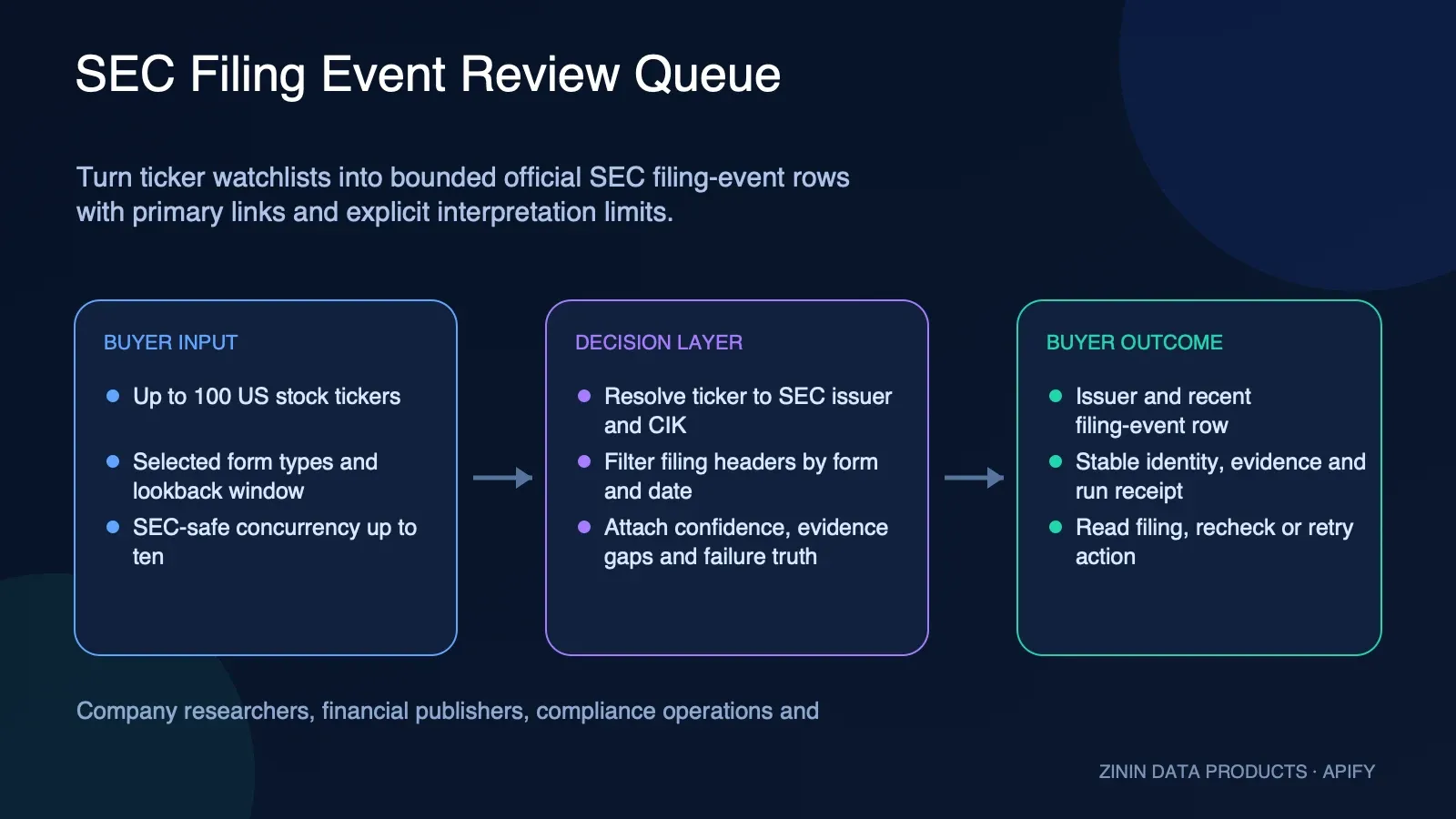
Check up to 100 stock tickers for bounded filing activity from official SEC EDGAR data. Get issuer identity, filing metadata, primary links, observed time, evidence, confidence, gaps, and billing. Unknown tickers are free. Filing activity is not intent, legal advice, or investment advice.
Pricing
from $2.55 / 1,000 delivered sec ticker filing reports
Rating
0.0
(0)
Developer

Tim Zinin
Maintained by CommunityActor stats
0
Bookmarked
2
Total users
1
Monthly active users
2 months ago
Last modified
Categories
Share
SEC EDGAR Filing Watcher — New Filings by Ticker
Point this Actor at a list of tickers and get back every SEC filing that landed in your lookback window — form type, filing date, accession number and a direct document URL. Straight from official SEC EDGAR data: no API key, no browser, no login.
What you get
- One row per ticker: company name, how many filings matched your window, and the list of those filings — each with
form,filedAt,accessionNumber,primaryDocumentand a ready-to-openurl. - Filter by form type (
10-K,10-Q,8-K,S-1, …) or leave empty to include every form type. - Lookback window up to 10 years (
sinceDays, max 3650). - Up to 100 tickers per run, concurrency up to 10 — SEC EDGAR's own documented rate limit.
- Runs on Apify: schedule it, monitor it, call it from the API or the MCP server, export to JSON, CSV or Excel, or push results straight into your own pipeline.
Who uses it
- Investors & analysts — an alert-ready feed of 10-K/10-Q/8-K filings for a watchlist, without babysitting the EDGAR full-text search UI.
- Journalists & researchers — track S-1s (new IPO filings), 8-Ks (material events) or insider Form 4s for a set of companies.
- Fintech builders — a clean, structured filings feed to wire into a bot, dashboard or n8n workflow.
- Compliance/IR teams — monitor competitors' or portfolio companies' disclosure activity.
Why it matters
SEC EDGAR's own search UI has no ticker-list mode and no API key/quota system to build on top of — you either poll the website by hand or write your own ticker-to-CIK resolver and pagination logic. This Actor does that resolution once per run and hands back one row per ticker, ready to filter, alert on, or pipe into a dataset.
How to run it
- Click Try for free — no card needed on the free plan.
- Paste tickers into Tickers, one per line. Optionally narrow by Form types and Since (days).
- Press Start. Results appear in the dataset — read them in the UI, pull them from the API, or have a webhook push them onward.
Pricing
Pay-per-event: $0.005 per run start + $0.003 per result found. No monthly seat, no minimum. 100 tickers that resolve cost about $0.31; 1,000 about $3.01.
An unknown ticker, or a lookup that fails, is still returned — with found: false and an error explaining why — and it is not charged for.
简体中文说明
输入一批股票代码(ticker),此 Actor 会直接读取官方 SEC EDGAR 的公开数据,返回你设定的回溯窗口内每家公司提交的全部新备案:表格类型、提交日期、accessionNumber,以及可直接打开的文档链接。数据来自 SEC 官方接口,无需 API 密钥、无需登录,也不做网页抓取。
可以用 formTypes 只筛选特定表格(如 10-K、10-Q、8-K、S-1),留空则返回全部类型;回溯窗口 sinceDays 最长可设 10 年(3650 天)。SEC EDGAR 官网的检索界面本身不支持按一批股票代码批量查询,也没有配额化的 API——本 Actor 一次性完成代码到 CIK 的解析,按代码逐行返回结果,方便直接过滤、告警或接入自己的数据管道。
计费为按事件付费:每次运行 $0.005,每条查到的备案结果 $0.003(result-found)。查不到的代码或解析失败的记录仍会以 found: false 返回并说明原因,不计费。100 个可解析代码约 $0.31,1000 个约 $3.01。
这不是什么。 本 Actor 不读取备案文件的具体内容,不总结 8-K 或 10-K 里发生了什么变化,也不计算任何交易信号——它只回答"这个时间窗口内、这个代码有哪些备案"这一个问题,数据直接来自 SEC 官方索引。本 Actor 呈现的是用于研究和监控的公开 SEC 备案元数据,不构成投资建议:一份备案清单不等于买入、卖出或持有的建议。
Input
| Field | Required | What it does |
|---|---|---|
tickers | yes | Stock tickers to watch, e.g. AAPL, TSLA, NVDA. Up to 100 per run. |
formTypes | no | Only these SEC form types (e.g. 10-K, 8-K). Empty = every form type. |
sinceDays | no | Only filings from the last N days (default 90, max 3650 — 10 years). |
maxConcurrency | no | Parallelism (1–10, default 5). SEC EDGAR's documented rate limit is 10 req/s. |
Output (one item per ticker)
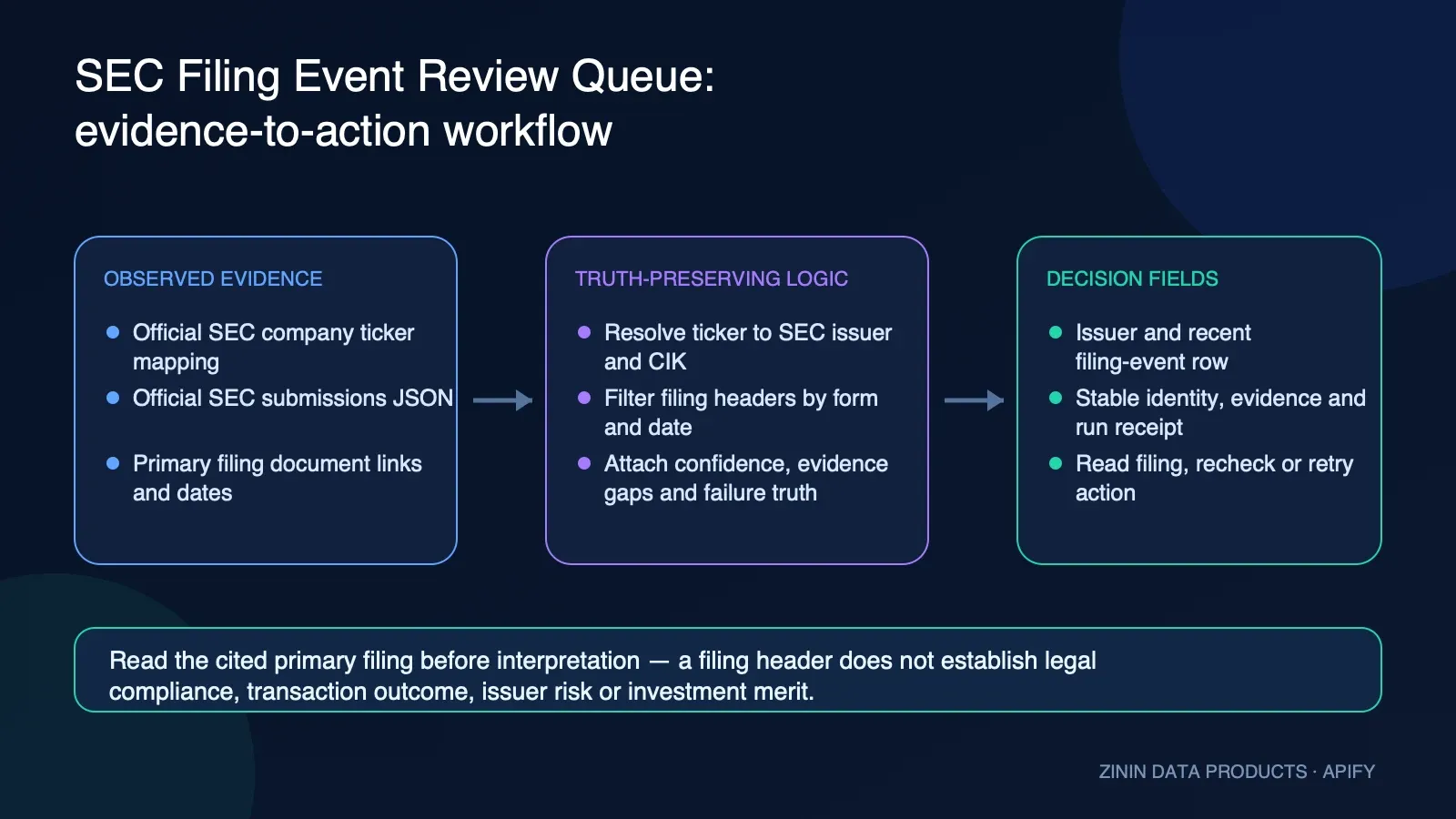
The Actor returns one row per unique ticker with resolved issuer identity, the bounded filing-event list, observation time, evidence, confidence, gaps and a review action. Filing counts and dates are not embedded here as evergreen facts; the exact-build canary receipt supplies the release's live example.
| Field | What it means |
|---|---|
filingsCount | Total filings matched in the lookback window |
recentFilings[].form | SEC form code, e.g. 10-K, 8-K, 4, SCHEDULE 13G |
recentFilings[].primaryDocument | Filename of the main document; some old/paper filings have none, and url then points at the filing's index folder |
found | false means the ticker wasn't resolved or the lookup failed — check error |
An unknown ticker returns found: false with an error explaining why — never a partial or ragged row.
API
Start a run with a bearer token and explicit JSON input:
Read Dataset rows using the returned defaultDatasetId:
MCP
For an Apify MCP client exposing the standard call-actor tool, send this exact payload:
Related tools
Related tools for adjacent workflows in financial signals and markets.
| Actor | What it does |
|---|---|
| Funding Round Tracker | Pair it in the financial signals and markets workflow: Track recent SEC Form D filings by company name or sector keyword — the notice a company files when it... |
| Insider Trading Tracker | Pair it in the financial signals and markets workflow: Track insider stock trades — SEC Form 3/4/5 filings — for any list of tickers |
| Clinical Trials Monitor | Pair it in the financial signals and markets workflow: Watch conditions, drugs or sponsors for new and updated clinical trials |
| 13F Portfolio Tracker | Pair it in the financial signals and markets workflow: Track institutional managers (hedge funds, family offices) by SEC CIK or name and get their recent 13F-HR... |
| Patent Filing Monitor | Pair it in the financial signals and markets workflow: Watch keywords or technologies for newly granted US patents |
FAQ
Does it need an API key or login? No — company_tickers.json and submissions/CIK*.json are public SEC EDGAR endpoints.
How fresh is the data? Every row records when EDGAR was queried. SEC publication timing and availability remain upstream conditions; read the cited filing for authoritative status.
Does it cover filings older than what sinceDays reaches? It reads each company's filings.recent list (SEC's own most-recent-filings feed, up to ~1000 entries). For tickers with very high filing volume, a multi-year sinceDays window may not reach as far back as 10 years if the 1000-entry cap is hit first — SEC's own archived/paginated filing files are out of scope for this Actor.
Can I filter by form type? Yes — set formTypes to any SEC form codes, e.g. ["10-K", "10-Q", "8-K"].
Can I call it from an AI agent? Yes — it's a standard Apify Actor, callable via the Apify API or the Apify MCP server.
What this is NOT. It does not read the contents of a filing, does not summarize what changed inside an 8-K or 10-K, and does not compute alerts or trading signals. It answers one question — which filings landed in this window for this ticker — from SEC's own structured index.
This Actor surfaces public SEC filing metadata for research and monitoring. It is not investment advice — a filing list is not a recommendation to buy, sell or hold anything.
Found a wrong result, or need a check we don't run? Open an issue on this Actor's page.
Machine use
The Actor is callable through the Apify API, SDK, and Apify MCP server. The input and Dataset row are the machine-facing contract; a found:false row means the ticker never resolved to a CIK or the lookup failed — an agent scanning a watchlist should read error on those rows rather than treat a missing ticker as "zero filings."
Built by zinin. Questions? Telegram @timzinin.
What this Actor is — and is not
SEC Filing Watcher converts a bounded ticker watchlist into structured filing-event evidence from official SEC EDGAR data. Each ticker produces one row containing resolved CIK and company identity, the matching filings inside the chosen window, primary filing links, confidence, data gaps, failure truth and a manual next action. It is designed for research queues, compliance intake, corporate development monitoring, issuer-watch workflows and agent pipelines that need traceable metadata.
It is not a filing-content parser, legal analysis service, issuer-risk score, materiality detector, financial statement model, transaction-completion check or investment recommendation. The Actor does not decide whether a filing is good or bad. It reports that an official filing event was observed and points the reviewer to the primary record.
Source chain and identity
The run first loads the SEC ticker-to-CIK map, then requests the company submissions feed for each resolved CIK. The selected lookback and optional form filter are applied to the parallel filing arrays returned by EDGAR. Each retained item includes form, filing date, accession number, primary document when available and a direct SEC URL.
Ticker resolution is deterministic against the current SEC map. A missing ticker does not mean the company has no filings; it means that input did not resolve through this source path. Symbols can change, some issuers have multiple classes, and non-US or non-reporting entities may not appear. Use the CIK and company name in the row to verify that the resolved issuer is the one intended.
SEC availability and data shape are external dependencies. The Actor uses a descriptive User-Agent, bounded concurrency, timeouts, response-size limits and limited retries for transient ticker-map failures. It does not bypass rate limits or access controls.
Evidence, confidence, and gaps
Every row includes an additive decision contract:
recordTypedistinguishes a result from a free advisory;entityIdgives a stable Actor-specific row identity;observedAtrecords when the bounded observation was created;confidenceScoreandconfidenceBanddescribe source/identity strength;confidenceReasonsandconfidenceRisksexplain the score;sourceEvidenceretains primary or official URLs;dataGapsstate what the row cannot establish;recommendedAction,actionPriorityandactionReasonroute review;failureType,retryableandfailureDiagnosticsseparate invalid input from transient failure;interpretationBoundaryprevents filing metadata from becoming an unsupported conclusion;billingexplains whether a delivered result event was billable;safeToAutomateremainsfalse.
High confidence means the ticker resolved to a CIK and the row came from official submissions data. It does not mean the filing content has been read, the issuer has been assessed, or a legal or investment conclusion is justified. Zero filings in the selected window is a valid bounded result, not proof that the issuer has never filed anything.
Form and window design
Use formTypes when a workflow cares about a narrow event family. Examples include 8-K for
current reports, 10-Q for quarterly reports, 10-K for annual reports and S-1 for registration
statements. The Actor treats form codes as filters, not interpretations. Amendments and related form
variants should be added explicitly when your process requires them.
Use sinceDays as an observation window. A short window reduces review noise but can miss older
context. A long window returns more metadata but does not summarize changes between filings. Store
the configured window with exported results so a later reviewer understands what absence means.
Decision playbooks
Corporate development watchlist
Run a verified issuer list on a schedule. Route rows with matching filings to a research queue. Open the primary filing, confirm issuer identity and decide whether the form is relevant to the mandate. Keep the Actor row as discovery evidence, not the analysis itself.
Compliance or legal intake
Use the Actor to identify new official records for triage. Do not label an issuer compliant, non-compliant, risky or safe from the form code alone. A qualified reviewer must read the filing, its exhibits, amendments and applicable law.
Market-research monitoring
Join filing events with independently sourced company or market facts using CIK as the preferred identity key. Preserve source timestamps. Avoid language that converts the presence or absence of a form into a price forecast or recommendation.
Automated agent workflow
An agent may schedule the Actor, normalize the rows and create review tasks. It must not generate a
trade, legal conclusion or external assertion without reading the primary filing. Branch on
recordType, failureType, retryable, confidenceBand and recommendedAction, then require
human approval for interpretation.
Happy, empty, partial, and failure states
Happy result: found:true, a resolved cik and company, one or more recentFilings, official
links, high confidence and READ_PRIMARY_SEC_FILINGS. The row is billed as one delivered ticker
evidence result regardless of how many filing records are nested.
Valid empty result: found:true, filingsCount:0, an empty recentFilings array and a schedule-
recheck action. This means no matching filing was observed inside the specified filter and window.
It is still useful evidence and not a source failure.
Invalid-input advisory: found:false, failureType:"invalid_or_ambiguous_input",
retryable:false, and billing.billable:false. Correct the ticker or verify the intended issuer
instead of retrying indefinitely.
Transient-source advisory: found:false, failureType:"source_unavailable", retryable:true,
and a source gap. Retry with backoff. Do not convert the missing response into “zero filings.”
Budget stop: OUTPUT becomes partial and reports withheld work. Any free advisory row explains the stop without pretending a ticker check was completed.
OUTPUT: run completeness and replay safety
The default Dataset contains one row per processed ticker. The Key-Value Store record OUTPUT
contains run-level reconciliation: requested, unique, duplicate, attempted, delivered, paid,
local-non-monetized, free, source-failure and withheld counts. It also provides status, partial,
budgetStopped, fatalError, replaySafe, completedAt and resultsUrl.
COMPLETE means all unique inputs reached a terminal delivered result without recorded source or
budget gaps. PARTIAL means at least one input produced an advisory or was withheld. FAILED means
the linked delivery/money outcome became unsafe or unknown. If replaySafe:false, reconcile the
prior Dataset and charged-event receipt before retrying.
The billing critical section is serialized across concurrent workers. The Actor checks remaining
money immediately before linked pushData(row, "result-found"). A source error or invalid ticker is
written as a free advisory. A paid counter increments only after delivery reports a charged result.
Field dictionary
ticker is the normalized requested symbol. cik is the zero-padded SEC identifier. company is
the name returned from the ticker map. filingsCount counts only records passing the configured
date and form filters. recentFilings is an array of filing metadata and primary links. summary
is a compact human-readable description, not a substitute for the structured fields.
checkedAt is retained for backward compatibility. observedAt is the normalized decision-layer
timestamp. sourceEvidence collects usable primary links. dataGaps and
interpretationBoundary travel with the row so downstream systems do not discard the caveats.
Integration recipes
For API use, start the Actor with tickers, optional formTypes, sinceDays and concurrency.
After completion, fetch Dataset items and the KVS OUTPUT record. Reject a run as complete unless
OUTPUT says so. Persist CIK, accession number, form, filing date, URL and observation timestamp.
For webhooks, send only evidence-linked rows and run status. Do not send a generic “no filing” alert when OUTPUT is partial or a ticker failed to resolve. For data warehouses, keep nested filings or explode them using ticker+CIK+accession number as the durable event key.
For scheduled monitoring, deduplicate downstream alerts by accession number. The Actor itself is a snapshot reader, not a durable alert-state service. If you compare runs, retain both source windows and do not infer deletion when an older filing simply leaves the lookback window.
Privacy, licensing, and retention
This Actor reads public corporate filing metadata and does not seek private accounts, credentials or contact lists. Public records can still contain names or other information inside linked filing documents; this Actor does not parse those documents. Apply your own lawful purpose, minimization, retention and access-control policy before combining the metadata with other datasets.
SEC data is attributed and linked to its primary records. Availability of public data does not remove obligations around source terms, fair access, redistribution, professional advice or your downstream use. Review current SEC guidance for production-scale workflows.
Operational checklist
- Verify ticker-to-CIK identity before trusting the watchlist.
- Keep concurrency at or below the documented SEC ceiling exposed by the schema.
- Read Dataset rows and OUTPUT together.
- Treat zero findings, invalid input and source failure as different states.
- Preserve accession numbers and primary URLs.
- Alert on partial runs and non-replay-safe failures.
- Require a qualified reviewer for legal, compliance, accounting or investment interpretation.
Release and alert acceptance
The production package is accepted only after one exact-build no-retry canary proves Dataset and KVS contracts together. Its receipt records build, run, storage IDs, requested and unique tickers, successful and failed resolutions, delivered, paid, free and withheld rows, charged events, usage and direct-cost coverage. Duplicate tickers must not create duplicate result charges. Unknown tickers and source advisories remain distinct from a resolved issuer with zero matching filings.
An alerting consumer should require complete OUTPUT, a resolved ticker/CIK pair and a new accession
number. Otherwise route the row according to failureDiagnostics. Never convert a form code or
filing count alone into a legal, accounting, compliance or investment conclusion. The primary
filing remains the decision source.
Retain the receipt beside every downstream alert for auditability.


